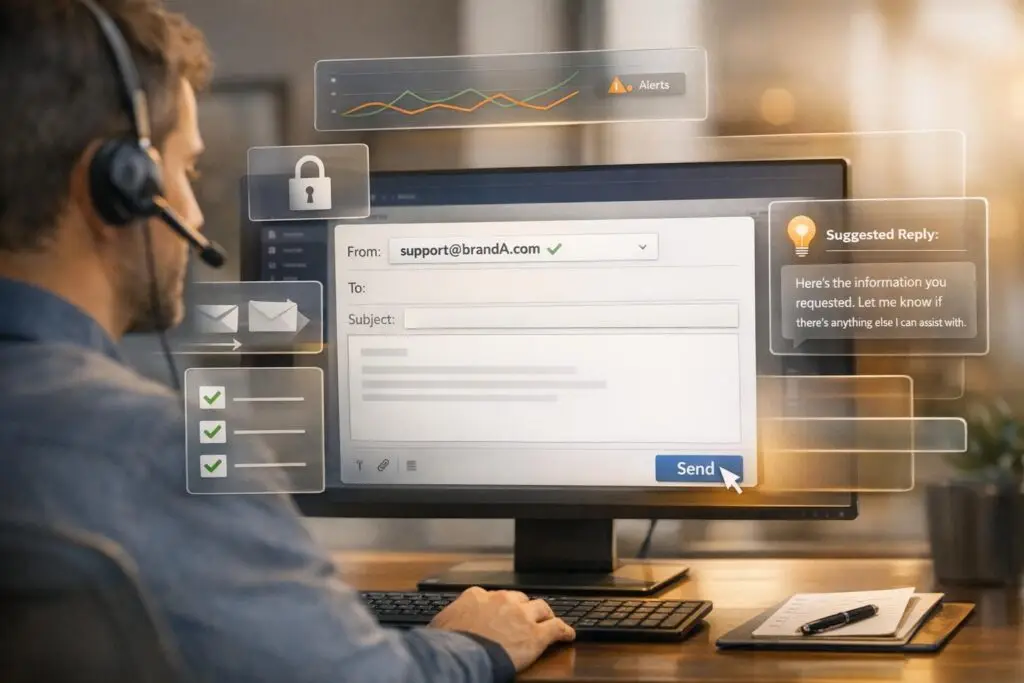
Responding from the wrong brand email confuses customers and damages trust. Mistakes often happen due to shared inbox chaos, lack of access controls, and manual errors. To prevent this, follow these five steps:
- Set up email routing rules: Automatically tie emails to specific brands to avoid manual selection errors.
- Use role-based permissions: Restrict agents to brand-specific queues to reduce risks.
- Automate pre-send verification: Ensure the "From" address matches the correct domain.
- Leverage AI monitoring: Detect and flag mismatched sender identities before emails are sent.
- Implement AI copilots: Guide agents with brand-specific response tools and automated signatures.
These measures minimize errors, improve email accuracy, and maintain customer trust. By combining automation, permissions, and AI tools, businesses can ensure every reply aligns with the correct brand identity.
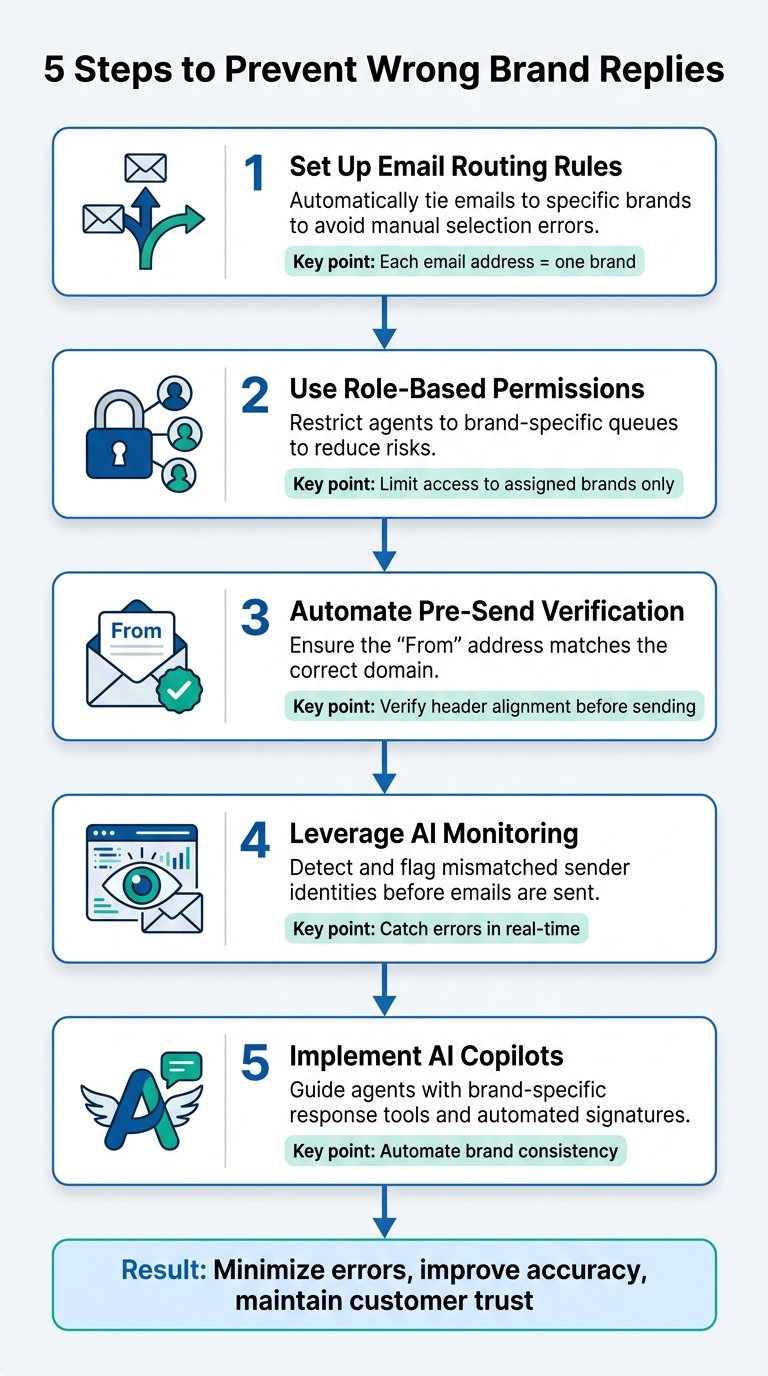
5 Steps to Prevent Agents from Replying from Wrong Brand Address
Why Agents Reply from the Wrong Brand Address
Mistakes with brand addresses often stem from organizational and technical shortcomings that make these errors hard to avoid. This is especially true when agents are managing multiple brands under tight deadlines. Below are the core technical and operational gaps that contribute to these issues.
Poor Email Routing and Queue Organization
Intelligent email management prevents the chaos of shared inboxes. When agents work out of a generic email address like info@company.com, "message collision" becomes a frequent problem. This can result in multiple agents replying to the same email or, worse, responding to a message meant for an entirely different brand [1]. Jorge Ferreiro from Inbounter explains:
Without dedicated email identity, agents operate in a shared gray zone where messages get mixed, threads get crossed, and reliability suffers [1].
Email threads rely on headers like Message-ID and In-Reply-To to stay intact, but shared inboxes disrupt these headers, making conversations appear fragmented to customers [1]. Additionally, using shared root domains for multiple brands – such as brand1@company.com and brand2@company.com – can lead to "reputation bleed." This happens when poor email practices from one brand harm the deliverability of others sharing the same domain [3].
Missing Access Controls and Permission Limits
Lack of restrictions leads to errors. When agents have unrestricted access to multiple brand addresses, they risk creating what Hugo Pochet, Co-Founder at Mailpool, describes as a "reputation collision" zone:
A reputation collision happens when the actions or reputation of one brand, sender, or inbox negatively impact another within the same organization or infrastructure [3].
Maintaining a good sender reputation requires keeping bounce rates below 2% and spam complaint rates under 0.1% [3]. A single mistake by one agent can push these metrics beyond acceptable thresholds, potentially getting the entire domain blacklisted. This highlights how technical and operational weaknesses can lead to costly brand miscommunications.
Manual Selection Errors
Manual processes invite mistakes. A study of 1,289 misdirected emails at Fortune 500 companies found that 68% of these errors occurred because users thought they had selected the correct address but hadn’t [4]. The issue isn’t carelessness – it’s how the brain processes information.
Standard email interfaces use uniform font sizes, weights, and colors for different brand identities. This provides no clear visual cues to indicate the active selection [4]. Digital Productivity Coach Mia explains:
The most widespread misconception is that manually inspecting the ‘From’ field before hitting Send is sufficient. It is not – and here’s why, grounded in empirical human factors research [4].
Agents relying on visual scanning make errors in 14.6% of outbound emails [4]. The problem worsens when agents switch between tools – 81% of misaddressed emails happen within 90 seconds of switching applications [4]. This "attention residue" often causes agents to default to the last-used or most visually prominent identity instead of the correct one.
Manual dropdown selection is 3.8 times more error-prone than automated verification workflows [4]. These statistics show why system-level safeguards are crucial. Without them, even experienced agents are at risk of making costly errors.
sbb-itb-e60d259
How to Prevent Wrong Brand Replies: 5 Steps
Fixing the technical and operational issues behind incorrect brand replies requires more than just better training for agents. A system-level approach is essential. Here are five practical steps to address and eliminate brand address errors.
Step 1: Set Up Email Routing Rules and Brand-Specific Queues
Ensure each email address is tied to a single brand. This setup allows replies to automatically use the correct sender identity, removing the need for manual selection. Beth-Ann Sher from Intercom highlights this:
Each email address can only be connected to one brand. This is especially important to bear in mind where your brands cover different regions / countries or you cater for different languages [2].
For businesses operating across multiple regions, use localized email addresses (like support_uk@company.com) to maintain consistency [2]. If customers contact multiple brand addresses at once, prioritize routing based on the "To" field first, then the "CC" field [2]. Additionally, assign a default notification address for each brand to handle automated system emails [2].
Once routing rules are in place, further secure the system by limiting who has access.
Step 2: Configure Role-Based Permissions for Brand Access
Restrict agent access to their assigned brands. By limiting agents to specific brand email queues and addresses, you significantly reduce the risk of them selecting the wrong sender identity.
Step 3: Add Automated Pre-Send Verification
Ensure the "From" address matches the authenticated sender domain. Allegrow warns about the risks of mismatched headers:
When the ‘From’ address doesn’t match the authenticated sender, it mimics the exact technique phishing bots use to mask their true location, causing your email to be flagged for deep scrutiny [6].
To avoid this, test header alignment using the "Show Original" feature and confirm that the "From" and "Mailed-By" fields are identical [6]. Avoid alias domains, which 90% of IT teams use because they seem cost-effective but harm email deliverability [6]. Instead, opt for secondary domains with dedicated SPF, DKIM, and DMARC records [6].
Automating the selection of the correct reply address based on the inbound email simplifies the process and ensures brand consistency [2].
Step 4: Monitor Outgoing Emails with AI
Leverage Generative AI in customer support to catch brand mismatches before emails are sent. AI tools can detect when the sender’s email address doesn’t align with the verified domain set in the system [5]. This is critical because poor customer service has immediate consequences – 85% of consumers take action, and nearly half stop doing business altogether [8].
There’s often a gap between what companies think they deliver and what customers actually experience. A Qualtrics study found that while 80% of CEOs believe their companies provide an excellent experience, only 8% of customers agree [7]. AI monitoring can help bridge this gap by identifying errors before they harm customer trust.
After errors are flagged, AI copilots can step in to guide responses.
Step 5: Use AI Copilots for Brand-Specific Response Guidance
Assign AI agents verified, brand-specific reply addresses within workspace settings [2]. AI systems can automatically link conversations to the correct brand based on the customer’s inbound email address [2].
To eliminate manual formatting, set up default brand-specific signatures in the AI settings [2]. AI can also ensure consistency by formatting sender names as "[Agent Name] from [Brand Name]" and applying the appropriate brand signatures [2].
Supportbench Features That Prevent Brand Address Errors
Supportbench takes a proactive approach to preventing brand address errors by automating tasks, controlling access, and verifying outgoing communications. These features ensure brand-specific messaging remains accurate and secure.
Role-Based Security and Brand-Specific Queues
Supportbench limits agent access through role-based controls, allowing agents to interact only with their assigned brand addresses. This prevents accidental use of the wrong sender identity. As TechTarget notes:
Not every agent should be able to do everything. Restrict certain actions, like profile changes and recovery resets, by role, and keep high-impact events out of general queues [10].
Incoming emails are automatically routed to brand-specific queues based on the recipient address. This ensures that agents reply using the correct branded sender identity. Considering the 79% rise in contact center fraud in 2024 and the impact on 29% of U.S. adults through account takeover attacks [9][11], these controls are essential for safeguarding brand communications.
AI Agent-Copilot and Workflow Engine
Supportbench’s AI-powered Agent-Copilot enhances response accuracy while automating email routing for consistent branding. The platform uses "Routes" to separate email traffic based on business needs, ensuring distinct identities for different brands or departments. Administrators can set a "Default System Address" for each route, so all agent replies automatically align with the correct brand.
The system also supports multiple "Reply Addresses", each paired with unique "Reply Display Names" to reinforce brand identity. Additionally, dynamic variables in email signatures automatically populate agent names, job titles, and contact details, ensuring every interaction reflects the right information [12].
Multi-Address Email Editor with Pre-Send Checks
Supportbench’s email editor simplifies managing multiple brand addresses while including pre-send verification to prevent mistakes. Only active and valid Reply Addresses can be used for customer interactions. By using the Default System Address for the primary brand, the risk of manual errors is reduced. Automated signatures further ensure agent details are accurate and consistently formatted [12].
Measuring Results with AI Metrics and Dashboards
Once safeguards are in place, real-time AI dashboards become essential for keeping tabs on agent performance and system efficiency. These dashboards continuously monitor operations, allowing teams to spot brand alignment problems before they affect customers. Unlike static reports that require manual updates, AI-driven metrics refresh in real time, offering instant insights into brand consistency [15].
Let’s dive into the key metrics that highlight how accurate brand address handling impacts support operations.
Track Error Rates and Resolution Times
Keeping an eye on brand-specific error rates is critical to ensuring automated safeguards are functioning as intended. One of the most important metrics to watch is the misrepresentation rate – how often agents send replies with incorrect brand addresses, outdated pricing, or inaccurate product details. Supportbench’s AI flags these errors by tracking incidents of misaligned sender addresses. Additionally, it evaluates resolution times in brand-specific queues to determine whether automated routing is speeding up case closures [14].
Another important step is simulating and validating new routing rules before they go live. By testing automated logic against thousands of historical tickets, AI can predict how well the system would have handled previous scenarios. This eliminates guesswork and ensures that new safeguards are likely to reduce, rather than increase, errors [14].
Use Predictive CSAT and FCR Data
Error counts are just one piece of the puzzle. To truly gauge the customer experience, metrics like predictive customer satisfaction (CSAT) and first-contact resolution (FCR) are invaluable. Supportbench’s AI Predictive CSAT estimates satisfaction levels based on case histories, even when customers don’t complete surveys. Meanwhile, AI-driven FCR detection identifies whether cases were resolved on the first attempt – something that has historically been tough to measure without advanced tools [15].
These insights are crucial for understanding how brand alignment errors affect customer satisfaction. For instance, when agents respond using the wrong brand, customers often need to re-explain their issue or endure re-routing delays. Such missteps can drag down both CSAT and FCR scores. By linking brand alignment metrics with customer satisfaction data, support teams can quantify the operational and trust-related costs of these errors.
Monitor Brand Alignment with Real-Time Dashboards
Real-time dashboards are key to reducing mistakes like wrong brand replies by offering instant feedback on agent performance. Customizable dashboards provide a live view of brand-specific performance across the entire support operation. Supportbench’s dashboards pull directly from live data sources, ensuring metrics update automatically as new cases are handled [15]. Agents can see their individual brand alignment scores, while managers can monitor department-wide performance and spot trends across multiple brands.
An effective dashboard doesn’t just track performance – it also enforces boundaries. For example, it can measure whether agents or AI copilots are recommending the correct brand based on customer constraints [13]. Automated alerts flag issues, such as spikes in brand misclassification, so teams can take immediate action. As Hervé Coureil, Chief Digital Officer at Schneider Electric, puts it:
We want our KPIs to evolve over time because we don’t want to drive our business on legacy or vanity metrics [15].
Conclusion
Making sure agents respond from the correct brand address is essential for maintaining customer trust and keeping support operations running smoothly. When customers receive replies from the right brand address, it reinforces a sense of professionalism and consistency. If they don’t, confusion can arise, potentially damaging your brand’s credibility.
A five-step system – covering AI-powered ticket routing, permissions, verification, AI monitoring, and AI copilot guidance – adds multiple layers of protection against brand misalignment. However, having the right infrastructure is equally important. Segmentation plays a key role because each brand requires its own sending infrastructure to avoid reputation clashes. Isolating these infrastructures ensures that one brand’s deliverability issues or spam complaints (which should stay under 0.1%) don’t negatively affect others within the same organization [3]. This approach combines advanced AI workflows with efficient operations, a hallmark of effective B2B support.
To further safeguard your brand, implement SPF, DKIM, and DMARC protocols for every sender identity. These measures ensure that only authorized servers can send emails on behalf of your brand [3]. When setting up new brand inboxes, start small – sending just 10 to 20 emails per day – and gradually increase over three to four weeks to establish a strong sender reputation [3]. By pairing these best practices with AI-driven workflows and real-time dashboards, you create a system where brand alignment happens automatically, not by chance. These technical measures protect your brand while also improving response times and overall customer satisfaction.
Beyond error prevention, these safeguards bring broader benefits. They lead to quicker resolutions, higher first-contact resolution rates, and improved customer satisfaction scores. Most importantly, they help build trust, ensuring every interaction reflects the professionalism your brand stands for.
FAQs
What’s the fastest way to stop wrong-brand replies without retraining everyone?
One of the fastest ways to stop agents from replying from the wrong brand email address is by setting up email routing safeguards. Here’s how you can tighten up your process:
- Use allowlists: These ensure that replies are sent through the correct brand channels, reducing the chance of mistakes.
- Set up rules: Configure rules to flag or block any incorrect email addresses before a reply goes out.
To take it a step further, consider adding AI-driven workflows and automated verification steps. These tools can catch errors early and ensure brand consistency – without the need for time-consuming agent retraining.
How can we verify the correct ‘From’ address automatically before an email is sent?
To make sure the correct ‘From’ address is used, set up email routing rules that validate it against approved brand-specific addresses before sending. Support platforms can streamline this by automating workflows that align the ‘From’ address with the appropriate brand queues. For more advanced systems, AI-powered tools can provide real-time monitoring to reduce errors and ensure professional communication with customers.
What metrics should we track to prove brand-alignment fixes are working?
Track metrics such as customer satisfaction scores, net promoter scores, social media engagement, and support response times. These metrics provide valuable insights into how well your brand-alignment efforts are working and help ensure customers enjoy a consistent experience with your brand.