



Executive summaries simplify complex support cases into concise, actionable insights for decision-makers. They focus on business impact, key actions, and next steps rather than technical details, making them essential for leadership, account reviews, and escalations.
Key Takeaways:
- Purpose: Provide a clear, business-oriented overview of support cases for executives.
- Core Sections: Include customer info, purpose, findings, actions, sentiment, impact, recommendations, and next steps.
- Writing Tips: Be brief, avoid jargon, and focus on outcomes over technical details.
- When to Use: For critical cases, escalations, or high-value accounts at risk.
- AI Tools: Use AI to draft summaries faster, but review for clarity and relevance.
A standardized template ensures consistency across summaries, saving time and improving decision-making. Below, you’ll find step-by-step guidance, examples, and a reusable template to streamline your process.
How to Write an Executive Summary That Gets Decisions Made
sbb-itb-e60d259
What Makes an Executive Summary Work
An executive summary takes a support ticket and tailors it for decision-makers, focusing on the essential insights and actionable next steps. While a support ticket outlines events, an executive summary dives deeper into their impact and what needs to happen next.
Key Sections Every Summary Needs
To ensure consistency and usefulness, every executive summary should include the following sections. These elements make the document clear and actionable across different accounts and issue types. Here’s a breakdown of the must-have sections:
| Section | What It Covers |
|---|---|
| Customer & Account Info | Key details like customer name, ARR, account tier, and case priority (Low, Medium, High, Urgent) |
| Purpose Statement | A single sentence summarizing the main issue – focused solely on the problem |
| Key Findings | A brief bulleted list of the support team’s discoveries |
| Actions Taken | Steps already completed to avoid duplication of effort |
| Customer Sentiment | The customer’s current mood – frustrated, neutral, or satisfied |
| Business Impact | How the issue has affected operations, revenue, or team productivity |
| Recommendations | Specific steps the business should take to resolve the issue |
| Resolution Status & Next Steps | The current case status (open or closed) and a clear plan for what happens next |
Including the resolution status is critical. It eliminates confusion during handovers and prevents situations where customers have to repeat information when switching between agents [3].
Writing Style Tips for Support Summaries
Once the core sections are outlined, focus on writing with clarity and brevity.
- Keep it short. The summary should fit on one page. If stakeholders need to scroll, it’s too long. Aim for 200–350 words that concisely cover the essentials.
- Use bullet points strategically. Summarize findings and actions in bullet format, while using concise sentences for sections like the purpose statement, business impact, and recommendations.
Avoid overly technical language. For example, instead of saying, "the API endpoint returned a 503 during the OAuth handshake", use business-friendly terms like: "The integration failure caused a six-hour platform outage, disrupting daily reporting." This approach makes technical issues accessible and relevant for executive-level readers.
"Transform complex technical data into executive-friendly reports that highlight business impact, trends, and actionable insights." – Neo Agent Documentation [1]
Finally, adopt a direct and neutral tone. The goal is to provide leadership with a clear, accurate snapshot that supports quick, informed decision-making.
How to Build an Executive Summary from a Support Case
When to Write a Summary
Not every support ticket warrants an executive summary – it all depends on the situation. You should craft one when a case is closed with a Critical priority, when an escalation involves leadership, or if a high-ARR account shows signs of renewal risk. These summaries are especially helpful during regular reporting cycles, such as weekly, monthly, or quarterly reviews, as they provide actionable insights for strategic decisions [1]. Additionally, only prepare a summary when external stakeholders need a clear explanation of the incident and next steps. Once you’ve identified the right trigger, AI tools can help streamline the drafting process.
Using AI Tools to Draft Summaries Faster
AI tools can save significant time when drafting summaries. For example, Supportbench‘s AI can analyze the entire case history, including internal notes and side conversations, to generate a structured draft. These drafts typically cover key sections: the customer’s request, how the issue was resolved, the root cause, and suggested next steps [4].
To get the most out of your AI tool, ensure it pulls data from all relevant contexts, not just public-facing ticket comments. Internal notes and external communication (like emails or Slack threads) often hold crucial details. At the same time, configure the tool to filter out automated messages that could clutter the draft [4].
"Leadership gets the information they need to make informed decisions about IT operations and service delivery." – Neo Agent [1]
Reviewing and Refining the Draft
Even with AI-generated drafts, a human touch is crucial to ensure the summary is clear and actionable. Start by aligning the draft with the established template, covering the core sections consistently. Translate technical jargon into terms a business audience can understand – replace error codes or API-specific details with explanations of their operational impact. Focus on making the business impact and recommendations sections actionable for decision-makers [1].
Tailor the summary to your audience. For instance, an engineering VP might appreciate deeper technical context, while a CFO or customer success leader would benefit from a higher-level overview. Adjusting the tone and detail to match the reader’s role can make the summary far more effective [4].
A Reusable Template for Support Case Executive Summaries
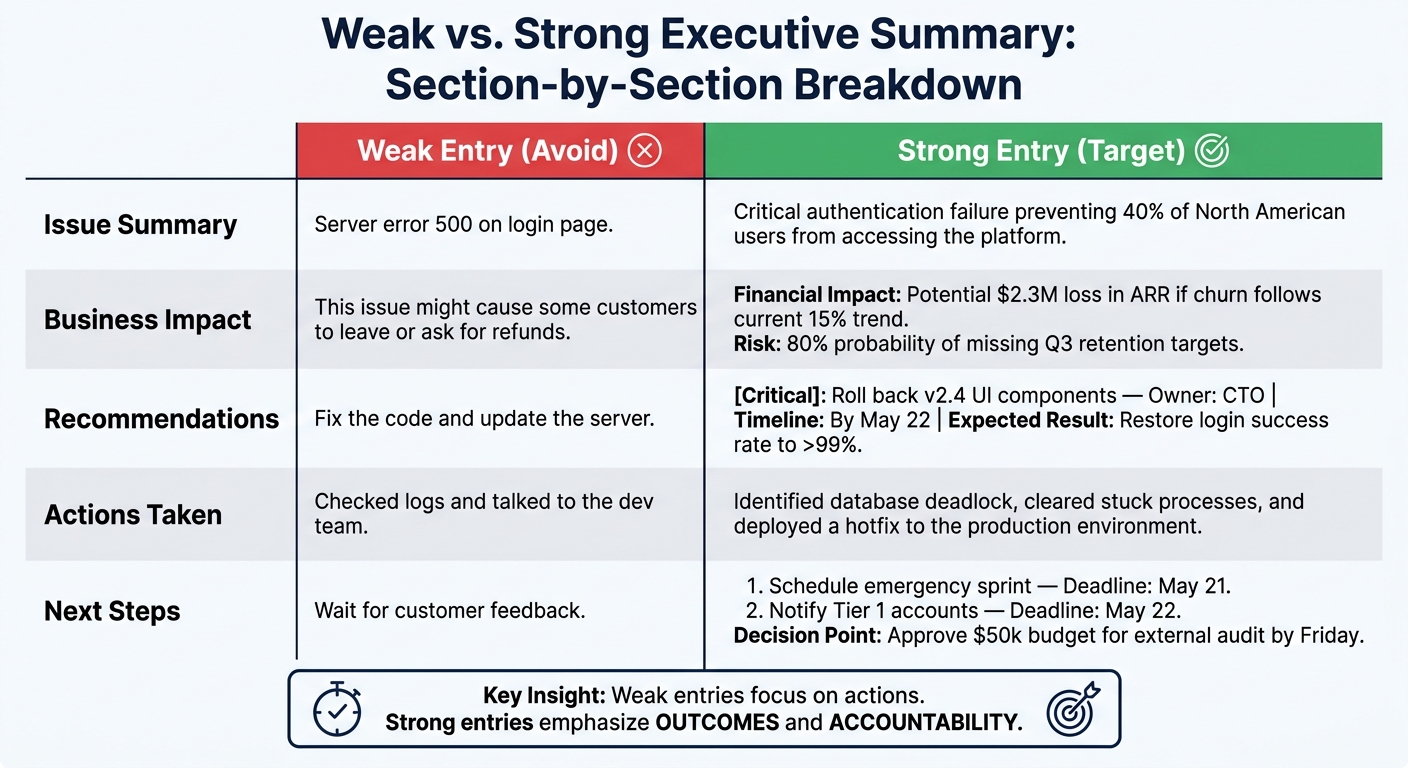
Weak vs. Strong Executive Summary Sections: Examples & Best Practices
With your polished draft ready, this template ensures every summary delivers the key details decision-makers need. By standardizing data entry, it simplifies workflow automation and provides leadership with actionable insights.
Template Sections and Fields
Every executive summary should include the following fields:
- Case Header: Include essential details like account name, case ID, date, priority level (Low, Medium, High, Urgent), and category (e.g., Billing, Technical, Feature Request). These fields help with automated filtering and routing.
- Issue Summary: Write a single sentence that clearly defines the issue and its scope. This is the first thing executives see, so make it concise and focused on the business impact.
- Root Cause Analysis: Explain what went wrong in plain language. Cover the failed steps, attempted solutions, and what ultimately resolved the issue.
- Business Impact: Quantify the operational and financial consequences. Use metrics like dollar amounts, usage declines, or SLA violations whenever possible.
- Resolution & Actions Taken: Detail the final case status and provide a brief list of the actions your team took to resolve the issue.
- Key Metrics: Include data such as response time, CSAT score, number of agents involved, and resolution time.
- Customer Sentiment: Label the customer’s mood as Positive, Neutral, or Negative. This helps leadership tailor their follow-up approach appropriately [2].
- Recommendations & Next Steps: Outline actionable recommendations, assign owners, and set deadlines. Focus on tasks that can realistically be completed within 30 days [5].
Each section serves a specific purpose. Header fields enable automated reporting, while impact and sentiment fields guide executive communication. The recommendations section ensures accountability by clearly defining next steps.
"Use custom instructions to emphasize business outcomes rather than technical details. Highlight customer impact, cost implications, and operational efficiency." – Neo Agent Documentation [1]
To better understand how to craft effective summaries, compare the examples below.
Strong vs. Weak Section Examples
A useful summary stands out through clarity and actionable details. The following examples contrast ineffective entries with well-crafted ones that focus on outcomes and accountability:
| Template Section | Weak Entry (Avoid) | Strong Entry (Target) |
|---|---|---|
| Issue Summary | "Server error 500 on login page." | "Critical authentication failure preventing 40% of North American users from accessing the platform." |
| Business Impact | "This issue might cause some customers to leave or ask for refunds." | "Financial Impact: Potential $2.3M loss in ARR if churn follows current 15% trend. Risk: 80% probability of missing Q3 retention targets." [5] |
| Recommendations | "Fix the code and update the server." | "[Critical]: Roll back v2.4 UI components – Owner: CTO | Timeline: By May 22 | Expected Result: Restore login success rate to >99%." [5] |
| Actions Taken | "Checked logs and talked to the dev team." | "Identified database deadlock, cleared stuck processes, and deployed a hotfix to the production environment." |
| Next Steps | "Wait for customer feedback." | "1. Schedule emergency sprint – Deadline: May 21. 2. Notify Tier 1 accounts – Deadline: May 22. Decision Point: Approve $50k budget for external audit by Friday." [5] |
The key difference? Weak entries focus on actions, while strong entries emphasize outcomes and accountability. Every section should answer the critical executive question: "What does this mean for us, and what happens next?"
How to Roll Out Executive Summaries Across Your Team
Crafting one effective executive summary is straightforward. But ensuring consistent quality across an entire team? That’s where things get tricky.
Building Standard Templates and Automated Workflows
The first step is to eliminate the guesswork. When team members create their own prompts from scratch, results can vary wildly. Instead, think of your summary template as a reliable recipe – a set of instructions that ensures the same tone and structure, no matter who uses it or when [2].
Once you’ve finalized your template, integrate it into your support platform’s workflow engine. Use triggered workflows to generate summaries automatically for high-priority events – like when a "Critical" or "Urgent" ticket is resolved. For ongoing leadership updates, set up scheduled workflows to produce weekly digests of escalated cases [1]. Before rolling it out, test the template with past tickets to identify potential gaps, such as misinterpreted context or missing details. This step ensures errors don’t slip through to your leadership team [2].
Automation like this helps maintain consistent, concise, and actionable communication for decision-makers.
"A ‘prompt template’ isn’t just a chunk of text you copy and paste. It’s more like a recipe for the AI." – Kenneth Pangan, Writer and Marketer, eesel AI [2]
Once your workflows are in place, the next priority is measuring their effectiveness.
Tracking Whether Summaries Are Making a Difference
To gauge impact, focus on key metrics: time saved per summary, SLA (Service Level Agreement) adherence rates, and renewal influence – specifically, whether account teams are using summaries during QBRs (Quarterly Business Reviews) or renewal discussions to showcase the value of your support team.
For example, engineers often spend 2–4 hours reconstructing context for escalated tickets [6]. A noticeable reduction in this time indicates your process is working. Pair this with metrics like automation rate – the percentage of tickets summarized without manual input – to get a full picture of your progress [1] [2].
Here’s a breakdown of metrics to track:
| Metric Category | Metrics |
|---|---|
| Team Efficiency | Time saved per summary, context reconstruction time |
| Service Quality | SLA adherence, CSAT, CES, and NPS scores, resolution trends |
| Business Impact | Renewal influence, major incident resolution time |
Lastly, make summaries part of your internal notes for QA reviews. This creates a natural feedback loop, gradually improving the quality of summaries without needing a formal review process [4].
Conclusion: Next Steps for Putting This Into Practice
Using your standardized template and AI-powered drafting process, you can turn ticket data into concise, stakeholder-ready summaries. By combining your reusable template, step-by-step workflow, and AI tools within a structured measurement framework, you’ll streamline communication and decision-making.
Begin by focusing on high-priority cases, particularly in high-escalation queues. These are areas where miscommunication can cost between $200 and $500 per ticket due to engineering rework [6]. Even small improvements in efficiency here can lead to noticeable cost savings, making it an excellent starting point for scaling your process.
Next, integrate all the components: grant AI access to full ticket histories, configure template fields with auto-regeneration triggers, and flag ambiguous cases for manual review [6]. Following this phased approach, you could reduce cost-per-ticket by 20–40% within 4–8 weeks [6].
If manual compliance with summaries falls below 60%, consider moving to full automation. Manual processes often struggle to keep up with high volumes [6].
Finally, ensure summaries are automatically delivered through email, Slack, or internal notes so decision-makers can act on them promptly [1].
FAQs
What’s the fastest way to turn a long ticket into a one-page executive summary?
Using AI-powered summarization tools is one of the fastest ways to condense ticket data into clear, easy-to-digest overviews. These tools can be set up to highlight critical metrics, trends, and actionable insights that are specifically tailored to what leadership needs to see.
Another approach is to use prompt templates to guide AI in summarizing key issues, actions taken, and customer sentiment. This ensures you get concise and accurate summaries directly within your support platform.
How do I quantify business impact when I don’t have clear dollar or usage data?
When you can’t access direct dollar figures or usage data, shift your focus to operational impacts and customer-facing outcomes. Highlight how the issue disrupts workflows – examples could include "preventing team access to critical tools" or "slowing down the onboarding process." Use AI tools to bridge the gap between technical jargon and business language, emphasizing areas like operational efficiency, potential costs, or interruptions to key processes. Clearly documenting these qualitative effects gives leadership the insights they need to gauge the problem’s seriousness and make well-informed decisions.
What should be automated vs. manually reviewed in AI-generated summaries?
Automation works perfectly for tasks like generating initial summaries, pulling out key details, and ensuring updates stay in sync as tickets progress. This can cut down manual work by as much as 80%. On the other hand, manual review plays a crucial role in maintaining accuracy. It’s necessary for fine-tuning complex or sensitive cases, simplifying technical jargon, and handling summaries flagged for low confidence. Together, these approaches ensure summaries remain precise, easy to understand, and customer-focused, without sacrificing quality.






