



Tired of spending hours preparing case summaries for leadership? AI can help you save time and improve accuracy.
AI-generated internal case summaries provide a quick, structured overview of support tickets tailored for leadership. These summaries highlight key details like the issue, resolution, root cause, and next steps, ensuring leadership gets the information they need without digging through ticket histories. By automating this process, teams can reduce manual work, improve reporting consistency, and free up hours for other priorities.
Here’s how it works:
- Identify leadership needs: Tailor summaries for different roles (e.g., executives, support managers, account managers).
- Define use cases: Use AI for reports, escalation briefs, and risk assessments.
- Set up workflows: Automate summary creation at key points (e.g., case creation, closure).
- Measure impact: Track metrics like time savings and accuracy to refine processes.
AI tools like Supportbench integrate directly into workflows, enabling automatic and reliable summaries. This approach not only saves time but also ensures leadership gets clear, actionable updates to make informed decisions.
Mapping Leadership Needs for Case Summaries
Before crafting AI prompts, it’s crucial to pinpoint who your audience is and what matters most to them. A VP of Customer Success will have vastly different needs compared to a Support Manager or an Account Manager preparing for a renewal call. Without this clarity, your summaries risk missing the mark entirely. Understanding these distinctions is what allows for tailored use cases and precise summary requirements.
Identifying Key Audiences and Their Priorities
Leadership roles come with distinct priorities, and each audience requires information that aligns with their specific focus areas. For example:
- C-suite executives are concerned with the bigger picture: business impact, costs, retention, and emerging trends. They don’t need granular details like which agent handled a ticket or how many back-and-forths occurred.
- Support managers focus on operational metrics like SLA compliance, response times, and team performance.
- Account managers need insights into customer sentiment, churn indicators, and any potential risks ahead of renewal discussions.
Here’s a breakdown of audience-specific priorities and how often they need updates:
| Audience | Primary Focus | Recommended Frequency |
|---|---|---|
| C-Suite / Executives | Business impact, cost implications, operational trends [3] | Monthly / Quarterly |
| Support Managers | SLA compliance, response times, CSAT, team workload [3][4] | Weekly / Monthly |
| Account Managers | Customer sentiment, churn risk, resolution quality [3] | Per incident / Pre-renewal |
| Technical Leads | Root cause, resolution steps, technical handoff details [1] | Real-time / Per ticket |
The takeaway? AI can adapt summaries to suit each audience’s needs [3]. This means you’re not creating a single template but rather a set of tailored ones, each fine-tuned for a specific group.
Defining Use Cases for AI-Generated Summaries
With your audiences clearly defined, the next step is to identify where AI-driven summaries can provide the most value. Common scenarios include:
- Monthly service reports: These give executives a snapshot of trends in volume and resolution quality.
- Incident impact analyses: Perfect for leadership after a major escalation, providing clarity on what happened and why.
- Pre-renewal risk assessments: These help account managers identify recurring issues and gauge customer satisfaction levels [3].
Each use case has its own trigger. Scheduled reports, like a monthly digest, are automated and routine. Others, like escalation summaries, are event-driven and kick in when a ticket hits a certain severity level. By defining these triggers in advance, you ensure AI workflows are efficient and purposeful, not just another layer of manual effort.
Setting Summary Requirements
Effective leadership summaries need to do more than just rehash ticket details. They should include:
- The initial request
- The resolution
- Root cause analysis
- Clear next steps [1]
These components should be tailored to the audience, integrating relevant context from internal communications to provide a well-rounded view that supports decision-making [1][4].
Keep it concise. Leadership summaries should take no longer than two minutes to read. If it’s longer, it’s too detailed for the intended audience. As Priya Nair, IoT Architect and Senior Editor, aptly puts it:
"Summarization doesn’t replace the agent’s judgement; it accelerates it. Treat the summary as a decision-support artifact, not the decision itself." [5]
Lastly, ensure data governance is built into the process. Automating the redaction of sensitive details from the start safeguards compliance and confidentiality [5].
sbb-itb-e60d259
Designing AI Prompts and Summary Templates
Standardizing the Summary Format
Creating a consistent summary template ensures leaders can quickly grasp the essentials in under two minutes. An effective leadership-focused summary should include these clearly labeled sections:
- Issue Summary: A concise, one-to-two sentence overview of the problem.
- Current Status: A field to indicate the case’s state (e.g., Open, Pending Engineering, Resolved).
- Key Timeline: A brief list of three to five milestone events.
- Next Action: Specific details on ownership and deadlines for upcoming steps.
For escalation briefs, add an Impact Statement that highlights business consequences, such as the number of users affected, SLA risks, or revenue concerns. Internal diagnostic notes, like workarounds or root cause details, should be separate from customer-facing language. This format not only streamlines leadership reviews but also aligns with AI-native support strategies.
Writing Leadership-Focused AI Prompts
The right prompts make all the difference when generating actionable insights. Effective prompts for leadership summaries should address the audience, define the output format, and set clear constraints for tone and length. For example, a prompt for a VP-level monthly digest might look like this:
"You are summarizing a resolved support case for a VP of Customer Success. Write a two-sentence issue description, a bulleted list of actions taken, and one sentence on business impact. Avoid technical jargon. Include a flag for churn risk."
For simple cases, zero-shot prompts work well, while few-shot examples help maintain consistent classification (e.g., tagging sentiment as Positive, Neutral, or Negative). For more complex escalations, step-by-step prompting ensures better reasoning.
"The reader context and familiarity level do significant work… This single prompt adaptation point is where most of the quality gains come from." – AIUnpacker Editorial Team [7]
"An AI is only as good as the instructions you give it. That’s where getting your prompts right makes a huge difference." – Kenneth Pangan, Writer and Marketer, eesel AI [6]
Once prompts are fine-tuned, integrating them into automated workflows becomes the next logical step.
Using AI-Native Tools to Automate Summaries
Automation eliminates the need for manual intervention in executing prompts. Platforms like Supportbench simplify this by automatically generating AI Case Summaries as soon as a new case is created and producing a comprehensive summary upon closure. These summaries pull from the full interaction history, requiring no additional input from agents. Admins can embed specific prompts into workflows, ensuring that escalation briefs are automatically prepared when a case hits a certain severity threshold.
This automation enhances both speed and accuracy. For example, in a 12-week pilot of AI summarization for technical support, organizations saw a 15% drop in after-call work and a 9% improvement in first reply speed [5]. Supportbench offers this functionality from the start, priced at $32 per agent per month, with no extra fees for AI features. These automated summaries form the backbone for the optimized workflows discussed in the next section.
Setting Up AI Workflows for Case Summarization
Preparing Data and Setting Governance Standards
The quality of your input data directly impacts the accuracy of every AI-generated summary. To ensure reliable results, make sure all case fields – like ticket descriptions, SLA timestamps, and issue tags – are complete and consistently labeled. If agents leave fields blank or use inconsistent terminology, the AI will reflect those gaps or inconsistencies in its summaries.
Two key governance practices are essential here: PII redaction and human-in-the-loop (HITL) verification. Redaction tools should strip sensitive customer data before it ever reaches the AI model. Additionally, access to the AI-generated summaries should be limited to authorized personnel. To maintain accuracy, agents or team leads should review and approve summaries before they are finalized. Keeping raw transcripts on hand also allows for manual fact-checking when needed. These measures help ensure that the summaries are both trustworthy and actionable.
A phased rollout is a smart way to begin. Start with a pilot program involving a small group of experienced agents. This allows you to fine-tune prompts and identify common issues early on. Another helpful feature is configuring the AI to provide a confidence score with each summary. This score can help agents quickly flag summaries that need closer scrutiny [5]. Once your data quality and governance practices are in place, you’re ready to integrate these standards into your Supportbench workflows.
Configuring AI Workflows in Supportbench
Supportbench simplifies the process by automatically generating AI case summaries at key points – when a case is created and when it’s closed. These summaries pull from the entire interaction history, including ticket fields, activity logs, comments, and SLA data, without requiring extra effort from your agents.
For leadership-specific updates, administrators can set up custom prompts within workflows. These prompts can trigger summaries based on specific case conditions. For example, if a case hits a high-severity threshold, the system can generate a brief summarizing key details, such as the initial request, the resolution, the root cause, and any recommendations for the future. This ensures leadership receives timely and relevant updates without adding extra work for the team.
Building Recurring Leadership Update Processes
Once workflows are in place, you can schedule regular updates to match leadership’s reporting needs. Create tailored daily, weekly, and monthly reports using different prompt variations. Tracking the correction rate – the percentage of AI summaries edited by agents or managers – can help you refine the AI’s output over time [5]. Pair this with logging tools that record agent feedback to take a data-driven approach to improving the summaries. By continuously incorporating feedback, you’ll ensure that the AI delivers increasingly accurate and useful updates.
Measuring the Impact of AI on Leadership Reporting
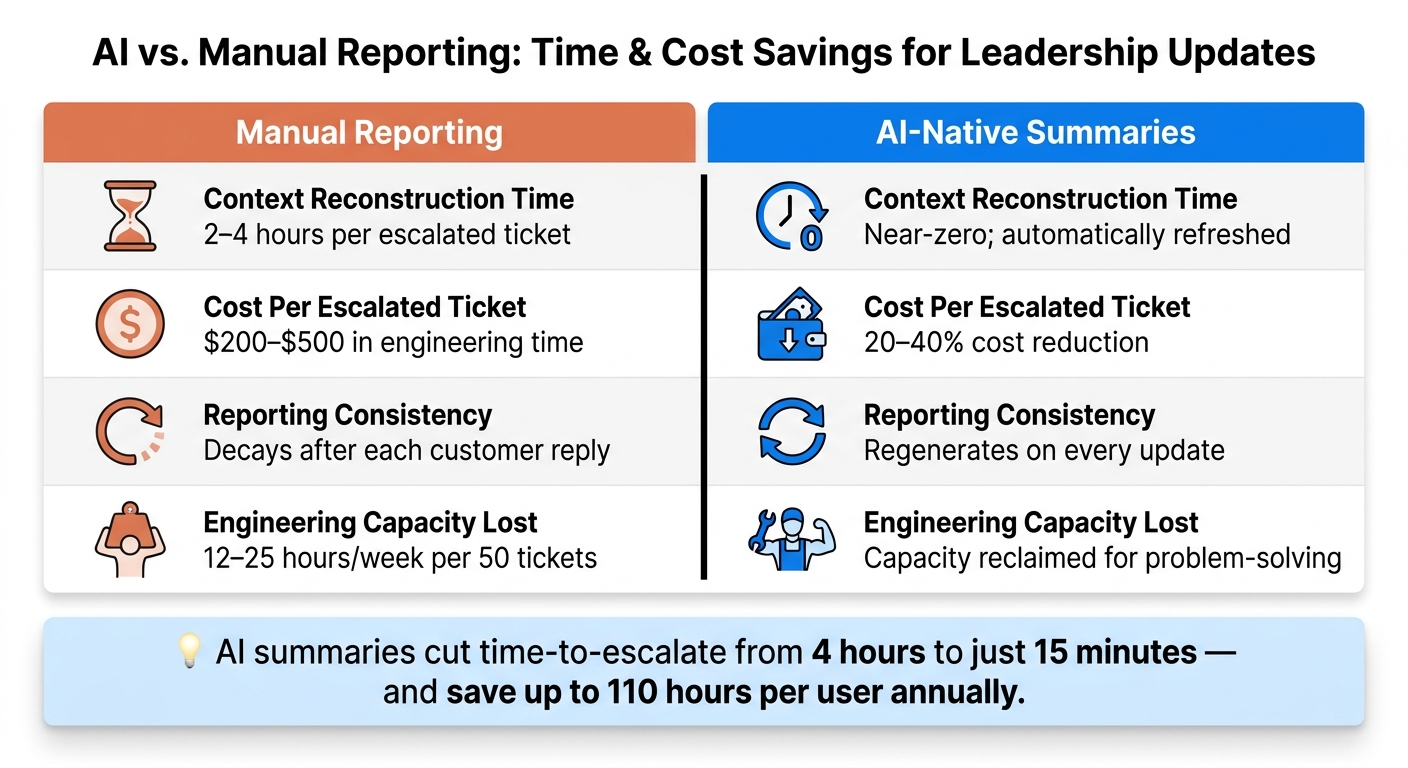
AI vs. Manual Reporting: Time & Cost Savings for Leadership Updates
Linking Summaries to Key Metrics
To prove that your AI workflows are effective, it’s essential to track key metrics. Focus on time-to-publish (how long it takes to create a leadership-ready summary), SLA compliance rates, and resolution speed for escalated cases. If your AI summaries are performing well, you should notice quicker handoffs and fewer escalations being sent back due to missing details.
The financial impact of AI is another critical area to watch. Reconstructing context manually for escalated tickets can cost between $200 and $500 per case [10]. For teams handling 50 escalations weekly, this could mean losing up to 25 hours on manual efforts [10]. AI-generated summaries, which update continuously, can cut the time-to-escalate from 4 hours to just 15 minutes [10]. This not only saves time but also lowers the cost per ticket.
Monitoring AI Output and Refining Workflows
Once you’ve established your metrics, the next step is ensuring the quality of AI-generated summaries. Keep an eye on the number of corrections required per summary – frequent corrections might indicate issues with your prompts or gaps in the input data. You can also program the AI to flag contradictions between internal notes and customer-facing comments, helping to catch reliability issues before they reach leadership [7].
For technical cases, it’s vital to preserve details like error messages, log excerpts, and stack traces exactly as they are [7]. Paraphrasing these details can confuse engineering leads and slow down resolutions. Additionally, refining prompts based on the intended audience – whether it’s a VP of Customer Success or a CTO – can significantly improve the summaries’ usefulness [7].
"The goal isn’t 100% automation. It’s removing the 80% of manual summarization that agents skip under volume pressure anyway." – Omar Nasser, Inkeep [10]
Reducing Costs and Scaling with AI-Native Tools
With these metrics in place, you can assess the scalability and cost savings of AI-native tools. For example, platforms like Supportbench offer AI case summaries that are seamlessly integrated into workflows – there’s no need for agents to switch tabs or manually trigger the process [10]. This built-in functionality is especially valuable for teams under high pressure, as it ensures summarization happens automatically at case creation and closure. The result? A scalable process without adding headcount or complexity.
Deeply integrated AI platforms can save up to 110 hours per user annually [2], and organizations typically see a return on investment in less than six months [2]. For leadership, this translates into consistent and effortless reporting, regardless of individual agent performance.
| Metric | Manual Reporting | AI-Native Summaries |
|---|---|---|
| Context reconstruction time | 2–4 hours per escalated ticket | Near-zero; automatically refreshed |
| Cost per escalated ticket | $200–$500 in engineering time | 20–40% reduction [10] |
| Reporting consistency | Decays after each customer reply | Regenerates on every update |
| Engineering capacity lost | 12–25 hours/week per 50 tickets | Capacity reclaimed for problem-solving |
Conclusion: Getting More from AI in Leadership Updates
Key Takeaways
AI-generated case summaries aim to give leadership the context they need without creating extra work for agents. The secret lies in using structured summaries that include the initial request, resolution, root cause, and next steps – all delivered automatically [1].
Here’s what makes this process effective:
- Using all available data: Summaries should pull from public comments, internal notes, and even side conversations (like Slack or email threads) to ensure a full picture [1].
- Tailoring prompts to the audience: A VP of Customer Success and a CTO will have different needs, so prompts should reflect those differences [1].
- Automating the workflow: Consistent and reliable summaries depend on automation to eliminate manual effort.
These points provide a clear path for turning AI for customer service into a practical tool for leadership updates.
Next Steps for Building AI-Driven Summaries
Start with a 12-week pilot program. Choose a group of experienced agents to test and refine the system. Teams often see a 15% drop in After-Call Work and a 9% improvement in first reply speed during these trials [5].
Next, add a human review process. Have agents flag inaccuracies or hallucinations to improve AI performance. Include sources or transcript excerpts in the summaries to make them easy to verify [5].
Once the system is reliable, standardize the summary format and automate delivery straight into executive dashboards. This eliminates the need for manual slide decks or lengthy email threads [8][9]. By following these steps, you’ll seamlessly integrate AI into your operations, making leadership reporting faster and more efficient.
FAQs
What ticket data should AI use for summaries?
To craft strong internal case summaries, AI tools need to dig into key ticket data. Here’s what should be analyzed:
- Public comments and customer messages: These reveal the core issues, customer expectations, and overall sentiment.
- Internal notes: Look for details about troubleshooting steps, escalations, and any roadblocks encountered.
- Metadata: This includes account IDs, product specifics, priority levels, and timestamps, all of which provide essential context.
- Previous ticket history: Reviewing past interactions ensures continuity and avoids redundant efforts.
Before processing, make sure to clean the data. Strip out email signatures, disclaimers, and duplicate information to keep the analysis focused and accurate.
How do I prevent sensitive data from appearing?
To keep sensitive data out of AI-generated summaries, make sure to set up AI prompts that specifically exclude internal or confidential details. It’s also essential to manually review any summaries before sharing them to confirm that no private information slips through. Continuously update and refine your workflows and prompts to minimize the chances of accidental disclosures and ensure compliance with privacy policies and security standards.
How can we verify AI summaries are accurate?
To ensure AI-generated summaries are accurate, compare them directly with the original case or ticket data. This includes reviewing public logs and internal notes. Focus on key details like the issue, steps taken, the outcome, and the current status.
When crafting prompts for the AI, aim for precision by centering them around these critical facts. Additionally, set the AI model to a low temperature (e.g., 0.1). This helps minimize errors by reducing randomness in the responses.
For better reliability:
- Require confidence labeling in summaries.
- Include transcript excerpts whenever possible to provide context.
- Track how often agents need to correct AI summaries – this can serve as a metric to monitor and improve accuracy over time.
By following these steps, you can maintain a higher standard of quality in AI-generated outputs.






