
Which migration strategy is better for your support system: Big Bang or phased? The answer depends on your needs. Big Bang migrations are fast and cost-effective but come with high risk – issues affect everyone immediately. Phased migrations are safer and allow for gradual adjustments but take more time and resources.
Key differences:
- Big Bang: One-time switch, lower costs, faster helpdesk ROI, higher risk of disruption.
- Phased: Gradual rollout, better for complex systems, minimizes risk, higher short-term costs.
Quick Comparison
| Feature | Big Bang Migration | Phased Migration |
|---|---|---|
| Timeline | Short (single event) | Extended (months/years) |
| Risk Level | High (single failure point) | Low (isolated issues) |
| Cost | Lower upfront | Higher due to dual systems |
| User Training | One-time | Incremental |
| Ideal For | Interconnected systems | Complex, siloed systems |
Choose Big Bang for simpler systems with tight deadlines. Opt for phased migration if you need flexibility, feedback loops, or are managing complex support operations.
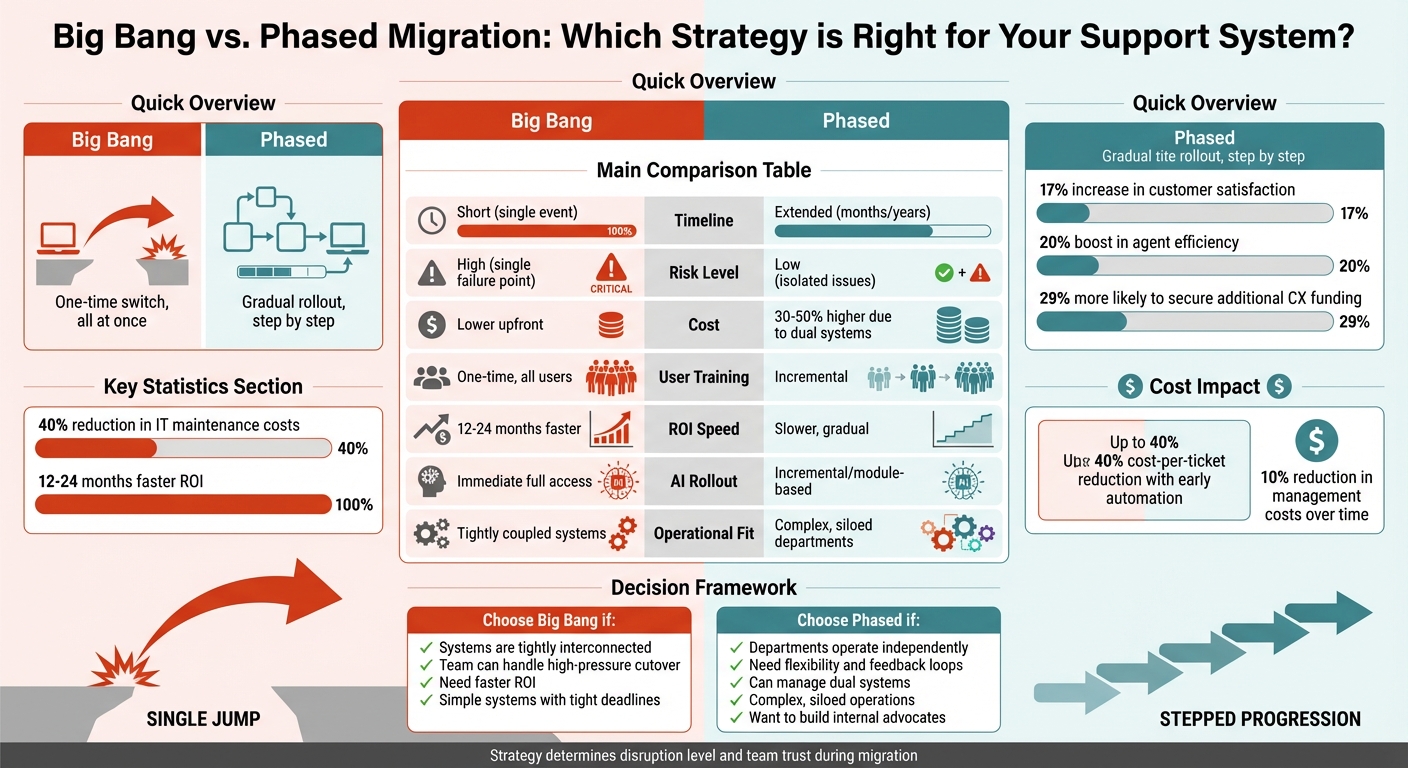
Big Bang vs Phased Migration: Complete Comparison Guide for Support Systems
Legacy System Migration: A Complete Guide
sbb-itb-e60d259
What is Big Bang Migration?
Big Bang migration, also known as Direct Cutover, Forklift, or Immediate Implementation, is a one-time, all-at-once transition from an old support system to a new platform. On the go-live date, the legacy system is completely shut down, and the new system takes over as the sole operational platform for all users, data, and integrations [10][4]. There’s no overlap or gradual transition – everything changes in a single decisive moment.
Big Bang Migration Explained
In B2B support operations, this method means the entire team shifts to the new system simultaneously. For example, when migrating to Jira, the legacy platform is fully retired on the go-live date [2]. This approach follows an "Event Horizon" design, where all transactions immediately move to the new system [7].
"Big bang migrations are appealing because they promise closure. There’s one timeline, one communication plan, and one moment where everyone is told, ‘This is Jira now.’" – Rodney N., The Jira Guy [2]
The main draw of this approach is its simplicity and speed. Big Bang migrations typically have the shortest implementation timelines and lowest overall costs, as there’s no need to maintain and operate two systems simultaneously. Additionally, it eliminates legacy technical debt on Day 1 [10][4][7]. However, the stakes are high – any issues during the transition will affect the entire organization at once [2][1].
How to Prepare for Big Bang Migration
A successful Big Bang migration hinges on thorough preparation and precise execution, often requiring months of planning and multiple practice runs [7].
One key step is conducting iterative mock go-lives. Start with a Technical Mock (testing data migration), move to a Process Mock (involving actual users), and end with a Full Dress Rehearsal on production hardware [7]. These dry runs help minimize downtime and ensure the new system is ready to handle live operations smoothly.
Data preparation is another critical element. For AI-native support systems, this involves implementing a "code freeze" and "data freeze" on the legacy system to keep the migration snapshot static [7]. Cleaning up your knowledge base beforehand ensures AI tools have accurate data from day one [1]. Many teams use the "delta" technique, where an initial large migration is performed early, followed by smaller syncs to capture recent changes just before the final cutover [6].
"Although it can be painful to endure the downtime required for a single all-encompassing migration… proper planning including dry-running, and a targeted cutover time… will be important to ensure that user access isn’t disrupted." – Frank D’Entrone, Head of Business Development, fme US [6]
A detailed minute-by-minute runbook for the cutover weekend is essential, along with a "War Room" for real-time communication [7]. Set clear Go/No-Go criteria – for example, "If 100% of customer data isn’t loaded by Saturday at 2:00 PM, we rollback" [7]. Always have a full backup of the legacy system taken 48 hours before the cutover as a safety net [7].
Timing is another critical factor. Schedule the cutover during low-traffic periods, such as weekends or holidays, to minimize disruption [6]. Simultaneously train the entire support team, as there won’t be any overlap between systems [10]. Finally, bolster your help desk staffing immediately post-migration to handle the inevitable surge in user questions [4].
With careful preparation, the transition can be smoother, but the immediate effects on support operations are intense.
Short-Term Effects on Support Operations
The aftermath of a Big Bang migration can be challenging. Support ticket volumes often spike as users encounter the new system all at once [1][2]. Your team will need to troubleshoot unexpected configuration or automation issues in real time, with the entire organization watching. Without the gradual learning curve provided by phased approaches, any mistakes can quickly erode user confidence [2].
"If something goes wrong, it goes wrong for everyone at the same time. Support queues spike immediately. Users lose confidence quickly." – Rodney N., Atlassian Certified Professional [2]
To manage this, plan a Hypercare period lasting 1-4 weeks after launch. During this time, maintain elevated support levels, hold daily triage meetings, and deploy rapid-response teams to address issues as they arise [7]. Both support teams and end-users may experience temporary productivity dips as they adjust to the new workflows and interfaces [10].
That said, there are immediate benefits. Training the entire workforce at once avoids the fatigue of multiple updates [7]. Organizations that deploy virtual agents and automate customer support workflows on Day 1 often see cost-per-ticket reductions of up to 40% [1]. Additionally, Big Bang migrations can accelerate ROI by 12-24 months compared to phased approaches, as the new system’s capabilities are fully utilized from the start [7].
Next, we’ll look at phased migration and how it affects support teams.
What is Phased Migration?
Phased migration is all about rolling out changes step by step instead of doing everything all at once. In B2B support operations, this means breaking the process into smaller, more manageable parts – whether by modules, teams, customers, or products. The idea is to let each group adjust to the changes before moving on to the next stage.
Phased Migration Explained
A phased migration typically follows a structured approach: planning, a pilot phase, data integration, gradual team rollouts, and thorough testing before fully transitioning. For instance, you might start by migrating your email support system, then move on to chat, and finally tackle voice support. Alternatively, you could stagger the transition geographically – starting with the U.S. team in April, the European team in July, and the APAC team in October.
This method allows you to focus on simpler, high-volume tasks first – like password resets or order status updates – before addressing more complex challenges, such as Tier 3 support requests [1]. A 3-month gap between phases is recommended to refine processes based on feedback from earlier stages [6].
"The staged approach can help to contain any risk and bring users on a journey rather than switch everyone over en masse and hope for the best." – Frank D’Entrone, Head of Business Development, fme US [6]
Next, let’s look at what happens when your old and new systems run side by side during the transition.
Running Old and New Systems Together
In a phased migration, the legacy system and the new platform often operate simultaneously. This overlap allows early adopters to test the new system and provide feedback, which helps fine-tune the rollout for later groups [2][8]. For example, if the pilot team notices that an automation rule isn’t working as expected, you can fix it before it impacts the entire organization.
This dual-system phase can also help build internal momentum. Early adopters who experience the benefits firsthand often become advocates for the new system, easing concerns among other teams [2]. Additionally, organizations that show measurable improvements after early phases are 29% more likely to secure extra funding for customer experience initiatives [1]. The phased approach ensures that AI tools and workflows are continually refined based on real-world feedback.
That said, running two systems at once isn’t without its challenges. Teams have to coordinate data between platforms, ensure integrations are functioning smoothly, and manage where specific tasks or historical data reside [2][11]. During this period, the workload often doubles as teams juggle maintaining the old system while learning and building the new one [9]. Despite these hurdles, this overlap can ultimately improve workflows in the long run.
How Phased Migration Affects Support Teams
For support teams, phased migration introduces changes in smaller, more manageable steps, minimizing the risk of widespread disruptions. Any issues that arise are limited to specific groups or tasks rather than affecting the entire operation [2][6]. This approach also allows agents to gradually familiarize themselves with the new system, starting with less demanding channels like email before moving on to more complex tasks like live voice support [1].
Big Bang vs. Phased Migration: Pros and Cons
Now that we’ve covered how each migration approach works, let’s dig into the trade-offs. Each strategy comes with its own set of strengths and challenges, which can directly influence your costs, timeline, and support operations.
Big Bang: Pros and Cons
A Big Bang migration offers instant access to AI-driven tools and automation, delivering immediate benefits like enhanced analytics and streamlined operations. It also clears out all legacy systems at once, eliminating technical debt on Day 1. This is particularly effective for organizations with tightly interconnected systems, where implementing everything at once ensures seamless integration and avoids prolonged inefficiencies [7].
That said, this approach carries significant risks. A major hiccup during the launch can disrupt your entire operation, affecting users and potentially halting critical business activities [3]. Support teams often face an overwhelming surge in tickets as users adjust to the new system, and there’s no chance to refine the process based on early feedback – everything rides on a single go-live event.
"Big Bang migration – the complete system replacement in a single coordinated event – is often misunderstood as merely ‘risky.’ In reality, when executed with military precision, it eliminates the prolonged operational friction and ‘bridge code’ maintenance costs associated with parallel running." – Salfati Group [7]
One real-world example: In 2023, a Fortune 500 manufacturing company replaced a two-decade-old on-premise ERP system with a cloud-based solution using a Big Bang approach. Their tightly integrated supply chain, finance, and HR systems made a phased migration impractical. The result? A 40% reduction in IT maintenance costs and immediate access to unified global reporting [7]. Additionally, Big Bang migrations can speed up ROI realization by 12 to 24 months compared to phased projects [7].
Phased: Pros and Cons
Phased migration takes a more cautious route, isolating potential issues to specific user groups or departments. This minimizes risk and allows for gradual adjustments. Early adopters provide valuable feedback, helping refine the system for later phases. Organizations often see improvements in customer satisfaction and agent productivity, and deploying early automation features can reduce cost-per-ticket by up to 40% [1]. This method is ideal for businesses with siloed or highly complex operations, where a slower rollout reduces disruption.
However, the longer timeline and need to maintain parallel systems come at a cost. Dual licensing, integration upkeep, and data synchronization can increase expenses by 30% to 50% during the migration period [7]. Teams must juggle tasks like ensuring smooth integrations and managing where data and processes reside. While automation introduced during early phases can eventually cut management costs by about 10% [1], the initial complexity is hard to ignore.
Interestingly, companies that report early successes in phased migrations are 29% more likely to secure additional CX funding [1]. This can help finance the remaining phases, but the extended timeline means it could take years to fully reap the benefits of your new AI-powered platform.
Side-by-Side Comparison: Big Bang vs. Phased Migration
| Feature | Big Bang Migration | Phased Migration |
|---|---|---|
| Timeline | Short (single cutover event) | Extended (months or years) |
| Risk Level | High (single point of failure) | Low (issues isolated to phases) |
| Cost Profile | Lower integration/dual-run costs | Higher due to dual licensing/staffing |
| AI Rollout | Immediate full access | Incremental/module-based |
| Operational Fit | Best for tightly coupled systems | Best for complex, siloed departments |
| User Training | Single-cycle training | Incremental training |
Choosing the right approach depends on your organization’s specific needs, risk tolerance, and system architecture. Up next, we’ll provide a practical checklist to help you align your migration strategy with your operational goals.
How to Choose the Right Migration Strategy
Evaluate Your Team and Operations
To decide between Big Bang and phased migration, you need to match the strategy to your team’s capacity and your organization’s operational needs. Start by looking at the complexity of your systems. If your workflows are deeply connected – where teams frequently exchange tasks across departments – running parallel systems might be too complicated. In such cases, a Big Bang approach could be the only viable option since it avoids the technical chaos of managing dual systems simultaneously [2][5].
Next, consider your organization’s risk tolerance and resource availability. Big Bang migrations bring intense, short-term pressure, while phased migrations spread the workload over time. Ask yourself: Can your teams handle the high-stakes, all-at-once nature of a Big Bang migration? Or would the extended effort of maintaining two systems during a phased rollout stretch your resources too thin [5][8]? Choose the approach that aligns with your team’s ability to execute effectively.
Think about user readiness, too. Phased migrations allow you to gather feedback from early adopters, which can guide improvements and reduce resistance. This iterative process often builds internal advocates who help smooth the transition for the broader team [2][5].
Finally, evaluate your data migration best practices. If you’re dealing with large volumes of critical customer data, it might be safer to migrate in stages. This allows for validation and cleanup between phases, ensuring your data remains accurate and reliable throughout the process [5][6].
By carefully weighing these factors, you can make an informed decision about your migration strategy.
Checklist: Big Bang vs. Phased Migration
Here’s a quick guide to help you choose the right approach:
Opt for Big Bang migration if:
- Your systems are tightly interconnected, making it nearly impossible to run them in parallel.
- Your team has the capacity to focus intensely on a single, high-pressure cutover.
Go with phased migration if:
- Your departments operate independently with distinct workflows.
- You want the flexibility to test and refine the process before full deployment.
- Your team can handle the extended timeline and the challenges of managing dual systems.
- Early successes are important – organizations with measurable wins are 29% more likely to secure additional funding for customer experience initiatives [1].
- You can start small by piloting with a specific business unit or region.
"Strategy is what determines how much disruption teams feel and how much trust admins retain when (not if, when) something inevitably doesn’t go exactly as planned." – Rodney N., Atlassian Certified Professional [2]
To kick off your migration, audit your contact drivers to identify high-volume, low-complexity tasks like password resets [1]. These are ideal for initial migration or automation efforts. If you’re taking a phased approach, consider starting with less critical digital channels like email or web widgets. These channels give agents a chance to get comfortable with the new system without the pressure of handling live calls [1].
Conclusion
Key Takeaways
Your migration strategy plays a critical role in ensuring a smooth and controlled transition. A Big Bang migration offers a swift, all-at-once approach but carries significant risks – any failure impacts all users immediately. On the other hand, phased migrations spread the workload and risk across smaller segments, giving you the chance to learn and adapt as you go. In fact, companies using a staged migration approach have reported a 17% increase in customer satisfaction and a 20% boost in agent efficiency [1]. Additionally, organizations that achieve early measurable successes are 29% more likely to secure further funding for customer experience initiatives [1].
The best strategy depends on factors like your system’s complexity, your organization’s risk tolerance, and available resources. For simpler systems with minimal dependencies, a Big Bang approach might deliver faster results. However, for more intricate, interconnected environments, a phased migration offers a safer, more flexible option. It allows for testing, gathering feedback, and achieving early wins that build momentum. Use these insights to guide your planning process.
Next Steps for Migration Planning
Begin by auditing your contact drivers to pinpoint high-volume, low-complexity tasks that are ideal for early automation. Clean up your data – AI systems are only as effective as the quality of the inputs they receive. Make sure to update your knowledge bases and customer records before starting the migration. If you’re adopting a phased approach, consider piloting with a specific business unit or starting with less complex channels like email before moving on to live voice interactions.
Deploy virtual agents and workflow automations early in the process. This can lower your cost-per-ticket by as much as 40% [1]. Additionally, implement robust monitoring tools to identify and address issues in real-time during the transition.
The journey to AI-native support begins with aligning your migration strategy to your organization’s specific goals and capacities. Plan carefully, execute with precision, and leverage your team’s strengths to ensure success.
FAQs
How do I decide between Big Bang and phased migration for support?
When deciding how to transition systems, you’ll typically weigh two main approaches: Big Bang or phased migration.
A Big Bang migration involves switching all systems over at the same time. This method is quicker but comes with higher risks, including potential downtime and disruption. On the other hand, phased migration takes a more gradual approach, rolling out changes in stages. This reduces risks and allows for incremental testing, making the transition smoother.
Your decision should factor in things like how complex your systems are, the resources you have available, and how critical uninterrupted service is to your operations. Each strategy has its strengths, so choose the one that aligns with your specific needs and priorities.
How can I reduce cutover downtime and ticket spikes?
To keep downtime and support tickets under control during a migration, careful planning and execution are key. Here’s what to prioritize:
- Schedule the cutover wisely: Aim for low-traffic periods to minimize disruption to users.
- Test extensively: Validate data integrity through thorough testing before making the switch.
- Prepare for the unexpected: Have backups ready and create rollback plans in case something goes wrong.
- Use AI tools: These can streamline the data transfer process and help identify errors quickly.
For more complex setups, consider a phased migration. This can reduce risks and spread out ticket spikes, making the process smoother for everyone involved.
What’s the best way to keep data accurate during migration?
To keep data accurate during migration, it’s crucial to plan carefully and validate at every step. Start by auditing your data to spot problems like duplicates or missing fields. Backing up your data is another must-do, ensuring you have a safety net. Pay close attention to field mapping to ensure data aligns correctly, and always test in a controlled environment before going live.
Whether you choose a Big Bang migration or a phased approach, ongoing validation is non-negotiable. This includes thorough post-migration checks and involving team members, like agents, in testing. These steps are key to maintaining data integrity and ensuring the migration process runs smoothly.