Managed Service Providers (MSPs) require helpdesk tools that handle unique challenges like multi-client management, SLA tracking, and integration with RMM/PSA systems. This article evaluates four helpdesk platforms – Supportbench, Atera, Zendesk, and Freshservice – based on features such as AI-driven ticketing, multi-tenant management, integrations, and pricing.
Key Takeaways:
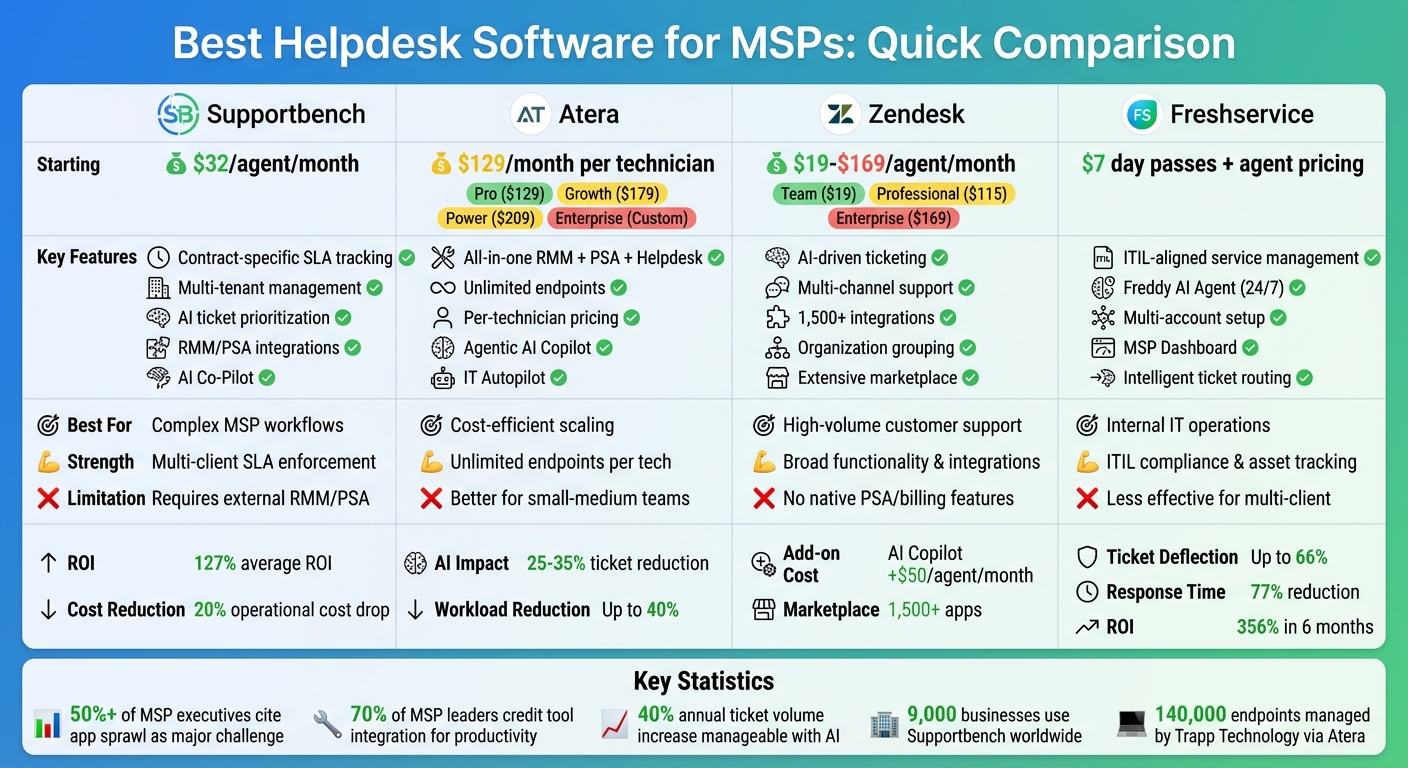
- Supportbench: Tailored for MSPs with contract-specific SLA enforcement, AI tools for ticket prioritization, and seamless RMM/PSA integrations. Pricing starts at $32 per agent/month.
- Atera: Combines RMM, PSA, and ticketing with per-technician pricing, making it cost-effective for growing MSPs. Plans start at $129/month.
- Zendesk: Offers broad functionality and strong integrations but lacks native MSP-specific features. Pricing ranges from $19 to $169 per agent/month.
- Freshservice: Provides ITIL-aligned service management with AI automation but is better suited for internal IT teams. Pricing depends on agent numbers, with day passes available for $7.
Quick Comparison:
| Platform | Key Features | Pricing | Best For |
|---|---|---|---|
| Supportbench | SLA tracking, multi-tenant, AI tools | $32/agent/month | Complex MSP workflows |
| Atera | RMM, PSA, unlimited endpoints | $129-$209/month per technician | Cost-efficient scaling |
| Zendesk | AI ticketing, multi-channel support | $19-$169/agent/month | High-volume customer support |
| Freshservice | ITIL service management, AI tools | $7 day passes + agent pricing | Internal IT operations |
Choosing the right platform depends on your MSP’s size, budget, and client management needs.
MSP Helpdesk Software Comparison: Features, Pricing & Best Use Cases
Ranking the BEST and WORST Help Desk Software
sbb-itb-e60d259
1. Supportbench
Supportbench is tailored for MSPs (Managed Service Providers) juggling complex, multi-client environments. As Nooshin Alibhai, Founder and CEO, explains:
"Supportbench acts as the hub of an MSP’s operations by connecting with PSA, RMM, and monitoring tools. It automates SLA tracking, supports multi-tenant clients, and includes a built-in knowledge base. All in one platform." [5]
This platform simplifies managing multiple clients with unique contracts and SLAs, cutting down on the need to switch between tools. It ensures strict data separation while giving technicians a unified workload view. Let’s explore its standout features in multi-tenant management, AI functionality, integration, and pricing.
Multi-Tenant Management
Supportbench’s structure ensures complete data separation for each client, while MSPs can still operate from a single, centralized dashboard. Each client benefits from tailored SLA policies, branded portals, and team-based access controls that align with their specific agreements [5] [1].
The platform also includes SLA timers with real-time notifications, eliminating the hassle of manual tracking [1]. MSPs can create detailed workflows and escalation paths based on service tiers. For instance, a Platinum client’s server outage might immediately escalate to senior technicians, while a Bronze client’s routine request follows standard routing. This level of customization is rare in general vs MSP-specific helpdesks not explicitly designed for multi-organization use [1].
AI Capabilities
Supportbench integrates AI to help MSPs reduce costs and boost efficiency. The AI Co-Pilot feature gives agents quick access to ticket histories, the knowledge base, and customer details, significantly cutting down search time [6]. Additionally, it automates ticket prioritization, assigns issue types, and generates summaries, streamlining the triage process [6] [1].
The AI CX Intelligence tool monitors customer sentiment, catching early signs of frustration before problems escalate. It also automates the collection of CSAT (Customer Satisfaction) and CES (Customer Effort Score) data while providing built-in quality checks for agent responses. Plus, once a ticket is resolved, the system can generate knowledge base articles from the interaction, ensuring documentation grows alongside client needs [6] [1].
Users have reported an average ROI of 127% and a 20% drop in operational costs within two years. The platform is trusted by roughly 9,000 businesses worldwide [6].
Integration Options
Supportbench integrates seamlessly with key tools MSPs rely on, such as PSA platforms (ConnectWise Manage, Autotask), RMM software (NinjaRMM), and network monitoring tools (PRTG, SolarWinds, Nagios) [5]. This allows device details, service history, and billing information to appear directly in the ticket view [2].
Its REST APIs and native connectors ensure smooth data syncing. For example, if an RMM tool detects a server issue, it can automatically generate a ticket in Supportbench with all relevant device details attached. This enables technicians to review the client’s infrastructure and past issues without leaving the interface [2].
Pricing
Supportbench offers straightforward pricing, starting at $32 per agent per month with all features included from the beginning [website]. The cost scales predictably as MSPs grow, avoiding unexpected fees or forced upgrades. Discounts are available for startups and non-profits [website].
2. Atera
Atera is making strides in the industry with its AI-native approach, offering a platform that combines RMM (Remote Monitoring and Management), PSA (Professional Services Automation), and helpdesk functionalities. Its integrated architecture ensures that monitoring, ticketing, and billing all operate from a shared database. This design minimizes data synchronization issues and streamlines workflows for MSPs managing multiple clients [7].
One of Atera’s standout features is its pricing model. Instead of charging per device, Atera uses a pay-per-technician system. This allows MSPs to manage unlimited endpoints for a fixed monthly fee per technician, making it a scalable and cost-effective option as businesses expand [8].
Multi-Tenant Management
Atera simplifies multi-client management with its Network Discovery feature, which scans workgroup and domain controller networks to detect and list all connected devices across client environments [10]. Each client gets a dedicated portal for submitting tickets and tracking progress [7]. Technicians can handle patch management for Windows, Mac, and Linux systems from a single dashboard, ensuring updates are deployed efficiently across all clients [7]. Additionally, IT Automation Profiles help standardize routine tasks, ensuring consistent service delivery across all agents [10].
AI Capabilities
Atera leverages Agentic AI, which goes beyond basic automation by reasoning through problems and performing multi-step tasks independently [11]. The AI Copilot assists technicians with real-time diagnostics, automated script creation, and concise ticket summaries. Zack Barr, a Service Desk Analyst, shared:
"The AI copilot is like having another team member. Tickets have been reduced by 25-35% and it’s assisting us with knowledge base generation." [11]
The platform’s IT Autopilot handles routine end-user requests – like password resets or software installations – via Slack or Microsoft Teams, escalating only complex issues to human technicians [11]. This self-service functionality can reduce IT team workloads by up to 40% [11]. For example, in 2026, Trapp Technology used Atera to manage over 2,500 clients and 140,000 endpoints. Under President Shawn Davidson, they achieved a 30% reduction in first reply time and saw a 10% annual improvement in their Net Promoter Score [9].
Integration Options
Atera enhances its capabilities with seamless integration options. Its built-in RMM provides real-time monitoring, automated patch management, and remote access without needing additional tools. For financial management, Atera integrates with QuickBooks Online and Xero, enabling automated invoicing [8]. Security integrations include solutions like Bitdefender, Webroot, Acronis, Malwarebytes (ThreatDown), and Ironscales [7]. For communication, Atera supports Microsoft Teams and Slack, and its compatibility with Zapier, Boost.space, and an open API allows connections with thousands of third-party applications [7].
Pricing
Atera offers four annual pricing tiers per technician:
- Pro: $129/month, which includes RMM, PSA, ticketing, and basic remote access.
- Growth: $179/month, adding Mac/Linux support, AnyDesk, and QuickBooks/Xero integrations.
- Power: $209/month, featuring custom analytics, data recovery, and unlimited support addresses.
- Enterprise: Custom pricing, with features like SSO, Azure AD sync, and a dedicated account manager [8].
Add-ons are also available, such as Network Discovery for $29 per license and security tools like Bitdefender at $1.20 per endpoint [8].
3. Zendesk
Zendesk is a popular helpdesk platform with broad appeal across various industries [13]. However, unlike platforms designed specifically as helpdesk platforms for MSPs, Zendesk’s general-purpose approach can make it less efficient for managing multi-client, contract-driven workflows. While it offers strong ticketing features and an extensive app ecosystem, it doesn’t fully cater to the daily multi-tenant needs of MSPs.
Multi-Tenant Management
Zendesk handles multi-client management through its organization grouping feature, but the functionality depends heavily on the pricing tier.
- The Support Team plan, priced at $19 per agent/month, offers only basic single-organization grouping.
- The Suite Professional plan, at $115 per agent/month, adds multiple organization grouping with skills-based routing.
- The Suite Enterprise plan, costing $169 per agent/month, supports up to 300 help centers and includes automated ticket sharing [1].
For MSPs, this tiered approach may feel limiting. The platform lacks the robust multi-client workflows and contract-specific SLA enforcement that are standard in tools designed exclusively for MSPs [1]. Advanced automation and multi-tenant capabilities are often locked behind higher-tier plans or pricey add-ons, significantly increasing the total cost [1][12]. This makes adapting Zendesk to complex, client-specific requirements a challenge.
Integration Options
Zendesk stands out with its Marketplace, which hosts over 1,500 pre-built integrations. These include popular CRM tools like Salesforce and HubSpot, communication platforms like Slack and Microsoft Teams, and developer tools like Jira and GitHub [13]. Basic integrations are straightforward, often requiring just one click to set up. However, more complex configurations, such as full omnichannel setups or custom automation, can take anywhere from 2 to 4 months to implement. These often require specialized technical resources or external consultants [13]. The Marketplace includes both official Zendesk apps and third-party solutions, so the quality of integrations can vary.
Pricing
Zendesk’s pricing is split into four main tiers, ranging from $19 to $169 per agent/month, billed annually. MSPs should factor in additional costs for AI-powered features, premium support, and custom integrations, which are not included in the base subscription [13]. Access to a sandbox environment for testing integrations is another cost consideration – it’s available only as an add-on for the Suite Professional plan or included with Suite Enterprise (up to two sandboxes) [13].
Ultimately, Zendesk offers a balance of broad functionality and scalability. However, for MSPs, the platform’s general-purpose design and cost structure may not align perfectly with the specialized needs of managing multi-client operations.
4. Freshservice
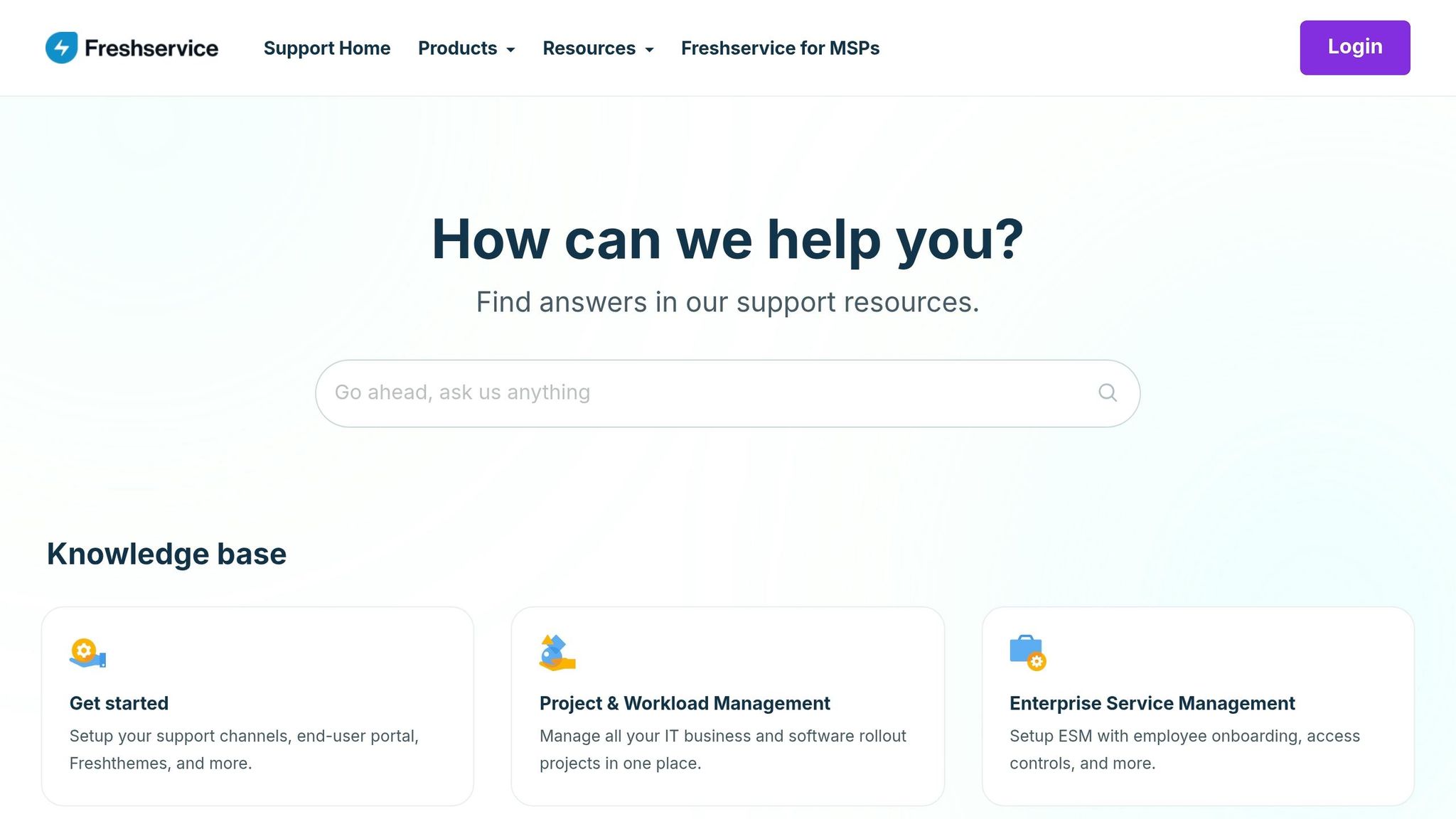
Freshservice, like other modern MSP support tools, simplifies complex client management with adaptable account configurations. It offers two main options: a multi-account setup for client-specific workflows and an MSP Mode for streamlined operations across multiple clients [14][15].
Multi-Tenant Management
The multi-account setup is ideal for clients needing unique workflows or when granting agent-level access to a client’s employees. Freshservice includes an MSP Dashboard that consolidates open and pending tickets across all managed accounts. For easy navigation, the Freshworks Switcher allows agents to move smoothly between client accounts [14]. A key billing feature is that charges apply only to unique agents, no matter how many client accounts they access [14]. For occasional contributors, day passes are available at $7 per agent for 24-hour access [16]. This centralized approach supports Freshservice’s advanced AI and integration capabilities.
AI Capabilities
The platform’s Freddy AI Agent provides 24/7 support through Slack and Microsoft Teams, handling routine requests so technicians can focus on more involved tasks. It uses intelligent ticket routing to assess user intent and urgency, automatically assigning tickets based on agent availability and workload before manual triage. For escalations, AI reduces noise by automating alerts and ensuring SLA compliance through deadline notifications. Freddy AI Copilot assists further by drafting responses, summarizing ticket threads, and creating effective knowledge base articles. Freshservice reports that AI-powered self-service can deflect up to 66% of tickets, while AI assistance has led to a 77% drop in Average Response Time [17].
Integration Options
Freshservice is designed to meet MSP operational demands with strong native integrations. It connects seamlessly with tools like RMM and PSA platforms, along with Slack, Microsoft Teams, and an extensive marketplace for additional integrations. This streamlined approach has resulted in a 356% ROI within six months, thanks to improved IT efficiency and reduced reliance on outdated tools [17]. Romel Dababneh, Corporate IT Operations Manager, shared:
"Freshservice is a robust IT service desk that didn’t add any complexity to the IT operations… The simplicity and obviousness of the interface made it the preferred choice for the agent and the user" [17].
Pricing
Freshservice pricing is based on the number of unique agents across all accounts [14]. For temporary contributors, day passes are available at $7 per agent for 24-hour access [16]. This pricing model works well for teams managing diverse client environments, though exact costs depend on the features and agent numbers required.
Advantages and Drawbacks
This section highlights the strengths and limitations of each platform, giving MSPs a clearer picture of how to optimize their support operations.
Supportbench stands out with features like contract-specific SLA timers, multi-tenant visibility, and custom scorecards. However, it relies heavily on external RMM/PSA integrations to function effectively [1].
Atera offers a cost-efficient model with per-technician pricing and unlimited endpoints, making it ideal for managing growing fleets without unexpected cost increases [4] [19]. Its all-in-one RMM and PSA platform minimizes tool clutter but is better suited for small-to-medium-sized teams [4].
Zendesk shines with its AI-driven ticketing and multi-channel support capabilities. On the downside, it lacks native PSA and billing features, often requiring pricey third-party plugins to handle MSP-specific SLA policies [1] [4].
Freshservice delivers strong ITIL-aligned service management, excelling in incident, problem, and asset tracking [4]. Yet, its focus on internal IT operations can make it less effective for managing multi-client environments [4].
| Platform | Key Strength | Primary Limitation | Best Operational Fit |
|---|---|---|---|
| Supportbench | Contract-specific SLAs and multi-tenant features [1] | External RMM/PSA integration needed [1] | Complex MSP workflows |
| Atera | Per-technician pricing with unlimited endpoints [4] [19] | Limited scalability for large enterprises [4] | Cost-efficient scaling of device fleets |
| Zendesk | AI ticketing and multi-channel support [4] | Lacks native PSA/billing; add-ons required [1] [4] | High-volume customer support |
| Freshservice | ITIL-aligned ITSM and asset tracking [4] | Focused on internal IT, not multi-client [4] | Standardized internal IT operations |
It’s crucial to consider the hidden costs of add-ons, as these can significantly inflate the base pricing of platforms. Over 50% of MSP executives cite underused tools and "app sprawl" as major operational hurdles [4]. For example, Zendesk’s AI Copilot adds $50 per agent per month [18], while Atera includes AI features in its higher-tier plans without additional charges [19].
Conclusion
Selecting the right helpdesk platform comes down to your MSP’s size, budget, and operational priorities. For smaller teams working with tight budgets, platforms offering per-technician pricing with unlimited endpoints are a smart choice. These solutions help keep costs predictable as your client base grows and minimize app sprawl – an issue over 50% of MSP executives identify as a major challenge [4]. They also integrate well with AI-powered ticket management, a must-have for handling increasing ticket volumes efficiently.
Mid-sized MSPs juggling complex, multi-client setups need tools tailored for features like contract-specific SLA enforcement and multi-tenant visibility. Platforms like Supportbench are designed to scale effortlessly – from managing just a few clients to handling hundreds – without forcing costly upgrades or adding unnecessary complexity. Its AI-driven ticket summaries and custom scorecards empower teams to manage a 40% annual rise in ticket volumes without needing to hire additional staff [1][4]. These capabilities are critical for maintaining efficiency while growing your client portfolio.
For enterprise-level MSPs, the focus shifts to platforms offering deep customization and extensive third-party integrations. While these solutions may come with higher upfront costs and steeper learning curves [3], it’s essential to prioritize tools that strike a balance between flexibility and operational efficiency, rather than those primarily built for internal IT teams [4].
Before committing, conduct a thorough cost analysis that includes implementation, training, and any additional fees. Testing the platform through a pilot program ensures it meets key needs like SLA tracking and escalation processes, and billing integration. This aligns with the 70% of MSP leaders who credit deep tool integration as a major driver of technician productivity [4]. By adopting an AI-native helpdesk solution, MSPs can tackle rising ticket volumes, reduce manual inefficiencies, and streamline multi-client management – key challenges highlighted throughout this discussion.
FAQs
What MSP features should I require in a helpdesk?
When evaluating helpdesk solutions for Managed Service Providers (MSPs), certain features are crucial for smooth operations. Look for tools with multi-tenant architecture to manage multiple clients from a single platform, and SLA enforcement to ensure service commitments are met. Features like automated ticket routing and client-specific workflows streamline processes, while integrated billing simplifies financial management. Role-based access controls enhance security by restricting access based on user roles. Lastly, ensure the helpdesk integrates seamlessly with RMM (Remote Monitoring and Management) and PSA (Professional Services Automation) tools for a unified and efficient support system. These functionalities help MSPs deliver effective, scalable, and client-focused services.
How do I calculate total helpdesk cost for an MSP?
To figure out the total helpdesk costs for an MSP, you’ll need to break it down into a few key areas:
- Per-agent licensing fees: These are the recurring costs for each agent using the platform.
- Add-on features: Extras like AI capabilities, integrations, or advanced analytics often come with additional charges.
- Deployment fees: Whether you opt for a cloud-based or self-hosted setup, there may be initial deployment costs.
- Setup and customization: Tailoring the system to fit your specific needs can also add to the overall expense.
If you manage multiple clients, factor in the costs of a multi-tenant architecture. Don’t forget to include ongoing expenses like maintenance, support, and training. Adding all these elements together will give you a more accurate estimate based on your MSP’s unique requirements.
What should I test in a helpdesk pilot?
When trying out a helpdesk platform, it’s essential to zero in on features that directly affect MSP operations. Pay close attention to multi-client management, ticket automation, scalability under heavy usage, integration with other tools, user experience, and reporting functions. Create realistic scenarios to test how the platform performs under conditions similar to your daily operations and future demands. Focus on how easy it is to use, how well it works with your current tools, and whether its analytics provide insights that can drive smarter decisions.