



If Vtiger is slowing your B2B support team down, the short answer is this: pick the replacement based on account context, routing depth, AI costs, and migration work – not just ticket features.
I’d narrow the list like this:
- Supportbench: best fit for B2B teams with multi-contact accounts, SLA pressure, and account-based workflows
- Zendesk: best for teams that want a broad platform and can handle higher monthly cost and setup work
- Freshdesk: lower starting price, but less account depth and less stable AI spend
- HubSpot Service Hub: makes sense if you already run support inside HubSpot CRM
- Zoho Desk: low-cost option for basic support needs
- Salesforce Service Cloud: strong if you already live in Salesforce, but setup and upkeep can get heavy
A few numbers stand out right away:
- Supportbench starts at $32 per agent/month
- Zendesk Suite Professional starts at $115 per agent/month
- Freshdesk Pro starts at $49 per agent/month
- HubSpot Service Hub Professional starts at $90 per seat/month plus a $1,500 onboarding fee
- Zoho Desk Professional starts at $23 per agent/month
- Salesforce Service Cloud ranges from $25 to $550 per user/month, before setup costs
If I were comparing these tools for a B2B team, I’d focus on four questions first:
- Can agents see the full account, not just one ticket?
- Can I enforce SLAs by tier, region, product, or contract?
- Is AI included, add-on priced, or usage priced?
- How much work will migration and setup take?
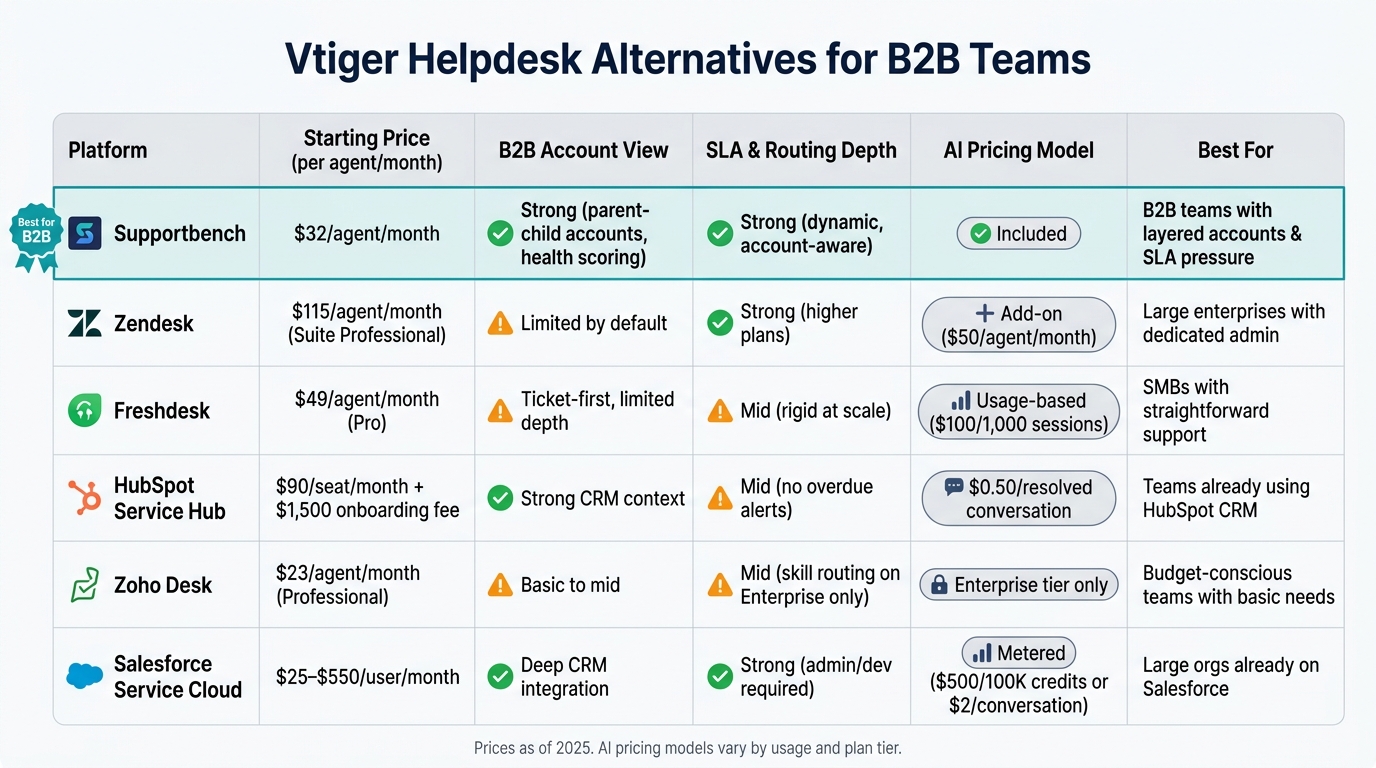
Vtiger Alternatives for B2B Teams: Side-by-Side Comparison
Quick Comparison
| Platform | Account view | SLA/routing depth | AI pricing | Best fit |
|---|---|---|---|---|
| Supportbench | Strong B2B account view | Strong | Included | B2B teams with layered accounts |
| Zendesk | Limited by default | Strong on higher plans | Add-on | Larger teams with admin help |
| Freshdesk | Ticket-first | Mid | Usage-based | Simple SMB support |
| HubSpot Service Hub | Strong CRM context | Mid | Per resolved conversation | HubSpot users |
| Zoho Desk | Basic to mid | Mid | Higher-tier only | Lower-budget teams |
| Salesforce Service Cloud | Strong CRM depth | Strong | Metered/add-on | Salesforce-first companies |
Bottom line: if your main problem is weak account context and hard-to-control SLAs, I’d start with Supportbench. If your company is already tied to HubSpot or Salesforce, staying in that stack may make more sense. And if budget is the top issue, Zoho Desk or Freshdesk will be the first tools to check.
Below, I break down the six options by what matters most to B2B teams: account context, routing, AI, reporting, and migration risk.
sbb-itb-e60d259
1. Supportbench
If Vtiger is starting to feel cramped for multi-contact accounts and stricter SLA management, Supportbench goes straight at those pain points. It’s built for B2B support teams that work at the account level, with parent and child accounts, multiple locations, and contract tiers built in from the start.
B2B account complexity
Agents get a single account view that pulls together open and past tickets, contract details, renewal dates, and account history. That matters when a team is dealing with more than one contact, more than one site, and more than one contract. Supportbench also includes customer health scoring, which flags renewal risk based on adoption, engagement, sentiment, and SLA history.
SLA and routing control
Supportbench gives teams dynamic SLAs and flexible routing rules based on the customer, product, or contract. You can set separate goals for first response, next reply, and resolution, then route tickets by segment, product line, tier, or custom fields.
For example, a premium manufacturing account can go straight to Tier 2 with a 1-hour first-response SLA, while standard accounts follow a 4-hour target. Reported results include 96% SLA attainment and a 1 hour, 12 minute average first response time [1].
AI and knowledge workflows
AI is included in the core platform, which keeps things simple. The AI Co-Pilot suggests replies and next steps using past cases and the knowledge base. Resolved cases can also turn into knowledge base articles, with AI drafting the subject, summary, and keywords. That helps teams keep documentation up to date without piling more work on agents.
Total cost and migration risk
Pricing starts at $32 per agent per month for the first 15 agents, then $2.50 per additional agent. AI, chat, the knowledge base, onboarding, and training are included, with no per-resolution fees or add-ons [1].
Most teams go live in under two weeks. The main migration risk is mapping custom Vtiger fields the right way. A sandbox test migration with a smaller set of accounts can lower that risk before the full move [1].
For teams moving off Vtiger because they need deeper account context, tighter SLA control, and built-in AI help, Supportbench is the closest match on the operations side. Next up: how it stacks up against broader service platforms that lean more toward general ticketing than account-level support.
2. Zendesk
Zendesk handles high ticket volume well. But for B2B teams, the bigger issue is often context. Out of the box, it doesn’t give agents much native account-level detail.
B2B account complexity
Zendesk is built around tickets first. That means contracts, renewals, and account history usually sit outside the main workflow unless your team connects other tools.
For B2B support, that can be a headache. If an agent is dealing with an account that has multiple contacts, they may need to jump between systems just to check renewal status, contract terms, or past account activity. That extra tool switching adds friction to every escalation.
SLA and routing control
Zendesk supports escalation thresholds at 75% and 90% of an SLA window. It can also auto-reassign tickets to senior agents. So if your team runs tiered response commitments, the setup can work well.
The catch is cost. More advanced SLA rules are locked behind higher plans like Suite Professional, which starts at $115 per agent per month [3].
AI and knowledge workflows
Zendesk’s AI works, but it isn’t bundled in a simple way. AI Copilot is a separate add-on at $50 per agent per month, and AI Agents are billed per automated resolution. So the more automation you use, the less predictable your monthly spend can feel [4].
Recent testing showed a 54% deflection rate, which points to a more cautious setup that leans toward accuracy instead of pushing aggressive auto-resolution [3].
Its knowledge base tools can help with self-service deflection. But that payoff doesn’t happen by magic. Teams still need to put in the work during migration to clean up, rewrite, and organize content.
Total cost and migration risk
For a 20-agent team on Suite Professional, the 3-year total cost is about $82,800 before add-ons [3].
Migration of tickets, contacts, and knowledge base articles usually takes two to four weeks with automated import tools [4]. That’s the easy part. The tougher job is rebuilding SLAs, routing logic, and macros in a way that matches how your team works.
If you don’t have a dedicated admin, it’s smart to budget for a partner or consultant. A proper enterprise setup often takes 8 to 14 weeks [3]. And once you add AI Copilot at $50 per agent per month, monthly cost can move around based on usage.
Freshdesk shifts this tradeoff toward simpler administration and a lower starting cost, but you give up some depth in account-level control.
3. Freshdesk
Freshdesk stays low-cost at first. But once B2B support gets messy, its ticket-first setup starts to show strain.
B2B account complexity
Freshdesk is built around tickets, not accounts. That sounds fine until one customer account has several contacts, several channels, and several people handling the work. Then the shared picture starts to break apart.
If one account opens tickets through email, chat, and voice, agents often have to jump across separate tabs for each channel instead of working from one account view [7]. That back-and-forth slows people down and makes handoffs rougher. Slack also comes as an add-on, which makes thread continuity and ownership easier to lose. Conversations can split, and it gets less clear who owns what [7].
That same ticket-first setup carries over into routing and escalations too.
SLA and routing control
Freshdesk uses three automation layers – Dispatch’r, Observer, and Supervisor – to manage routing and SLA enforcement [9]. On paper, that gives teams options. In practice, things get harder when routing depends on pods, account tiers, or multi-step escalation paths [5].
Admins may need to spend more time than expected setting up SLA policies, dispatch rules, and agent groups [9]. So if your support motion has a lot of “send this type of account to this pod, unless priority changes, then escalate here,” the setup can get clunky fast.
Once routing starts to hit limits, teams often try to make up for it with more automation and AI.
AI and knowledge workflows
Freshdesk’s Freddy AI suite includes AI Copilot and AI Agents for autonomous resolution [10]. The pricing model is where things get a lot less predictable. AI is sold in 1,000-use packs for $100, and unused volume does not roll over [5][10].
On a 10-agent Pro plan, adding AI Copilot pushes annual spend from about $5,880 to $9,360. That’s a 59% jump [5]. For teams with uneven usage from month to month, that can make budgeting harder as adoption grows.
Total cost and migration risk
Pro costs $49 per agent per month on annual billing. Enterprise costs $79 per agent per month. And if you want omnichannel support, you need Freshdesk Omni, which starts at $29 per agent per month [6][8][10].
For teams moving off Vtiger, the price tag is only part of the story. You also need to account for the work of keeping your reporting and routing logic intact.
Freshdesk supports CSV and API-based imports for tickets, contacts, and knowledge base articles [5]. The larger risk is reporting continuity. Standard dashboards are fairly rigid, and deeper SLA compliance reporting or CRM data integration sits behind the Enterprise tier [7]. If you don’t map reporting needs before migration, the gap may not show up until after go-live.
The next platform moves the tradeoff away from ticket handling and more toward CRM-linked service workflows.
4. HubSpot Service Hub
HubSpot Service Hub puts support around the contact record, not the ticket. Because it runs on HubSpot’s Smart CRM, reps can see deals, marketing touchpoints, and past conversations in one place on a single record [12]. That means agents stay inside one CRM record instead of bouncing between tools. If sales and support handle the same accounts, that shared view can make day-to-day work much smoother.
That said, shared context is not the same as tight service control. If your team has strict escalation rules, this setup doesn’t fully close that gap.
B2B account complexity
Shared inboxes can make ownership fuzzy when tickets aren’t auto-assigned. Service Hub shows SLA status, but it does not send alerts for overdue responses [11]. For tiered accounts with response-time promises, that missing alert can turn into a problem fast.
SLA and routing control
Service Hub can route work based on workload, product, or customer details [11]. That’s useful. The issue is SLA enforcement. The platform shows SLA status, but it doesn’t notify teams when a response goes overdue [11]. For teams that live by strict response commitments across account tiers, that’s a meaningful miss.
AI and knowledge workflows
Breeze AI can summarize tickets, draft replies, and turn conversation threads into knowledge base articles [11]. The autonomous Customer Agent is limited to Professional plans and higher [14].
As of April 2026, HubSpot switched to per-resolved-conversation pricing at about $0.50 per resolved conversation [12]. A resolved conversation means one that never reaches a human agent. So while the AI tools can save time, monthly costs can swing more than some teams expect.
There are a couple more limits to keep in mind:
- Knowledge base permissions are page-based
- The editor is rigid [11]
Total cost and migration risk
Professional costs $90 per seat per month with a 3-seat minimum, plus a required $1,500 onboarding fee. Enterprise costs $150 per seat per month with a 10-seat minimum, plus a $3,500 onboarding fee [12]. For teams leaving Vtiger, that’s real upfront spend before you’ve even proved the setup works for your team.
Migration is another factor. HubSpot’s ticket data fields don’t always map neatly to standalone help desk structures, which often pushes teams toward third-party migration services [11]. And if you’re not already using HubSpot, the CRM tie-in adds work instead of cutting it down.
Teams that need tighter service controls than CRM-linked support usually move next to Salesforce Service Cloud.
5. Zoho Desk
Zoho Desk makes the most sense for teams already working inside Zoho CRM, Projects, or Books. Its native integrations pull customer, project, and billing details into the ticket sidebar, so agents can see account context without bouncing between tools. If your team wants to stay inside the Zoho stack, that’s a big plus.
B2B account complexity
Support for multiple departments starts on the Professional tier ($23/agent/month). That lets teams split support by product line or business unit[15]. For B2B teams with shared ownership across service areas, that setup can help a lot.
The tradeoff is admin time. Zoho Desk keeps license costs lower, but more flexible automation usually takes 1 to 2 weeks to set up, a common trade-off when choosing between SMB and enterprise helpdesks[15].
SLA and routing control
SLA tracking starts on the Standard tier ($14/agent/month). It includes response and resolution targets, escalation paths, and priority-based enforcement[15][18].
A few details matter here:
- Timers pause when a ticket is in "Awaiting Customer Response"
- Round-robin routing starts at Professional
- Skill-based routing starts at Enterprise ($40/agent/month)[15][20]
That gives teams a decent amount of control, but some of the stronger routing options sit on higher plans.
AI and knowledge workflows
Zia is only available on Enterprise. It handles sentiment analysis, auto-tagging, and response suggestions, but there’s a catch: training can’t start until you have at least 500 tickets per department and 500 per category[15][16][17].
Zoho Desk also includes internal and public knowledge bases, plus version control and approval workflows. On top of that, Zia-powered Answer Bots can suggest articles before a ticket is created[20].
So the setup is useful, especially for self-service. But the best AI features are gated behind the top plan.
Total cost and migration risk
The bigger issue for many teams is usability. Reviewers say the interface feels cluttered, dated, and click-heavy, which can slow larger teams down[17][19].
Setup also usually takes 1 to 2 weeks, so migration plans should leave room for configuration work[15].
Teams that need tighter enterprise controls move next to Salesforce Service Cloud.
6. Salesforce Service Cloud
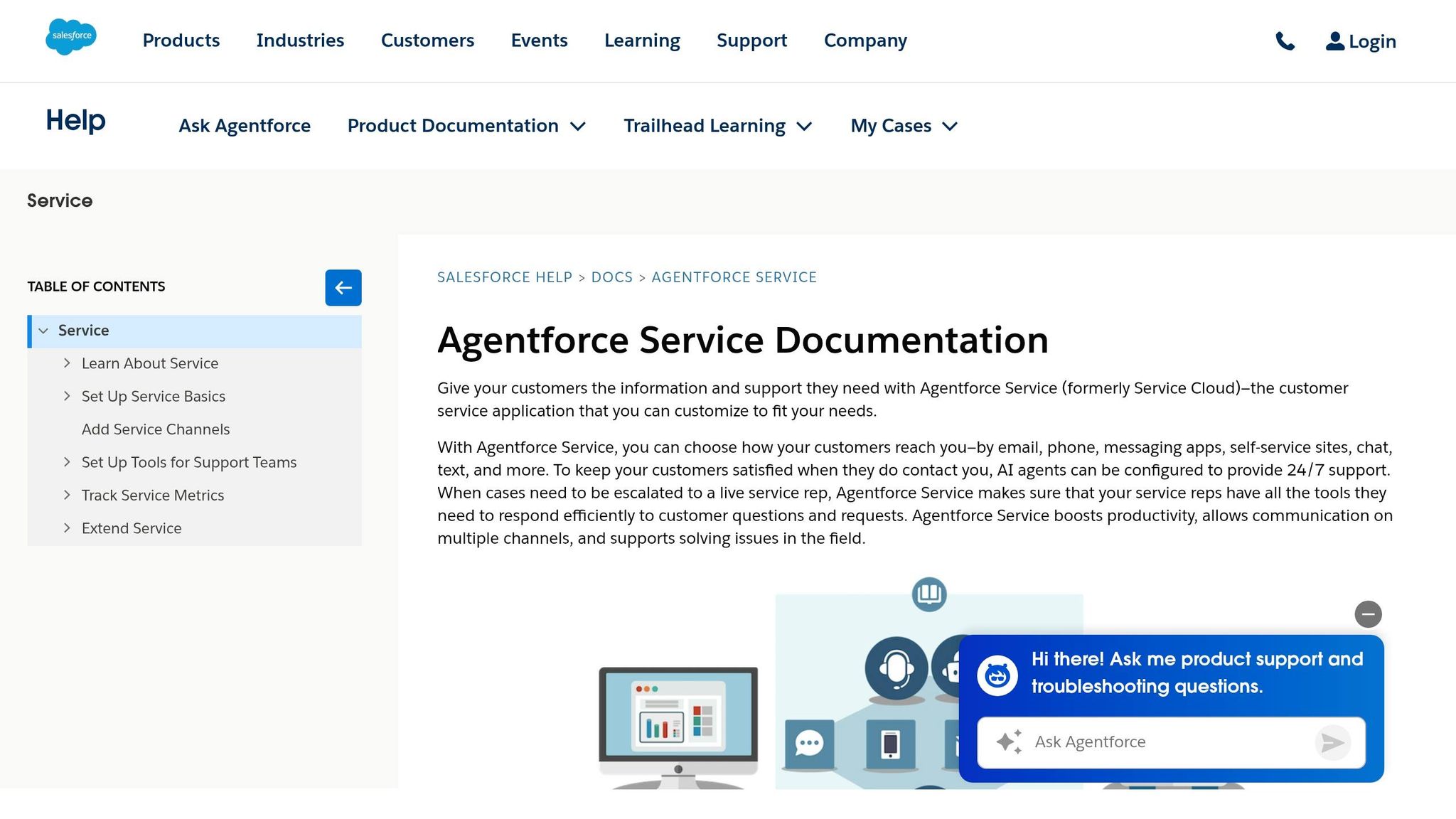
For Vtiger teams already tied to Salesforce, Service Cloud pulls support into the same CRM. That can clean up visibility across teams, but it also comes with a much higher setup and admin load.
B2B account complexity
Service Cloud keeps support, sales, and marketing on a single record. For B2B teams, that shared view can make account history easier to follow.
The tradeoff is admin overhead. Even small changes often need an admin, and in some cases, developer help too. So while everything lives in one place, that setup can be harder to manage day to day.
SLA and routing control
Service Cloud comes with advanced Omni-Channel Engagement, skills-based routing, and strong SLA tracking [13][22]. If your team needs tight control over who gets what case and when, Salesforce gives you a lot to work with.
Salesforce Flow can handle a lot, too. But there’s a catch: setting it up usually takes admin or developer skills [24]. This isn’t the kind of system most teams tweak on the fly.
In practice, enterprise rollouts often take 6 to 18 months, with setup costs commonly landing between $50,000 and $150,000+. In some cases, implementation runs 2 to 3 times higher than the annual software license cost [25][24][23]. If a team also needs messaging or WhatsApp, Digital Engagement adds $75 per user per month [24][25].
AI and knowledge workflows
Agentforce for Service uses the Atlas Reasoning Engine to support autonomous case resolution based on the support CRM [21][13]. Salesforce says its own support organization handled more than 1 million requests using Agentforce [21].
AI pricing is separate. Usage is metered through Flex Credits at $500 per 100,000 credits, with roughly 20 credits per action, or through a $2 per AI conversation model [21]. That matters because AI costs can stack up fast once usage grows.
Some knowledge base connections may also need specific add-ons or higher-tier licenses [26]. So if knowledge workflows are a big part of your support model, it’s worth checking what’s included before you commit.
Total cost and migration risk
Pricing starts at $25 per user per month for Starter Suite and goes up to $550 per user per month for Agentforce 1 Service [21]. Salesforce pricing is often negotiated down by 25% to 40%, but that doesn’t tell the full story. Total cost climbs once you add implementation, admin time, and upkeep [13][25].
Migration risk is high as well. Moving to Service Cloud usually means rebuilding workflows in Salesforce Flow and cleaning up the CRM data model before service teams can trust the system [26]. That’s a big lift, especially for teams coming from a setup that has grown messy over time.
| Edition | Price (per user/month) | Notable inclusion |
|---|---|---|
| Starter Suite | $25 | Core case management, basic flows |
| Pro Suite | $100 | Real-time chat, more automation |
| Enterprise | $175 | AI for service, self-service help center |
| Unlimited | $350 | Salesforce Knowledge, full sandbox |
| Agentforce 1 Service | $550 | Full AI suite, 2.5M Flex Credits/org/year |
Those tradeoffs are easier to judge when you look at account context, routing control, AI pricing, and admin load side by side. For teams already standardized on Salesforce, Service Cloud can replace Vtiger. For everyone else, the setup work and admin demands are high, which makes the side-by-side comparison below the fastest way to judge fit.
How the alternatives compare across key criteria
After the platform-by-platform breakdown, this summary makes it easier to spot the fastest fit for your team. The table cuts out feature noise and zeroes in on the day-to-day tradeoffs that tend to matter most.
| Platform | B2B Account Complexity | SLA & Routing Control | AI & Knowledge Workflows | Total Cost & Migration Risk |
|---|---|---|---|---|
| Supportbench | Native parent-child accounts, linked contacts, and health scoring [27] | Dynamic, account-aware SLAs; multi-level escalations | Native AI Co-Pilot and knowledge base article generation included | Predictable pricing, included onboarding, fast migration [1][2] |
| Zendesk | Usually needs add-ons or custom fields for account context | Advanced SLA controls are tied to higher-tier plans | AI is a paid add-on at $50/agent/month [1][5] | Higher total cost; dedicated admin and services often required [1][5] |
| Freshdesk | Basic account grouping; limited B2B depth | Rigid at scale; weak for multi-team routing | Freddy AI Copilot adds $29/agent/month plus $100 per 1,000 sessions [5] | Moderate risk; usage-based AI costs and workflow gaps can add friction [5] |
| HubSpot Service Hub | Strong CRM context, but basic service workflows | Basic SLA management | Breeze AI available | Low if already on HubSpot CRM; otherwise support teams often outgrow it as needs expand [5] |
| Zoho Desk | Basic account grouping; weak cross-channel context | Standard SLA management | Zia AI available | Budget-priced; simple setup; low migration risk [5] |
| Salesforce Service Cloud | Deep CRM integration and customization | Highly customizable, but admin and developer support are usually required | Einstein AI is paid and can get expensive | Very high implementation and ongoing admin overhead [5] |
From there, compare each option against three things: your support volume, how hard your SLA targets hit, and how much change your team can handle during migration.
Pros and cons of each alternative
Using the criteria above, the table below turns the decision into a simple tradeoff map.
| Platform | What It Does Well | Where It Falls Short | Best For | Where It Breaks Down |
|---|---|---|---|---|
| Supportbench | Account-level context, dynamic SLAs, built-in AI | Not built for high-volume B2C | B2B SaaS teams managing high-value accounts | Very small teams that only need a shared inbox |
| Zendesk | Broad ecosystem and enterprise reporting | Higher cost and admin burden | Large enterprises with dedicated admin resources | Mid-market B2B teams on a tight budget |
| Freshdesk | Low-friction setup and flexible pricing | Unpredictable AI costs; limited account context | SMBs with straightforward support operations | Teams that need complex routing or multi-level escalations |
| HubSpot Service Hub | Strong CRM context for existing HubSpot users | Advanced service controls are paywalled | Teams already running sales and support inside HubSpot | High-volume teams that need deeper SLA and routing depth |
| Zoho Desk | Low-cost basic ticketing | Dated UI and limited B2B workflow depth | Budget-conscious teams with basic ticketing needs | Teams relying on multi-level escalations or modern collaboration tools |
| Salesforce Service Cloud | Deep CRM integration and customization | High cost and heavy admin overhead | Large organizations already invested in Salesforce | Agile teams that need to change workflows without a dedicated admin |
Use this as your shortlist filter:
- account complexity
- SLA pressure
- AI needs
- migration tolerance
Here’s the main tradeoff: account depth versus admin load.
Supportbench keeps account context, AI-powered routing, and AI closer to the day-to-day workflow. That matters when your team handles high-value accounts and can’t afford to lose the thread between tickets, SLAs, and customer history.
Zendesk and Salesforce give you more breadth, but they also ask for more admin time. Freshdesk, HubSpot Service Hub, and Zoho Desk make more sense for simpler support setups or for teams that are already deep inside one ecosystem.
Conclusion
Replacing Vtiger comes down to a simple call: which platform gives your team better account context, routing, AI, and reporting without piling on admin work?
The right pick depends on the gap that hurts most right now. For some teams, it’s account context. For others, it’s routing control, AI-driven B2B support, or the cost and effort of migration.
If you manage complex B2B accounts with renewals, escalations, and health tracking, Supportbench is the strongest fit. Pricing starts at $32 per agent per month, and onboarding is included [1].
For other teams, the answer depends on the systems you already use and the tradeoffs you’re willing to make. HubSpot Service Hub makes the most sense for teams already set up on HubSpot CRM. Salesforce Service Cloud fits teams built around Salesforce, but it brings heavy admin work and can cost as much as $330 per user per month [5]. Zoho Desk is the low-cost pick for basic ticketing updates. Freshdesk is a better match for straightforward multi-channel SMB support. Zendesk works well for teams that need lots of integrations and enterprise compliance, but it gives you less account-level context.
In the first 90 days after migration, watch a small set of metrics closely:
- Resolution time
- SLA attainment
- CSAT
- Account health visibility
Those numbers will show whether the new platform is fixing service issues or just shifting the same problems into a different system.
Use migration complexity as the last filter. Supportbench and Zoho Desk are lower effort moves. Freshdesk and HubSpot Service Hub sit in the middle. Zendesk and Salesforce Service Cloud usually take more work.
Choose the platform that improves account context, routing, and reporting without increasing admin burden.
FAQs
How do I know if Vtiger is no longer a fit for my B2B support team?
Vtiger can start to feel like a tight squeeze once your team outgrows its ability to handle complex, multi-stakeholder account relationships.
A few signs tend to show up fast: automation that stops at basic ticketing, trouble managing changing SLAs, no single view of the full customer history, and manual workflows that feel patched together. Another red flag? Paying for premium add-ons just to get the kind of enterprise features your team expected to have from the start.
What should I audit before migrating off Vtiger?
Before you move off Vtiger, take a close look at your current setup. The goal is simple: make sure the new platform can handle your B2B support needs without dropping anything that matters.
Check your migration readiness for tickets, macros, customer records, and knowledge base content. Review the workflows your team depends on, like SLA management, account views, and escalations. Look at the total cost, not just the base price. That includes add-ons, support, setup, and any limits that could show up later.
You’ll also want to review integrations and API access, especially if your support team relies on other systems every day. And don’t gloss over historical data. Old contracts, licensing details, and account context often make the difference between a smooth handoff and a messy one.
Which metrics should I track after replacing Vtiger?
Track metrics that reflect both relationship health and day-to-day support performance, including first response time, resolution time, and SLA attainment.
For B2B support, it also helps to watch escalation rates, proactive account health scores, predicted CSAT and CES, automated quality reviews, and First Contact Resolution (FCR). These metrics give teams a clearer view of what’s happening in more complex conversations, where accuracy and empathy both matter.
Related Blog Posts
- HappyFox alternatives for B2B: what platforms support complex workflows best?
- Help Scout alternatives for B2B teams: what to choose when you outgrow shared inbox
- Zoho Desk vs. Supportbench: Which Offers Better Customization for B2B?
- Is Vtiger still a helpdesk in 2026? What buyers should know before choosing it
Evaluating help desks for a B2B team?
Supportbench is all-inclusive from $32 per agent per month, with migration and onboarding included. See pricing or book a 20-minute demo.






