


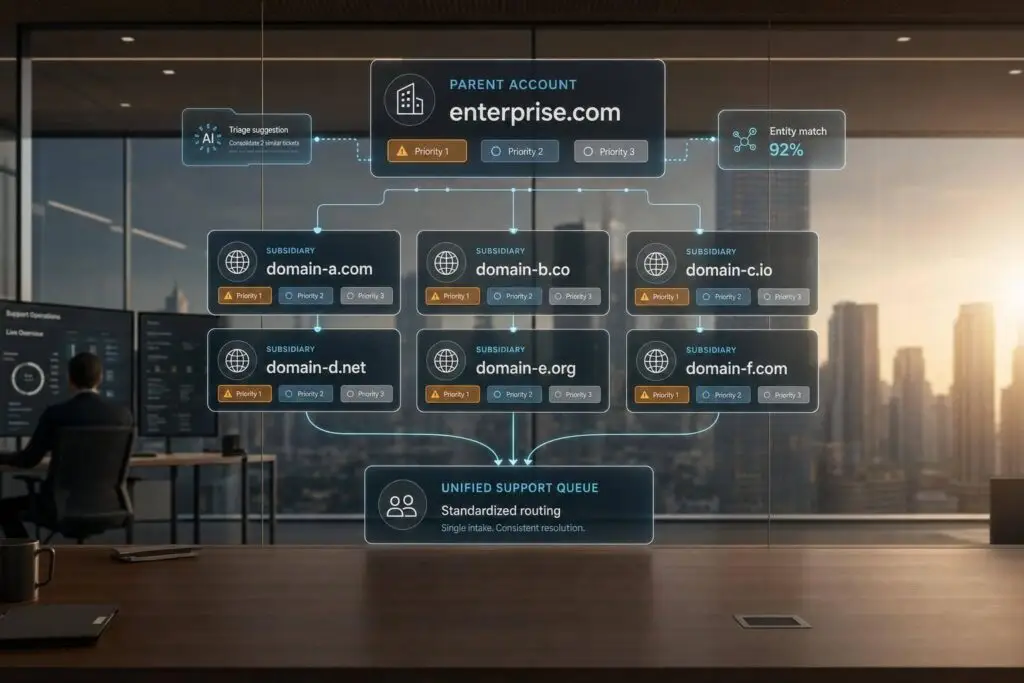
If one customer uses many domains, one-domain support rules will fail. I’d fix it with five moves: map every entity and domain, set a parent-child account structure, connect parent and child SLAs, standardize routing and escalations, and then use AI for matching, triage, and visibility.
Here’s the short version:
- Audit first: list every domain, portal, legal entity, contract owner, and shared contact
- Model accounts the right way: keep a parent account for master contracts and child accounts for local support differences
- Map entitlements clearly: apply the parent SLA first, then child overrides
- Route with more than domain: use domain, product, tier, entity, region, and urgency
- Control post-acquisition mess: keep acquired teams separate at first, then merge in phases
- Use AI after the structure is clean: for duplicate matching, AI-powered ticket triage, entitlement checks, and cross-entity summaries
A few numbers stand out:
- ML-based matching can cut duplicate records by 60%–80%
- AI sentiment tagging in support can land around 70%–85% accuracy
- Post-acquisition exceptions should usually have a 6–18 month migration target
What I like about this approach is that it keeps two things visible from the start: who owns the customer and what support they paid for. That lowers SLA misses, cuts back on internal back-and-forth, and helps agents treat @parentco.com and @subsidiary.com like the same commercial customer when they should be.
The rest of the article explains how to set that up without creating duplicate records, split case history, or routing confusion.
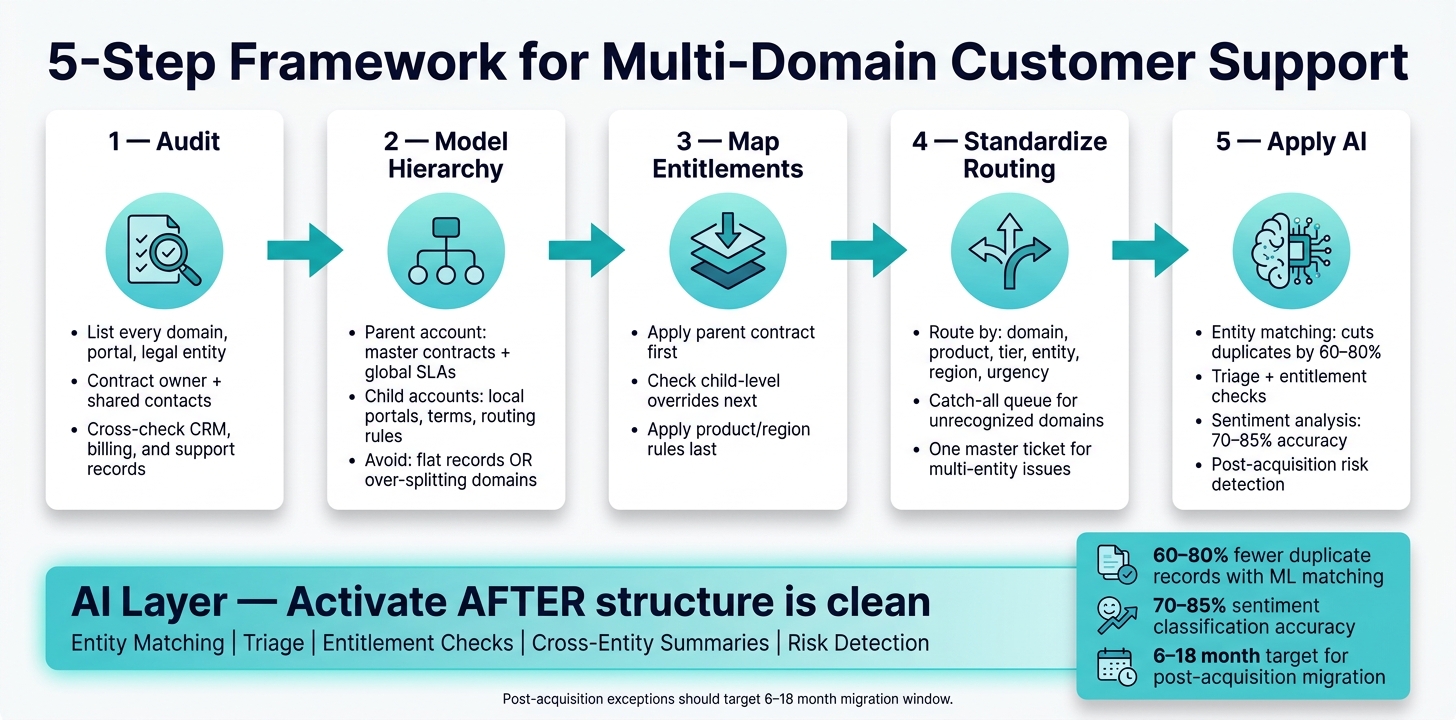
5-Step Framework for Multi-Domain Customer Support
1. Audit your customer structure before changing workflows
Before you change routing or SLA rules, audit the full customer map.
List domains, entities, contracts, and support channels
Start by pulling every email domain, login domain, portal URL, shared mailbox, legal entity name, doing business as (DBA) name, and contract owner tied to each customer. Check your CRM, billing data, and support records against each other instead of trusting one system to tell the whole story. Also, set clear definitions for terms like active customer, contract, and account before you touch any workflow.
Contract ownership and billing hierarchy need extra care. Your support system should know which entity owns the contract, which entity submitted the ticket, and whether related records are already linked.
Then use that inventory to decide which entities need separate child accounts and which contacts should stay shared.
Separate parent accounts, child entities, and shared contacts
Once the inventory is in place, define your core objects in plain terms: parent account, child account, contract, entitlement, global SLA, local SLA, and shared contact. These fields shape routing, escalation, and reporting.
Shared contacts can get messy fast. The same person may be tied to more than one entity. If your system treats each ticket like it belongs to a totally separate customer record, context disappears in a hurry. Tag shared contacts clearly and note which entities they support, so agents can see the whole relationship without digging.
When two agents work the same account from split records, things go sideways. They can give different answers, miss past escalations, and create a poor customer experience right when the account is already in transition.
Two account structure mistakes to avoid
The two most common modeling errors go in opposite directions, and both can hurt.
- Mistake 1: Treating every domain as a separate customer.
If you create a new account for every unfamiliar domain, enterprise entitlements may never apply to those tickets. Duplicate records, inconsistent IDs, and mismatched tax ID or address formats make it easy to lose the link between related entities. - Mistake 2: Collapsing everything into one flat account.
If you merge all entities into one parent record with no clear structure, you hide differences in contracts and entity-level support needs. When the setup is too flat, agents start filling in the gaps on their own, and that leads to inconsistent treatment.
Use a parent account for master entitlements and global SLAs, and child accounts for subsidiary-level portals, terms, and routing rules. That inventory becomes the input for the account hierarchy, entitlement map, and routing rules in the next step.
sbb-itb-e60d259
2. Build the right hierarchy for accounts, domains, and entitlements
Choose a parent-child model that matches billing and support ownership
Set up the hierarchy to match contract ownership and support responsibility. A simple rule helps here: who owns the contract, who pays, and who gets support. When those three sit with the same entity, a standard parent-child model usually works well.
Use a region-based hierarchy when support ownership follows geography instead of legal entity. For example, a global manufacturer with separate North America, EMEA, and APAC support teams, each with its own hours and languages, is a good fit for that setup. If billing and support ownership don’t line up, anchor the hierarchy to the contract first, then add support rules on top. [1][2]
During acquisitions, a temporary hybrid model is often the best place to start. Keep the acquired company as its own child account, with its current domains and entitlements untouched, until record merges are done. [2][5]
Once the hierarchy is set, use it to map domains, portals, and entitlements without splitting the account record.
Map multiple domains and portals without creating duplicate records
Map every domain and portal to an existing parent or child account. A main account with domain aliases keeps case history together and stops agents from dealing with split records for the same customer relationship. If a customer uses more than one domain, requests from @subsidiary.com can still route to the right corporate structure. [2][6]
Use one portal when the main differences come down to permissions. Use separate portals only when branding, security, or customer workflows are meaningfully different. Even then, keep the back-end account hierarchy unified so agents can view cross-entity case history and inherited contracts without jumping between systems. [2][5]
For shared domains and overlapping contacts, link one contact to more than one account. Then mark each relationship as shared, primary, or authorized for that entity, so routing decisions don’t depend on guessing which domain the requester belongs to. [1][2]
That structure feeds directly into routing and SLA rules in the next step.
Connect entitlements and SLAs at the parent and entity level
Model entitlements at two levels. The parent account should hold the master contract, global support tier, and renewal dates. Child accounts should hold local carve-outs, like reduced hours, product exclusions, language needs, or country-level response targets. This gives agents fast answers to two basic questions: what does the full organization have, and does this entity have an exception? [3][4]
A clear evaluation order helps avoid SLA gaps:
- Apply the parent contract first
- Check for child-level overrides next
- Apply product- or region-level rules after that
Only override what has changed. That keeps maintenance lighter and cuts down on SLA gaps.
Start with a global baseline at the parent level, then add child-level overrides only when there are actual contract, regional, or product differences. [3][4]
With the hierarchy and entitlement map in place, the next step is routing by domain, product, tier, and entity.
3. Standardize routing, workflows, and escalations across shared and local teams
Route cases using domain, product, tier, and entity signals
Routing needs to protect account history, entitlement accuracy, and clear queue ownership across related entities. The simplest way to do that is to use the account hierarchy you already have and route by domain, product, tier, entity, region, and urgency.
Start with the domain-account map to identify the account. Then narrow the case to the right queue based on product, tier, region, and severity. You should also keep a catch-all queue for domains you don’t recognize or entities that aren’t clear. Send those cases to triage, confirm the right account, and then update the domain map so the next case routes on its own.
| Input | How it’s detected | Example routing outcome |
|---|---|---|
| Email/portal domain | Requester email or SSO | @subsidiarya.com → "Subsidiary A – Global Support – Standard Tier" queue |
| Product/service | Portal form or entitlement record | Product = "Payments Gateway" → "Global Payments Squad – L1" |
| Support tier | Contract or entitlement record | Premium tier → bypass generic L1 and route to "Premium – Payments – NA Pod" with 24/7 on-call |
| Entity/operating unit | Domain, profile, or billing account | Entity = "Subsidiary B – APAC" → APAC regional queue even if the email domain is shared |
| Region/time zone | Entity record or billing address | APAC → "APAC – Shared L1 Queue" during local business hours; after-hours to "Global 24/7 – Follow-the-sun" |
| Urgency/impact | Customer severity + system signals | Critical issue for a premium account → "Major Incident – Command Center" with paging of the on-call engineer |
Once routing is stable, the next step is to line up the fields and SLA rules every entity uses.
Define shared workflows and local exceptions
This is where the account model turns into an operating model. Share the parts that drive routing and reporting. Keep local variation only where there is a real reason for it.
Intake fields, severity rules, and SLA definitions should be standardized across entities. Those pieces hold group reporting together and make cross-entity comparisons possible. If one subsidiary collects different fields or defines response times in its own way, the roll-up data stops being dependable.
Local exceptions make sense when the difference is real and has clear impact, not when it’s just team preference. Regional compliance steps, local business hours, language-based templates, and legacy flows from acquired products all fit. Post-acquisition exceptions should be treated as temporary, with a 6–18 month migration target. [7]
| Workflow area | Shared vs local | Driver | Risks if misconfigured |
|---|---|---|---|
| Case intake fields | Shared | Consistent routing, reporting, and SLA tracking across the group | Different entities collect different fields; routing becomes unreliable and group reporting breaks |
| SLA framework and priority definitions | Shared framework, local parameters | Global customer commitments; local coverage hours | SLA gaps and inconsistent expectations between subsidiaries and parent |
| Business hours and on-call rotations | Local | Time zone differences and local staffing | Tickets stuck outside local hours; global promises local teams can’t meet |
| Regulatory/compliance steps | Local with global guardrails | Different legal regimes | Non-compliance, legal exposure, and delayed approvals |
| Security incident handling | Shared global policy with local execution | Centralized risk management and consistent communication to regulators and customers | Inconsistent responses to security events; reputational and legal damage |
| Legacy acquired product support | Local, temporary | Unique tools, configurations, and knowledge in the acquired entity | Tickets sent to teams with no expertise; long delays and customer churn |
Once those workflows are set, escalation rules can make ownership clear before things get messy.
Build escalation paths that prevent ownership disputes
Shared workflows fall apart fast when escalation ownership is vague. That’s usually where arguments start. One team thinks it’s theirs, another team pushes it back, and the customer waits. The fix is simple: decide ownership before a critical case shows up.
For each major case type, document a plain responsibility matrix. Define who is Responsible for working the case, who is Accountable for the outcome, who needs to be Consulted, and who should be Informed. This matters most in cross-entity cases, where a local L1 team, a parent engineering group, and a commercial stakeholder may all have a valid stake in the outcome.
Escalation triggers should be objective. Use triggers like breached SLA time, number of affected entities, or severity level. Don’t leave it to personal judgment in the middle of a tense moment. Set these up as automated alerts in the ticketing system so the right people are notified right away.
| Case type | Starting queue | Escalation direction | Typical stakeholders |
|---|---|---|---|
| Product bug (entity-specific) | Local L1/L2 | Escalate to parent engineering | Product manager, dev lead, entity support lead |
| SLA breach risk | Local queue | Escalate to support operations | Support director, account manager, CSM |
| Cross-entity technical issue | Shared triage | Escalate to global L3/platform team | Platform engineer, parent support lead, affected entity leads |
| Contractual dispute | Local entity | Escalate to commercial/legal | CSM, sales VP, legal counsel |
| Major outage (multi-entity impact) | Shared incident queue | Escalate to crisis management | CTO, head of support, parent account owner |
When a case affects multiple subsidiaries at the same time, use one master ticket with linked child tickets for each entity. That keeps the issue from splintering into separate cases, and it stops the same engineering team from getting hit with multiple escalations for the same root problem.
4. Use AI to improve matching, triage, and cross-entity visibility
Once your account hierarchy and routing rules are set, AI can take a lot of the heavy lifting off your team. It helps with matching records, sorting incoming work, and giving people a clear view across related entities.
Use AI to match accounts and catch duplicate or related entities
When you bring in records from an acquired company’s CRM or help desk, the data is almost never clean. Names differ. Billing details don’t line up neatly. One customer may appear in several places with slightly different records.
AI-based entity resolution helps by looking at multiple signals at once, such as identity data, billing details, and account history, instead of depending on one field match. The model should return both a confidence score and a relationship label for each match. ML-based matching can cut duplicate customer records by 60%–80% compared with manual deduplication, which is a big deal when you’re merging more than one system after an acquisition. [7]
Human review still matters. Keep people in charge of approving merges and account links. A simple threshold model works well:
- Auto-link accounts that score 90 or above
- Send scores from 70 to 89 to an admin review queue
- Show anything below 70 as an in-context hint for agents, without changing the account structure
Every AI-driven link or merge should also write to an audit log. If something gets matched the wrong way, you need a clean rollback path.
Once records are linked, those same signals can also support triage and entitlement checks.
Apply AI to triage, summaries, and entitlement checks
After linking accounts, AI can help with intake triage. Intent detection can classify each incoming ticket as a production outage, billing dispute, onboarding question, entitlement issue, or feature request by reading the message, portal form fields, and attachments. Pair that with urgency scoring based on language cues like system is down or CEO escalated, plus customer tier and time of day, and the model can send cases to the right queue without a person reviewing each one first. [7]
One area where AI pays off fast in complex account structures is entitlement checking. It can read the account hierarchy, check direct entitlements on the entity, apply inheritance rules from the parent, and show the right SLA and escalation path to the agent before they reply. If the record is unclear, the model should mark the case as entitlement uncertain, apply a safe default SLA, and create a task for the CSM or contract ops team to sort it out. That helps prevent misapplied SLAs. [7]
Generative AI summaries are also handy at handoff points. Say a case moves from a local subsidiary team to a global shared services team. An AI-generated briefing can pull together the current thread, prior tickets from the same entity and its siblings, and contract notes into a short summary for the next agent. That saves the receiving team from piecing the story together by hand. [7]
That same context should also show up in reporting, so support leaders can catch post-acquisition friction before it spreads.
Monitor post-acquisition support risk with roll-up reporting
Basic reporting won’t tell the whole story when you’re managing a newly acquired business unit. Friction can build quietly. AI-native analytics go further by grouping ticket themes, calculating effort scores and tracking sentiment across interactions, and flagging odd patterns at the account-family level, not just for one entity at a time. [7]
AI sentiment analysis in support settings reaches about 70%–85% accuracy for classifying positive, neutral, and negative interactions. That’s enough to power early-warning dashboards. [7] If one subsidiary suddenly shows more negative sentiment or more escalations, even while CSAT stays flat, that can point to integration friction that needs attention before it shows up in a renewal discussion.
| Use case | Input signals | Output/action | Operational benefit |
|---|---|---|---|
| Account and entity matching | Email domain, company name, billing metadata, historical case patterns | Confidence-scored match suggestions; auto-link or admin review queue | Eliminates duplicate records and fragmented history post-acquisition |
| Automated triage and routing | Ticket intent, sentiment, urgency signals, entity tier, product | Routes to specialized, regional, or shared queue | Reduces manual dispatch and keeps routing consistent across entities |
| Entitlement check | Subsidiary ID, parent contract status, SLA tags, inheritance rules | Validates applicable SLA and escalation path; flags ambiguous cases | Prevents SLA gaps and over-servicing; reduces ownership disputes |
| Cross-entity case summary | Historical cases, notes, and emails across related domains | Concise agent-facing briefing at escalation or handoff | Cuts manual research time and improves escalations |
| Post-acquisition risk detection | Sentiment trends, escalation frequency, effort scores, migration-tagged tickets | Risk classification (low/medium/high) at account-family level; proactive alerts | Surfaces integration friction early; reduces silent churn risk |
Different stakeholders also need different reporting views. A VP of Support won’t look for the same signals as a regional manager or a CSM.
| View type | Primary metrics | Typical audience |
|---|---|---|
| Parent-child roll-up | Total case volume, average CSAT, SLA compliance across all entities | VP of Support, CX leadership |
| Acquisition health | Sentiment trends, SLA compliance trends, effort scores | Post-merger integration leads |
| Entity comparison | Resolution time by subsidiary vs. parent average | Support operations, regional managers |
| Risk monitor | Escalation frequency, at-risk account signals, entitlement gaps | Customer success managers |
The aim is simple: get the right context in front of the right people before a support issue turns into a repeat pattern.
Conclusion: A practical operating model for multi-domain support
Taken together, these steps form one operating model for multi-domain support using a modern support CRM.
The five parts need to work as a single system: audit structure, model hierarchy, map entitlements, standardize routing, and apply AI. Skip one, and the rest start to wobble. Routing gets messy again, duplicate records pile up, SLA gaps appear, and the customer experience starts to vary from one entity to another.
What changes here? One thing that matters most: ownership and entitlement become visible from the very beginning. That leads to faster resolution, fewer ownership disputes, and steady treatment across entities no matter which domain or portal a customer uses to contact you.
But this only works when global rules stay steady and local exceptions stay clear. Use one global framework with local exceptions. Standardize the account hierarchy, core SLA tiers, and escalation rules, then let local teams configure inside that setup.
Once the structure is clean, AI can help with accuracy and visibility. Use it for entity matching, triage, cross-entity summaries, and post-acquisition risk detection – but only after the hierarchy and entitlement rules are in place.
FAQs
How do I decide between one portal and separate portals?
Choose a single portal when you can keep data clean and control user access well. In most cases, it gives you one place for customer data, smoother workflows, a consistent user experience, consolidated invoicing, shared knowledge bases, and reporting across entities.
Use separate portals only when legal, regulatory, or day-to-day business needs call for strict isolation that granular permissions in one system can’t handle.
What should I do when one contact supports multiple subsidiaries?
Use a verified work email as the main identifier. Then create a relationship record that ties the person to the exact account, subsidiary, or workspace tied to each ticket.
If your portal supports it, add an entity switcher so people can move between business units without signing in again. Skip broad superuser access. Instead, use role-based controls so each person sees only the data tied to that entity.
How do I prevent SLA mistakes during an acquisition?
Clean up and centralize your data before the migration starts. Use stable identifiers like system IDs, external IDs, and verified domains so each record stays linked to the right account. It sounds simple, but this is where teams often get tripped up.
Set one clear source of truth for every field. For example, billing should own renewal dates, while support should own entitlement and SLA status. That way, people aren’t pulling the same data point from two different places and getting two different answers.
You’ll also want to map historical tickets and triggers to the new IDs. And before launch, test any high-risk routing and escalation rules. If those fail on day one, the mess shows up fast.
Related Blog Posts
- Mapping Complex Organizational Structures (Parent/Child Accounts) in Support
- How to design a customer portal that supports parent/child (multi-entity) accounts
- How to implement domain-based account matching safely
- How to avoid “wrong account” ticket assignment due to domain collisions
Evaluating help desks for a B2B team?
Supportbench is all-inclusive from $32 per agent per month, with migration and onboarding included. See pricing or book a 20-minute demo.






