


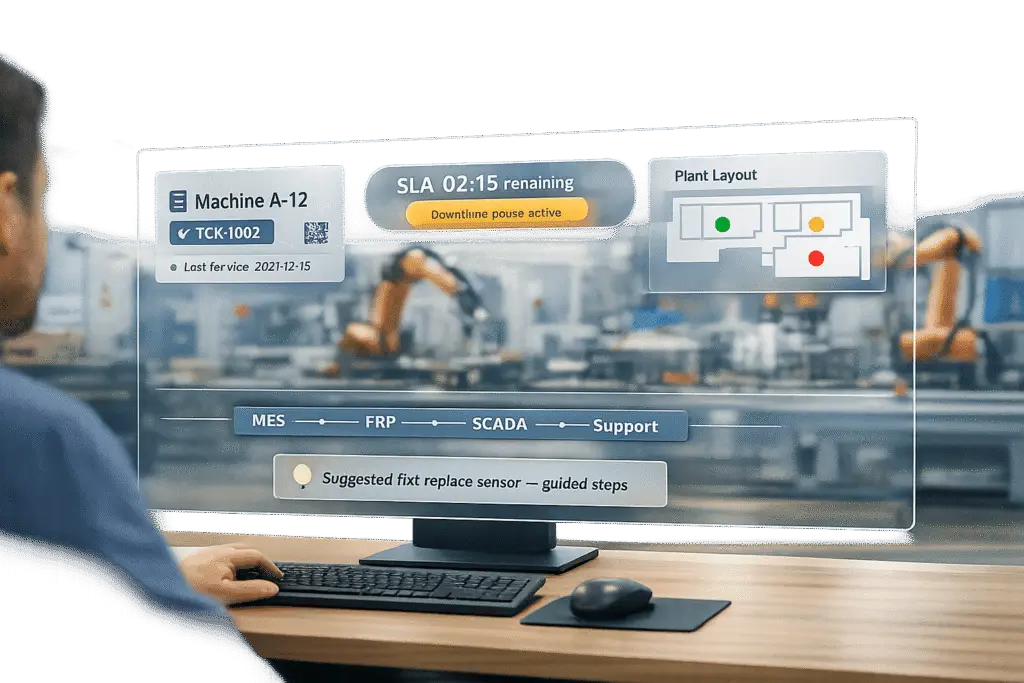
Manufacturing IT teams face unique challenges that standard help desk tools can’t address. Their focus is on keeping production lines running, managing complex IT/OT systems, and minimizing downtime, which can cost U.S. manufacturers $50 billion annually. This means they need support software tailored to their environment.
Key Requirements:
- IT/OT Integration: Support software must handle ERP, MES, and SCADA systems, linking tickets to machine IDs and real-time data.
- Dynamic SLA management: Dynamic SLA management ensures quick responses to critical issues, minimizing production losses.
- AI-Driven Automation: Automates ticket routing, extracts data, and predicts satisfaction scores to save time and improve efficiency.
- Asset-Centric Case Management: Tracks machine details, maintenance logs, and compliance requirements directly within tickets.
- Multi-Site Visibility: Dashboards and metrics for tracking performance across plants and shifts.
To succeed, choose tools that address specific manufacturing needs, test vendors with real-world scenarios, and roll out solutions in phases to reduce implementation risks. This approach ensures production-critical systems remain operational.
Bridging IT and OT in Manufacturing: Real-Time Solutions | The Manufacturing Matrix | Episode 12
sbb-itb-e60d259
Why Manufacturing IT Environments Drive Specific Support Software Requirements
Manufacturing IT is a whole different ball game compared to the usual corporate help desk. The stakes are higher, the systems are deeply interconnected, and the demands are relentless. These unique pressures call for AI-driven, specialized support software tailored to production-critical needs.
The IT and OT Integration Challenge
One of the biggest differences in manufacturing IT is the need to manage both Information Technology (IT) and Operational Technology (OT). IT includes familiar systems like ERP platforms, email, and workstations. OT, on the other hand, governs the shop floor – think SCADA systems, PLCs, MES platforms, and IIoT sensors tied directly to production equipment.
What used to be separate domains have now merged. Today, an IT issue can immediately disrupt a production line. This means support software must handle real-time data from MES and SCADA systems, link tickets to specific machine IDs, and consider factors like active work orders and OEE (Overall Equipment Effectiveness) when routing cases.
"As manufacturers adopt advanced tech on the shop floor, they must transform the service processes that keep that equipment up and running. A seemingly simple transaction – the routing of a ticket from the assembly line to central IT – has a huge impact on overall equipment effectiveness (OEE) and downtime." – Deloitte manufacturing client [9]
Manufacturing service requests are also far more intricate than typical IT cases. A single ticket might involve a tooling adjustment, a quality issue, and a supplier-related problem – all at the same time. These are cross-functional challenges that generic ticketing systems simply aren’t designed to handle.
This convergence of IT and OT underpins the urgency and multi-site challenges discussed next.
Downtime Costs and Multi-Site Complexity
In a manufacturing plant running three shifts, a critical issue like an ERP outage during production demands acknowledgment within 15 to 30 minutes and resolution within 2 to 4 hours [6]. Every minute of delay translates directly into operational losses.
Things get even more complicated with multi-site operations. Manufacturing IT teams often manage support for dozens of plants across various time zones, each with its own shift schedules, escalation protocols, and local regulations. Companies using structured response frameworks can resolve issues up to 30% faster than those relying on informal processes [6]. Without support tools designed for site-specific needs, teams can waste 12 to 15 hours per week manually routing and prioritizing tickets [2].
| Priority | Plant Floor Example | Response Target | Resolution Target |
|---|---|---|---|
| P1 – Critical | ERP down, assembly line halted, SCADA failure | 15–30 minutes | 2–4 hours |
| P2 – High | Security breach, degraded network, backup failure | Within 1 hour | Same shift |
| P3 – Standard | Single workstation failure, software access issue | 2–4 hours | Next business day |
| P4 – Low | Routine maintenance, hardware refresh | Next business day | Scheduled window |
Source: IT Support SLA Benchmarks for Manufacturing [6]
Where Generic Help Desk Tools Fall Short
The unique demands of manufacturing environments expose the limitations of standard help desk tools. Generic platforms often rely on keyword-based ticket assignment or round-robin logic, which completely ignores critical manufacturing context – like machine priority, shift timing, or whether the production line is in operation.
Compliance is another area where generic tools fall flat. Manufacturing support often intersects with strict regulations like ITAR, ISO 9001, and OSHA. Without mechanisms to enforce mandatory human review before closing tickets, companies risk serious compliance issues. Cybersecurity is another concern. In 2024, manufacturing was the top target for cyberattacks globally, making up 25.7% of all incidents [6]. Effective support software must manage incident response protocols and breach notification timelines, not just log a ticket and move on.
"Generic MSP agreements define ‘critical’ as an email server outage. On the plant floor, critical means a SCADA failure mid-shift, an ERP system offline during a production run, or ransomware working through your OT network while your line keeps moving." – IT GOAT [6]
Using the wrong tools doesn’t just slow things down – it leads to measurable production losses and growing compliance risks over time.
Core Features Manufacturing IT Teams Look for in Support Software
Manufacturing IT requires support software that can handle the intricate challenges of IT/OT convergence, multi-site operations, and strict compliance requirements. Here’s a closer look at the features that help meet these demands.
Case Management Built for Complex B2B Relationships
Manufacturing cases are rarely straightforward. A single issue, like a production line stoppage, may involve multiple systems such as ERP configurations and machine maintenance history. This complexity means case management tools need to go far beyond simple contact tracking.
Essential features include asset-linked case records (covering details like serial numbers, warranty status, and maintenance logs), real-time data integration from ERP and MES systems, and automated compliance flagging for standards such as ITAR and ISO 9001. Without these, agents waste time gathering information that should already be at their fingertips.
The benefits of effective case management are clear. For example, a global industrial equipment manufacturer operating in over 100 countries implemented an AI-driven support system that analyzed 150,000 historical tickets. This system created knowledge profiles for each support team, cutting manual effort by 45% and speeding up resolution times by 30–50% [7]. Supportbench addresses these needs with features like datatables, which allow teams to attach custom data – such as infrastructure specs, training records, and login credentials – directly to customer profiles. Combined with a 360-degree customer view, agents have all critical information readily available within the case interface.
Flexible SLA and Escalation Management
Static SLAs don’t cut it in manufacturing. A low-priority ticket can quickly escalate into a critical issue if a production line is affected. Support software must be able to adapt on the fly.
Manufacturing IT teams need dynamic SLA configurations that adjust based on real-time case developments rather than static timelines. Paired with automated, multi-tiered escalation paths, this ensures unresolved issues are prioritized without manual intervention.
Take Fisher & Paykel as an example. The appliance manufacturer implemented AI to manage customer self-service, automatically routing inquiries to human agents based on location, time zone, and skill set. When agents stepped in, they received a full summary of prior AI interactions, reducing call handling times from 12 minutes to under 6 minutes [10]. Supportbench’s dynamic SLAs are built for these scenarios, tightening response times automatically as conditions evolve.
Built-In AI Automation and Agent Assistance
Without intelligent routing, IT teams can lose up to 12–15 hours each week simply reassigning cases [2]. AI-driven automation eliminates this inefficiency.
Key AI features include context-aware routing that factors in real-time OEE data, shift schedules, and active work orders; automated data extraction that pulls asset details from incoming messages before agents even open the case; and predictive CSAT scoring that flags cases likely to result in poor satisfaction. In one instance, an AI layer reduced first-response times from over 8 hours to just 90 seconds, while boosting NPS by 22 points within a single quarter [4].
Supportbench integrates these AI capabilities seamlessly, offering tools like AI-generated case summaries, predictive CSAT and CES scoring, automated tagging and prioritization, and agent assistance that surfaces relevant solutions from past cases and the knowledge base. These features not only reduce downtime but also simplify compliance, making them indispensable for manufacturing IT teams.
Integration and Visibility Requirements for Manufacturing IT Support
In manufacturing IT, integration with ERP, MES, and CMMS systems isn’t just helpful – it’s essential. Without it, even the most advanced support tools can become bottlenecks. Integration ensures that tickets are resolved quickly and efficiently, preventing delays caused by agents having to hunt for information across disconnected systems. This seamless connection also enhances the precision of AI-driven routing and prioritization, which relies on the case management capabilities discussed earlier.
Connecting Support Software to ERP and MES Systems
Imagine this: an agent opens a ticket and immediately sees all the relevant details – production orders, batch numbers, machine IDs – without having to search manually. That’s the power of integrating ERP and MES systems with support tools. These integrations automatically pull critical data, like machine IDs or real-time OEE baselines from MES or SCADA systems, the moment a ticket is created [1][2]. Updates flow both ways, so changes made in systems like SAP or MES are instantly reflected in the support ticket and vice versa, eliminating communication gaps and redundant work between engineering and IT teams [11].
"A seemingly simple transaction – the routing of a ticket from the assembly line to central IT – has a huge impact on overall equipment effectiveness (OEE) and downtime, and it must be transformed to match the speed and efficiency of smart manufacturing in the future." – Deloitte manufacturing client [9]
For example, a Deloitte-led pilot with a German manufacturer showed how this integration can transform operations. By connecting shop floor workers directly to central IT teams, the company reduced ticket routing time from 30 minutes to just 6 minutes, achieving an 80% improvement in critical ticket routing speed [9]. These kinds of results are only possible with tightly integrated systems.
Tracking Assets Within Support Cases
Integration is only part of the solution. Effective support also requires detailed asset tracking. Each support case should automatically link to a specific machine ID, pulling in firmware versions, maintenance history, and recent failure modes from CMMS and asset management systems. This eliminates the need for agents to toggle between different platforms to gather information [1][3].
For instance, if a conveyor motor triggers multiple tickets within a short timeframe, this pattern should be immediately visible in the case interface – not buried in separate logs. Standardized asset IDs across ERP, CMMS, and support platforms are crucial here. Without consistent identifiers, automation workflows break down, leaving gaps in visibility and data flow [1][11].
Supportbench’s datatables feature tackles this issue by allowing teams to attach structured data – like maintenance records or firmware details – directly to asset profiles. This keeps all critical information centralized and accessible within the case.
Dashboards and Plant-Level KPI Tracking
Resolving tickets is just one piece of the puzzle. Manufacturing IT teams also need a clear view of performance metrics across plants, production lines, shifts, and equipment types. Metrics like MTTR, OEE impact per ticket, first-time fix rate, and SLA adherence provide insights that global averages often miss [2][8].
| Metric Category | Key Manufacturing IT Metrics | Data Source |
|---|---|---|
| Operational Efficiency | MTTR, First-Time Fix Rate, First Response Time | ITSM, CMMS |
| Production Impact | OEE Impact per Ticket, Downtime %, Asset Uptime | MES, SCADA, ERP |
| Resource Management | Technician Utilization, Resolution Time by Shift/Line | HRIS, ITSM |
| Compliance & Cost | SLA Adherence (ITAR/ISO), Service Cost per Job | ERP, Quality Management Systems |
Supportbench’s customizable dashboards and KPI scorecards make it easy for teams to track these metrics without needing extra BI tools or heavy IT involvement. These visual tools consolidate critical data, helping IT teams maintain focus on operational priorities while leveraging AI-driven support systems. This ties directly back to the case management and SLA adjustments discussed earlier, ensuring a streamlined and efficient process from start to finish.
How to Evaluate and Roll Out Support Software for Manufacturing IT
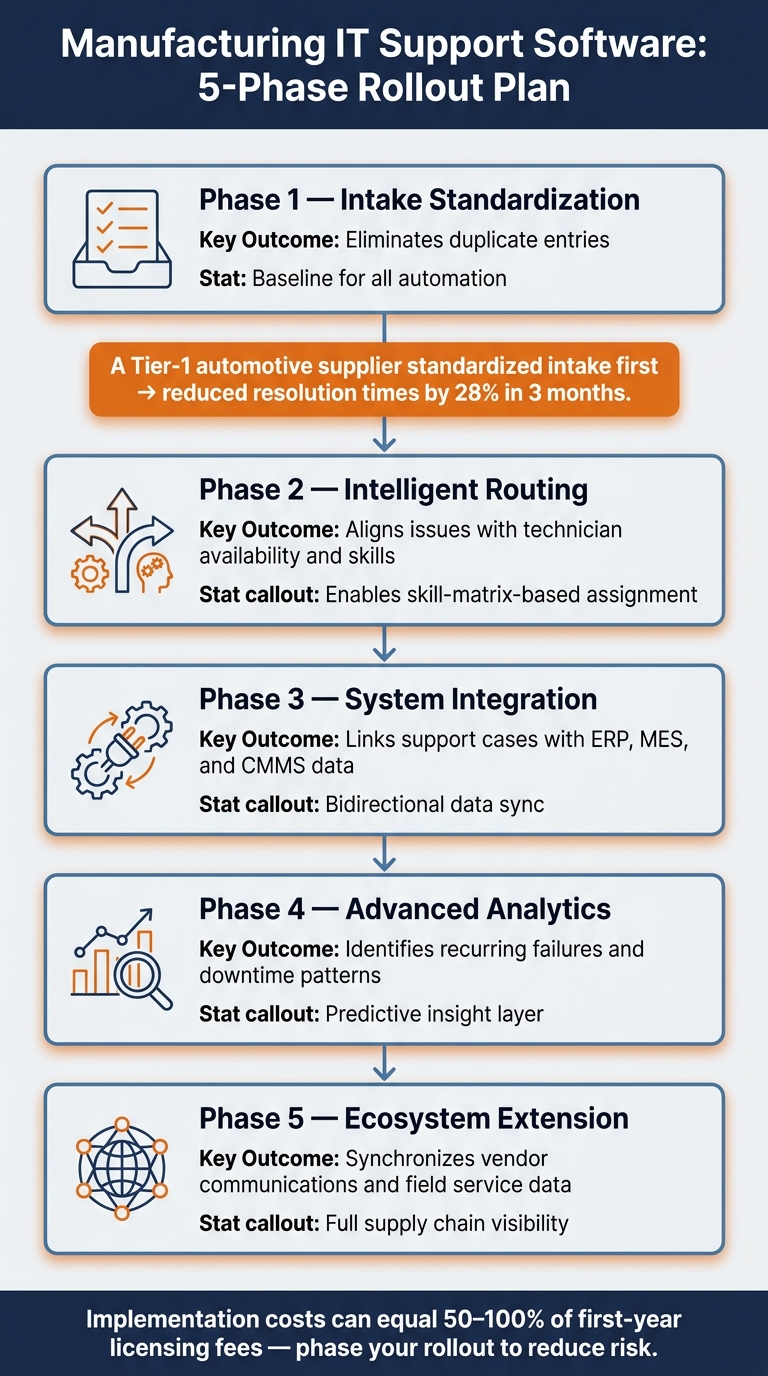
Manufacturing IT Support Software Rollout: 5-Phase Implementation Guide
Choosing the right software platform and deploying it without disrupting operations can be tricky. Many manufacturing IT teams struggle – not because they select the wrong features, but because they overlook key questions before committing to a solution.
What to Require Before Signing a Contract
Once you’ve identified your operational needs, the next step is to evaluate vendor capabilities. A common mistake is focusing too much on feature lists rather than addressing specific challenges, such as manual ticket triage, missing asset context, or limited SLA visibility across shifts. The right platform should directly address these pain points.
Put vendors to the test with real-world scenarios. For example, ask how their system handles a sudden rerouting of 500 tickets when a skill group becomes unavailable [12]. This kind of test shows how the platform performs under pressure. Make sure the following must-haves are covered:
- AI features included at no extra cost
- Flexible SLA configurations, including pause rules for planned downtime
- Seamless integration with ERP and MES systems
- A configuration model that doesn’t require constant IT involvement for daily maintenance
Supportbench, for instance, is designed to minimize reliance on IT teams for day-to-day tasks – a significant advantage in lean manufacturing setups.
"Implementation is where support tool purchases succeed or fail. A product that is technically excellent but takes nine months to implement… is a worse choice than a product that… can be stood up in six weeks." – Hutch Morzaria, Director of CX and Support Leadership [12]
To verify implementation timelines, reach out to references directly. Use LinkedIn to identify the vendor’s largest manufacturing customer instead of relying solely on names provided by the vendor [12]. In manufacturing, every minute of uptime is critical.
Keeping Total Cost of Ownership Low
The costs of implementation, training, and integration often far exceed the initial licensing fee. In fact, implementation alone can account for 50% to 100% of the first year’s licensing fees [12]. Additionally, be wary of renewal pricing that doubles after the initial contract period.
"The licensing fee is not the cost of the tool. Factor in: implementation costs, training time, ongoing administration, integration costs, and renewal pricing." – Hutch Morzaria, Director of CX and Support Leadership [12]
To manage costs effectively:
- Consolidate tools to avoid overlap.
- Lock in renewal pricing in writing before signing.
- Request a three-year total cost of ownership (TCO) projection.
Supportbench offers a scalable pricing model starting at $32 per agent per month, with all AI features included. This avoids the hidden add-on costs that can inflate expenses as your team grows. With a clear understanding of costs, you can plan a phased rollout to minimize disruptions.
Rolling Out in Phases and Refining Over Time
A phased rollout helps ensure smooth adoption and reduces the risk of data errors. By tackling one layer at a time, you can build a solid foundation before adding complexity.
| Rollout Phase | Focus Area | Key Outcome |
|---|---|---|
| Phase 1 | Intake standardization | Eliminates duplicate entries [1] |
| Phase 2 | Intelligent routing | Aligns issues with technician availability and skills [1] |
| Phase 3 | System integration | Links support cases with ERP, MES, and CMMS data [1] |
| Phase 4 | Advanced analytics | Identifies recurring failures and downtime patterns [1] |
| Phase 5 | Ecosystem extension | Synchronizes vendor communications and field service data [1] |
Even if Phase 1 feels basic, it’s essential. For example, a Tier-1 automotive supplier first standardized intake before implementing automated routing based on a skill matrix. This approach reduced resolution times by 28% within three months [1]. Without that groundwork, automation would have been unreliable, leading to frustration among technicians.
As the system evolves, AI-generated insights can highlight patterns like recurring equipment failures, SLA breaches tied to specific shifts, or ticket spikes linked to production schedule changes. At this stage, support shifts from being reactive to actively improving uptime – an essential goal in manufacturing, where every minute matters. This phased strategy complements earlier integration and asset management efforts, boosting overall support effectiveness.
Key Takeaways for Manufacturing IT Teams Choosing Support Software
When it comes to manufacturing IT support, the stakes are incredibly high. This isn’t your typical IT scenario – if an ERP system stalls or an MES fails, production grinds to a halt within minutes [5]. That reality should shape every decision you make when selecting support software.
This guide boils down lessons learned from a range of manufacturing challenges. The most important takeaway? Start by focusing on failure modes, not a feature checklist. Pinpoint where things are currently breaking down – like missing machine IDs on tickets, SLA clocks that don’t align with shift schedules, or incorrect routing – and build your requirements around fixing those issues. Hutch Morzaria, Director of CX and Support Leadership, puts it bluntly: "Most RFPs are designed to select the best vendor presentation, not the best vendor solution." [12]
You’ll need to focus on asset-centric ticketing, IT/OT integration, and downtime-aware SLAs – these are the non-negotiables for effective manufacturing support. As mentioned earlier, addressing IT/OT integration and downtime risks is critical. Beyond just features, keep a close eye on the total cost of ownership. Remember, implementation costs alone can range between 50–100% of the first-year licensing fees [12].
One proven strategy? Standardizing ticket intake before automating routing. This simple adjustment led to a 28% reduction in resolution times within three months [1]. Such results underline the value of a phased, step-by-step approach. These insights collectively offer a practical roadmap for selecting the right support software.
Finally, don’t skip direct reference checks with vendors’ current manufacturing clients. Ask them tough questions: Did the implementation take as long as promised? Would they choose this platform again if they had to start over? These conversations are the final piece of your strategy to reduce implementation risks [12].
FAQs
What IT/OT integrations should a manufacturing support tool have first?
To create a cost-effective, AI-driven support system, start by linking your ticketing platform with essential operational systems. This integration establishes a centralized data hub. Focus on these three areas:
- Transactional Systems: Tie in ERP platforms like SAP and PDM/PLM tools to access order statuses and technical manuals.
- Operational Technology: Incorporate SCADA or IIoT systems to gather real-time telemetry and enable proactive alerts.
- Service Management: Connect CMMS or ITSM tools to track equipment history and automate updates efficiently.
How do you set SLAs that match shift schedules and production downtime risk?
To make sure Service Level Agreements (SLAs) work seamlessly with manufacturing schedules and potential downtime, it’s important to adjust the way SLA clocks operate. Here’s how you can fine-tune them:
- Match SLA Clocks to Operational Hours: Exclude weekends and non-shift times from SLA tracking. This ensures your team is evaluated based on actual working hours, not when the factory isn’t running.
- Pause Timers During External Delays: Use status-based pauses to stop SLA timers when delays are caused by factors beyond your team’s control. This keeps SLA metrics fair and accurate.
- Prioritize by Production Impact: Set response priorities based on how incidents affect production. For example, critical issues that disrupt operations should get faster responses compared to minor problems.
- Automate SLA Tracking: Implement event-driven triggers and proactive alerts to monitor SLA compliance in real time. These tools can help you spot potential breaches early and take corrective action before it’s too late.
- Define Clear Escalation Paths: Establish straightforward escalation processes to hold the right people accountable and ensure issues are resolved efficiently.
By tailoring SLAs to reflect manufacturing realities, you can improve accountability, maintain fairness, and minimize the risk of SLA breaches.
What should you test in a vendor demo to prove it works on the plant floor?
To make sure software performs effectively on the plant floor, avoid relying solely on polished demos. Instead, test it with 25-50 anonymized real-world tickets that include edge cases and common errors like typos. Require the vendor to handle these tickets live to see how the system performs under realistic conditions.
Use your own data – such as asset hierarchies or KPI dashboards – to simulate workflows. This helps ensure the software aligns with your specific needs. Additionally, confirm that bi-directional integrations sync seamlessly and in real time.
Don’t overlook the importance of involving plant floor technicians in the process. Their input is crucial to determine if the interface is practical and efficient for high-pressure environments.






