Government and education customers operate under strict regulations like FERPA, FedRAMP, and NIST standards. Supporting them means balancing compliance with efficiency while safeguarding sensitive data. This guide explains how to:
- Understand key regulatory frameworks and their impact on support workflows.
- Build secure systems using deployment models like SaaS, VPC, or on-premise setups.
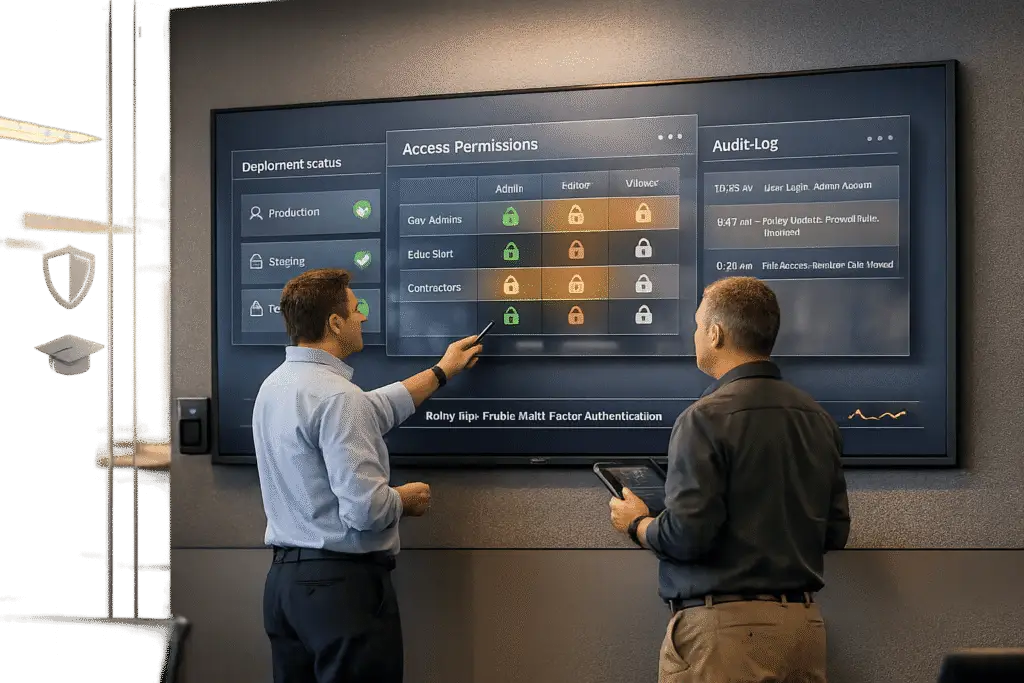
- Implement strict access controls with tools like SSO, MFA, and role-based permissions.
- Use AI responsibly for ticket triage and prioritization, knowledge management, and compliance monitoring.
- Maintain audit readiness with continuous monitoring and structured workflows.
Success requires secure infrastructure, clear processes, and AI integration that prioritizes human oversight. These steps ensure compliance while delivering reliable support for public-sector clients.
FedRAMP: Why Checkbox Compliance Isn’t Enough for Government Security
sbb-itb-e60d259
Understanding Security and Compliance Requirements in Government and Education
Before setting up your support operation, it’s critical to identify which regulations apply and understand how they shape your processes. While government and education clients don’t follow a single set of rules, several key standards dictate how data, access, and incidents must be managed.
Key Regulatory Frameworks and Standards
FISMA (Federal Information Security Modernization Act) serves as the cornerstone of federal information security. It mandates specific protections and lays the groundwork for other frameworks. Building on FISMA, FedRAMP standardizes the assessment and authorization of cloud products for government use. However, FedRAMP doesn’t guarantee universal security; agencies must still evaluate products individually. As stated in the FedRAMP Consolidated Rules:
"The primary purpose of a FedRAMP Certification is to supply sufficient information… so that agencies can effectively and consistently apply this information to make decisions." [6]
NIST SP 800-53 provides the detailed controls behind FedRAMP, covering areas like access control and incident response. For contractors handling federal data outside agency systems, NIST SP 800-171 is the relevant guide. It focuses on protecting Controlled Unclassified Information (CUI) in nonfederal systems. The upcoming May 2024 revision (r3) organizes its requirements into 17 categories, including Access Control, Audit and Accountability, and Incident Response [5].
In the education sector, FERPA governs the handling of student records, placing operational responsibilities on vendors working with educational institutions. Unlike FedRAMP, FERPA doesn’t include a formal certification process. As Microsoft has pointed out: "Any academic institution that is subject to FERPA must assess for itself whether and how its use of a cloud service affects its ability to comply." [7] This means institutions – and their vendors – must take on the compliance burden themselves.
Once you understand these frameworks, the next challenge is converting their requirements into actionable processes for your support team.
Translating Compliance into Support Processes
Knowing the rules is one thing; applying them effectively is another. Each framework’s requirements – whether for access control, audits, or incident response – translate into specific responsibilities for your support team.
For example, access control requirements under NIST SP 800-53 and 800-171 mean your team must clearly define account types (e.g., privileged vs. non-privileged) and monitor their usage [5]. Audit and accountability mandates require logging every interaction involving sensitive data, while incident response protocols must be well-documented and ready to deploy.
FedRAMP adds another layer with strict communication standards. Under proposed RFC-0018 rules, vendors must maintain a dedicated FedRAMP Security Inbox (FSI) – a direct, non-gated email address for government agencies to contact, bypassing portals or registration steps [8]. Response times are non-negotiable:
| FedRAMP Impact Level | Response Time (FedRAMP) | Response Time (Other Parties) |
|---|---|---|
| High | Within 12 hours | Within 1 business day |
| Moderate | Within 1 business day | Within 3 business days |
| Low | Within 3 business days | Within 5 business days |
Source: FedRAMP RFC-0018 [8]
Failing to meet these timelines isn’t just a minor infraction – cloud services that miss communication deadlines can be suspended from the FedRAMP Marketplace for at least 30 days [8]. This makes it essential for your team to integrate these requirements into their daily operations to avoid disruptions. These details illustrate how compliance directly shapes the way support teams function.
Building a Secure Support Architecture for Government and Education Customers
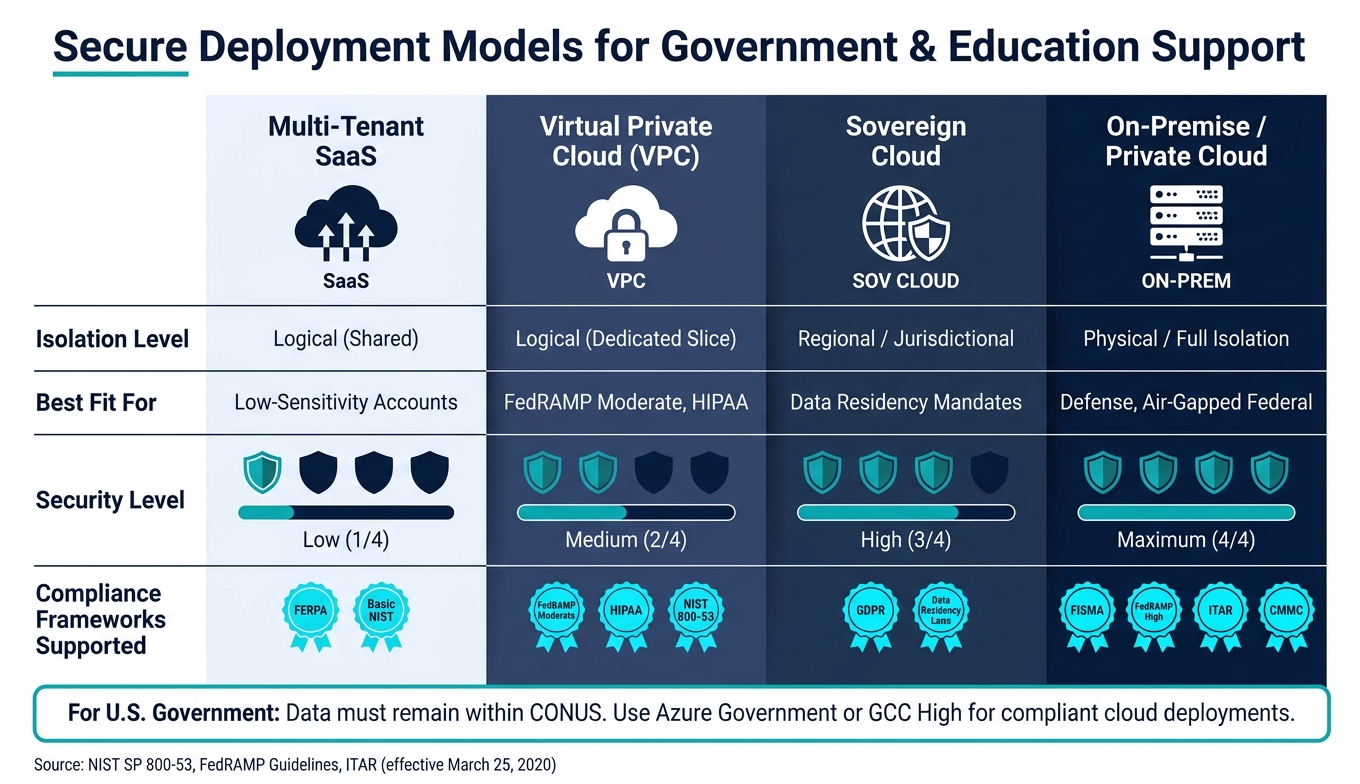
Secure Deployment Models for Government & Education Support
Creating a secure support framework involves translating compliance protocols into actionable processes. This requires making clear choices about deployment models, access controls, and how data flows through support channels, all while maintaining operational efficiency. This framework acts as the backbone for integrating secure support systems with AI-driven workflows.
Secure Deployment Options and Data Boundaries
Your choice of deployment model directly impacts data residency, isolation, and vendor access. Options like multi-tenant SaaS, Virtual Private Cloud (VPC), sovereign cloud, or fully on-premise setups each offer varying levels of control.
For U.S. government customers, data must stay within the Continental United States (CONUS). Solutions like Azure Government or GCC High ensure compliance, while commercial clouds require strict self-imposed boundaries, which can add complexity and risk [9].
| Model | Isolation Level | Best Fit For |
|---|---|---|
| Multi-tenant SaaS | Logical (shared) | Low-sensitivity accounts |
| Virtual Private Cloud (VPC) | Logical (dedicated slice) | FedRAMP Moderate, HIPAA |
| Sovereign Cloud | Regional/jurisdictional | Data residency mandates |
| On-Premise / Private Cloud | Physical / full isolation | Defense, air-gapped federal |
If contractors handle Controlled Unclassified Information (CUI), encryption is essential for compliance. Under ITAR rules (effective March 25, 2020), storing unclassified technical data doesn’t count as an "export" if it’s protected with FIPS 140-compliant end-to-end encryption – provided decryption keys remain solely under customer control [9]. Tools like AWS KMS or Azure Key Vault enable Customer Managed Keys (CMK), ensuring customers retain full control over encryption.
Once deployment decisions are made, the focus shifts to controlling access to sensitive data.
Identity and Access Management Best Practices
Managing access to sensitive support data is critical. Core tools like SSO, MFA, and role-based access controls (RBAC) are foundational, but public-sector accounts demand even stricter measures.
Start by mapping agent roles to the minimum permissions needed for their tasks. Use permissions boundaries and Service Control Policies (SCPs) to enforce limits on actions, even if roles are misconfigured or escalated [4]. For highly sensitive accounts, implement a Customer Lockbox mechanism. This workflow requires support engineers to request elevated access, which the customer must explicitly approve or deny within a set timeframe [9].
"Customer Lockbox for Microsoft 365 provides an explicit access governance gate… giving your organization direct control over who touches your data and when." – Bryan Lopez, Microsoft [9]
Regular access reviews – at least quarterly – are essential to identify outdated permissions and accounts no longer requiring elevated access. Every identity-related action, such as which agent accessed specific records and when, should be logged to meet audit requirements under frameworks like NIST SP 800-53.
Securing Data Across Support Channels
Support data doesn’t just reside in ticketing systems; it flows through email, chat, customer portals, and file attachments, each presenting potential risks.
All communication channels must enforce TLS encryption in transit and HTTPS for customer-facing portals. To further secure data, route traffic between support platforms and backend systems via VPC endpoints (e.g., AWS PrivateLink), keeping it off the public internet entirely [10]. For file uploads, automated malware scanning is a must. Government networks are frequent targets, and a single malicious attachment can lead to major incidents [1].
AI processing introduces additional risks. When support tickets are analyzed by AI models for triage or summaries, the data is decrypted for processing. Using a public LLM in this workflow could expose PII, account numbers, or sensitive case details outside compliance boundaries. To mitigate this, many regulated organizations are adopting a Bring-Your-Own-AI (BYO-AI) approach, connecting private, vetted models via API instead of relying on public vendor models [1]. These measures collectively establish a secure foundation for compliant, AI-integrated support operations.
Using AI to Run Secure and Efficient Support Workflows
Once a secure architecture is in place, the next step is ensuring that support operations are not only fast but also compliant. Deploying AI chatbots with stringent security measures can help achieve this balance.
AI-Powered Case Triage and Routing
Every support ticket comes with potential compliance risks. As Palak Dalal Bhatia, CEO and Co-founder of IrisAgent, explains:
"Support tickets are a concentrated source of PII inside most SaaS companies. A single ticket often contains a customer email, a phone number, the last four of a card, a session ID, an account state, and the contents of a private complaint." [11]
AI-driven triage steps in by analyzing tickets for sentiment, intent, and topic, then routing them to the appropriate queue – often before a human even reviews the content [2]. For sensitive accounts, such as those in government or education, AI can ensure these cases are sent to agents with the right clearance, bypassing general inboxes.
To maintain security and accuracy, two controls are critical:
- Implement a PII redaction layer to tokenize sensitive data before it reaches the AI.
- Use confidence thresholds (e.g., 0.85 for automated actions and 0.70 for suggestions) to escalate uncertain cases to human agents [11][13].
This approach aligns with Human-in-the-Loop (HITL) frameworks, where AI supports decision-making but humans retain control over high-stakes scenarios [2][13].
The following table illustrates how common regulatory frameworks map to AI controls at this stage:
| Framework | Primary AI Risk in Triage/Routing | Required Controls |
|---|---|---|
| HIPAA | ePHI in LLM prompts | BAA-covered model, audit logging, RBAC |
| FERPA | Student record disclosure to LLM vendor | School-official designation or self-hosting |
| FedRAMP | Unauthorized data access/storage | NIST SP 800-53 controls, GovCloud deployment |
| GDPR | Cross-border data transfer | Data residency, deletion API, Art. 22 human review |
| PCI DSS | Cardholder data (PAN) exposure | Redaction at model input, tokenized references |
Source: HumansAI & Deskpro [13][1]
These measures not only secure the triage process but also extend to knowledge management, ensuring AI outputs are informed by approved content only.
AI-Assisted Knowledge Management
AI can speed up knowledge base updates while maintaining strict role-based access controls to reduce errors and security risks. For instance, Supportbench‘s AI can generate draft knowledge articles from resolved cases by extracting key details like the problem, solution, subject, and keywords. These drafts undergo human review before publication, adhering to HITL practices.
The bigger challenge arises when AI searches the knowledge base. If the base contains restricted information – such as internal procedures or sensitive documentation – role-based visibility controls must operate at the retrieval level, not just the display level. This ensures agents only access content appropriate for their role, and AI assistants are grounded to work with permitted data only.
Grounding AI models against a curated knowledge base also improves accuracy. While ungrounded public models may have error rates of 15% to 30%, grounded models can reduce this to under 5% [11]. For sectors like government or education, this isn’t just about quality – it’s about avoiding liabilities.
These processes also pave the way for streamlined compliance and audit readiness.
Using AI to Support Compliance and Audit Readiness
Audit preparation can be a time sink, but AI significantly eases this burden. AI-driven compliance monitoring has been shown to cut manual review hours by up to 70%, while automated evidence collection can reduce SOX audit prep timelines by weeks [12].
The key is continuous monitoring. Instead of relying on quarterly reviews, AI monitors workflows in real time, identifying policy violations approximately three times faster than manual checks [12]. Every AI inference, prompt, and response is routed through a dedicated logging proxy controlled by the organization, creating an immutable audit trail that meets federal standards [13]. Logs must be append-only and retained for at least six years to comply with these standards [14].
"Compliance is not a checkbox you add at the end. It is an architectural decision you make in week one." – Krishna Chheta, AI Automation Expert, HumansAI [13]
Supportbench further enhances this process by generating structured case summaries and closure notes. These summaries provide a clear, searchable history of actions taken and issues resolved, eliminating the need for agents to manually draft incident reports. This structured approach ensures compliance reviewers have everything they need at their fingertips.
Maintaining Compliance and Improving Support Over Time
Securing your architecture and automating workflows is only part of the puzzle. To ensure long-term success, your systems must remain compliant with shifting regulations, staff changes, and growing customer demands.
Standardizing Secure Support Processes
The best way to maintain compliance is to eliminate uncertainty in your support workflows. This involves creating runbooks and escalation playbooks tailored to your specific regulatory needs – not relying on one-size-fits-all templates.
Each deployment model comes with unique requirements. For example, a team supporting an on-premise deployment for a government agency will face different operational controls and data access restrictions than one working in a Virtual Private Cloud. Each scenario demands its own documented processes, outlining who has access to what, how escalations are managed, and the steps to take during a security event [1][3]. These documents should also clearly define responsibilities for tasks like applying security patches, updating infrastructure, and making configuration changes.
To avoid gaps or misunderstandings, involve key stakeholders from security, legal, and compliance teams when designing these workflows. A well-defined process not only supports compliance but also lays the groundwork for better data management.
Data Retention and Lifecycle Management
Compliance efforts must also address how support data is stored and disposed of. Retaining data longer than necessary isn’t just inefficient – it can become a liability. Automating retention policies with rules-based logic ensures data is labeled appropriately based on its type, such as student IDs, case metadata, or sensitive information, reducing the risk of oversight [15].
For workflows involving AI, consider implementing Zero Data Retention (ZDR) agreements. Under ZDR, the AI provider does not store any inputs or outputs, which is especially important in environments governed by HIPAA or high-security government standards [16]. This approach eliminates an entire category of compliance risks.
Equally important is documenting the deletion process. Generating audit-ready proof of disposition – logs that detail when and why data was deleted – provides a defensible record in case of regulatory inquiries [15].
Training Support Teams and Monitoring Agent Activity
Even with secure systems in place, compliance can falter if your support teams aren’t properly trained. Continuous training is critical, especially on risks like prompt injection attacks, where malicious inputs attempt to trick a language model into revealing sensitive data [1].
Human-in-the-loop practices are only effective if agents adhere to them. Use analytics to monitor agent activity and flag deviations, ensuring role-specific oversight as required by frameworks like CMMC [1][2].
Despite its importance, many regulated industries are slow to adopt AI in support operations. Only 58% of organizations in these sectors currently use AI, compared to 92% in tech companies. Additionally, over half of these organizations are still in the planning or pilot stages [2][1]. While this cautious approach reflects the high stakes of compliance, it also highlights the potential to improve efficiency without compromising standards. By implementing these measures, AI-driven support workflows can consistently meet compliance requirements over time.
Conclusion: Delivering Secure and Efficient B2B Support for Public-Sector Customers
Providing support for government and education customers goes beyond resolving tickets quickly – it’s about building trust with regulators, procurement teams, and end users. To achieve this, compliance must be part of the foundation from the very beginning.
"Compliance is not a checkbox you add at the end. It is an architectural decision you make in week one." – Krishna Chheta, AI Automation Expert, HumansAI [13]
The right approach includes a deployment model that ensures data residency, secure AI tools, and standardized, accountable workflows. The results speak for themselves. For example, ManTech implemented an AI assistant for 8,000 employees, which led to a 68% reduction in call center volume and a 50% decrease in Tier 1 staffing needs – all within a tightly regulated federal environment [17]. This demonstrates how critical it is to hold vendors to rigorous accountability standards.
Vendor accountability cannot be overlooked. With 78% of organizations involving IT and security teams in final help desk decisions [1], your support platform must meet their expectations. This means working with vendors that provide verified sub-processors, signed Data Processing Agreements, detailed audit trails, and clear, actionable plans for data exit.
FAQs
Which compliance framework applies to my customers?
The compliance framework you need to follow varies based on your customer’s industry, the type of data involved, and relevant regulations. Here are some examples:
- Government/Defense: Frameworks like FedRAMP (for cloud services) and CMMC (for defense contractors) are key.
- Education: FERPA governs the handling of student records.
- Healthcare: HIPAA compliance is essential and often requires a Business Associate Agreement (BAA).
- Financial Services: Regulations from bodies like the SEC or FINRA may apply.
- General Security: Standards such as SOC 2 or ISO 27001 are widely recognized.
Be sure to verify the exact requirements with your agency or institutional partners to ensure compliance.
What’s the safest way to let support access customer data?
The best way to manage access securely is by implementing Role-Based Access Control (RBAC) while sticking to the principle of least privilege. This means users should only have access to the resources they need for their specific tasks – nothing more. To strengthen access controls, focus on these key measures:
- Centralized authentication: Use Single Sign-On (SSO) combined with Multi-Factor Authentication (MFA) to enhance security and streamline access.
- Just-in-Time (JIT) access: Grant temporary access for sensitive or high-risk tasks, reducing the window of potential misuse.
- Automated provisioning and deprovisioning: Prevent risks tied to inactive accounts by automating the process of granting and revoking access.
- Immutable audit logs: Keep detailed, unchangeable logs to monitor access activities, and when using AI, replace sensitive data with tokens to protect it.
These steps help ensure access remains secure, controlled, and transparent.
How can we use AI without exposing sensitive ticket data?
To protect sensitive ticket data when working with AI, it’s crucial to take specific precautions. Start by redacting or tokenizing sensitive information, such as PII (Personally Identifiable Information) and API keys, during data ingestion. Use placeholders like {{person:p_001}} to maintain context while keeping the actual data hidden.
Whenever possible, opt for private, self-hosted AI models to ensure full control over your data. If you must use external APIs, verify that they include "no-training" clauses to prevent your data from being used to train the AI.
Lastly, adopt an identity-first architecture with role-based access controls. This approach ensures that AI systems only access the data they absolutely need, adding an extra layer of security.