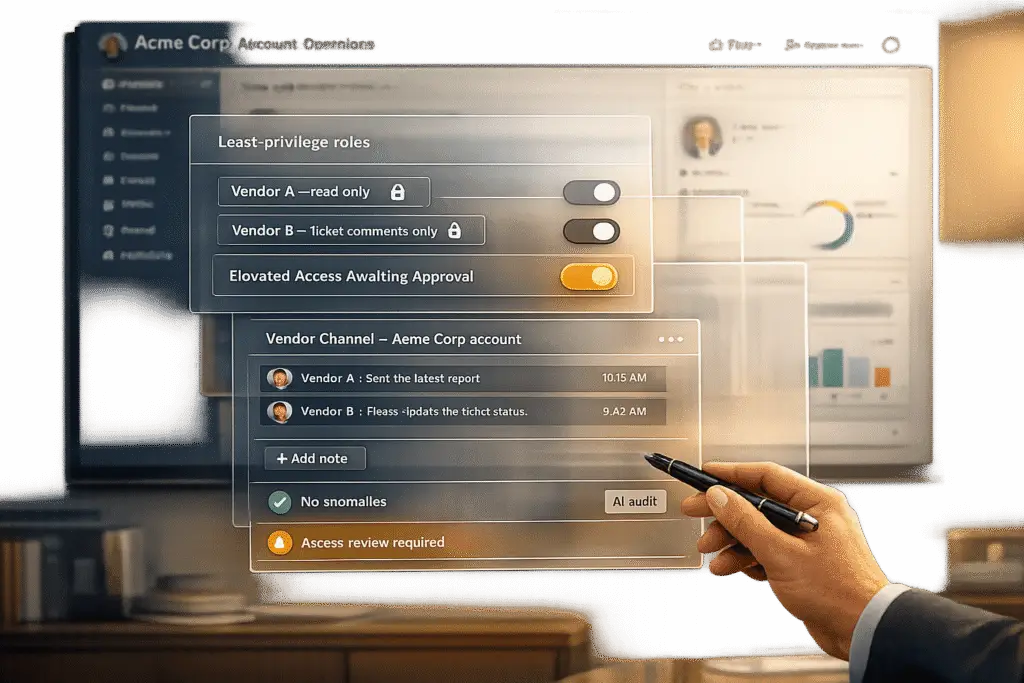
Managing vendor access to customer accounts is critical to reducing security risks, compliance violations, and operational challenges. Third-party compromises accounted for 35.5% of data breaches in 2024, with incidents costing an average of $4.91 million. To safeguard your systems:
- Restrict Access: Use role-based permissions, limit visibility to specific accounts or cases, and strategically manage support levels to enforce time-bound access.
- Monitor Activity: Implement AI-powered audit trails to track vendor interactions and flag unusual behavior.
- Centralize Communication: Keep vendor discussions within your ticketing system to maintain context and accountability.
- Set SLAs: Define clear service-level agreements for vendor performance and escalation paths.
- Review Regularly: Conduct periodic access reviews and update policies based on incidents or changes in vendor roles.
Vendor Touchpoints and the Risks They Create
Common Vendor Roles and How They Interact with Accounts
External vendors play a variety of roles within customer accounts. For instance, software providers and managed service providers (MSPs) often require admin-level access to configure systems or resolve integration issues. On the other hand, outsourced support teams may operate directly within your ticketing system – reviewing case details, posting updates, and sometimes modifying customer records. Similarly, payment processors and billing specialists handle financial data, while marketing analytics platforms may extract behavioral data for reporting purposes.
Vendors interact with accounts through multiple channels, including VPNs, remote monitoring and management (RMM) tools, shared portals, API tokens, and communication platforms. The method of access determines the level of visibility and control each vendor has, shaping the scope and nature of their interactions with your systems and data.
What Data and Systems Vendors Can Access
The range of data vendors can access is often broader than many teams anticipate. Depending on their role, vendors might encounter personally identifiable information (PII) like names, addresses, and phone numbers; financial details such as billing histories and invoices; account metadata like login logs and password reset records; and in regulated industries, electronic health records (EHR) or other sensitive information.
To better understand this, data exposure can be organized into three tiers:
- Internal-only data: Information visible solely to your team.
- Vendor-visible data: Data shared with vendors for operational purposes.
- Customer-visible data: What end users see in their portals.
Without clearly defined data tiers, vendors often gain access to more information than they truly need. This unnecessary exposure can lead to various risks, including security breaches, compliance violations, and operational challenges.
The Main Risk Categories in Vendor Management
Vendor interactions introduce three primary risk categories that leaders need to address.
Data security risks are the most immediate concern. Cybercriminals often exploit trusted vendor connections to infiltrate systems. TerraZone explains:
"Attackers do not need to breach your defenses directly. They breach your vendor, steal or reuse credentials, and pivot into your network through the trusted connections you gave them." [3]
Real-world incidents illustrate this threat. In March 2024, HealthEquity revealed that attackers had exploited compromised vendor credentials to access a SharePoint server, exposing the records of 4.3 million individuals [3]. Similarly, in June 2025, Qantas reported a breach involving a third-party customer service platform, which led to the exposure of 6 million customer records due to weak vendor security controls [3].
Compliance risks are another serious issue. Excessive vendor access can result in violations of regulations like HIPAA, GDPR, PCI-DSS, and SOC 2, each of which carries steep penalties and potential certification losses. With new 2026 regulations requiring stricter data protection clauses for AI vendors, compliance risks are becoming even more challenging [5].
Operational risks complete the picture. Miscommunication with vendors, unclear escalation procedures, and misaligned service-level agreements (SLAs) can lead to delays in support, SLA breaches, and reduced customer satisfaction. While these issues might not grab headlines like a data breach, they can quietly erode trust and efficiency over time.
sbb-itb-e60d259
Vendor Privileged Access Management overview
How to Set Up Secure Vendor Access and Permissions
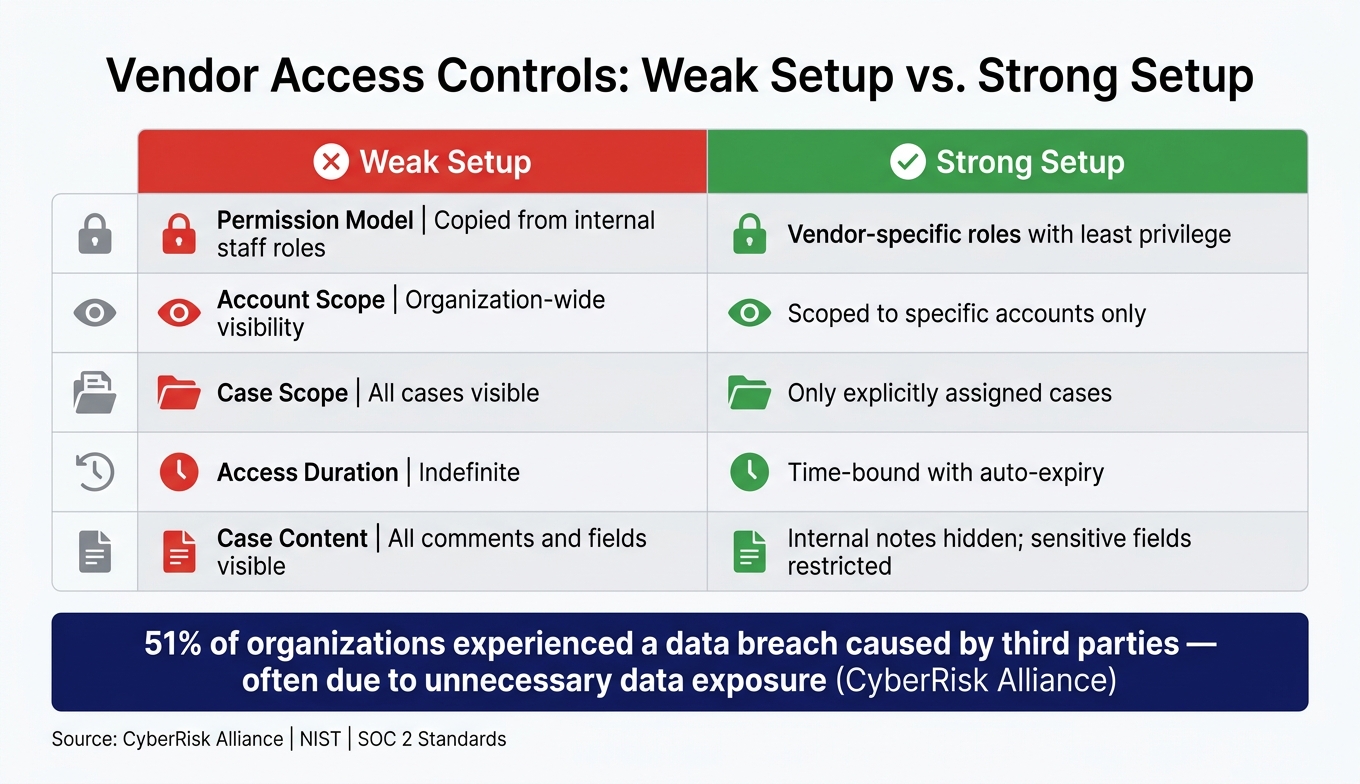
Vendor Access Controls: Weak vs. Strong Setup for Secure Account Management
Setting Up Role-Based Access Controls for Vendors
When it comes to secure vendor management, controlling access is the first step. Vendors should only have access to the tools and information necessary for their specific tasks – this aligns with the principle of least privilege, as recommended by standards like NIST and SOC 2. Start by defining the roles vendors will take on before creating their accounts. For instance, a billing specialist might only need access to invoice-related fields, while a technical integration partner might require access to a specific product issue case, but not to a customer’s full profile or all open tickets. Assign each vendor a clear, documented set of permissions that outline what they can read, edit, comment on, or escalate. Enforce these boundaries through your support platform.
Time-limited access is another critical safeguard. According to Gartner, 60% of organizations are expected to adopt just-in-time privileged access by 2025 to minimize standing permissions [6]. This means access should automatically expire once tasks are completed. Dormant vendor accounts can become security vulnerabilities if left active after their purpose is fulfilled. Use dynamic workflows to grant access only when needed, such as during a case assignment, and ensure permissions are reduced or revoked once the case is closed.
After defining roles and permissions, limit vendor access to only the customer accounts and cases directly relevant to their work.
Limiting Vendor Visibility by Customer and Case
Access controls should default to privacy. For example, if a vendor is engaged to address a specific enterprise customer’s outage ticket, they should only see that single case and nothing else. This can be enforced through account-level sharing rules and case-specific restrictions. Platforms like Supportbench allow administrators to use role-based security controls to limit what vendors can view and interact with [6].
Controlling What Vendors Can See Inside Cases
Taking it a step further, you can restrict what vendors see within individual cases to protect sensitive information. For example, internal notes – where your team might document details like root-cause analyses, escalation strategies, or pricing discussions – should remain hidden from vendors. This separation should be enforced at both the field and record levels, not just through informal practices.
Consider using a three-layer content model:
- Vendor-visible updates: These are sanitized status updates that vendors can read and respond to.
- Internal notes: Reserved for internal team communication and not visible to vendors.
- Restricted sensitive fields: Fields containing personal, financial, or legal information should be hidden from vendor roles using field-level security.
Research from CyberRisk Alliance found that 51% of organizations experienced a data breach caused by third parties in the past two years, often due to unnecessary data exposure [6]. By structuring access and separating data fields, you can significantly reduce these risks.
| Access Area | Weak Setup | Strong Setup |
|---|---|---|
| Permission model | Copied from internal staff roles | Vendor-specific roles with least privilege |
| Account scope | Organization-wide visibility | Scoped to specific accounts only |
| Case scope | All cases visible | Only explicitly assigned cases |
| Access duration | Indefinite | Time-bound with auto-expiry |
| Case content | All comments and fields visible | Internal notes hidden; sensitive fields restricted |
Building Clear Communication and Accountability with Vendors
Once you’ve secured access permissions, the next challenge is ensuring communication stays organized and responsibilities remain clear. Even with proper access controls, vendor interactions can introduce operational risks if conversations are scattered across personal inboxes, email threads, or various tools.
Standardizing Which Communication Channels Vendors Use
Keep vendor communication centralized. Routing conversations outside the ticketing system creates gaps in context and delays in response times. Instead, ensure all vendor interactions happen within the case itself.
"Vendor communication is structurally disconnected from where service delivery happens. Conversations live in inboxes, while decisions, timelines, and next steps live inside tickets." – Gorelo Team [7]
To streamline this process, configure your support platform so vendor replies are automatically logged within the ticket. Maintain three distinct communication streams: internal notes for your team, vendor-visible notes for third-party coordination, and customer-facing updates for the client. This structured approach keeps sensitive discussions private while ensuring a clean, traceable record for compliance. [7]
Assigning Ownership and Escalation Paths
Every vendor case should have two clearly assigned roles: a case owner, who is responsible for the overall resolution, and a vendor liaison, who manages interactions with the vendor. This division of responsibility prevents delays and ensures nothing gets overlooked. It also complements the access controls discussed earlier, creating a stronger framework for managing vendor risks.
"When vendor conversations break down, tickets stall. When context scatters, decisions slow. When responsibility becomes unclear, timelines drift." – Gorelo Team [7]
Equally important are well-defined escalation paths. Set clear triggers for escalation, such as a vendor missing a response deadline or a case exceeding a specific threshold. Document who handles escalations and what information they require. By carrying the entire conversation history forward during escalations, team members avoid wasting time piecing together context from scattered notes. [7]
This clarity in roles and escalation processes also supports tracking vendor performance through specific SLAs.
Aligning SLAs with Vendor Commitments
Vendor delays can create hidden gaps in your SLA metrics. While a ticket may appear active, waiting on a vendor response can still count against the customer SLA, skewing resolution time data.
To address this, track vendor SLAs separately from your internal ones. Use your platform’s dynamic SLA tools to account for vendor dependencies without obscuring accountability. For instance, Supportbench offers dynamic SLA adjustments that differentiate between internal resolution time and vendor-related wait time. This ensures both metrics remain visible and measurable.
Vendor SLAs should also go beyond operational metrics to include customer-focused measures like CSAT scores and escalation response times. Examples of effective benchmarks include a 95% QA compliance rate or responding to escalations within 30 minutes. These metrics align vendor performance with your customer experience goals, ensuring they contribute to overall satisfaction rather than just internal efficiency. [1][7]
Using AI and Automation to Manage Vendors More Safely
Clear SLAs and communication protocols help reduce friction, but they can’t catch everything. While access controls are essential for limiting exposure, manual vendor monitoring often falls short as organizations grow. That’s where AI and automation step in, transforming reactive oversight into a continuous, evidence-based process.
Automating Monitoring and Audit Trails
Every vendor interaction – whether it’s a login, file download, or data export – should leave a traceable record. AI-powered audit logs automatically capture and organize this activity, providing auditors and insurers with clear evidence of who accessed what, when, and why.
For instance, AI can streamline the collection of vendor security certifications. Platforms can automatically request documents like SOC 2 or ISO 27001 reports 30 days before a scheduled review, ensuring your team isn’t left scrambling for compliance documentation at the last minute. [8] This creates a structured, proactive approach to vendor oversight, replacing the chaos of reactive management.
Another challenge AI tackles is uncovering hidden vendor relationships. Organizations often find 20–50% more vendor connections than they initially estimate, thanks to shadow IT – tools adopted by teams without IT approval. [9] Automated discovery tools can cross-reference accounts payable data with SSO-connected applications, revealing these unapproved relationships before they turn into compliance risks.
AI doesn’t stop at monitoring. It also plays a critical role in safeguarding sensitive information in real time.
Using AI to Protect Sensitive Information
Logging activity is just the beginning. AI can also analyze content as it’s created, adding an extra layer of security. Even with access controls in place, sensitive data can unintentionally slip through in case notes, attachments, or automated replies. AI tools address this by scanning files and messages in real time, flagging personally identifiable information (PII), protected health information (PHI), or payment card details before they’re exposed to unauthorized vendors.
This added protection is vital, especially considering that 15% of all data breaches involve third-party vendors – a figure that’s even higher in industries like healthcare. [9] Solutions like Supportbench centralize oversight by keeping vendor-facing content separate from internal notes, while AI ensures sensitive information doesn’t fall through the cracks.
"Your compliance program is only as strong as your weakest vendor relationship." – ComplianceStack Editorial Team [9]
Automating Approvals and Escalations for Vendor Cases
Not all vendor interactions carry the same level of risk. For instance, a Tier 1 vendor with admin access to production systems requires a far more rigorous approval process than a Tier 3 vendor with limited or no system access. AI-native platforms simplify this by automatically routing cases based on risk, eliminating the need for manual triage.
| Vendor Tier | Access Level | Automated Workflow Requirement |
|---|---|---|
| Tier 1 | Admin / Production Systems | Named accounts, MFA, documented justification, annual review trigger |
| Tier 2 | Sensitive Workflows (HR/Finance) | Least-privilege definition, biennial review cycle |
| Tier 3 | Low/No System Access | Standard contractual terms, renewal/termination tracking |
Automated workflows can also respond to risk signals after onboarding. For example, an expiring SOC 2 certification, a reported security incident, or a subprocessor change mid-contract can all trigger escalations. This is particularly crucial for regulatory compliance. GDPR Article 33 mandates breach notifications to authorities within 72 hours, making automated alerts a necessity, not just a convenience. [9] Platforms like Supportbench use conditional triggers to notify stakeholders immediately when a vendor case crosses a risk threshold – no manual intervention required.
Keeping Vendor Access Compliant Over Time
Maintaining compliance is an ongoing process, especially as vendor relationships shift – employees leave, contracts grow, and systems evolve. While strong initial controls provide a foundation, effective lifecycle management ensures those controls stay relevant over time.
Building a Structured Vendor Onboarding Process
A well-organized onboarding process minimizes vendor-related risks by implementing safeguards before access is granted. It treats every new vendor as a potential risk to be managed.
Start by creating a centralized inventory that records each vendor’s name, internal business owner, systems accessed, and risk tier [4]. From there, classify vendors into tiers based on the sensitivity of the data they access and their potential business impact. This classification determines the documentation and review frequency required.
| Vendor Risk Tier | Access Level Examples | Minimum Onboarding Requirements |
|---|---|---|
| Tier 1 (Critical) | Admin access, production systems | Named accounts, MFA, SOC 2 Type II, quarterly reassessment |
| Tier 2 (High) | Finance tools, HR platforms, sensitive data | Least-privilege defined, integration documentation, annual review |
| Tier 3 (Standard) | Limited data access, no system integration | Listed in inventory, contact owner documented, basic due diligence |
Incorporate security requirements directly into contracts. Include clauses for audit rights, breach notification timelines, and data deletion processes upon contract termination. As Precursor Security emphasizes: "Security requirements that exist only in a questionnaire response carry no contractual weight" [10].
Running Regular Access Reviews
After onboarding, keeping vendor access up-to-date is essential. In 2024, 70% of third-party breaches involved overly permissive accounts [3], meaning vendors retained access they no longer needed.
Schedule access reviews based on vendor risk levels. For example, Tier 1 vendors should undergo quarterly reviews or continuous monitoring, while Tier 3 vendors might only require annual revalidation. Additionally, review access whenever significant changes occur, such as a vendor acquisition, a lapsed SOC 2 certification, or a reported security issue.
Make sure every review is documented in a verifiable format. Auditors require clear evidence – not vague assurances. As Net-Tech Consulting aptly asks: "Who has access to what – and how do you know?" [2]. Without timestamped records, your review process lacks credibility.
Updating Policies Based on Incidents and Feedback
Even with robust controls in place, policies need regular updates to address gaps revealed by incidents or feedback. Near-misses and insights from internal stakeholders can highlight weaknesses overlooked during initial policy creation.
After a vendor-related incident, conduct a thorough post-incident review to ensure corrective actions are implemented and to identify any policy shortcomings [11]. Use AI-driven telemetry to detect unusual patterns, such as unexpected bulk data exports or access from unfamiliar locations, and update automated detection rules accordingly [4]. If a vendor is involved in a near-miss, consider increasing their review frequency – for instance, moving from annual to quarterly reviews.
"The biggest shift we’ve made is moving from viewing vendor assessment as a procurement gate to treating it as an ongoing relationship. The initial evaluation is just the beginning of continuous risk management." – Security Leader, Abnormal AI Webinar [12]
Reassess vendor classifications whenever their role changes. For example, if a Tier 3 vendor begins handling payment data, they should be reclassified as Tier 1. Policies must adapt proactively – before an incident forces the issue.
Conclusion: Keeping Vendor Interactions Safe in Customer Accounts
Managing external vendor interactions demands consistent effort from the moment they are onboarded to the end of their contract. Most security issues tied to vendors arise from lapses in visibility, accountability, and process. The numbers back this up.
Implementing structured vendor access governance can cut third-party risk by up to 60%, reduce the average time to contain incidents by 40%, and lower the exposure of credentials after contracts by 80% [4]. These aren’t just small improvements – they can mean the difference between a manageable situation and a compliance disaster.
The key lies in combining three critical elements: least-privilege access controls that restrict vendor permissions, clear communication protocols to define ownership and escalation paths, and AI-driven monitoring to detect unusual behavior before it escalates. These components must work together seamlessly.
As Nooshin Alibhai, Founder and CEO of Supportbench, emphasizes:
"In an era where data breaches and compliance failures can have catastrophic consequences, choosing an enterprise support platform like Supportbench is not just a strategic decision; it’s a necessity." – Nooshin Alibhai, Founder and CEO of Supportbench [13]
For B2B support teams navigating complex, multi-vendor environments, Supportbench brings these capabilities into a single platform. It offers features like role-based security, AI-powered anomaly detection, secure API integrations, and compliance tools for frameworks such as GDPR and HIPAA. This gives support leaders the control they need without requiring a full IT team to manage it. With the right strategies in place, vendor interactions can shift from being a potential risk to a dependable asset, enhancing your support operations and reinforcing trust.
FAQs
How do I decide a vendor’s risk tier?
When assessing vendors, it’s essential to evaluate them through three main lenses: data access, service criticality, and regulatory impact. This classification ensures you understand their role, risks, and compliance requirements. Here’s how to approach it:
- Data Access: Determine if the vendor handles sensitive information such as Personally Identifiable Information (PII), Protected Health Information (PHI), or payment data. Vendors with access to these types of data require stricter scrutiny due to the potential risks involved.
- Service Criticality: Evaluate how essential their services are to your organization’s operations. For example, if the vendor’s services directly impact business continuity or daily operations, they should be classified as higher priority.
- Regulatory Impact: Identify whether the vendor falls under compliance requirements or financial reporting regulations. This includes ensuring they meet standards like HIPAA, PCI DSS, or SOX, depending on the data and services they provide.
Assigning Tiers
Once you’ve assessed the vendors based on these criteria, assign them to tiers such as Critical, High, Medium, or Low. These tiers help prioritize oversight and resource allocation:
- Critical: Vendors with access to highly sensitive data, essential services, and significant regulatory obligations.
- High: Vendors with moderate access to sensitive data or services that are important but not essential to operations.
- Medium: Vendors with limited access to sensitive data and services that have a lower operational impact.
- Low: Vendors with minimal or no access to sensitive data and non-critical services.
Documentation for Audit and Compliance
To meet audit and compliance standards, document the entire classification process. Include:
- Criteria Definitions: Clearly outline how you define data access, service criticality, and regulatory impact.
- Assessment Results: Record the vendor’s classification and the reasoning behind it.
- Supporting Evidence: Keep relevant documentation, such as contracts, service agreements, and compliance certifications.
This structured approach ensures transparency, helps mitigate risks, and keeps your organization prepared for audits.
What’s the fastest way to remove vendor access after a project ends?
When a contract or project ends, it’s crucial to start the offboarding process immediately. Begin by centrally revoking vendor access through your identity provider. Rotate any affected secrets, and remove or deactivate vendor identities from IAM resources. Implement time-bound access so privileges automatically expire, reducing the risk of lingering permissions. Finally, confirm that all access has been revoked by running automated scans and verifying with business owners. This ensures there are no leftover active accounts, SSO sessions, VPN connections, or API credentials.
How can we track vendor-caused delays without breaking our customer SLAs?
To keep tabs on vendor-caused delays while sticking to your SLAs, start by pulling vendor communication into your main ticketing system. This creates a centralized view of case histories, ensuring nothing slips through the cracks. Set up clear escalation paths with defined tiers based on how much the delay impacts your business. For high-priority issues, establish checkpoints like updated ETAs to keep things on track.
Leverage AI tools to monitor progress and send reminders when updates are overdue. These tools can also maintain audit trails, making it easier to pinpoint bottlenecks and hold parties accountable if disputes arise.