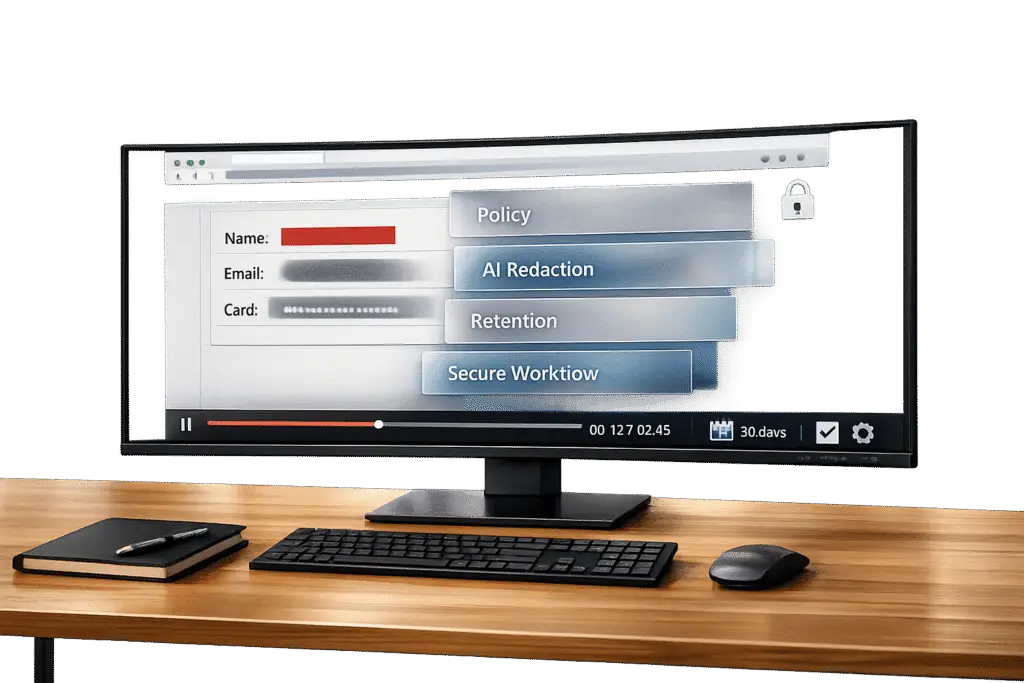
Screenshots and screen recordings are essential tools in customer support but can unintentionally expose sensitive data, like personal information, session tokens, or private messages. This guide explains how to handle these risks while ensuring compliance with laws like GDPR, CCPA, and HIPAA, which classify such exposures as data processing events and impose strict penalties for mishandling information.
Key Takeaways:
- Risks: Screenshots and recordings can capture Personally Identifiable Information (PII) like emails, session tokens, and financial details.
- Compliance: Laws such as GDPR and CCPA treat unredacted media as a breach, with fines up to €20 million or $7,500 per violation.
- Solutions: Use AI-powered tools for automatic redaction, set clear policies for media capture, and train teams to avoid capturing unnecessary data.
- Best Practices: Limit what is recorded, redact sensitive info, automate retention policies, and enforce strict access controls.
By combining smart tools, clear policies, and ongoing training, businesses can protect customer data, avoid compliance risks, and maintain trust.
Understanding PII Risks in Screenshots and Screen Recordings
What Is PII and Why Does It Matter in B2B Support?
Personally Identifiable Information (PII) refers to any data that can be used to identify a specific individual, either directly or indirectly. This includes obvious identifiers like full names and email addresses, as well as indirect ones like session tokens or IP addresses often found in consolidated support views.
In support environments, PII rarely exists in isolation. A single support ticket might display billing records, authentication logs, and CRM entries on the same screen – creating a dense collection of sensitive data. Recognizing these elements is crucial for designing secure workflows in customer support.
How Screenshots and Recordings Accidentally Capture PII
Screenshots and screen recordings often capture more than intended, including CRM sidebars or URL bars with live tokens. If these visuals are left unredacted and attached to tickets, they can create unauthorized duplicates of customer data. For example, a 2026 audit of a SaaS company’s Jira instance uncovered 847 tickets containing screenshots with sensitive information like user emails, subscription details, and partial payment data. These tickets were accessible to 200 staff members, including contractors who lacked proper Data Processing Agreements [5].
Here are some common areas where PII may inadvertently appear in captured media:
| Area | Data Exposed |
|---|---|
| URL Bar | Session tokens, user IDs, internal subdomains, search queries [1][7] |
| Browser Tabs | Logged-in services, tab titles with private context [1][6] |
| Notification Banners | Email previews, chat snippets, calendar events [1][6] |
| Application Sidebar | Customer lists, account statuses, routing codes [2][6] |
| Developer Tools | API keys, authorization headers, bearer tokens [1][4] |
| Form Fields | Plain-text passwords, Social Security numbers, phone numbers [1][7] |
These exposures pose compliance risks under various data protection laws, requiring careful handling to avoid regulatory penalties.
Regulatory and Contractual Obligations
The accidental capture of PII in screenshots and recordings is treated as a serious data processing event under multiple regulatory frameworks. While laws like GDPR, CCPA/CPRA, HIPAA, and PCI-DSS may not explicitly mention screenshots or recordings, they classify any capture of personal data as a regulated processing activity [2][9].
For instance, GDPR’s Article 5 mandates that teams must prove a lawful basis for any shared data, ensure the data is collected solely for its intended purpose, and implement robust technical safeguards – not just rely on policies [6]. Similarly, HIPAA applies to recordings that capture Protected Health Information (PHI), and PCI-DSS considers the capture of credit card numbers or CVVs as a storage event that could trigger incident reporting.
Contractual obligations add another layer of complexity. Many B2B vendors are bound by Data Processing Agreements (DPAs) and Business Associate Agreements (BAAs), which often impose stricter requirements than the law. These agreements may demand specific redaction protocols and shorter timelines for breach notifications.
"GDPR is not intent-based. The key question is whether data exposure was limited, lawful, and protected by appropriate technical and organizational measures." – ContextBlur [6]
For U.S.-based B2B support teams, this underscores the importance of understanding how customer location dictates applicable rules. Unmanaged screenshots and recordings represent a compliance risk even if no breach occurs. To address these challenges, support teams must adapt their policies and tools to minimize vulnerabilities effectively.
How to INSTANTLY Remove Sensitive Information from Video and Audio with AI
How to Build Policies for PII-Safe Screenshots and Recordings
When it comes to managing PII risks, having well-defined policies for media capture is non-negotiable. Clear rules ensure consistent handling of sensitive information.
Setting Rules for Media Capture and Sharing
An effective media capture policy should outline when capturing is allowed, what must be redacted, and what is strictly off-limits. Without clear guidelines, inconsistencies can lead to errors.
A "minimal disclosure" approach works best: agents should only capture the exact window or UI element needed to resolve an issue – never an entire account dashboard. Certain data, such as passwords, Social Security numbers, or full financial statements, should be explicitly marked as prohibited for capture. Any other sensitive information must be redacted before leaving the secure environment.
Defining roles and responsibilities is equally important. Here’s a breakdown of key roles and their permissions:
| Role | Permissions | Accountability |
|---|---|---|
| Screen Recorder | Captures activity; saves locally for secure upload | Ensures "minimal disclosure" during live capture [8] |
| Supervisor | Views recording lists and metadata; no download rights | Monitors agent workflows and performs quality checks [8] |
| Admin / Auditor | Full access; can download files for external review | Verifies compliance and handles legal reviews [8] |
| Compliance / DPO | Configures PII profiles and confidence thresholds | Establishes organizational standards for sensitive data [3] |
"Organizations that treat it as a governance problem first, then a tooling problem, tend to arrive at durable policies." – Ali Rind, Product Marketing Executive, VIDIZMO [2]
Once the rules are in place, focus on refining what gets captured and establishing retention periods.
PII Minimization and Retention Standards
The best way to manage sensitive information is to avoid capturing it in the first place. Agents should be required to record only specific application windows, use dedicated browser profiles, and enable "Do Not Disturb" mode to prevent accidental exposure.
Retention policies should be tailored to the type of artifact, rather than applying a one-size-fits-all rule. Here’s a recommended breakdown:
| Artifact Type | Recommended Retention | Purpose |
|---|---|---|
| Original Media | Short-term (30–90 days) | Used for rework, quality assurance, and audits |
| Redacted Output | Per system policy (1–3 years) | Retained for support history and knowledge bases |
| Intermediate Artifacts | Immediate deletion after export | Temporary files not meant for long-term storage |
| Audit Logs | Long-term (5–7 years) | Documents compliance actions and legal defensibility |
"Originals often need to be kept for a short period for possible rework. Redacted outputs follow the retention policy of the destination system. Audit logs typically have the longest retention because they document compliance actions." – Ali Rind, Product Marketing Executive, VIDIZMO [3]
Relying on manual purging is risky. Automating retention policies ensures files are deleted on schedule, reducing the likelihood of overlooked files lingering.
With retention under control, it’s time to align these policies with AI-driven redaction tools.
Aligning Policies With AI and Privacy Workflows
AI-based redaction tools require clear guidelines to function effectively. Start by defining which PII categories the AI should detect – names, emails, account numbers, card data – and establish confidence thresholds tailored to specific use cases. For example:
- Legal or compliance exports: Use lower confidence thresholds to prioritize thoroughness and maximize recall.
- Internal training datasets: Opt for higher thresholds to reduce false positives while maintaining compliance.
Custom regex patterns for organization-specific identifiers, such as proprietary account formats or internal case IDs, should also be integrated into the detection tool [7]. These configurations should be managed by the compliance team, not individual agents.
Lastly, standardize capture settings across the organization. Using consistent resolution and codec formats ensures OCR-based redaction tools can accurately detect text in recordings. Variations in capture quality are a common reason AI tools fail to identify sensitive content [3].
Tools and Workflows for PII-Safe Media Capture
To complement established policies and automated redaction, these tools and workflows provide actionable ways to minimize the risk of capturing personally identifiable information (PII).
Configuring Capture Tools for Privacy
Modern media capture tools are designed to safeguard sensitive information while maintaining efficiency for agents. For example, CSS selector blurring can automatically obscure specific HTML elements – like .credit-card or #ssn-field – before recordings are generated[13]. Some tools also implement cross-tab synchronization via localStorage events, ensuring that blurring applied in one browser tab is mirrored across all other open tabs of the same application[13].
For environments requiring stricter security, double-overlay protection offers an extra layer of defense. This method uses reverse capture techniques to mask sensitive data while still allowing agents to view it in real time[14].
To enhance privacy further, configure tools with default settings that enable blurring or redaction at the start of a recording. This approach ensures sensitive data is protected unless manually toggled off by an authorized user[13].
Once the technology is set up to prioritize privacy, good pre-capture practices can further strengthen data protection.
Agent Workflow Hygiene Before Capturing Media
Even the most advanced configurations can be compromised by poor pre-recording habits. For teams using virtual desktops, disabling clipboard, drive, and printer redirection can help prevent accidental data leakage outside the secure session[11]. In mobile support scenarios, screen capture should be blocked unless an Intune MAM policy is in place to explicitly prevent unauthorized captures[11].
APIs such as SuspendContactRecording and ResumeContactRecording can also be integrated to automatically pause recording on sensitive screens and resume only when it is safe to do so[15].
Secure Storage and Access Controls
The way recordings are stored and accessed is just as critical as the capture process itself. Encrypt files both during upload and transit, and ensure that recording artifacts are stored in encrypted buckets immediately upon upload[15].
Implement Role-Based Access Control (RBAC) to limit who can view or download recordings. For example, agents should not have access to review or download their own recordings. Supervisors may have permissions to search and view, while only administrators or auditors should be allowed to download recordings for external review[8].
To streamline management, use searchable metadata attributes – like tagging a contact record with "screen recording = true" – to help supervisors quickly filter and audit sessions containing media without opening every file. Automated bulk deletion jobs can also be scheduled to purge recordings after a set retention period (e.g., 365 days), ensuring compliance with data retention policies discussed earlier[8]. These measures ensure secure storage and align with broader data governance strategies.
sbb-itb-e60d259
Using AI and Automation to Detect and Redact PII
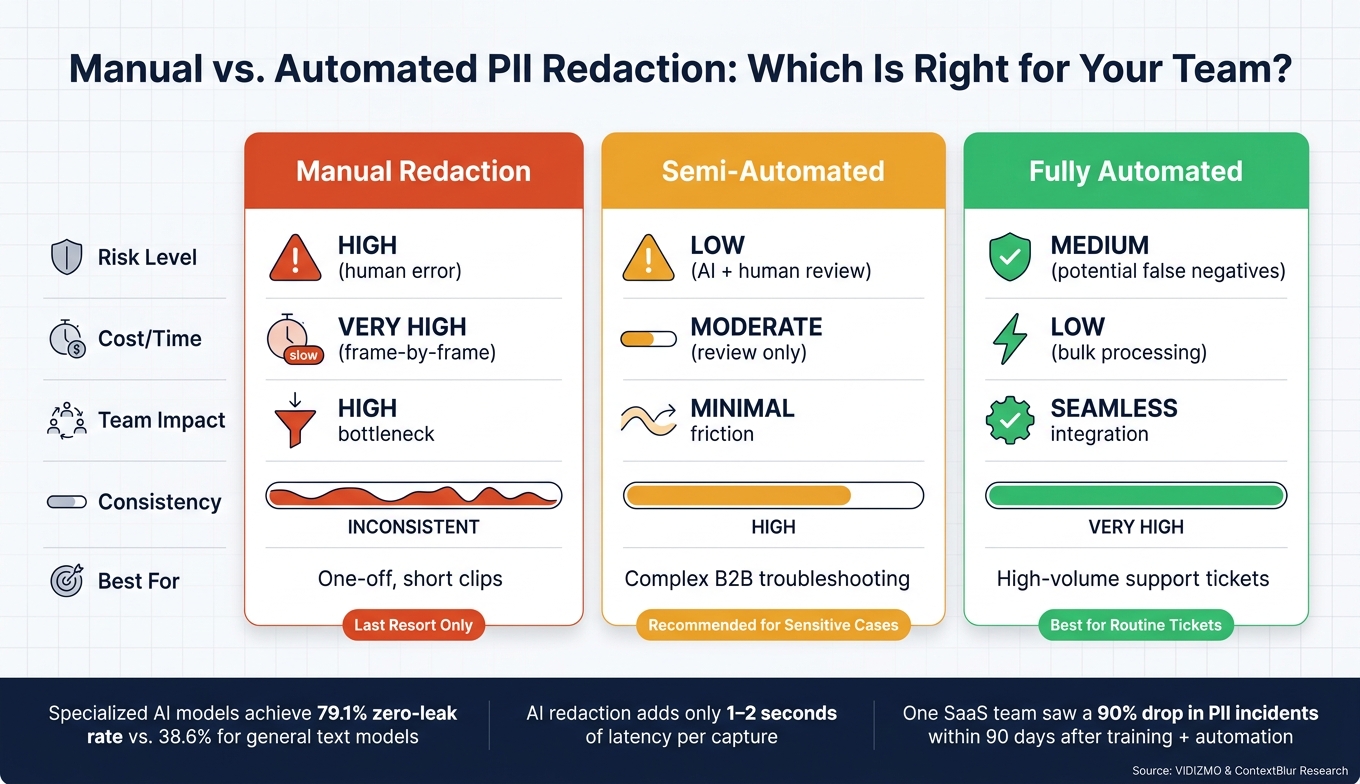
Manual vs. Automated PII Redaction: Which Is Right for Your Team?
Building on secure storage and pre-capture protocols, AI-powered redaction takes PII protection to the next level. Once systems are in place to secure storage and control access, the focus shifts to ensuring no PII makes its way into recordings or screenshots.
How AI Detects and Redacts PII
AI redaction follows a two-step process. First, Optical Character Recognition (OCR) scans each frame to pull out visible text. Then, Named Entity Recognition (NER) classifies that text into PII categories like names, emails, phone numbers, or credit card details [12][7].
What sets this method apart is its selective redaction. It targets high-risk fields – like Social Security numbers or financial data – while leaving non-sensitive elements like navigation paths or product labels untouched. This ensures that troubleshooting remains effective. Sensitive data is replaced with placeholders like [EMAIL] or [PHONE] to maintain context [16].
For more tailored needs, custom regex patterns can identify organization-specific identifiers, such as proprietary account formats (e.g., ACCT-XXXXXX), which standard AI models might miss. This ensures thorough coverage [7][20].
Advanced redaction engines are capable of handling over 40 types of PII across video, audio, and documents [12]. Specialized models fine-tuned for screen data achieve a zero-leak rate of 79.1%, far outperforming general text models, which only reach 38.6% [17].
"The recording does not need to be regulated content for the redaction to be necessary. Confidentiality obligations to clients exist independent of compliance frameworks." – Ali Rind, Product Marketing Executive, VIDIZMO [7]
Another key consideration is whether to process media locally or in the cloud. Local processing keeps sensitive data on the user’s machine until redaction is complete, adding only 1–2 seconds of latency per capture. On the other hand, confidential compute enclaves encrypt memory at the hardware level, offering a secure option for cloud processing while ensuring cloud providers cannot access raw data [16].
With reliable detection and selective redaction in place, the next step is integrating these tools into everyday support workflows.
Integrating AI Into Support Workflows
After PII is automatically detected and redacted, the challenge is incorporating these tools into support workflows without disrupting operations. Common integration methods for B2B support teams include:
- Browser-Based Extensions: These mask or blur PII directly in the DOM before screenshots are taken. Examples include BlurIt and Smart Blur [19].
- Ticket System Hooks: Scripts automatically redact uploads to support platforms before they are stored. Tools like Google CCAI and privacy-mask work well here [18][20].
- Local AI Agents: Middleware redacts screen data before it is shared with systems or language models. Examples include Screenpipe and redact-ai [16][21].
- Bulk Processors: These queue and process entire libraries of recordings in the background. VIDIZMO Redactor is a popular choice [12].
When integrating large NER models like GLiNER (around 170MB), it’s crucial to extend command timeouts to at least 60 seconds during the model’s initial load. This prevents timeouts during image processing [20].
In high-stakes situations, adding human oversight to the workflow can reduce risks further. For example, AI can flag sensitive elements and suggest redactions, which an agent can then review and confirm. Additionally, a fail-closed policy ensures that if the redaction service is unavailable, unredacted media cannot be uploaded [16].
Modern tools also generate JSON audit manifests, detailing what was redacted and why (e.g., "Rule ID: FI-002, Category: Financial"). These automated logs complement compliance procedures and are essential for meeting regulations like GDPR and HIPAA [21].
Manual vs. Automated PII Management: A Comparison
Choosing between manual, semi-automated, and fully automated redaction depends on your team’s workload, risk tolerance, and resources. Here’s a breakdown:
| Feature | Manual Redaction | Semi-Automated | Fully Automated |
|---|---|---|---|
| Risk Level | High (human error) | Low (AI + human review) | Medium (potential false negatives) |
| Cost/Time | Very high (frame-by-frame) | Moderate (review only) | Low (bulk processing) |
| Team Impact | High bottleneck | Minimal friction | Seamless integration |
| Consistency | Inconsistent | High | Very high |
| Best For | One-off, short clips | Complex B2B troubleshooting | High-volume support tickets |
For most B2B support teams, fully automated redaction is ideal for handling routine tickets, while semi-automated workflows are better suited for sensitive or complex scenarios. Manual redaction, given its time-consuming and error-prone nature, should only be used as a last resort.
Training Teams and Improving PII-Safe Practices Over Time
Even the most advanced tools can’t replace the need for well-trained teams. Automated redaction can handle much of the work, but agents still face critical decisions daily – what to capture, when to share, and how to navigate tricky edge cases. That’s why structured training and clear governance are indispensable.
Training Agents to Spot and Avoid PII Risks
Short, targeted training sessions often work better than long, generic courses. For example, a 15-minute module focusing on PII checks for screenshots and media workflows is far more practical than a broad privacy overview. Building habits through pre-capture checklists can make a big difference.
Agents should focus on these areas before taking screenshots or recordings:
| Area to Scan | Potential PII Risk |
|---|---|
| URL Bar | Session tokens, user IDs, internal URLs, search queries [1] |
| Browser Tabs | Other logged-in services, personal account names [1] |
| Notification Badges | Email previews, chat messages, calendar alerts [1] |
| Page Header | "Logged in as" labels, profile pictures, email addresses [1] |
| Console/Logs | API keys, authorization headers, bearer tokens, user IDs [1] |
Using incognito mode, closing unrelated tabs, and working in demo environments with synthetic data are also key steps to avoid accidental PII capture [1][22]. Screenshots should be cropped tightly to include only the necessary UI elements.
This kind of training produces real results. One SaaS company introduced a 15-minute training module and a mandatory PII check process, leading to a 90% drop in screenshot PII incidents within 90 days [5]. Before this, their GDPR audit revealed 847 Jira tickets containing unredacted PII – like user emails and billing details – accumulated over just 18 months [5].
But training alone isn’t enough. Governance frameworks are essential for maintaining these practices.
Governance and Policy Audits
Governance doesn’t have to mean layers of bureaucracy. Start simple: take inventory of where media is stored, who creates it, and which platforms it flows through. Common blind spots include Slack threads, Jira tickets, and Teams channels. Sampling a few dozen files from each source can turn abstract risks into actionable insights [4].
"The problem is not that teams are careless with recordings. The problem is that the recordings capture more than anyone intended, and nobody has been looking." – Ali Rind, Product Marketing Executive, VIDIZMO [4]
Set up Role-Based Access Control (RBAC) to manage who can capture, review, or download media. For example, agents might have a "Screen Recorder" role, while supervisors and admins handle reviews or downloads [8]. This limits exposure without slowing down workflows.
Another effective practice is the 10% weekly sampling rule, where a random sample of shared media is audited, and findings are reported to team leads [5]. This approach creates accountability without disrupting daily work. Pair these audits with regular policy reviews – annually at a minimum, or after regulatory changes or internal incidents.
Tracking progress through measurable metrics ensures these efforts stay on track.
Metrics for Tracking PII Safety
The right metrics can transform PII safety from a vague goal into something manageable and measurable. Here are some key performance indicators (KPIs) for B2B support teams:
| Metric Category | Key Performance Indicator (KPI) | Tool/Method |
|---|---|---|
| Incident Volume | Number of PII leaks per 1,000 tickets | Jira/Slack PII Bots [5] |
| Detection Accuracy | Recall and precision on labeled data sets | AI Redaction Dashboards [5] |
| Audit Readiness | Percentage of media with verified audit trails | VIDIZMO Redactor [10] |
| Process Efficiency | Time spent on redaction per video hour | Manual vs. AI Benchmarks [22] |
| Risk Exposure | Percentage of "high-confidence" PII hits in random samples | Weekly 10% Sampling [5] |
Supportbench dashboards help leaders monitor these metrics, identify trends, and address issues – whether they stem from training gaps, misconfigured tools, or flawed processes.
"Text logs aren’t enough. Compliance frameworks don’t ask for logs. They ask for evidence of control. And for AI agents, that evidence is visual." – PageBolt [23]
Audit trails that log what was redacted, when, and by whom – along with AI confidence levels – provide a clear, defensible record for regulatory inspections or internal reviews [4][10]. Beyond satisfying auditors, this documentation creates a feedback loop, continuously improving how teams handle PII. These practices strengthen secure, compliant, and efficient support operations.
Conclusion: Protecting Customer Trust Through Secure Media Practices
Every screenshot or recording carries the potential to expose sensitive personal information. In 2024, a major ticketing platform reported unauthorized access to customer support records, which included sensitive attachments [1]. Storing unredacted media internally can lead to uncontrolled copies of sensitive data, creating significant vulnerabilities [1][4]. These risks call for a thorough and layered approach to data protection.
It begins with clear policies outlining what can be captured, how long it can be stored, and who is allowed access. Pairing these policies with disciplined workflows – like using clean browser profiles, limiting screen sharing to specific windows, and following pre-capture checklists – ensures that every capture is intentional and secure. AI-driven redaction tools enhance this process, reducing the chances of errors that can occur with manual redaction.
Sustaining these practices requires a commitment to ongoing training, regular audits, and strict role-based access controls. Over time, this builds a culture of accountability. As Ali Rind explains, "The AI does the heavy lifting, but the workflow is what makes the AI useful" [3].
Safeguarding customer data in support media isn’t merely about meeting compliance requirements. It demonstrates to enterprise clients that their information is handled with the utmost care. Trust, after all, takes time to earn but can be lost in an instant. As ContextBlur aptly notes, "the setup overhead is small; the legal and reputational cost of repeated leakage is not" [6]. By adopting a disciplined approach, organizations not only protect their operations but also strengthen the trust that underpins their relationships with customers.
FAQs
What PII is most likely to show up in screenshots and recordings?
Common types of sensitive information often found in screenshots and recordings include names, email addresses, account or card numbers, transaction details, passwords, API keys, session tokens, private conversations, browser tabs, URLs, addresses, and health-related details. The exact data varies depending on the situation, so it’s crucial to carefully review and protect any sensitive content before sharing.
How can we redact PII automatically without slowing support down?
AI-powered tools can help you automatically redact PII (Personally Identifiable Information) without slowing down your support processes. By combining OCR (Optical Character Recognition) and entity recognition, these tools identify sensitive details like emails, credit card numbers, or other private data in screenshots or recordings. Once detected, they apply redaction methods such as blurring or masking to ensure consistent privacy protection.
Features like batch processing and customizable detection rules further enhance speed and precision. This reduces the need for manual intervention while ensuring compliance with privacy standards.
What retention and access rules should we set for support media?
When managing support media like screenshots and recordings, it’s essential to balance regulatory requirements with day-to-day operational needs.
- Retention: Retain media only for as long as it’s needed. For most non-regulated industries, this typically means 2–3 years. However, industries governed by stricter regulations (like HIPAA) may require longer retention periods. To safeguard sensitive information, such as Personally Identifiable Information (PII), implement regular reviews and automated cleanup processes.
- Access: Limit access to support media strictly to authorized personnel. Use role-based permissions to manage who can view or handle the data. To further enhance security and compliance, consider automated workflows for deletion or redaction of sensitive content.
By following these practices, you can ensure both compliance and the protection of sensitive data.