



Premium support tiers can elevate your customer service, but without proper planning, they risk overwhelming your team and disrupting workflows. The solution? A structured approach that aligns with your goals, segments customers effectively, audits current systems, and leverages AI to streamline processes. Here’s a quick breakdown:
- Set Clear Objectives: Align premium support with business goals like reducing churn or increasing revenue.
- Segment Customers: Prioritize high-value or high-risk accounts for premium services.
- Audit Workflows: Identify inefficiencies like poor handoffs or overused escalations.
- Define Tiers: Offer clear levels of service (e.g., Base, Enhanced, Premium) with tailored benefits.
- Use AI Tools: Automate ticket routing and triage, and proactive issue detection to protect margins.
- Roll Out Gradually: Start with a pilot program and track metrics like resolution quality and escalation rates.
Key Insight: Companies using AI for support see up to a 50% cost reduction per ticket and improved customer retention. By combining clear tier structures with AI-driven tools, you can offer premium service without overburdening your team or disrupting standard support.
The rest of the article dives into detailed steps and best practices for implementation, ensuring your premium support strategy is scalable and effective.
Assessing Your Readiness for Premium Support Add-Ons
Jumping into premium support tiers without first evaluating your current operations can lead to costly missteps. Before introducing new service levels, it’s crucial to understand where your operations stand – what’s functioning well, what’s under strain, and where improvements are needed.
Setting Business and Operational Objectives
Premium support add-ons should directly align with your business goals. Start by identifying key metrics that matter most to your organization. Are you focusing on reducing churn among enterprise clients? Boosting annual recurring revenue (ARR) through upsells? Improving first-call resolution (FCR) rates? Each objective will shape how your premium tiers are structured and priced.
For instance, if reducing churn is your main focus, prioritize features like quicker access to senior experts and proactive client outreach, rather than just faster response times. Operational data, such as backlog size and reopen rates, can also provide valuable insights. High reopen rates, for example, often signal premature case closures or inadequate issue diagnosis at lower support tiers [1].
Segmenting Customers and Defining Eligibility
Segmenting your customer base is essential for determining who qualifies for premium support. Consider factors like contract value, the complexity of their technical environment, and renewal risk. A large enterprise with intricate technical needs and an upcoming renewal deadline will require a very different level of support compared to a mid-market customer with simpler use cases.
"When the problem is serious, the model should move customers toward capable humans quickly, not trap them in channels that cannot recover trust." – William Westerlund, Suptask [1]
One effective strategy is to prioritize high-value or high-risk customers for faster access to Tier 3 expertise. Studies consistently show that human interaction during complex issues significantly boosts both customer satisfaction and purchase intent [1]. Tailor your support levels to match the specific needs of each customer segment.
Auditing Existing Workflows and Spotting Gaps
Before launching premium tiers, conduct a thorough audit of your current workflows. Examine your triage processes, escalation triggers, staffing levels, and tool limitations. Pay special attention to how information is passed along when cases move between tiers – issues like incomplete handoffs or "escalation overuse", where Tier 1 merely serves as a pass-through, are common pitfalls [1].
Evaluate whether your KPIs prioritize speed over resolution quality and whether clear distinctions exist between support tiers. If Tier 1 and Tier 2 roles overlap too much, introducing a premium tier may only create more unnecessary handoffs. Engaging frontline staff during this audit can uncover practical challenges that leadership might overlook, while also fostering buy-in from the team [2].
sbb-itb-e60d259
Designing Premium Support Tiers and Packages
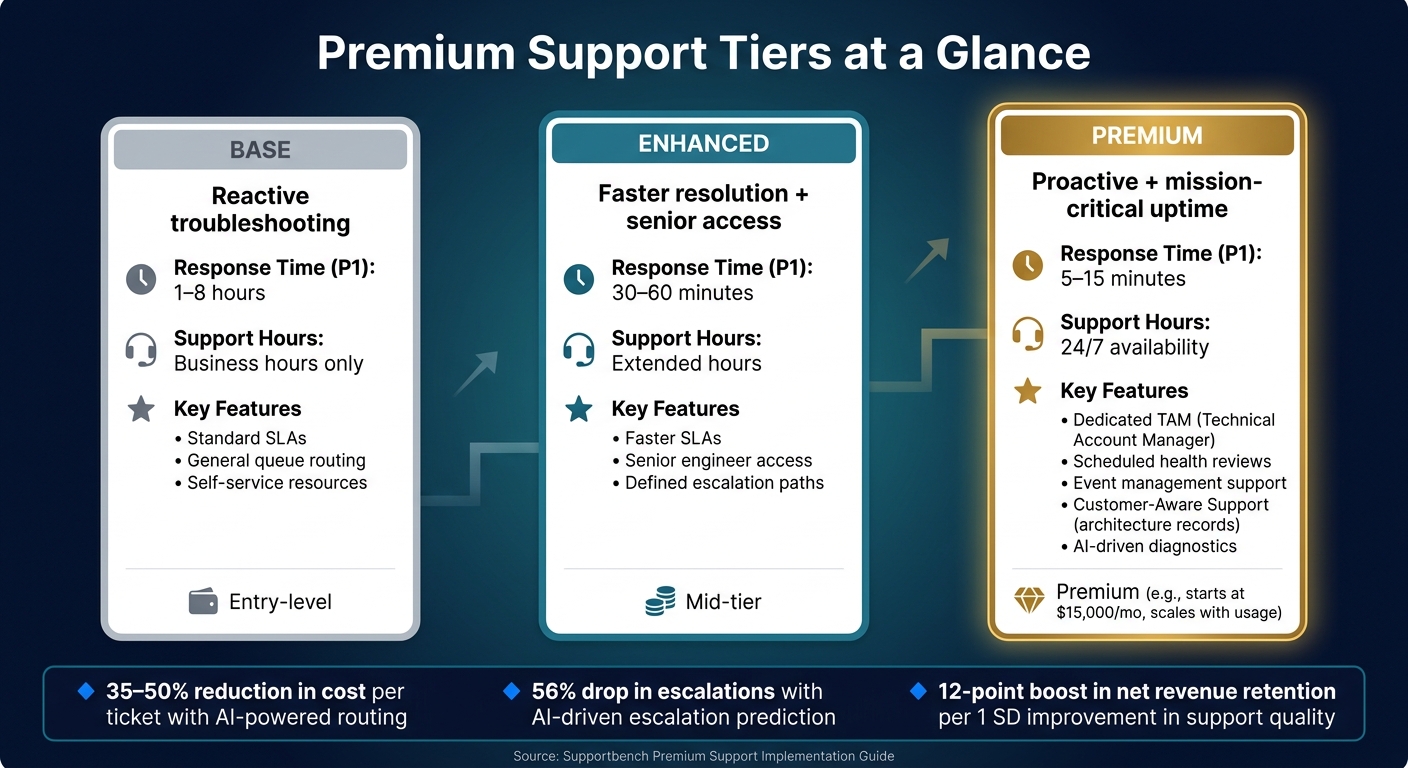
Premium Support Tiers Compared: Base vs Enhanced vs Premium
Once you’ve reviewed your workflows and zeroed in on your target customer segments, the next step is turning those insights into a clear and manageable tier structure. This is where many teams falter, often by making things too complicated.
Defining Entitlements and Value Propositions
Every feature or benefit in a premium support tier should directly align with outcomes your customers value. While quick response times are important, the real appeal of premium support lies in deeper commitments that address critical customer needs.
Key entitlement categories include:
- Responsiveness: Think sub-30-minute response times for priority issues (P1) and 24/7 availability.
- Dedicated expertise: Assign a Technical Account Manager (TAM) or Customer Success Manager who knows the customer’s setup and is ready to step in during a crisis.
- Proactive engagement: Offer scheduled health reviews and pre-event planning to help customers stay ahead of potential issues [3][4][6].
"The event management service has been invaluable, with white glove planning and Google engineers assistance during the event. This New Year’s Eve was the smoothest yet, in large part thanks to Cloud Support." – Karl D’Adamo, Senior Director of Engineering, Snapchat [4]
A frequently overlooked but impactful feature is "Customer Aware Support". This involves keeping a detailed record of the customer’s architecture, integrations, and projects to eliminate delays during troubleshooting. For complex, multi-system problems, this can significantly cut down resolution times [6]. Once these entitlements are defined, organize them into clear tiers and optional add-ons, giving customers the flexibility to tailor support to their needs.
Building Tier Structures and Add-On Packages
With well-defined entitlements, a simple three-tier model – Base, Enhanced, and Premium – provides a clear upgrade path without overburdening your team. Here’s how the tiers could be structured:
- Base: Standard reactive support with defined service level agreements (SLAs).
- Enhanced: Faster response times, extended support hours, and access to senior engineers.
- Premium: Proactive, mission-critical support with dedicated TAMs, health reviews, and event management.
This streamlined approach avoids unnecessary complexity while protecting your team’s productivity. For example, premium tiers should exclude support for custom scripts or third-party integrations unless explicitly covered by a specialized add-on [7]. Modular add-ons, like compliance-focused support for regulated industries or AI-driven diagnostic tools, let customers enhance their coverage without forcing you to redesign your entire support structure [4][5].
| Tier | Primary Focus | Response Time (P1) | Key Features |
|---|---|---|---|
| Base | Reactive troubleshooting | 1–8 hours | Standard SLAs, business hours |
| Enhanced | Faster resolution + senior access | 30–60 minutes | Extended hours, escalation paths |
| Premium | Proactive + mission-critical uptime | 5–15 minutes | TAM, health reviews, event support |
Pricing for Long-Term Operational Stability
Pricing isn’t just about revenue generation – it’s also about ensuring your support operations remain scalable and effective. A well-structured pricing model can have a massive impact on profitability. Even a small 1% improvement in pricing can boost profits by about 11.1% [8].
A hybrid pricing model works best. This combines a minimum monthly fee to cover fixed costs with a percentage of the customer’s total contract or usage value. For instance, Google Cloud’s Premium Support starts at $15,000 per month and scales based on cloud usage: 10% on the first $150,000, then dropping to 3% for spending above $1 million [4][6]. This ensures your team is compensated for maintaining premium services, regardless of ticket volume.
To avoid overwhelming your team, include overage guardrails in your contracts. Define what standard usage looks like – such as the number of named contacts, monthly case volume, or TAM hours – and charge extra for exceeding those limits. Limiting senior staff access to three named contacts per account is a practical way to maintain high service quality without overextending your team [3].
"The ideal client prioritizes partnerships, so our pricing model rewards long-term commitments." – Jason Hennessey, CEO, Hennessey Digital [10]
Annual contracts often outperform monthly plans in terms of revenue stability. On average, annual subscriptions generate 50% to 60% higher per-user revenue compared to monthly options [9]. For customers concerned about budget flexibility, consider offering a "pause" or downgrade option rather than pushing for cancellation. This keeps the relationship intact and opens the door for future upsells.
Creating Workflows and SLAs That Do Not Disrupt Standard Support
Premium support tiers can sometimes create a ripple effect, complicating workflows and impacting the quality of standard support. The challenge lies in managing this complexity without compromising service for any customer group.
Entitlement-Aware Intake and Routing
It all starts with how cases are handled at intake. Your system should instantly recognize who submitted the case, their support tier, and the appropriate routing – all without manual intervention. By embedding entitlement data into intake forms and routing logic, premium P1 tickets can skip the general queue altogether.
For instance, a "Medium" priority issue from a standard customer could be automatically elevated to "High" when it originates from a premium account [13]. AI tools can further streamline this process by classifying, tagging, and assigning cases, allowing agents to focus on resolving issues instead of sorting them. Supportbench’s AI automation excels at this, ensuring cases are routed accurately based on customer tier and ticket content.
"The challenge isn’t that teams work differently. The challenge is that their work constantly intersects, and those handoffs are where momentum is often lost." – Chaviva Gordon-Bennett, monday.com [11]
Once cases are routed correctly, the next step is managing the workload to maintain efficiency.
Managing Queues and Balancing Agent Workloads
Separate queues are a must. Dedicated queues for premium and standard cases ensure that resources are allocated effectively. Pair this with AI to assign cases based on agent skills and workload, preventing senior engineers from getting bogged down with routine tickets while premium customers are left waiting. Escalation paths should remain flexible, allowing cases to move between queues when necessary, while maintaining visibility across all streams.
A great example is AWS‘s Unified Operations support plan, which guarantees a human response within 5 minutes for mission-critical issues [5]. Achieving this level of responsiveness requires precise queue management and automation to keep everything running smoothly.
Dynamic SLA Configuration and Adjustment
Once queues are optimized, dynamic SLAs (Service Level Agreements) allow you to adapt service levels to real-time conditions. For example, a premium customer nearing a contract renewal or launching a major product might require faster response times than during quieter periods. Dynamic SLA configuration enables you to adjust thresholds based on context, not just ticket priority.
Supportbench makes this possible by tightening SLAs automatically when certain triggers occur, such as an upcoming renewal date. This removes the guesswork and ensures support stays aligned with customer needs. AI can help set initial SLA targets slightly above historical averages – by 10–20% – and then refine them as consistency improves. To go beyond time-based metrics, include experience-focused measures like CSAT (Customer Satisfaction) and customer effort scores. These metrics are twice as effective as technical uptime metrics in predicting customer churn [12].
Using AI to Protect Margins in Premium Support
Delivering premium support comes with high costs. Features like dedicated agents, faster SLAs, and handling complex escalations can quickly eat into the revenue generated by these premium tiers. Without the right tools, these expenses can quietly outweigh the benefits. AI offers a solution by automating tasks like triage, response, and issue detection, reducing the burden on support teams.
AI-Assisted Triage and Case Prioritization
One of the biggest hidden costs in premium support is ticket misrouting. When a critical ticket from a premium customer ends up in the wrong hands, even a small delay can lead to SLA breaches [14]. AI-assisted triage minimizes this risk by analyzing incoming tickets immediately. It cross-references account data and automatically routes tickets to the right agent or team, bypassing manual errors [14].
AI doesn’t just stop at routing. By using AI sentiment analysis, it can identify tickets with urgent emotional cues – even when the customer hasn’t explicitly flagged the issue [14][15]. This early detection is crucial because premium customers often leave without vocalizing their dissatisfaction.
Another key feature is pre-breach alerts. Instead of waiting for SLA violations, AI tools issue warnings when a ticket approaches 75–80% of its SLA deadline. This gives agents a buffer to act before a breach occurs [14]. Platforms like Supportbench integrate entitlement-aware routing with these pre-breach alerts, ensuring premium cases are handled proactively. This kind of automation not only protects SLAs but also streamlines agents’ workflows.
Agent Copilot and Knowledge Management
Beyond triage, AI tools can significantly reduce the time agents spend gathering information. A common inefficiency in premium support is the time wasted on retrieving account details, past tickets, and CRM data before tackling the actual issue.
"Our support agents were spending the first ten minutes of every interaction just figuring out who they were talking to. Checking account status, verifying permissions, reviewing their setup. The actual problem-solving came second." – Kathleen Matthews, Global Support, Mixpanel [16]
An AI-powered copilot changes this dynamic by instantly providing agents with account history, support tier, and permissions. This allows them to jump straight into resolving the issue [16]. Supportbench’s Agent Copilot takes it a step further by scanning past cases and the knowledge base to suggest solutions and flag similar resolved issues. If a case reveals a gap in documentation, the platform can even generate a knowledge base article from the case history, ensuring the same issue doesn’t resurface.
Predictive Analytics for Early Issue Detection
AI tools also enhance efficiency through predictive analytics, shifting support from reactive to proactive. By analyzing ticket sentiment, account history, and context, predictive analytics can spot potential issues before they escalate – sometimes even before the customer raises a concern.
Salesforce, for example, saw a 56% drop in escalations after implementing AI-driven escalation prediction, according to Katherine Sullivan, SVP Customer Success [17]. Similarly, Nutanix and Basware reported an 80% decrease in escalation requests after rolling out similar tools [17].
"First and foremost, we saw north of fifty percent reduction in our escalations – game changer." – Katherine Sullivan, SVP Customer Success, Salesforce [17]
Supportbench applies these insights with predictive CSAT and Customer Effort Score (CES) indicators. These tools flag cases likely to lead to dissatisfaction before surveys are even sent. This proactive approach allows support teams to reassign cases, adjust SLAs, or involve a Customer Success Manager while there’s still time to improve the outcome.
Rolling Out Premium Support Without Disrupting Operations
Launching a premium support tier is no small feat. If rushed, it can lead to confusion for both agents and customers, ultimately disrupting your workflows. A thoughtful, strategic approach is key to success.
A Phased Rollout Plan
Before introducing premium support, make sure your standard tier is rock-solid. Start by using AI to handle routine, high-volume tasks. Once that’s running smoothly, you can begin layering in premium workflows – whether human-led or AI-augmented.
To minimize risk, pilot the premium tier with select high-value accounts. During this phase, focus on tracking performance metrics, setting clear escalation triggers, and automating governance controls to ensure AI interactions align with your brand’s voice and standards [18].
This gradual approach creates a stable foundation for monitoring performance as both tiers evolve.
Metrics to Track Across Premium and Standard Tiers
Once your premium and standard tiers are live, it’s important to measure them differently. Premium cases often require more time and in-depth analysis compared to standard issues.
"A tiered model should reduce effort across the system. If it increases friction for customers or teams, the structure needs to be simplified or redefined." – William Westerlund, Customer Support Operations Guide [1]
Here’s a breakdown of the key metrics for each tier:
| Metric | Standard Support | Premium Support |
|---|---|---|
| Primary goal | Fast resolution of common issues | Deep diagnosis and systemic fixes |
| Key metric | First-Contact Resolution (FCR) | Resolution quality and root cause analysis |
| Escalation signal | Failed self-service or ambiguous issues | New systemic issues |
| Satisfaction measure | Post-resolution CSAT | Post-escalation effort score |
Keep a close eye on reopen rates – frequent reopenings may signal that issues are being resolved too quickly without addressing root causes. Additionally, track the volume of escalations between tiers. If frontline teams are escalating too often, it may indicate they’re struggling to resolve issues effectively [1].
While metrics are critical, the real power lies in leveraging AI insights to refine your approach over time.
Using AI Insights to Improve Over Time
AI isn’t just a tool for handling customer interactions – it’s also a powerful ally for post-launch optimization. Unlike manual QA, which only reviews a small sample of cases, AI-driven quality assurance can analyze every interaction. It can highlight shifts in customer sentiment, inconsistent responses, and recurring gaps in your knowledge base.
Use premium case resolutions as a feedback loop. For instance, when a Tier 2 or Tier 3 issue is resolved, feed the solution back into your standard-tier documentation and self-service tools. Over time, this process reduces the need for escalations. Platforms like Supportbench can help by automatically identifying patterns and providing actionable insights, so you can adjust workflows based on real-world data [1].
Conclusion: Growing Premium Support Without Losing Control
By combining solid operational practices with smart AI tools, premium support can enhance both customer satisfaction and operational efficiency. Introducing premium support tiers doesn’t have to lead to overwhelming complexity, increased headcount, or unnecessary risks. Successful teams focus on a stable base and lean on AI to handle repetitive tasks, freeing up human agents for complex, high-value interactions.
The numbers back this up. SaaS companies that automate ticket routing see a 35–50% reduction in cost per ticket [19]. Additionally, improving support quality metrics by just one standard deviation leads to a 12-point boost in net revenue retention – which translates to roughly $2.4 million annually for a $20 million ARR business [19]. When done right, premium support isn’t just a service upgrade; it’s a strategic tool for improving margins and retaining customers.
"The ROI of routing automation is not just operational; at scale, it is a valuation input." – US Tech Automations [19]
The roadmap for success is clear: let AI handle standard-tier interactions at scale, implement safeguards to ensure automated responses remain accurate and aligned with your brand, and give your team the capacity to deliver the personalized service that premium customers expect. Supportbench offers a unified system that includes AI-powered triage, dynamic SLAs, escalation management, and predictive CSAT – all without locking essential features behind steep paywalls.
The goal is simple: scale efficiently. Premium tiers should grow revenue, standard tiers should stay lean, and your team should remain firmly in control. This aligns with earlier strategies on optimizing workflows and integrating AI seamlessly across support levels.
FAQs
How do I decide which customers qualify for premium support?
Start by diving into historical ticket data to get a clear picture of recurring issues, their complexity, and how they tie into customer value. Break down tickets into categories like technical difficulty, business impact, and customer spend or loyalty. This will help you spot patterns and prioritize effectively.
Transparency is key. Make sure the criteria you use to determine eligibility are clear and tailored to actual customer needs. This builds trust and ensures fairness in how premium support is allocated.
AI tools can be a game-changer here. They can help identify high-value customers quickly and direct their issues to the right teams. But balance is critical – efficient routing shouldn’t lead to overburdened resources or operational bottlenecks. Keep the system running smoothly while ensuring top-tier support for your most important customers.
What guardrails prevent premium tiers from hurting standard support?
Guardrails involve conducting in-depth customer research, defining service levels clearly, and ensuring open, honest communication. Businesses need to tailor premium tiers to meet customer needs and expectations while building trust by delivering consistent service quality. By incorporating support costs into core subscription plans and using AI tools effectively, companies can maintain fairness, reliability, and efficiency across both premium and standard tiers without sacrificing service standards.
Which AI automations deliver the fastest cost savings in premium support?
The quickest way to cut costs in premium support is by using AI automation for routine tasks like handling basic inquiries, triage, routing, and escalations. These tools can independently resolve 40-70% of straightforward queries, bringing the cost-per-resolution down to less than $20. They can also deflect 60-75% of tier-1 tickets, significantly lightening the workload.
On top of that, automating triage and SLA management can save a lot of time – up to 250 minutes a day for every 50 tickets. This not only improves efficiency but also boosts SLA compliance by 40-60%.
Related Blog Posts
- How to Manage Customer Support Across Multiple Products with Different Complexity Levels
- How do you handle support for “mission-critical” customers without building a VIP mess?
- What are the signs you’ve outgrown Help Scout (SLAs, tiers, escalations, reporting)?
- How to run implementation support without drowning the support queue






