



If your support team struggles as your business grows, the problem might not be your team – it’s your processes. Scaling requires moving from chaotic, reactive support to structured, data-driven, and AI-powered operations. This guide explains how to fix common issues at four stages of support maturity:
- Stage 1: Startup Reactive – Consolidate fragmented tools (Slack, email, etc.) into one system, categorize tickets, and establish clear workflows. Start using AI for response drafts and context assembly to save time.
- Stage 2: Emerging Structured – Standardize ticket tagging, escalation rules, and knowledge documentation. Introduce auto-tagging and internal knowledge bots to improve consistency.
- Stage 3: Scaling Data-Driven – Shift focus to outcome-based metrics (e.g., resolution times, customer effort scores (CES)). Use AI for predictive insights like customer health scoring and proactive risk alerts.
- Stage 4: Enterprise AI-Native – Fully integrate AI to handle repetitive tasks, predict issues, and share insights across teams. AI becomes central to preventing problems and driving customer retention.
Each stage builds on the last. Start by identifying your current stage, fix the basics, and gradually introduce AI to simplify workflows. This step-by-step approach ensures your support team grows efficiently without sacrificing quality.
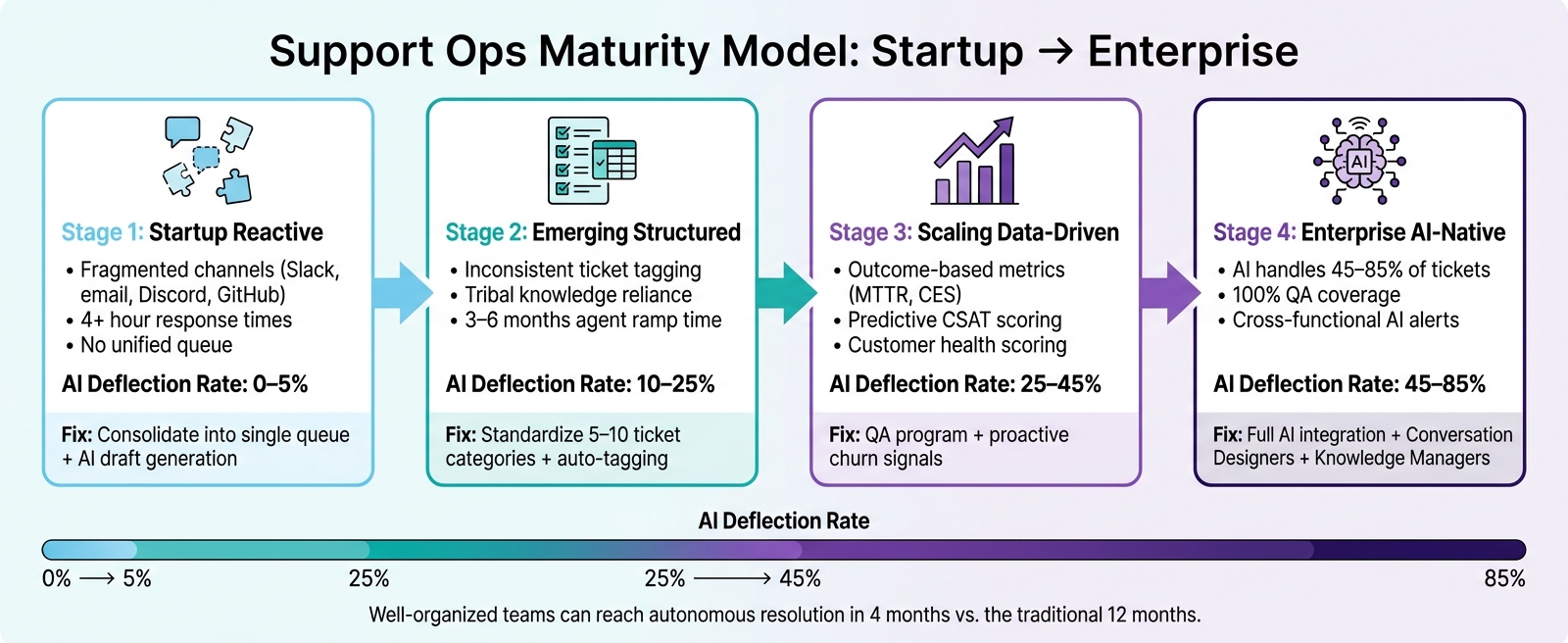
Support Ops Maturity Model: 4 Stages from Startup to Enterprise AI
Stage 1: Startup Reactive – Getting Out of Chaos
Signs You’re in the Startup Reactive Stage
If your support process feels chaotic and scattered, you’re probably in Stage 1. Here’s what it looks like: customers are reaching out through a mix of Slack DMs, emails, Discord messages, and GitHub issues. There’s no unified system, no clear ownership, and no way to quickly see what’s pending. It’s a mess.
Want to confirm you’re here? Look for two key signs: customers often wait more than 4 hours for a response, and a significant portion of tickets require checking multiple tools before anyone can reply [1]. Another giveaway? Engineers or founders are getting looped in – not because the problems are complex, but because the information needed to resolve them is scattered across too many systems [1].
"We’d spend 20 minutes assembling context before we could even start thinking about the answer. The issue wasn’t ticket complexity. It was that everything we needed was somewhere else." – Support Manager, B2B SaaS Company [1]
This is a common problem: 29% of early-stage B2B support teams report channel fragmentation as their biggest challenge [1]. The solution isn’t hiring more people – it’s consolidating your tools and processes. Recognizing these signs is the first step toward fixing the chaos.
What to Fix First
Before jumping into automation or AI, you need to address the basics. Start by consolidating all your support channels into a single queue. Whether it’s Slack, email, or Discord, everything should flow into one system where tickets can be assigned, tracked, and closed. This alone will solve most of the “falling through the cracks” issues [1].
Once you’ve got a unified queue, set up a simple ticket lifecycle with clear stages: New, Triaged, Assigned, In Progress, Pending, and Resolved. This ensures everyone understands what “done” looks like. At the same time, draw a clear boundary between support and engineering. Engineers should only step in for genuine technical escalations – not to gather scattered context that a better system could surface automatically.
Here’s a useful exercise: review your last 200–500 tickets and group them into three tiers:
- Tier 1: Simple, repeatable questions (e.g., password resets).
- Tier 2: Issues requiring some account history or documentation.
- Tier 3: Complex, one-off problems or high-priority accounts.
This categorization helps you pinpoint where automation can make a difference and where human expertise is essential [1]. By consolidating your channels and organizing your tickets, you’ll not only stabilize your operations but also lay the groundwork for smarter, data-driven improvements down the line.
Quick AI Wins at This Stage
Once your system is consolidated, you can start introducing AI tools to streamline your workflow. The best approach for small teams (under 50 seats) is to use AI to enhance your agents’ efficiency, not replace them [1].
Focus on these two high-impact features first:
- Draft Generation: AI scans incoming tickets and suggests responses based on your knowledge base. Agents review and edit the drafts, speeding up response times while keeping human oversight.
- Context Assembly: AI gathers related tickets, account history, and relevant documents automatically, saving agents from wasting time digging through multiple tools [1].
Together, these features can save agents about 20% of their time on routine cases, which translates to roughly four hours per week [1].
After that, consider enabling ticket summarization for escalations. When engineers or founders need to step in, an AI-generated summary of the issue, past actions, and next steps can save them time and keep their focus on solving the problem. While it’s a small feature, it can make a big difference for technical teams.
| AI Feature | Fixes | Beneficiaries |
|---|---|---|
| Draft Generation | Slow response times | Support agents |
| Context Assembly | Time wasted hunting for context | Engineers, founders |
| Ticket Summarization | Painful, slow escalations | Senior leads, technical teams |
| Auto-Categorization | Disorganized and unprioritized queues | Support ops, first hires |
When rolling out AI, start cautiously. Use shadow mode for at least 30 days – AI drafts responses, but agents review and send them. This lets you track how often agents accept the AI’s suggestions. If acceptance rates climb above 50%, it’s a good sign your knowledge base is solid enough to expand AI’s role [1].
sbb-itb-e60d259
Stage 2: Emerging Structured – Building Consistency
Once the initial chaos is under control, the next hurdle is creating a process that runs smoothly and consistently.
Signs You’re in the Emerging Structured Stage
The disarray of Stage 1 is behind you. You’ve implemented a unified ticketing system, assignments are happening, and engineers aren’t constantly being interrupted by non-support issues. However, there’s still a lack of uniformity. Ticket responses vary widely depending on who handles them, new agents take months to become independent, and senior team members are the go-to for every tough question.
This stage is marked by heavy reliance on "tribal knowledge" – information stored only in the minds of experienced agents. In B2B support, it typically takes new agents 3 to 6 months to work independently and up to a year to reach full productivity without standardized processes [6]. When senior agents leave or move up, that knowledge often leaves with them.
Other red flags include inconsistent ticket tagging, unclear escalation paths, and reliance on scattered tools that don’t integrate well.
Key Fixes at This Stage
To move forward, the focus needs to be on standardizing processes. Start by defining 5–10 clear ticket categories – like password resets, pricing questions, integration issues, or onboarding errors. This ensures every ticket is tagged consistently, which is critical for accurate routing and future analysis [2].
Establish clear escalation rules. Define exactly when a ticket should move from a junior agent to a specialist, and from a specialist to engineering. Without these guidelines, escalations can become arbitrary, causing delays or unnecessary handoffs.
Integrate documentation into the workflow. Require agents to link a relevant knowledge article – or flag missing documentation – before closing a ticket. This practice limits the risk of knowledge loss when senior staff leave. As Mosaic AI highlighted:
"If documenting a ticket adds five minutes of friction, it won’t happen. The workflow has to be low-resistance enough that it becomes a habit." – Mosaic AI [6]
At this stage, it’s also time to bring in a dedicated support operations (support ops) role. This person ensures tools are consolidated, escalation rules are maintained, and processes stay consistent – even during busy periods.
AI Features That Improve Consistency
At this point, AI’s primary benefit lies in bridging the gap in consistency, not just automating responses.
AI-powered ticket routing take the guesswork out of ticket triage. AI can classify tickets into your standardized categories, ensuring they land in the right queue with the correct priority – no matter who’s on shift.
Internal knowledge base bots help combat the reliance on tribal knowledge. Instead of new agents repeatedly asking senior colleagues the same questions, they can query the bot for accurate answers based on your documented solutions. Teams using AI-driven knowledge management have seen a 30% drop in resolution times and a 40% reduction in ticket volume [6].
AI-assisted drafting transforms agents into editors rather than authors. Instead of crafting responses from scratch, agents review and tweak AI-generated drafts. This approach can speed up first response times by 30–60% compared to purely human efforts [2]. Keep an eye on draft acceptance rates – if they’re low, it might indicate gaps in your documentation rather than an issue with the AI.
"AI will surface gaps in your knowledge base quickly… your support team needs to see the AI get things right before they trust it to go autonomous." – Twig [2]
Start introducing AI autonomy in areas where your documentation is already reliable. Focus on high-confidence ticket categories first, and expand as your team builds trust in the system. These steps not only improve consistency but also set the stage for leveraging deeper insights in the next phase.
Stage 3: Scaling Data-Driven – Turning Data Into Action
Signs You’re in the Scaling Data-Driven Stage
At this point, you’ve nailed down consistent processes and built a reliable knowledge base. Tickets are routed efficiently, escalation paths are clear, and agents aren’t scrambling to create new solutions for every issue. But growth introduces fresh challenges: a larger team, a global customer base, and the demand for deeper reporting.
Now, the focus shifts to understanding trends beneath the surface. Dashboards need to show patterns over time, not just snapshots. You should be able to identify at-risk customers before they voice concerns. And your support data has to inform teams beyond customer support, like product and customer success.
The next step? Adjust your metrics and processes to transform this data into actionable insights.
What to Fix Now
To tackle these challenges, refine your metrics and quality controls so your support data drives meaningful results.
Start by moving from activity-based metrics to outcome-based ones. For example, tracking how many tickets your team closes or how quickly they respond only shows how busy they are – not whether customer problems are truly resolved.
| Activity-Based Metric | Outcome-Based Equivalent |
|---|---|
| Tickets closed | Issues fully resolved |
| First response time | Mean time to resolution (MTTR) |
| Ticket backlog size | SLA compliance (response and resolution) |
| Tickets per agent | Customer Effort Score (CES) |
| Deflection rate (basic) | Deflection rate (resolved without agent intervention) |
Customer Effort Score (CES) is especially important. It measures how easy it is for customers to get help and is a strong predictor of loyalty. If customers are constantly jumping through hoops, your churn risk could be higher than your CSAT scores suggest.
This is also the right moment to set up a formal quality assurance (QA) program. As AI takes on more volume, experienced agents can shift into roles like "AI Quality Analyst", where they review AI interactions, flag errors, and update the knowledge base based on patterns surfaced by AI. A key metric to monitor: escalation accuracy should stay above 90% before expanding AI’s role further [2].
Finally, integrate your support data with other business functions. Dynamic SLAs – response targets that adjust automatically based on factors like account health or upcoming renewals – are a practical way to make this happen. Prioritize tickets by their potential impact rather than treating them equally.
Using AI to Get Ahead of Customer Issues
At this stage, AI’s real value isn’t just faster ticket responses – it’s spotting problems before they escalate.
Take Rapid7, a global cybersecurity company, as an example. By implementing AI-driven workflows and proactive alerts across 7,000+ complex tickets per month, they reduced ticket handling time by 30%, increased agent capacity by 35%, and maintained a 95% CSAT score [5]. The goal wasn’t to replace agents but to give them better tools to act on.
"There’s an opportunity for support to move from a very reactive state… to one that is much more proactive, where the measure of success is how impactful support is at driving great customer outcomes." – Josh Solomon, General Manager and VP of Revenue, Mosaic AI [5]
Predictive CSAT and CES scores make this shift even more tangible. Instead of waiting for customers to submit surveys, AI can predict – at the case level – how satisfied a customer is likely to be based on sentiment trends and interaction history. Tools like Supportbench‘s Predictive CSAT and CES features highlight potential satisfaction outcomes directly in the case list, allowing managers to step in before issues escalate.
Customer health scoring takes it a step further. By analyzing support signals like ticket volume, sentiment changes, and repeat contacts, AI can flag account-level risks. For example, if a high-value customer starts submitting more tickets with increasingly frustrated language, that’s a sign of potential churn. Routing this information to the customer success team in real time turns support into a function that protects revenue, not just a cost center.
"The difference between a reactive and a proactive AI support tool is when it acts." – Ami Heitner, Worknet [7]
At this stage, advanced AI workflows can achieve deflection rates of 25%–45% and speed up ticket resolution by 50%–80%, building on earlier progress. But as Ami Heitner from Worknet points out: "A deflected ticket is valuable if the customer’s issue is resolved" [7]. The key metric isn’t just the number of deflected tickets – it’s whether CSAT scores for AI-handled tickets stay within 1 to 5 points of your human baseline [2][7].
This proactive use of AI builds on the structure established earlier, keeping your support operation ahead of customer needs as you scale.
Stage 4: Enterprise AI-Native – Predictive and Fully Integrated Support
What an AI-Native Enterprise Looks Like
At this stage, AI becomes the backbone of operations. The support team doesn’t just resolve issues faster – they proactively prevent them. Support data flows seamlessly into product, sales, and customer success teams in real time. For instance, if tickets spike around a specific feature, the product team gets an instant alert. If a high-value account shows declining sentiment, customer success managers are flagged before churn becomes a risk. Support evolves from being seen as a cost center to a critical function that protects revenue.
Take Intercom’s AI agent Fin as an example. It resolved 81% of support volume, handled a 300%+ increase in demand, and saved the company an estimated $7.5M–$9M annually. As Intercom pointed out: "The ones achieving the most aren’t treating AI as a tool bolted onto existing processes, they’re restructured support workflows around it." [8]
This real-time integration lays the groundwork for scaling and refining processes across the organization.
Refining Processes, People, and Technology at Scale
As operations mature, the focus shifts to governance and ongoing optimization.
Global playbooks are audited to align with regional customer needs. Dynamic SLAs (Service Level Agreements) become key – automatically tightening response times around renewal dates or when account health dips, ensuring consistency without requiring manual effort. Custom portals tailored to specific customer segments further reinforce this approach.
The roles within support teams also transform. New specialized positions like Conversation Designers, Knowledge Managers, and AI Operations Specialists emerge to oversee the AI lifecycle. [8] Meanwhile, agents who once handled routine Tier 1 tickets shift into roles as escalation specialists or customer advocates. With 30–50% of their workload freed up, they focus on proactive tasks like retention and account expansion. [3][8]
Cross-functional governance becomes essential. A three-layer alert system ensures that AI insights reach the right teams:
- Knowledge gap alerts go to product and operations teams.
- Escalation risks are sent to support leads.
- Churn signals are routed directly to customer success managers. [5]
Without this structure, even the most advanced AI-generated insights can get lost in the shuffle.
Advanced AI Capabilities to Maintain Excellence
With roles and processes streamlined, advanced AI capabilities take center stage, focusing on maintaining quality and consistency at scale. The goal shifts from just speed to ensuring operational efficiency and protecting revenue.
100% QA coverage becomes the norm, replacing manual ticket reviews. Instead of sampling just 1–2% of cases, AI evaluates every resolved ticket for tone, accuracy, and adherence to policy. This approach uncovers systemic coaching opportunities that traditional spot-checking would miss. [9] Platforms like Supportbench offer built-in AI tools for sentiment analysis, emotional scoring, and predictive CSAT (Customer Satisfaction) insights, giving managers a continuous view of quality without adding to their team size.
AI also monitors ticket clusters to identify knowledge gaps and drafts new articles to address them. A weekly review process flags outdated articles and emerging ticket categories, ensuring the knowledge base stays current. [3]
"Top-quartile programmes drive cost-per-ticket below $12 not by hiring cheaper agents but by deflecting 60%+ of tier-1 to self-service and AI." – Peter Vogel, Founder, peppereffect [3]
At full maturity, AI-native enterprises achieve deflection rates of 45% to 85%, depending on the complexity of their industry. [4] However, the true measure of success lies in ensuring that AI-handled interactions maintain the same CSAT levels as human agents. This proves that quality hasn’t been sacrificed for efficiency.
Diagnosing Your Stage and Planning What Comes Next
Now that you’ve established the basics, it’s time to assess where your support system stands and map out the next steps for improvement.
Quick Diagnostic Checklist by Stage
A quick way to determine your current stage is by auditing your last 200–500 tickets. Break them down into three categories: Tier 1 (simple FAQs), Tier 2 (multi-step or context-heavy issues), and Tier 3 (unique or high-risk cases). The ratio between these categories is revealing. For example, if most of your tickets are Tier 1 but still handled manually, you’re likely in Stage 1 or 2. If agents spend more time gathering context than composing responses, this points to structural inefficiencies rather than staffing issues [1].
| Maturity Stage | AI Deflection Rate | Key Indicator |
|---|---|---|
| 1: Pilot | 0–5% | No AI in place; fragmented channels (Slack, email, Discord) |
| 2: Assisted | 10–25% | AI drafts responses; agents review them before sending |
| 3: Expanded | 25–45% | AI resolves most FAQs; CSAT matches human performance |
| 4: Majority | 45–65% | AI is the default responder; agents handle escalations |
| 5: Autonomous | 65–85% | AI manages non-sensitive cases; team focuses on strategic customer experience |
Once you’ve identified your stage, focus on making improvements in a logical sequence that builds on your existing systems.
How to Prioritize Fixes and Sequence Improvements
Don’t rush through fixes or skip steps – each stage lays the groundwork for the next.
The first priority should always be integrating your AI-powered knowledge base. This is the backbone for both AI retrieval and consistent human responses. After that, centralize your ticketing system, incorporate CRM data, and finally, layer in product analytics. Each step amplifies the effectiveness of the previous one [1].
To stay on track, use a 90-day plan:
- First 30 days: Categorize tickets and establish baseline metrics.
- Next 30 days: Run AI in shadow mode to gather data without impacting live operations.
- Final 30 days: Enable AI for high-confidence categories. Expand only when AI-handled tickets consistently match or exceed human CSAT benchmarks [1][2].
This methodical approach ensures smooth scaling and avoids disruptions along the way.
How an AI-Native Platform Speeds Up the Journey
An AI-native platform can address inefficiencies right from the start. One of the biggest early-stage challenges is the time agents spend gathering context – checking multiple systems before they can even begin crafting a response. AI-native tools solve this by automatically pulling up relevant data, like past tickets, account history, and knowledge articles, as soon as a case is opened [1].
For example, Supportbench is designed with these capabilities built in. Features like the AI Agent-Copilot, predictive CSAT, and automated case summaries are available from the start for $32 per agent per month. This means even teams at Stage 1 have access to the same tools that Stage 4 teams rely on, significantly reducing the time needed to advance. Well-organized teams can reach autonomous resolution in just four months, compared to the 12 months it used to take [1].
"Augmentation-first is not the conservative-by-default choice. It is the sequenced-correctly choice for teams that do not yet have that foundation." – Plain [1]
The bottom line? You don’t need to be at Stage 4 to see the benefits of AI. Even at Stage 1, AI can draft responses and flag sentiment issues, saving agents about four hours per week. As your deflection rate improves, these efficiencies only multiply [1]. By integrating AI strategically, you can accelerate your team’s progress and position them for long-term success in an AI-driven support model.
Conclusion: Scaling Support That Keeps Up With Your Business
Support teams don’t fail because they lack effort – they struggle when their tools, processes, and expectations don’t align with their current capabilities. For example, a startup attempting to roll out enterprise-level automation without first building a solid knowledge base is likely to waste both time and money. Similarly, even large enterprises can run into trouble if they stick to outdated manual processes, like ticket routing.
When you follow a proper sequence, you can save agent time early on and scale efficiently without needing additional hires. This approach can deliver impressive results. Mature AI operations, for instance, often achieve deflection rates of 65–85%, with large-scale teams avoiding costs that can exceed $100,000 each month [2]. The key to this success lies in respecting the sequence: teams that rush to achieve 60%+ deflection rates without laying the groundwork often face costly setbacks due to mismatched expectations [2].
AI can accelerate this process, but timing is everything. When introduced at the right stage, AI can identify gaps in your knowledge base, handle high-confidence tickets automatically as volumes increase, and free up agents to focus on more strategic tasks. The goal is to deploy AI thoughtfully, step by step, ensuring it complements your team’s growth.
As highlighted earlier, a strong knowledge base and streamlined processes are essential. Supportbench builds on this foundation with its unified platform, offering advanced AI-driven features starting at just $32 per agent per month. This makes it possible for teams of all sizes – from startups to enterprises – to scale effectively without ballooning costs.
FAQs
How do I know which maturity stage we’re in?
Take a close look at your support operations by examining your processes, tools, team structure, and performance metrics. The goal is to measure these elements against established maturity benchmarks.
Here’s an example: In the early stages of support operations, you might notice limited automation and lower deflection rates. On the other hand, more advanced stages often rely heavily on automation, sometimes achieving near-complete automation of repetitive tasks.
Start by identifying your current practices and metrics. Then, compare them to widely recognized frameworks in the industry. This approach will help you pinpoint where you stand today and establish clear benchmarks to guide your progress toward the desired level of maturity.
What should we fix before adding more AI?
Before introducing additional AI tools, it’s essential to tackle infrastructure challenges like fragmented support channels and incomplete documentation. These gaps can create unnecessary friction and hinder AI performance. Start by addressing knowledge retrieval bottlenecks – connect systems, keep knowledge bases up-to-date, and set up clear processes for documentation and ticket classification. This ensures AI isn’t relying on outdated or missing information. Taking these steps lays the groundwork for AI to function efficiently and deliver stronger outcomes.
How do we measure if AI is actually helping customers?
To gauge the effectiveness of AI, we keep an eye on key metrics such as CSAT (Customer Satisfaction Score), resolution rate, first response time, escalation quality, and the customer effort score. These indicators give us a clear picture of how well the AI is performing in customer interactions.
Beyond these, we also monitor factors like knowledge base coverage, confidence scores, and the reasons behind escalations. By doing so, we can pinpoint areas where the AI excels and where improvements are needed.
To stay on top of these metrics, we rely on dashboards and scorecards. These tools make it easier to analyze performance data and ensure ongoing refinement.
Related Blog Posts
- How to Create Your First Support Ops Role (What to Hire For, When, and a 90-Day Plan)
- How do you build a support org chart that scales (roles, ratios, and when to hire ops)?
- Reducing “Ticket Ping-Pong”: Strategies for Faster Resolution
- How to build a support ops roadmap: the first 10 improvements to prioritize






