


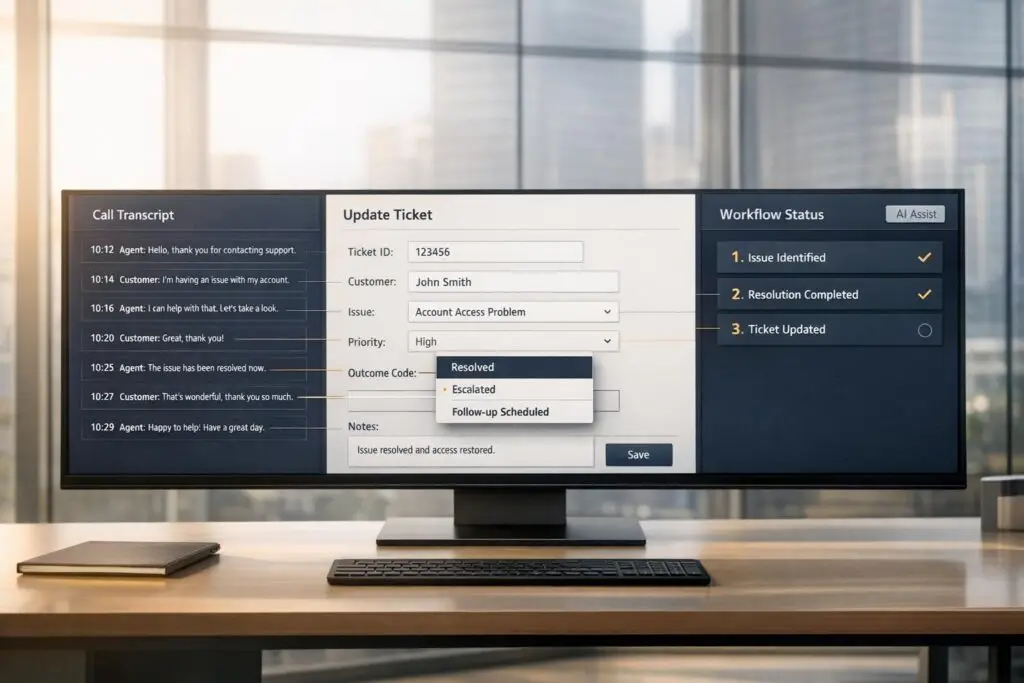
Accurate call outcomes are essential for improving customer support. Yet, most agents struggle to document calls effectively, leading to incomplete records, wasted time, and frustrated customers. This article breaks down how to streamline this process with standardized codes, clear templates, and AI automation.
Key Takeaways:
- Standardize Outcomes: Use a concise list (10–15 codes) for consistent data logging.
- Train Teams: Provide clear definitions and rules for outcome tags.
- Leverage Templates: Pre-built fields ensure agents log critical details without guesswork.
- Automate with AI: AI tools can transcribe, summarize, and auto-fill tickets for accuracy and efficiency.
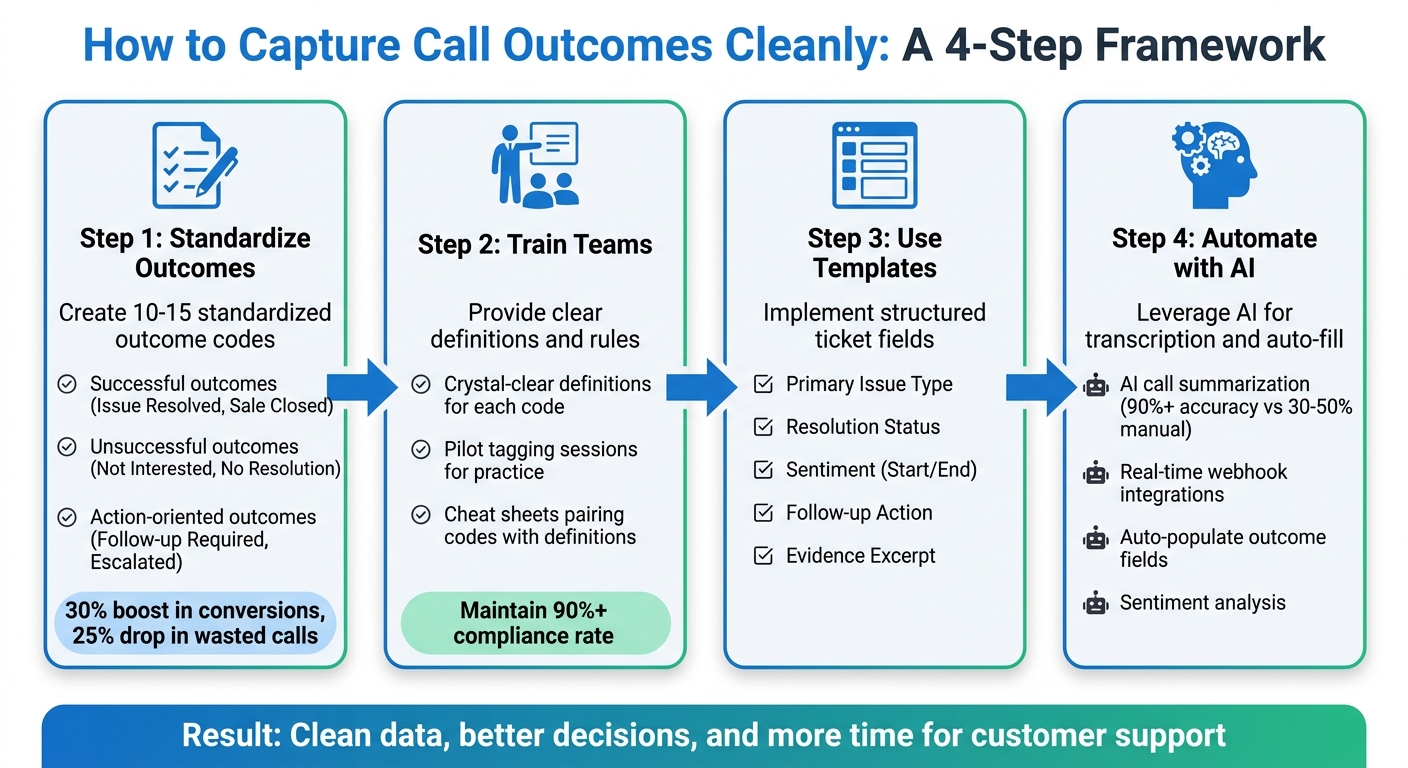
4-Step Framework for Capturing Clean Call Outcomes in Support Tickets
Documentation and Managing Tickets – Learn Help Desk Series
sbb-itb-e60d259
How to Standardize Call Outcomes
To standardize call outcomes, the first step is creating a shared vocabulary. Imagine one agent logging "Issue Resolved" while another uses "Case Closed" for the exact same situation – this inconsistency can make your data unreliable. The fix? A predefined list of outcome codes that everyone uses consistently. Here’s how to make it work.
"It is better to keep the disposition lists short. Ideally, it should be under 15 to 20 codes. This makes it easier for agents to choose the right option quickly. Plus, it keeps reports accurate without overwhelming the team." – Shubham Nikam, Senior Product Marketing Specialist, CallHippo [6]
Build a List of Outcome Categories
Start by organizing outcomes into three key categories: successful, unsuccessful, and action-oriented. Examples include:
- Successful outcomes: "Issue Resolved", "Sale Closed", or "Information Provided."
- Unsuccessful outcomes: "Not Interested", "No Resolution", or "Abandoned/Disconnected."
- Action-oriented outcomes: "Follow-up Required", "Escalated to Specialist", or "Left Voicemail" [6][8].
Keep the list concise – 10 to 15 codes is ideal. A longer list can overwhelm agents and lead to random selections, which reduces the quality of your data [5]. Each label should clearly describe the final result of the call, not intermediate steps [7].
For anything that doesn’t fit into these categories, include an "Other" option that requires agents to add notes. Review these entries weekly to identify recurring reasons and decide whether they warrant a new category [5][8]. One SaaS company implemented this approach and saw a 30% boost in conversions and a 25% drop in wasted calls after refining their call disposition codes [6].
Train Teams on Outcome Definitions
Every outcome code needs a crystal-clear definition, outlining when it should – and shouldn’t – be used [8]. For calls that cover multiple topics, establish rules, such as prioritizing the first issue mentioned by the customer or the topic that took up the most time [8].
Run pilot tagging sessions where team members practice applying codes to identical call transcripts. Comparing their results will help pinpoint any confusing definitions before the system is rolled out [8]. Provide agents with a cheat sheet that pairs each code with its definition and any related follow-up actions [9].
"A tagging template only works if people use the same tags in the same way. Consistency matters more than having a long list of perfect labels." – Daniel Chang, GoTranscript [8]
Regular quality checks are essential to ensure agents are logging similar situations with the same codes [6][8]. If compliance drops below 90%, it’s a sign that agents may not be following the process, which undermines the reliability of your data for decision-making [9]. By enforcing standardized definitions, you not only improve data accuracy but also pave the way for smoother workflow automation and better insights for AI-driven support systems. With these measures in place, agents can log outcomes effortlessly, whether manually or through automated systems.
Manual Workflows: How to Log Call Outcomes into Tickets
Even with the rise of AI tools, many support teams still stick to manual processes for logging call outcomes. When done right, this approach can work well. The trick is to eliminate guesswork. Agents need clear instructions about what to log, where to log it, and how to format their entries. Using structured templates is a great way to simplify and standardize this process.
Use Ticket Templates for Outcome Fields
Pre-built templates take the confusion out of manual logging. Instead of leaving agents to figure out what details to include, templates provide mandatory fields that must be filled before a ticket can be closed. Systems should require agents to select a call outcome during or immediately after the call to ensure no data gets overlooked [10].
A good template should include a consistent set of fields for every call log. These might include:
- Primary Issue Type: Examples could be Billing, Technical, or Sales.
- Resolution Status: Options like Resolved, Escalated, or Follow-up Required.
- Sentiment at Start and End: To track changes in the customer’s mood during the call.
- Follow-up Action: Next steps such as sending an email, creating a ticket, or scheduling a callback [8].
For fields that are important for reporting, dropdown menus work best. Open-text fields can be reserved for details that don’t need to be quantified.
| Core Call-Level Field | Description |
|---|---|
| Primary Issue Type | The main topic of the call (e.g., Billing, Technical, Sales) |
| Resolution Status | The final outcome (e.g., Resolved, Escalated, No Resolution) |
| Sentiment (Start/End) | The customer’s tone at the beginning vs. the close of the call |
| Follow-up Action | Specific next steps required (e.g., Send email, Create ticket) |
| Evidence Excerpt | A short quote or timestamp supporting the chosen tags |
An Evidence Excerpt field is particularly useful. This could be a short quote or timestamp from the call that backs up the selected outcome or sentiment tag. It prevents unsupported tagging and speeds up quality audits [8].
While templates provide structure, following best practices ensures that every ticket is clear and accurate.
Best Practices for Manual Entry
Vague documentation like "Customer called about account" doesn’t cut it. Instead, encourage agents to provide detailed descriptions, such as "Customer requested a refund for a duplicate charge on 5/8/2026." To keep things organized, agents should always select one primary issue that reflects the main topic of the call. Secondary fields can capture additional details [8].
For calls that don’t fit neatly into standard categories, include an "Other" option. However, make it mandatory for agents to add a note explaining what "Other" means in that context. Regularly review these entries to see if new categories need to be added. If "Other" shows up more than 10% of the time, it’s a sign your outcome tags might need updating.
"Frequent modifications to call outcomes can disrupt analytics. Changes should be made cautiously, with consideration of the downstream impact on reporting and data integrity." – Gong [10]
When tickets are handed off between teams, valuable information can get lost. To avoid this, use a handoff checklist to ensure all critical details are included. Make sure:
- All mandatory fields are filled.
- The troubleshooting history is documented in a clear format.
- The customer impact is explicitly stated.
- The next action is clearly outlined for the receiving team [11].
This practice prevents "mechanical information loss", where key details, like "Customer Impact", might disappear because the receiving system doesn’t have a corresponding field [11].
How to Automate Outcome Capture with AI and Integrations
Modern support teams are leaning on automation to minimize errors and boost productivity. Instead of manually logging call details, automation steps in to transcribe conversations, analyze them with AI-driven sentiment analysis, and seamlessly input structured outcomes into tickets. This shift allows support staff to focus on solving customer issues rather than tedious data entry. Let’s dive into how AI-powered call summarization can turn raw audio into actionable information.
Use AI for Call Summarization
AI call summarization tools take audio recordings and transform them into text, using advanced language models like GPT-4o to extract key details. These summaries capture the main issue, troubleshooting steps, resolutions, and even specific data such as the reason for the call, proposed solutions, action items, or deal-related signals like mentions of competitors or budget concerns [12][1].
"This tech turns messy conversations into clear, useful data, giving your team more time to focus on what really matters: helping customers." – Kenneth Pangan, Writer and Marketer, eesel AI [4]
To ensure accuracy, test the AI in a controlled environment with historical transcripts before using it in live scenarios. This approach helps refine the summaries and maintain a professional tone. For complex tickets involving multiple interactions, use tools that consolidate various transcripts into a single, chronological summary. This avoids overwhelming the ticket with fragmented notes [13].
Integrate Webhooks and APIs for Real-Time Updates
After generating summaries, real-time integration is key to keeping your CRM updated without delays. Webhooks enable these AI-generated summaries and outcomes to flow directly into your system [12][1]. You can set triggers like "Voice Agent Data Generated" or "Call Summarized" to ensure updates occur only when the data is complete [15][12][18].
To maintain clean and accurate data, map JSON payload fields like outcome_id, summary, and isSuccessful to the appropriate fields in your support tickets. Secure these integrations using Authorization headers with Bearer tokens or API keys [14][1]. To reduce unnecessary data, filter webhook payloads on your server by call_traits, or use settings like "Send only on completed" to avoid logging incomplete or failed calls [15][17].
| Payload Field | Data Type | Description |
|---|---|---|
outcome_id | Integer | The specific category ID for the call result [14] |
summary | String | AI-generated overview of the conversation [16][12] |
isSuccessful | Boolean | Indicates if the call achieved its business objective [16][17] |
disconnectionReason | String | Identifies if the call ended naturally or due to technical issues [16] |
transcript | Array | The full text of the conversation for record-keeping [16][17] |
Automating outcome capture with AI and integrations not only streamlines workflows but also ensures that your team has access to accurate and actionable data in real time. This combination of AI and seamless integration can significantly enhance how support operations handle customer interactions.
Common Mistakes in Outcome Logging and How to Avoid Them
Support teams often make recurring errors when logging call outcomes, which can undermine the clean data needed for automation and insights. Recognizing these common missteps allows you to create systems that sidestep them from the outset.
Prevent Data Duplication and Inconsistencies
Duplicate tickets and inconsistent formatting are two major culprits that disrupt data quality. Data duplication occurs when multiple tickets are created for the same caller in a short time, cluttering the queue and fragmenting customer history [2]. To combat this, set up deduplication rules that check for active tickets tied to the caller before generating a new one [2].
Inconsistent formatting poses another challenge, making it nearly impossible to analyze data effectively [3]. Instead of relying on free-text entries, implement structured fields and controlled tag lists. Clearly define tags in plain language, specifying when and how to use each one, ensuring uniform application across your team [8].
Be mindful of over-categorization. Too many tag options can overwhelm agents and lead to errors [8]. Tags like "Other" or "Miscellaneous" often become catch-alls, masking emerging trends. If agents must use "Other", require them to include a note explaining why. Regularly review these notes – weekly if possible – to determine whether new standard tags should be added [8].
While consistency is key, complete and accurate documentation is just as important for maintaining data integrity.
Ensure Complete and Accurate Documentation
Good formatting and deduplication provide a solid framework, but thorough documentation ensures no critical details are overlooked. Incomplete note-taking is a frequent issue. Agents juggling high call volumes often rush through notes, leading to missing details like specific objections, stakeholder names, or subtle cues such as hesitation or enthusiasm [3]. On average, manual notes capture only 30-50% of key information, whereas AI-generated summaries can capture over 90% [3].
Another common problem is the loss of context during handoffs, which forces teams to redo work and frustrates customers [19]. Keep an eye on your escalation bounceback rate – if more than 20% of tickets are returned due to missing information, it signals a documentation failure [19]. Metrics like time to escalate and repeat escalation rates can help identify these gaps early [19]. Additionally, a priority mistranslation rate above 5% may indicate that critical details are being lost as tickets move between systems [19].
Lastly, ensure AI-generated call logs are used appropriately. Post these logs as internal notes rather than public replies to maintain professional customer communication [2].
Avoiding these common pitfalls will help you maintain the high-quality data needed to power efficient and effective support systems.
How Supportbench Simplifies Call Outcome Capture
In the fast-evolving world of customer support, where efficiency and precision are key, capturing call outcomes accurately is more important than ever. Supportbench streamlines this process by embedding AI-driven automation into ticket workflows. Instead of relying on agents to manually document every detail, the platform takes care of it. It automatically creates structured summaries, applies consistent tags, and fills in outcome fields. By standardizing and automating these tasks, Supportbench simplifies ticket management and ensures nothing important slips through the cracks.
AI-Powered Outcome Summarization
Supportbench leverages AI to analyze ticket conversation histories and produce clear, concise summaries of key issues and resolutions [20][21]. This eliminates the inconsistencies and potential errors that come with manual note-taking, maintaining a consistent level of documentation across the board [20].
"By condensing complex ticket histories into clear and actionable summaries, AI summarization empowers support teams to work smarter, not harder." – Supportbench [21]
The AI doesn’t just summarize; it also populates critical outcome fields like outcome_id, tags, and issue_id. This ensures thorough, error-free documentation while saving agents valuable time [14][21].
Built-In AI Automation for Workflows
Supportbench goes beyond summarization by automating repetitive tasks that often bog down support teams. The platform’s AI categorizes tickets and auto-tags them based on the content of interactions, organizing data for easier reporting without requiring manual input [22]. Sentiment analysis adds another layer by assessing the tone of customer interactions, providing immediate insight into call outcomes and customer satisfaction [22].
"AI can analyze the content of a ticket to determine its intent (e.g., a refund request, a technical issue, or a sales inquiry) and automatically categorize it." – Supportbench [22]
The platform also enables configurable policies to automate tasks like ticket routing and prioritization, and status updates based on the interaction’s details and outcomes [22][23]. For instance, if sentiment analysis flags a negative interaction, the system can automatically escalate the ticket to a senior team member or account manager [22]. Additionally, the outcome_id field is specifically designed for standardized outcome logging, which can be managed through the API or user interface, ensuring precise tracking of every interaction [14].
Conclusion: Building a Culture of Clean Data
Capturing accurate call outcomes isn’t just about saving time – it’s about creating a solid base for smarter, more informed decisions. Relying on manual call notes eats up countless hours every year and often misses critical details. This lack of context can lead to dropped handoffs and forecasts built on incomplete or inaccurate information.
The key to achieving clean data lies in removing barriers. As Mark Rachapoom, author at Dench Blog, aptly explains:
"The problem isn’t motivation. It’s that updating a CRM is genuinely more work than the value it seems to deliver in the moment" [24].
Modern AI tools address this challenge head-on by automating after-call work. These tools transform unstructured conversations into organized, searchable records – without requiring agents to type a single word. By eliminating manual effort, AI-driven solutions reshape how teams approach support and data management.
Clean data doesn’t just streamline processes; it leads to better outcomes. Standardized call outcomes ensure smooth handoffs between teams, provide clear pipeline visibility, and allow businesses to analyze trends across hundreds of interactions – whether it’s spotting recurring objections or identifying popular feature requests [3]. In regulated industries, AI-generated summaries add another layer of reliability, offering timestamped, objective documentation that far outclasses subjective manual notes during disputes [3].
Supportbench is a prime example of this shift. By integrating AI-powered ticket routing directly into workflows, the platform automatically fills in outcome fields, applies consistent tags, and keeps records structured across all interactions. This means your team can focus less on admin work and more on solving real customer issues.
Creating a culture of clean data starts with the right tools. When documentation happens automatically, it becomes effortless – and, most importantly, consistent. This seamless approach ties together the standardized and automated processes discussed throughout this article, ensuring clean data becomes second nature for your team.
FAQs
What outcome codes should we start with?
Start with outcome codes that reflect the most frequent and trackable results. These might include:
- Sold or Conversion: Indicates a successful sale.
- No Sale: Marks an unsuccessful attempt.
- Appointment Booked: Used when a follow-up is scheduled.
- Qualified Lead: Represents leads that meet specific criteria.
- Transfer: For cases that require escalation or handoff.
These straightforward, top-level codes provide clarity and can be adjusted over time to suit your team’s specific needs.
How do we handle calls with multiple issues?
When dealing with calls that involve multiple concerns, having a clear system in place is key. Start by ensuring all issues are documented accurately during the call. One way to streamline this is by standardizing call outcomes – create specific categories or fields where agents can log each issue individually. This keeps records organized and easy to reference later.
AI tools can also be a game-changer here. They can analyze conversations in real-time, summarize the discussion, and highlight the most important points. This ensures that no detail slips through the cracks.
Finally, invest in training your agents and incorporating automation into your process. This combination helps create thorough, uncluttered tickets, reducing the risk of incomplete or messy notes. It’s all about making sure every issue is addressed without overwhelming your system.
How can AI auto-fill outcome fields safely?
AI systems can now streamline the process of filling outcome fields by analyzing call transcripts to produce consistent and precise data. These tools leverage features like summarization and detection to suggest appropriate outcomes, which agents can then review and confirm before finalizing. By incorporating review steps and customized prompts, the process ensures greater accuracy. Additionally, structured workflows help reduce errors, cutting down on manual work while preserving the integrity of data in support operations.






