
Long support cases can turn ticket histories into a mess, wasting time and delaying resolutions. Here’s how to fix that:
- Use structured templates for updates, including key details like dates, summaries, actions, and next steps.
- Write clear, concise notes that focus on changes and avoid overly technical jargon.
- Leverage AI tools to summarize case histories, auto-tag updates, and detect patterns.
- Organize updates with collapsible sections to make navigation easier.
- Use AI-powered search to quickly find relevant details across cases.
Why it matters: Messy ticket histories cost companies $200–$500 per case due to lost productivity. By keeping records organized and readable, you save time, improve efficiency, and maintain customer trust.
Let’s dive into actionable strategies to clean up your ticket histories and make long-term cases manageable.
How to Structure Updates for Better Readability
A clear structure separates well-organized ticket histories from chaotic ones. When agents follow a consistent format for updates, it becomes much easier for anyone to step into a case and quickly understand the situation without wading through unnecessary details. This approach is especially important for cases that span weeks or even months.
Here’s how to use specific templates to improve clarity and maintain consistency.
Use Standard Update Templates
Templates establish a reliable structure, making even lengthy ticket histories easy to scan. Each update should include the following:
- Date (MM/DD/YYYY)
- Agent’s name
- Brief summary
- Actions taken
- Next steps
This format ensures that agents don’t have to repeat the same context during handoffs.
"The subject provides a concise summary, making it easy to identify and categorize the ticket at a glance. The description offers a comprehensive explanation of the issue or request, ensuring that the support team has all the context they need." – Ignacio Graglia, InvGate [3]
For cases that run over a long period, templates should also include:
- Current status (e.g., active, waiting on vendor, on hold)
- Progress summary to avoid redundant troubleshooting
- Reason for delays
- Expected update date
Including an update date alone can significantly reduce follow-up inquiries, as customers will know when to expect the next communication. Before reassigning or escalating a case, agents should ensure the troubleshooting history is well-documented, the customer impact is clearly outlined, and the next steps are explicitly defined.
Once a structured template is in place, the next priority is writing updates that are concise and actionable.
Write Clear, Actionable Notes
A template is only as effective as the content within it. Updates should focus on what has changed and outline specific next steps, steering clear of overly technical language. Always consider the customer’s perspective. For example, instead of saying, "Ran diagnostics on API endpoint", opt for something like, "Tested the connection between your CRM and our API – found intermittent timeouts during peak hours. Next: escalating to engineering for load balancing review by 05/08/2026."
AI tools can assist here by reviewing draft updates, tweaking the tone, or expanding on technical details before sending them out [3]. This can save time while ensuring the updates are understandable to non-technical stakeholders.
A well-structured template also lays the groundwork for effective AI-driven summaries and tagging, which will be explored in the next section.
sbb-itb-e60d259
Using AI to Summarize and Organize Ticket Histories
AI vs Manual Ticket History Management: Features and Benefits Comparison
AI tools are transforming the way lengthy ticket histories are managed, making them more concise and easier to navigate. When cases stretch over months, the sheer volume of updates, comments, and attachments can feel overwhelming. AI steps in by summarizing these extensive conversation threads and structuring the information so agents and stakeholders can quickly understand the situation. When paired with standard templates, these tools ensure even the most complex case histories remain manageable.
Automatic Case Summaries with AI
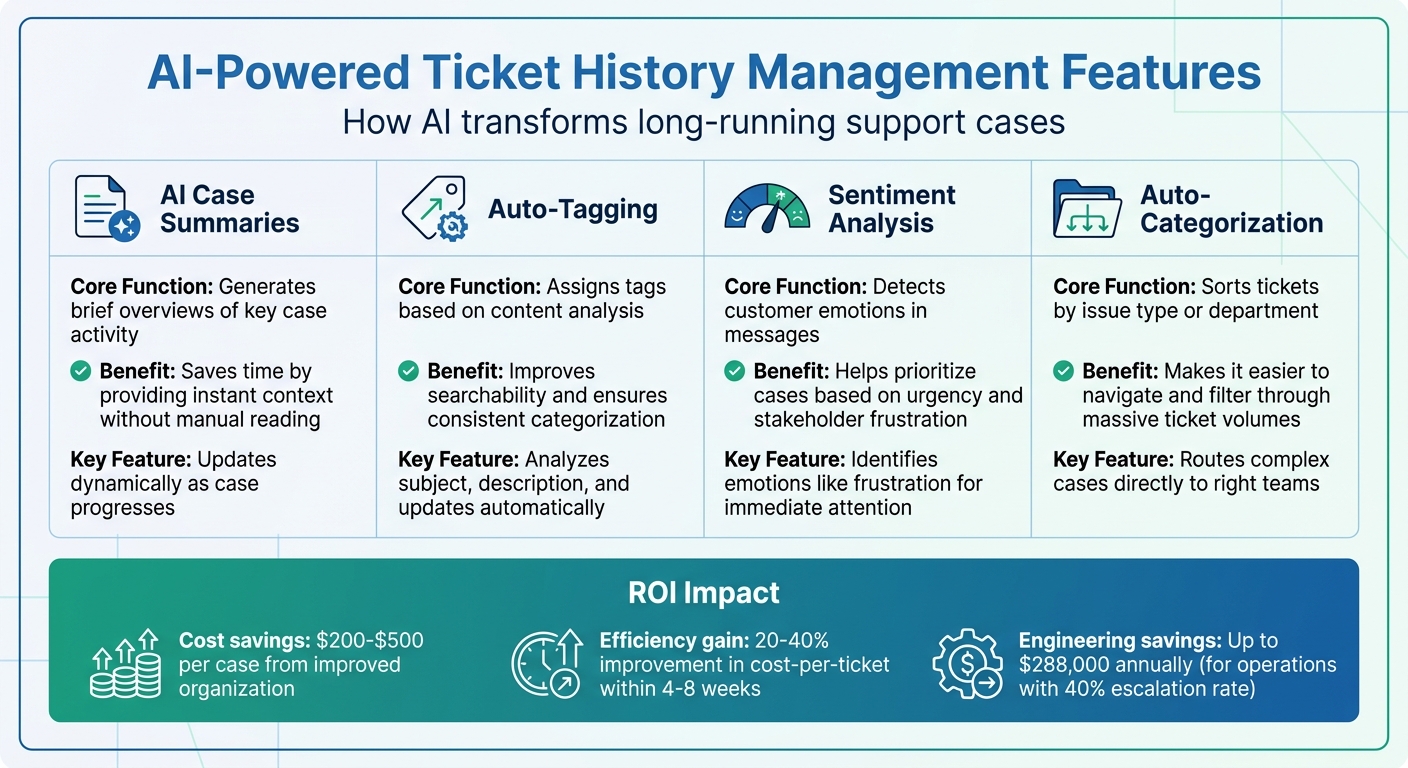
AI-driven case summaries simplify the process of understanding a ticket’s history by creating brief overviews of key activities. Instead of combing through every message, agents can rely on these summaries to get up to speed quickly. For example, a summary might outline the main problem, what actions have been taken, and the current status – perfect for handovers where missing critical details isn’t an option [6][7].
Supportbench‘s AI Case Summaries take this a step further by updating dynamically as the case progresses. The system pulls information from the subject line, initial description, and ongoing comments to craft summaries that reflect the latest developments [5]. This eliminates information overload while ensuring critical details aren’t lost. These summaries also pave the way for advanced tagging systems to further organize and classify cases.
Auto-Tagging and Categorization
AI-powered auto-tagging complements case summaries by analyzing ticket details – like the subject, description, and ongoing updates – to assign relevant tags automatically. These tags might include issue type, priority, product area, or even customer sentiment [4]. As the case evolves, the AI updates these tags to stay aligned with the latest context of the conversation.
This automated approach ensures consistent categorization across cases, making it easier to search historical data without worrying about manual errors or inconsistent labels. AI-driven sentiment analysis adds another layer by identifying customer emotions, such as frustration, which can help teams prioritize cases that need immediate attention. Integrating auto-tagging with workflows also allows complex cases to be routed directly to the right teams, streamlining the resolution process.
Here’s a quick breakdown of how these AI features benefit long-running cases:
| Feature | Core Function | Benefit for Long-Running Cases |
|---|---|---|
| AI Case Summaries | Generates brief overviews of key case activity | Saves time by providing instant context without manual reading [6][7] |
| Auto-Tagging | Assigns tags based on content analysis | Improves searchability and ensures consistent categorization [4] |
| Sentiment Analysis | Detects customer emotions in messages | Helps prioritize cases based on urgency and stakeholder frustration [4][5] |
| Auto-Categorization | Sorts tickets by issue type or department | Makes it easier to navigate and filter through massive ticket volumes [4] |
Making Long Ticket Histories Easy to Navigate
Long-running cases can quickly become a headache for agents, bogged down by endless updates. Scanning through these histories to find key details wastes time and energy. The fix? A combination of smart design and AI-powered tools that surface the right information when it’s needed most. By blending a clear structure with advanced search capabilities, agents can handle even the most complicated cases with ease.
Collapsible Sections
Collapsible sections are a game-changer for organizing long ticket histories. Instead of being buried under a mountain of text, agents are presented with a clean, structured outline. Each major update or milestone is tucked into its own section, ready to be expanded or collapsed as needed – just like flipping through chapters in a book. This setup allows agents to quickly scan for high-level details and dive into specifics only when necessary.
The trick lies in making those collapsed headers informative. For instance, instead of a vague "Update 3/15/2026", a header like "Escalation to Engineering Team – 3/15/2026" or "Customer Requested Refund Discussion – 4/22/2026" immediately provides context. Lengthy sections can be collapsed by default, preventing information overload right from the start. Tools like "Expand All" and "Collapse All" buttons add flexibility, letting agents move between summary and detailed views effortlessly [9].
While structured views simplify navigation, the real magic happens when AI-driven search tools come into play.
Search Past Cases with AI
Manually digging through ticket histories is inefficient and frustrating. That’s where AI Agent-Copilot steps in, offering a smarter way to search case histories. Agents can ask specific questions in plain language, and the system delivers precise answers instantly [8].
This capability isn’t limited to single cases. Agents can also search across multiple past interactions, uncovering patterns or identifying similar issues. This reduces mental strain and allows them to focus on solving the problem at hand. As Supportbench explains, "AI Agent-Copilot… can search previous interactions and retrieve relevant information" [8]. For teams managing complex, long-term customer relationships, this is a game-changer.
When paired with auto-tagging, AI search becomes even more effective. Tags organize unstructured data into clear categories, making it a breeze to filter updates and locate specific details within sprawling ticket histories. Together, these tools transform how agents tackle long-running cases, saving time and improving efficiency.
Common Mistakes That Make Ticket Histories Unreadable
Even the most skilled support teams can fall into habits that turn ticket histories into chaotic, unsearchable records. These issues not only slow down resolutions but can also erode customer confidence. To keep ticket histories clear and actionable, it’s important to recognize and address common pitfalls.
Here’s a closer look at two major challenges that often compromise ticket clarity:
Unstructured Notes and Too Many Attachments
Unstructured notes are a major culprit when it comes to messy ticket histories. Without a clear format, updates can end up being scattered and inconsistent, making it difficult to locate specific details. This lack of structure becomes more problematic as the data grows – consider this: unstructured data accounts for 80% to 90% of new enterprise information and is expanding three times faster than structured data [10].
Attachments can also add to the confusion. Scanned PDFs, images, and other files often require Optical Character Recognition (OCR) to be machine-readable [10]. When these files accumulate without proper metadata or tagging, they become nearly impossible to find. Searching through a pile of unorganized files wastes time and resources, as systems struggle to process various formats and exceptions [12].
The solution lies in standardization. Using consistent log formats like JSON can make notes both machine-readable and easy to search [12]. Intelligent Document Processing (IDP) tools can automate much of the work by extracting, classifying, and validating data from attachments like invoices or claim forms [10]. Adding metadata to unstructured files ensures they remain discoverable [11]. For complex B2B cases, employing Dynamic SLA management can help teams stay focused, especially during key moments like escalations or contract renewals.
Manual vs. AI-Driven History Management
Another challenge is the way ticket histories are managed. Fragmented data spread across multiple channels creates gaps in context [1]. Often, the most critical insights – like internal discussions or technical diagnoses – are left out of the ticket entirely. This forces agents to piece together information from scattered sources, wasting valuable time.
AI-driven systems offer a way to bridge these gaps. They act as a central hub, capturing customer interactions, internal conversations, and technical findings in a single, searchable repository [1]. These systems can also identify patterns across tickets, serving as an early warning system for recurring issues. By doing so, they build a self-updating knowledge base that helps prevent duplicated efforts.
| Method | Advantages | Disadvantages | B2B Suitability |
|---|---|---|---|
| Manual Management | Works well for basic workflows, assignments, and SLA tracking. | Loses critical context from internal discussions. | Low for long-term, complex cases. |
| AI-Driven Management | Offers instant context, pattern recognition, and automated escalation briefs. | Requires consistent input, like forwarding key communications. | High for account reviews and escalations. |
To make AI-driven systems effective, teams can adopt simple habits like recording quick 30-second voice summaries after calls or jotting down one-sentence root cause notes immediately after resolving an issue. Important emails and key Slack discussions should also be forwarded to the AI-enabled system. These small efforts ensure that insights remain searchable and prevent teams from having to start over when similar problems arise. Natural language queries can then surface past investigations and solutions, saving time and effort [1].
Conclusion
Managing long-running B2B support cases becomes much simpler when structured update templates, AI summarization, and smart navigation tools work together. This guide has explored how these tools complement each other to keep ticket histories clear and actionable.
Structured updates play a key role in standardizing how context is captured, while AI summarization solves the issue of context decay. Unlike manual summaries, which quickly lose relevance when customers reply, AI-driven summaries refresh automatically with every change in the ticket. This combination not only keeps operations running smoothly but also delivers measurable efficiency gains. In fact, moving from manual to automated history management can improve cost-per-ticket by 20–40% within just 4–8 weeks [2].
The savings in engineering time are equally impressive. For example, in operations with a 40% escalation rate and a cost of $300 per ticket, context loss can lead to $288,000 in annual engineering expenses [2]. By adopting continuous summarization and structured workflows, teams can recover that lost capacity and focus on resolving customer issues instead.
"Continuous summarization isn’t a feature upgrade – it’s the difference between context that helps and context that misleads." – Omar Nasser, Inkeep [2]
These strategies deliver real, quantifiable benefits to modern support operations. To maximize impact, start by targeting areas where context loss is most damaging, such as high-escalation queues. Use metrics like "tickets returned for missing context" to measure success, and ensure AI tools integrate seamlessly into your CRM to avoid workflow disruptions. Forwarding key communications and recording brief voice summaries can also help keep critical insights easy to find.
When ticket histories are clear and accessible, collaboration improves, handoffs become seamless, and teams spend less time piecing together the past. Instead, they can focus on moving cases forward. This is the difference between support operations that scale effectively and those that struggle to manage complexity.
FAQs
What should every long-case ticket update include?
Every update for long-case tickets should focus on delivering clear and concise information to keep everyone in the loop. Here’s what to include:
- A brief summary of the current status and progress.
- Specific details about actions taken or issues resolved.
- Clear next steps or planned actions.
- Information on any changes, escalations, or delays.
- Consistent updates at scheduled intervals to maintain transparency.
Following this format ensures ticket histories remain organized and easy to track.
How do we keep AI summaries accurate as tickets change?
Keeping AI summaries accurate as tickets evolve requires consistent updates to reflect the latest details. AI tools can assist by automatically tracking updates, comments, and notes, ensuring summaries remain up-to-date and relevant. Fine-tuning AI prompts and configurations also allows the summaries to adjust to shifting contexts, cutting down on manual work and reducing the chances of outdated or incorrect information slipping through.
How can we reduce attachment clutter without losing context?
To keep ticket histories clean and easy to navigate, leverage AI-driven tools to condense long ticket histories and bulky attachments into short, actionable updates. Use clear formatting for entries, skip adding duplicate attachments, and archive older files regularly. This way, critical information stays accessible through brief notes or references, making it simpler for everyone involved to understand and manage the ticket history.