


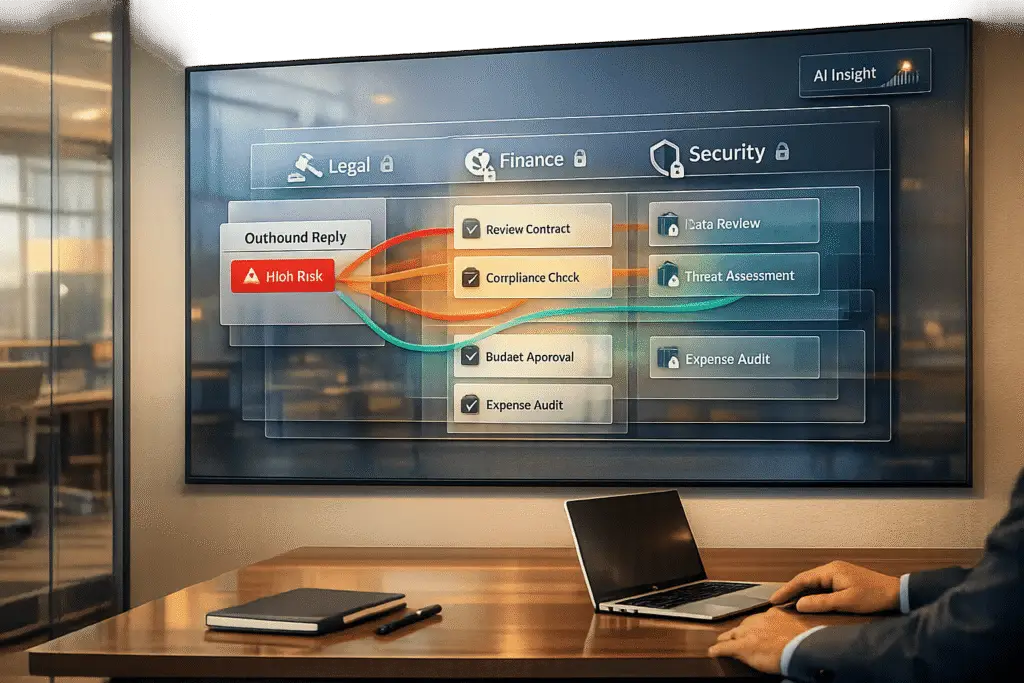
Managing approvals for outbound replies tied to legal, financial, or security matters is critical to mitigating risks like regulatory violations, reputational damage, or unauthorized commitments. Here’s how to create an efficient, risk-conscious approval workflow:
- Focus on High-Risk Messages: Only flag replies involving contracts, refunds, sensitive data, or regulatory concerns for review. Routine tasks (e.g., password resets) can be automated if AI confidence exceeds 90%.
- Assign Clear Roles: Match each approval to the right expert (e.g., legal, finance, or security) and use role-based access controls to limit unnecessary access.
- Automate Routing: Use predefined rules to direct approval requests to the correct team, prioritizing parallel reviews to avoid bottlenecks.
- Leverage AI: AI tools can draft responses, flag compliance issues, and assign risk scores, ensuring only sensitive or uncertain replies require human oversight.
- Monitor and Refine: Regularly audit the process to identify delays, adjust thresholds, and improve AI accuracy, reducing manual intervention over time.
Efficient approval workflows reduce errors, speed up response times, and maintain compliance by balancing automation with human expertise.
Step 1: Identify Which Replies Need Approval
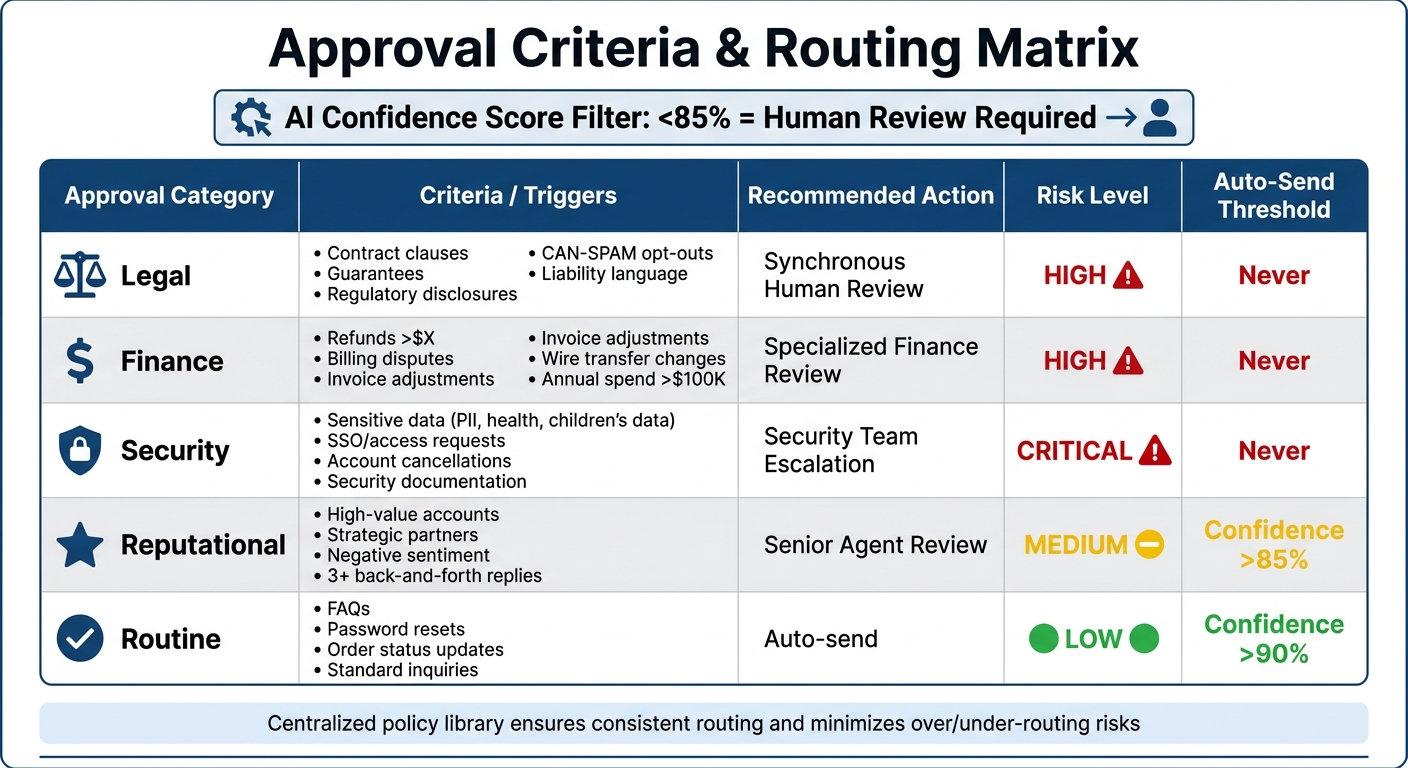
Approval Criteria and Thresholds for Outbound Reply Management
Not every outgoing message requires a detailed review. Focus on identifying high-risk communications – those that involve sensitive data, financial transactions, or binding commitments – and leave routine interactions to automation.
Start by categorizing messages into two groups: high-risk communications and routine ones. High-risk messages include anything that involves contracts, sensitive data, or financial matters. On the other hand, routine messages, such as password resets or order updates, can be sent automatically if the AI’s confidence score exceeds 90% [1].
"The goal is not to remove Legal. The goal is to make Legal’s time count by only routing the exceptions that deserve attention." – Ameya Deshmukh, EverWorker [8]
Once high-risk messages are defined, establish specific triggers for each department to ensure proper oversight.
Common Scenarios That Require Approval
Messages that fall under high-risk criteria should always be reviewed. For example:
- Legal oversight: Flag any communication that references contract revisions, guarantees, or regulatory disclosures like CAN-SPAM opt-outs. Messages containing liability language or performance claims that lack substantiation also require legal review before being sent.
- Finance approvals: These are necessary for messages involving refunds, billing disputes, invoice adjustments, or changes to payment terms. Any mention of wire transfers or unique discount structures should also be routed to the finance team [6].
- Security reviews: Replies involving sensitive data – such as health information, children’s data, or personally identifiable information (PII) – should be escalated to the security team. This also applies to requests for SSO access, account cancellations, or security documentation.
Additionally, high-value accounts, strategic partners, or messages with negative sentiment should be flagged for review. If a reply involves regulatory concerns or escalated customer dissatisfaction, it’s better to involve a human reviewer [3].
Set Clear Approval Thresholds
Ambiguity in policies can slow down processes or lead to errors. Instead, establish clear criteria for approvals. For instance:
- Require VP Finance approval for refund requests involving significant amounts or billing disputes.
- Route messages to legal if they involve an annual committed spend exceeding $100,000 [6].
AI confidence scores can also act as a filter. If the AI drafts a response with a confidence score below 85%, flag it for human review. This ensures that uncertain or low-quality replies don’t reach customers unchecked [3].
Another trigger to consider is complexity. For example, if a conversation has gone back and forth three or more times without resolution, it’s often a sign that the issue requires a senior agent’s attention rather than an automated response.
Here’s a quick reference table for approval criteria:
| Approval Category | Criteria / Triggers | Recommended Action |
|---|---|---|
| Legal | Contract clauses, guarantees, regulatory disclosures, opt-outs | Synchronous Human Review |
| Finance | Refunds >$X, billing disputes, wire transfer changes | Specialized Finance Review |
| Security | Sensitive data use, SSO/access issues, security docs | Security Team Escalation |
| Reputational | High-value accounts, negative sentiment, 3+ replies | Senior Agent Review |
| Routine | FAQs, password resets, order status | Auto-send (if confidence >90%) |
To streamline operations, compile these thresholds into a centralized policy library that your AI can consult during message composition [8]. This approach minimizes guesswork, avoiding over-routing (which slows processes) or under-routing (which increases risk).
sbb-itb-e60d259
Step 2: Assign Approvers and Set Permissions
After identifying which replies require approval, the next step is deciding who will review them. The key is to align each approval task with the right expert based on their knowledge and responsibilities.
Define Roles and Responsibilities
Assigning approvers should be based on their expertise and decision-making authority. For example, financial transactions should go to someone with the appropriate financial credentials, while responses involving sensitive data or compliance issues should be reviewed by compliance officers or other specialists. For critical actions – like issuing large refunds, modifying contracts, or granting access – dual approval is a smart safeguard to avoid reliance on a single decision-maker.
To streamline the process, match each type of message to the relevant expert. For instance, legal threats or regulatory concerns should be routed directly to senior agents or legal professionals.
"A shared approval inbox undermines control; approval must be tied to specific roles." – Samuel Chenard, Co-founder, LobsterMail [2]
Use Role-Based Access Controls (RBAC)
Not every approver needs to see every detail. Role-Based Access Controls (RBAC) ensure that reviewers only view the information necessary to make informed decisions. For instance, finance approvers might need access to budgets and payment terms, while legal reviewers only require contract details and signature authority – not financial specifics.
Permissions should be configured dynamically based on role, department, and workflow stage, using organizational directories to manage access. This setup minimizes disruptions when team members leave or shift roles.
To avoid delays, assign backup reviewers and implement time-sensitive escalation rules. For example, escalate finance approvals if they remain pending for over 24 hours, or prioritize urgent complaints within 30 minutes. When the context is clear, manual approvals typically take less than 30 seconds [3]. Having a pool of qualified reviewers ensures the process stays efficient without compromising security.
With roles assigned and permissions in place, the next step is automating the routing process to ensure approvals happen on time.
Step 3: Automate Approval Routing and Triage
Once roles and permissions are set, the next step is automating the routing process to cut down on delays and errors.
Manual routing can bog things down, creating unnecessary bottlenecks that a modern support CRM is designed to eliminate. Automation solves this by using predefined rules to instantly direct approval requests to the right people.
Create Automated Workflows
Design a single workflow that routes requests based on criteria like policy, risk, and thresholds, instead of relying on separate department-specific systems [6]. A unified intake process can capture key details – such as spend amount, customer tier, or data sensitivity – and use this metadata to drive branching logic for approvals.
For instance, a contract exceeding $50,000 and involving external data could automatically route to both Legal and Security teams at the same time. Whenever possible, prioritize parallel routing, which allows multiple approvers to review simultaneously. Reserve sequential routing for cases where one step depends on the outcome of another, like when legal changes impact financial terms that finance must re-check [6].
Set clear triggers with specific rules. Instead of vague instructions like "get sign-off", use defined conditions such as "requires VP Finance approval if annual spend exceeds $100,000." Add timeout and escalation protocols to keep things moving. For example, if a primary approver doesn’t respond within 24 hours for routine requests or 30 minutes for urgent ones, the system should automatically notify backup reviewers [2]. These well-defined rules pave the way for AI-powered triage to refine the process even further.
Use AI to Prioritize Requests
Not all approval requests are created equal. AI can analyze incoming requests and prioritize them based on factors like customer account value, urgency, and sentiment [3]. For example, responses with an AI confidence level above 85% can be sent automatically, while uncertain or low-confidence drafts are flagged for human review [3].
Topic-based triggers are another safeguard to ensure sensitive issues get proper attention. Requests involving legal threats, high-dollar refunds, or account cancellations should always require human oversight. For enterprise accounts, routing all responses through a human reviewer may be a smart move to maintain top-tier service.
"The best implementations use conditional logic so that only uncertain, sensitive, or high-stakes responses require approval while routine answers go through automatically." – Twig [3]
Teams that integrate AI feedback loops often see a dramatic improvement. Within three months, the proportion of responses needing human intervention typically drops from 40% to just 15%, as the system learns from past corrections. The key is providing reviewers with a clear decision summary that explains what action is needed, why it’s required, and what happens next. This approach can cut approval times to under 30 seconds per request [3][4].
Step 4: Use AI for Compliance Checks and Draft Creation
AI doesn’t just route requests – it also identifies compliance issues and drafts responses, saving approvers a significant amount of time.
AI tools can instantly scan drafts to catch missing disclosures or potentially risky language. They ensure required opt-out language is included, flag prohibited claims, and redact sensitive personal details like email addresses or account keys before the draft even reaches an approver [11]. This proactive approach, often called "shift-left", catches issues early in the drafting process, saving time and effort down the line.
These features are a critical part of a more efficient approval workflow, especially for responses involving legal, financial, or security concerns.
AI Compliance Checks
AI compliance tools automatically enforce company policies by comparing drafts against established rules. For legal matters, they check that CAN-SPAM disclosures are included, subject lines are accurate, and headers aren’t misleading [8][12]. In the financial realm, they monitor refund policies, pricing consistency, and payment term changes [11][9]. For security, they automatically identify and redact sensitive information such as addresses, account keys, or IDs [11].
The system assigns a risk score to each draft, ranging from 0.0 to 1.0:
- Low-risk (0.00–0.20): Automatically sent with a soft log.
- Medium-risk (0.21–0.49): AI rewrites the draft and rechecks it.
- High-risk (0.50–0.79): Sent to a human reviewer with specific flagged issues.
- Critical-risk (0.80–1.0): Blocked and escalated to a team lead immediately [11].
Organizations that use these automated checks report a 94% reduction in errors across contracts and documents [9].
"Trust thrives when problematic answers never make it beyond draft form." – Typewise [11]
By integrating these safeguards, compliance checks become a seamless part of the response drafting process.
AI-Generated Draft Responses
AI can also handle the heavy lifting of creating initial drafts by pulling from your knowledge base, past cases, and company guidelines. This shifts the approver’s role from writing an entire response to simply reviewing and fine-tuning. However, the effectiveness of these drafts depends entirely on the quality of the source material – teams need a well-organized and validated knowledge base before enabling AI drafting [5].
Using Approval Mode ensures that every AI-generated draft undergoes human review for tone and accuracy [1][2]. Many teams only allow auto-sending for specific categories once AI drafts are approved without changes at least 90% of the time [1]. In mature systems, 40–60% of emails are auto-sent, with the rest requiring manual approval [1]. With a user-friendly reviewer interface offering clear context and quick actions, most approvals take under 30 seconds [3].
Each human edit or rejection serves as valuable training data. Teams that implement feedback loops often see the need for manual approval drop from 40% to just 15% within three months, as the AI improves with every correction [3]. This streamlined process speeds up reviews across all support channels, making workflows faster and more efficient.
Step 5: Monitor and Improve Approval Processes
Once you’ve streamlined routing and introduced AI-driven compliance in Step 4, the next step is to keep a close watch on how the process unfolds. This isn’t a "set it and forget it" situation – maintaining efficiency requires ongoing attention and refinement.
Creating an approval workflow is just the starting point. The real value lies in tracking its performance and using data to make improvements. Without monitoring, bottlenecks can remain hidden, compliance gaps might expand, and response times could lag, frustrating customers.
To keep things running smoothly, focus on measuring both speed and quality. Key metrics include cycle time, approval latency, throughput, and rework rates. These indicators help pinpoint where delays or inefficiencies occur [13]. High-performing teams go beyond averages by also analyzing the 75th and 90th percentiles. This approach helps uncover those "long tail" issues – requests that get stuck and might otherwise be overlooked [13]. These metrics serve as the foundation for regular audits.
"Approval speed is one of the clearest indicators of how well an operations function is running." – Jordan Mercer, Senior Editorial Strategist [13]
Regular audits are critical for identifying deeper problems, like single points of failure. For example, processes can grind to a halt if a key approver is unavailable or overwhelmed. Similarly, approval chains with too many unnecessary steps can bog things down [14]. Audits also create feedback loops that turn raw data into actionable insights [15]. If you notice frequent rejections from Legal or Finance, the issue might not be with the reviewers but with incomplete or inaccurate data collected earlier in the process [14]. These audits not only refine human reviews but also improve AI performance over time.
To keep the system evolving, feed approval data back into your AI. This helps the system learn from past rejections and improve its first-pass approval rates while keeping escalations low – ideally under 10% [14][16]. Each edit or rejection becomes a learning opportunity for the AI, allowing it to handle similar cases more effectively in the future [3]. Over time, this iterative process can push first-pass approval rates to at least 85%, with escalations staying below 10% [14]. However, if approval rates climb above 95%, it might indicate that your thresholds are too strict, hinting at opportunities to automate further [16].
Common Problems in Approval Processes and How to Fix Them
Even with efficient workflows in place, issues like delays and miscommunication can still crop up. These two problems are the biggest culprits when it comes to slowing down approval processes and frustrating both teams and customers. Thankfully, with the right strategies, they can be addressed.
Reduce Approval Delays
Delays often occur when there’s confusion about who is responsible for reviewing a document. For instance, reviewers may not know if they’re the primary decision-maker, the final approver, or just copied for reference. This lack of clarity can leave documents stuck in limbo [10].
Another common issue is sequential handoffs. When one approver lags, the entire process grinds to a halt [17][2]. On top of that, overloading reviewers with routine, low-risk tasks can distract them from focusing on the more critical exceptions, further compounding delays.
To tackle these challenges, consider implementing parallel reviews. This allows departments like legal, finance, and security to work on different parts of a document at the same time, speeding up the overall review process [17]. For example, Equinix adopted Conga CLM in December 2025 and cut their contract lifecycle from 14 days to just 90 minutes by enabling low-risk agreements to bypass extra reviews and setting up auto-escalation for high-value deals [17].
Another effective approach is conditional routing. This method automates the approval of low-risk items while flagging high-value or non-standard documents for human review [10][3]. Veracode applied this strategy in 2025 by replacing email and spreadsheet workflows with a centralized CLM system. The result? Legal reviews were reduced to a single round, and contract renewal times dropped from seven minutes to under one minute [17].
"The fastest approval workflow is not the one with the fewest approvers. It is the one with the fewest unnecessary approvers, the clearest decision rights, and the best exception handling." – Daniel Mercer, Senior SEO Content Strategist [10]
But delays aren’t the only issue. Miscommunication across departments can also wreak havoc on workflows.
Improve Cross-Department Coordination
Miscommunication often arises from fragmented workflows. When systems are disconnected, critical updates can get lost. For instance, legal might make redline changes that impact payment terms, but finance never gets notified because the system doesn’t automatically update them [6].
The key is to shift from department-focused workflows to processes built around control logic – like budget or risk [6]. Start with a single intake form that captures standardized metadata (e.g., vendor name, spend, data sensitivity). This metadata can then trigger automated workflows, ensuring all relevant departments are looped in simultaneously [6][17].
Another game-changer is a centralized collaboration workspace. By keeping all redlines, comments, and document versions in one place, you eliminate the chaos of email chains and ensure everyone is working off the same version [6][17][7]. To keep things on track, set approval SLAs for each department. This helps identify bottlenecks and ensures reviews remain predictable [17][3]. Additionally, using role-based access controls (RBAC) can streamline the process by showing each team only the fields relevant to their role – like GL codes for finance or indemnity clauses for legal [6].
"Most approval workflows fail because they are designed around org structure, not control logic." – ocrdirect.com [6]
Finally, don’t overlook "shadow workflows." If employees are still forwarding documents via email or chat, your automation isn’t complete. These hidden manual steps can lead to broken audit trails and inconsistent turnaround times [10]. Addressing these gaps is crucial for a truly efficient process.
Conclusion: Build Faster, Compliant Approval Workflows
Streamlined approval workflows speed up response times while maintaining compliance. By focusing on the steps outlined earlier, you can create a system that balances efficiency with accountability.
Start by designing workflows around control requirements instead of rigid hierarchies. Standardize metadata collection during intake – fields like spend amount, data sensitivity, and jurisdiction help automate routing with precision. Use conditional logic to handle high-risk scenarios and implement parallel routing for simultaneous reviews by legal, finance, and security teams. Routine, low-risk tasks can be auto-approved, while shift-left compliance checks catch issues early in the drafting phase, reducing bottlenecks before they reach the approval stage [3][8].
AI tools, such as Supportbench, bring these practices to life by automating policy checks for every message. Teams adopting AI-driven workflows often see manual review efforts drop significantly within just three months, as the system adapts to reviewer input [3]. With AI assistance, reviewers get streamlined context and single-click approval options, speeding up the entire process [3].
"An AI agent doesn’t eliminate compliance. It operationalizes it – turning policy into a repeatable pre-check that runs every time." – Ameya Deshmukh, EverWorker [8]
This approach ties together risk-based routing and AI-powered pre-checks into a cohesive strategy. The key isn’t minimizing the number of approvers but eliminating unnecessary ones, clarifying decision-making authority, and ensuring effective exception management. Done right, your approval workflows will be both fast and compliant.
FAQs
How do we decide what really needs approval?
To figure out which outbound replies need approval, consider the complexity, risk level, and compliance requirements of each message. Replies that include sensitive or regulated information – especially those with potential legal, financial, or security implications – should be routed to an approval queue. On the other hand, straightforward, low-risk responses, such as simple acknowledgments or routine updates, can often be sent automatically, provided there’s a reliable knowledge base in place. Using AI tools to flag messages for review can help maintain both compliance and operational efficiency.
What happens if an approver doesn’t respond in time?
If an approver misses a deadline, it can throw a wrench into workflows, stall decisions, and hold up progress. This often happens due to bottlenecks, the absence of timely reminders, or poor routing processes. To tackle this, AI-powered tools can be a game-changer. These systems send intelligent reminders and offer real-time visibility into the approval process, keeping things on track and ensuring smoother operations.
How do we prove approvals and changes for audits?
Organizations can maintain transparency and compliance during audits by implementing secure workflows that generate detailed and traceable audit trails. These workflows should record essential information, such as who approved a change, the time of approval, and the specific conditions involved. By using automated routing systems and integrated audit trails, every approval is documented, timestamped, and stored in an easily accessible format. This approach ensures a clear record of actions, simplifying the audit process and reinforcing accountability.






