


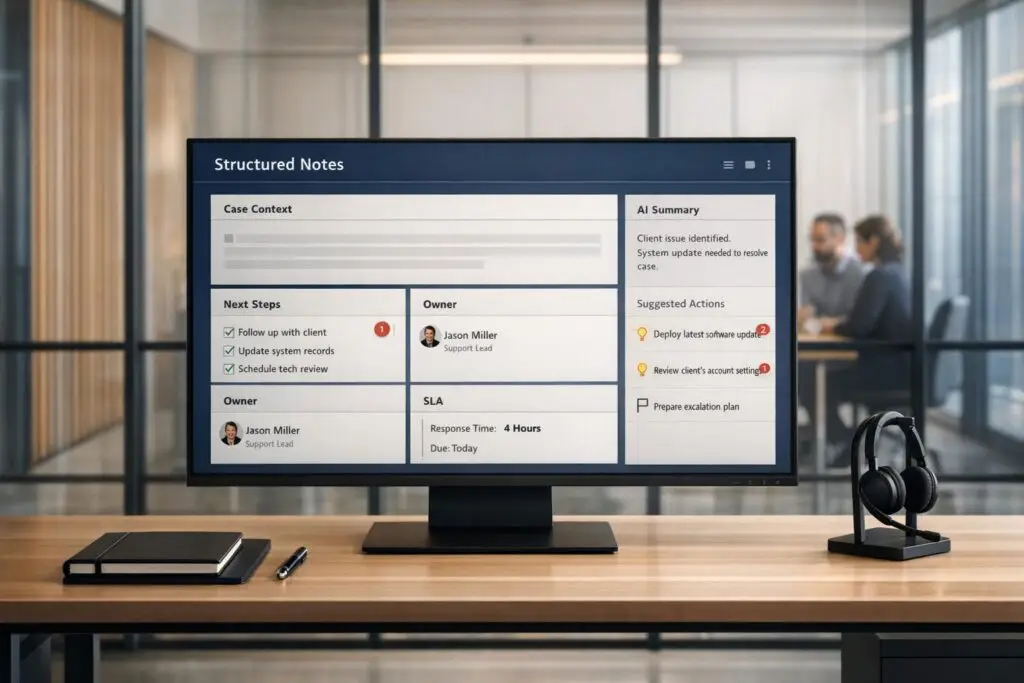
In B2B support, teams often waste 3 hours coordinating for every 1 hour solving problems because critical details are scattered across emails, Slack, and ticketing systems. This disorganization leads to repeat issues, slower resolutions, and frustrated customers. The solution? Structured notes.
Structured notes centralize key information – like technical findings, troubleshooting steps, and customer feedback – into one searchable source. This reduces redundant communication, improves team alignment, and transforms support history into a knowledge-centric support system.
Key takeaways:
- Reduce wasted time: Eliminate fragmented communication by consolidating case details.
- Improve efficiency: Use templates to document critical information consistently.
- Leverage AI: Automate summaries and identify recurring issues faster.
- Cut costs: Avoid duplicate efforts and lower support costs.
Why Too Much Internal Communication Hurts Team Performance
In B2B support, the well-meaning effort to "keep everyone in the loop" can often backfire. Instead of resolving issues, teams end up wasting time reconnecting fragmented case details. The problem isn’t the act of communicating – it’s the way information gets scattered. When critical details are buried across Slack threads, email chains, and ticketing systems, agents are forced to piece together the context before they can even begin solving the problem.
This scattered communication creates "compression points", where crucial details are lost during handoffs. Richie Aharonian from Unito captures this frustration perfectly:
"You’re about to spend your evening reconstructing days of troubleshooting from Slack messages and email threads because someone, somewhere, marked the ticket as ‘in progress’ without documenting what progress meant." [2]
The result? Poor communication leads to high customer disloyalty and repeat contacts. 96% of customers who face high-effort interactions – like needing to follow up multiple times for the same issue – report becoming disloyal, compared to just 9% in low-effort scenarios [3]. For many enterprise SaaS companies, repeat contacts account for 20% to 30% of total support volume [3]. This is a direct consequence of poor internal alignment, which delays root-cause resolution, slows down response times, and drives up operational costs.
The Real Cost of Scattered Communication
Unorganized communication, like ad-hoc Slack updates or email threads, doesn’t just waste time – it also increases costs. Consider this: the average live agent interaction costs $6 to $12, while self-service options cost under $0.25 [3]. When agents spend their time chasing down context instead of solving problems, those costs quickly add up.
Neelam Chakrabarty from Querri highlights this issue bluntly:
"The most expensive ticket your support team handles is not the complicated one. It is the second one on the same issue." [3]
This redundancy happens because the history of attempted fixes often gets trapped in private conversations or isolated systems [2]. Teams end up repeating failed solutions, leading to longer resolution times and frustrated customers who have to explain their problem all over again. Beyond the financial impact, this misalignment slows resolution efficiency and damages the customer experience.
The Alignment Problem in Complex B2B Support
In high-stakes B2B environments, misalignment often shows up as conflicting prioritization systems. For instance, what’s labeled as "High" priority in a CRM might not correspond to a "P1" in an engineering bug tracker. This disconnect can result in critical issues being deprioritized [2]. Meanwhile, tickets marked "In Progress" may sit idle for days because important discussions are happening in unconnected channels [2] [1].
Escalation meetings often devolve into "reconstruction exercises", with the first 15–20 minutes spent piecing together what’s already happened instead of making decisions [1]. On top of that, support data is typically designed for day-to-day operations rather than strategic insights. This means key information about recurring product issues rarely makes it to the engineering or product teams that could address the root causes [3]. Without a clear way to identify patterns, recurring problems are treated as isolated incidents, perpetuating a cycle of inefficiency [1].
Structured notes and better documentation practices offer a way to break out of this cycle, making it easier to align teams and tackle systemic challenges effectively.
sbb-itb-e60d259
How Structured Notes Cut Chatter and Improve Alignment
Structured notes tackle internal communication problems by creating a shared, centralized context alongside your tickets. Instead of wading through Slack threads, email chains, and scattered meeting notes to piece together a case’s history, structured notes gather all relevant details into one searchable hub. This means teams can stop asking, "What happened?" and focus on solving the issue.
The benefits are immediate. Workers switch between apps an average of 1,200 times a day [4], which adds to cognitive overload. Structured notes ease this burden by eliminating the need to piece together fragmented information. The real challenge isn’t tracking tasks – it’s maintaining context. While ticketing tools handle workflows and status updates, structured notes capture the deeper insights: the diagnosis, troubleshooting efforts, and customer history that accelerate problem-solving.
Creating a Single Source of Truth for Case Details
Structured notes bring together all customer-facing communication, internal discussions, and technical findings in one place [1]. This eliminates the need to sift through scattered records, ensuring that every critical detail is housed in a single case record. It also prevents the common problem of wasting the first 15 to 20 minutes of a meeting just trying to reconstruct what’s already happened.
A crucial feature here is field mapping. This ensures that key details – like "Customer Impact", "Affected Users", or "Troubleshooting Steps" – stay with a ticket as it moves across systems [2]. For example, when a case escalates from a support platform to an engineering bug tracker, structured notes ensure no vital information gets lost. Richie Aharonian from Unito puts it this way:
"Every handoff is a compression point. Information gets compressed into whatever the receiving system can accept." [2]
By consolidating these details into a single source, teams can rely on standardized templates to further streamline information recording.
Using Standardized Templates for Consistent Updates
Once all the essential details are centralized, standardized templates ensure that every update adds value to the case history. These templates guide agents to document what’s important – whether it’s the root cause, resolution steps, customer feedback, or next actions – without unnecessary clutter. For instance, instead of a vague note like "Customer is having login issues", a template might prompt for specifics, such as "Intermittent 403 errors occurring after the latest update, affecting multiple users."
With only 14% of workers feeling fully aligned with business goals [4], these templates create a shared framework that keeps everyone on the same page, ensuring clarity and consistency across teams.
Using AI to Auto-Generate Note Summaries
AI takes this a step further by automating note summarization, saving time and reinforcing alignment. It can synthesize a case’s history – including reported issues, investigations, and attempted fixes – in seconds, eliminating the need for manual summaries [1]. This means meetings can start with everyone on the same page, rather than spending time reconstructing the past.
AI also enables smarter documentation. Instead of combing through wikis or asking colleagues for help, team members can simply query, "How do we handle X?" and get an instant, synthesized response based on months of captured notes [5]. Additionally, AI can spot recurring issues across cases and alert teams before minor problems escalate into widespread ones [1]. The outcome? Fewer repeat issues, quicker resolutions, and less wasted time overall.
Step-by-Step Guide to Implementing Structured Notes
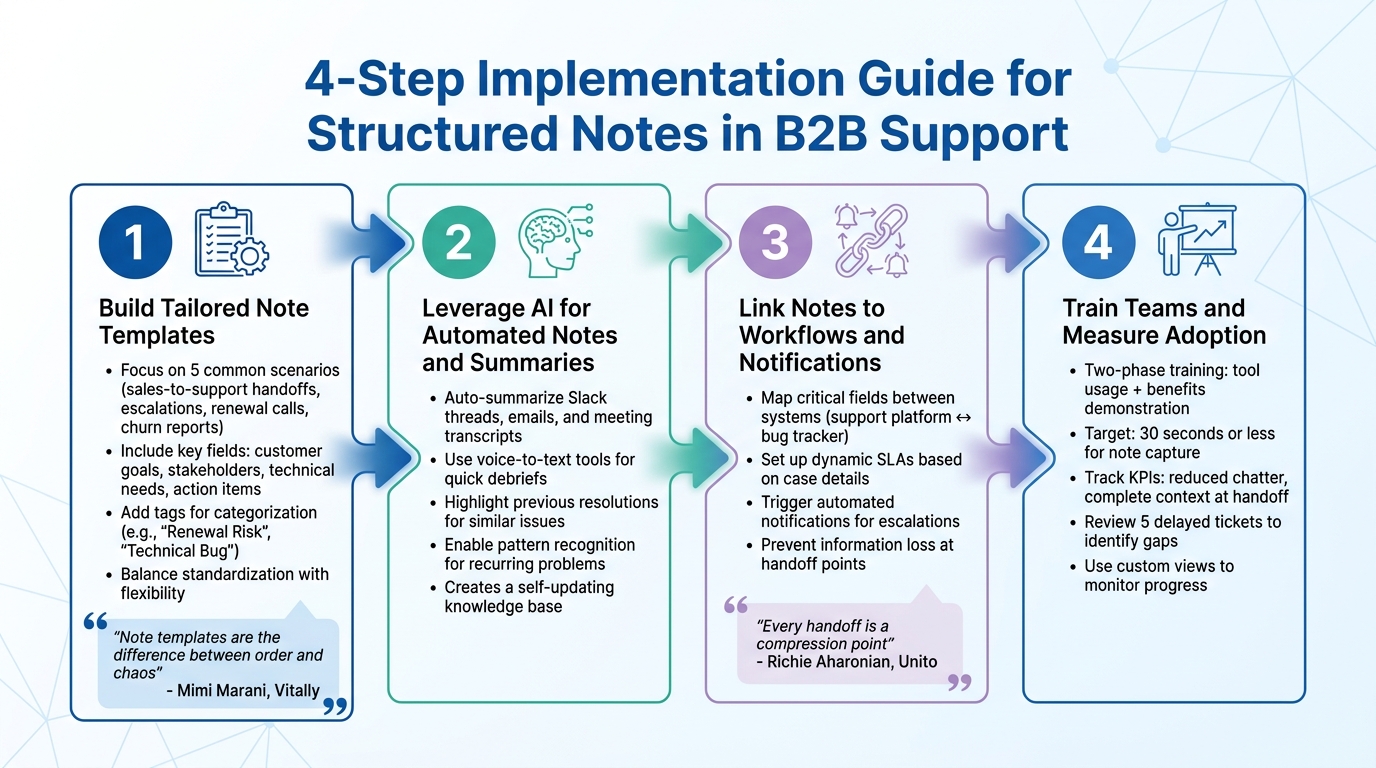
4-Step Guide to Implementing Structured Notes in B2B Support
Move from scattered communication to well-organized notes by using clear templates, AI tools, and integrating workflows.
Step 1: Build Tailored Note Templates
Start by focusing on the five most common scenarios your team encounters – like sales-to-support handoffs, escalations, renewal calls, or churn reports. For each, design a template that captures the key details without overloading users. As Mimi Marani, Senior CSM at Vitally, says:
"Note templates are the difference between order and chaos" [7].
For example, a sales-to-CS transition template should include fields like customer goals, key stakeholders, technical needs, and action items. An escalation template might include sections for issue summaries, steps to reproduce the problem, and the impact level [7][9]. The idea is to balance standardization with flexibility, ensuring all critical information is captured while leaving room for specific details.
Incorporate tags to categorize interactions, such as "Renewal Risk" or "Technical Bug", making it easier to generate reports for leadership [6]. Advanced templates can also include variables that pull customer data automatically, reducing manual input errors [7]. Keep the templates adaptable for unique situations but structured enough for consistency across the team.
Step 2: Leverage AI for Automated Notes and Summaries
Once templates are in place, bring in AI to simplify note-taking further. AI can automatically summarize Slack threads, email conversations, and meeting transcripts, pulling scattered details into one cohesive note [1]. This eliminates the need for manually piecing together case histories.
Use voice-to-text tools to let agents record quick debriefs after calls – AI can then turn these into structured, searchable notes [1]. AI can also highlight previous resolutions for similar issues, creating a live knowledge base that updates itself. With pattern-recognition capabilities, you can answer questions like "What were the most reported issues this month?" – helping you identify recurring problems early [1].
Step 3: Link Notes to Workflows and Notifications
Structured notes become even more impactful when they actively drive workflows. Map critical fields like "Customer Impact" or "Troubleshooting Steps" between systems, such as linking your support platform to an engineering bug tracker. Richie Aharonian from Unito explains the challenge:
"Every handoff is a compression point. Information gets compressed into whatever the receiving system can accept" [2].
Set up notes to trigger dynamic SLAs based on case details. For example, if a note is tagged "Escalation Required", automated notifications can alert the right stakeholders immediately, ensuring no critical updates are overlooked. This approach prevents important information from getting buried in ticket queues and keeps teams aligned.
Step 4: Train Teams and Measure Adoption
Standardizing note-taking with templates and AI tools can reduce redundant communication and improve team alignment.
Roll out training in two phases: first, teach teams how to use the templates and tools; second, show them how structured notes minimize repetitive tasks, like answering the same questions or attending unnecessary meetings. Stress that capturing notes should take 30 seconds or less – whether it’s a quick voice memo or a concise sentence summarizing the root cause [1].
Track success with KPIs like reduced internal chatter and better alignment scores, such as the percentage of cases with complete context at handoff. Review five delayed tickets to identify where information was lost between systems, and use these insights to refine templates and workflows [2]. Managers can also use custom views – like "Tasks breaching due date" or "Service Summary" – to monitor progress and address bottlenecks [8].
Common Mistakes to Avoid When Using Structured Notes
Structured notes can be a powerful tool, but only if teams avoid a few common traps. By identifying these pitfalls, you can create a system that teams actually use – one that boosts both alignment and efficiency.
Making Templates Too Complex or Rigid
If templates are too complicated or rigid, they can frustrate users and discourage adoption. Templates packed with excessive required fields slow down agents who need to resolve tickets quickly. In fact, research shows that overly complex systems often degrade faster than the content they’re meant to organize [11].
A better approach? Stick to three to five essential fields that focus on actionable information, such as root cause, customer impact, and next steps. Build in flexibility so agents can add relevant context without being forced into unnecessary checkboxes. The goal is to make note-taking quick – ideally, it should take no more than 30 seconds [1]. If your template takes longer, simplify it and adjust based on team feedback.
Ignoring AI-Generated Summaries
AI-driven summaries and KB article creation can save time and reduce redundant work, but ignoring them can lead to inefficiencies. Without clear summaries, teams often waste time reconstructing events during meetings – spending 15 minutes figuring out “what happened” instead of addressing the problem [1]. Worse, downstream teams like Engineering might redo investigations already completed by Tier 1 support, delaying resolutions [2].
To avoid this, make AI summaries your starting point, not an afterthought. Configure them to bridge gaps between systems. For instance, ensure that a "Customer Impact" field in your support platform aligns with a "Priority" field in your bug tracker [2]. This minimizes the risk of critical details slipping through the cracks. Imagine a scenario where a business-critical outage is misclassified because a summary failed to convey its urgency – Engineering might deprioritize what should have been a P1 ticket [2].
Setting Poor Access Controls on Notes
Managing access to structured notes is just as important as designing templates and using AI. If access is too open, teams may face information overload. On the flip side, overly restrictive controls can isolate key details from people who need them. The solution? Role-based permissions that balance accessibility with clarity.
For executives, use AI to create concise escalation briefs that summarize case histories without overwhelming them with technical details [1]. For teams like Sales or Product, grant access to notes tagged with relevant themes – such as "Renewal Risk" or "Feature Request" – so they can stay informed without wading through unrelated issues. Ultimately, structured notes should act as a unifying layer, capturing key outcomes from tools like Slack, email, and Jira in one secure and accessible platform [1].
Practical Templates for Complex B2B Support Scenarios
Using a structured approach to note-taking, these templates are designed to bring order and clarity to complex B2B support situations. By consolidating scattered details into a single, reliable source, these templates ensure that teams are aligned and equipped to handle challenges effectively. Each template focuses on specific scenarios, helping teams document interactions clearly and with purpose.
Template 1: Renewal Risk Case
This template is all about identifying potential risks to customer renewals by examining the relationship timeline. Key fields to include:
- Strategic objectives: What the customer aims to achieve with your product.
- Current product footprint: The systems and licenses they’re currently using.
- Health signals: Metrics like usage trends, support volume, and overall sentiment.
- Open risks: Unresolved issues, such as escalations or pending feature requests.
- Next steps: Clear action items, complete with owners and deadlines.
The goal here is to provide a comprehensive view of the customer relationship, making it easier to spot and address churn risks proactively [12].
Template 2: Multi-Stakeholder Issue
When multiple teams are involved in managing a single account, this template ensures everyone stays on the same page. Here’s what to include:
- Owner matrix: A breakdown of stakeholders, their roles (e.g., IT Director, CFO), and their priorities or perceptions.
- Linked customer notes: Context from past interactions to avoid redundancy.
- Internal planning notes: Insights for cross-functional collaboration between sales, support, and product teams.
- AI-generated activity summaries: Condensed summaries of Slack discussions or email threads, making it easy to track communication history [10].
This template serves as a shared memory for the team, ensuring that even new members can quickly understand the account’s history and decisions [1].
Template 3: Escalation Chain
For escalation scenarios, clarity and speed are critical. This template provides a structured way to document every step. Key fields include:
- Timeline structure: Tracks handoffs between teams, noting timing and actions taken.
- Root cause identification: Pinpoints the underlying issue.
- Investigation history: Details the troubleshooting steps already completed.
- Attempted resolutions: Lists fixes that didn’t work.
- Current status: Summarizes where things stand now.
The result is an escalation brief that eliminates unnecessary meetings and allows teams to focus directly on resolving the issue [1].
| Template Type | Key Components | Goal |
|---|---|---|
| Renewal Risk | Strategic objectives, health signals, trust deficits, feature gaps, renewal timeline [12] | Secure renewals and identify churn risks early |
| Multi-Stakeholder | Owner matrix, stakeholder priorities, internal planning notes, AI summaries [12][10] | Align cross-functional teams on account strategy |
| Escalation Brief | Root cause, investigation history, attempted resolutions, current status [1] | Provide instant clarity for leadership and engineering teams |
Conclusion
Structured notes go beyond being just a documentation tool – they redefine how B2B support teams handle context and collaboration. As Mem.ai aptly states:
"Customer support isn’t a tracking problem — it’s a context problem" [1].
When teams rely on scattered communication channels, they risk losing critical details with every handoff.
Organizations that adopt AI-driven support workflows have seen impressive results, such as a 38% reduction in average inbound call handling times and up to a 50% improvement in key processes [13]. But the benefits extend far beyond efficiency. Structured notes serve as a central hub for capturing vital knowledge – like conversations, investigations, and patterns – that traditional ticketing systems simply aren’t equipped to manage.
By combining standardized templates with AI-driven summaries and pattern recognition, support teams can shift from reacting to problems to proactively solving them. These documented cases effectively build a living knowledge base, turning past resolutions into immediate solutions for future challenges.
To stay ahead, support teams must move past basic tracking systems and focus on managing context proactively. As outlined, leveraging structured notes, AI-powered insights, and standardized approaches leads to faster resolutions, better team alignment, and stronger customer loyalty. This shift isn’t just a process improvement – it’s a competitive advantage.
FAQs
What should a structured note include?
A structured note combines elements of a debt security (like a bond) and a derivative (such as an option), creating a unique investment product. Here’s what it typically includes:
- Debt and Derivative Mix: The note is partly tied to bonds and partly to derivatives linked to assets like stocks or indexes.
- Principal Protection Features: Most of the investment focuses on bonds to safeguard the principal, while a smaller portion is connected to derivatives for potential returns.
- Clear Payoff Terms: The terms specify how returns are calculated and the type of note, such as principal-protected or reverse convertible.
This structure allows investors to balance risk and reward based on the note’s design.
How do we keep note templates fast to fill out?
To make note templates easy and quick to fill out, focus on creating structured and concise layouts with only the most essential fields. For more complex situations, predefined templates can help simplify the process and ensure consistency. You can also leverage AI tools – like automated summarization and sentiment tagging – to highlight key details and cut down on manual effort. The aim is to design templates that are intuitive and reduce mental effort, allowing agents to document efficiently while maintaining clarity and effectiveness.
How can AI summarize cases without missing key details?
AI streamlines case summaries by pulling the most important details from customer interactions. It processes data from sources like emails, chat logs, and ticket histories, ensuring summaries stay up-to-date with the latest information. By zeroing in on key elements – such as customer concerns and technical specifics – and integrating human oversight, AI maintains accuracy while taking care of repetitive tasks. This approach ensures no critical information is overlooked.






