


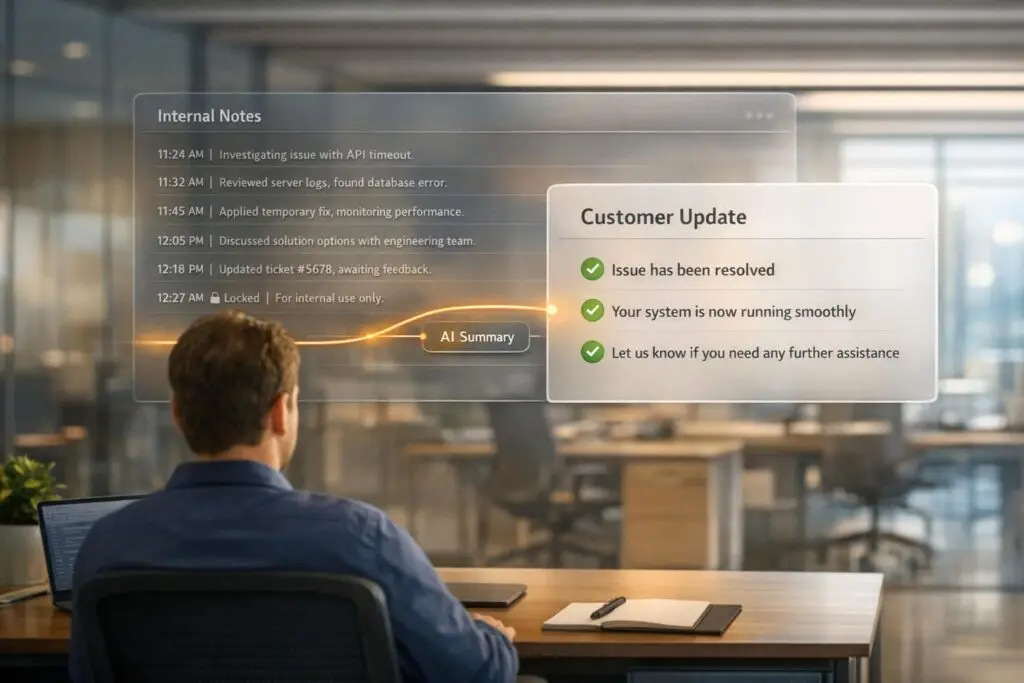
Managing internal notes while keeping customers informed can be tricky. The goal is to maintain clear internal communication without accidentally sharing sensitive details or leaving customers in the dark. Here’s how to strike the right balance:
- Use internal notes to streamline teamwork: Notes help track progress, avoid duplicate efforts, and ensure smooth handoffs between agents.
- Keep customers updated: Share clear, concise updates that summarize progress without unnecessary technical details.
- Avoid common mistakes: Poor organization, ambiguity, and accidental sharing of internal notes can lead to confusion or trust issues.
- Leverage AI tools: Automate note summaries, flag overdue updates, and reduce manual errors.
The key is to document thoroughly internally while maintaining professional and transparent communication with customers. Using modern tools with built-in safeguards ensures internal notes remain private and effective while improving overall support efficiency.
Why Internal Notes Matter for B2B Support Operations
Internal notes are essential for capturing the context, decisions, and technical details needed to manage complex B2B cases effectively. As Caroline Dangson from Sendbird explains, "Context is king in customer service: internal notes support smarter customer conversations" [2]. These notes form the backbone for better case management, knowledge sharing, and proactive customer engagement.
Better Case Management and Team Collaboration
B2B cases often stretch over several days, involve multiple teams, and require seamless coordination. Internal notes ensure every agent working on a case knows what’s already been done, what’s still pending, and what steps to take next. Without clear documentation, agents risk duplicating efforts, and customers end up repeating themselves – a frustrating experience for everyone involved.
Using tools like @mentions helps assign responsibility and keep updates clear. Attaching notes at the organization level, rather than just the ticket level, provides a broader view of all active conversations with a client [1]. This is especially valuable when managing enterprise accounts with multiple ongoing issues, ensuring everyone stays on the same page and builds a unified knowledge base.
Building Knowledge for Future Cases
Detailed internal notes turn individual expertise into a shared resource, making it easier for other team members to solve similar problems in the future. This becomes especially important as teams grow or experience turnover. Support platforms that leverage internal notes to build knowledge bases can cut ticket volume by 30% [3], allowing agents to focus on more challenging issues.
By summarizing long threads into concise updates, internal notes also help new agents quickly grasp the situation. This avoids the issue of "cherry-picking", where agents shy away from complex cases due to a lack of context. With proper notes, even complicated cases can be handled efficiently.
Supporting Customer Success Goals
Internal notes are invaluable for tracking account health, documenting escalations, and identifying strategies for proactive outreach. For instance, if a customer mentions budget concerns or an upcoming renewal, noting it ensures the customer success team can follow up at the right time. Considering that 63% of customers are likely to leave a brand after just one poor support experience [3], maintaining detailed notes is key to delivering consistent, high-quality service.
Additionally, returning customers, while only making up 8% of a customer base, generate 40% of total revenue [3]. Tracking their history and preferences through internal notes ensures high-value clients receive personalized attention without having to repeatedly explain their needs. This continuity strengthens relationships and supports long-term loyalty.
sbb-itb-e60d259
Common Mistakes When Using Internal Notes
Even with the best intentions, teams can unintentionally diminish the usefulness of internal notes through common errors. These missteps not only slow down case resolution but can also frustrate agents and, in severe cases, harm customer relationships. Recognizing these pitfalls is the first step toward building better workflows.
Poor Note Organization
Scattered or incomplete information is a frequent issue. When notes fail to transfer seamlessly between modules, agents are forced to manually gather details or search across different areas for context. Many platforms compound this problem by lacking global search capabilities or detailed edit histories, turning what should be a quick lookup into a time-consuming task.
Long-running conversations without clear summaries are another major hurdle. Faced with threads containing 20 or more messages and no concise internal recap, agents may avoid these cases altogether – a behavior often referred to as "cherry-picking." On the flip side, overloading notes with unnecessary details can make it just as hard to identify the key takeaways, further slowing down resolution times.
Ambiguity in note ownership also creates confusion. Notes often fail to specify who they’re intended for – whether that’s support, engineering, or another team – or what the next steps should be. To make matters worse, internal notes are frequently excluded from support metrics like reply counts or one-touch resolutions, making it harder to gauge the actual effort invested in resolving a ticket.
Finally, teams must be vigilant about keeping internal notes from being accidentally shared with customers.
Accidentally Exposing Internal Notes to Customers
When internal notes are accidentally shared with customers, the consequences can be serious. These notes may contain sensitive details, candid assessments, or even unprofessional remarks. While some platforms, such as Gorgias, use visual indicators like a coral background to distinguish internal notes from public messages, agents still need to manually select the correct channel. A single misstep can result in unintended exposure.
To make matters worse, certain platforms restrict the ability to delete notes through the standard interface, leaving little room for error. Some safeguards do exist – for instance, Gorgias automatically excludes internal notes when forwarding a ticket thread to an external email address. However, these features aren’t foolproof. The best practice is to write internal notes with the assumption that a customer could see them. This mindset minimizes potential damage in the event of accidental exposure.
While safeguarding notes is crucial, it’s equally important to maintain open communication with customers.
Using Notes Instead of Customer Communication
Over-relying on internal notes without updating customers can create the impression that no progress is being made. Internal notes don’t contribute to metrics like "tickets replied", "messages sent", or "one-touch tickets." As a result, even if a support team is working hard behind the scenes, it may appear inactive both in reporting and to the customer waiting for an update.
Striking the right balance is key. Internal notes should provide a clear record of internal actions, but they should never replace direct communication with customers. Proactively updating customers about the status of their case reassures them that their issue is being addressed. When agents fail to provide updates, customers are left in the dark, often leading to frustration and escalations that could have been avoided with a simple message.
How to Attach Internal Notes Securely
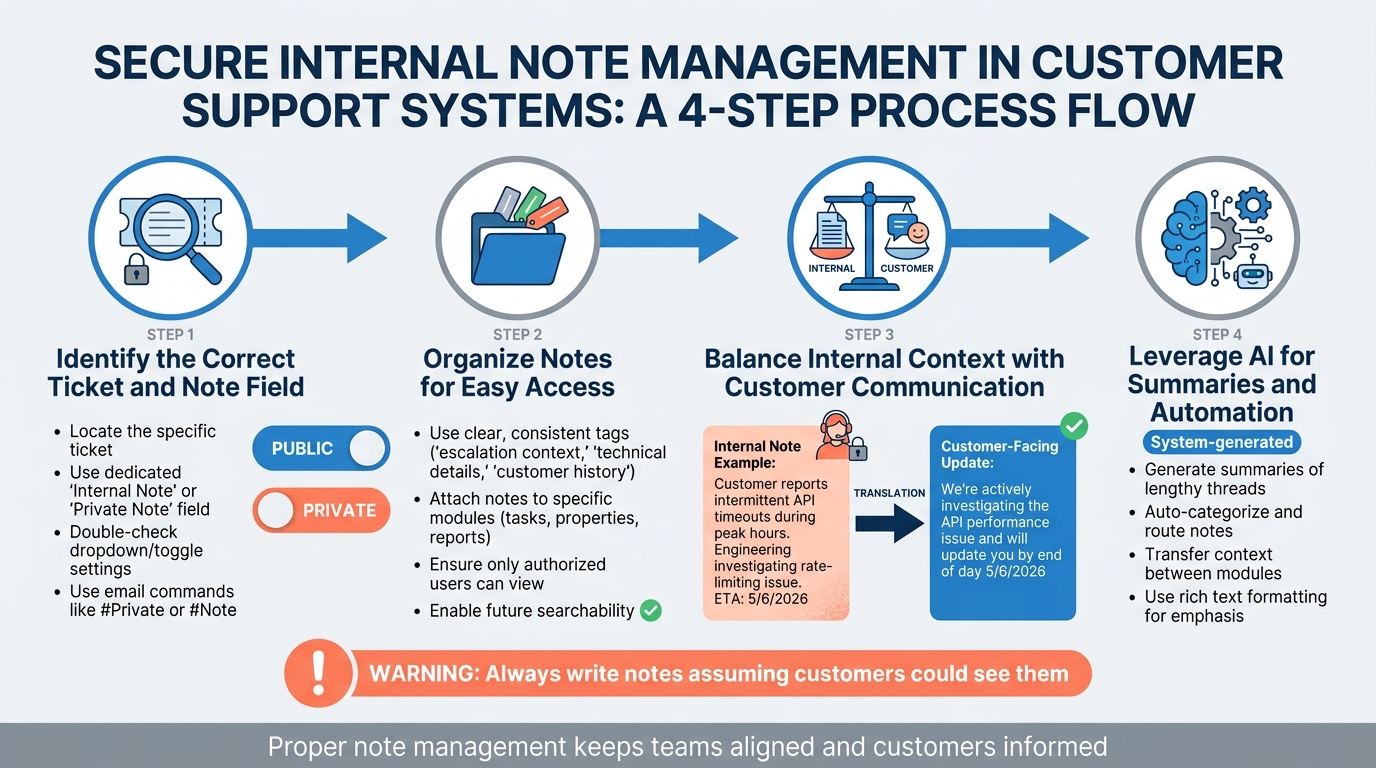
4-Step Process for Attaching Internal Notes Securely in Customer Support
Keeping internal notes secure requires a careful approach to avoid accidental exposure. It’s about choosing the right tools, organizing information effectively, and using automation to minimize mistakes. Here’s a step-by-step guide to creating a secure workflow for internal notes that keeps your team aligned and your customers informed.
Step 1: Identify the Correct Ticket and Note Field
Start by locating the specific ticket where you need to add your note. Most platforms provide a dedicated "Internal Note" or "Private Note" field, which is separate from public responses. Double-check that you’re using the correct field – many systems use dropdowns or toggles to differentiate between private and public entries.
"Internal notes are designed for collaboration between your team members. They are only visible to users with desk and field licenses who have the necessary permissions and are not visible to your clients." – Teresa Bui, Uptick [5]
If you’re working through email, commands like #Private or #Note can often be used to ensure your response is logged as an internal note. This is especially helpful when agents are managing tickets quickly and need to avoid errors.
Step 2: Organize Notes for Easy Access
Categorizing notes as soon as they’re created makes future searches much easier. Use clear and consistent tags that describe the note’s purpose, such as "managing support escalations", "technical details", or "customer history." Many platforms also let you attach notes to specific modules like tasks, properties, or reports, ensuring only authorized users can view them.
For platforms without global search capabilities, proper categorization becomes even more important to avoid losing critical details.
Step 3: Balance Internal Context with Customer Communication
While internal notes should be thorough, customers still need clear updates. For instance, an internal note might say:
"Customer reports intermittent API timeouts during peak hours. Engineering team investigating potential rate-limiting issue. ETA for resolution: 5/6/2026."
Meanwhile, the customer-facing update could read:
"We’re actively investigating the API performance issue you reported and will provide an update by the end of the day on 5/6/2026."
This approach ensures your team has all the necessary details while presenting a professional, concise update to the customer. Even though platforms are designed to keep internal notes private, human error can still lead to accidental exposure, so extra care is essential.
Step 4: Leverage AI for Summaries and Automation
AI tools can simplify your documentation process by generating summaries of lengthy note threads. These summaries are usually marked as "system-generated" or "system automation", making it clear they weren’t written manually while adhering to security protocols.
Automation can also help with categorization and routing. For example, notes created during the quoting phase can automatically carry over to repair tasks, giving field technicians the context they need without manual input. Adding rich text formatting (like bullet points or bold text) can further emphasize key details, ensuring nothing is overlooked.
Best Practices for Keeping Customers Informed
Share Key Updates with Customers Proactively
Once you’ve documented internal progress, the next step is making sure your customers are kept in the loop. Detailed internal notes are pointless if customers remain unaware of what’s happening. Your role is to translate technical updates into clear, customer-friendly communication that reassures them you’re working on their issue. For instance, if your internal note reads, "Engineering team identified memory leak in API gateway, deploying patch to staging environment", you could simplify it for the customer as: "We’ve pinpointed the issue and are currently testing a fix. We’ll provide another update by 5/3/2026."
Some platforms allow for low-impact notifications, which let you share quick updates – like "We’re on it!" – without cluttering the customer’s inbox with frequent emails. This approach is especially useful for multi-day investigations, where too many emails can become overwhelming [6].
Separate Internal Notes from Customer Replies
Always double-check that you’re using the correct "Note" field before posting updates. Many platforms provide visual indicators to help distinguish between internal notes and customer-facing replies. Additionally, some tools automatically exclude internal notes when forwarding ticket threads to external email addresses, adding an extra layer of protection against accidental oversharing [4].
Use AI to Fill Communication Gaps
AI-powered ticket routing and prioritization tools can help you spot when customers need an update, even without manually reviewing every ticket. For example, if internal notes have been piling up for several days without a corresponding reply to the customer, that’s a clear signal that an update is overdue. AI can flag these gaps and even draft update suggestions, saving time while ensuring customers stay informed.
Poor communication not only wastes time but also erodes trust. In fact, only 14% of employees feel fully aligned with their company’s goals [7][8]. By leveraging AI to automate routine updates, your team can focus on solving complex issues while maintaining strong communication with customers.
Adopting these practices ensures a seamless connection between your internal processes and customer communication.
How Supportbench Manages Internal Notes and Customer Updates
Supportbench is built with an AI-driven framework tailored for complex B2B support environments, where managing internal notes and collaboration is a daily necessity. The platform analyzes the complete ticket history – covering both internal notes and public replies – to create concise case summaries. These summaries provide agents with a quick understanding of the situation without needing to sift through lengthy note threads, saving time and improving efficiency [9][10]. This feature not only enhances team alignment but also supports clear and consistent communication with customers. Additionally, strict permission settings ensure sensitive internal discussions remain secure.
With role-based permissions, only authorized team members can access or generate AI summaries, ensuring that sensitive information is protected [11][12]. This approach allows the AI to use internal notes for context while safeguarding private details from being visible to customers.
Supportbench also incorporates workflow automation that responds to internal notes. For instance, specific content within notes can trigger automated actions like ticket escalations, SLA adjustments, or status changes based on team input [10]. A practical example: you can set up the system to alert a supervisor immediately if internal notes include keywords linked to customer dissatisfaction or technical obstacles [10]. This not only streamlines escalations but also ensures that crucial details are preserved and acted upon [12].
Conclusion
Managing internal notes effectively is about more than just adjusting tool settings – it’s about creating a support system that’s clear, efficient, and reliable. When your team can document essential context, work together seamlessly, and keep customers informed, you foster an environment where both agents and customers trust the process.
Think of internal notes as tools that serve a purpose – categorize them to retain key knowledge, use them to trigger automation, and ensure they work alongside, not in place of, direct communication with customers. While technical details might stay internal, customers still deserve timely updates about their cases.
This approach sets the stage for AI-powered solutions to improve both internal workflows and customer interactions. Tools like Supportbench integrate detailed internal documentation with simplified customer updates. By summarizing lengthy note threads and ticket histories, AI enables agents to quickly catch up without overwhelming customers with unnecessary details [12]. This allows your team to focus on solving problems rather than sifting through endless notes.
Strong note management practices, combined with secure permissions and AI-driven automation, help build a scalable and effective support system. Your team stays coordinated, your customers stay informed, and your operation grows without sacrificing quality.
FAQs
How do I prevent internal notes from being sent to customers?
To keep internal notes away from customers, set up your support system to ensure they remain private and accessible only to your team. Many platforms let you mark notes as private by default. Make sure agents consistently choose the internal/private option when adding notes. Additionally, review your settings to avoid accidental public visibility of internal comments. This setup ensures a clear separation between internal discussions and customer-facing communication.
How often should we update customers on long-running tickets?
It’s important to keep customers in the loop when dealing with long-running tickets. For urgent issues, providing updates every hour can help reassure them that progress is being made. For less critical matters, daily updates strike a good balance between staying communicative and avoiding overloading them with information. This approach ensures customers feel informed without being overwhelmed.
What should AI be allowed to do with internal notes?
AI can help streamline internal notes by summarizing ticket histories, breaking down complex technical jargon, and automating repetitive tasks like triage and routing. That said, its role should remain supportive – focused on improving organization and efficiency – rather than taking on decision-making or handling sensitive information. Always double-check AI-generated content to confirm it’s accurate and suitable before using or sharing it. Human oversight is key to ensuring trust and reliability.






