


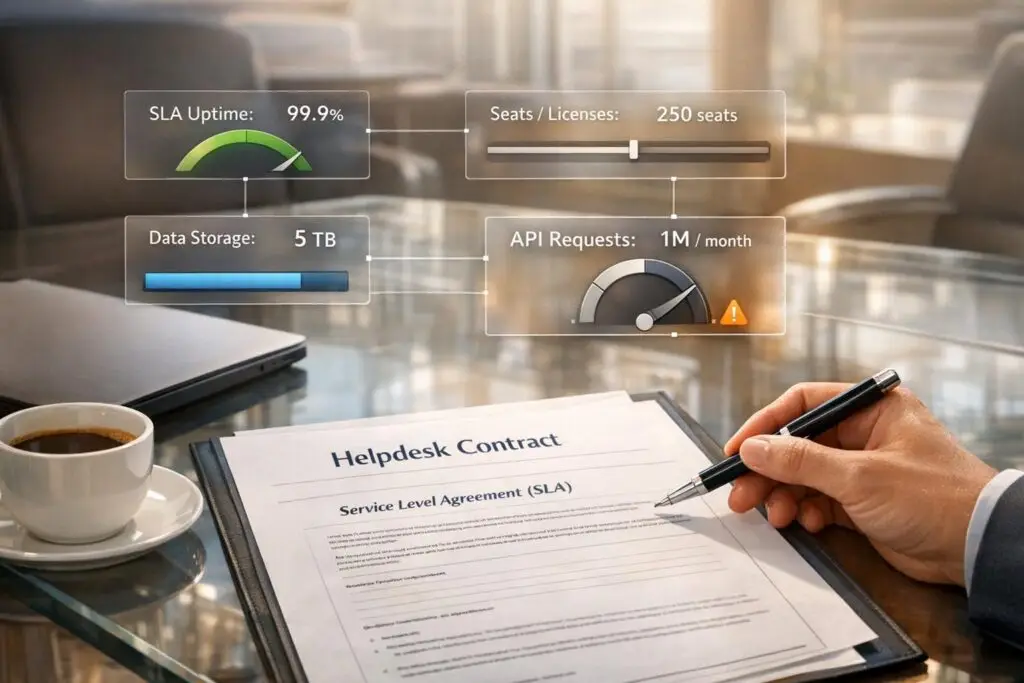
When signing a helpdesk contract, don’t settle for vendor-friendly terms. Negotiate four critical areas to avoid hidden costs and operational risks:
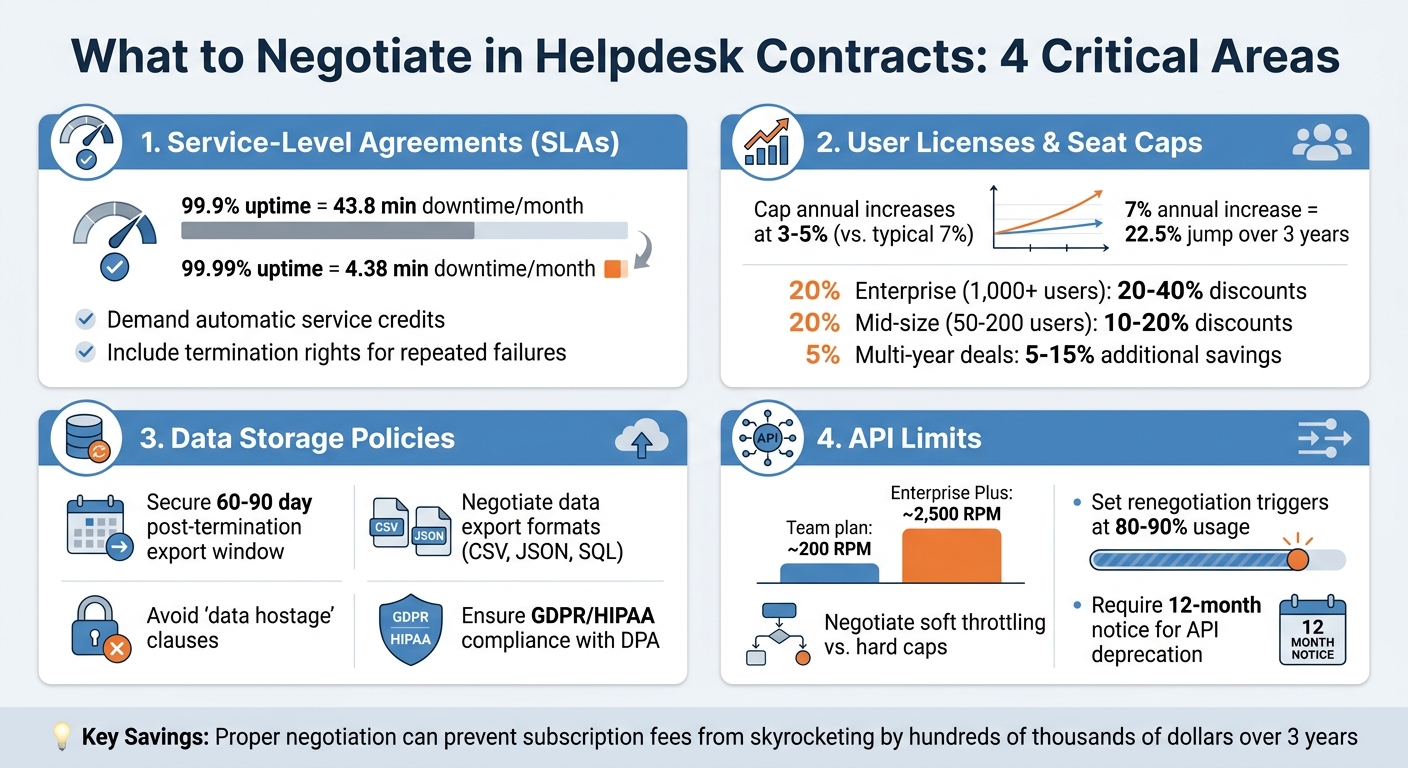
- Service-Level Agreements (SLAs): Demand clear uptime, response times, and remedies for breaches. Push for automatic service credits and termination rights if performance fails.
- User Licenses and Seat Caps: Manage costs with flexible scaling options, caps on price hikes (e.g., 3–5% annually), and discounts for larger teams or multi-year agreements.
- Data Storage Policies: Secure data export rights, avoid overage fees, and ensure compliance with retention and residency regulations.
- API Limits: Prevent workflow disruptions by negotiating higher rate limits, soft throttling, and renegotiation triggers for usage spikes.
Skipping these steps could lead to price hikes, downtime, and surprise charges. With a clear strategy, you can secure terms that align with your team’s needs and growth.
Helpdesk Contract Negotiation: 4 Critical Areas to Secure
Negotiating Software Contracts: An Expert Guide to Secure Best Deals
sbb-itb-e60d259
Service-Level Agreements (SLAs): Setting Performance Expectations
Service-Level Agreements (SLAs) lay out exactly what "reliable" means in your contract. Without them, you’re left guessing how long you’ll wait for a response when your support system grinds to a halt. Vague SLAs force you to track downtime, document failures, and fight for service credits that rarely reflect the true cost of disruptions.
Take this example: a 99.9% uptime guarantee allows for 43.8 minutes of downtime per month [5]. For a B2B support team managing hundreds of cases daily, that downtime could create a backlog lasting days. Systems that are mission-critical often require 99.99% uptime, limiting downtime to just 4.38 minutes per month [5]. Before signing any SLA, calculate how much downtime your operation can handle without breaking your commitments to customers. Let’s dive into how precise definitions and measurable targets in SLAs protect your business.
Uptime and Downtime Definitions
It’s essential to scrutinize how vendors define uptime because they often exclude events like scheduled maintenance, third-party outages (e.g., AWS or Azure), and DDoS attacks [5]. These exclusions can make a 99.9% uptime promise look better on paper than it performs in practice. Negotiate to minimize exclusions or require advance notice and approval for maintenance during your busiest hours.
You’ll also want clarity on what "downtime" actually means. Does it only include total system failures, or does it also cover degraded performance? For instance, if your API slows to a crawl but technically stays online, does that count? For operations relying on AI workflows and real-time case routing, even partial slowdowns can cripple productivity. Make sure these scenarios are clearly defined in your SLA.
Response Times by Issue Severity
Not every issue demands the same urgency, so your SLA should prioritize response times based on severity. This avoids overloading your team with unnecessary escalations while ensuring critical problems get immediate attention. A well-written SLA will outline four severity levels, each with specific response and resolution targets:
| Severity Level | Impact Description | Typical Response Target | Typical Resolution Target |
|---|---|---|---|
| Level 1 (Critical) | System down; total productivity loss for all users | < 15–30 minutes | 2–4 hours |
| Level 2 (High) | Major functionality impaired; significant productivity impact | < 1 hour | 4–8 hours |
| Level 3 (Medium) | Partial loss of non-critical functionality; workaround exists | 4–8 business hours | 24–48 hours |
| Level 4 (Low) | General questions; cosmetic issues; minor feature requests | 12–24 business hours | 3–5 business days |
Ensure your contract includes escalation paths for each level. For Level 1 issues, you’ll need a direct phone line and updates every 30 minutes until the issue is resolved. For lower-severity issues like Level 3 or 4, email or ticketing might suffice. Also, clarify the difference between "response" and "resolution." A vendor acknowledging your ticket in 15 minutes doesn’t help much if the fix takes three days.
SLA Breach Remedies and Penalties
When SLAs are breached, service credits are the most common remedy. However, these credits are often capped at 10% to 30% of your monthly fees [5]. This barely scratches the surface of the losses you might face from downtime, including lost productivity and damaged customer trust. Worse, many vendors treat credits as the only available remedy, preventing you from seeking further compensation – even in cases of gross negligence.
Push for automatic credits that don’t require you to file claims. Vendors like Microsoft Azure, for example, make customers submit claims within two months of an incident, then take up to 45 days to process them [7]. This cumbersome process often discourages claims altogether. Instead, negotiate for credits to be applied automatically, based on the vendor’s own monitoring data.
For repeated failures, insist on a termination-for-cause clause. For example, if uptime drops below 99.5% for two consecutive months, you should have the right to terminate the contract without penalty and receive a pro-rata refund [6][5]. This clause gives you leverage beyond service credits and holds the vendor accountable. Additionally, include clear escalation procedures: who to contact, how often updates are provided, and what happens if multiple SLA targets are missed within a year. This ensures you’re not left scrambling during critical failures.
User Licenses and Seat Caps: Controlling Growth Costs
Once you’ve nailed down reliable service performance with clear SLAs, the next priority is managing user license costs. Just like SLAs protect your uptime, negotiating user license terms can protect your budget as your team expands.
License terms directly impact whether your helpdesk costs stay manageable or balloon out of control. Vendors typically offer two pricing structures: seat-based (a fixed fee per user) or usage-based (tied to activity, such as ticket volume or API calls). Seat-based pricing provides cost predictability but can leave you paying for unused licenses during team downsizing. On the other hand, usage-based pricing adjusts with activity levels but might lead to unexpected charges during busy periods [8]. For teams with steady headcounts, seat-based pricing is often the better choice. But if your organization deals with seasonal fluctuations or unpredictable growth, usage-based pricing can offer flexibility – provided you negotiate usage caps and monitoring tools upfront.
Another factor to watch out for is price escalation clauses, which can significantly increase costs over time. For example, a 7% annual increase results in a 22.5% jump over three years [5]. To avoid this, negotiate a cap tied to the Consumer Price Index (CPI) or a fixed rate of 3% to 5% [5]. Larger organizations with 1,000+ users can often secure 20%–40% off published rates [9], while mid-sized teams (50 to 200 users) can aim for 10% to 20% discounts by working with solution partners [9]. Multi-year agreements can unlock an additional 5% to 15% discount compared to annual renewals [9], but only if you lock in competitive pricing from the outset.
"Atlassian’s list pricing is the starting point for small customers, not the price large organisations should accept. Enterprise buyers with 500-plus users who have not negotiated a custom agreement are almost certainly paying above market." – Morten Andersen, Co-Founder, Redress Compliance [9]
Temporary scaling clauses are another key tool for managing costs during peak demand without committing to long-term seat increases. Negotiate month-to-month options for extra seats so you can scale up temporarily without locking into multi-year commitments [5]. Standard contracts often require 60–90 days’ notice to reduce seats, which can leave you paying peak rates longer than necessary. Push for 30-day notice periods and ensure prorated pricing for adding or removing users [5]. Also, schedule cancellation windows immediately after signing – missing a deadline by even one day could lock you into high rates for another full term [5].
Up next, we’ll explore how data storage policies can further influence your overall costs.
Data Storage: Managing Limits and Costs
Once you’ve optimized user license expenses and SLA management terms, it’s time to turn attention to data storage. Without proper planning, storage overages can lead to unexpected costs and even compliance risks. Many helpdesk contracts include what seem like generous storage limits at first glance, but as your ticket history grows and attachments pile up, those limits can quickly be surpassed – triggering hefty overage fees.
Storage Allocation and Overage Charges
Helpdesk providers usually allocate storage in two main ways: a base organizational limit and additional storage per agent. For example, a typical plan might offer 10 GB of base storage for both data and files, with incremental increases based on team size. A Team plan might add 50 MB of data storage and 2 GB of file storage per agent, while an Enterprise plan could provide 200 MB and 10 GB per agent.
Let’s break it down: a 50-agent team on an Enterprise plan would have 20 GB of data storage and 510 GB for files. While this sounds like a lot, storage is finite. Once you exceed these limits, overage fees kick in. To avoid surprises, ensure your contract includes clear export options (like CSV, JSON, or SQL dumps) so you can archive older data without losing access [3]. Additionally, negotiate a post-termination data export window – ideally 60–90 days, though some experts suggest up to 180 days of read-only access – to retrieve your data without incurring rush fees [3][2].
Data Retention and Export Rights
Retention policies dictate how long your data is accessible and in what format after your contract ends. Customizing retention timelines by data type can help you avoid excessive storage costs and unnecessary security risks [12]. For instance, you might keep customer tickets for a few years while archiving less critical data sooner. This approach ensures compliance with regulations without overloading your storage.
Another crucial point is to avoid "data hostage" clauses. These clauses allow vendors to restrict access to your data during payment disputes or before your export window closes [5]. Your contract should guarantee uninterrupted access to your data and require vendors to provide written confirmation once all data is successfully exported and deleted [5][3]. These safeguards help you maintain control over your data and keep storage costs predictable.
Data Residency and Compliance Requirements
Understanding where your data is stored and the applicable legal framework is just as important as managing storage limits. If your organization is subject to regulations like GDPR or HIPAA, your contract must specify the physical location of your data and the legal jurisdiction governing it.
For example, data residency refers to the physical location of your data, while data sovereignty deals with the legal rights tied to that location [11][12]. Some countries, like China and Russia, require citizen data to stay on local servers, while the EU enforces GDPR protections regardless of where the data is stored [13].
"Data residency is the physical or geographical location of an organization’s data." – Tom Fisher, Product Marketing Manager, IBM Security Guardium [11]
To ensure compliance, negotiate a Data Processing Agreement (DPA) that overrides conflicting terms in your main contract [3][10]. Specify regional deployment settings – such as "Switzerland North" for Azure services – to prevent your data from crossing borders without your approval [14]. Ignoring these details can lead to severe penalties. For instance, Meta faced a $1.3 billion fine in May 2023 for GDPR violations related to data residency [11].
API Limits and Integration Constraints: Preventing Workflow Bottlenecks
Once data storage is squared away, the next step is tackling API limits to ensure your integration flows remain uninterrupted. API limits dictate how many requests your system can send to the helpdesk platform within a specific timeframe. Exceeding these limits can lead to "429 Too Many Requests" errors, which can disrupt ticket synchronizations, break custom dashboards, and halt automated workflows [15].
API Rate Limits
API rate limits are thresholds that vendors put in place – usually measured in requests per minute (RPM) or requests per second (RPS) – to manage their server load. These limits often vary depending on your subscription plan. For instance, a basic Team plan might allow around 200 RPM, whereas an Enterprise Plus plan could offer up to 2,500 RPM. Some endpoints, like those for incremental exports, may have even stricter caps, such as 10 RPM. This variability means that as your ticket volume or team size grows, you could unexpectedly hit these limits [15].
When negotiating your contract, use at least a year’s worth of production data to estimate your API consumption accurately [16]. To minimize API usage, consider strategies like replacing polling with webhooks, batching requests, and caching static data. These steps can significantly reduce the strain on your API quota.
Throttling vs. Hard Caps
Knowing the difference between throttling and hard caps is crucial for keeping your systems running smoothly during high-traffic periods.
- Throttling slows down request processing by returning 429 errors along with a "Retry-After" header, which tells your system when to try again. This approach ensures the system remains available but may result in slower performance.
- Hard caps, on the other hand, block all additional requests outright once the limit is reached, preventing any further interactions until the limit resets [17].
| Feature | Throttling | Hard Caps |
|---|---|---|
| Action | Slows request processing | Rejects all additional requests |
| Error Response | 429 errors with a delay ("Retry-After") | Immediate 429 errors, no access |
| Impact | Keeps the system available but slower | Stops all interactions entirely |
| Best For | Handling temporary traffic spikes | Protecting system infrastructure |
To maintain business continuity during unexpected traffic surges, negotiate for soft throttling, where requests are delayed or queued rather than outright rejected. Your integration code should also include exponential backoff logic to handle 429 errors gracefully. Additionally, configure your system to remain functional even if rate limiting fails [15][18].
Overage Costs and Renegotiation Triggers
Overage costs are typically billed retroactively and are often higher than your base contract rates, which can lead to financial surprises [16]. To manage this risk, negotiate overage fees that align closely with your base pricing. You might also include a clause that caps overage charges – say, at 20% of your baseline monthly fee – to avoid unexpected costs during traffic spikes [4].
"Overages are typically higher than base contract prices and are paid in arrears, securing a favorable rate for these additional costs is crucial."
- Eyal Solomon, Co-Founder & CEO, Lunar.dev [16]
Set clear renegotiation triggers in your contract. For example, if API usage consistently hits 80–90% of your current limit, this should prompt a review to adjust the terms and avoid sudden overage charges [18]. Vendors should also provide automated alerts when your usage reaches 70% and 90% of the limit [4].
Lastly, negotiate a minimum 12-month notice period for any API deprecation, giving your team enough time to re-engineer integrations. If a critical API is deprecated with less than 90 days’ notice, ensure your contract includes termination rights with a pro-rata refund [5].
Conclusion
Negotiating your helpdesk contract is a smart way to manage growth while avoiding hidden costs. For instance, securing firm price caps – keeping annual increases between 0–3% instead of the usual 7–12% – can save your business from subscription fees skyrocketing by hundreds of thousands of dollars over just three years [1]. These savings can be reinvested directly into strengthening your support operations.
Focusing on four key areas – SLAs, user licenses, data storage, and API limits – helps bring stability to your operations. Clear SLAs ensure accountability during critical incidents, while volume-based pricing and reduction rights let you scale without financial penalties [1]. Including data portability clauses (in formats like CSV or JSON) protects you from vendor lock-in, and well-defined API rate limits with renegotiation triggers prevent bottlenecks as ticket volumes increase [2][3]. Together, these elements form the backbone of a reliable support system.
Don’t settle for one-sided terms. Every negotiation point you win – like extending renewal notice periods to 90–120 days, capping true-up charges at base rates instead of inflated premiums, or securing termination-for-convenience clauses – reduces your overall risk [1][2].
"Termination for convenience with data export rights is the most important negotiation point."
Your helpdesk contract should grow alongside your business. Addressing these critical areas upfront ensures your support infrastructure can scale effectively and adapt to evolving demands, including those driven by AI.
FAQs
What SLA terms matter for a helpdesk?
When evaluating SLA (Service Level Agreement) terms for a helpdesk, there are a few critical points to focus on:
- Uptime Guarantees: Pay attention to the promised availability, such as 99.9% or 99.99%. Even a small difference here can significantly impact downtime over time.
- Exclusions: Check for any scenarios where the SLA doesn’t apply. These might include scheduled maintenance or certain types of outages.
- SLA Credits: Look for provisions that offer credits or compensation in case the provider fails to meet the agreed-upon uptime.
Additionally, make sure the agreement addresses data ownership and portability. This ensures you retain control over your data and can transition smoothly to another provider without being locked in.
How do I cap seat costs as my support team scales?
To keep seat costs under control as your team expands, consider negotiating contracts that are flexible and based on actual usage. Make sure these agreements include clear limits on overage fees and seat counts. Regularly monitor your usage and set up alerts to prevent going over your allocated seats. Additionally, leverage forecasting tools to predict demand surges during peak times, such as the holiday season, and adjust your seat allocations ahead of time. These approaches can help you manage expenses while growing your team efficiently.
How can I avoid API overage fees and rate-limit outages?
To steer clear of API overage fees and avoid rate-limit outages, it’s important to negotiate flexible contract terms. Look for agreements that include usage-based billing, transparent metering, and audit rights so you can monitor consumption in real time.
Make it a habit to actively track your API usage and set up alerts when you’re nearing your limits. Additionally, consider opting for short-term pilot agreements that include price protection clauses. These steps can help you stay on top of your usage and avoid surprise charges or disruptions to your service.






