


When evaluating support software for compliance, the goal is to ensure it meets legal and security standards like HIPAA, SOC 2, and GDPR. Non-compliance can lead to fines, reputational damage, and lost business opportunities. Here’s a quick guide to get started:
- HIPAA: If handling healthcare data, ensure the vendor signs a Business Associate Agreement (BAA) and supports encryption (TLS 1.2+ and AES-256). Audit logs must be retained for six years, and AI systems should not use sensitive data for training.
- SOC 2: Request the vendor’s latest SOC 2 Type II report. Confirm they meet security standards, including access controls and incident response protocols.
- GDPR: Vendors must provide a Data Processing Agreement (DPA), support data erasure requests, and comply with breach notifications within 72 hours.
Quick Overview
- Certifications: Verify SOC 2 Type II, HIPAA BAAs, and GDPR DPAs.
- Security: Check encryption, access controls, and data deletion capabilities.
- AI Compliance: Ensure AI systems respect privacy and data isolation.
- Costs: Balance software costs against compliance needs and scalability.
Failure to comply can result in fines like $1.3M for HIPAA or up to 4% of global revenue under GDPR. Prioritize vendors with strong documentation, automated compliance tools, and scalable solutions.
Data Privacy & Compliance: GDPR, HIPAA & Best Practices Explained
sbb-itb-e60d259
HIPAA, SOC2, and GDPR: What Each Standard Requires
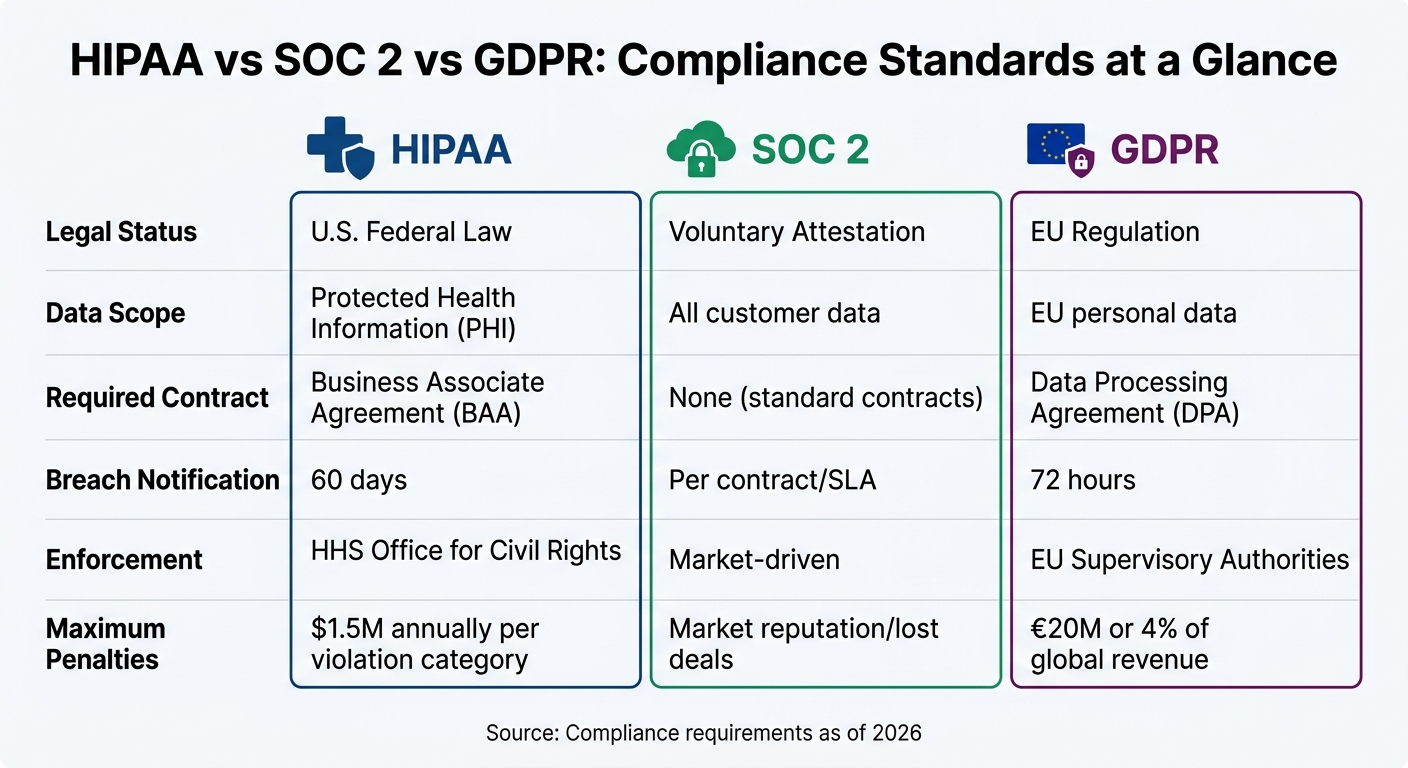
HIPAA vs SOC 2 vs GDPR Compliance Requirements Comparison
Each of these compliance standards tackles different types of risks and data. HIPAA is a U.S. federal law that governs Protected Health Information (PHI). SOC 2 is a voluntary auditing framework that evaluates a vendor’s security and operational practices. Meanwhile, GDPR is an EU regulation that provides individuals with extensive control over their personal data, regardless of where the company processing the data is located.
These differences are crucial when choosing support software. For instance, a vendor might hold a SOC 2 Type II report but decline to sign a Business Associate Agreement (BAA), making them unsuitable for handling healthcare data. Similarly, a vendor may claim GDPR compliance but lack the ability to fully erase data from logs and backups when requested.
Here’s a quick comparison of how these standards apply:
| Standard | Legal Status | Data Scope | Required Contract | Breach Notification | Enforcement |
|---|---|---|---|---|---|
| HIPAA | U.S. Federal Law | Protected Health Information (PHI) | Business Associate Agreement (BAA) | 60 days | HHS Office for Civil Rights |
| SOC 2 | Voluntary Attestation | All customer data | None (standard contracts) | Per contract/SLA | Market-driven |
| GDPR | EU Regulation | EU personal data | Data Processing Agreement (DPA) | 72 hours | EU Supervisory Authorities |
Let’s take a closer look at how these standards impact support operations.
HIPAA: Requirements for Handling Health Information
If your support operations involve sensitive health data, HIPAA compliance is non-negotiable.
The first step is securing a signed Business Associate Agreement (BAA) with your software vendor. Without this, the vendor cannot legally handle PHI.
No BAA = no HIPAA compliance. Period. [1]
HIPAA also mandates strong encryption (TLS 1.2+ for data in transit and AES-256 for data at rest), detailed audit logs retained for at least six years, and access controls based on the "minimum necessary" principle [1][6]. Penalties for "willful neglect" can reach up to $1.5 million annually per violation category [6]. In 2025, hacking and IT incidents accounted for 76% of large healthcare breaches, highlighting the importance of robust security measures [8].
Another key consideration is AI training policies. Make sure your vendor does not use customer support data or PHI to train global AI models. As of April 2026, companies like OpenAI and Anthropic only offer BAAs for specific Enterprise-tier services [8].
SOC 2: Security and Trust Requirements
SOC 2 focuses on operational security and evaluates vendors based on five Trust Service Criteria: Security (mandatory), Availability, Processing Integrity, Confidentiality, and Privacy [1].
The distinction between Type I and Type II reports is critical. Type I provides a snapshot of controls at a specific time, while Type II demonstrates their effectiveness over a 6–12 month period [1]. By 2026, 70% of enterprise RFPs required a SOC 2 Type II report, with that number climbing to 80% for Series B+ startups [2]. Vendors with clean SOC 2 audits often close deals three times faster and lower customer acquisition costs by 20% [2].
SOC 2 compliance also involves strict operational controls, such as background checks for employees, incident response protocols, and secure processes for software updates [1]. For support teams, this means ensuring vendors have documented procedures for managing security incidents, rotating credentials, and quickly revoking access when employees leave.
In one example, Map Collective achieved SOC 2 Type II certification in just two months using Opsfolio’s "Compliance-as-Code" approach, which automated evidence collection from existing workflows [7]. This shows that compliance doesn’t have to slow down operations.
GDPR: Data Privacy and Customer Rights
GDPR sets the rules for handling data from EU residents, no matter where your business is based.
Under GDPR, companies must sign a Data Processing Agreement (DPA) with vendors and ensure support workflows can handle data access, erasure, and portability requests. Breach notifications must be issued within 72 hours [1][4].
GDPR also establishes data subject rights that support systems must respect. Transparency is key – customers must be informed when they’re interacting with AI instead of a human [1][4]. For automated processes like AI-driven ticket routing, Article 22 requires a way for users to request human intervention [4].
AI customer support tools can be GDPR compliant, but compliance depends on how the vendor designs and manages the system. [4]
Another critical feature is the ability to perform a "hard delete" of customer data across all logs and caches. Many vendors claim compliance but lack the backend infrastructure to fully erase data when requested.
Together, these standards shape how support software should be evaluated, ensuring both compliance and operational effectiveness.
How to Evaluate Support Software for Compliance: 5 Steps
When it comes to compliance, the stakes are high. A single data breach can cost an average of $4.4 million, and fines for violations like GDPR can reach up to 4% of global revenue or €20 million [1][10]. To avoid these risks, follow these five steps to thoroughly evaluate support software.
Step 1: Check Vendor Certifications and Agreements
Start by verifying the vendor’s certifications. Don’t just trust website badges – ask for full compliance documentation. For SOC 2, request their most recent Type II report (within the last 12 months) and review the auditor’s notes for any exceptions [1].
For HIPAA, ensure the vendor is willing to sign a Business Associate Agreement (BAA). If they rely on third-party AI providers like OpenAI or Anthropic, confirm those sub-processors also have BAAs in place – this is known as the "BAA chain" [1]. For GDPR, require a Data Processing Agreement (DPA) with Standard Contractual Clauses (SCCs) for data transfers between the EU and the U.S. [1][10].
"SOC 2 is now table stakes… If you don’t have it, you don’t get the demo." [2]
Additionally, check for ISO 27001 certification, which shows the vendor has a strong information security management system [10]. By 2026, 70% of enterprise RFPs will require SOC 2 Type II, and 80% of Series B+ startups won’t work with vendors lacking it [2].
Step 2: Review Security and Privacy Features
Ensure the software meets top-tier encryption standards – TLS 1.2+ for data in transit and AES-256 for data at rest [1]. For HIPAA compliance, the platform should maintain audit logs tracking who accessed Protected Health Information (PHI) for at least six years [1].
For GDPR, confirm the software supports data subject rights, including locating and permanently deleting personal data across logs, analytics, and backups. Some vendors claim compliance but lack the infrastructure for true "hard deletes" [1][4].
If the platform uses AI, verify that customer data isn’t used to train shared models without explicit consent. Sensitive information included in an AI session should not be stored or cached [1]. Since only 21% of SaaS platforms currently support single sign-on (SSO), ensure the platform enforces Role-Based Access Controls to limit user privileges [10].
Step 3: Examine Vendor Policies and Documentation
Ask for the vendor’s shared responsibility matrix to clarify which compliance tasks fall on you versus the vendor [10].
Request detailed configuration guides and inquire about how the vendor handles compliance updates. Do they notify you of changes that might affect audit readiness? How quickly do they address vulnerabilities? By 2025, 97% of organizations without AI governance policies reported AI-related security incidents [10].
"Building a library of all your applications should be number one on your list. You want to confidently say to auditors, ‘This is my list of certified applications.’" – Jennifer Clark, Global IT Asset Manager, Hyatt [10]
After reviewing policies, ensure they align with your operational workflows and data management processes.
Step 4: Test Integration and AI Features for Compliance
Use a sandbox environment to test the software with production-like data [11]. Confirm that AI agents only access the minimum PHI or PII needed for specific tasks instead of pulling entire customer records [1].
For GDPR Article 22, ensure customers can object to AI-driven decisions (like automated refund denials) and request human intervention [4]. Test automated data retention schedules to confirm conversation histories aren’t stored indefinitely [4].
Also, make sure the AI system identifies itself as a bot at the start of interactions to meet transparency requirements [1][4]. If third-party LLMs are involved, check that those providers have proper DPAs or BAAs in place [1][4]. Configured AI agents can reduce audit prep time by up to 90% [11].
Step 5: Compare Costs, Scalability, and Support
Compliance software costs can vary widely – from $199/month for open-source tools to over $50,000 annually for enterprise solutions [3]. SOC 2 audits alone typically range from $30,000 to $80,000 upfront, with annual renewals costing between $10,000 and $40,000 [2]. Platforms like Vanta or Drata can cut audit expenses by up to 50% compared to traditional consulting [2].
Confirm the platform can scale with your organization without requiring major reconfiguration. Does the vendor offer dedicated support during audits, or will you be left to navigate the process alone?
Lastly, think about outcome churn – when customers are forced to drop non-compliant software due to internal compliance requirements [2]. With 81% of SaaS spending now driven by business teams rather than IT, ensuring compliance upfront saves time and minimizes risk [10].
Common Compliance Risks and How to Address Them
Compliance Risks in Support Operations
Understanding and mitigating compliance risks is just as important as evaluating them. For support teams, this means recognizing specific vulnerabilities that often come with using advanced tools like AI. These risks aren’t always obvious, but they can have serious consequences if left unchecked.
For instance, prompt injection attacks can manipulate AI systems into disclosing sensitive information, while model memorization might inadvertently store Protected Health Information (PHI) from customer interactions [1]. Industry data highlights just how prevalent these issues are [10].
Another pitfall is the failure to secure legally binding agreements like BAAs (Business Associate Agreements) or DPAs (Data Processing Agreements). This isn’t just a compliance issue – it can lead to customer churn and lost revenue. With 80% of Series B+ startups now requiring SOC 2 certification, lacking these agreements can directly affect your bottom line [1][2].
Data handling is another area where teams often falter. Using historical support tickets containing PHI or PII to train AI models without proper de-identification is a significant risk [1]. Moreover, only 21% of SaaS applications currently support single sign-on (SSO), leaving many platforms without robust access controls [10]. Compounding this, 45% of applications in the average tech stack fall under "shadow IT" – tools purchased outside formal review processes – creating compliance blind spots [10].
To address these challenges, modern compliance tools now provide continuous monitoring and automated solutions, helping teams stay ahead of potential risks.
Tools for Monitoring and Auditing Compliance
Today’s compliance tools are designed to tackle these risks head-on with automated, round-the-clock monitoring. They integrate directly with cloud infrastructure, identity managers, and HR systems, pulling data like configuration settings, access logs, and training records without requiring manual intervention. This eliminates the need for tedious screenshot-based audits, which consume up to 60% of audit preparation time [2].
AI-driven remediation has become the go-to solution for closing compliance gaps. These systems can draft fixes automatically, cutting audit prep time by 90% and reducing audit costs by 60% compared to manual processes [11][12].
For support operations, automation is key. Tools that redact Personally Identifiable Information (PII) – like Social Security numbers or credit card details – before data is sent to cloud-based LLM providers are essential [5]. Cryptographically secured, immutable audit trails further bolster compliance by allowing cross-framework mapping. For example, controls such as multi-factor authentication can simultaneously satisfy SOC 2, HIPAA, and GDPR requirements [3][5]. This approach not only ensures consistency but also minimizes redundant work across multiple compliance frameworks.
Compliance Implementation Checklist
Before Deployment
To ensure your support software is compliant and runs efficiently, it’s crucial to complete key checks before deployment.
Start by identifying the regulations that apply to the data you handle. For instance, if you’re processing health information for U.S. customers, HIPAA is relevant. Serving EU residents? GDPR applies. And if you’re aiming for enterprise clients, be prepared for SOC 2 requirements – 70% of enterprise RFPs now explicitly call for a SOC 2 Type II report [2].
Make sure to sign all necessary Business Associate Agreements (BAAs) and Data Processing Agreements (DPAs) before any data exchange begins. Double-check that your sub-processors, including third-party LLM providers, have similar agreements in place [1][4]. Be ready for legal review costs, which can range from $5,000 to $15,000 per provider [13].
Always request the actual SOC 2 Type II report instead of relying on a website badge. Confirm that the audit was conducted within the last 12 months and verify encryption standards: TLS 1.2 for data in transit and AES-256 for data at rest [1][4].
If you’re using AI to handle customer data, perform a Data Protection Impact Assessment (DPIA) and create a Record of Processing Activities (ROPA) to document where and why data is stored [2][4]. Before launching, set up email templates that automatically redact sensitive ticket details to avoid accidental PHI exposure [14]. Also, ensure the software supports "Right to Erasure" and "Right of Access" requests, even across caches, logs, and backups [1][4].
Once these initial steps are complete, the focus shifts to maintaining compliance over time.
After Deployment: Ongoing Monitoring
After deployment, continuous monitoring is essential to keep your operations compliant.
Ensure encryption protocols and audit log practices remain consistent with your pre-deployment standards. HIPAA requires audit logs to be retained for at least six years, so plan accordingly. Using automation platforms that integrate with tools like Slack, GitHub, and Jira can streamline real-time monitoring and reduce audit preparation time by up to 60% [1][2]. Run daily scans to identify non-compliant devices or unsecured cloud storage.
Regularly review role-based access controls (RBAC) and confirm that automatic session timeouts are functioning properly [9]. If you’re leveraging AI, set up alerts to monitor for model drift, bias, or safety issues, which will help you comply with the EU AI Act set to take effect on August 2, 2026 [2]. Privacy portals can simplify compliance by automating data subject rights requests, ensuring GDPR’s one-month response requirement is met [1][2].
"Building a library of all your applications should be number one on your list. You want to confidently say to auditors, ‘This is my list of certified applications.’"
– Jennifer Clark, Global IT Asset Manager, Hyatt [10]
Keep your SOC 2 Type II certification current by adhering to audit cycles [1][2]. Conduct regular security risk assessments and update your incident response playbook as your operations evolve. The stakes are high – HIPAA breaches cost an average of $1.3 million [1], and GDPR penalties can reach up to €20 million or 4% of global annual revenue [1][2].
Conclusion
Compliance is a critical business decision that protects your organization from hefty penalties and operational setbacks. For instance, HIPAA violations can result in penalties averaging $1.3 million, while GDPR breaches may cost up to €20 million or 4% of global revenue – financial risks that can significantly impact companies each year [1].
To assess compliance effectively, follow these five steps:
- Verify vendor certifications: Always request the full SOC 2 Type II report instead of relying on a badge.
- Review security features: Look for measures like AES-256 encryption and role-based access controls.
- Examine vendor policies: Ensure they include robust agreements such as BAAs and DPAs.
- Test AI features: Confirm data isolation and obtain clear consent for training data.
- Compare total cost of ownership: Balance costs against your scalability requirements.
"Non-compliance isn’t just a legal risk. It’s a business risk." – AI Genesis Blog [1]
These measures not only reduce legal exposure but also create a stronger operational foundation. As discussed earlier, platforms designed with compliance at their core are essential for AI-powered support systems. For example, AI-native platforms like Supportbench incorporate features such as data isolation, automated audit logging, and built-in support for GDPR-compliant data subject rights. This approach minimizes implementation costs and simplifies ongoing management.
"If your AI vendor cannot provide a robust DPA, that is a significant red flag." – Twig [4]
Compliance doesn’t end with initial deployment – it’s an ongoing responsibility. Post-deployment, you’ll need tools for real-time monitoring, regular reviews of access controls, and automated evidence collection to maintain certifications. Modern platforms streamline this process with automation, cutting audit preparation time from over 500 hours to under 100 hours [15]. This efficiency frees up your team to focus on delivering top-notch customer support.
FAQs
Which compliance standard applies to my support data?
The compliance standard for your support data hinges on the regulations tied to your operations and the nature of the data you manage. For instance, GDPR applies if you’re handling personal data of EU residents, emphasizing privacy and obtaining proper consent. On the other hand, SOC 2 is often used in the US to showcase robust security and operational controls. Selecting the right standard depends on factors like the type of data you process, where your operations are based, and the specific requirements of your industry.
What vendor documents should I request before signing?
Before committing to a support software contract, it’s essential to ask for documentation that outlines the vendor’s compliance and security practices. Look for key materials like:
- Certifications such as SOC 2, GDPR, or HIPAA.
- Audit and attestation reports that validate their processes.
- Data handling policies detailing how your information is managed.
- Security procedures explaining safeguards in place.
- Workflow guides that outline operational processes.
These documents not only back up the vendor’s compliance claims but also give you a clearer understanding of potential risks before you sign the agreement.
How can I verify AI features won’t store or train on sensitive data?
To protect sensitive data when using AI features, make sure the system processes information only in memory and avoids storing it. Check vendor policies to confirm they explicitly ban training on customer data unless you’ve given clear consent. Implement safeguards such as data anonymization, access controls, and prompt filtering to minimize risks. Additionally, conduct regular audits of workflows to ensure they align with compliance requirements like HIPAA, GDPR, or SOC2.
Related Blog Posts
- How do Canadian data residency requirements affect helpdesk selection?
- How do you evaluate “foreign access risk” when choosing a US vs non-US helpdesk?
- Zendesk Enterprise vs. Supportbench Enterprise: A Security and Compliance Audit
- Cybersecurity Software Support: Handling Sensitive Client Data Safely
Evaluating help desks for a B2B team?
Supportbench is all-inclusive from $32 per agent per month, with migration and onboarding included. See pricing or book a 20-minute demo.






