


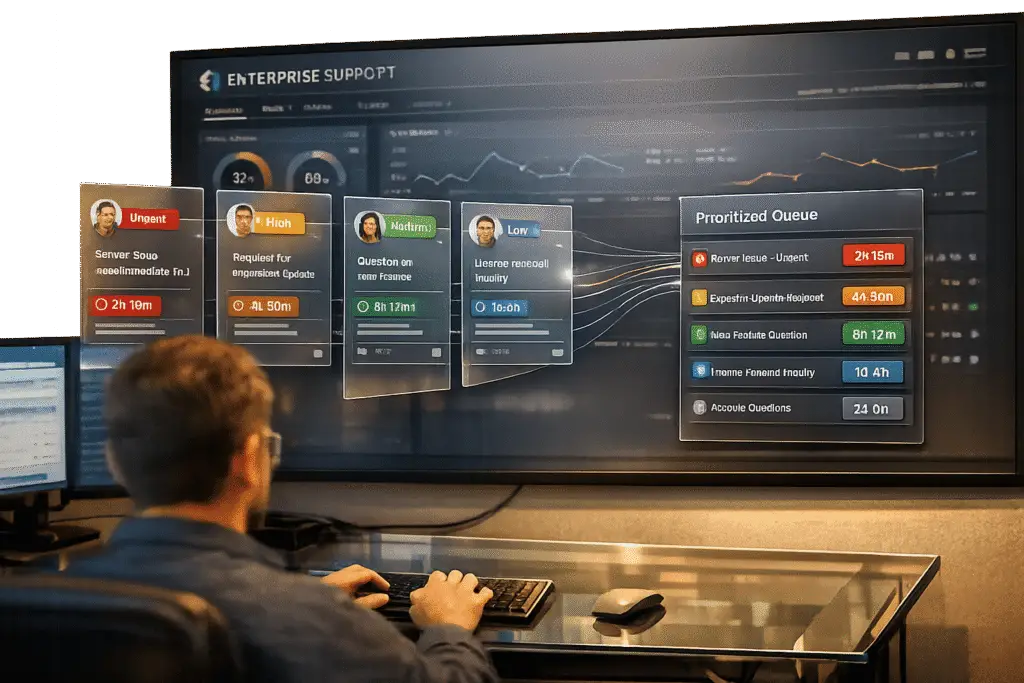
Managing conflicting requests in B2B support can be challenging. Different stakeholders – like executives, admins, and end users – often have competing priorities. Mishandling these conflicts risks wasted time, SLA breaches, and customer churn. Here’s a quick guide to resolving these issues effectively:
- Document everything: Record each request’s details, goals, and urgency. Use AI tools to identify overlaps and conflicts faster.
- Align with business goals: Prioritize requests based on their impact on revenue, operational stability, and renewal risks.
- Improve communication: Shift discussions from features to business outcomes. Centralize updates with automation to ensure clarity.
- Use AI for prioritization: Let AI tools assess urgency, sentiment, and customer value to create a fair, data-driven priority system.
- Prevent future issues: Turn resolved cases into knowledge base articles and use AI for root cause analysis to avoid recurring problems.
Pro tip: Clear processes, AI tools, and open communication are key to balancing conflicting priorities without damaging customer relationships.
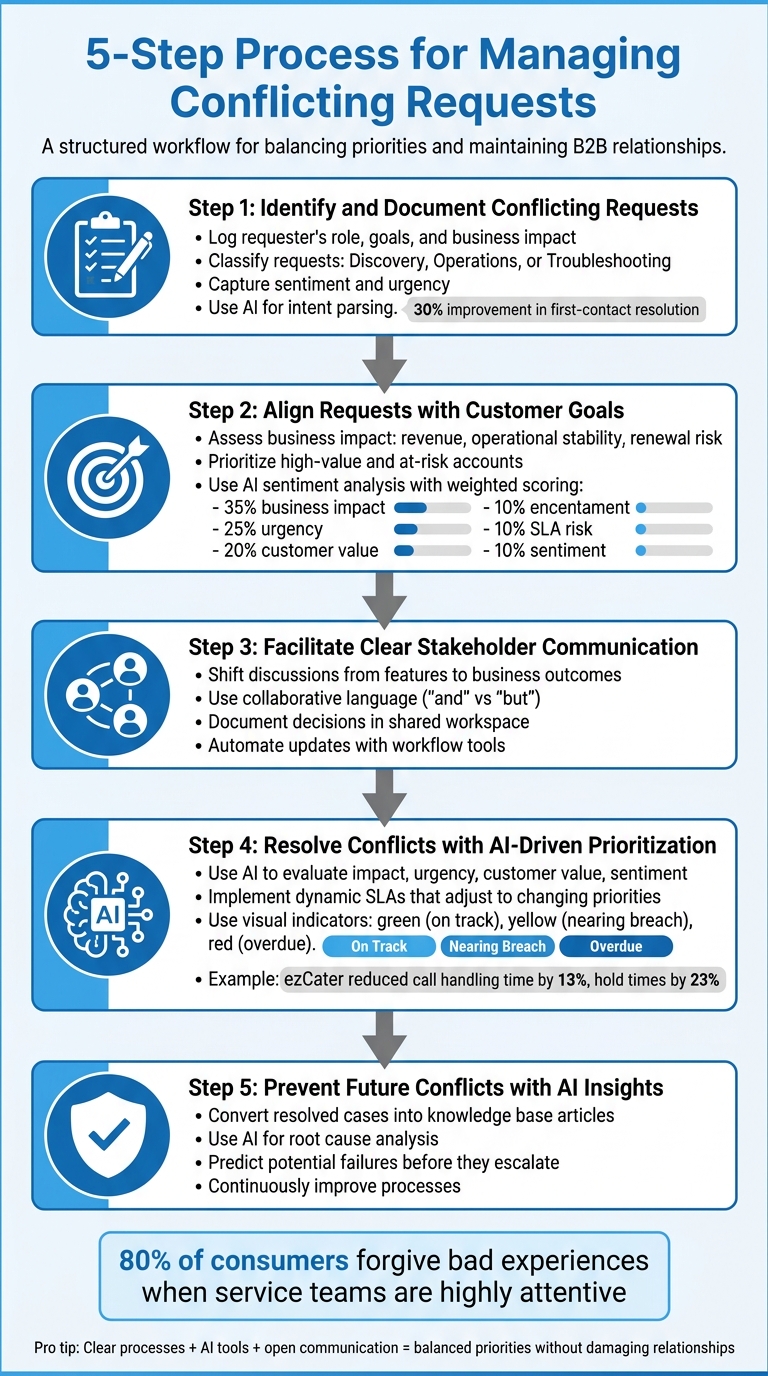
5-Step Process for Managing Conflicting B2B Support Requests
Step 1: Identify and Document Conflicting Requests
Handling conflicting requests in B2B support starts with precise documentation. This step lays the groundwork for effective conflict resolution by ensuring every request is clearly understood and categorized.
Log Key Details for Each Request
Begin by thoroughly documenting each request. Go beyond just noting the basics – include the requester’s role, their specific goals, and the business impact they’re most concerned about. For example, a Chief Revenue Officer (CRO) might request a feature update to drive revenue growth, while a system admin might prioritize stability and reliability instead [2].
Classify each request into one of three categories: Discovery (seeking information), Operations (requesting actions or tasks), or Troubleshooting (addressing an issue) [2]. This categorization helps identify patterns. For instance, if multiple stakeholders submit "Operations" requests related to billing adjustments, you may have uncovered a conflict.
Record additional details like symptoms, suspected causes, and affected systems (e.g., billing, permissions, or analytics). This level of detail makes it easier to pinpoint overlapping issues. For example, an end user might report slow load times, while an admin flags database errors – both pointing to the same root problem.
It’s also crucial to capture the sentiment behind each request. A neutral tone from a procurement manager might suggest low urgency, whereas a frustrated tone from a user could indicate a high-priority issue that might escalate [1]. Once all the details are logged, summarize and confirm your findings with the stakeholders. This step not only ensures accuracy but also fosters collaboration. Research shows that 80% of consumers are willing to forgive a bad experience if they feel the service team is highly attentive [5].
Once the documentation is complete, leverage AI tools to streamline the process of detecting conflicts.
Use AI to Detect Overlaps and Conflicts
Manually comparing requests can be a time drain. AI tools like intent parsing make this process faster and more accurate by identifying underlying goals, even when stakeholders phrase their requests differently [4]. This technology has been shown to improve first-contact resolution rates by 30% and cut average response times nearly in half [4].
"Intent parsing… deciphers the underlying goals behind a client’s message – recognizing urgency, topic, and next steps even when buried in ambiguity." – futurecoworker.ai [4]
AI-powered sentiment analysis adds another layer of insight by monitoring emotional tone in real time. This helps flag high-risk situations where conflicting requests might be causing frustration [3][4]. For example, when Klarna introduced AI for sentiment detection and context summarization, they reduced repeat inquiries by 25% [3].
Additionally, AI can auto-generate conversation summaries, helping agents quickly identify overlapping issues. A large equipment rental company used this approach to cut call escalations by 85% [3]. To handle ambiguous cases, configure AI systems with confidence scoring that escalates unclear situations to human agents. This prevents the "amnesia problem", where agents lack context from previous interactions, forcing customers to repeat themselves and increasing the risk of contradictory responses [3].
sbb-itb-e60d259
Step 2: Align Requests with Customer Goals
Once you’ve documented customer requests, the next step is to focus on those that directly influence key business outcomes – not just the loudest or most frequent demands [6][7].
Assess Business Impact and Renewal Risk
The first priority is to evaluate how each request impacts the customer’s critical business objectives. Consider factors like safeguarding revenue, ensuring operational stability, and improving the likelihood of renewals. For instance, a billing system issue threatening monthly recurring revenue (MRR) should take precedence over something less urgent, like a minor user interface adjustment [9].
It’s also essential to prioritize accounts based on their strategic importance. High-risk or high-value customers, such as VIP accounts, need immediate attention. Meanwhile, accounts in stable condition or new trial users may not require the same urgency [9].
"Finding common ground with a customer is often the pathway to cooperation and collaboration." – Clarity Voice [5]
When assessing risks, keep an eye on potential SLA violations, compliance concerns, and data security vulnerabilities. Requests containing terms like "leak", "breach", or "compliance failure" should be escalated without delay [8][9]. Poor prioritization is a common pitfall, contributing to nearly 37% of project failures, often due to conflicting demands [8].
Before finalizing how to address a request, engage with the customer to understand their preferred resolution approach. This not only clarifies their business priorities but also fosters trust. Offering multiple resolution options allows customers to choose what works best for their operational needs.
Once you’ve assessed the business impact, leverage AI-powered tools to fine-tune your prioritization process.
Use AI for Sentiment and Intent Analysis
AI can take your prioritization efforts to the next level by providing deeper insights into customer sentiment and intent. Beyond just analyzing the content of requests, AI can detect emotional cues and escalation risks. For example, language indicating frustration or terms like "churn" or "cancel" might reveal a strained relationship, even if the request itself seems routine [9].
Advanced AI systems use weighted scoring models to minimize human bias and ensure consistent decision-making [9]. A sample model might allocate 35% of the score to business impact, 25% to urgency, 20% to customer value, 10% to SLA risk, and 10% to sentiment. This method ensures prioritization aligns with real business needs rather than just the loudest demands [9].
"Consistency beats heroics. A clear, daily-applied prioritization rubric keeps customers satisfied and loyal." – Typewise [9]
Dynamic prioritization should automatically flag requests tied to active incidents or those containing security-related keywords. Tools like Supportbench’s AI automation can handle tagging and scoring, allowing your team to focus on resolving issues instead of sorting through them. To keep this system effective, conduct regular reviews – weekly for high-priority cases and monthly to adjust scoring weights based on evolving product or market conditions [9].
Step 3: Facilitate Clear Stakeholder Communication
After aligning requests with customer goals, the next step is ensuring all stakeholders are on the same page and working together toward a solution. Often, conflicting requests persist because the trade-offs between them aren’t fully understood – stakeholders may push competing priorities without realizing that prioritizing one can delay another [10].
Establish Shared Understanding
Shift the focus of discussions from specific features to broader business goals [10][11]. For instance, if someone insists, "We need this immediately", try reframing the conversation to uncover the underlying priority: "It sounds like keeping this key account stable is your main concern." This approach opens the door to considering alternative solutions [12].
"Stakeholder conflicts are not problems to avoid but negotiations to navigate." – Figr [12]
Language matters. Small adjustments can make conversations less confrontational. For example, swap "but" for "and" when addressing constraints: "I understand your concern, and here’s the limitation." This subtle shift promotes collaboration rather than opposition [12]. Acknowledging concerns in straightforward terms also helps build trust and keeps discussions productive [12].
To avoid rehashing the same debates, document key decisions. Use a shared workspace to centralize prioritized items, their rationale, and any dependencies. This way, everyone works from the same set of facts, reducing the risk of "decision drift" [10][12].
Clear communication now saves time and prevents misunderstandings later. Once everyone is aligned, move to automated updates to keep stakeholders informed efficiently.
Use Workflow Automation for Updates
Manually updating stakeholders can be time-consuming and prone to errors. Automated workflows solve this by keeping everyone informed without requiring constant manual effort. For example, auto-tagging can categorize tickets by issue type, product area, or sentiment, enabling stakeholders to easily track high-priority conflicts in real time [13].
For more delicate situations, consider a "human-in-the-loop" approach. Automation can flag sensitive cases for human review, ensuring critical accounts get the attention they need without sacrificing speed [13]. When escalating issues, provide full context – including sentiment and intent – so the next agent can hit the ground running [3].
Supportbench’s workflow automation simplifies tagging, routing, and stakeholder notifications. This reduces the operational burden of managing complex B2B accounts while ensuring no stakeholder feels ignored. By streamlining updates, automation not only saves time but also strengthens alignment across all parties involved.
Step 4: Resolve Conflicts with AI-Driven Prioritization and SLAs
With documentation, alignment, and communication in place, the next step is to tackle conflicts using AI-driven prioritization and flexible SLAs. By streamlining stakeholder communication, AI tools can help prioritize and address conflicts objectively. Manual prioritization often falls short when every issue is considered urgent. AI eliminates guesswork by assessing requests based on data, while dynamic SLAs allow teams to adjust to changing priorities without compromising on commitments.
AI-Driven Request Prioritization
AI-powered systems use algorithms to evaluate tasks by analyzing factors like issue severity, customer impact, and historical interactions, assigning priority levels automatically [14]. This approach ensures decisions are based on tangible criteria rather than on who shouts the loudest. Key factors include:
- Impact: Is this a widespread issue or a minor inconvenience?
- Urgency: Is the problem blocking work or non-urgent?
- Customer Value: Does it involve a strategic account or a lower-tier user?
- Sentiment: Is the tone frustrated or neutral?
Natural Language Processing (NLP) and predictive analytics further enhance prioritization by detecting urgency and tone, ensuring critical issues are flagged quickly, no matter who submits them [14]. Take ezCater, for example. In 2024, the company implemented Level AI‘s Real-Time Agent and Manager Assist to manage peak-hour orders. By leveraging AI to sift through over 1,000 articles and monitor calls, ezCater reduced call handling time by 13% and cut hold times by 23% [19].
"The goal isn’t just to do things faster; it’s to do the more important things, period. It’s about turning your inbox from a chaotic list of demands into a prioritized queue of next best actions." – Danny Essner, Mixmax [18]
AI routing also minimizes manual errors and helps avoid SLA breaches [14]. Tools like Supportbench’s predictive CSAT and CES scoring can identify cases that might escalate, giving teams a chance to address potential problems early. To measure success, track metrics like initial response time, resolution rates, and SLA management compliance [14].
Dynamic SLAs for Flexible Case Management
Once requests are prioritized, dynamic SLAs come into play, offering flexibility to manage cases fairly. Unlike rigid SLAs with fixed deadlines, dynamic SLAs adjust automatically when factors like risk scores, priority levels, or business impact shift [16]. This adaptability is crucial for handling conflicting requests. For instance, if a ticket involves a renewal deadline that’s moved up, its priority can escalate accordingly.
AI also assigns tasks based on urgency and team capacity, reducing the risk of SLA breaches [14]. For example, if a strategic account has an upcoming renewal, Supportbench can tighten SLAs for related cases to ensure faster resolutions. To keep things fair, use "on-hold" statuses to pause timers when waiting for customer input, so agents aren’t unfairly penalized for delays outside their control [15][17].
Visual tools like countdown timers and color-coded status indicators (green for on track, yellow for nearing breach, red for overdue) help agents manage their workload effectively [17]. Define clear priority levels, such as P0 for critical issues (e.g., 10-minute response) and P3 for low-priority tasks (e.g., 1-business-day response) [9]. Regularly review and adjust your scoring rubrics – such as through a monthly reset – to align with evolving product features or customer needs [9].
"Consistency beats heroics. A clear, daily-applied prioritization rubric keeps customers satisfied and loyal." – Typewise [9]
Step 5: Prevent Future Conflicts with AI Insights
Avoiding conflicts before they arise is key to maintaining smooth operations. By building on earlier conflict resolution steps, proactive measures can help ensure long-term success. AI plays a crucial role here by analyzing patterns from past interactions and turning resolved cases into actionable knowledge. This approach transforms past challenges into opportunities for ongoing improvement.
Create Knowledge Base Articles from Resolved Cases
Every resolved conflict is a learning opportunity. AI can take these resolutions and transform them into structured knowledge base articles, highlighting recurring issues and suggesting ways to avoid them in the future [23]. This process involves extracting essential details from resolved cases and drafting ready-to-use documentation.
For example, Supportbench uses AI to analyze case interactions and generate articles that address both the problem and its solution. These articles become a valuable resource, enabling teams to quickly resolve similar issues in the future. To ensure the information is accurate and empathetic, a double-pass validation process is recommended. This involves AI-generated summaries being reviewed for accuracy and relevance, followed by a final human review to ensure the content reflects the necessary ethical and empathetic tone [24][25][26].
While documentation is essential, understanding the deeper causes of conflicts is equally important for preventing future issues.
Use AI for Root Cause Analysis
AI takes root cause analysis to the next level by moving from educated guesses to data-driven insights. It processes signals from incidents to identify the actual causes of recurring conflicts [20][21]. By comparing the "signatures" of current issues – such as specific logs, behaviors, or data flows – with historical data, AI can uncover patterns that might otherwise go unnoticed [20].
In 2025, researchers at the University of Warwick introduced a framework that uses AI to analyze team dynamics. This system organizes team artifacts into three dimensions – Contribution, Interaction, and Role – while leveraging language models to extract goals and tasks from meeting logs. It even uses Gini index measures to identify potential conflict indicators and provide actionable advice [24].
AI also excels at piecing together a clear timeline of events by correlating data from multiple sources. This helps teams understand not just what happened, but why, by filtering out irrelevant data and focusing on meaningful anomalies [20][22]. Additionally, AI can predict potential failures by identifying subtle performance declines or small triggers that might escalate into larger issues. In some cases, it can alert teams hours before a critical incident occurs [20].
"Reliability is not only about restoring service quickly. It is about adjusting systems and business processes so they evolve in a safer direction." – Resolve AI [22]
Common Mistakes to Avoid When Managing Conflicting Requests
When it comes to handling conflicting requests, avoiding common missteps is just as important as having solid strategies for identification, alignment, and resolution. Support teams can easily falter due to unclear escalation processes or over-reliance on manual workflows. Recognizing these mistakes early can help prevent delays and safeguard customer relationships.
Ignoring Informal Communication Channels
One frequent mistake is overlooking requests that come through informal channels like Slack, text messages, or internal chats. These requests often bypass formal ticketing systems, creating hidden tasks that disrupt prioritization and leave teams working with incomplete information [27].
The fix? Consolidate all communication channels into a single triage workflow. By ensuring every request is logged into one central system, teams can make decisions based on a complete picture [27].
Delaying Senior Stakeholder Involvement
Another common error is waiting too long to involve senior leaders in resolving high-stakes conflicts. This is especially risky when dealing with issues like potential customer churn, contract disputes, or critical pricing and policy decisions. Frontline teams often lack the authority to address these concerns effectively.
Consider this: 85% of employees face workplace conflict, and in the U.S., this costs companies over $350 billion annually in lost productivity, with employees spending an average of three hours per week dealing with conflict [28].
"Aligning executive stakeholders with conflicting priorities is a puzzle… elevate the conversation: align first on company goals." – Melissa Perri, Influencer [11]
To avoid this, establish clear escalation triggers from the start. For example, unresolved issues, SLA breaches, or renewal risks should automatically prompt senior-level review. In B2B settings, early alignment between account managers and customer success leaders is essential, particularly when strategic goals or tight deadlines are at stake [11].
Relying on Manual Processes Without AI Support
Manual processes often force agents to make quick decisions without full context, a method that becomes unsustainable as the volume and complexity of requests grow.
AI tools can make a big difference here. They can automatically assess customer sentiment, flag frustrated stakeholders, and prioritize requests based on factors like customer tier and issue urgency [27]. These tools don’t just speed up decision-making – they also provide the data needed to craft solutions that work for everyone involved. While AI streamlines the process, human judgment remains critical for managing nuanced customer relationships [11].
| Communication Mistake | Impact | Recommended Fix |
|---|---|---|
| Ignoring Informal Channels | Skewed priorities due to incomplete visibility | Consolidate all entry points into a unified triage workflow [27] |
| Delaying Senior Involvement | Strategy-execution gap and renewal risk | Align on CEO/Company goals at the start [11] |
| Manual Prioritization | Inconsistent SLAs and misrouted tickets | Use AI for automated classification and routing [27] |
Conclusion: Key Takeaways for Managing Conflicting Requests
Recap of the 5-Step Process
Handling conflicting requests doesn’t have to throw your support operations off track. This guide’s five-step process offers a structured way to tackle these challenges: start by thoroughly documenting every request, ensure decisions align with your company’s overarching goals (not just individual preferences), encourage open communication among stakeholders to foster shared understanding, leverage AI tools for objective prioritization, and address root causes to minimize future conflicts.
"Conflicting stakeholder inputs are not a sign of dysfunction. They are a signal that your product sits at the intersection of multiple expectations, constraints, and business goals." – Siddharth, Blog Author, Agile Seekers [10]
The goal is to move from simply reacting to problems to proactively managing conflicts. By steering conversations toward measurable outcomes instead of focusing solely on feature demands, and using objective frameworks to clarify trade-offs, you can turn potential conflicts into opportunities for strategic growth [10][11].
Supportbench’s AI-native platform enhances these proactive strategies, making conflict resolution more efficient and effective.
How Supportbench Enables Conflict Resolution
Supportbench’s AI-powered platform builds on these methods by incorporating tools like dynamic SLAs, AI-driven sentiment analysis, and automated updates. Dynamic SLAs adapt based on customer tier and renewal risk, ensuring that critical issues are addressed quickly and efficiently. Predictive scoring evaluates both business impact and sentiment in real time, helping teams pinpoint which conflicts could jeopardize customer relationships. Meanwhile, automated case management consolidates communications, providing a single source of truth and eliminating confusion.
FAQs
How do I decide who to prioritize when stakeholders disagree?
When stakeholders have conflicting opinions, it’s crucial to rely on a clear and objective framework. One effective approach is to use predefined criteria, focusing on factors like impact and urgency. Tools such as weighted scoring models and priority levels can bring consistency to decision-making. Always aim to align decisions with overall business goals and the needs of customers, giving priority to issues that are either highly valuable or time-sensitive.
AI tools can also play a role by assisting with tasks like triage and routing, making the process more efficient. To maintain fairness and alignment, ensure transparency and regularly review key metrics, such as SLA compliance, to evaluate and adjust as needed.
When should I escalate a conflict to senior leaders?
When a conflict can’t be resolved at lower levels, especially if it carries major risks, complexities, or delays affecting customer satisfaction, it’s time to involve senior leaders. Escalation is also necessary for urgent or lingering issues that demand higher-level decisions to achieve a resolution and uphold trust. If your team’s authority or resources fall short of handling the problem effectively, prioritizing escalation becomes essential.
How can AI help without making support feel impersonal?
AI improves customer support by making interactions more personal. It does this by analyzing user behavior, understanding context, and referencing past conversations. Tools like chatbots, powered by natural language processing, respond in real time with tailored answers that feel conversational and relatable. By adjusting to each user’s specific needs, AI delivers support that feels sincere while staying consistent and efficient.
Related Blog Posts
- How to Manage Customer Support Across Multiple Products with Different Complexity Levels
- How do you build an incident management process for B2B support (not just engineering)?
- How to handle vendor-to-vendor support in a portal (B2B2B workflows)
- How to handle “customer internal politics” in support tickets professionally






