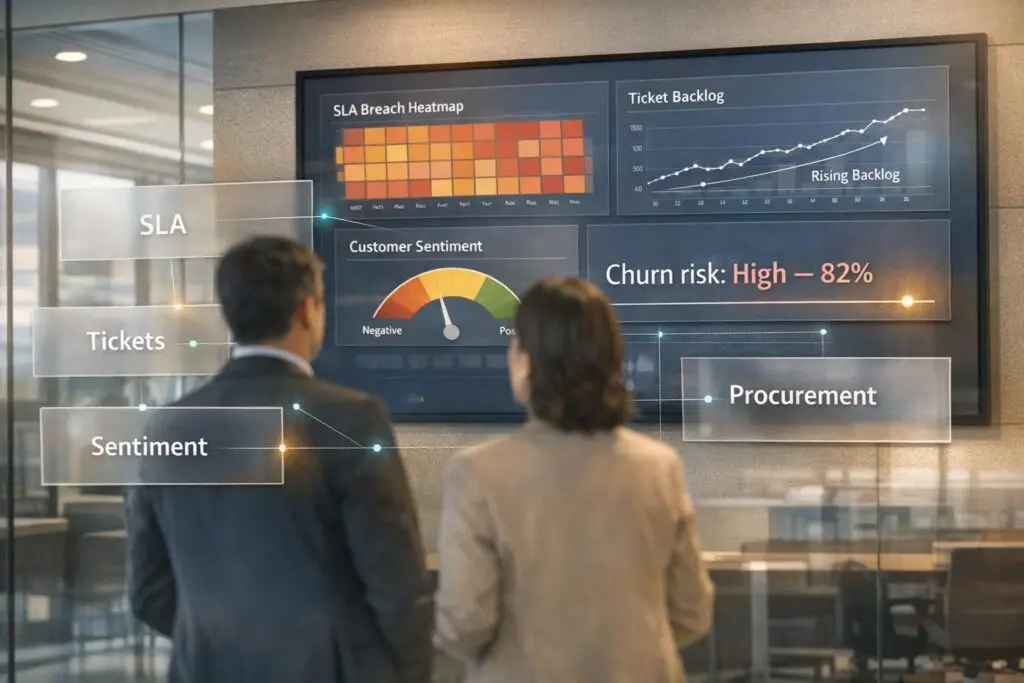
In procurement-heavy organizations, churn often develops quietly through unresolved support issues, negative sentiment, and missed follow-ups. These issues may not show up in usage metrics but can signal deeper dissatisfaction. Here’s what to watch for:
- Unresolved escalations: Multiple stakeholders raising issues that remain unaddressed can weaken trust.
- Negative sentiment shifts: Drops in CSAT scores or frustrated language in support tickets often precede churn.
- SLA breaches near renewals: Missed service agreements close to contract renewals give procurement teams reasons to reconsider.
- Pricing concerns and executive turnover: Questions about value or leadership changes at the client organization often point to risk.
To address these risks, consolidate support data, use AI tools to score interactions, and align insights with procurement timelines. AI can predict customer churn weeks in advance, such as tonal changes in communication or spikes in unresolved tickets. Acting quickly – especially within 4 hours of identifying risks – can significantly improve retention and reduce churn by up to 25%. By turning support data into actionable insights, businesses can stay ahead of potential issues and maintain strong client relationships.
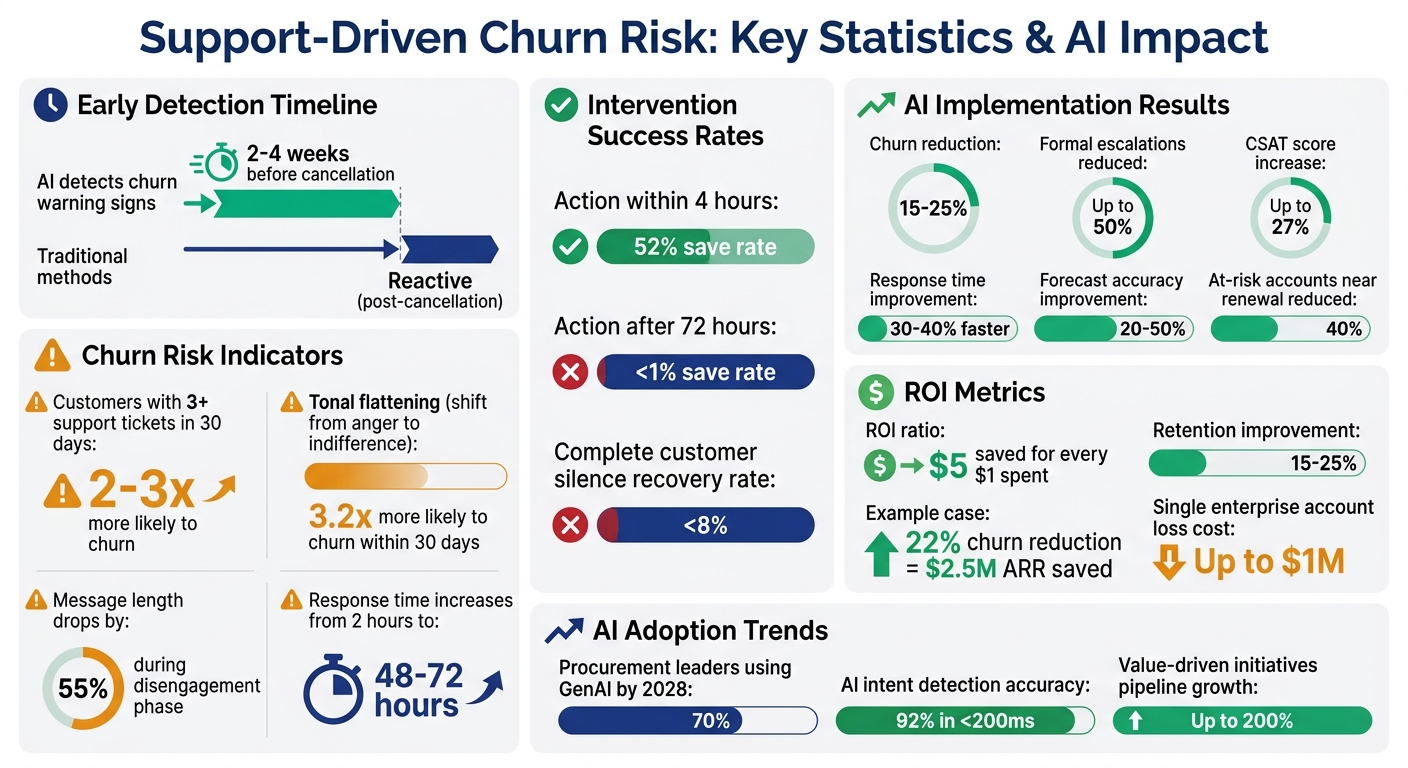
AI-Driven Churn Detection Statistics and Impact Metrics for Procurement Organizations
Early Warning Signs of Support-Driven Churn
Churn in procurement-heavy organizations doesn’t usually come with dramatic, sudden events. Instead, it sneaks in through subtle patterns in support interactions. Spotting these early requires paying close attention to behaviors that hint at declining trust, frustration, or shifting priorities among stakeholders. Let’s break down how specific support signals point directly to increased churn risk.
Unresolved Escalations Across Multiple Stakeholders
When escalations go unresolved and involve multiple stakeholders in an account, it’s a red flag. This often signals issues like product complexity, recurring bugs, or poor support resolution [3]. In procurement-heavy organizations, unresolved escalations create cracks in your relationship. Stakeholders who encounter these problems may start questioning the partnership, which weakens your champion’s ability to defend your value during vendor reviews. Essentially, every unresolved issue adds another voice questioning your reliability. AI-driven health scoring can help connect these signals to predict churn risk.
Negative Sentiment Changes in Support Tickets
A noticeable drop in CSAT scores – for example, from 5 to 2 – can be an early indicator of trouble. This kind of sentiment shift often appears weeks before metrics like usage dashboards show any signs of risk [3]. In organizations with complex procurement processes, negative sentiment in support tickets can hint at deeper issues like budget pressures, plans for vendor consolidation, or doubts about ROI. These concerns might not yet be part of formal conversations but are already brewing under the surface [1].
SLA Breaches Near Renewal Dates
Service Level Agreement (SLA) breaches close to renewal dates are particularly damaging [1]. They give procurement teams an easy argument for ending the contract, especially if the product isn’t seen as essential anymore [1]. Another red flag: when high-value enterprise accounts experience slower response times than average. This often happens when tickets are submitted during peak hours without priority routing, further increasing churn risk [3].
Pricing Complaints and Executive Sponsor Turnover
Support interactions that bring up pricing concerns or involve greater procurement scrutiny are clear danger signs [1]. When customers start questioning pricing or asking to delay renewals, it’s often because they no longer see your solution as delivering enough value [1]. Even more concerning is executive sponsor turnover. As Madison Kochenderfer, Customer Success Lead at Dock, puts it:
The conservative philosophy here is that if you don’t have a verbal ‘Yes, I plan to renew,’ then the company should be flagged as a churn risk [4].
When support failures dominate the narrative procurement teams hear about your product, it’s a tough story to overcome [4].
sbb-itb-e60d259
How to Analyze Support Data for Churn Patterns
Once you’ve identified early warning signs, the next step is to dig into your support data to confirm and address churn patterns. Turning scattered support interactions into actionable insights helps you tackle issues before they escalate. For procurement-heavy organizations, this means gathering data from various systems and making sense of it before renewal periods arrive.
Consolidate Support Data by Customer Account
To get started, bring together all support-related interactions – tickets, escalations, chat logs, and phone calls – into a single, unified view for each customer account. Many companies use ETL/ELT pipelines to pull data from CRMs like Salesforce or HubSpot, support platforms, and billing systems into a centralized data warehouse [5][7]. Standardizing information (e.g., naming conventions, date formats, and eliminating duplicate entries) ensures you have a reliable, complete dataset to work from [5][6]. Without this unified view, you might miss critical patterns that only emerge when looking at the bigger picture across multiple stakeholders. After consolidating the data, AI sentiment analysis tools can then help quantify risk.
Use AI to Score Interaction Risk
AI scoring tools analyze a wide range of factors – like sentiment, intent, emotional tone, and engagement trends – to identify accounts that need immediate attention [7]. For example, customers who submit three or more tickets within 30 days are twice as likely to churn compared to those with zero or one support interaction during the same period [3]. Machine learning models like Random Forest or XGBoost can generate real-time risk scores, which can then be integrated into your CRM. This allows sales and customer success teams to receive alerts directly in their daily workflows [7]. Businesses using AI for churn prediction have reported up to a 27% increase in CSAT scores [7].
Align Support Data with Procurement Timelines
It’s crucial to align support data trends with procurement cycles – whether 30-day, 90-day, or annual renewal windows. Set up automated alerts to notify teams when high-risk behavior occurs within 90 days of a renewal [8]. For example, if an enterprise client suddenly experiences a spike in ticket volume or unresolved issues near their contract renewal date, that’s a major warning sign [2]. By connecting support sentiment data with contract details like renewal dates and payment history, you can identify risks during these critical periods [2][7]. This alignment helps you validate churn risks alongside broader customer health metrics.
Cross-Check with Customer Health Scores
Finally, compare your findings from support data with other predictive metrics, such as CSAT trends, Customer Effort Scores (CES), and usage patterns. If a customer who typically contacts support every 2-3 weeks suddenly goes silent for 6+ weeks, check their engagement metrics to confirm disengagement [3]. Similarly, if high-value enterprise accounts are experiencing slower-than-average response times during critical periods and lack priority routing, this could signal an elevated churn risk [3]. Lincoln Murphy from Sixteen Ventures sums it up well:
For SaaS, churn isn’t just a number; it’s a signal [6].
Using AI to Detect Churn Risk Earlier
AI tools are now enabling businesses to identify churn risk much earlier than traditional methods. In fact, AI can detect warning signs 2 to 4 weeks before a cancellation occurs [10]. For companies with complex procurement processes, this early detection is a game-changer. It creates a critical window to take action before customers make their final renewal decisions.
What sets AI apart is its ability to assess customer sentiment, going beyond basic behavioral data like logins, usage, or payment history. By analyzing the emotional tone of every support interaction, AI-powered predictive models have helped organizations reduce formal escalations by up to 50% [11]. Additionally, businesses using these models to detect risk early have seen churn rates drop by 15% to 25%, compared to those relying on reactive strategies [10]. These insights allow for targeted interventions, as explained below.
AI Sentiment Analysis on Support History
AI sentiment analysis tracks emotional trends over time, identifying shifts in tone that may signal disengagement. Interestingly, the most dangerous sign isn’t outright anger or frustration – it’s indifference. As Eclincher points out:
"The shift from anger to indifference is not improvement – it is the most dangerous moment in the customer relationship." – Eclincher [10]
Customers who display this "tonal flattening" are 3.2 times more likely to churn within 30 days than those who express dissatisfaction openly [10]. AI tools can pick up on these subtle changes by aggregating sentiment data from diverse, unstructured sources that manual reviews often miss [9]. During the disengagement phase (typically 2 to 4 weeks before churn), customers tend to send shorter messages – on average, message length drops by 55%. Additionally, their response times slow dramatically, shifting from 2 hours to 48–72 hours [10]. These behavioral shifts are red flags that signal a need for immediate action.
AI Prediction of Escalations and Emotional Risk
Building on sentiment analysis, AI can also predict when escalations are likely to occur. By analyzing language patterns, such as phrases like "I need to speak to your manager", AI identifies early warning signs of formal complaints [11]. Monika Voorhis, Senior Solutions Architect at SupportLogic, explains:
"Escalations are not random. They are the logical conclusion of a series of detectable patterns." [11]
Intervening during the tonal flattening phase can significantly improve outcomes. If action is taken within 4 hours, businesses report a 52% save rate for at-risk accounts [10]. However, if more than 72 hours pass, the save rate plummets to less than 1%, making timely responses essential [10]. To improve tracking, companies can use custom objects with timestamps in their CRM systems to monitor the duration and recurrence of friction points [11]. This approach shifts the focus from reactive problem-solving to proactive, data-driven prevention.
AI-Powered Triage for Complex Accounts
AI-powered triage systems are particularly valuable for procurement-heavy accounts, where dissatisfaction can escalate quickly. By analyzing the tone of support tickets, emails, and chat interactions, AI flags high-risk accounts before formal complaints arise [9]. Companies using these systems report 30% to 40% faster response times and 20% to 50% better forecast accuracy during volatile periods [12].
Interestingly, prioritizing "quiet" accounts over the most vocal complainers is often more effective. Once a customer reaches complete silence, recovery rates drop below 8% [10]. Beyond customer interactions, AI can also predict supply chain disruptions 60 to 90 days in advance [12], giving procurement teams ample time to address potential issues. As Bhavuk Chawla, Associate Procurement Director at Unilever, puts it:
"Risk management is, at its core, a speed game – and AI wins that game every time." [12]
Adding AI Tools to Your Support Operations
The adoption of GenAI is becoming widespread among procurement leaders, with projections suggesting that 70% of sourcing events will incorporate AI assistance by 2028 [14][16]. However, success depends on more than just using AI – it requires seamless integration. When implemented effectively, AI tools can transform raw support data into strategies designed to reduce churn. The real value lies in orchestrating these tools effectively, not simply having them in place.
Features That Improve Churn Detection
Certain AI-driven features directly address churn risks and enhance your ability to retain customers. For instance, Supportbench offers AI capabilities tailored for procurement-heavy accounts. One standout feature is Predictive CSAT, which displays customer satisfaction predictions directly in your case list – even for customers who didn’t complete a survey. Similarly, Predictive CES (Customer Effort Score) highlights accounts where resolving issues is becoming more challenging, flagging potential risks early.
Dynamic SLAs are another game-changer, as they adjust response requirements automatically based on account risk. This ensures your team focuses on at-risk accounts without needing manual intervention.
AI automation also streamlines repetitive tasks, such as prioritizing cases, assigning issue types, and tagging content. Escalation management simplifies routing high-risk tickets by using pre-defined workflows, tracking multi-level escalations, and maintaining detailed audit logs. Together, these features help identify churn risks sooner and ensure they’re addressed by the right people quickly.
How to Integrate AI Without Disrupting Workflows
Implementing AI in a chaotic environment can dilute its effectiveness. As JAGGAER highlights:
Successful AI adoption in procurement is not defined by how fast it is implemented but by how well it is governed [15].
To set the stage for success, start by standardizing your intake channels. Replace scattered methods like emails, Slack messages, and spreadsheets with a centralized, AI-enabled intake system [13]. This provides structured data from the outset, which is critical for accurate AI predictions.
Focus first on automating high-volume, repetitive tasks such as ticket classification or sentiment tagging to secure early wins [14][16]. For more complex, high-risk decisions, use human-in-the-loop models, which require human approval before AI actions proceed [15]. This approach maintains accountability while speeding up response times. When integrated thoughtfully, AI enhances proactive churn detection while minimizing workflow disruptions. Companies leveraging advanced AI in structured environments have seen their pipeline of value-driven initiatives grow by up to 200% [13]. However, this is only achievable when AI operates within clear boundaries and governed policies [13][15].
Choose platforms that support no-code integration with your existing ERP, CRM, or P2P systems. For example, Supportbench integrates seamlessly with Salesforce and provides open APIs to connect customer data, licensing details, and contract timelines – all without requiring a complete system overhaul. This approach allows AI to access critical context, linking supplier, contract, and spending data into a unified foundation [13][15], while your team continues working in familiar systems.
Measuring Results and Improving Your Approach
Using AI for churn detection is just the beginning – tracking the right metrics sharpens your strategy and demonstrates ROI effectively.
Monitor Key Performance Indicators
One critical metric to watch is the Repeat Contact Rate. Customers who reach out to support three or more times within 30 days are 2 to 3 times more likely to churn compared to those with fewer interactions [3]. By monitoring this weekly and segmenting it by account tier, you can identify emerging patterns before they become bigger issues.
Sentiment trends also provide valuable insights. Instead of focusing on a single CSAT score, like a 4-star rating, examine the trajectory over the last five interactions. A decline from consistent 5-star ratings to 3-star ratings can indicate potential churn. Similarly, an increase in the escalation rate – where more tickets require senior-level intervention – might highlight problems with product complexity or gaps in front-line training that need immediate attention [3].
Another red flag is engagement silence. If a previously active customer suddenly stops communicating, especially if paired with low product usage, it’s a strong indicator of churn risk [3]. To assess this, create a weighted churn risk score. For example:
- Declining CSAT trends: +2 points
- Response times exceeding SLA: +1 point
- Recent escalations: +1 point
Accounts scoring 5 or higher should receive immediate attention from a manager or Customer Success Manager [3].
Improve AI Models with Early Warning Data
Once you’re tracking these metrics, use the data to refine your AI models. Metrics like intent distribution and escalation patterns can enhance your early warning systems [3]. For instance, if your AI flagged 20 accounts as high-risk last quarter, compare this to how many of those accounts actually churned or renewed. This feedback loop helps improve the model’s accuracy and reduces false positives.
Modern AI systems can identify customer intent with 92% accuracy in under 200 milliseconds [3]. However, this accuracy improves when you validate predictions with human oversight. By reviewing misclassified cases and updating training data, you can make your AI smarter over time. This iterative process doesn’t just improve the model – it also strengthens your overall support operations. Over time, your AI evolves from a simple alert system into a reliable tool for catching risks earlier and with more precision, aligning perfectly with proactive customer support strategies outlined in this guide.
Conclusion
In organizations where procurement plays a major role, losing a single enterprise account due to support-driven churn can cost as much as $1 million [20]. However, early detection of these risks can make a huge difference. Companies that actively tackle support issues report retention improvements of 15–25%, while health scoring reduces the number of at-risk accounts near renewals by 40% [18].
Here’s a real-world example: A SaaS company used Supportbench to identify SLA breaches close to renewal periods. By intervening in 80% of at-risk tickets, they cut churn by 22%, saving $2.5 million in annual recurring revenue over a single year [19].
Supportbench enables this proactive approach without disrupting existing workflows. Its AI-driven tools can detect risks – like shifts in customer sentiment – up to 30 days earlier than manual reviews [17]. This gives teams the chance to act before renewal discussions take a negative turn.
The return on investment is undeniable: for every $1 spent, $5 is saved [18]. But beyond the numbers, it’s about safeguarding relationships that have taken months or even years to build. By keeping an eye on critical metrics – such as repeat contacts, sentiment changes, and escalations – and letting AI highlight potential churn risks, businesses can stay ahead of problems before they grow. This forward-thinking model highlights the game-changing role of AI in support operations.
FAQs
What support signals predict churn even when usage looks healthy?
Frequent support requests, such as submitting 3 or more tickets within 30 days, can be a red flag, even if usage looks healthy. These often point to hidden product challenges that customers are struggling with. Another subtle indicator is early signs of frustration, which tools like AI-powered sentiment analysis can detect. Changes in tone or passive-aggressive language in communication might reveal dissatisfaction, even when CSAT scores appear positive. Catching these signals early can make a big difference in addressing customer concerns.
How can I tie support risk to renewal and procurement timelines?
To connect support risks with renewal and procurement timelines, keep an eye on critical indicators like unresolved escalations, changes in customer sentiment, and SLA breaches. Leveraging AI-powered sentiment analysis can help spot dissatisfaction early on. Set up your systems to automatically flag accounts that might be at risk. By aligning this data with renewal processes, you can focus on retention efforts, anticipate challenges, and lower churn costs by resolving issues before procurement or renewal deadlines hit.
What’s the fastest workflow to act on an AI churn alert?
When you get an AI churn alert, the fastest way to respond is through automated, real-time actions. Here’s how to tackle it effectively:
- Receive alerts: Stay on top of customer behavior changes with notifications from your AI system.
- Trigger workflows: Set up immediate outreach or follow-up processes to engage at-risk customers without delay.
- Leverage AI tools: Use features like sentiment analysis to identify and prioritize the most critical cases.
- Escalate when necessary: If the situation calls for it, hand off complex issues to dedicated agents for a more personal touch.
Keep an eye on the outcomes and tweak your approach to keep improving customer retention.