


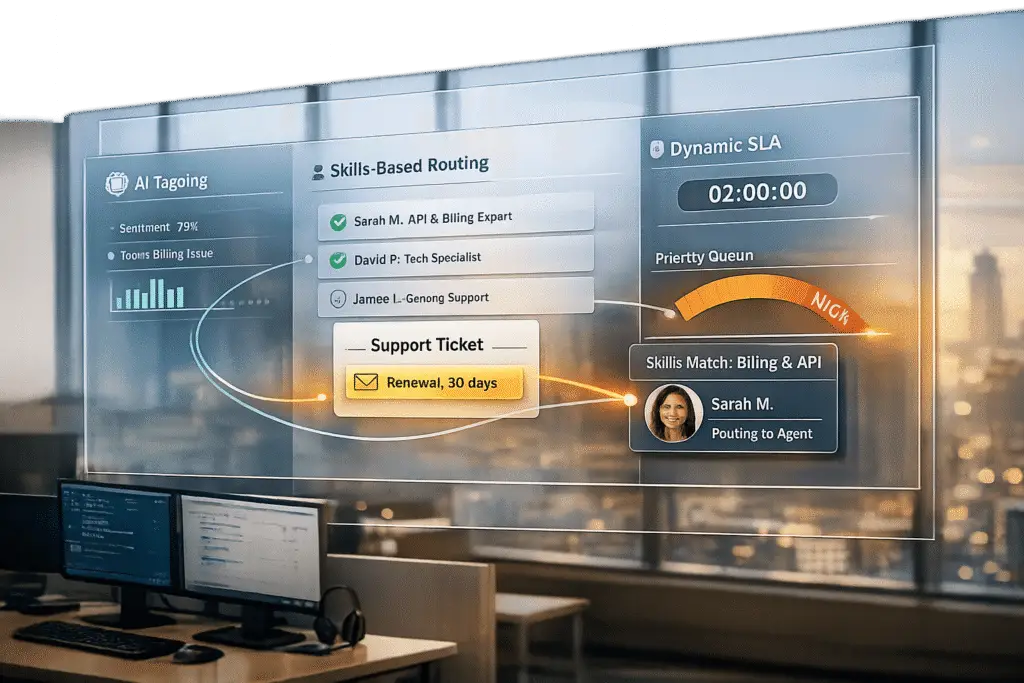
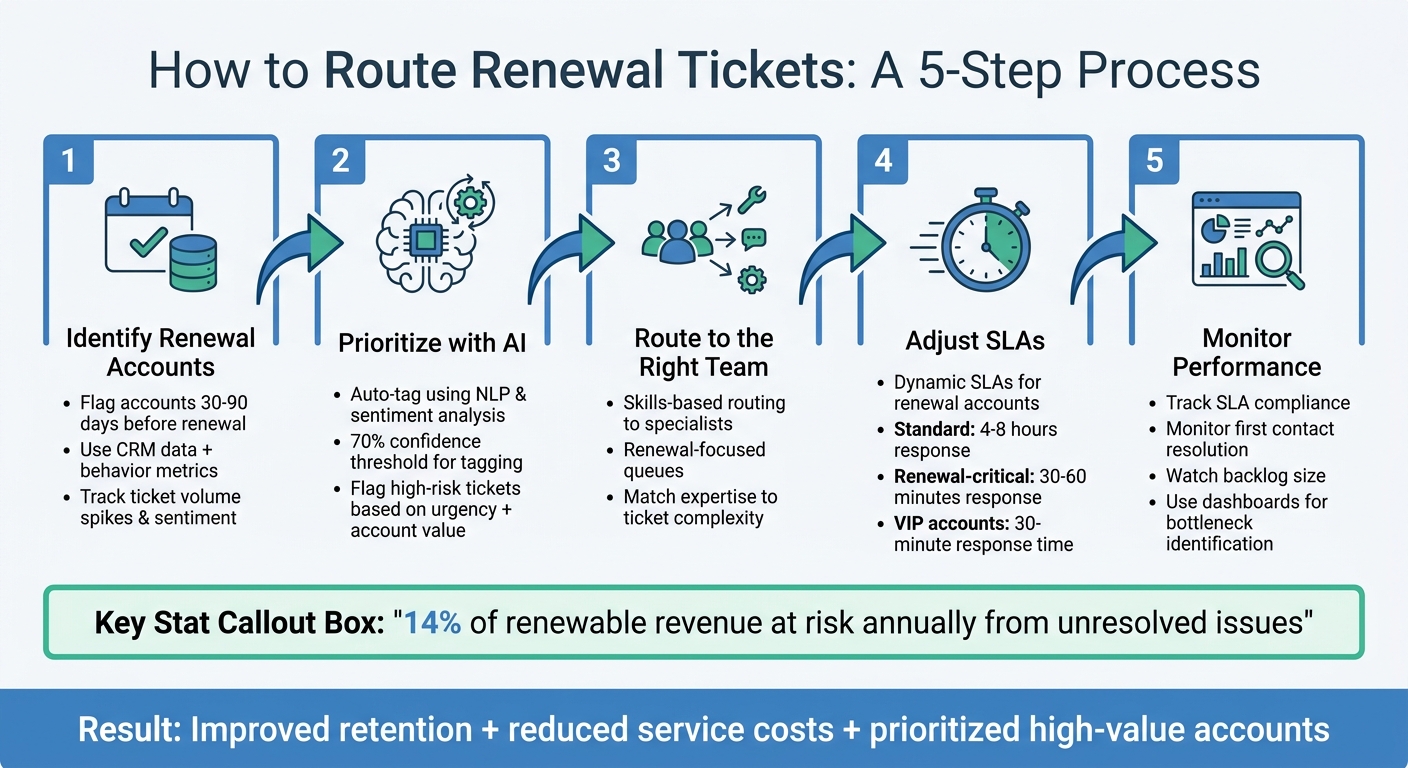
When customers are close to their renewal dates, their support interactions become critical. Unresolved issues or delays can lead to churn, costing companies up to 14% of renewable revenue annually. Traditional methods often fail to prioritize these cases effectively. Here’s how you can improve ticket routing for renewal accounts:
- Identify renewal accounts: Use CRM data to flag accounts 30-90 days before their renewal date. Combine this with customer behavior metrics like ticket volume spikes or negative sentiment.
- Prioritize with AI: Automate ticket tagging using natural language processing (NLP) and sentiment analysis. High-risk tickets can be flagged and escalated based on urgency and account value.
- Route to the right team: Set up rules to direct renewal-related tickets to specialized agents or teams. Skills-based routing ensures experts handle critical issues.
- Adjust SLAs: Use dynamic SLAs to shorten response times for renewal accounts. For example, VIP accounts might require a 30-minute response time.
- Monitor performance: Track metrics like SLA compliance, first contact resolution, and backlog size. Dashboards can help identify bottlenecks and ensure timely interventions.
These strategies not only improve customer retention but also reduce service costs while ensuring high-value accounts receive the attention they need.
5-Step Process for Routing Renewal Tickets with AI Automation
How to Identify Accounts Near Renewal
Spotting accounts approaching their renewal dates involves combining CRM contract details with customer support activity. This blend of data helps reveal which customers may need extra care as their renewal dates draw closer.
Set Your Renewal Window
Start by defining your renewal window based on CRM data. Commonly, businesses set these alerts for 30, 60, or 90 days before a contract expires [3]. The ideal timeframe depends on your sales cycle and the complexity of the contracts, with some account types needing tailored notice periods.
Use CRM tools to automatically flag accounts nearing their renewal window by tracking contract expiration dates, annual recurring revenue (ARR), and account tiers [3]. AI can make this process even easier by pulling renewal dates directly from contracts. For example, Bureau Veritas saved $9 million annually by reducing churn through automated renewal notices, while Nexi Group reclaimed 400 hours per month by automating renewal-related documentation [6].
After identifying these accounts, you can layer in behavioral indicators to better assess renewal risks.
Track Customer Health Metrics
Contract dates alone don’t tell the full story. Keep an eye on customer support trends that might indicate dissatisfaction or risk. For example, a surge in ticket volume, repeated escalations, or ongoing issues like billing errors or technical glitches can all be red flags [3][4].
Key metrics to monitor include ticket volume trends, escalation rates, SLA compliance, and customer sentiment. Sudden spikes in activity or a noticeable drop in engagement could signal trouble. For instance, a previously quiet customer who suddenly submits multiple support tickets may be hinting at deeper issues. It’s worth noting that 73% of customers say quick issue resolution is the most crucial part of a positive support experience – something that becomes even more critical as renewal dates approach [3].
Churn prediction models can identify at-risk accounts with 70–85% accuracy up to 90 days before renewal [7]. AI tools enhance this process by identifying patterns like engagement declines or sentiment changes. These systems can flag behaviors such as a once-active user going silent for two weeks or detect concerns like budget constraints or competitor mentions in support interactions [5][7].
sbb-itb-e60d259
Prioritize Renewal Tickets with AI Automation
Once you’ve identified renewal accounts, the next step is to ensure their tickets are handled promptly. AI automation can analyze incoming requests, evaluate their context, and automatically adjust their priority levels. This approach highlights high-risk issues without disrupting the overall flow of support operations. By seamlessly prioritizing tickets, AI helps route renewal-related concerns to the right teams efficiently.
Auto-Tag Renewal Tickets
After flagging renewal accounts, AI takes things a step further by identifying and tagging high-risk tickets. Using natural language processing (NLP), the system scans incoming messages for keywords like "renewal", "cancel", and "billing" that might indicate a renewal issue[8][9]. Sentiment analysis adds another layer by detecting emotions such as frustration or urgency. To ensure accuracy, set your AI to tag tickets only when it meets a 70% confidence threshold[9].
For instance, if a ticket from a VIP customer nearing their renewal period shows a "Very Negative" sentiment, the system can immediately escalate it for senior management’s attention. This ensures critical issues are flagged and addressed without delay.
Use Dynamic Prioritization Based on Customer Context
AI doesn’t stop at tagging – it evaluates tickets in the broader context of customer data. This includes factors like account value, product usage patterns, and past support interactions. By considering these elements, AI can prioritize tickets based on current customer health indicators[10][11].
For example, a routine inquiry from a high-value customer approaching their renewal date might take precedence over a similar request from an account with a later renewal period. This context-aware prioritization ensures that the most pressing issues are addressed first.
"The concept of being a truly strategic CSM was impossible before. With the AI features… now they actually have the time and visibility to do the work they were hired to do." – Larry Hogan, Global VP of Customer Success at Triptease (February 2026)[5]
Companies like Cynet have seen tangible results from this approach. They achieved a 14-point increase in CSAT (from 79 to 93) and a 47% ticket deflection rate by using AI to prioritize tasks. This allowed senior engineers to focus on high-value customer needs rather than getting bogged down with routine queries[10].
Additionally, tiered alerts can be configured around contract milestones to flag early warning signs, potential friction, or closing risks[5]. This layered system ensures that tickets are surfaced at the right time with the appropriate urgency, aligning smoothly with existing routing rules for an integrated workflow.
Set Up AI-Driven Routing Rules
Building on AI-powered ticket prioritization, routing rules take things a step further by directing renewal tickets straight to the experts who can handle them best. Using customer context – like renewal dates, account value, and predicted satisfaction – AI ensures that critical tickets land in the hands of the most qualified agents or teams. This way, high-priority cases avoid getting stuck in general queues. Now, let’s dive into how skilled agents manage these escalated cases.
Route to Renewal Specialists
Skills-based routing ensures tickets are matched with agents who have the right expertise. For renewal accounts, AI evaluates factors such as predictive CSAT scores and case history to decide whether a ticket needs to go to a senior agent or a dedicated renewal specialist. For example, high-value billing issues close to a renewal date might trigger an escalation, while routine, lower-value cases follow the standard routing path[12].
When AI flags and escalates a ticket, it’s critical to include the full conversation history and customer context. This ensures agents can provide fast, tailored solutions. Why does this matter? Because 36% of contact centers report that customers now expect more personalized and quicker responses than ever before[2]. For example, AI can send complex contract questions directly to a renewal specialist while routing technical issues to engineering. This precision ensures every ticket lands with someone capable of resolving it efficiently.
"A poorly resolved ticket doesn’t just create frustration; it threatens renewal conversations and expansion opportunities." – Josh Solomon, Mosaic AI[10]
Confidence-based routing adds another layer of efficiency. When AI has high confidence in resolving a routine issue – like license provisioning – it can handle the request automatically. On the flip side, if the AI isn’t confident, it will route the ticket to a specialist, complete with suggested solutions and all relevant context[10]. This approach balances automation with quality, ensuring that even complex cases are addressed effectively.
Create Renewal-Focused Queues
To further streamline the process, set up a dedicated queue specifically for renewal accounts. This ensures that tickets from accounts nearing their renewal window (typically 30-90 days before contract expiration) are handled promptly by your renewal team or senior support staff.
Dynamic SLAs (Service Level Agreements) can help prioritize these cases without overloading the system. For instance, you might set a 2-hour response time for critical enterprise renewal tickets to guarantee fast action.
Before implementing these rules, it’s essential to audit your ticket taxonomy. Clean up your categories and resolution codes so the AI has accurate, high-quality data to work with[10]. Clear categories like "Billing", "Subscription Changes", and "Renewal" help the AI distinguish renewal-related inquiries from other messages. Finally, keep an eye on reopen rates for AI-routed tickets to ensure that speed doesn’t come at the expense of resolution quality[10].
Adjust SLAs and Monitor Performance
Once routing rules are in place, it’s time to fine-tune your SLAs to reflect the urgency of renewals. Standard response times just won’t cut it when a high-value account is nearing renewal and facing issues. Dynamic SLAs adapt response and resolution targets based on customer context, while dashboards provide real-time insights into how well your routing strategy is working. Here’s how to configure these dynamic SLAs and keep an eye on performance metrics.
Configure Dynamic SLAs for Renewal Accounts
Dynamic SLAs are a natural extension of AI-driven routing rules, ensuring renewal-critical tickets get the attention they need. These SLAs use criteria-based triggers to tighten service levels automatically when an account approaches renewal. For example, you could set a rule like: "If Days to Renewal < 30 and Customer Tier = Gold, apply a 30-minute first response time instead of the standard 4-hour target" [14].
The difference in SLA targets can be stark. Standard accounts might have 4–8 business hours for first response and 3–5 business days for resolution. By contrast, renewal-critical accounts often require 30–60 minutes for first response and 4–8 hours for resolution, with 24/7 availability replacing standard business hours [15][16]. Escalation triggers should also be stricter – set them at 50% of the SLA duration for renewal accounts, compared to 80% for standard ones.
To implement this, create a custom field to track the "Renewal Window" status on your account or case entity. Link these SLAs to entitlements, ensuring premium treatment is reserved for customers with active, high-value support agreements [13][14]. Proactive alerts can further safeguard renewal outcomes. For instance, notify the account manager if a renewal-critical ticket reaches 50% of its response window, enabling timely action [13][15].
Track Key Metrics with Dashboards
Fine-tuning SLAs is just the start – monitoring performance in real-time is equally critical. Dashboards let you track whether your routing strategy is hitting the mark. Focus on metrics like SLA compliance rate (are you meeting the tighter response targets?), first contact resolution (are tickets reaching the right specialist on the first attempt?), and average resolution time (are renewal tickets being resolved faster than standard ones?) [17][18][20]. Keep an eye on the backlog size of your renewal queue as well – any increase could signal an overwhelmed team or a need to adjust routing rules [20].
For renewal accounts, go a step further by integrating license utilization and user sentiment data into your dashboards. If a customer is under-using their licenses and has low CSAT scores, it’s a red flag for renewal discussions [19]. Set up alerts to trigger 90 to 120 days before a contract expires, giving your renewal team enough lead time to address potential issues [19]. While 85% of companies claim to have a formal renewal process, only 30% feel it’s effective – dashboards help bridge that gap by surfacing early warning signs [19].
AI-driven insights can take monitoring to the next level. Advanced systems analyze historical ticket data to predict SLA breaches, enabling managers to reassign tickets before deadlines are missed [20]. For example, if AI detects that a renewal ticket has been idle for 50% of its allotted time, it can automatically escalate the case or alert a supervisor. This proactive approach ensures that speed doesn’t compromise quality, keeping the focus on securing customer renewals.
Common Pitfalls in Renewal Ticket Routing
Even the most well-thought-out routing strategy can go awry if not executed carefully. Two common issues include treating every renewal ticket as an emergency and failing to safeguard sensitive customer data.
Avoid Over-Prioritization and Agent Burnout
Labeling every ticket as "urgent" undermines the purpose of prioritization. If everything is flagged as critical, agents can’t distinguish between genuinely pressing issues and routine concerns[3][1]. This often results in top-performing agents becoming overwhelmed while others remain underutilized, creating uneven workloads and increasing the risk of burnout[3].
A better approach is to use multi-variable priority scoring instead of a blanket "urgent" label. This ensures that only the most critical renewal tickets are escalated to the top[1]. Additionally, implementing load-balanced ticket routing – where tickets are distributed based on agents’ current workloads – can help maintain efficiency. AI confidence thresholds can also be applied to automatically route cases with high certainty, reducing manual intervention[3][1].
While balancing workload is essential, protecting sensitive ticket data is just as important.
Manage Role-Based Access Control
Renewal tickets often contain sensitive details like contract terms, pricing discussions, payment issues, or account termination requests. Without strict role-based access control (RBAC), this data could be exposed, leading to compliance risks and security vulnerabilities[21][23]. By using AI to flag high-risk tickets and enforcing RBAC, you can secure sensitive information while enabling quick and informed responses.
Roles should be defined based on job functions rather than technical permissions. For instance, a "Renewal Specialist" role might include access to contract details and account health metrics, while a "Tier 1 Support" role could be limited to basic troubleshooting tasks[22][23]. A hierarchical structure can simplify management – for example, a "Renewal Director" role could inherit permissions from the "Renewal Specialist" role while adding oversight capabilities[21][22]. This prevents the creation of too many narrowly defined roles, which can quickly become unmanageable.
Another best practice is to implement just-in-time (JIT) access. Instead of granting permanent access to sensitive data, provide temporary elevated permissions only when a specific ticket requires it[23]. Regular audits can also help identify and address "role creep", ensuring that agents don’t accumulate unnecessary permissions over time[22][23]. These measures align with the principle of least privilege, ensuring that users have only the access they need to perform their tasks effectively.
Wrapping Up
Renewal-critical ticket routing isn’t just about shifting queues – it’s about reshaping your support strategy to focus on retention and profitability. Here’s a compelling stat: boosting customer retention by just 5% can drive profits up by 25% to 95%. Plus, retaining an existing customer is far more cost-effective, requiring 5–7 times less investment than acquiring a new one[24].
The key lies in proactive strategies. By setting clear renewal windows, tracking customer health metrics, and leveraging AI for smarter prioritization, you can shift from reactive problem-solving to proactive engagement. AI-powered tools don’t just enhance the customer experience – they can also increase revenue by 5–8% while slashing service costs by 20–30%[24]. Features like auto-tagging, dynamic SLAs, and contextual routing make it easier to spot at-risk accounts 30–90 days ahead of renewal, allowing for timely and effective intervention.
Striking the right balance is essential. Use multi-variable priority scoring to ensure fair and accurate routing, enforce role-based access controls to protect sensitive information, and keep an eye on reassignment rates to maintain AI accuracy[1]. To measure success, track both operational metrics (like SLA compliance) and financial outcomes (such as Gross Renewal Rate, or GRR). For reference, a healthy SaaS business typically achieves a GRR of 90% or higher[25].
Looking forward, AI’s role in customer experience is only set to grow. By 2028, it’s estimated that 68% of customer interactions will involve AI-driven assistance[24]. The teams that thrive will be those who use automation to enhance human expertise, not replace it. The goal? Route intelligently, escalate wisely, and empower renewal specialists to focus on the interactions that matter most for retention.
FAQs
What data do I need to flag accounts near renewal?
To identify accounts approaching renewal, focus on gathering key data points like the renewal date, customer engagement metrics (such as usage frequency and support interactions), and support signals (like sentiment analysis or unresolved issues). Additionally, monitor account health indicators, including satisfaction scores and negative feedback. This information allows you to prioritize accounts, address potential risks, and refine retention strategies effectively during the renewal period.
How do I score renewal-ticket priority without burning out agents?
AI-powered tools can make managing renewal-related tickets much more efficient. By analyzing factors like customer sentiment, specific keywords, previous interactions, and case history, these tools can pinpoint which tickets need immediate attention. This ensures that agents can focus their energy on issues that have the greatest impact.
Another smart move is aligning workflows with renewal timelines. This helps surface at-risk accounts early, cutting down on manual effort and giving teams the chance to act proactively. The result? A smoother process that not only keeps agents from getting overwhelmed but also boosts customer satisfaction during the crucial renewal phase.
Which KPIs prove renewal-focused routing is working?
Two critical metrics to monitor are the Repeat Purchase Rate (RPR) and the Customer Retention Rate.
- Repeat Purchase Rate (RPR): This measures the percentage of customers who choose to renew or upgrade their purchases. It’s a direct indicator of how well your strategies are encouraging repeat business.
- Customer Retention Rate: This metric evaluates overall customer loyalty and the success of renewal efforts, offering a broader view of how effectively you’re maintaining long-term relationships.
Together, these KPIs give a clear picture of how well renewal-focused routing strategies are performing.






