



Support teams can improve troubleshooting by balancing structure with flexibility. Standardized workflows ensure consistency, reduce errors, and save time, but rigid scripts frustrate agents and customers when unexpected issues arise.
Here’s how to create flexible workflows that guide agents without limiting their problem-solving:
- Use decision trees: Dynamic tools adapt to customer needs in real-time, skipping unnecessary steps and tailoring responses based on account details or issue complexity.
- Leverage AI tools: Automate repetitive tasks like triage, provide real-time sentiment analysis, and offer instant access to knowledge bases to speed up resolutions.
- Avoid over-scripting: Focus on intent-based guidance rather than rigid phrases to maintain a natural conversation flow.
- Keep workflows updated: Treat decision trees as living documents and involve agents in updates to capture their expertise.
The goal is to empower agents with tools that streamline processes while allowing them to think critically and address unique challenges effectively.
Building Blocks of Effective Troubleshooting Workflows
These workflows are designed to streamline troubleshooting processes while giving agents the flexibility they need to adapt to unique situations.
What Standardized Workflows Should Do
Good troubleshooting workflows minimize errors, maintain consistency, and let agents focus on problem-solving instead of administrative tasks. Did you know the average knowledge worker spends 60% of their time on "work about work"? That’s time wasted chasing updates, searching for documentation, or figuring out who to contact next. Standardized workflows eliminate this inefficiency by automating tasks like triage and routing, ensuring work gets assigned to the right agent based on capacity and priority [3].
The goal is to guide agents without micromanaging them. When done right, structured workflows can reduce handle time by 40%, lower escalations by 58%, and cut protocol deviations by 89% [5]. For example, one helpdesk client saw a 72% drop in misdiagnoses after introducing guided workflows [5]. These workflows act as tools to support agents, not rigid rules, giving them a framework to follow while allowing room for judgment and adaptability.
Start by targeting your highest-volume ticket types – like password resets, billing issues, or common technical problems. These areas offer the quickest return on investment [5]. Map out how tickets currently move through your system to identify bottlenecks or frequent transfer patterns that highlight routing issues. This ensures your workflows are grounded in how your system actually operates, not just theoretical best practices.
Decision trees are a great way to build on these principles, offering flexible guidance that adapts in real time to customer needs.
How Decision Trees Guide Without Restricting
Rigid workflows that force agents to follow a fixed sequence often fail when unexpected issues pop up. A better solution? State-machine workflows, which focus on the "resting state" of data. This approach lets agents move forward, backward, or loop through steps based on the situation [2]. It’s structured but flexible.
"A helpdesk decision tree isn’t just software – it’s a competitive moat. It turns chaotic support operations into streamlined, scalable systems." – Process Shepherd [5]
Dynamic decision trees take this a step further by using branching logic (think if/then statements) to adapt in real time. They integrate with live CRM data, skipping unnecessary questions and tailoring steps based on the customer’s plan, account tier, or history [5][6]. For instance, an enterprise client reporting a critical outage gets routed differently than a standard-tier user with a minor issue – without requiring manual intervention from the agent.
To keep things manageable, limit decision trees to four or five layers. Overcomplicating the process slows everything down. Each troubleshooting path should end in a "terminal node", like connecting to an agent, sending an automated response, or scheduling a callback. Always include at least two fallback options for each terminal node – so if a specialist isn’t available, the system can offer alternatives like a callback or routing to another team [6]. This ensures no customer is left hanging.
Treat decision trees as living documents. Review and update them every six months to keep them accurate and effective [4]. Involve experienced agents in the design process to capture their expertise and transform it into scalable, documented workflows for the entire team.
Next, we’ll look at how AI tools can enhance these workflows to make troubleshooting even more efficient.
sbb-itb-e60d259
Using AI Tools to Support Better Troubleshooting
AI doesn’t replace the judgment of support agents – it enhances it. The best AI tools handle tasks like automated triage and quickly provide relevant information, freeing agents to focus on solving more complex problems. Instead of spending time digging through documentation or manually categorizing tickets, agents can work more efficiently. When used effectively, AI becomes a force multiplier, speeding up resolutions while still giving agents the freedom to decide how to handle each situation [7][8]. This creates workflows that are not only faster but also more tailored to the needs of both agents and customers.
Workflows That Adjust Based on Context
Traditional ticket systems treat every issue the same, requiring agents to ask repetitive questions even when key details about the customer are already available. Enter dynamic decision trees: these systems use real-time CRM data to craft unique workflows based on factors like account status, urgency, or issue complexity [6]. For example, an enterprise client experiencing a critical outage gets routed differently than a standard-tier user with a minor inquiry – no manual adjustments needed.
Automated triage can save agents 2–5 minutes per call by eliminating manual assessments and ensuring escalated cases include all relevant context and history [6]. This efficiency has contributed to a drop in average IT spending per user, from $9,647 in 2022 to $7,614, as automation reduces manual workloads across support operations [7]. Beyond routing, AI also analyzes customer sentiment to spot potential issues before they escalate.
Reading Customer Sentiment and Predicting Escalations
AI tools equipped with sentiment analysis, sometimes called "emotion AI", interpret the tone of customer messages – whether they’re frustrated, neutral, or satisfied. This allows agents to prioritize high-risk cases before they turn into bigger problems. AI can even pick up on subtle warning signs in calm messages, such as when a customer quietly loses access to critical features, which might go unnoticed during busy periods.
By applying consistent criteria across all conversations, AI eliminates the guesswork in deciding when to escalate an issue. Agents receive real-time alerts when a conversation shows signs of escalating, enabling them to adjust their approach or involve a specialist before the situation worsens. This proactive strategy shifts support from reacting to problems to preventing them, catching issues like password expirations or system outages before customers even report them [7][8].
AI Copilots and Knowledge Base Access
To further improve workflows and sentiment analysis, AI copilots provide on-demand access to critical knowledge, helping agents respond quickly and accurately. These copilots pull information from SOPs, manuals, historical tickets, and knowledge bases, delivering it right within the agent’s workflow. This eliminates the need for agents to leave their screens to search for answers [9].
Take Outset Medical, for example. In April 2025, they implemented a console troubleshooting app using Tulip AI and Frontline Copilot. Trained on over 2,500 historical repair cases, the system allowed technicians to ask plain-text questions and receive tailored recommendations based on specific console alarms. The result? A 50% reduction in equipment repair times [9]. Similarly, DMG MORI embedded Tulip AI into their machine interfaces, enabling operators to troubleshoot equipment directly on the shop floor, with access to maintenance manuals in over 20 languages [9].
Retrieval-Augmented Generation (RAG) takes this a step further by synthesizing conversational answers from trusted files and providing clickable citations for verification [10]. Companies using AI-powered knowledge bases report up to a 70% reduction in support inquiries, as agents find answers faster and customers benefit from improved self-service options [10]. Tools like Supportbench include AI copilots as a standard feature, allowing agents to search case histories, get resolution suggestions, and access knowledge base articles seamlessly, without needing extra software or costly upgrades.
"72% of surveyed manufacturers report reduced costs and improved operational efficiency after implementing AI in their operations." – National Association of Manufacturers (NAM) [9]
Common Mistakes to Avoid When Standardizing
Standardizing troubleshooting workflows might sound straightforward, but it’s easy to stumble along the way. One common misstep is over-scripting – forcing agents to stick to rigid phrases that strip away the natural flow of conversation. For instance, if a system only recognizes specific keywords, a customer saying "stop this thing" instead of "cancel my subscription" could completely derail the process[13].
Another issue is the maintenance death spiral. As products and policies change, manual decision trees can become bloated and fragile. Adding just one new branch might unintentionally break others, creating a mess that teams eventually stop updating. This leaves agents stuck with outdated guidance, frustrating both them and the customers they’re trying to help[13].
Why Over-Scripting Hurts Performance
Rigid scripts can make interactions feel robotic, which hurts both the agent’s performance and the customer’s experience. Research shows that 64% of contact center agents want to change their scripts because they’re too long, inflexible, or poorly worded[11]. On top of that, 24% of agent errors happen when key responses are forgotten, while 21% stem from stress – all of which contribute to burnout, a risk faced by 74% of agents[11].
A great example of breaking free from over-scripting comes from Expo Home Improvements. In May 2022, they adopted Balto’s real-time AI guidance to replace static scripts. This approach allowed agents to speak naturally while staying aligned with key objectives, boosting script adherence by 40 points to an impressive 90% adherence rate[11]. As Marc Bernstein, Founder & CEO of Balto, explains:
"The anti-script doesn’t mean that you should wing it on every call… you’re taking the most powerful part of the human out of the human." [14]
Over-scripting can also lead to emotional disconnects. When agents are locked into predetermined responses, especially when dealing with frustrated customers, the situation can escalate rather than resolve. This contributes to the $75 billion annual cost of poor customer service for U.S. companies[12].
Measuring Success Without Micromanaging
Focusing too much on metrics like call duration can backfire. Agents might rush through calls to meet time goals, leaving issues unresolved. Instead, shifting to intent-based adherence – where agents focus on hitting key compliance points and solving problems on the first attempt – produces better outcomes. Companies using this approach have reported a 20% increase in customer satisfaction scores[12].
Voice analytics can also help without resorting to micromanagement. In fact, 72% of businesses say they achieve better service outcomes when analytics are used to identify workflow issues[12]. These tools allow managers to monitor performance while giving agents the freedom to focus on meaningful resolutions.
Empowering Agents to Think and Adapt
Standardization works best when agents understand not just the steps but the reasoning behind them. Training should prepare agents for complex situations where memorized fixes won’t cut it. Techniques like role-playing real scenarios build both empathy and confidence, with 95% of trainees reporting higher satisfaction when training includes interactive elements[12].
Involving agents in the creation and updating of workflows can also boost engagement. This sense of ownership – sometimes called the "IKEA effect" – makes agents more invested in the process[11]. As Dean Grover, Co-founder of Chanl, puts it:
"The agent owns the conversation. The scripts own the rules." [13]
Finally, gamification tools like leaderboards or challenges can turn adherence into a fun and rewarding habit. These strategies not only help reduce burnout but also improve both agent morale and customer outcomes. Striking the right balance between structure and flexibility is essential for creating effective support operations.
Rigid Scripts vs. Flexible Standardization
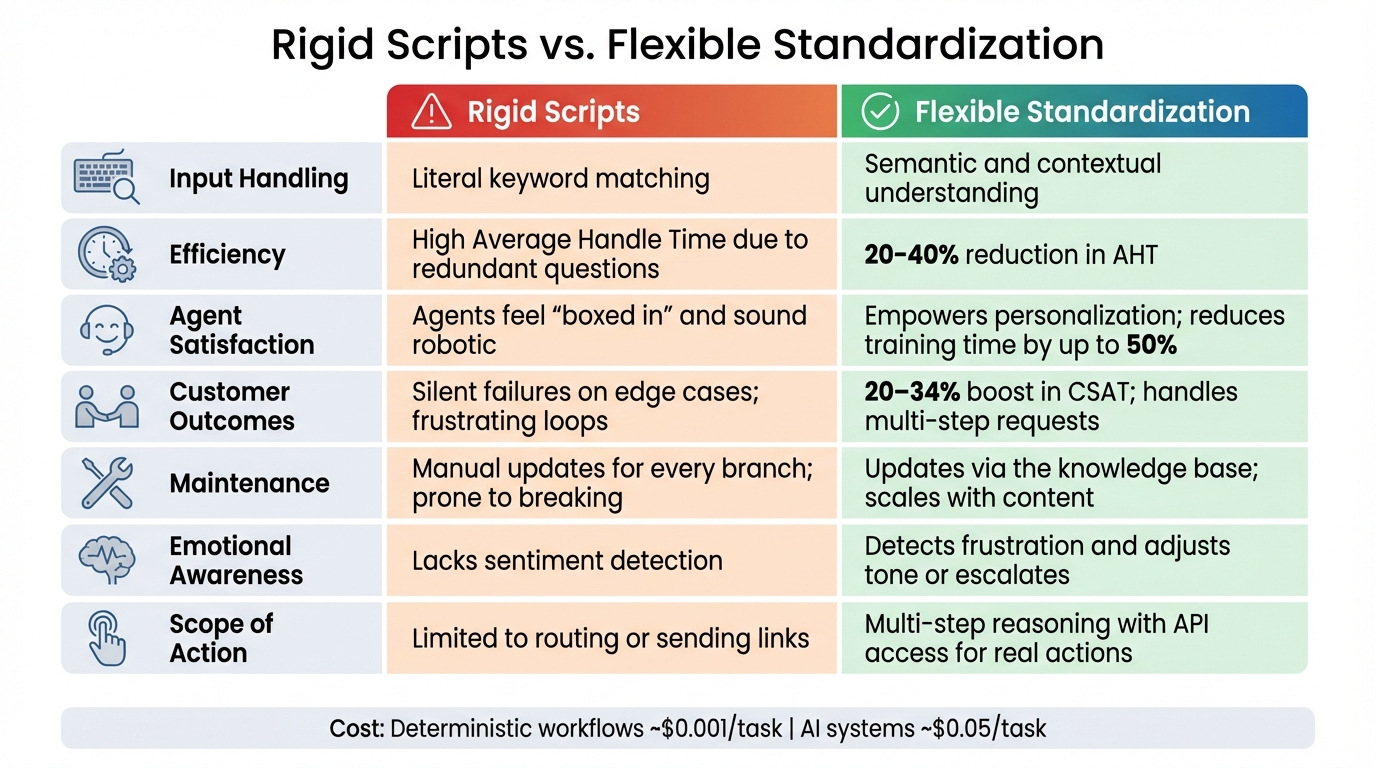
Rigid Scripts vs Flexible Standardization: Performance Comparison
Let’s take a closer look at how rigid scripts compare to flexible standardization in key performance areas. The differences between these two approaches are not just theoretical – they have a measurable impact on outcomes.
Rigid systems depend on literal keyword matching and if/then branching. This makes them vulnerable to failure when customers use unexpected phrasing. In contrast, flexible standardization uses semantic understanding to interpret intent, no matter how it’s expressed [13][15].
Another major drawback of rigid scripts is their need for constant manual updates. Every tweak requires revising the script, which can be time-consuming and prone to errors. Flexible systems, however, update automatically by refining their knowledge base. As Jonathan Bar, Founder of Corebee, advises:
"Don’t write a script for what the bot should say. Write rules for when the bot should stop talking and hand off. The resolution part handles itself if your docs are good." [15]
Rigid scripts also fall short in emotional intelligence. They can’t adjust to a customer’s tone or sentiment, which is a major disadvantage given that poor customer service costs U.S. businesses an estimated $75 billion annually [12]. Flexible systems, on the other hand, can detect frustration or other emotions in real time. This allows them to adapt their responses or escalate issues proactively.
Comparison Table: Rigid Scripts vs. Flexible Standardization
| Dimension | Rigid Scripts | Flexible Standardization |
|---|---|---|
| Input Handling | Literal keyword matching [15] | Semantic and contextual understanding [13] |
| Efficiency | High Average Handle Time due to redundant questions [1] | 20–40% reduction in AHT [1] |
| Agent Satisfaction | Agents feel "boxed in" and sound robotic [12] | Empowers personalization; reduces training time by up to 50% [12] |
| Customer Outcomes | Silent failures on edge cases; frustrating loops [15] | 20–34% boost in CSAT and customer satisfaction; handles multi-step requests [12][17] |
| Maintenance | Manual updates for every branch; prone to breaking [13] | Updates via the knowledge base; scales with content [13] |
| Emotional Awareness | Lacks sentiment detection [13] | Detects frustration and adjusts tone or escalates [13] |
| Scope of Action | Limited to routing or sending links [13][16] | Multi-step reasoning with API access for real actions [13][16] |
This side-by-side comparison highlights why many companies are moving toward a hybrid model. Deterministic workflows, which cost about $0.001 per task, are ideal for high-risk tasks like payment authentication. Meanwhile, flexible AI systems, which cost around $0.05 per task, excel in customer-facing interactions [13][16]. Together, these approaches strike a balance between efficiency and personalization, making them a practical choice for modern businesses.
Wrapping It Up
Standardized troubleshooting doesn’t have to strip your agents of their individuality or turn them into script-following machines. The trick lies in creating workflows that offer structure while still allowing room for human intuition and empathy. It’s about guiding agents effectively through tough challenges without boxing them in.
This is where AI-driven decision trees shine. They’re easy to understand and explain[19], enabling agents to confidently guide customers through solutions without sounding robotic. Unlike fixed scripts that crumble when customers describe problems in unexpected ways, today’s decision trees handle complex, non-linear issues and adjust their guidance based on the situation[19][20]. Even better, they can process raw, unstructured data without requiring everything to be perfectly formatted[18][19].
Platforms like Supportbench make this approach practical and affordable. For just $32 per agent per month, you get access to AI copilots, predictive analytics, and automated knowledge bases – all included from the start. This means your agents can focus on solving intricate, high-value issues, while AI handles repetitive, time-consuming tasks.
The takeaway? AI-powered flexible standardization offers a balance of consistency and adaptability. It boosts efficiency without micromanaging and ensures better results for both your team and your customers.
FAQs
How do I standardize troubleshooting without making agents sound scripted?
To create a consistent troubleshooting process without making agents sound robotic, structured workflows are key. These workflows strike a balance between uniformity and adaptability, enabling agents to handle various scenarios effectively. Tools like dynamic decision trees, sentiment analysis, and escalation prediction help agents tailor their responses to the situation while staying aligned with a standardized approach. By integrating rule-based automation, AI-driven decision support, and flexible workflows, you can ensure reliable outcomes while giving agents the freedom to think critically and personalize customer interactions.
What ticket types should I standardize first for the fastest ROI?
If you’re looking to see quick returns, focus on standardizing ticket types that come up often and have a big impact – think recurring issues or commonly reported problems. Use tools like AI analytics or dive into your ticket data to pinpoint these frequent cases. Once identified, document their solutions in a centralized knowledge base so your team can access them easily.
For example, automating the classification and routing of tickets like billing questions or known technical issues can make a noticeable difference. It speeds up workflows, cuts down on escalations, and boosts overall efficiency in a short amount of time.
How do I keep decision trees updated without creating a maintenance nightmare?
To keep maintenance manageable, rely on dynamic decision trees that adjust automatically to changes and work seamlessly with knowledge management systems. By designing decision trees with modular components, updates become simpler and more consistent. On top of that, AI-powered tools can handle real-time updates, cutting down on manual work. These approaches make maintenance smoother while ensuring troubleshooting stays efficient and current.
Related Blog Posts
- What’s the best way to set up tier 1 / tier 2 / tier 3 support workflows in a help desk?
- How do you design a support queue strategy (triage, routing, and ownership rules)?
- Why “ITIL-first” workflows break for external customer support portals
- How to write troubleshooting questions customers will actually answer






