



When troubleshooting, asking the right questions can save time, reduce costs, and improve customer satisfaction. Poorly phrased or vague questions lead to delays, misunderstandings, and frustration. Here’s how you can craft better questions:
- Be specific: Instead of asking, "What’s wrong?" try, "What error message appeared when you clicked ‘Submit’?"
- Ask one question at a time: Avoid overwhelming customers with multiple questions in a single message.
- Provide context: Explain why you’re asking, so customers understand the purpose of the question.
- Match the question to the customer’s expertise: Tailor your phrasing based on whether you’re speaking to a non-technical user, a technical operator, or an IT decision-maker.
- Use open-ended and closed-ended questions strategically: Start broad (e.g., "What steps led to the issue?") and narrow down (e.g., "Was the error consistent across devices?").
- Avoid jargon or accusatory language: Keep questions simple and neutral to encourage clear responses.
Using these principles, companies have seen up to a 70% reduction in resolution time and significant cost savings. AI tools for customer service can further enhance this process by generating, personalizing, and refining questions based on customer history and context.
Key takeaway: Clear, focused, and well-structured troubleshooting questions lead to faster resolutions, happier customers, and fewer back-and-forth exchanges.
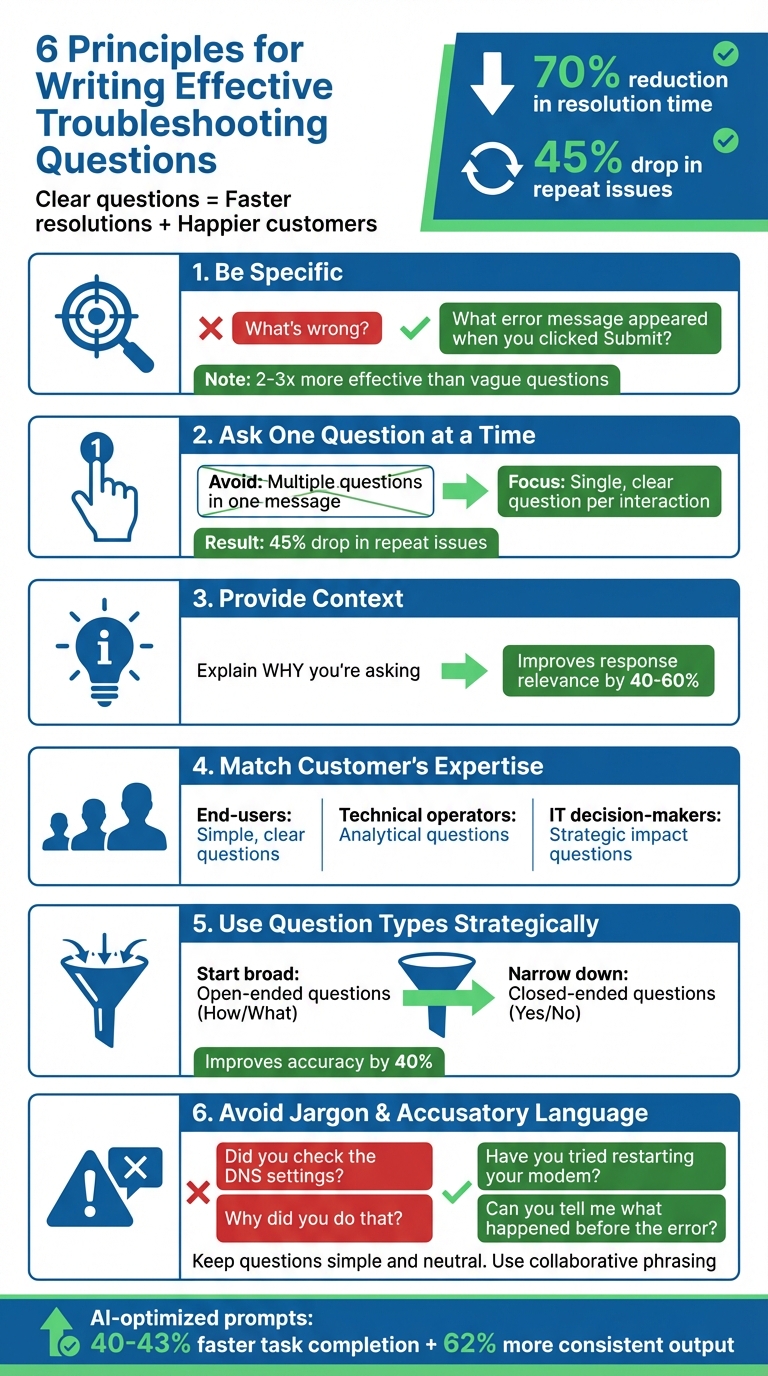
6 Principles for Writing Effective Troubleshooting Questions
Basic Principles for Writing Troubleshooting Questions
A well-crafted question gets answered when it has a clear focus, provides enough context, and uses the right format. These elements help ensure customers can give complete, actionable responses without requiring additional back-and-forth.
Ask One Question at a Time
Bombarding customers with multiple questions at once can lead to confusion and incomplete answers [2]. For example, asking, "Can you tell me what browser you’re using, whether you’ve cleared your cache, and if this happens on mobile too?" might result in customers addressing only part of the question – or skipping it altogether.
Instead, keep it simple and focused: "Which browser are you using to access the dashboard?" Once you get that response, you can follow up with the next question. Although this step-by-step approach might seem slower, it often leads to more thorough and actionable answers. In fact, companies that adopt this single-question method report a 45% drop in repeat issues [1].
Next, make sure your questions are specific and provide enough context.
Be Specific and Include Context
Use the 5W1H method (Who, What, When, Where, Why, How) to frame your questions. For example, instead of asking, "What’s wrong?" you could ask, "What error message appeared when you clicked the ‘Submit Payment’ button on the checkout page?" [2].
Adding a "So What?" element – explaining why you’re asking – can also improve response quality. For instance: "Which step in the configuration process is causing errors? This will help us determine if it’s a permissions issue or a data validation problem." Questions like these not only reduce the need for follow-up but also speed up issue resolution. Specific questions have been shown to be 2-3 times more effective than vague ones in gathering useful information [2].
Choose the Right Question Type
Different types of questions serve different purposes. Open-ended questions – those starting with "How" or "What" – are great for uncovering details and understanding the context. For example: "What happened right before you saw the timeout error?" encourages customers to provide more detailed insights [3][4]. On the other hand, closed-ended questions, such as "Did you try clearing your browser cache?" are useful for confirming specific details.
Using a funnel approach can be particularly effective: start with open-ended questions to gather broad context, and then narrow down with closed-ended ones. For example, asking, "Can you walk me through each step you took, starting from when you logged in?" not only organizes the customer’s response but can also improve accuracy by up to 40% [2]. A prompt like "Let’s think step by step" can further guide customers to provide structured and complete answers.
sbb-itb-e60d259
Mistakes That Lead to Poor Customer Responses
Even well-intentioned troubleshooting questions can fall flat if they confuse or overwhelm customers. Steering clear of common pitfalls can speed up resolutions and cut down on support costs.
Avoid Technical Jargon and Accusatory Language
Throwing around internal acronyms or technical terms without explaining them can alienate customers. This is often referred to as the Curse of Knowledge – assuming others know what you know. For instance, asking, "Is the GTMS syncing correctly?" might leave customers scratching their heads. A better alternative would be: "Are the changes you made in the settings showing up on your main dashboard?"
Similarly, accusatory language can derail a conversation by putting customers on the defensive. A question like, "Why did you do that?" forces them to justify their actions instead of focusing on solving the issue. A more productive approach is to ask, "What outcome were you aiming for with that step?" This keeps the focus on solutions. As Mike Luekens, Founder of QuestionCraft, explains:
"Asking bad questions isn’t just inefficient – it’s actively harmful… You develop bad habits. Your brain learns that [the tool] is ‘kind of helpful but not that useful,’ when the real problem was your question." [2]
Don’t Assume Technical Knowledge
Asking customers to perform tasks like clearing cache or finding browser logs can lead to incomplete responses if they don’t know how to do them. This is a classic case of information asymmetry – expecting customers to provide details they might not understand or know how to access.
To avoid this, use the "Explain It Back" Test: if a novice wouldn’t understand your question, simplify it. For example, instead of saying, "Can you send me the browser console logs?" try, "Can you take a screenshot of any error messages you’re seeing? Here’s a quick guide on how to take a screenshot." This approach accommodates varying skill levels without sounding patronizing.
Additionally, avoid bundling too many questions or tasks into a single message, as it can overwhelm customers.
Break Down Complex Questions
The "Kitchen Sink" approach – where multiple questions or requests are packed into one message – can lead to confusion and incomplete answers. For example, a question like, "Can you tell me what operating system you’re using, whether this happens in incognito mode, what time the error occurred, and if you’ve tried restarting?" might overwhelm the customer, resulting in partial or unclear responses.
Breaking down such questions into smaller, sequential steps makes things easier to follow. For instance, saying, "Let’s tackle this one step at a time", can improve response accuracy by 30-40% [2]. While this method might seem slower at first, it avoids the back-and-forth caused by incomplete information. Plus, it helps address the root cause of issues, preventing the 67% of recurring problems that arise from focusing only on surface-level symptoms [1].
How to Adjust Questions for Different Customers
Customers come with varying levels of technical knowledge. A question that makes perfect sense to an IT administrator might completely baffle an end-user – and vice versa. Adjusting your questions to match the customer’s expertise and the problem at hand can lead to better, faster responses.
Match Questions to Customer Roles
The key to effective troubleshooting is tailoring your questions to the customer’s role and technical understanding. The level of detail you include should align with their expertise:
- End-users often need simple, clear questions that focus on what they see or experience. For example, ask, "What happened on your screen when you clicked ‘Submit’?" This avoids overwhelming them with jargon and keeps the conversation accessible.
- Technical operators can handle more in-depth, analytical questions. Instead of asking what they saw, you might ask, "What is the relationship between the error and the recent update?" This encourages them to analyze the situation and provide more detailed insights.
- IT decision-makers require questions that address broader impacts or strategic considerations. For instance, ask, "What are the consequences for your team if we implement this workaround?" This approach respects their role in evaluating the bigger picture.
When dealing with non-technical users, steer clear of "why" questions, as they can feel accusatory or confusing. Instead, use collaborative phrasing like, "What happened when…?"
Tailor Questions to Problem Types
Different types of problems call for different diagnostic approaches. Here’s how to align your questions with the issue at hand:
- Hardware issues: Start with physical checks. For example, ask, "Is the cable firmly seated in port 23?" or "Do you hear any beeping sounds when the device powers on?" These focus on clear, verifiable factors.
- Software bugs: Focus on the steps leading up to the issue. A good question might be, "Can you describe the steps you took when the issue occurred?"
- Integration failures: Shift your focus to the environment. Ask questions like, "Have there been any recent updates to either system?" or "What authentication method are you currently using?"
- Networking problems: Use a broad-to-narrow approach. Start with, "Can you access other websites?" and then drill down based on their answers to pinpoint the issue.
By tailoring your questions to the type of problem, you can guide the customer through troubleshooting more effectively.
Use Past Interactions to Skip Repetitive Questions
Reviewing a customer’s history can save time and improve the relevance of your responses. Checking prior tickets allows you to see what they’ve already tried, their setup, and which solutions didn’t work. This can boost response relevance by 40-60% [2].
For instance, if a customer has already mentioned clearing their cache, don’t ask them to do it again. Instead, acknowledge their effort and move forward: "Since you’ve already cleared your cache, let’s check if this happens in a different browser."
Not only does this save time, but it also builds trust. As Mike Luekens, Founder of QuestionCraft, explains:
"LLMs don’t have access to your situation, your history, or your constraints unless you tell them. Studies show that providing relevant context improves response relevance by 40-60%" [2].
The same principle applies to human interactions. Context is everything, and using it ensures your questions are precise, efficient, and helpful. This sets the foundation for smoother troubleshooting and better customer experiences.
Using AI to Write Better Troubleshooting Questions
AI is transforming how troubleshooting questions are crafted, making them more relevant, efficient, and tailored to specific cases. By analyzing case histories, adapting tone, and learning from past interactions, AI simplifies the process for support teams, leading to quicker resolutions and higher customer satisfaction.
Generate Questions Based on Case Context
AI doesn’t just throw random questions into the mix – it builds a detailed understanding of an issue before generating a single question. By pulling data from case histories, emails, and resolved cases, AI ensures every question is grounded in real product data. This method, known as Retrieval-Augmented Generation (RAG), helps eliminate generic questions and tackles the 30% repeat contact rate often caused by agents struggling to surface the right information quickly [6].
For instance, if a customer reports a vague issue like "the system isn’t working", AI can break it down into specific diagnostic questions, such as:
- "What browser are you using?"
- "Did this happen after a recent update?"
- "Can you access the system from a different device?"
These targeted questions gather critical details right from the start, saving time and reducing frustration [5].
AI also leverages Chain-of-Thought prompting, a method that encourages step-by-step reasoning. This approach has been shown to improve the accuracy of complex problem-solving by 30–40% [2]. For tricky, intermittent bugs, AI creates questions that help pinpoint triggers, frequency, and environmental factors – tasks that might take a human agent several minutes to formulate [5].
Once the contextual questions are ready, AI refines them further to align with the customer’s communication style.
Personalize Questions with AI Data
AI doesn’t just stop at generating questions – it tailors them to the individual customer. By analyzing past interactions, AI adjusts the tone and complexity of its questions. For instance, if a customer seems frustrated, AI can strip out emotional language and focus purely on the technical details [5].
Adding context, like browser version, operating system, device type, or prior resolution attempts, improves the relevance of AI-generated questions by 40–60% [2]. AI can also adopt different personas – such as an "empathetic support agent" or an "expert technical lead" – to match the tone and depth of the conversation to the customer’s role or expertise [2][5]. This makes the questions feel tailored, not like generic templates.
Refine Questions Based on Response Data
AI doesn’t just generate and personalize questions – it learns and improves over time. By analyzing which question templates lead to faster resolutions and higher satisfaction, AI continuously refines its approach. Metrics like response rates, resolution times, and customer experience metrics guide this process [5][8].
Support teams using optimized AI prompts have reported 40–43% faster task completion and 62% more consistent output [5]. AI also tracks the “rewrite rate,” or how often agents edit its questions, to identify areas for improvement [8][9]. If certain templates consistently need manual tweaks, the system flags them for refinement.
Through few-shot learning, AI incorporates successful past interactions into its training data. This helps the system get better at asking the right questions the first time, reducing back-and-forth exchanges and improving the customer experience [7].
Conclusion
Getting troubleshooting questions right boils down to clarity, context, and consistency. The best questions are straightforward, focus on one issue at a time, and use language that feels natural to your customers. Steer clear of technical jargon, avoid assuming expertise, and always provide enough background so customers understand what you’re asking and why it matters.
Adapting questions to fit the customer’s role and the type of problem makes a noticeable difference. For instance, a technical admin will need different types of questions compared to a non-technical end user. This tailored approach not only improves the quality of initial interactions but also helps AI refine its responses by learning from customer history. Role-specific questioning sets the stage for AI to further personalize interactions.
AI also brings speed and consistency to your team’s workflow. Teams using optimized AI prompts report task completion times that are 40–43% faster, along with a 62% improvement in output consistency [5]. By analyzing past interactions, AI helps eliminate redundant questions and focuses on what drives cases forward.
The key to asking questions customers will actually answer lies in understanding their perspective. By combining these principles with AI-driven support workflows, you can create a more efficient support system. With AI scaling this understanding, you’ll experience quicker resolutions, happier customers, and fewer frustrating back-and-forth exchanges.
FAQs
What should I ask first when a customer reports a vague issue?
When a customer describes an issue vaguely, the first step is to ask clarifying questions. Your goal is to gather details about the symptoms, understand the context, and learn about any recent changes or actions that might be linked to the problem. This approach cuts through the uncertainty, giving you a clearer picture to work with and making it easier to pinpoint the root cause.
How do I adapt troubleshooting questions for non-technical vs. technical users?
When troubleshooting, it’s crucial to adjust your approach based on the user’s technical knowledge. For non-technical users, stick to simple, jargon-free language. Instead of diving into specifics, try relatable questions like: "What were you doing when the problem started?" This helps them describe the situation without feeling overwhelmed.
On the other hand, technical users benefit from more detailed and precise questions. Use relevant terms and focus on specifics, such as: "Were there any error codes or logs generated when the issue occurred?" They’ll appreciate the directness and clarity.
Visual aids, like screenshots or diagrams, can be a lifesaver for non-technical users, making complex ideas easier to grasp. Meanwhile, a step-by-step, structured approach works better for technical users, as it aligns with their analytical mindset. The key is adapting your style to ensure the conversation stays clear and productive.
How can AI help write better troubleshooting questions without sounding robotic?
AI refines troubleshooting questions by emphasizing clarity, specificity, and empathy. It crafts concise, context-driven, and personalized inquiries that align with the customer’s unique situation, helping them feel heard and valued. By incorporating empathetic language and adapting questions using real-time data, AI eliminates stiff, robotic phrasing. This results in more natural and actionable interactions, improving response rates and elevating the overall customer experience.






