



Routing customer support tickets based on agent skills can improve resolution times and customer satisfaction. However, traditional ticket routing automation often fails as they grow too complex, requiring constant manual updates and leading to errors like misrouted tickets and redundant transfers.
An AI-driven approach solves these issues by analyzing ticket content using natural language understanding and matching requests to agents based on skills and real-time workload. This method eliminates the need for rigid rules, reduces ticket transfers by over 80%, and scales with team growth. Key steps include mapping agent skills, classifying tickets accurately, and balancing workloads dynamically.
Switching to AI-driven routing involves a gradual rollout: start with AI suggestions, validate its accuracy, and automate tasks progressively. Metrics like routing accuracy, resolution times, and customer satisfaction scores help measure success and refine the system over time. This approach simplifies operations, improves efficiency, and ensures tickets are handled by the right agents from the start.
How Does AI Enhance Ticket Routing Automation? – Customer Support Coach
sbb-itb-e60d259
Why Static Rules Engines Don’t Work for Modern Support Teams
Static rules engines might seem practical at first, but they quickly spiral out of control as support operations grow. What starts as a small, manageable set of routing rules – say 10 or 15 – can balloon into hundreds within months. Each new product launch, service tier, or team restructuring demands manual updates to these rules. This constant tweaking not only eats up time but also introduces errors, making the system fragile and expensive to maintain.
The Cost of Maintaining Static Rules
Keeping a rules-based routing system up to date is a never-ending task. Every new product line, regional team, or role change requires manual adjustments to the rules. These updates are tedious and prone to mistakes. A single error, like a misplaced condition, can misroute hundreds of tickets before anyone even notices.
As the rules multiply, the complexity grows. Support managers often find themselves spending hours each week troubleshooting and testing these updates. This administrative burden pulls them away from more impactful tasks, like coaching their team or improving the customer experience. Instead of simplifying operations, static rules often end up draining productivity.
How Misrouting Affects Response Times and Customer Satisfaction
When tickets are sent to the wrong queue, they sit untouched while agents who can’t address them scramble to reroute them. This delay means customers wait longer for an initial response. Even worse, when an agent finally picks up the ticket, they may realize it needs to be transferred again. The result? Multiple handoffs, longer resolution times, and frustrated customers.
Misrouting also wreaks havoc on key performance metrics. First-response times go up because tickets linger in the wrong queue. Resolution times stretch out as customers are forced to explain their issues repeatedly to different agents. And CSAT scores? They drop when customers experience these delays and inefficiencies. For B2B customers dealing with urgent issues like billing or technical problems, these delays can damage trust and put renewals at risk.
Why Static Systems Can’t Scale with Team Growth
As support teams grow, static routing systems crumble under the pressure. Adding new agents requires updating rules to reflect their skills and availability. New ticket categories mean crafting even more conditional logic. What worked for a small team of 10 becomes chaotic for a team of 50 and downright unmanageable for 100.
The real issue is that static rules lack flexibility. They can’t adjust to real-time conditions like agent workload, availability, or skill levels. For instance, a rule might route all API-related tickets to a senior developer. But what happens if that developer already has 15 open tickets while a junior developer with API expertise is available? Static systems don’t account for these nuances, leading to bottlenecks and uneven workloads.
For modern support teams, these limitations make it clear: transitioning from rigid, static systems to dynamic, AI-driven solutions is no longer optional. Adaptive systems can better align tickets with agent capabilities, ensuring smoother operations and happier customers.
What Makes Skill-Based Routing Work
Skill-based routing thrives on three key components: precise skill mapping, smart ticket classification, and fair workload distribution. Unlike older systems that handle these tasks separately, today’s advanced solutions merge them into a dynamic routing engine that adjusts in real time. This adaptability addresses the inflexibility of traditional rule-based approaches.
How to Map Agent Skills and Competency Levels
The first step is to clearly define each agent’s skills and proficiency levels. Don’t just rely on basic skill tags – go deeper by documenting how well an agent can handle specific tasks, from simple inquiries to complex escalations. Some systems even use a "Skill Ontology", which maps relationships between skills. For example, certain skills may depend on others (Skill A might require Skill B), or some skills could act as substitutes (Skill C being similar to Skill D) [3].
Structured skill mapping can lead to a 10–30% improvement in agent performance [3]. To ensure no ticket is left unassigned, include a fallback skill group for tickets that don’t perfectly match existing criteria [2]. When skills are well-documented, AI can better understand ticket intent and route it to the right agent.
Using AI to Classify Tickets and Detect Intent
AI systems excel at analyzing ticket content to uncover what the customer truly needs, rather than just relying on keywords. The first step is intent detection, which identifies the customer’s specific goal – like "cancellation_request" or "order_tracking" – and aligns it with the appropriate workflow [4]. Advanced AI can even group similar phrases, such as "Where’s my stuff?" and "Check delivery status", under the same intent [4].
Some systems take it further by recognizing multiple intents in a single message. For instance, a customer might ask both to return an item and update their account address in one request [4]. The AI identifies both needs, ensuring the ticket is routed to an agent capable of handling everything in one go. Sentiment analysis also comes into play, flagging frustrated or urgent requests for priority handling. This level of precision in ticket classification is essential for managing workloads effectively.
Matching Skills While Balancing Workloads
Routing tickets based solely on skills isn’t enough. Imagine your top API specialist already juggling 15 tickets – assigning another complex issue to them creates delays while other capable agents remain underutilized. This is where capacity limits come in. By setting a maximum number of tickets per agent, you can ensure work is distributed evenly across the team [2]. Some systems refine this further by only counting tickets with active SLA timers, offering a more accurate view of each agent’s workload [2].
When a specialist reaches their capacity, a timeout mechanism can reassign tickets to the next qualified agent. This approach reduces customer wait times and prevents overloading top-performing agents, helping to avoid burnout. The goal is to create a balanced and efficient system where tickets are distributed dynamically and intelligently, paving the way for AI-driven improvements in routing.
How to Move from Rules-Based to AI-Driven Routing
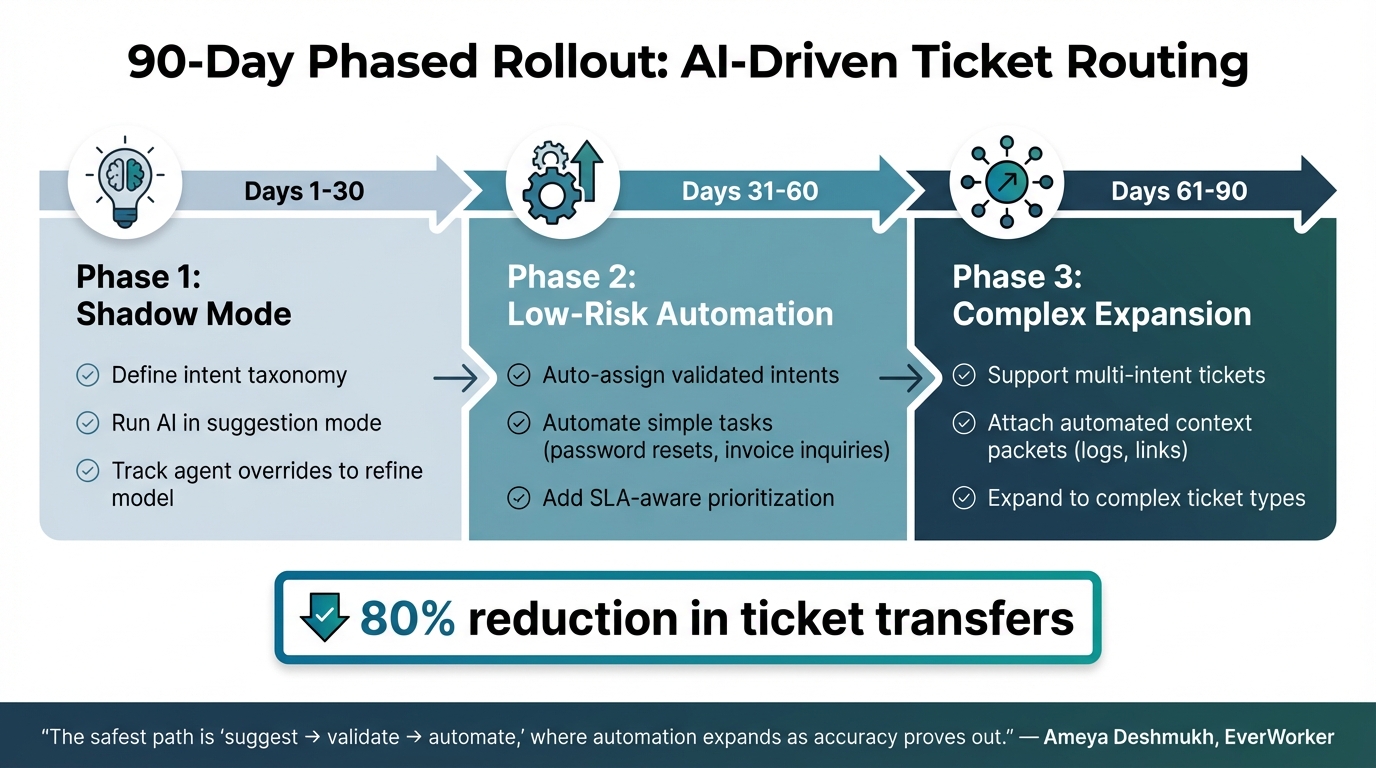
AI-Driven Ticket Routing Implementation Timeline: 90-Day Phased Rollout
Switching from static rules to AI-powered ticket routing and prioritization doesn’t have to be overwhelming. A gradual transition is often the best approach. Start with a "suggest → validate → automate" model, where automation is introduced progressively as it proves reliable [5]. Begin by auditing your historical tickets to pinpoint high-volume categories – like billing issues or troubleshooting requests – that are ideal for automation [1][5]. This analysis helps you create a clear intent taxonomy for classifying incoming tickets, a crucial step for building a scalable and efficient routing system.
During the first 30 days, operate in shadow mode – a trial phase where AI provides routing suggestions without automatically assigning tickets [5]. This phase builds trust within your team and collects valuable data on agent overrides, which helps refine the AI model. Once the shadow phase ends, you can start automating straightforward tasks, such as password resets or invoice inquiries, before moving on to more complex ticket types [1][5].
Using AI to Analyze Ticket Content
AI systems use Natural Language Processing (NLP) to analyze ticket text, metadata, and historical resolutions [5]. Unlike static rules that rely on exact keyword matches, NLP identifies patterns in phrasing. For example, it can recognize that "Where’s my stuff?" and "Check delivery status" represent the same type of inquiry [5]. AI also uses entity extraction to pull structured data – like order numbers or product IDs – directly from the ticket [1][5].
In addition to categorizing tickets, real-time analysis can assess priority levels based on factors like customer tier, context, and SLA commitments [5]. For instance, if a VIP customer submits a ticket with negative sentiment, the system can flag it as high priority and route it to a senior agent. This contextual understanding removes the need for rigid "if-then" rules, which often fail when product terminology changes.
How Machine Learning Reduces Manual Routing Work
AI-driven routing becomes smarter over time, thanks to machine learning. Models learn from "ground truth" outcomes – the actual resolution paths and escalation patterns – rather than relying solely on initial ticket labels [5]. This approach allows the system to adapt, identifying which tickets are resolved efficiently and which ones tend to get bounced between teams. Some large organizations have reported an 80% drop in ticket transfers after implementing AI-driven routing [1].
To keep the system accurate, it undergoes continuous retraining using agent feedback and monitoring for model drift [1][5]. When confidence levels are low, tickets can still be flagged for manual review [1]. Normalizing key data fields – like product categories, customer tiers, and priority definitions – across all support channels ensures high-quality inputs for training the model, avoiding errors caused by inconsistent data [5].
Example: AI-Driven Routing in Action
Here’s how a phased rollout might look, ensuring a smooth transition while maintaining day-to-day operations:
- Days 1–30 (Shadow Mode): During this phase, define your intent taxonomy, run AI in suggestion mode, and track agent overrides to refine the model.
- Days 31–60 (Low-Risk Automation): Begin automating validated intents, such as simple tasks, and introduce SLA-aware prioritization.
- Days 61–90 (Complex Expansion): Expand automation to handle multi-intent tickets and include automated "context packets" with logs or links for agents.
| Phase | Timeline | Key Activities |
|---|---|---|
| Shadow Mode | Days 1–30 | Define taxonomy, run AI as suggestions, capture agent overrides |
| Low-Risk Automation | Days 31–60 | Auto-assign validated intents, add SLA-aware prioritization |
| Complex Expansion | Days 61–90 | Support multi-intent tickets, attach automated "context packets" (logs, links) |
"The safest path is ‘suggest → validate → automate,’ where automation expands as accuracy proves out." – Ameya Deshmukh, EverWorker [5]
This step-by-step approach ensures a seamless transition to AI-driven routing, creating a system that evolves alongside your team’s needs while keeping operations running smoothly.
How to Implement AI-Driven Skill-Based Routing
To make the most of AI-driven routing, focus on creating systems that adapt automatically, handle unique cases, and improve continuously. This involves building self-updating skill profiles, managing exceptions effectively, and tracking performance to fine-tune the system over time.
Setting Up and Updating Agent Skill Profiles
Start by automating the creation of agent skill profiles. Use data from past ticket resolutions and execution patterns to identify and classify skills automatically [3]. Organize these skills into a three-tier structure: taxonomy, relational skills, and deployable skill sets [3]. This layered approach aligns with the flexibility AI-driven systems require for modern support operations.
For agents with multiple skills, prioritize their primary expertise in their profiles. Feedback loops can then keep these profiles current, leading to performance gains of 10–30% [2][3]. Regular updates ensure the system remains accurate without constant manual input.
Routing Edge Cases and Escalations
Not every ticket will fit neatly into predefined categories, and that’s where robust exception handling comes in. For example, when the AI’s confidence level drops below 80%, flag the ticket for human review [1][8]. Similarly, use real-time sentiment analysis to detect frustration or urgency. Tickets with negative sentiment can be escalated automatically to senior specialists or given higher priority, with sentiment-based systems achieving over 92% accuracy [7][8].
To cover all bases, implement a fallback skill as a last-resort routing option. This ensures no ticket goes unassigned, even if a specialist isn’t available.
| Strategy | Implementation Method | Primary Benefit |
|---|---|---|
| Confidence Thresholds | Flag tickets for human review if AI certainty is low | Prevents misrouting of ambiguous or unfamiliar issues |
| Fallback Skills | Use a "catch-all" rule as the final routing option | Ensures generalists handle tickets that specialists can’t |
| Sentiment Triggers | Escalate tickets with negative sentiment automatically | Prioritizes frustrated customers and reduces the risk of losing high-value clients |
"In high-stakes customer relationships, even a 30-minute delay in addressing a critical issue can mean the difference between retaining a loyal client and losing them to a competitor." – Ameya Deshmukh, Integrail Corp [7]
With these measures in place, the system can handle edge cases while maintaining efficiency.
Tracking and Improving Routing Performance
To keep improving, track key metrics like ticket transfer rates, time to first response, and resolution times. Misclassified tickets or incorrect sentiment analysis should be manually corrected to refine the AI model [6]. This continuous feedback helps the system learn and improve its precision over time.
For optimal efficiency, only include tickets with active SLAs in an agent’s workload. This prevents low-priority tasks from skewing capacity metrics [2]. Additionally, review and update the skill hierarchy periodically to reflect changes in business needs and team capabilities [2]. When done right, AI-powered routing can cut average ticket resolution times by 40% [8].
How to Measure AI-Driven Routing Success
Once your AI-driven routing system is up and running, keeping an eye on the right metrics is essential to ensure it’s doing its job. The aim isn’t just to speed up ticket handling but to ensure tickets land with the right specialists, leading to better results for both your customers and your support team.
Metrics That Indicate Routing Effectiveness
To gauge how well your routing system is working, start by measuring routing accuracy. This includes tracking correct queue assignments and misroute rates. For example, a high average transfer rate could signal the need to fine-tune the system [1].
Speed metrics like First Response Time (FRT), Time-to-Resolution (TTR), and Time in Triage show how quickly tickets are acknowledged, resolved, or assigned to agents [5][7]. On the quality front, metrics such as First Contact Resolution (FCR) and reopen rate highlight whether tickets are being resolved completely on the first try [7].
Operationally, the SLA compliance rate indicates whether tickets are being resolved within agreed timelines, while agent utilization shows if workloads are evenly distributed across the team [7]. Additionally, tracking cost per ticket can reveal efficiency gains, as AI reduces the need for manual triage [7]. Together, these metrics provide a clear picture of operational performance and how it impacts customer satisfaction.
Linking Routing Accuracy to Customer Satisfaction
Effective routing doesn’t just improve operations – it directly boosts customer satisfaction by cutting down on unnecessary ticket handoffs. When tickets bounce around between agents, delays increase, and customers grow frustrated [5]. Tracking CSAT by intent can help identify ticket categories that need better skill matching or additional agent training [5].
Another benefit of smart routing is the added ticket context. By attaching details like entitlements, logs, or past interactions, agents can respond more effectively right away [5]. For high-volume teams, even modest improvements – like a 20–30% boost in FCR or SLA compliance – can result in noticeable cost savings and protect revenue [7].
Refining Routing with Data Over Time
Improving AI-driven routing is an ongoing process, and agent feedback plays a big role. Tracking agent overrides can help fine-tune the model [5]. Running the AI in shadow mode – where its predictions are compared to human triage decisions – can validate improvements before full deployment [5].
To keep the system accurate, monitor for model drift and retrain regularly, especially as customer language or product features evolve [5]. Use final resolution codes and CSAT scores to check if initial skill assignments were correct. Focus on the top 10–20 intents that frequently lead to misroutes for faster progress [5]. Regular refinements to the AI routing system not only improve agent efficiency but also help cut operational costs in the long run.
Conclusion
Switching from static rules engines to AI-powered skill-based routing is transforming how B2B support operates. Instead of juggling countless fragile if-then rules, companies can rely on a single, context-aware classification layer. This shift eliminates the constant need for manual updates and effortlessly scales as teams expand [1].
The benefits are clear and measurable. Businesses that have moved to AI-driven classification have seen noticeable reductions in ticket transfers [1]. Getting tickets to the right specialist on the first try boosts first contact resolution (FCR), shortens time to resolution (TTR), and elevates customer satisfaction. Fewer handoffs mean less frustration for both customers and agents.
Beyond these immediate gains, AI’s adaptive capabilities bring even more value. Its ability to learn continuously improves routing accuracy, with agent feedback acting as real-time training data [1]. As Agentix Labs highlights:
"Intelligent routing is not only about technology, it is an operational practice that blends good data, clear design, and agent partnership" [1].
This transition from rigid, rule-based systems to dynamic, adaptive models represents a core principle of modern support operations. For growing B2B companies, the decision is straightforward. Static rules add complexity over time, while AI-driven routing simplifies workflows, enhances customer experiences, and scales seamlessly. By investing in dynamic skill profiles and leveraging training data, organizations can cut costs, optimize resources, and continuously improve support efficiency. Adopting AI-driven skill-based routing equips support teams with the tools they need to meet the demands of today’s B2B landscape.
FAQs
What data do I need to start AI skill-based ticket routing?
To set up AI-driven skill-based ticket routing, start by gathering data from various sources like CRM systems, ticketing platforms, chat logs, and product usage. This data allows the AI to understand ticket content, customer intent, sentiment, and language, ensuring precise routing.
Next, clearly outline the skills and attributes of your agents – such as their areas of expertise and language capabilities. This step is crucial for matching tickets with the right agents, leading to smoother triage and more efficient resolutions.
How do I handle low-confidence or edge-case tickets safely?
To handle low-confidence or edge-case tickets in a skill-based routing system, leverage AI-driven triage. This approach evaluates ticket content by analyzing factors like intent, language, and sentiment. By doing so, uncertain tickets can be directed to the most qualified agents or specialized teams.
In addition, it’s important to have fallback procedures in place. For example, you can assign these tickets to a dedicated queue or route them to senior agents. This not only minimizes the chances of misrouting but also helps maintain high resolution quality.
How can I prove AI routing is working without disrupting the team?
To test AI routing without causing disruptions to your team, consider a step-by-step approach. Begin by setting up baseline metrics to understand your current performance. Then, compare this data with results after introducing AI to measure any changes.
A good starting point is using a pilot program or running the AI in shadow mode. This allows you to test AI-generated suggestions alongside your existing manual routing process. During this phase, collect feedback from your agents and closely monitor key metrics such as resolution time and misrouting rates.
As confidence in the system grows, you can gradually increase AI involvement. Keep tracking results and adjust as needed to maintain smooth workflows while proving the AI’s value.






