


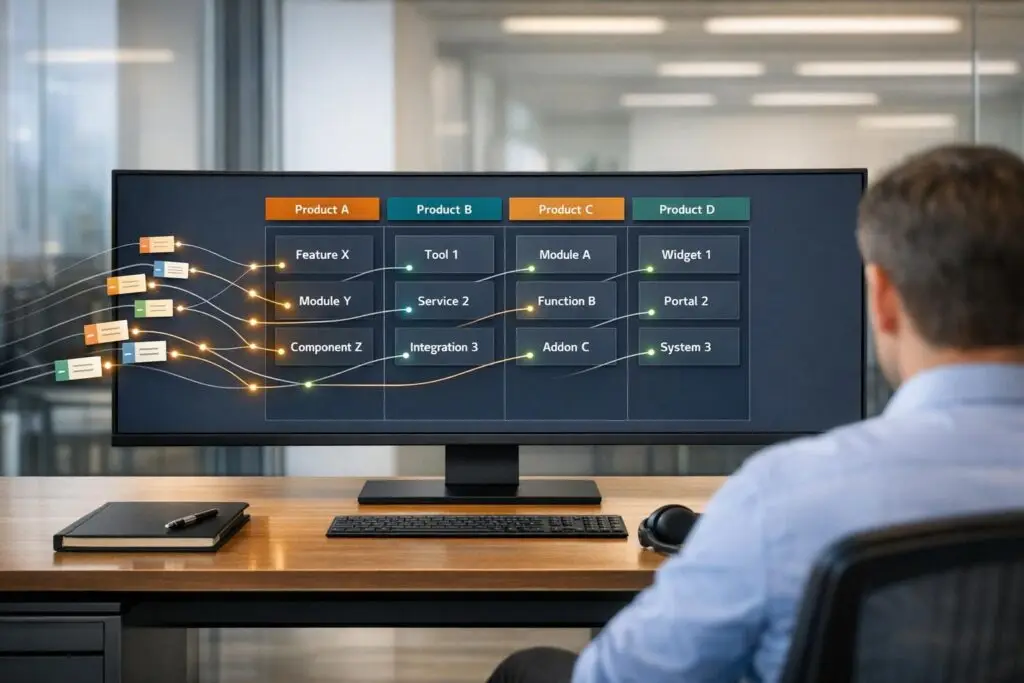
When customers submit support tickets, they often face confusing dropdowns, vague categories, or too many options – leading to frustration, misrouted tickets, and slower resolutions. The key solution? Automated ticket classification using AI. It analyzes ticket descriptions, identifies intent, and routes tickets accurately without relying on customers to guess.
Key Points:
- Manual classification wastes time: Agents spend 30–40% of their time sorting tickets instead of solving issues.
- Misclassification causes delays: 20–30% of manually tagged tickets require multiple interactions to resolve.
- AI improves efficiency: Automating classification cuts ticket volumes by 20–40%, reduces response times by 46%, and lowers costs by up to 95%.
- Streamlined taxonomy matters: Use a two-tier system (e.g., "Technical Issue > API") with fewer, clearer categories to avoid confusion.
- NLP boosts accuracy: AI tools like MSPbots achieve 90% classification accuracy by analyzing ticket content and customer context.
By implementing AI-driven classification, support teams can reduce manual effort, improve accuracy, and enhance customer satisfaction – all while lowering costs.
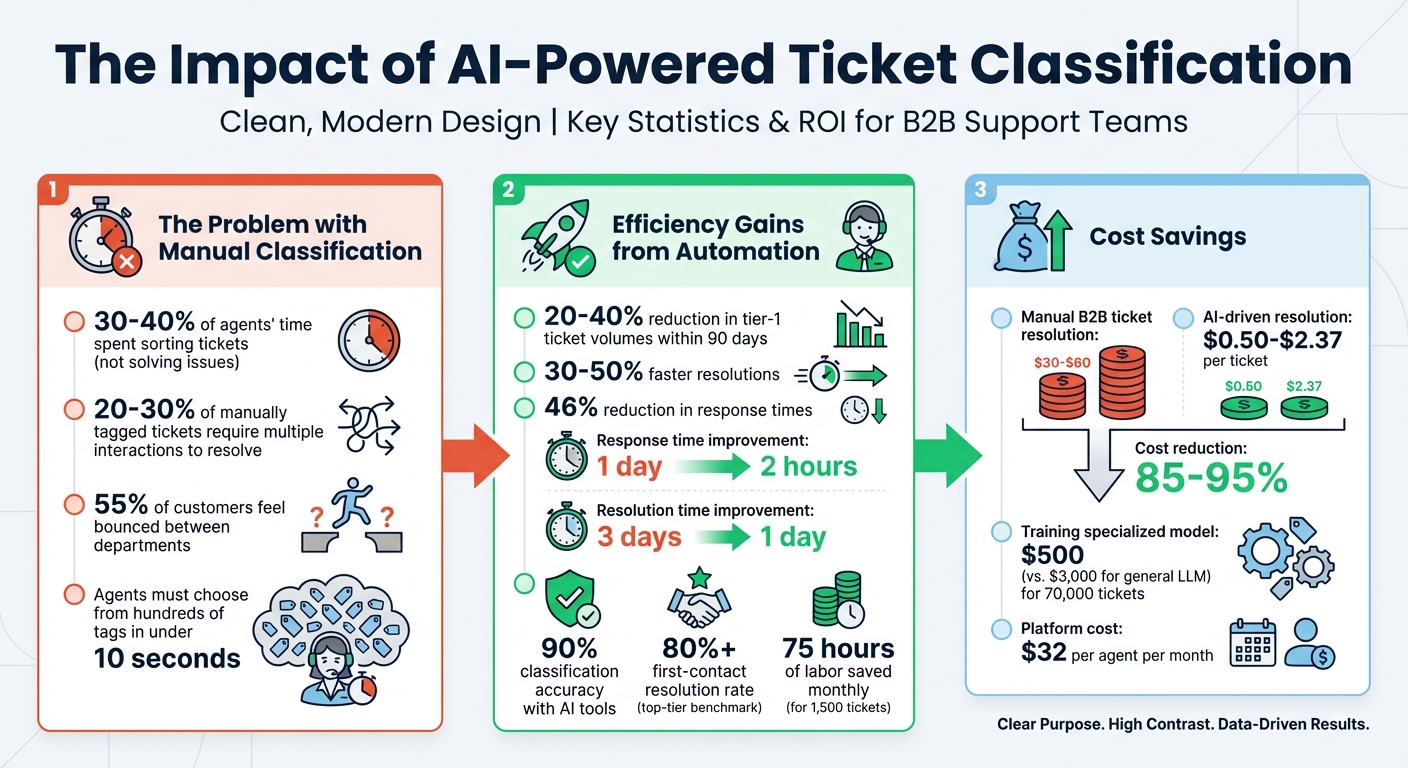
ROI of AI-Powered Ticket Classification: Key Statistics and Cost Savings
Ticketing Triage: Let AI Sort and Route Your Tickets
sbb-itb-e60d259
Why Automated Ticket Classification Matters for B2B Support
Manual ticket classification eats up 30–40% of agents’ time, forcing them to focus on sorting and routing instead of solving customer problems. This not only delays resolutions but also frustrates customers [10]. As Casper from Bika.ai aptly puts it:
Every minute spent tagging a ticket is a minute not spent solving it [10].
In B2B support, the stakes are even higher. Misrouted tickets can lead to longer resolution times, repeated explanations from customers, and a fragmented experience that damages trust – especially when renewal discussions are on the horizon. Agents often face the impossible task of choosing from hundreds of tags in under 10 seconds [2], which leads to errors and inefficiencies. These challenges highlight the need for automation to streamline AI-powered ticket routing and prioritization to improve outcomes.
Problems with Manual Classification
Manual classification turns skilled agents into "mail sorters", pulling them away from resolving complex issues and contributing to triage fatigue [10]. Instead of diving into technical problems, agents are stuck choosing between categories like "Billing > Invoices" or "Accounts > Payment Issues." This repetitive task often results in errors, with tickets being misclassified or assigned generic labels like "Other" or "Refund" because they don’t fit neatly into predefined categories [2].
The impact of these missteps shows up in critical metrics. Around 20–30% of manually classified tickets require more than one interaction to resolve [8]. Even worse, 55% of customers feel like they’re being bounced between different departments rather than dealing with a unified company [8]. In B2B settings, where a single support interaction can influence high-value renewals, these errors can be incredibly costly.
Cost and Efficiency Gains from Automation
AI has the potential to transform ticket classification by handling repetitive, high-volume tasks that drain an agent’s time and focus [6]. Automated systems can reduce tier-1 ticket volumes by 20–40% within just 90 days, while also speeding up resolutions by 30–50% [6]. For medium-sized businesses, this means response times can drop from 1 day to just 2 hours, and resolution times can shrink from 3 days to 1 day [8][9].
But the benefits go beyond speed. Automation allows teams to focus on strategic, high-impact tasks that improve both customer retention and the product itself. As Josh Solomon from Mosaic AI explains:
The real ROI is the strategic capability your team gains when they’re no longer drowning in repetitive work [6].
AI also makes it easier to scale expertise across the team. Instead of escalating every tricky issue to senior engineers, junior agents can rely on AI-suggested solutions based on how similar problems were resolved in the past [6]. This reduces the bottleneck where senior engineers spend half their time answering repetitive questions [6]. By pushing first-contact resolution rates above 80% – a benchmark for top-tier automated support [7] – AI ensures that tickets are classified accurately and resolved efficiently, all without adding extra burden to the customer experience.
How to Build a Ticket Classification Framework
Creating a solid ticket classification framework starts with cleaning up your taxonomy. Before diving into automation, consolidate duplicate categories and eliminate outdated ones. Get rid of vague or catch-all tags like "Other" that don’t add value. For clarity, define each category with a one-sentence explanation and include two examples. This ensures everyone – whether it’s your support team or an AI model – interprets terms like "Technical Issue" or "Account Management" the same way.
A two-tier taxonomy model works best. This involves a mandatory Tier 1 "Topic" and an optional Tier 2 "Subtopic." Keep Tier 1 categories under 10 options to avoid overwhelming decision-makers. These top-level categories should be clear, exclusive, and broadly relevant – examples include Technical Issue, Billing, Feature Request, or Account Management. Tier 2 subtopics can then focus on specific product modules or features, like "API" or "Reporting Module", making the data actionable for product teams. As Jake Bartlett aptly says:
The taxonomy is the strategy. Ticket tagging is just the execution [3].
Consistency is key – stick to one term for each concept. For instance, use "Billing" instead of splitting it into "Payments" and "Invoicing." Conduct quarterly audits to identify and remove redundant tags.
Aligning Categories with Your Product and Workflow
Once your taxonomy is streamlined, align it closely with your product modules and workflows. If your product includes distinct features – like a Mobile App, Reporting Module, or API – these should appear as subtopics under their relevant Tier 1 category. This alignment helps both agents and AI route tickets accurately without unnecessary guesswork.
Categories should also serve as triggers for automated actions. For example:
- A "Technical Issue" ticket tagged with "API" could automatically route to Engineering and apply a Technical SLA.
- A "Billing & Payments" ticket tagged with "Refund" might route to Finance and initiate a refund template.
Every category should connect to a specific first-reply playbook, complete with macros, knowledge base links, and checklists for logs or artifacts.
| Tier 1: Topic (Mandatory) | Tier 2: Subtopic (Optional/Contextual) | Action |
|---|---|---|
| Technical Issue | Login, Export, API, Performance | Route to Engineering; Apply Technical SLA |
| Billing & Payments | Refund, Invoice, Subscription Change | Route to Finance; Trigger Refund Template |
| Feature Request | Reporting Module, Mobile App, UI/UX | Route to Product Manager; Tag for Roadmap |
| Account Management | Authentication, Permissions, Onboarding | Route to Customer Success |
By linking categories to your product catalog, you make the framework intuitive for both customers and internal teams. As Swifteq points out:
If a tag doesn’t change how you handle a ticket or how you understand your support data, it’s adding noise instead of clarity [3].
Setting Up Priority Levels and Routing Rules
With your categories aligned, the next step is defining clear priority levels and routing rules. Use a fixed urgency scale – Low, Medium, High, Critical – and apply it consistently. For example, automatically escalate tickets from high-value customers or those marking a second contact within 24 hours. Calculate priority as the product of Impact and Urgency, and set clear criteria for each level to ensure consistent handling.
Routing rules should go beyond simple labels. Enrich tickets with metadata like product type, platform, region, entitlement level, or error codes pulled from the message or CRM. This added context ensures that the resolver has all the necessary details upfront. AI-driven routing becomes more accurate when combined with clear priorities and detailed metadata. Use a three-tier confidence system:
- Auto-route tickets with high confidence scores (above 0.8).
- Request one-click human confirmation for medium confidence.
- Fall back to manual triage for low-confidence cases.
It’s also essential to define automation boundaries. Certain topics – like legal complaints, identity checks, safety issues, or high-value refunds – should always involve a human touch. Close the feedback loop by asking agents to flag reasons (e.g., "too broad", "ambiguous") whenever they manually adjust an AI-assigned label. Use this feedback to refine the taxonomy monthly and improve accuracy over time.
Using AI and NLP for Accurate Classification
With your taxonomy and routing rules established, AI and Natural Language Processing (NLP) take over to streamline ticket classification. By analyzing the content of each ticket, AI identifies intent, urgency, and sentiment, removing the need for customers to guess categories or for agents to rely on quick assumptions. This automation leads to faster responses, cutting response times by 46% within just a few weeks [2]. The result? Less effort for customers and improved resolution accuracy, aligning perfectly with the goal of eliminating guesswork in customer support. Let’s dive into how NLP effectively detects customer intent.
Detecting Customer Intent with NLP
Modern NLP tools go far beyond simple keyword matching. Machine learning-based NLP examines word patterns and sentence structure to understand context and meaning. For example, a phrase like "I don’t want a refund" is correctly interpreted as a negation, something basic keyword systems might misclassify as a refund request. Ben Goodey, a Customer Service Researcher at SentiSum, highlights this capability:
Machine-learning… infers meaning based on patterns between words and the wider context of the sentence and paragraph they sit within [2].
NLP also evaluates sentiment and urgency in real time. Tickets from frustrated or angry customers are flagged automatically, allowing these cases to be prioritized and routed to senior agents. This proactive approach reduces churn and boosts CSAT scores by ensuring critical issues receive immediate attention. Compared to traditional help desk tools that rely on rigid keyword extraction – often missing up to 90% of relevant tickets [2] – NLP-powered systems achieve over 80% accuracy from day one [11]. These advanced capabilities make NLP a cornerstone for accurate ticket categorization.
AI Tools for Ticket Categorization
AI-powered tools bring NLP insights into your support operations, seamlessly improving classification and routing. One example is MSPbots AI Ticket Triage, which uses Azure OpenAI to automate categorization, prioritize tickets, and route them effectively by analyzing both ticket content and contact history. This tool boasts 90% accuracy in classification and can save around 75 hours of labor each month for a service desk managing 1,500 tickets [11]. Dean Lause, CTO, shared:
We’re seeing 90% accuracy with MSPbots – a significant improvement over our previous solution that was costing us over $1,000/month plus a dedicated high-salary resource [11].
Another example is Databricks AI Functions, which leverages large language models (LLMs) through specific functions like ai_classify for categorization, ai_extract for identifying details such as affected systems or error codes, and ai_gen for generating response templates [12]. These functions integrate directly into workflows, updating ticket fields via webhooks to ensure actionable classification. Similarly, Supportbench offers built-in AI automation, handling prioritization, issue type assignments, and ticket tagging automatically. This eliminates guesswork, bringing consistency and efficiency to your support processes.
Adding Customer Context for Better Ticket Routing
AI and NLP can handle ticket classification efficiently, but introducing customer context takes routing to the next level. By incorporating details like account status, product usage, and contract terms, ticketing systems can make smarter, more tailored decisions. For example, an enterprise customer nearing a renewal date is treated differently than a free-tier user with a general question – all without requiring agents to jump between systems.
How Centralized Customer Data Improves Classification
Centralizing customer data enables automated workflows and smarter routing rules [3]. By connecting tools like your CRM, product logs, and contract database, AI can analyze tickets with added context, such as account type or subscription level [5]. This eliminates the need for agents to manually search for details [4]. For instance, a ticket from a Platinum account holder might be automatically routed to a senior agent and prioritized based on contractual obligations [13].
This approach reduces manual guesswork, where agents might otherwise have to sift through countless categories in seconds [2]. Platforms like Supportbench streamline this process by linking customer data directly to ticket records. This lets AI handle tasks like prioritization, issue categorization, and tagging based on factors like account value, entitlement level, or product usage. The result? A system that routes tickets with precision and context.
Examples of Context-Based Routing
Context-based routing leverages enriched data to make real-time decisions. For example, a high-value account nearing an SLA deadline gets immediate priority, helping avoid costly delays. Sentiment analysis can flag frustrated customers, where even a short delay in responding to a critical issue might risk losing a loyal client [13].
Another scenario: a customer using a specific product module, like the "Reporting Module", has their ticket routed directly to the team specializing in that feature. This is made possible by pulling configuration data from your product database [1]. Similarly, entitlement levels dictate the support pathway – enterprise customers are connected with senior engineers, while free-tier users are guided to self-service tools [4]. These decisions occur in real time, ensuring every ticket reaches the right person with the right priority.
Measuring Performance and ROI of Automated Classification
Once your automated classification system is up and running, measuring its impact becomes crucial. You’ll need clear metrics to ensure it’s delivering real value. The focus should be on both hard ROI – like cutting labor costs – and soft ROI, which includes benefits such as better customer experiences and quicker decision-making [14][17]. While many businesses zero in on cost savings, those that evaluate both types of ROI tend to see a 22% higher overall return [14].
Key Metrics to Track
Start with classification accuracy, which tells you how often tickets are categorized correctly. This is the foundation of your system’s reliability. But don’t stop there – accuracy alone doesn’t paint the full picture. You’ll also want to track:
- Precision: How many tickets assigned to a category actually belong there? Higher precision means fewer tickets bouncing between departments.
- Recall: How many relevant tickets are correctly identified? This ensures important issues aren’t overlooked.
- F1-Score: A combined measure of precision and recall, offering a single snapshot of your model’s performance.
Beyond accuracy, focus on metrics that reflect real-world impact. For instance, measure response time acceleration to see how quickly AI identifies topics and priorities, reducing the time tickets spend in limbo. Another key metric is Mean Time to Resolution (MTTR), which shows whether faster routing is leading to quicker problem-solving.
For customer-facing results, track Resolved on Automation Rate (ROAR). Unlike basic deflection rates, this metric highlights whether the AI is genuinely solving issues rather than just redirecting customers. Lastly, evaluate sentiment and priority accuracy to check how well the system identifies critical issues and detects frustrated customers.
These metrics provide a solid foundation for assessing performance and calculating ROI, ensuring you capture both immediate savings and broader strategic gains.
Calculating ROI
Once you’ve gathered these metrics, calculate ROI using this formula: (Net Benefits – Total Costs) / Total Costs × 100 [14][17]. To get accurate results, start by establishing a baseline. Before rolling out automation, record data on ticket handling times, error rates, and transaction costs [14][16][18].
Don’t forget to include hidden costs like API fees, data cleaning, model retraining, and change management [14][15][16]. It’s wise to budget an additional 25% to cover potential compute cost overruns [16]. To test the system’s impact, consider using a control group – deploy the AI with half your team while leaving the other half as is [14]. As MindStudio points out:
The problem isn’t the technology. AI agents work. The issue is how companies measure value [14].
Track savings on a quarterly basis. Early results at three months will likely differ from those at the one-year mark [14]. This ongoing review helps you capture both the immediate cost reductions and longer-term improvements in customer satisfaction and operational efficiency.
Conclusion
Automated ticket classification takes the guesswork out of manual triage, allowing human agents to concentrate on solving complex problems instead of categorizing tickets [4]. By leveraging NLP-powered intent detection, intelligent routing, and data enrichment, tickets can be directed to the right team with all the necessary context from the very beginning.
The financial advantages are hard to ignore: while resolving B2B tickets manually costs between $30 and $60, AI-driven resolutions cost as little as $0.50 to $2.37 – a cost reduction of 85–95% [20]. Cutting down on repeated interactions and unnecessary back-and-forth can significantly lower resolution expenses [20]. Additionally, training a specialized model once, rather than relying on a general LLM for every request, allows the classification of 70,000 tickets for about $500 compared to $3,000 [19].
However, the key to unlocking these benefits lies in a well-organized taxonomy. Start with a clean structure, establish confidence thresholds for human review, and link each category to a detailed playbook [4]. This approach turns classification into a proactive step toward resolution, boosting First Contact Resolution rates and enhancing customer satisfaction.
Platforms like Supportbench make it easier to implement these strategies. With features like intelligent routing, automated data enrichment, and specialized classification models, you can get started for just $32 per agent per month.
FAQs
What’s the best way to design a simple ticket taxonomy by product/module?
The most effective strategy involves a layered system that merges keyword-based triage with AI validation. Begin with a simple, hierarchical classification system that relies on keywords to handle the majority of tickets. For more complicated cases, incorporate semantic similarity methods, such as vector embeddings, and then validate these results using large language models (LLMs). This approach strikes a balance between precision, efficiency, and cost while minimizing the workload for both customers and support teams.
How do you decide when AI should auto-route vs ask for human confirmation?
AI can streamline ticket management by automatically routing tickets when its confidence in classification and prioritization surpasses a set threshold. This ensures tasks are handled with precision. However, for tickets where confidence is lower or the issue is flagged as complex, human review is essential to prevent errors. This method strikes a balance – using AI to handle simpler tasks efficiently while reserving human expertise for more intricate cases, ultimately boosting both productivity and support quality.
What data should you connect to improve routing without slowing agents down?
To improve routing accuracy while keeping agents efficient, integrate data such as keywords, vector embeddings, and semantic understanding with AI validation. A multi-tier system works best: start with quick keyword matching for initial triage, then use embedding-based similarity for deeper analysis, and finish with LLM validation for precise classification. This method balances speed and accuracy, reducing the risk of delays or misclassifications that could slow down your team.






