


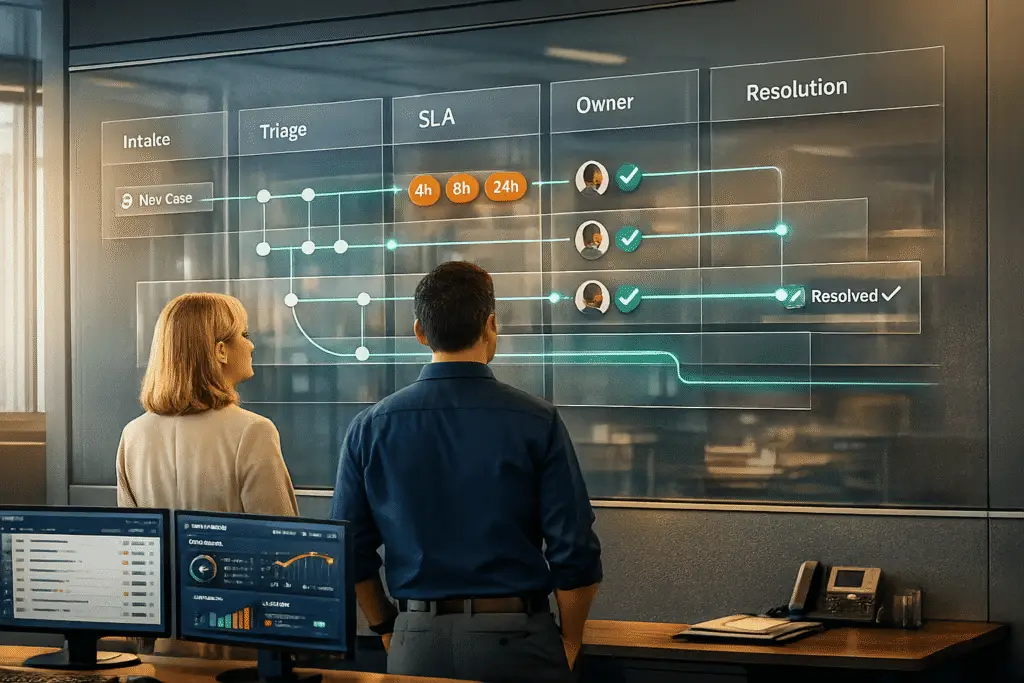
When Customer Success and Support teams don’t collaborate effectively, customers face delays, repeated explanations, and frustration, leading to churn and lost revenue. To prevent this, teams need clear roles, structured workflows, and better communication.
Key Takeaways:
- Define Roles Clearly: Use a RACI matrix to assign responsibilities (Responsible, Accountable, Consulted, Informed) for escalations.
- Standardize Escalation Protocols: Categorize issues into priority levels and set specific SLAs for response and resolution times.
- Improve Communication: Centralize tools and information to ensure smooth handoffs and consistent updates.
- Leverage AI: Use AI for predicting escalations, automating tasks, and maintaining context during handoffs.
- Measure Success: Track metrics like First Response Time, CSAT, escalation rates, and churn to evaluate team performance.
By aligning processes and leveraging technology, you can resolve customer issues faster, rebuild trust, and improve retention.
Aligning Support and Success to Improve Customer Retention | TSIA + @Gainsight + @SupportLogic
sbb-itb-e60d259
How to Define Roles and Responsibilities for Escalations
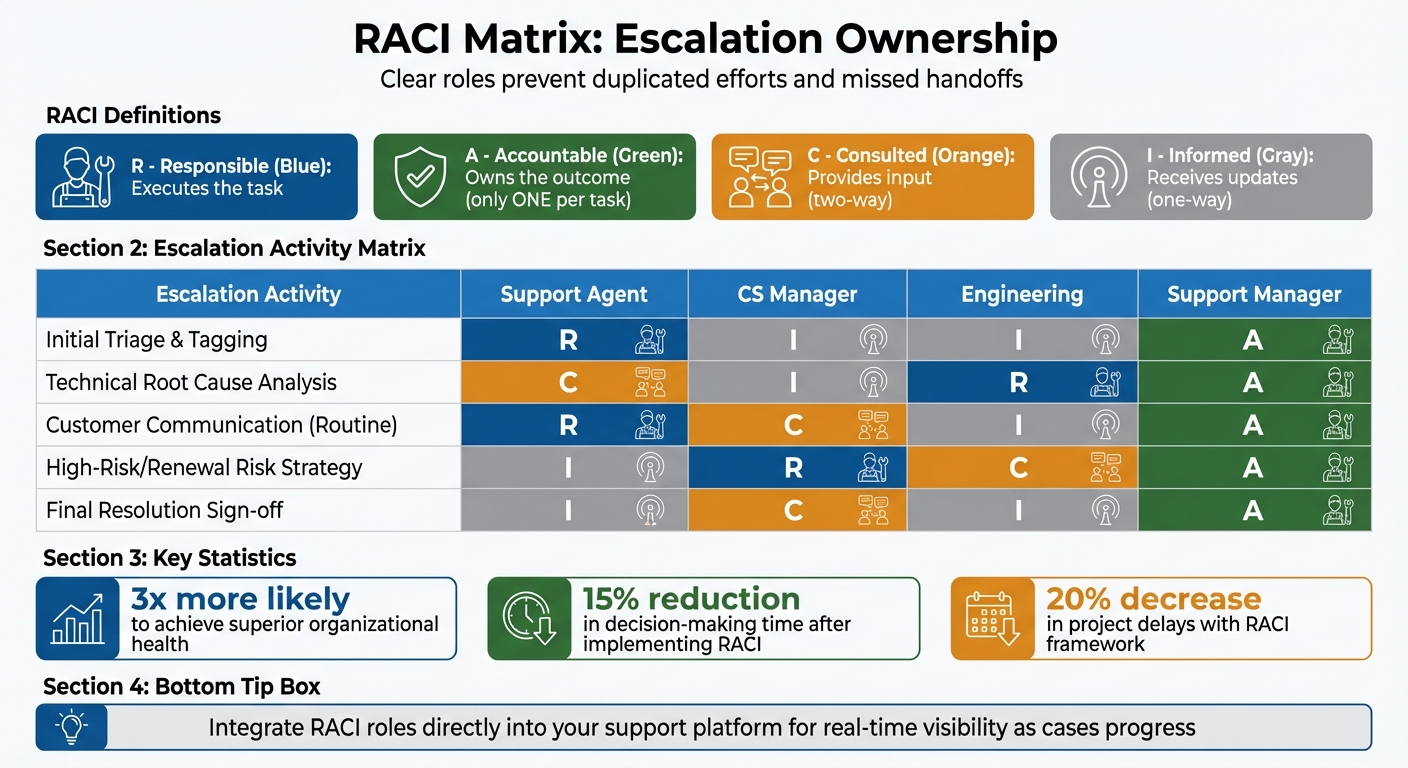
RACI Matrix for Customer Success and Support Escalation Ownership
One of the biggest challenges in handling escalations is unclear ownership. When Support and Customer Success teams don’t have well-defined roles, it can lead to duplicated efforts, missed handoffs, and frustrated customers who feel neglected. To avoid these issues, it’s crucial to establish clear responsibilities using a RACI matrix.
The RACI matrix assigns four key roles: Responsible (executes the task), Accountable (owns the outcome), Consulted (provides input), and Informed (receives updates). Importantly, only one person should ever be Accountable for each task.
"Assigning one Accountable person per task makes it clear who to escalate issues to… Organizations that communicate well are far more likely to achieve their goals" – Chandler Paul, Senior Project Manager at NEWMEDIA.com [3]
In practice, Support agents typically handle technical resolution and ticket management, while Customer Success Managers (CSMs) focus on relationship management and business impact, especially for high-value or complex cases [6]. Consider the 2022 Microsoft Teams outage: technical teams worked on resolving the root cause, while CSMs reassured clients, communicated timelines, and addressed business concerns to maintain trust [1].
Using RACI Matrices to Assign Escalation Ownership
For routine escalations, the Responsible role often falls to Support agents, who manage initial triage and customer communication. The Support Manager, however, remains Accountable for signing off on the resolution. When dealing with high-risk or renewal-sensitive cases, the CS Manager takes charge as Responsible, while Engineering may be Consulted for technical feasibility [2][3].
Data supports the effectiveness of this approach: organizations with clearly defined roles are over three times more likely to achieve superior organizational health [4]. For example, a global semiconductor company reduced decision-making time by 15% and cut project delays by 20% after implementing a RACI framework [4]. To ensure balance, avoid overloading any individual with too many "Responsible" tasks [3][4].
Integrate RACI roles directly into your support platform so that ownership is visible in real-time as cases progress. Clearly distinguish between "Consulted" (provides two-way input) and "Informed" (receives one-way updates) to minimize unnecessary communication [3][4].
"[RACI matrices] force owners of the project to clear timelines for approvals, provide clarity, push decisions faster, and call out gaps before they become failures" – Jamilyn Trainor, Senior Project Manager at Müller Expo Services International [3]
Here’s an example of how roles might be assigned for various escalation activities:
| Escalation Activity | Support Agent | CS Manager | Engineering | Support Manager |
|---|---|---|---|---|
| Initial Triage & Tagging | R | I | I | A |
| Technical Root Cause Analysis | C | I | R | A |
| Customer Communication (Routine) | R | C | I | A |
| High-Risk/Renewal Risk Strategy | I | R | C | A |
| Final Resolution Sign-off | I | C | I | A |
Common Mistakes in Role Definition and How to Fix Them
One major mistake is treating escalations as rare occurrences rather than planning for them. Without standardized playbooks, teams often improvise, leading to conflicting decisions and delays. This is risky, especially since 90% of Americans consider customer support a key factor in choosing where to do business [5]. Yet many companies still rely on vague triggers like "time in queue" to escalate issues.
Another frequent error is not distinguishing between functional escalations (requiring more expertise) and hierarchical escalations (requiring higher authority). Blurring these lines can lead to "manager bloat", where leaders get pulled into technical tasks they aren’t equipped to handle. Instead, use clear triggers in your SLAs – such as negative sentiment, missed response deadlines, or unresolved issues after multiple interactions – rather than relying solely on elapsed time.
Finally, preserve context during handoffs. If Support escalates an issue to Success without documenting prior interactions, customers may have to repeat themselves, which erodes trust. A shared CRM and knowledge base can help ensure all relevant information is retained. Regularly review escalated cases to identify communication gaps and refine your playbooks.
"Escalations should only happen when they’re necessary… agents should clearly explain things to customers so that they understand when an escalation is necessary" – Tracie Liao, SuccessCOACHING [5]
Next, we’ll dive into how structured escalation protocols can further reduce confusion.
How to Build Escalation Protocols That Work
Once roles are clearly defined, the next step is to establish a repeatable process for handling escalations efficiently. Without a standardized approach, teams may resort to ad-hoc problem-solving, which can lead to inconsistent customer experiences and missed service-level agreements (SLAs). The objective is to create a system that responds to urgency and business impact while keeping everyone on the same page. This structured framework connects clear roles with consistent processes, driving better outcomes.
Standardizing Your Escalation Process
Start by implementing a triage system that categorizes issues into three levels: Priority 1 (Critical), Priority 2 (High), and Priority 3 (Standard). Use a five-step workflow to manage these cases: Triage & Score, SLA Check, Route, Set Expectations, and Document [7]. This approach eliminates guesswork and ensures no issue is overlooked.
To empower your frontline agents, consider increasing refund limits and granting them access to advanced troubleshooting tools [7]. Ideally, the escalation rate should remain below 10%. If it climbs above 15%, it may indicate gaps in training or unclear processes. Conduct monthly reviews of escalation trends to uncover recurring problems, such as product bugs or knowledge gaps, and address these root causes instead of just managing symptoms [11,12].
Different types of escalations will involve different stakeholders, as outlined in your role guidelines. Clearly defining these triggers within your platform ensures automatic routing to the right teams.
Set tiered SLAs to match the urgency of each priority level. For example:
- Priority 1: 15-minute first reply, 2-hour resolution, and auto-escalation after 30 minutes of inactivity.
- Priority 2: 1-hour first reply, 8-hour resolution, and escalation after 2 hours.
- Priority 3: 4-hour first reply, 24-hour resolution, escalating after 8 hours [7].
During active escalations, maintain customer trust by providing updates every 2–4 hours, even if a final resolution isn’t ready yet [7].
"72% of customers prefer waiting longer for a complete solution rather than receiving a fast but incomplete answer."
– Maddy Martin, SVP of Growth, Smith.ai [7]
This standardized process serves as the backbone for creating flexible SLAs that can adapt to more complex, high-impact situations.
Using Dynamic SLAs for High-Impact Cases
Dynamic SLAs go beyond static timelines, adjusting in real time based on factors like renewals, customer health, or revenue at risk. For instance, if a customer is within 30 days of renewal and opens a case, the SLA can automatically tighten to ensure faster resolution, reducing the risk of churn.
Match escalation severity with the right level of leadership involvement:
- Critical cases (major impact, high risk of losing the customer): Require daily updates and oversight from senior leaders like the VP of Sales, Product, CRO, or even the CEO.
- High-severity cases (affecting the customer’s ability to use the product): Need multiple updates per week from the VP of Customer Success or a CSM leader.
- Medium cases (impacting deployment or posing a renewal risk): Require weekly or bi-weekly updates from Global CSM Leaders.
- Low-severity cases: Follow a regular cadence managed by Regional CSM Managers [8].
Adjust SLAs to reflect the unique demands of your industry. For example:
- Legal firms might need 5-minute acknowledgments for compliance-related issues.
- E-commerce companies may prioritize VIP customers with 30-minute response targets.
- Healthcare providers often require instant escalation for safety-related reports [7].
Tailor your SLAs to align with your business and customer needs. Use automation tools to adjust SLAs based on factors like contract size, product usage, or support history. For instance, Supportbench leverages CRM data to automatically prioritize high-risk accounts, reducing the mental workload for agents and ensuring consistent service across the team.
How to Improve Communication Between Customer Success and Support
Once you’ve defined roles and escalation protocols, the next step is ensuring smooth communication between Customer Success and Support. Escalation protocols can fall apart when teams lack real-time visibility. For example, if Support closes a ticket without informing Customer Success, or if a Customer Success Manager (CSM) makes a promise without checking Support’s workload, the customer ends up feeling the disconnect. The key to avoiding this isn’t more meetings – it’s creating shared visibility and structured workflows that keep everyone on the same page without adding unnecessary complexity.
Using Shared Tools for Better Visibility
Centralizing account information on a single platform is crucial. If Support and Success teams operate in separate systems, valuable context often gets lost during handoffs. This can lead to repeated questions, slower resolutions, and frustration on all sides. A unified view solves this problem by consolidating customer history, product usage, support tickets, and account health in one place. Dedicated communication channels also make it easier for all stakeholders to stay updated on active escalations.
For example, you can create public channels with clear naming conventions like #esc_customername to centralize updates for high-priority cases. This way, anyone can quickly access relevant information without digging through countless email threads [8]. Tools that provide automated meeting summaries or record customer calls can also be a game changer. Highlighting action items ensures both teams stay aligned on the account’s status without requiring everyone to attend every meeting.
Internal knowledge bases further streamline operations. By housing best practices, troubleshooting guides, and escalation playbooks in a searchable format, both agents and CSMs can quickly find answers to common questions. This reduces the need for internal back-and-forth and allows teams to spend more time addressing customer needs. Platforms like Supportbench integrate these features seamlessly, giving teams a single source of truth for account notes, escalation history, and resolution workflows – all without the hassle of juggling multiple tools or costly add-ons.
Once shared tools are in place, the next priority is adopting clear communication practices.
Best Practices for Root Cause Analysis and Customer Updates
For standard account-level escalations, aim to provide at least three updates per week [8]. This aligns with customer preferences – 72% of customers would rather wait longer for a complete solution than receive a quick but incomplete response [7].
When escalating an issue to technical teams, it’s essential to provide a clear and concise summary of the problem. Include details about the issue, the troubleshooting steps already taken, and a proposed hypothesis. This approach minimizes back-and-forth clarifications and speeds up resolution time [9].
"You should strive to connect with the engineering team, understand how they solve problems, and learn what information they need to do so."
– Caleb Gammon, Tech Meets Human [9]
Documenting both the resolution and the root cause of an issue is equally important. This practice not only reinforces the importance of role clarity but also builds a knowledge base that agents can draw from in the future. Conduct quarterly reviews of escalation trends to identify recurring issues, whether they stem from product bugs, training gaps, or unclear documentation. Addressing these patterns proactively reduces the volume of future escalations and improves the overall customer experience.
With these communication strategies in place, teams are better prepared to explore how AI can predict and manage escalations effectively.
Using AI to Predict and Manage Escalations
AI tools can predict potential escalations by analyzing risk signals like low confidence in intent mapping, repeated customer loops (where someone rephrases the same issue multiple times), and frustration indicators such as keywords like "supervisor" or "human" [10][11]. Sentiment analysis plays a key role here. While isolated negative messages might not be enough to trigger action, combining them with repetitive messaging or the status of a high-value account can prompt immediate intervention [10].
The secret to accurate escalation prediction lies in a unified intelligence layer that pulls data from various sources: CRM systems (account value, renewal dates), ticketing history, product databases (configurations, versions), and internal tools like Slack [12]. For instance, AI-powered triage might detect a billing issue from a customer with $50,000 in annual recurring revenue (ARR) nearing their renewal date. It can analyze the ticket content, assess the customer’s technical expertise and account health, and route the issue to a senior CSM with full context. This proactive approach feeds into a broader system, ensuring optimized routing for escalations.
By 2029, it’s predicted that AI will autonomously resolve 80% of common customer service issues, cutting operational costs by 30% [10][11]. A real-world example comes from Cynet, a cybersecurity company that implemented AI for B2B support in 2025. They achieved a 47% ticket deflection rate and a 14-point CSAT increase (from 79 to 93). Nearly half of their tickets were resolved at Tier 1 without escalating to senior engineers, and resolution times were halved [12].
"Escalations have a much more significant impact than they realize. It’s a bottleneck that can be removed rather easily."
– Tina Grubisa, Value Consultant, Mosaic AI [12]
AI-Powered Escalation Prediction and Routing
AI enhances escalation handling by refining routing protocols, relying on weak signals rather than rigid rules. These signals include low AI confidence scores (below 70%), repeated loops (the same question rephrased three or more times), negative sentiment, and high-priority categories like billing or security issues [13][10]. Before handing off a case, AI performs pre-escalation tasks such as gathering logs, verifying identity, and drafting internal notes, ensuring a "ready-to-finish" case for human agents [10].
AI also creates a structured case brief that includes a plain-language summary, diagnostics, customer environment details, and recommended next steps, so customers don’t need to repeat themselves [10][11]. Tools like Supportbench offer features like AI Predictive CSAT and AI Predictive CES (Customer Effort Score), which analyze case history to foresee customer satisfaction or effort levels before surveys are even sent. This allows teams to proactively escalate cases trending toward negative outcomes.
To streamline escalation management, establish three AI escalation lanes:
- Autonomous: AI resolves the issue end-to-end.
- Guardrailed: AI resolves but requires human approval for sensitive actions, like financial or security-related decisions.
- Human-first: AI gathers context and immediately hands off high-risk cases (e.g., legal threats) to a human agent [11].
Additionally, set a maximum turn limit, where after a specific number of back-and-forth exchanges, the AI escalates the case to a human to avoid frustrating the customer [11]. For high-value accounts – such as those with monthly recurring revenue (MRR) double the average – non-routine issues should automatically escalate to ensure personalized attention from Customer Success and Support teams [13]. These predictive capabilities, combined with automated knowledge capture, ensure continuous improvement.
Automating Knowledge Base Creation and Case Summaries
Every resolved escalation can trigger an AI-driven feedback loop, which extracts the solution, generates a knowledge base article, and shares it with frontline agents to prevent similar issues from escalating in the future [12]. This eliminates the need for specialists to manually document every solution. Tools like Supportbench feature AI KB Article Creation from Case History, using case interactions to create articles that include the subject, summary, and keywords automatically.
AI can also generate case summaries throughout the ticket lifecycle – summarizing activities as they occur and creating a final summary upon closure. These summaries provide instant context to both Support and Customer Success teams without requiring them to sift through lengthy message threads. For example, if a customer reports an API timeout error, AI can analyze the history, identify the issue as a version-specific bug, and generate a knowledge base article with affected versions, reproduction steps, and the workaround – all without manual input.
This automation reduces internal back-and-forth, freeing teams to focus on customer needs. Supportbench’s AI Agent-Copilot searches previous cases and knowledge bases for relevant answers, helping agents resolve issues faster. Meanwhile, the AI Agent Knowledgebase AI Bot scans the entire knowledge base for solutions, while the AI Custom Knowledge Base AI Bot focuses on external-facing articles for customer self-service.
"The goal isn’t ‘AI or humans,’ but reliable routing plus a high-quality handoff that reduces customer effort and protects outcomes."
– Ameya Deshmukh, VP of Customer Support [10]
How to Measure and Improve Collaboration with KPIs
Once you’ve established clear roles and structured escalation protocols, the next step is measuring collaboration through KPIs. These metrics help turn strategies into actionable results. For instance, over 70% of customers now expect personalized interactions [15], making it essential to monitor how well teams handle transitions and handoffs.
In B2B scenarios, revenue-focused metrics play a key role. For example, Gross Dollar Churn can signal whether high-value customers are leaving due to poor escalation handling, while Expansion Revenue shows if collaboration is creating enough value to drive upsells. In the SaaS industry, aligning Customer Success with revenue goals is critical for long-term growth [14]. Additionally, metrics like Agent Utilization Rate can reveal whether team members are stretched too thin to manage complex escalations effectively.
Efficiency and quality metrics also provide a clearer picture of performance. First Response Time (FRT) measures how quickly Support acknowledges issues, helping to prevent minor problems from escalating. Customer Satisfaction (CSAT) offers immediate feedback on how seamless the handoff between Support and Customer Success feels. For B2B teams managing complex, ongoing cases, tracking metrics like the escalation rate and first-contact resolution can show whether tools like AI routing or knowledge base automation are reducing repeat issues. Together, these financial and operational metrics form a strong foundation for performance tracking.
Key Metrics for Measuring Success
A well-rounded KPI framework combines efficiency, quality, financial impact, and customer relationship health. For example:
- First Response Time (FRT): Ensures quick acknowledgment to prevent minor issues from escalating.
- Customer Satisfaction (CSAT): Gauges how smooth and effective team handoffs feel to customers.
- Expansion Revenue: Reflects the value created by strong collaboration.
- Gross Dollar Churn: Identifies if key accounts are leaving due to unresolved issues.
Using a shared dashboard to track these metrics in real time helps Support and Customer Success teams stay aligned. AI-powered tools can further enhance this process. For example, platforms like Supportbench offer features such as AI Predictive CSAT and AI Predictive CES, which analyze past cases to predict satisfaction trends. These insights allow teams to address potential issues before they escalate into negative outcomes.
Setting OKRs to Drive Alignment
Once KPIs are in place, OKRs (Objectives and Key Results) help translate these metrics into actionable goals.
"Every OKR should ultimately connect to a customer-centric outcome, not just an internal efficiency metric." – Henrik van der Pol, CEO of Perdoo [16]
The focus should be on leading indicators, such as onboarding time or feature adoption, rather than lagging indicators like churn, which only reveal problems after the fact [17].
Keep OKRs focused by limiting them to 2–3 high-impact goals per quarter [16]. For example:
- Objective: Reduce churn with faster resolution times.
- Key Results: Decrease average resolution time from 36 to 24 hours; lower escalation rates from 15% to below 8% [16].
- Objective: Deliver an outstanding support experience.
- Key Results: Maintain a CSAT score of 90%+ for tier-1 tickets; resolve 95% of tier-2 tickets within 24 hours [17].
Regular bi-weekly check-ins ensure progress remains on track and allow teams to adjust based on evolving customer needs [16]. A closed-loop feedback process – where customers are informed when their input leads to tangible changes – builds trust and ensures escalations lead to meaningful action rather than becoming routine internal tasks.
Conclusion
Bringing Customer Success and Support teams together on escalations creates a system that not only safeguards revenue but also builds stronger customer connections. When teams operate with defined roles, clear protocols, and shared tools, issues get resolved faster, and customers never feel lost during transitions. The results are tangible: quicker resolutions, consistent context throughout interactions, and greater accountability to keep cases moving forward. These improvements pave the way for tracking success through focused KPIs and OKRs.
The impact of alignment is hard to ignore. It drives higher Net Revenue Retention (NRR) and can significantly increase company valuations [20]. Even a modest 5% boost in customer retention can increase profits by 25% [19], underscoring how effective escalation management directly supports financial performance. With 79% of customers expecting seamless interactions across all departments [21], meeting this expectation becomes a clear advantage in a competitive market.
AI plays a pivotal role by predicting escalations, instantly routing cases, and automating tasks like status updates and knowledge base creation. These capabilities allow teams to focus on what truly matters: solving customer problems and rebuilding trust. In a tiered support model, Level 1 agents – when equipped with the right tools – can handle 80% of inquiries, leaving expert resources available for the 5% of cases that require specialized attention [18].
Tracking metrics like First Response Time, CSAT, Expansion Revenue, and escalation rates creates a feedback loop for continuous improvement. Focused OKRs ensure that teams stay aligned on delivering outcomes that matter to customers, not just internal goals. Regular post-escalation reviews and feedback sessions help identify and address gaps before they become recurring issues. The strategies outlined here – from clear role definitions to AI-driven escalation prediction – highlight how operational excellence enhances both customer satisfaction and revenue growth. By embedding these practices into a cycle of continuous improvement, teams can consistently build on their achievements.
"Revenue-aligned Customer Success is the cornerstone of sustainable growth in the SaaS industry." – Remco de Vries, VP of Revenue Marketing, Gainsight [14]
Handling escalations effectively builds trust, reduces churn, and opens doors for growth. Through clear ownership, smart automation, and measurable collaboration, what once were costly disruptions can become moments to showcase your team’s value.
FAQs
Who owns an escalation – Support or Customer Success?
Clear communication and well-defined roles are essential when handling escalations. Typically, Customer Success takes the lead on overall escalation ownership, as they oversee the broader customer relationship and navigate complex challenges. Meanwhile, Support teams focus on managing specific ticket escalations, ensuring technical issues are addressed efficiently. This balance between the two teams helps maintain a seamless resolution process.
What triggers an escalation besides time in queue?
Escalations often happen when customer satisfaction drops or when a customer raises a complex issue – whether tied to a specific support ticket or not. These situations emphasize how crucial it is to respond to customer concerns quickly and efficiently.
How can AI route escalations without losing context?
AI-powered escalation systems evaluate factors such as sentiment, severity, and confidence to pinpoint issues that require escalation. They then assign cases to the most suitable agents by considering factors like skill sets and issue complexity. These systems ensure that all relevant details – such as customer history and specifics of the issue – are retained during handoffs. By streamlining transitions, AI eliminates the need for customers to repeat themselves and reduces the chances of miscommunication, creating a smoother experience and boosting resolution speed.






