


Switching your helpdesk platform? Convincing the C-suite requires a data-driven business case that speaks their language: ROI, cost savings, and measurable outcomes. Here’s how to build a winning pitch:
- Identify inefficiencies: Quantify time and money lost with your current system. For example, agents spending 20–35% of their time searching for information could cost $360,000–$630,000 annually for a 30-agent team.
- Calculate the cost of doing nothing: Outdated systems lead to higher operational costs and churn. A 5% retention boost can increase profits by 25%–95%.
- Align with executive priorities: Focus on hard savings (e.g., reduced costs per ticket) and capacity gains (e.g., handling more tickets without additional hires).
- Show clear ROI: AI can cut ticket costs from $15 to $9.50, saving $720,000 annually for 10,000 tickets/month.
- Propose a low-risk rollout: Start with a phased implementation and sandbox testing to minimize disruption.
Executives need clarity, not technical jargon. Use numbers, highlight risks of inaction, and position the switch as a smart business investment.
Selling to the C-Suite: Why Better Questions Beat More Questions (Part 1)
sbb-itb-e60d259
Evaluate Your Current Helpdesk Problems
Before making a case for change, it’s essential to pinpoint where your current helpdesk setup is falling short. Establishing a clear baseline of inefficiencies will help you align your proposal with executive priorities like cutting costs and improving operations. To justify a switch, tracking essential support metrics is key.
Start by monitoring three specific metrics over the course of a week: how many tools an agent uses per ticket, how much time they spend searching for information before responding, and how often duplicate work occurs across systems [6]. These insights can expose inefficiencies that drain resources. For instance, a team of 30 agents earning an average salary of $60,000 could lose between $360,000 and $630,000 annually just from wasted search time [6].
Once you’ve identified these gaps, take a closer look at operational inefficiencies and quantify the cost of sticking with the status quo.
Find Operational Inefficiencies
Support agents often spend 20%–35% of their day searching for information across disconnected systems instead of resolving customer issues [6]. This problem usually stems from fragmented system architecture. When knowledge is scattered across multiple platforms, agents waste time switching between tools, repeating tasks, and dealing with unstable integrations.
Use platform analytics to understand resolution workflows. How many systems does an agent need to interact with to close a single ticket? Are engineers or product managers excluded due to per-seat pricing, leaving agents to handle complex problems on their own? For mid-market companies, fragmented helpdesk systems can lead to overspending by 40%–70% compared to unified solutions [6]. These hidden costs are often buried in salary budgets rather than showing up clearly in software expenses.
Once you’ve identified these inefficiencies, connect them directly to financial losses to strengthen your case.
Calculate the Cost of Doing Nothing
Sticking with an outdated helpdesk often costs more in the long run than switching to a better system. Over three years, these costs – like administrative overhead, lengthy onboarding processes, and missed revenue opportunities – can exceed the cost of upgrading within 12–18 months [6]. For reference, the cost of a single human-handled support interaction ranges from $6 to over $20, depending on complexity [7].
Also, consider how inefficiencies impact customer retention. Increasing retention rates by just 5% can boost profits by 25% to 95% [7]. If your helpdesk delivers inaccurate answers or causes delays while agents search for information, you’re not just losing time – you’re losing revenue. To quantify this impact, use the formula: (Number of Customers) × (Churn Rate Reduction %) × (Average Customer Lifetime Value) [7]. The real return on investment includes better productivity, higher-quality support, and stronger customer loyalty.
Match Your Proposal to Executive Priorities
Once you’ve quantified inefficiencies, the next step is to align your proposal with what matters most to executives. Approvals at the C-suite level hinge on clear business outcomes. Your proposal needs to focus on the metrics that resonate with them: cost savings, operational improvements, and measurable returns. The trick is to translate helpdesk capabilities into numbers that directly affect profitability.
As industry leaders point out, CFOs prioritize payback periods and returns that account for risk [3].
Frame your proposal as a smart operational investment, not just a tech upgrade. Instead of diving into technical features, emphasize how the switch reduces cost-per-incident and increases capacity – allowing your team to handle more tickets without adding staff. This shift from talking about features to focusing on financial impact can be the difference between getting approval and being overlooked. By doing this, you set the stage to show how technical capabilities translate into cost-saving outcomes.
Executives are primarily concerned with three areas: hard savings (like reduced contractor expenses or avoided hires), capacity gains (managing higher workloads with the same team), and risk management (via tools like audit logs and controlled rollouts). Your proposal should highlight these benefits with specific numbers, clear dollar amounts, and achievable timelines.
Link Helpdesk Features to Business Outcomes
AI-powered tools like predictive CSAT and intelligent triage can significantly boost efficiency and scalability. For example, predictive CSAT helps identify unhappy customers before they churn, while intelligent triage reduces average handling times by surfacing instant answers. Even a modest 5% increase in customer retention can lead to a profit boost of 25% to 95% [7]. Additionally, AI agent copilots can cut onboarding time for new agents by up to 50% [7]. Features like automated triage and categorization reduce administrative tasks, freeing your team to focus on complex, high-value interactions.
The shift from conversational AI to autonomous support agents is a game-changer for support operations. According to Gartner, by 2028, 33% of enterprise applications will include agentic AI [5]. These autonomous agents can handle multi-step workflows independently, escalating issues to humans only when necessary. For executives, this means increased capacity: managing higher ticket volumes, clearing backlogs, and improving SLA performance – all without increasing headcount.
| ROI Lever | Measurable Business Outcome | Executive Priority |
|---|---|---|
| AI Copilots | Reduced AHT & faster onboarding | Operational Efficiency |
| Predictive CSAT | Reduced churn rate | Revenue Retention/Growth |
| AI Chatbots | High case deflection | Cost Reduction |
| Auto-Triage | Reduced administrative overhead | Scalability |
| AI-Driven Analytics | Accurate FCR & sentiment trends | Actionable Intelligence |
Show Cost Savings Opportunities
The financial benefits of switching go beyond just software licensing. With transparent pricing at $32 per agent per month, costs are predictable and scale with your team. For instance, a 30-agent team would pay about $960 per month, or $11,520 annually, for a full-featured enterprise platform.
Think about your current total cost of ownership (TCO). Implementation and consulting might make up 40%–50% of your costs, with training and change management adding another 15%–20%, and ongoing maintenance accounting for 10%–15% [3]. If your current system requires constant IT involvement for configuration or troubleshooting, those hidden costs can pile up. An AI-native platform designed to run independently can eliminate these ongoing drains on resources.
Savings can come from multiple areas: reduced contractor expenses when AI handles routine tickets, avoided hires thanks to increased capacity, and lower costs per incident as automation deflects simple requests. For example, if your current cost per ticket is $15 and you handle 10,000 tickets per month, reducing that to $9 through automation could save $60,000 monthly – or $720,000 annually. That’s a 492% ROI in the first year, with a payback period of just two months [7].
Demonstrate Long-Term ROI with AI
While upfront savings are compelling, the long-term benefits of AI make the case even stronger. Integration costs are a one-time expense, but the benefits compound as AI systems learn and improve over time [8]. AI implementations can deliver returns of 3x–6x within the first year [8], and 66% of CFOs expect substantial ROI from AI within two years [3].
Focus on the metrics that matter: faster resolutions, better first-contact outcomes, and reduced churn. Teams using AI agents have reported up to 72% higher productivity [8], with process errors dropping by 40%–45% [8].
"For organizations where support quality and accuracy are paramount, simply automating agents away isn’t the goal. The true ROI encompasses empowerment and intelligence." – Nooshin Alibhai, Founder and CEO of Supportbench [7]
Start with high-volume, repetitive tasks like ticket triage, incident summaries, and drafting resolutions. These workflows can demonstrate immediate ROI and build trust among executives. Aim to automate processes that handle at least 500 transactions per month to ensure the investment pays off [8]. This straightforward, practical approach resonates with decision-makers who are shifting from experimental AI projects to initiatives that drive real financial results.
Build a Data-Driven Business Case
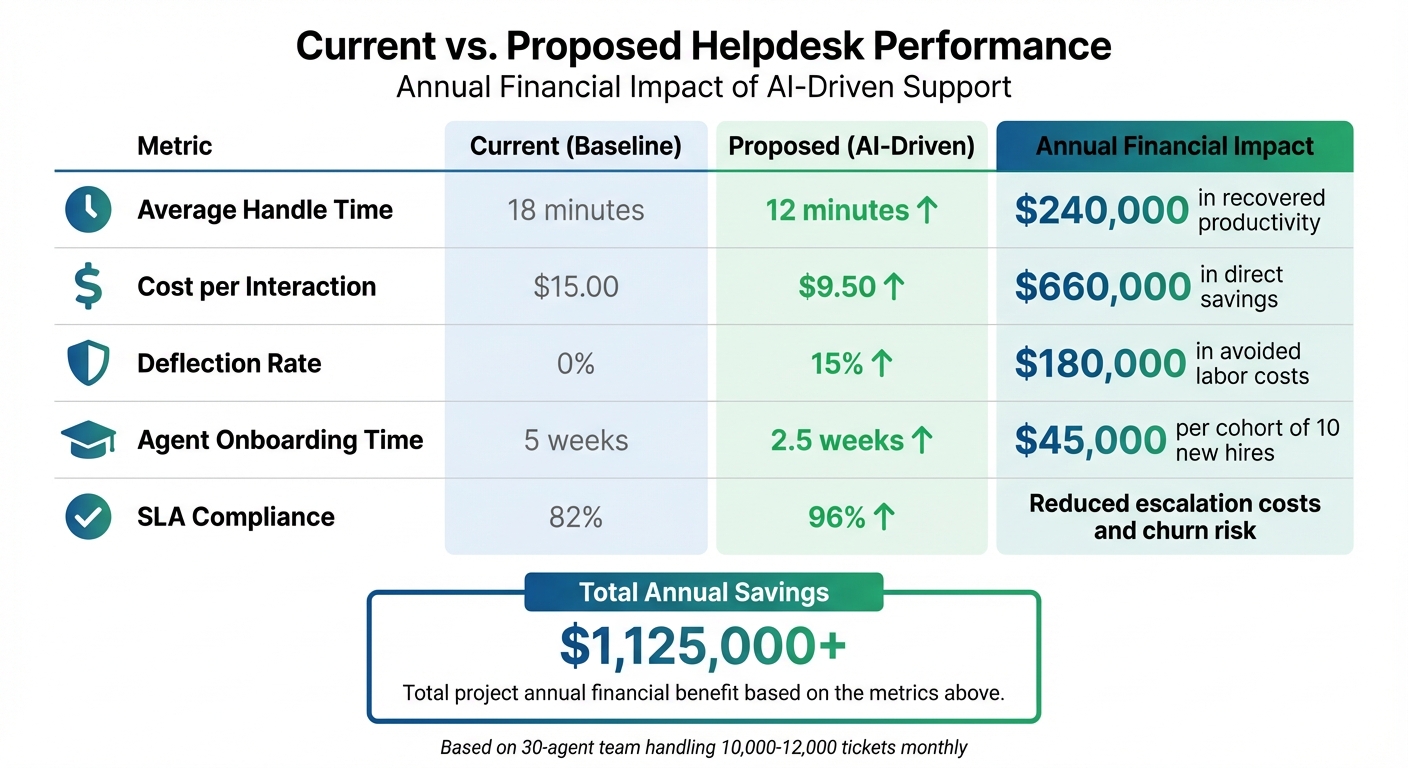
ROI Comparison: Current vs AI-Driven Helpdesk Performance Metrics
Executives make decisions based on hard numbers, not vague promises. To build a convincing proposal, start by documenting baseline metrics like Mean Time to Resolution (MTTR), cost per ticket, and agent productivity [5]. Without these benchmarks, any projected improvements may seem unsubstantiated. For CFOs, the focus is often on payback periods rather than the technical intricacies of a solution.
When building your case, break down savings into two categories:
- Hard Savings: These are direct budget cuts, such as reduced contractor fees or avoiding new hires.
- Capacity Release: This refers to enabling your team to handle more work or clear backlogs.
Using data-driven scenarios, quantify inefficiencies and demonstrate how addressing them can lead to measurable improvements.
Remember, Total Cost of Ownership (TCO) isn’t just about licensing fees. It also includes implementation, training, maintenance, and often-overlooked costs like data cleanup, API integration, and change management. For context, North American IT tickets typically cost between $6 and $40 in direct support expenses, with productivity losses adding approximately $90 per incident [3]. When presenting time-saving benefits, calculate the fully loaded hourly cost (including salary, benefits, and overhead) for accuracy [5].
To address uncertainty, present three ROI scenarios: Conservative, Expected, and Upside. This approach ensures you’re not overpromising and allows room for operational variability. For example, you could propose a 90-day pilot with clear goals, such as cutting handle time by 15%, before asking for full-scale funding. While 66% of CFOs anticipate significant AI returns within two years, nearly half would withdraw funding if measurable ROI isn’t seen within 12 months [9]. A data-backed proposal reduces ambiguity and builds trust with decision-makers.
Compare Current vs. Proposed Performance
Turn operational improvements into financial outcomes by presenting a side-by-side comparison. Use a table to clearly illustrate the impact:
| Metric | Current (Baseline) | Proposed (AI-Driven) | Annual Financial Impact |
|---|---|---|---|
| Average Handle Time | 18 minutes | 12 minutes | $240,000 in recovered productivity |
| Cost per Interaction | $15.00 | $9.50 | $660,000 in direct savings |
| Deflection Rate | 0% | 15% | $180,000 in avoided labor costs |
| Agent Onboarding Time | 5 weeks | 2.5 weeks | $45,000 per cohort of 10 new hires |
| SLA Compliance | 82% | 96% | Reduced escalation costs and churn risk |
Also, emphasize productivity loss metrics. For example, the average employee loses 2 hours and 50 minutes of productive time per incident [9]. If support agents spend 20% to 35% of their day searching for information rather than solving issues [6], a 30-agent team earning $60,000 annually could face productivity losses between $360,000 and $630,000. These figures underscore the financial value of a unified platform.
Use Practical Examples
Concrete examples help bring your data-driven ROI projections to life and align with executive priorities. For instance:
- A manufacturing support team with an SLA compliance rate of 82% might face penalties and rising escalation costs. By introducing AI-powered triage and prioritization, they could boost compliance to 96% within 90 days, cutting down on penalties and overtime expenses.
- A mid-market SaaS company managing 12,000 tickets monthly with a 25-agent team spends roughly $2.16 million annually at a cost of $15 per ticket. By introducing AI deflection for routine inquiries and reducing handle times, they could lower the cost per ticket to $9.50. Running a 30-day pilot to measure these improvements provides real-world data, which resonates far more with executives than vendor promises.
These examples demonstrate how AI-driven solutions can deliver measurable results, making your business case more compelling and credible to stakeholders.
Create Your Executive Pitch
Now that you’ve gathered your data, it’s time to craft a pitch that speaks directly to the C-suite. Executives are busy and expect decisions to be backed by solid financial evidence. Your job? Turn those numbers into a clear, strategic story that aligns with their priorities.
Frame It as a Business Investment
This isn’t just a technical upgrade – it’s a strategic move. Use the performance comparisons and ROI scenarios you’ve already built to position the helpdesk switch as a business investment. Executives care about measurable outcomes like payback periods, risk-adjusted returns, and strategies to mitigate risks – not the nitty-gritty of model architecture or APIs.
Tailor your message to your audience:
- CEOs: Highlight the impact on the bottom line and how it strengthens competitive positioning.
- CFOs: Focus on metrics like EBITDA, cash flow, and measurable cost reductions.
- COOs: Emphasize gains in operational efficiency and productivity.
Make a clear distinction between hard benefits (e.g., avoiding new hires, reducing contractor expenses, or cutting external costs) and soft benefits (e.g., improved employee satisfaction). Hard benefits should take center stage, while soft benefits can serve as secondary points to strengthen your case. CFOs, in particular, are skeptical of vague claims – so be specific and back up every promise with data.
Don’t forget to highlight the cost of doing nothing. Delaying the switch doesn’t mean costs stay the same – it means inefficiencies will grow, especially during inflationary times. Meanwhile, competitors using AI-driven support are likely to outpace you in speed, cost savings, and customer satisfaction [1].
Use Charts and Executive Summaries
Executives trust data – 97% of them require quantifiable evidence when making decisions [4]. A concise, one-page executive summary can be a game-changer. Include key points like the 12-month benefits versus costs, the payback period, and the top three risks along with mitigation strategies [5][3].
Visuals are your friend here. Use charts to make your case at a glance:
- Bar charts: Highlight ROI and cost savings.
- Waterfall charts: Break down how savings are distributed across areas like ticket deflection, reduced handle time, and onboarding improvements.
Offer three ROI scenarios – Conservative, Expected, and Upside – to set realistic expectations and account for variability. For example:
- Conservative: 10% reduction in handle time.
- Expected: 15% reduction in handle time.
- Upside: 20% reduction in handle time.
This approach builds trust, especially when 66% of CFOs expect notable AI ROI in two years, yet only 14% see real value today [3]. Propose a 90-day pilot with clear success metrics, like achieving a 15% reduction in handle time, before committing to full-scale funding [3].
Finally, provide a detailed budget breakdown. Be upfront about hidden costs – licensing fees might only make up 25% of the total, while implementation (40–50%), training (15–20%), and ongoing maintenance (10–15%) account for the rest [3]. Transparency here builds credibility with finance leaders and avoids surprises down the road.
Present a Low-Risk Implementation Plan
A low-risk implementation plan strengthens your business case by demonstrating that the transition can happen smoothly, without disrupting operations or introducing unnecessary risks. Executives want to see that you’ve carefully considered how to execute the switch while maintaining business continuity [4]. The secret lies in presenting a step-by-step strategy that minimizes risks at every stage.
Plan a Phased Transition
Jumping into a full-scale transition all at once can be a recipe for chaos. Instead, break the process into smaller, manageable phases with clear milestones – 30, 60, and 90 days. Start with sandbox testing. This allows your team to simulate real workflows and migrate a small batch of tickets to identify any data mismatches before fully going live. Sandbox testing also gives support staff the chance to practice tasks like ticket handling and escalations in a risk-free environment.
After that, run both the legacy and new systems side by side for stability. New tickets can be routed to the updated platform, while the old system remains available for reference. When it’s time to fully switch over, schedule the cutover during a quieter business period. With fewer tickets coming in, troubleshooting becomes less stressful for your team.
Set checkpoints to monitor progress: at 30 days, confirm ticket routing is smooth and duplicates are eliminated; at 60 days, gather feedback from agents to identify any sticking points; at 90 days, compare key performance indicators (KPIs) against legacy data to ensure the new system is meeting expectations.
Additionally, include a rollback plan in case something goes wrong. This contingency will reassure executives that you’re prepared for any challenges.
With this phased approach in place, you can address potential concerns and gain stakeholder confidence.
Address Common Objections
Once you’ve laid out a structured rollout, tackle common objections head-on to further strengthen your plan. For instance, if executives worry about complexity, position the new system as a way to simplify workflows. Highlight features that replace cumbersome processes like endless email chains.
For concerns about integration, explain that sandbox testing ensures all integrations work seamlessly. If downtime is a worry, emphasize the parallel operation strategy, which keeps both systems running until the new platform’s stability is confirmed. Address cost concerns by referencing a detailed budget breakdown and pointing out that your timeline includes buffers for unexpected delays.
Employee resistance is another hurdle. Combat this by offering targeted training sessions and live chat support during the initial rollout weeks. Guide users away from outdated methods, such as email, and help them build habits around the new system.
"Executives want to know that you have thought through how the new ticketing software will be introduced and figured out a way to ensure it doesn’t interrupt daily operations." – DeskDirector [4]
Finally, set clear success criteria. For example, structure the rollout so that each phase must meet specific goals – like reducing handle time by 15% – before moving forward [3]. This kind of proactive planning ensures a smooth transition that aligns with both technical and financial goals.
Conclusion
Securing C-suite approval for a helpdesk switch boils down to three key factors: aligning your proposal with executive goals, supporting it with solid data, and ensuring a smooth, low-risk implementation. As Kara Martin from Naviant aptly states:
"The era of incremental technology change is over… the C-suite, especially the CFO, CIO, and COO, is shifting from ‘what’s possible’ to ‘what’s profitable’" [10].
To win their support, your business case must focus on what matters most to them – metrics like EBITDA impact, operational efficiency, and long-term strategic value. Highlighting features alone won’t cut it.
Consider this: IBM‘s AI deployment saved $4.5 billion and automated roughly 3.9 million work hours in just one year, delivering an average return of $3.50 for every $1 invested [11]. Framing your proposal around such measurable outcomes positions the switch as a smart, strategic investment. But alongside these numbers, you also need a plan to address potential risks.
Implementation risks can derail even the most promising initiatives. To avoid this, propose a phased rollout with clear milestones, sandbox testing, and defined success benchmarks. This is crucial, especially given that 42% of companies abandoned AI projects in 2025 due to fragile workflows and poor planning [12]. Building a contingency plan and integrating human oversight into the process will demonstrate your commitment to risk management.
AI-native helpdesk platforms offer more than just cost savings – they enhance productivity, empower less experienced staff, and scale operations without requiring proportional increases in headcount. Breeze Airways, for instance, resolved 37% of customer conversations entirely through AI and assisted with 71% of all conversations [2]. These results show how the right technology can create long-term cost advantages that grow over time. Delaying this transition not only increases expenses but also weakens your competitive position.
Each quarter of delay adds to your opportunity costs. As Gaspar AI puts it:
"In the AI landscape, postponing implementation is akin to impeding progress… the cost of inaction becomes steeper" [1].
Your competitors are already making their move. The decision is clear: act now to lead the way or risk being left behind.
FAQs
What numbers will my CFO trust most?
Your CFO is likely to focus on metrics that demonstrate clear financial outcomes, such as cost savings, ROI, and revenue growth. Tools like ROI calculators can be incredibly useful here, as they provide concrete data to showcase benefits – think along the lines of up to 90% cost reduction or a 300–400% ROI within the first year. The key is to emphasize measurable results that align directly with financial goals.
How do I estimate ROI without perfect data?
Calculating ROI when you don’t have perfect data might seem tricky, but you can still get a useful estimate using a simple formula:
(Net Benefits − Total Costs) / Total Costs × 100
To approximate the benefits, focus on measurable metrics like cost per ticket, time saved, or efficiency improvements. For example, look at how automation reduces ticket volume or how much more productive your agents become. These factors can help you fine-tune your estimates over time.
Don’t overlook intangible benefits either. Improvements in customer satisfaction or brand loyalty might not be easy to quantify, but they still contribute to the bigger picture of your ROI. Combining tangible and intangible factors offers a broader perspective on the true value of your efforts.
What’s the safest way to roll out a new helpdesk?
A phased rollout is often the best way to ensure a smooth transition. Start by assessing your current workflows to pinpoint any problem areas and establish clear, actionable goals. Create a change management plan to involve stakeholders, tackle potential resistance, and maintain open, effective communication throughout the process.
Kick things off with a pilot program to collect valuable feedback and identify any adjustments needed before scaling up. As you expand, offer customized training sessions that include hands-on practice to help everyone get comfortable with the changes. Keep a close eye on key performance indicators (KPIs) to track progress and make ongoing improvements as needed.






