


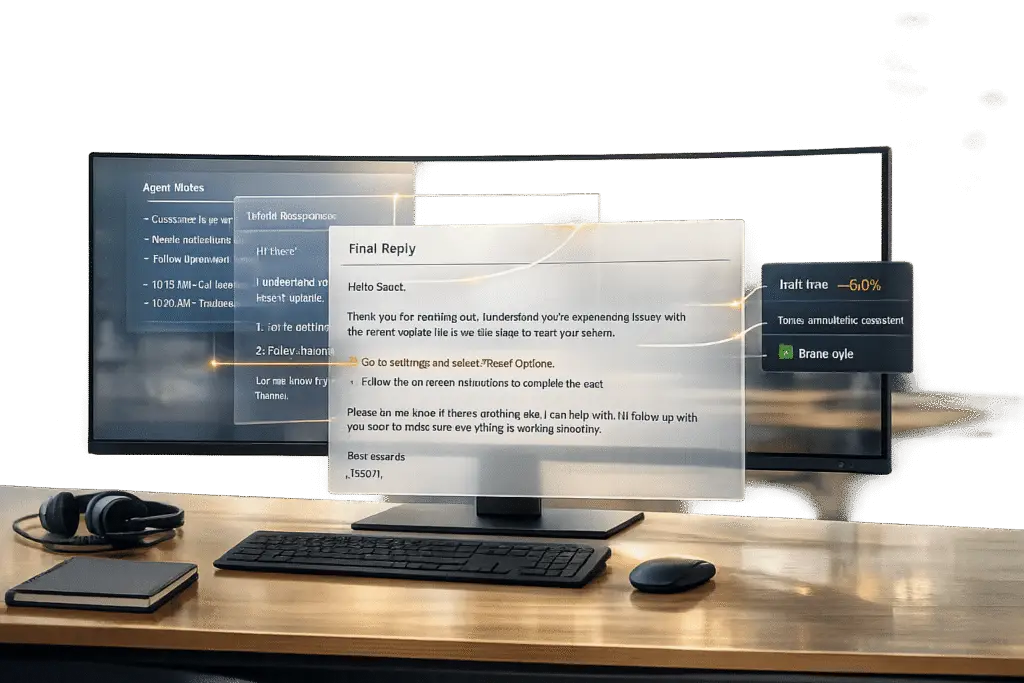
Support agents often struggle with turning quick notes into polished customer responses. AI tools now simplify this process by converting bullet points into professional replies, freeing agents to focus on problem-solving instead of sentence crafting. This approach improves response speed, accuracy, and tone – key factors in B2B support where customers expect fast, high-quality answers from the right customer support software.
Key Takeaways:
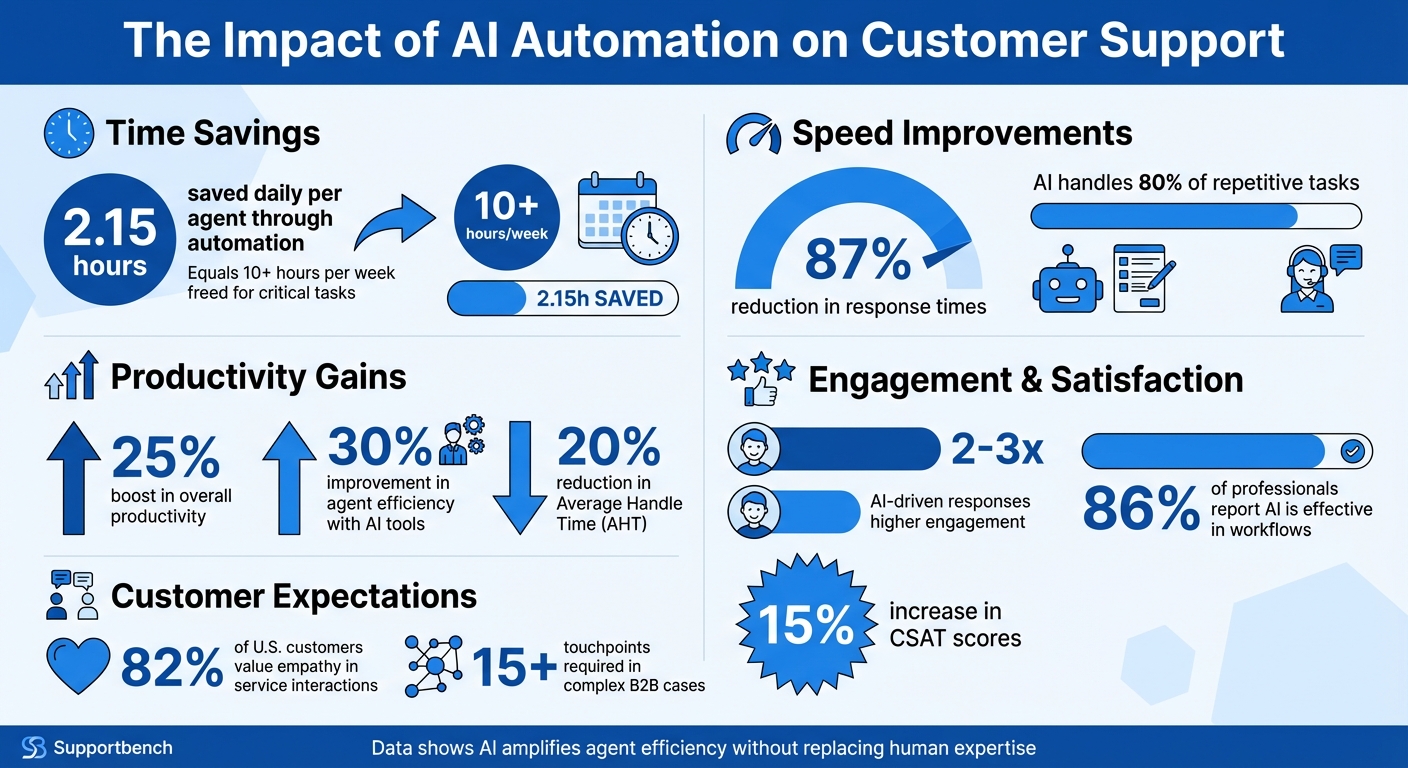
- Save Time: Automation saves agents up to 2.15 hours daily by handling repetitive tasks.
- Faster Responses: AI reduces response times by 87%, meeting tight SLA demands.
- Consistency Matters: Automated workflows ensure clear, standardized communication across complex, multi-touch cases.
- Tone is Critical: AI-generated replies balance professionalism with empathy, avoiding robotic language.
AI doesn’t replace agents – it amplifies their efficiency and lets them focus on delivering thoughtful, accurate solutions. With tools like Supportbench, agents can quickly turn raw notes into polished, context-aware replies while maintaining a human touch.
AI Automation Impact on Customer Support: Key Performance Metrics
I Built an AI Agent that Automates Customer Support (No-Code)
sbb-itb-e60d259
Why Automate Bullet Point Rewrites
Automating the process of rewriting bullet points can save support agents up to 2.15 hours every day [3]. That’s over 10 hours a week freed up for more critical tasks like handling complex issues, building stronger customer relationships, and addressing high-priority escalations – areas where human expertise truly shines.
Reducing Response Times and Agent Workload
AI can take on up to 80% of repetitive tasks, boosting productivity by 25% and slashing response times by 87% [3]. This is especially important when customers expect responses in under 10 minutes.
"Supportbench automates so many of our processes, from case assignments to escalations. This means our agents can focus on solving problems rather than managing logistics."
Automation also reduces the mental strain of navigating what’s often called the "Boolean Maze" – the tedious process of cross-referencing data, consulting knowledge bases, and adhering to formatting rules when crafting responses [6]. By eliminating these distractions, agents can focus on resolving issues faster and with less cognitive effort.
This streamlined approach ensures smoother operations and consistent service delivery, even for the most intricate B2B cases.
Ensuring Consistency in Complex B2B Cases
B2B cases can require 15 or more touchpoints before reaching a resolution [3]. Without automation, maintaining consistent communication over weeks or months can be a challenge. Different agents may interpret cases differently or use varying writing styles, which can lead to confusion and erode customer trust.
Automated workflows ensure that responses are standardized, reducing the likelihood of human error and ensuring consistent service quality at every stage [4]. When AI is trained on your knowledge base and brand guidelines, it crafts replies that reflect your team’s expertise and professionalism. For instance, standardized responses have been shown to deliver measurable improvements in operational efficiency [7].
While consistency is crucial for multi-touch cases, it’s equally important to strike the right balance between professionalism and empathy.
Maintaining a Professional and Human-Like Tone
One common worry is that AI might produce responses that feel robotic. However, modern AI tools are designed to analyze bullet points and generate replies that are context-aware and tailored to specific audiences – whether it’s a frustrated executive or a technical specialist [5]. In fact, 86% of professionals report that generative AI is effective in their workflows [3], and AI-driven responses often achieve 2–3× higher engagement [3].
Tone plays a critical role here. Studies show that 82% of U.S. customers value empathy in their service interactions, even when dealing with AI [9]. The best approach combines AI’s speed and precision with the human touch. AI can create a strong first draft, which agents can then refine with emotional intelligence and their personal voice [8]. This hybrid model delivers fast, thoughtful responses while preserving the empathy needed to build lasting B2B relationships.
How to Automate Bullet Point Rewrites with Supportbench
Supportbench’s AI Copilot streamlines the process of turning rough notes into polished customer responses. There’s no need for additional setup – the system automatically draws context from your case history and knowledge base to craft professional replies [10]. Here’s how it works:
Capturing Bullet Points During Case Review
Begin by jotting down clear, concise bullet points in the activity editor while reviewing the case. These notes feed into what Supportbench calls the "Current State Summary." This feature scans the entire case history to identify unresolved issues and outline the next steps [11]. The summary serves as the backbone for your response.
Supportbench also uses Individual Activity Summaries to compile a digest of every interaction – whether it’s an email, chat, or phone call note. This ensures that agents always have the complete context they need [11].
Once your bullet points are in place, you’re ready to generate a draft reply.
Using the ‘Create Response’ AI Helper
After documenting your key points, activate the "Create Response" feature. This tool pulls relevant context from the case history and your AI-powered knowledge base (both internal and external) to produce a professional draft in real time [10]. Using abstractive summarization, the AI crafts fluent, context-aware responses that focus on delivering the essential message rather than simply reusing phrases [11].
Reviewing and Editing AI-Generated Replies
Once the draft is ready, it’s time to refine it. Think of the AI-generated reply as a helpful starting point. Eric Klimuk, Founder and CTO of Supportbench, advises: "AI-generated case summaries… should be viewed as powerful tools for rapidly gaining context, but agents should still use their judgment. For critical decisions, review recent original interactions alongside the summary" [11].
Supportbench also includes an AI Quality Assurance tool to evaluate drafts for empathy, accuracy, tone, and overall effectiveness before sending [10]. This step ensures that the final message is polished, professional, and aligned with your brand’s voice, while maintaining the personal touch that customers value.
Writing Effective Prompts for Bullet-to-Reply Conversion
When it comes to automated rewrites, crafting effective prompts is the secret to unlocking an AI’s true potential. A well-designed prompt can transform a generic output into a polished, customer-ready reply. The trick? Providing clear context and specific details – like your business policies, product information, and the exact customer scenario [2][13].
One effective approach is the RTFD method: assign a Role (e.g., "Act as a senior customer success manager"), define the Task, specify the Format, and include Details [12]. For instance, instead of a vague request like "respond to this customer", try something more structured: "Act as a technical support engineer. Write a reply under 100 words that acknowledges the customer’s frustration about the delayed shipment and provides the updated delivery date of [date]. Use an empathetic yet solution-focused tone."
"AI won’t replace human customer service. It amplifies it by eliminating repetitive composition work." – TextExpander [2]
Adding constraints to your prompts also sharpens the AI’s focus. For example, instructions like "avoid technical jargon" or "keep it under 150 words" ensure the response is professional and concise [2][13]. Using placeholders such as [customer name] or [order number] makes prompts reusable and easy to adapt for various scenarios [2].
Prompting AI for Empathetic and Contextual Replies
To create replies that resonate with customers, direct the AI to acknowledge their emotions. A simple yet effective rule is to start with empathy: ask the AI to "validate the customer’s frustration in the first sentence" before offering a solution [2]. For example, if a customer is upset about a three-day delay caused by weather issues, the prompt could read: "Acknowledge the delay and frustration, then explain the updated timeline and offer a discount code."
Defining the tone is equally critical. Phrases like "kind but professional" or "warm yet solution-focused" help the AI balance approachability with authority [2][14]. Including "kind" in the tone instructions has been shown to soften responses without losing professionalism [2]. Without clear tone guidance, the AI might stray from your brand’s voice, so always be explicit.
For more intricate B2B cases, a step-by-step approach works wonders. You can instruct the AI to first classify the inquiry, then reference the appropriate knowledge base article, and finally draft a reply that aligns with your brand’s persona [16]. This layered strategy ensures accuracy and relevance, streamlining your support workflow and maintaining quality.
Incorporating Knowledge Base References
To prevent the AI from fabricating information, anchor your prompts to your knowledge base. Be specific: tell the AI to "respond only based on the provided documentation" or "reference our knowledge base article on [feature]" [15][16]. This keeps replies factual and aligned with your business’s actual policies.
When dealing with troubleshooting queries, instruct the AI to prioritize solutions by likelihood – start with the most common fixes and then move to less frequent ones [17][2]. You can also ask the AI to include "what you should see" confirmations after each step, reassuring customers that they’re on the right track [17].
"The most effective support prompts aren’t about speed – they’re about consistency." – AI Agents Kit [18]
For technical questions, use a "fact-checked" prompt that requires the AI to quote relevant sections from your sources and admit if information is unavailable rather than making guesses [15]. This approach minimizes errors and builds trust with customers who rely on precise answers.
These techniques fit seamlessly into Supportbench’s automated workflows, ensuring every reply is both accurate and aligned with the context of the customer interaction.
Common Pitfalls in AI-Generated Replies
When turning bullet points into polished, professional responses, there are a few traps you’ll want to avoid. Even with strong prompts, AI can generate replies that miss the mark. Spotting these issues – and knowing how to avoid them – can make the difference between responses that are genuinely helpful and ones that frustrate both your team and your customers.
Overly Generic Output
Generic prompts lead to generic replies. If the AI isn’t given enough context – like who the customer is, their relationship with your company, or the tone to use – it defaults to safe, broad language that lacks personality. The result? A response that feels disconnected and impersonal.
To fix this, include specific details in your prompts. For instance, instead of saying, “Respond to this customer about a delay,” try something like, “Respond to a project manager at a mid-market SaaS company about a three-day API outage affecting their production environment. Acknowledge the business impact and provide the exact restoration timeline.” Research shows that addressing issues like vague instructions and missing context can improve output by 5.85x [19].
Always provide key details: who’s involved, the situation’s background, and any constraints or sensitivities. This ensures the AI creates responses that feel tailored and thoughtful, not like they came from a generic script.
Next, let’s explore how AI can lose the human touch that’s so important in building customer trust.
Loss of Human Nuance
AI responses can sometimes feel robotic, with overly neutral language and rigid structure. Phrases like “It’s important to note that” or “This may help” can come across as detached, while a lack of variety in sentence structure makes the reply feel monotonous.
To keep the tone human, train the AI using examples from your best-performing agents. Showcasing one or two successful replies can help the AI better replicate your brand’s voice. You can also encourage it to mix up sentence lengths – balancing short, direct statements with longer, more detailed ones – and allow for casual phrasing, like starting sentences with “And” or “But.” As of April 2025, 93% of US consumers still prefer human agents over AI for customer service [22].
While tone is critical, inaccuracies in AI-generated responses can cause even bigger issues.
Hallucinated or Inaccurate Details
One major problem with AI is its tendency to “hallucinate,” or fabricate details. It might guess timelines, invent policy terms, or describe features that don’t exist, simply because it’s designed to provide answers – even when it doesn’t have the facts [20]. For example, in February 2026, Acme Retail’s chatbot falsely claimed that holiday return windows were extended to January 15, when the actual cutoff was December 24. This led to a 23% error rate on policy-related queries [23].
To combat this, ensure every response is grounded in verified data. Use document IDs (e.g., [KB-HOL-2024-RETURNS]) instead of vague instructions like “use the knowledge base.” This forces the AI to rely on specific sources as non-negotiable boundaries [23]. Acme Retail adopted this method, along with a “No Speculation” policy that required every response to include a source ID. Within 48 hours, their hallucination rate dropped to 2.6%, and QA cycle times improved from 22 hours to just 90 minutes [23].
“Hallucination isn’t a flaw in the model – it’s a symptom of misaligned prompting. In customer service, every unverified claim is a liability. Your prompt must act as both compass and constraint.” – Dr. Lena Torres, Director of AI Trust, SupportLogic Labs [23]
Additionally, allow the AI to say “I don’t know” or “Information not found.” Make it clear in your prompt that refusing to speculate is acceptable and aligns with compliance standards [23]. Another option is to build an “answer-or-clarify” mechanism, where the AI asks follow-up questions if the bullet points are unclear or conflicting, rather than making assumptions.
For high-stakes scenarios – like security breaches, contract updates, or cases involving at-risk customers – route these interactions to human agents instead of relying on automation [21]. As Typewise puts it, “Automate where it helps. Escalate when it matters” [21]. This approach ensures critical issues are handled with care, while repetitive tasks like password resets or order tracking can still be efficiently managed by AI.
Measuring the Impact of Automated Rewrites
Once you’ve explored the benefits of AI-powered rewrites, the logical next step is to measure their impact. This ensures that automated workflows not only meet expectations but also improve support operations in meaningful ways. By tracking specific metrics, you can evaluate performance, justify investments, and pinpoint areas for refinement.
Key Metrics to Track
- Response Time Reduction: Keep an eye on metrics like First Response Time (FRT) and Average Resolution Time (ART). These indicators reveal how automation affects the speed of ticket reviews and replies. Many companies have seen noticeable drops in response times after introducing AI tools [24][25].
- Agent Productivity: Measure how many cases each agent handles daily. AI tools, particularly those that summarize cases, allow agents to work faster and more efficiently. Some support teams have reported productivity boosts of up to 30% [24][25].
- Customer Satisfaction: Faster responses are great, but they need to maintain quality. Track Customer Satisfaction (CSAT) scores, which often improve by around 15% with AI-driven tools [24]. Adding sentiment analysis can also provide insights into the emotional tone of customer interactions [26].
- Consistency and Accuracy: Ensure communication remains professional and standardized across the team. Comparing Time-to-Draft metrics before and after AI implementation can confirm improvements. On average, AI tools have been found to reduce Average Handle Time (AHT) by about 20% [24].
By focusing on these metrics, you can clearly see how automation impacts your operations and identify where adjustments might be needed.
Case Study: Efficiency Gains Using Supportbench
One example comes from a mid-market logistics software company that adopted Supportbench’s AI-powered rewrite tools. The results? Significant reductions in case review and response drafting times, leading to lower Average Handle Time and higher agent productivity. Meanwhile, CSAT scores climbed, showing that faster responses didn’t come at the expense of quality.
The lesson here is clear: start by establishing baseline metrics before rolling out AI tools. Then, conduct regular quality checks and refine workflows as operational needs evolve. These steps ensure your AI-driven solutions continue to deliver measurable improvements.
Conclusion
Rewriting bullet points with automation isn’t just about working faster – it’s about reshaping the way support teams operate. By eliminating the struggle of starting from scratch, AI tools allow agents to move from creating drafts to refining responses. This shift gives agents more time to focus on resolving customer issues effectively [1].
The results speak for themselves. Teams can achieve up to 30% productivity improvements, respond more quickly, and maintain consistent communication. Supportbench’s AI Copilot leverages your knowledge base to craft context-aware, polished replies – without requiring agents to switch between tools.
This approach combines automation with quality assurance. Supportbench’s AI QA evaluates tickets for empathy, accuracy, and tone, ensuring that every agent – regardless of skill level – delivers consistent, high-quality responses. It also helps reduce emotional strain, making the job less taxing for your team.
By shifting the focus from drafting to editing, one of the biggest support challenges is addressed. As Mark Sherwood points out [1], this change creates a scalable, consistent, and cost-effective support system.
When automation is paired with quality safeguards, it paves the way for operational efficiency. To see real improvements, start by organizing your knowledge base, set clear quality standards, and let AI manage the heavy lifting. Your team will work smarter, and your customers will notice the difference.
FAQs
How do we keep AI replies accurate and avoid made-up details?
To get accurate and trustworthy AI-generated replies, start with well-thought-out prompts based on reliable sources like help center articles or verified knowledge bases. It’s essential to regularly review and update these materials to keep the information current and dependable. Creating a collection of tested prompts can also make responses more consistent and minimize errors, ensuring the AI stays focused on delivering precise and relevant answers.
How can I make AI drafts sound empathetic and on-brand?
To ensure AI drafts resonate with empathy and stay aligned with your brand, craft prompts that encourage a friendly and professional tone. For example, include specific guidance like “use a warm and understanding tone” or “reflect the personality of our brand.” Developing a collection of well-tested prompts can help maintain consistency and streamline the process. Make it a habit to regularly update and refine these prompts to keep them aligned with your brand’s evolving voice and emotional tone.
What metrics show that automated rewrites improve support?
Key metrics to watch include shorter ticket resolution and response times, greater agent efficiency, and improved customer satisfaction. For example, automation can slash resolution times by as much as 50% and first response times by 94%, all while keeping customer satisfaction (CSAT) scores high – hovering around 89%. Other benefits include quicker escalations, reduced average handling times, and more consistent service. This efficiency boost allows agents to manage 2–5 times more tickets without increasing team size.






