


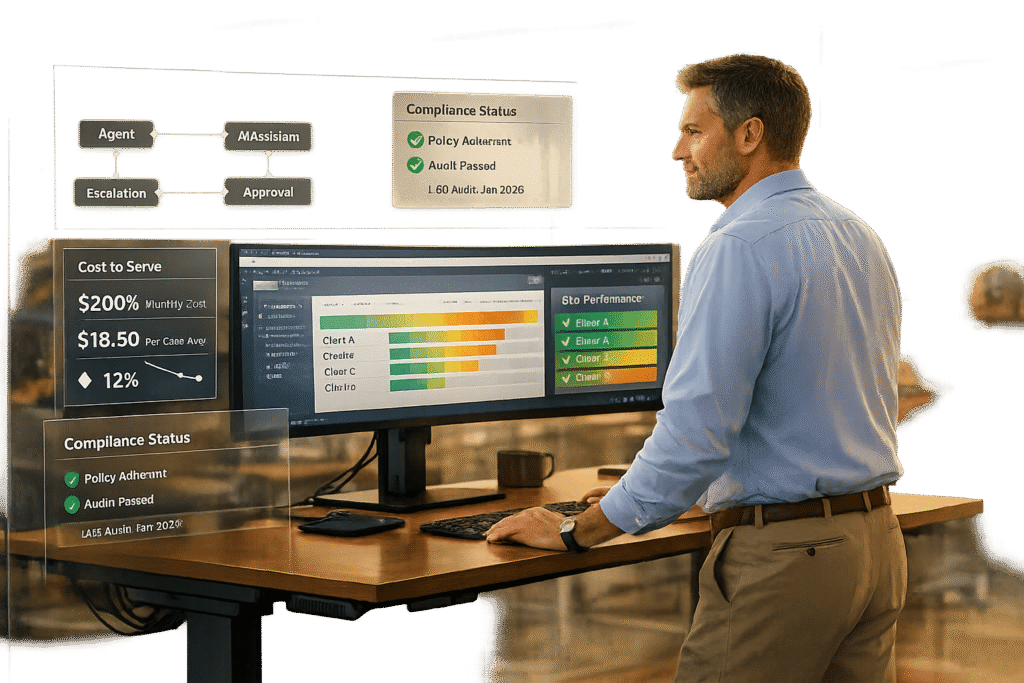
By 2026, the Support Operations Manager’s role has transformed into managing hybrid teams of AI and human agents, focusing on system design, data-driven decision-making, and cross-team coordination to improve customer support efficiency.
Key takeaways:
- AI Integration: 40% of enterprise apps now use task-specific AI agents, with 80% of SaaS companies adopting AI to cut costs by up to 50%.
- Hybrid Workflows: AI resolves 74% of cases autonomously at Salesforce, while human agents handle complex, high-value interactions.
- New Responsibilities: Managers now oversee AI-powered ticket routing and workflows, ensure context-rich customer interactions, and align AI tools with business goals.
- Metrics Evolution: Focus has shifted from ticket volume to cost-to-serve, resolution quality, and AI automation rates.
- Challenges: Success depends on robust infrastructure, effective AI-human collaboration, and maintaining compliance in AI-driven systems.
This shift demands a mix of technical expertise, leadership, and analytical skills to manage AI-enhanced operations and deliver measurable business outcomes.
AI in Customer Support isn’t replacing people. It’s levelling them up
sbb-itb-e60d259
What a Support Operations Manager Does in 2026
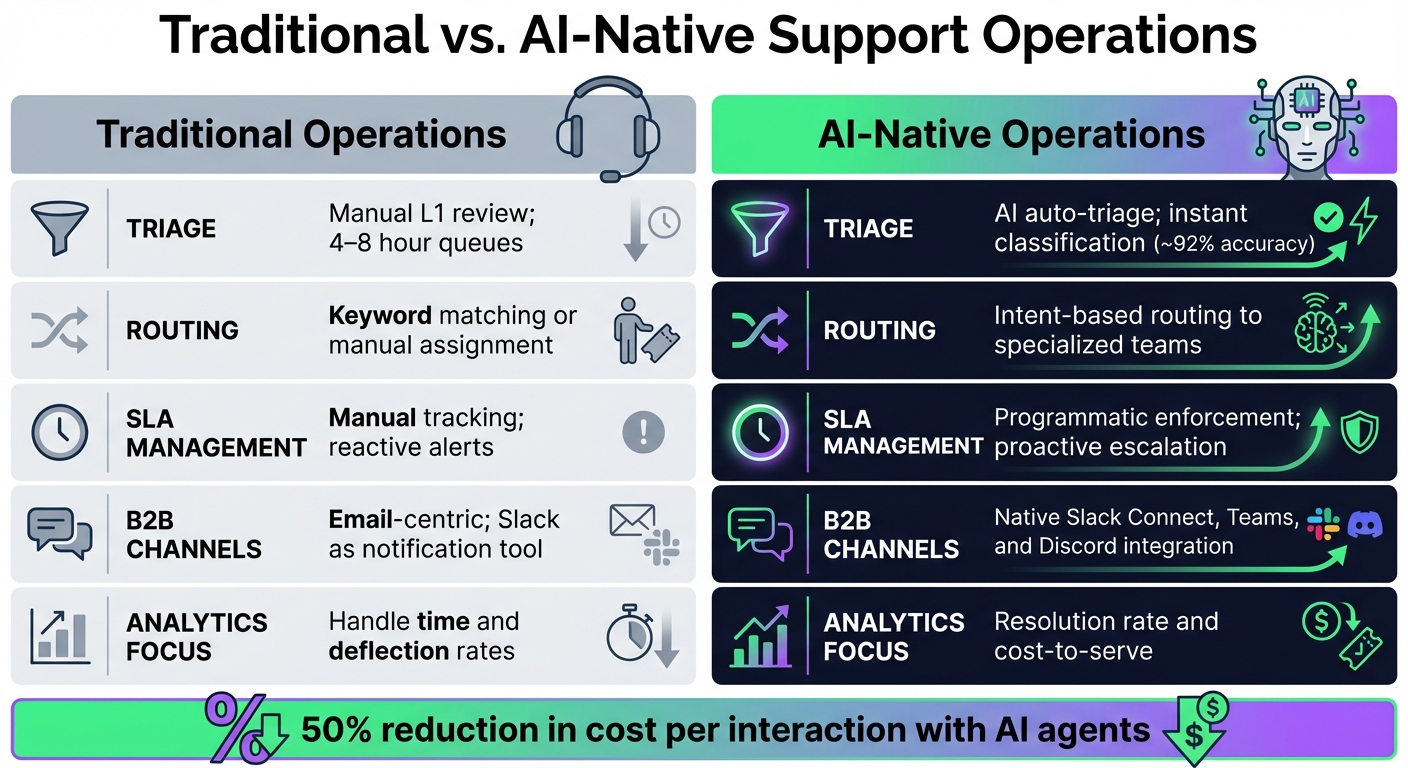
Traditional vs AI-Native Support Operations Comparison 2026
By 2026, the role of a Support Operations Manager has transformed from managing ticket queues to acting as a product manager for the entire support ecosystem. David Doyle, Support & CX Leader at ClickUp, perfectly captures this evolution:
"If you’re leading Support today, you’re also quietly becoming a product manager." [7]
Their primary focus is on creating integrated systems that enable smooth collaboration between humans and AI. This includes designing AI-driven workflows that determine when to automate tasks and when to escalate them to human agents. At the heart of this approach is the "five-layer agentic support stack" [1], which lays the foundation for these advanced systems.
The Shift to AI-Native Operations
Traditional support operations were all about reactive management – assigning tickets, tracking response times, and reducing volume. AI-native operations, on the other hand, emphasize proactive system design. This involves building "headless" support infrastructures where AI agents can independently interpret context, draft responses, and trigger actions like issuing refunds or creating Jira tickets – all without human intervention [1]. The manager’s role here is critical, acting as a "quality gate" to ensure AI responses meet high standards, especially for technical or enterprise-level queries [5].
Tackling the Context Problem in B2B Support
For B2B environments, one of the manager’s key responsibilities is solving the context problem. Every support interaction needs to start with a comprehensive view of the customer – details like account tier, plan specifics, recent usage, and open tickets. To achieve this, Support Operations Managers integrate platforms with tools like CRMs, product analytics, and engineering systems. This ensures both AI and human agents have immediate access to the information they need [6]. This seamless coordination is vital for handling the complexities of multi-stakeholder B2B support.
Traditional vs. AI-Native Operations
The contrast between traditional and AI-native setups boils down to how they’re built and operate. Traditional systems were designed for human agents, with APIs added later. AI-native systems, however, are built API-first, functioning as operating systems for autonomous agents [1].
Here’s a snapshot of the differences:
| Feature | Traditional Operations | AI-Native Operations |
|---|---|---|
| Triage | Manual L1 review; 4–8 hour queues | AI auto-triage; instant classification (~92% accuracy) |
| Routing | Keyword matching or manual assignment | Intent-based routing to specialized teams |
| SLA Management | Manual tracking; reactive alerts | Programmatic enforcement; proactive escalation |
| B2B Channels | Email-centric; Slack as a notification tool | Native Slack Connect, Teams, and Discord integration |
| Analytics Focus | Handle time and deflection rates | Resolution rate and cost-to-serve |
The financial impact of this shift is massive. Companies using AI agents report a 50% reduction in cost per interaction [1]. However, as Cole D’Ambra from Plain points out, success hinges on having the right infrastructure:
"The difference between the [successful and unsuccessful] groups almost always comes down to infrastructure. You need the right foundation before the AI can actually work." [1]
Coordinating Teams for B2B Success
Support Operations Managers in 2026 are more than system designers – they are the glue connecting support, customer success, engineering, product, and sales teams. In B2B support, where issues often involve multiple stakeholders, this coordination is essential.
Direct integrations with tools like Linear, Jira, and GitHub streamline collaboration [5]. For instance, when an agent flags a bug or feature request, the system can automatically create an engineering ticket with full context – customer tier, revenue impact, and conversation history – eliminating the back-and-forth that previously slowed down processes.
Additionally, customer interactions increasingly take place in platforms like Slack Connect, Microsoft Teams, and Discord [5]. Support Operations Managers design workflows to treat these platforms as native support tools. For example, when a customer asks a question in a shared Slack channel, AI agents can respond immediately, pull account data from the CRM, and escalate to a human if necessary – all without requiring the customer to leave their workspace.
Balancing AI and Human Support
Support Operations Managers also set confidence thresholds for AI escalations [1]. For complex issues or high-value accounts, AI agents may draft responses but require human approval before sending. This "human-in-the-loop" approach ensures personalized, accurate support while leveraging AI efficiency. Cole D’Ambra sums it up well:
"The support team becomes a quality gate, not just a routing mechanism." [5]
Metrics have also evolved. Instead of focusing on ticket volume or deflection rates, managers now track cost-to-serve, resolution quality, and AI automation rates [5]. These changes not only improve the customer experience but also make B2B support more scalable and cost-effective in an AI-driven world.
Main Responsibilities of a Support Operations Manager
In 2026, the role of a Support Operations Manager revolves around building and maintaining systems that seamlessly integrate AI agents, human teams, and customer data. The focus has shifted from managing individual tasks to designing systems that automate routine processes while strategically involving human expertise. Below, we’ll explore the key responsibilities that help drive efficiency in modern B2B support operations.
Managing AI-Enhanced Workflows
Support Operations Managers now oversee dynamic routing systems that replace manual ticket assignments. These systems analyze real-time factors – such as SLA status, customer health scores, agent expertise, and sentiment analysis – to route tickets intelligently. For example, high-value B2B accounts nearing renewal deadlines are prioritized by routing their issues to senior agents or account managers, ensuring critical problems are addressed immediately [1].
Clear confidence thresholds are essential for determining when AI can resolve an issue versus when human intervention is required. For instance, while AI might handle a simple task like a password reset, a more complex matter, such as a compliance-related inquiry, would be escalated to a human agent.
SLA management has also become more proactive. Instead of waiting for alerts about SLA breaches, managers now create workflows that automatically escalate tickets before deadlines are missed. For example, if a ticket from a high-value account is approaching its SLA threshold, the system can reassign it, notify managers, and adjust its priority – all without manual input.
Creating Reports and Tracking Performance
In 2026, reporting is no longer focused solely on ticket volume. Instead, Support Operations Managers track metrics like cost-to-serve, resolution quality, and renewal risk, linking these directly to overall account health. By integrating support data with CRM systems and customer health scores, managers gain a unified view of how support impacts broader business outcomes.
AI-powered dashboards provide real-time insights into both agent performance and account status. With these tools, managers can quickly identify accounts at risk by analyzing factors like customer sentiment, response times, and the complexity of unresolved issues. This shift from ticket-focused to account-focused reporting is especially critical in B2B settings, where understanding both individual and organizational interactions is key.
Overseeing Compliance and Renewal-Focused Accounts
Support Operations Managers also play a crucial role in ensuring compliance and maintaining high-value accounts. In AI-driven support systems, compliance safeguards are essential to maintain the integrity of automated interactions. Managers ensure their platforms meet strict standards such as SOC 2, HIPAA, and GDPR [1]. By using API-first, headless infrastructures, they secure data across all AI-driven interactions. Gartner predicts that by 2026, 40% of enterprise applications will embed task-specific AI agents – up from less than 5% in 2025 – highlighting the growing importance of compliance oversight [1].
For renewal-focused accounts, managers develop strategies that go beyond basic metrics like response times. Instead, they evaluate whether the overall support experience fosters stronger customer relationships. Thread-based systems consolidate communication across platforms like Slack, email, and Teams, ensuring customers don’t have to repeatedly explain their issues – one of the top factors driving B2B satisfaction [1].
To further streamline support for B2B customers, managers leverage tools like Slack Connect, allowing them to assist clients directly within their preferred collaboration platforms [1]. This reduces friction and keeps support interactions within the customer’s workflow. Coupled with automated SLA enforcement and prioritization based on revenue impact, these strategies help protect key accounts and improve renewal rates. Together, these responsibilities reflect the shift toward an integrated, AI-driven support ecosystem built on advanced, agent-focused technology stacks.
Required Skills for Support Operations Managers in 2026
As AI continues to reshape support operations, the skills needed for managers in this space are evolving rapidly. Today, Support Operations Managers must possess a mix of technical expertise, analytical precision, and adaptable leadership to manage hybrid teams and complex B2B environments effectively. These abilities are now the backbone of modern support systems.
Using and Optimizing AI Tools
To thrive in this role, managers must master AI tools and develop a knack for writing structured prompts and clear specifications. This "spec-writing discipline" ensures AI agents deliver consistent outputs, such as accurate case summaries, predictive analytics, and workflow automations that align with enterprise standards [5].
Managers also need to coordinate specialized AI agents for tasks like search, summarization, and context gathering. At the same time, they must know when to rely on human expertise for more complex issues. Proficiency in API-first, headless infrastructures is essential, as these systems enable real-time context reading and workflow automation [1].
"The support team becomes a quality gate, not just a routing mechanism." – Cole D’Ambra, Marketing, Plain [5]
Another key responsibility is acting as a verification gatekeeper. Managers review AI-generated code and technical explanations to prevent errors or security vulnerabilities from affecting customers. Setting confidence thresholds is critical – determining when AI can resolve issues autonomously and when human intervention is needed. Modern AI auto-triage systems already achieve about 92% accuracy in categorizing and routing requests [5].
Analyzing Data and Setting Benchmarks
Effective managers focus on metrics that matter: resolution accuracy, customer effort scores, and end-to-end cost-to-serve, rather than just ticket volume. AI-powered dashboards are invaluable for tracking AI resolution rates (how often issues are resolved without human input) and handoff accuracy (how often human agents override AI decisions) [1][5].
Topic clustering is another vital tool. AI can automatically group tickets into themes, helping managers identify product gaps or documentation needs without manual effort [1][8]. For instance, if tickets spike around a new feature, AI can pinpoint the root causes, enabling proactive fixes instead of reactive responses [9].
Tiered benchmarking is also crucial. Managers separate performance expectations for Tier 1 support (quick, automated answers) from those for Tier 2/3 (complex debugging and research-heavy cases). Since support engineers spend roughly 25% of their time searching for information [8], managers aim to reduce this with better context-gathering tools. They also measure "time to first useful response" – the time it takes to provide a reply with key facts and actionable next steps [8].
Before rolling out new AI workflows, skilled managers simulate performance using thousands of past tickets to validate accuracy and efficiency [9]. They also create "context packets" for escalations, which include environment snapshots, configuration states, and observability data to minimize research time [8].
This analytical approach ensures smoother operations and better cross-team collaboration.
Working Across Teams and Leading Effectively
Support workflows increasingly integrate with engineering and product systems, enabling automatic bug reports or documentation updates [5]. This integration requires managers to combine technical expertise with strong relationship-building skills to align cross-functional teams.
Managing B2B relationships has grown more complex. A single customer account may involve multiple stakeholders – procurement, IT, and end users – each with unique needs. Managers must navigate these dynamics while coordinating support across platforms like Slack Connect, email, Teams, and Discord [1].
Leadership in 2026 also involves solving the "handoff problem." This means ensuring AI escalates issues to human agents with full context when it reaches its confidence threshold, avoiding customer frustration [1]. Clear communication protocols and training programs are essential so teams know when to trust AI and when to step in.
Another critical skill is strategic autonomy. Managers need the freedom to deploy workflows and AI agents without constant engineering support. This involves auditing knowledge bases to prevent outdated information from being amplified by AI, setting security checks for AI-generated content, and shifting team metrics from "tickets closed" to measures like "cost-to-serve" and "AI resolution accuracy" [5]. With nearly 40% of AI projects projected to fail by 2027 due to poor infrastructure [1], managers who can navigate these challenges will distinguish successful implementations from failures.
AI Tools That Support Operations Managers Use
By 2026, the gap between traditional helpdesk software and AI-driven platforms shapes how Support Operations Managers scale their teams and processes. It’s not just about adding features – it’s a fundamental shift in how support work is approached. These AI tools streamline operations by automating complex tasks and improving decision-making, making them indispensable for modern support teams.
Core AI Features in Support Platforms
AI-native platforms leverage Natural Language Processing (NLP) to handle tasks like ticket categorization, issue type identification (e.g., bug reports vs. feature requests), and sentiment analysis. This eliminates the need for manual tagging, which often leads to inconsistent results and wastes time.
Smart assignment and routing have evolved beyond simple round-robin systems. AI now matches tickets to agents based on their skills, language fluency, and current workload. For instance, with complex B2B queries like SSO or SAML 2.0 issues, Supportbench‘s AI can detect technical details and route tickets directly to integration specialists. This eliminates the 20–30 minutes typically spent on manual triage and transfers by Tier 1 agents [10].
Context-aware prioritization takes things a step further by analyzing sentiment, urgency, and CRM data to determine ticket priority. For example, Supportbench’s AI flagged a ticket from a "Premier" tier customer with the subject line "Quick Question", which turned out to describe a server outage. While traditional systems might have marked it as low priority, the AI assigned it "Critical" status and routed it to Incident Management immediately [10].
Predictive tools for CSAT (Customer Satisfaction) and CES (Customer Effort Score) help managers identify potential satisfaction risks before surveys are even sent. Additionally, AI now measures First Contact Resolution (FCR) by analyzing case interactions, a task that previously required time-consuming manual reviews.
Another game-changer is knowledge base automation, which converts resolved cases into fully searchable articles, complete with summaries and keywords. This turns every resolved issue into a resource for self-service, reducing costs and increasing operational efficiency.
"AI is revolutionizing the operational backbone of support by bringing intelligence and context-awareness to ticket routing and prioritization." – Nooshin Alibhai, Founder and CEO of Supportbench [10]
Traditional Tools vs. AI-Native Tools
The differences between traditional systems and AI-native platforms become evident in real-world scenarios. Traditional tools rely on rigid IF-THEN rules and keyword matching, which break down when faced with typos or unexpected phrasing. AI-native tools, on the other hand, understand intent and context, making them far more adaptable.
| Feature | Traditional Rule-Based Tools | AI-Native Tools |
|---|---|---|
| Logic Foundation | Static IF-THEN rules and keyword matching | NLP and Machine Learning for context and intent |
| Handling Variations | Fails with typos or unexpected phrasing | Adapts to language variations and intent |
| Maintenance Requirements | High; frequent manual updates needed | Low; models learn and adapt automatically |
| Scalability | Limited; rules become unwieldy over time | High; adapts to new challenges seamlessly |
| B2B Suitability | Poor; struggles with complex queries | Excellent; handles technical and high-value tickets effectively |
Traditional tools demand constant updates as new issues arise, creating significant administrative overhead. AI-native platforms, however, learn and adapt on their own, routing tickets to the right specialists without manual intervention [10].
"For support leaders aiming to optimize their operations, embracing intelligent automation is no longer optional; it’s essential." – Nooshin Alibhai, Founder and CEO of Supportbench [10]
This evolution from manual processes to intelligent systems lets operations teams focus on higher-level tasks. Instead of manually processing every ticket, managers can monitor AI performance, address complex cases, and fine-tune configurations. This shift enables support teams to handle growing ticket volumes without needing to increase staff – a crucial advantage for cost-conscious B2B organizations.
How to Optimize Daily Workflows
Managing today’s hybrid workforces – where AI tools and human specialists work side by side – requires a thoughtful approach. Success hinges on using AI-generated insights to streamline processes, training teams to collaborate effectively with AI, and keeping an eye on the right metrics.
Using AI Insights to Make Better Decisions
AI dashboards have changed the game for managers by helping them spot and address workflow issues before they snowball. These platforms highlight patterns in real time, focusing on areas like handoff accuracy, knowledge gaps, and confidence scores [1].
Take Salesforce as an example. Their proactive use of dashboards has transformed operations. One manager shared how real-time monitoring is central to their day. This approach enabled Salesforce’s Agentforce platform to autonomously resolve 74% of inbound support cases. Meanwhile, their sales team dramatically increased meeting bookings from 150 per month to over 350 in just one week [3].
Tracking handoff accuracy is particularly important. For instance, when AI confidence scores dip or escalations lack sufficient context, managers can step in. They might adjust prompts, tweak routing rules, or refine training data using a "test-deploy-learn" cycle to keep the AI aligned with customer needs [3].
Root-cause analysis becomes faster and more effective when AI tracks failed resolutions and misclassifications. Instead of combing through hundreds of cases manually, managers can zero in on problem areas. For example, if AI repeatedly misroutes certain configuration issues, the classification model can be refined, or technical keywords added to improve accuracy moving forward.
These insights are invaluable, but they need to be paired with proper team training to maximize the potential of AI tools.
Training Teams to Use AI Co-Pilot Tools
The role of support agents has shifted significantly. Instead of crafting every response, agents now act as quality controllers – reviewing and fine-tuning AI-generated outputs before they reach customers. This change calls for a new kind of training that prioritizes verification over traditional product expertise [5].
Agents should learn how to create structured prompts that include context like customer type, product tier, and specific response requirements. By referencing resources such as documentation or past tickets, they can guide AI tools to deliver more precise and helpful suggestions [5].
For high-stakes scenarios, human oversight remains crucial. Support agents need to verify technical outputs – such as code snippets, security configurations (e.g., SAML 2.0 setups), or enterprise-level recommendations – before these are shared with customers. A single unchecked error could lead to serious complications down the line [5].
The benefits of this approach are clear. AI-powered support systems often cut response times by 40–50%, while AI auto-triage systems achieve about 92% accuracy in categorizing and routing requests [2][5]. However, these results depend on well-trained agents who understand when to step in and manually adjust AI outputs, especially when confidence scores suggest potential errors.
Once teams are trained to work effectively with AI, tracking key metrics becomes the next step to ensure smooth operations.
Tracking Key Metrics with AI Dashboards
Support Operations Managers rely on several key metrics to gauge performance, including Containment Rate (the percentage of inquiries resolved by AI without human help), First Contact Resolution (FCR), Customer Effort Score (CES), and AI-driven Customer Satisfaction (CSAT) scores [11][12].
Containment Rate is particularly important for cost efficiency. When AI handles routine inquiries, human agents are free to focus on more complex problems. Some companies have reported up to a 50% reduction in cost per interaction by deploying AI agents [1].
Another valuable metric is Labor per Ticket (LPT), which connects staffing costs to ticket volume, offering a clearer view of operational efficiency [14].
Dashboards should also monitor AI performance over time, tracking model drift and stability as customer behaviors and product features evolve [13]. Businesses that incorporate AI-enriched KPIs are over four times more likely to achieve alignment across teams and see measurable outcomes [13].
Setting alerts with clear green/yellow/red indicators helps managers act quickly. For instance, if CSAT for AI interactions falls below 75%, an alert can prompt a review to determine whether the AI needs retraining or if supporting resources require updates [12].
"If a metric doesn’t change a decision, it’s noise." – Nadeem Battla [14]
Future Challenges and Opportunities
The role of a Support Operations Manager is evolving rapidly. While AI tools offer the promise of greater efficiency, the real challenge in 2026 lies in integrating these tools across teams, managing costs, and avoiding burnout.
Scaling AI Adoption Across Multiple Teams
AI adoption is proving to be a tricky endeavor. By 2025, the failure rate for AI projects soared to 42%, with a staggering 95% of organizations seeing no return on their investments [15]. The main culprit? Change management. Employees often distrust AI, fearing for their job security, and resist changes to established workflows [15].
Another frequent issue is the lack of proper documentation. Many automation initiatives fail because they attempt to streamline undocumented processes [4]. Without clear guidelines, even advanced AI tools struggle to deliver results.
As AI adoption grows, new hurdles appear. Multi-agent orchestration – where one AI agent’s output feeds into another’s input – can lead to complex challenges. In fact, 40% of such projects fail due to mismatched expectations about accuracy [4].
Take Cynet, a B2B cybersecurity company, as an example. In early 2026, under the leadership of Adi, their Director of Global Customer Support, the team tackled these challenges head-on. They implemented Mosaic AI to address a bottleneck caused by limited subject matter experts (SMEs). By creating custom AI agents trained on internal knowledge, they boosted their CSAT score by 14 points (reaching 93%), cut resolution times by 50%, and resolved 47% of tickets at Tier 1 without escalation [15][17].
The role of Support Operations Managers is shifting, too. They’re becoming "Agent Managers" or "AI Operations Managers", focusing on managing AI agent stacks and hybrid workflows rather than just headcount [4][16][3]. As Zach Stauber, Support Agent Manager at Salesforce, explains:
"I start and end my day in dashboards, scorecards, and agent observability monitoring" [4][3].
To scale AI effectively, start small. Focus on one or two proven applications, like agent assist or ticket enrichment, and aim for measurable results within 60 to 90 days [15]. Assign someone to oversee agent performance, refine prompts, and manage handoffs between AI and humans [4][3]. Instead of slowing progress with excessive approvals, use coaching loops to review AI-human interactions regularly and ensure quality [6].
"The hard part isn’t the AI… it’s the change management, the training, the workflow redesign, and the cultural shift required to make AI effective." – Ben Nachmani, Mosaic AI [15]
Operational strategies must also adapt to scale without driving up costs.
Scaling B2B Support Without Increasing Costs
Scaling operations while keeping costs in check is a balancing act. Hiring more agents isn’t sustainable, so companies are turning to AI to expand without increasing headcount.
The trend is moving from "AI-adjacent" tools – like legacy helpdesks with added AI features – to AI-native platforms. These platforms leverage unified data models and real-time APIs to handle complex B2B scenarios [15][1]. Relying on fragmented AI add-ons can be expensive, costing $20 to $50 per seat per tool. For a 50-person team, that adds up to $4,000–$10,000 monthly [15].
One effective strategy is automating Tier-1 tasks, such as provisioning, password resets, and configuration issues. Companies typically see a 20% to 40% drop in Tier-1 ticket volume within 90 days of implementing AI customer support automation, along with a 50% reduction in cost per interaction [17][1].
Another area of opportunity is automated SME knowledge capture. AI-native platforms can analyze how SMEs resolve complex tickets and automatically generate knowledge articles. This allows junior agents to handle issues that previously required escalation [17].
To maximize AI’s impact, set clear confidence thresholds to determine when AI should resolve an issue versus when it should escalate to a human [17][1]. Use no-code tools that let support operations leads design AI workflows themselves, reducing reliance on engineering teams [15]. And always tie results to business outcomes – report metrics like churn prevention value or SME hours saved instead of just deflection rates [15].
Conclusion
The role of the Support Operations Manager has evolved significantly by 2026. These managers now oversee hybrid teams where AI takes care of routine tasks, while human agents focus on resolving complex, high-value issues.
This transformation highlights the importance of strategic leadership in integrating AI advancements effectively. As Suraj Srinivasan and Vivienne Wei noted in the Harvard Business Review:
"Technology alone doesn’t create transformation – leadership does. The agent manager is… the bridge between corporate intent and autonomous execution" [3].
To excel in this evolving role, managers need three core skills: a strong understanding of AI operations to fine-tune agent performance and prompts, the ability to make data-driven decisions using outcome-based metrics, and cross-functional leadership to align teams like Product, Engineering, and Customer Success toward a shared support vision. Fredrik Falk from Beam AI emphasized this point:
"The companies getting real value from AI agents are not the ones with the best models. They are the ones with someone managing, adjusting, and improving those agents over time" [4].
Armed with advanced dashboards, analytics, and AI-native platforms, today’s managers are leading with precision and foresight. The future isn’t about replacing human agents with machines – it’s about leveraging human strengths in areas like empathy, creativity, and strategic thinking. By 2029, it’s expected that 80% of common customer service issues will be resolved autonomously by AI [1], allowing support teams to focus on deeper customer connections and initiatives that drive revenue and retention.
As support operations continue to change, leaders must ensure technology aligns with customer expectations. Documenting workflows, starting with proven AI use cases, and prioritizing outcomes over ticket volume are key strategies. Far from becoming obsolete, the Support Operations Manager is now more essential than ever, serving as the critical link between AI capabilities and real business results.
FAQs
What’s the fastest way to start using AI in support ops without breaking workflows?
To bring AI into your processes without causing disruptions, take it step by step. Start by evaluating your current systems to see how well they align with AI capabilities. Once you have a clear picture, test small-scale solutions like AI chatbots or automation for repetitive tasks.
Look for tools that fit effortlessly into your existing support setup – things like AI-driven ticket routing or automated knowledge management. Begin with a manageable scope, track the return on investment (ROI), and expand gradually based on what works. This method ensures a smoother transition and minimizes risks as you scale.
How do I decide what AI should handle vs. what must go to a human agent?
Balancing automation with a great customer experience means letting AI take care of routine tasks – like sorting tickets, routing them to the right team, and answering common questions. Tools like natural language processing and sentiment analysis make this possible.
For more complex situations – like unique edge cases or emotionally charged issues – it’s crucial to involve human agents. A well-thought-out escalation process ensures that when AI passes these cases to a person, it does so smoothly, providing all the necessary context. This approach keeps the experience seamless for the customer while maintaining efficiency.
What 3 metrics best show AI support is reducing cost-to-serve?
Here are three key metrics that highlight how AI-driven support can lower cost-to-serve:
- Containment rate: This measures how often AI can resolve customer issues without needing a human agent. The higher this rate, the more effective AI is in handling tasks independently.
- Reduction in Average Handle Time (AHT): Faster resolutions mean less time spent per interaction, directly reducing operational costs and improving efficiency.
- Cost per ticket (CPT): This metric shows the cost of resolving each support request. A lower CPT indicates better cost management and greater efficiency in handling customer inquiries.
Together, these metrics offer a clear picture of how AI can streamline support operations while delivering noticeable savings.






