


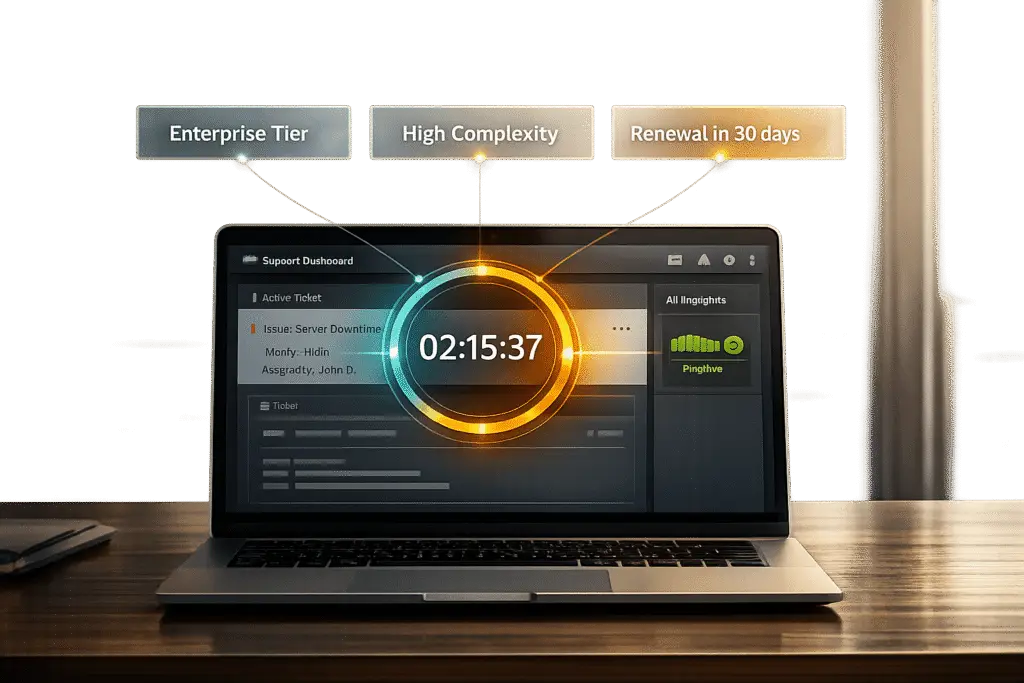
Dynamic SLAs are a smarter way to handle support tickets by adjusting response times and priorities based on factors like customer tier, issue complexity, and sentiment. Unlike fixed SLAs that treat all tickets the same, dynamic SLAs use AI and CRM data to prioritize critical issues and high-value clients. This approach improves efficiency, customer satisfaction, and retention by ensuring the right tickets get the right attention at the right time.
Key Takeaways:
- Customer Tiers: Faster response times for high-value accounts.
- AI-Powered Sentiment Analysis: Detects urgency even when not explicitly stated.
- Renewal Periods: Tightens SLAs near contract renewals to reduce churn.
- Real-Time Adjustments: Adapts SLAs dynamically as ticket contexts change.
Dynamic SLAs help support teams deliver personalized service, manage resources effectively, and prevent SLA breaches. By using AI tools and clear workflows, businesses can streamline support operations and meet modern customer expectations.
Key Factors for Designing Adaptive SLA Rules
Creating dynamic SLAs that work effectively means taking into account a variety of ticket-related factors. Things like customer tier, sentiment, issue complexity, and interaction patterns are all essential in deciding how quickly your team should respond and resolve a case. These elements serve as the foundation for the step-by-step guide outlined here.
Priority Levels and Customer Tiers
Your SLA targets should be directly tied to customer contracts and license details. For instance, a Premier-tier client with a higher contractual value would naturally warrant faster response times than a Standard-tier client with a lower value. By linking your SLA tool to your CRM, you can automate these adjustments based on contract terms and tier data. This automation ensures high-value clients get the attention they deserve – like setting tighter response windows for Premier accounts – without requiring constant manual intervention.
Issue Complexity and Sentiment Analysis
AI-powered sentiment analysis is a game-changer for detecting negative tones, even when urgency isn’t explicitly stated. This is critical because 88% of customers now value the experience a company provides as much as its products or services[3]. Beyond sentiment, AI can pinpoint historically critical issues – such as API integration problems, SSO/SAML errors, or system outages – and route them directly to specialists, cutting down on unnecessary escalations.
"AI determines priority not just based on a selected field or a single keyword, but by analyzing a confluence of factors." – Supportbench[1]
Traditional rule-based systems often fall short when customers misspell keywords or use non-urgent language to describe urgent problems. AI sidesteps this issue by focusing on meaning and intent rather than relying solely on exact keyword matches, making it a key player in context-aware support management.
Renewal Periods and Escalation Needs
Adjusting SLAs as contract renewal dates approach can protect revenue and reduce churn. For example, when a customer’s renewal date is within 30 days, your system should automatically tighten response targets to ensure top-tier service quality. Additionally, tracking interaction patterns – like several rapid follow-ups in a short time – can signal escalating urgency, prompting immediate SLA recalibration. This integration of renewal data highlights AI’s role in proactive support management.
"AI cuts through the noise to identify truly urgent issues requiring immediate attention, regardless of how poorly the initial request might have been phrased or categorized by the user." – Nooshin Alibhai, Founder and CEO of Supportbench[1]
sbb-itb-e60d259
How to Build Dynamic SLA Rules: Step-by-Step
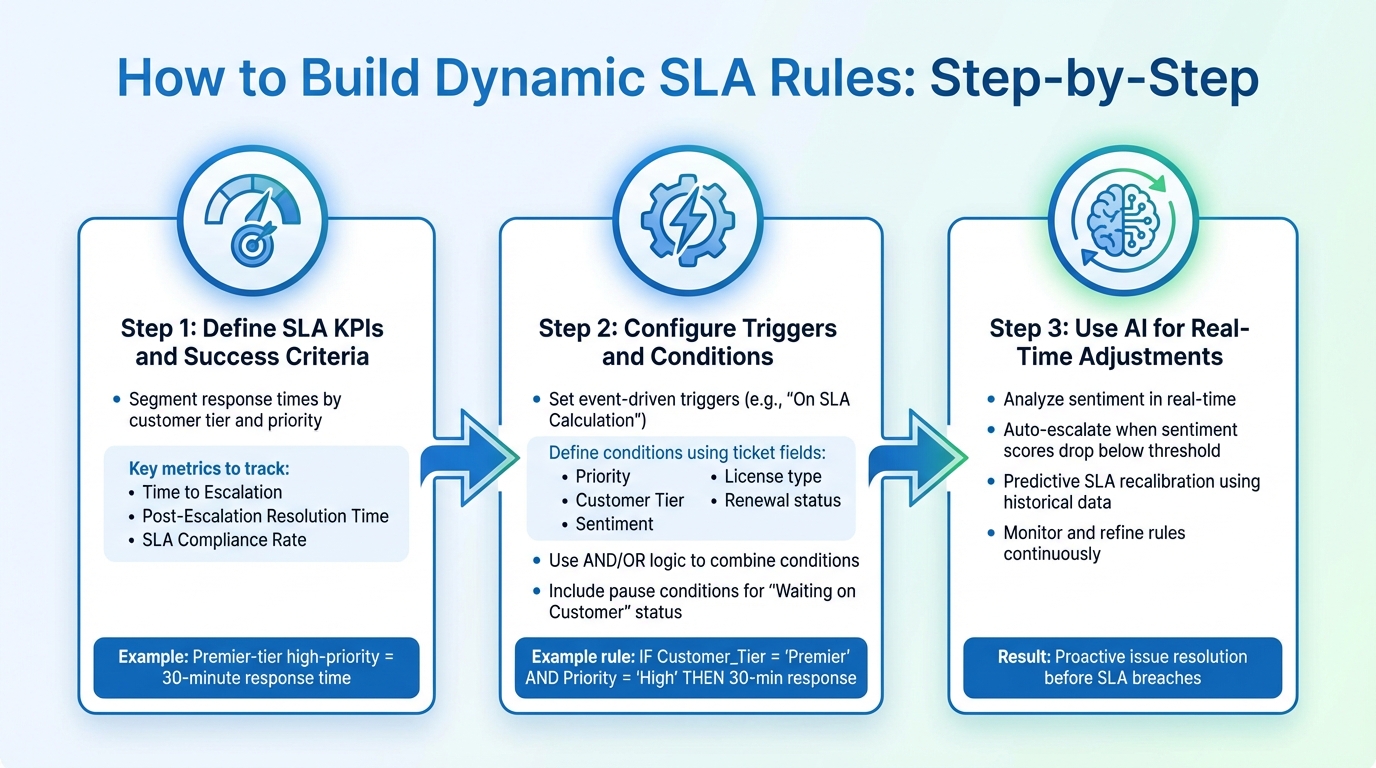
How to Build Dynamic SLA Rules in 3 Steps
Creating dynamic SLAs involves moving beyond static timers and building a flexible system that adjusts based on ticket context. The process starts with defining success for each ticket type, setting conditions to trigger appropriate response targets, and incorporating AI for real-time adjustments as situations evolve.
Define SLA KPIs and Success Criteria
Start by identifying the core SLA KPIs, segmenting response and resolution times based on customer tier and ticket priority. SLAs are essentially commitments between support teams and customers, outlining how quickly tickets will be addressed and resolved [5]. For instance, a high-priority issue from a Premier-tier client might require a 30-minute first response time.
In addition to standard response metrics, track escalation-specific KPIs to measure the efficiency of your multi-tier support system. Key metrics include:
- Time to Escalation: How quickly a ticket moves to a specialist.
- Post-Escalation Resolution Time: How fast the issue is resolved after reassignment.
- SLA Compliance Rate: Overall adherence to SLA targets.
These metrics help pinpoint bottlenecks and maintain accountability. As one expert put it:
"A successful escalation process isn’t only about speed – it’s about accountability, communication, and maintaining a positive customer experience even during complex support cases." [4]
Once your KPIs are in place, configure event-driven triggers to activate these SLA rules.
Configure Triggers and Conditions
Set up event-driven triggers to activate SLA workflows. For example, configure triggers to run on events like "On SLA Calculation (Target first response)" so timers start with the right context as soon as a ticket is created [5]. Next, define "applicable when" conditions using ticket fields such as Priority, Customer Tier, Sentiment, or custom attributes like license type or renewal status [6].
A real-world example from May 2025 illustrates this. Supportbench shared how an AI-powered system handled a ticket with the misleading subject line "Quick Question." While a rule-based system might have assigned it a ‘Low’ priority, the AI identified keywords like "full production outage" and "cannot access" in the ticket body. Recognizing the ‘Premier’ customer tier, the system immediately elevated it to ‘Critical’ priority and routed it to the ‘P1 Incident Management’ queue to meet the SLA for premier clients [1].
Use AND/OR logic to combine conditions and determine rule applicability. For instance: IF Customer_Tier = ‘Premier’ AND Priority = ‘High’, THEN apply a 30-minute response target. Include pause conditions for statuses like "Waiting on Customer" or "Internal Review" to ensure accurate SLA tracking [6].
After setting these static triggers, integrate AI to make dynamic adjustments as ticket contexts change.
Use AI for Real-Time Adjustments
Static rules lack the flexibility to adapt when situations escalate unexpectedly – like when a customer’s frustration grows during a conversation or a seemingly simple issue turns complex. AI bridges this gap by analyzing sentiment in real time. For example, if a customer expresses high frustration, AI can automatically increase the ticket’s priority or shorten response targets [2]. Configure your SLA engine to escalate tickets when sentiment scores drop below a set threshold, proactively addressing issues before they worsen.
AI also supports predictive SLA recalibration by using historical data to anticipate potential breaches. For instance, set triggers to escalate tickets to senior engineers if AI predicts a high likelihood of missing the resolution deadline based on current progress [2]. This proactive approach is especially useful during renewal periods or for handling complex, multi-tier escalations.
Monitor AI-driven adjustments in real time to improve compliance rates and customer satisfaction. This visibility allows you to refine your SLA rules over time, ensuring they meet the demands of modern B2B support operations effectively.
Common Mistakes and How to Avoid Them
When designing dynamic SLAs, steering clear of common errors is just as important as crafting effective rules. Even the most thought-out SLAs can stumble if these pitfalls are overlooked.
Inconsistent or Overly Complex Rules
Static SLA rules often falter because they depend on exact keyword matches or rigid field selections. A small error can disrupt these rules, and as your team or product evolves, managing a large number of static rules becomes overwhelming [1]. For instance, one legacy system transitioned to AI-driven rule categorization and saw SLA breaches drop by 42% [8].
"One of the most common mistakes is failing to clearly define and communicate the escalation triggers."
– Nooshin Alibhai, Founder and CEO of Supportbench [7]
To avoid this, leverage AI tools that intelligently categorize tickets. This eliminates the need for guesswork and ensures consistent handling, no matter how customers describe their issues. Simplicity should be the foundation before layering on AI’s advanced capabilities.
Ignoring AI-Driven Enhancements
Relying on manual systems often means only scratching the surface of ticket data, leading to misjudged priorities. Telefónica’s adoption of AI-driven SLA management in 2024 resulted in a 25% boost in customer satisfaction, 30% faster first-call resolutions, and a 40% drop in network downtime. These improvements stemmed from predictive maintenance and dynamic SLA adjustments that integrated sentiment analysis, automatically flagging tickets with negative language – even when traditional urgency markers were absent [8].
"Without a system, you’re relying on individual heroics, which isn’t scalable or sustainable."
– Nooshin Alibhai, Founder and CEO of Supportbench [7]
AI can identify urgency signals and sentiment, reducing the need for manual interventions while speeding up resolutions. Studies show AI-enhanced systems can cut operational costs by 25% to 40% and predict SLA breaches up to 72 hours in advance. Incorporating CRM data to prioritize tickets ensures high-value clients consistently meet their service expectations. Testing these AI-driven enhancements thoroughly is equally critical to their success.
Failure to Test SLA Workflows
Even a well-designed SLA system can fail without proper real-world testing. A flawless design on paper might crumble when customers need it most. Poorly managed handoffs, for example, force teams to gather information all over again, delaying resolutions [7].
Using live dashboards and automated alerts can help track SLA compliance proactively [2]. In 2023, Telstra implemented an AI-powered SLA system that saved $50 million annually by optimizing infrastructure usage and increasing staff productivity by 30% through predictive allocation [8].
"Analyzing escalation patterns can highlight areas where frontline agents need more training or where processes need refinement."
– Nooshin Alibhai, Founder and CEO of Supportbench [7]
Scenario-based training, combined with monitoring escalation rates and customer satisfaction for escalated tickets, can help fine-tune SLA workflows. Rigorous testing ensures your dynamic SLA system meets the high demands of B2B support, delivering both cost savings and faster response times.
Examples of Dynamic SLA Workflows
Here are some examples of how dynamic SLA workflows can reshape B2B support operations. These workflows use context-aware rules to adapt to specific scenarios, offering a more flexible approach than traditional, rigid processes.
High-Priority Renewal Tickets
Renewal periods are pivotal in B2B relationships. During these times, dynamic SLAs can automatically shorten response times to ensure timely support. For instance, a workflow might identify renewal-related tickets and flag them as high priority, setting a 30-minute response target[5]. For enterprise clients, customized SLA settings can ensure that Gold or Premier accounts receive even faster responses during these critical windows[2].
AI tools play a key role here. AI-driven sentiment analysis can detect frustrated language, such as "still waiting" or "this is unacceptable", and adjust the SLA for immediate action. Automated alerts help teams stay ahead of potential SLA breaches, especially when only 15 minutes remain[2]. This proactive approach helps retain customers and secure contract renewals by providing reliable, responsive support when it matters most.
Handling Complex, Multi-Tier Escalations
Multi-tier escalations often face challenges like slow handoffs and unclear accountability. Dynamic SLAs address these issues by adapting response targets as tickets move through different support levels. For example, when an AI system routes a complex API issue to a tier-two engineer, the SLA adjusts to account for the specialized expertise required. Live dashboards keep escalated tickets visible, while automated alerts ensure no ticket gets overlooked.
If sentiment analysis picks up signs of growing customer frustration during an escalation, the SLA tightens response times to maintain satisfaction levels[2]. This approach ensures smooth handling of high-stakes scenarios by combining sentiment-based adjustments with real-time monitoring.
AI-Driven Sentiment-Based Adjustments
Traditional SLA systems can miss hidden urgencies, such as when a subject line like "Quick Question" masks a critical issue like a full outage[1]. Sentiment analysis, powered by Natural Language Processing, identifies frustration, anger, or sarcasm in ticket content – even when no obvious "urgent" keywords are used[1]. If the AI detects negative sentiment tied to a business-critical issue like "API Issue" or "System Down", it automatically upgrades the ticket priority and routes it to the most qualified agent based on skills and workload[1].
For premier-tier clients, detecting negative sentiment triggers immediate SLA adjustments, allowing these accounts to skip general queues and receive attention from specialized agents[1]. The system also tracks interaction patterns – multiple rapid follow-ups can signal escalating urgency, prompting tighter SLA deadlines. This dynamic prioritization showcases how AI-driven workflows deliver faster, more efficient resolutions tailored to the situation.
Conclusion
Dynamic SLAs move away from rigid, one-size-fits-all policies, shifting instead to workflows that adjust based on real-time conditions. By factoring in the specifics of each ticket, support teams can deliver faster, more personalized service. This approach not only improves response times but also helps safeguard revenue, strengthen customer relationships, and eliminate the need for manual triage.
The cost savings of AI-powered dynamic SLAs are just as striking. By reducing unnecessary back-and-forth communication and routing requests to the right agent immediately, teams cut down on wasted time and administrative burdens. As Nooshin Alibhai, Founder and CEO of Supportbench, puts it:
"For support leaders aiming to optimize their operations, embracing intelligent automation is no longer optional; it’s essential."
That said, achieving these efficiencies requires careful planning and execution. Implementing dynamic SLAs involves defining clear KPIs, setting up effective triggers, and rigorously testing workflows. The benefits are clear: faster resolutions, better SLA compliance, and smarter resource allocation that boosts team productivity. With tools like real-time dashboards and predictive analytics, managers gain constant visibility into performance, enabling them to fine-tune processes and prevent SLA breaches.
Platforms like Supportbench take this a step further by automating sentiment analysis and ticket routing, simplifying SLA management. These systems handle categorization, prioritization, and recalibration automatically, freeing up your team to focus on resolving complex issues. For B2B organizations managing intricate accounts, dynamic SLAs enhance efficiency and improve customer satisfaction – all without the need for costly add-ons.
FAQs
What data do I need to power dynamic SLAs?
To make dynamic SLAs work effectively, start by collecting key data points like ticket priority, complexity, customer value, and the sentiment expressed during interactions. AI-powered systems can then dive into customer profiles, historical trends, and real-time signals – such as the tone of communication or the urgency of the request – to evaluate the business impact of each case. This approach allows SLAs to adapt on the fly, prioritizing critical issues for quicker resolutions and improving customer satisfaction by breaking free from rigid, rule-based workflows.
How do I prevent AI from mis-prioritizing tickets?
To ensure AI handles ticket prioritization effectively, it’s essential to keep dynamic SLA rules up to date. Regularly adjust these rules to account for key factors like customer value, sentiment, and issue complexity. While AI tools can be great for tasks like sentiment analysis and predicting escalations, it’s important to have manual review options in place for high-stakes situations where human judgment is critical.
Keep a close eye on how your AI performs by using dashboards and conducting audits. This helps you spot patterns and confirm that ticket prioritization aligns with both your business goals and your customers’ needs.
How should SLAs pause during “Waiting on Customer”?
To keep things accurate, SLA timers should stop ticking when a ticket is marked as "Waiting on Customer." After all, delays from the customer’s side aren’t something the support team can control. Set up your SLA rules so the timer automatically pauses when the ticket status switches to "Waiting on Customer" and starts back up once the customer responds. This way, the SLA only measures the time your team spends actively working on the issue, ensuring a fair and precise reflection of your resolution efforts.






