


In B2B customer support, a "Do Not Service" list helps prioritize active, high-value accounts by limiting resources spent on churned, paused, or bad-fit customers. These accounts often drain resources without contributing to revenue, making clear management essential. The key takeaways:
- Why it matters: Churned customers can consume excessive support time while offering no return. Managing these accounts ensures focus on growth-driving customers.
- How to identify: Use clear criteria like failed payments, inactivity, or misalignment with your Ideal Customer Profile (ICP). Combine automation and manual reviews for accuracy.
- Building & maintaining the list: Centralize customer data, create risk scores, and automate updates to ensure accuracy. Regularly review and clean data to avoid errors.
- Operational benefits: Free up agent time, reduce costs, and prevent resource misallocation. Use AI to automate workflows and improve efficiency.
How to Identify Accounts for the ‘Do Not Service’ List
Manual vs Automated Account Identification: Benefits and ROI Comparison
Pinpointing which accounts belong on your ‘Do Not Service’ list hinges on having clear criteria and a consistent process. This step is crucial for maintaining efficiency and ensuring resources are allocated effectively. Here’s a closer look at the criteria and methods to make this process smoother.
Criteria for Adding Accounts to the List
Start by dividing churn into two categories: avoidable and unavoidable. Jeff Kushmerek, Founder and CEO of Supportbench, explains unavoidable churn:
"Unavoidable churn is because of 1 of 2 things: – Your customer went out of business – Your customer was acquired and forced to use something else" [9].
These accounts are clear-cut cases and should be added to the list immediately since there’s no way to recover them.
For avoidable churn, focus on commercial factors and strategic alignment. Accounts with failed payments, terminated contracts, or formal cancellation requests are obvious candidates. Additionally, accounts that don’t align with your Ideal Customer Profile (ICP) but drain resources without generating sufficient revenue should also be flagged [9]. Research indicates that 85% of churn is linked to poor service rather than pricing or product issues [8], often signaling a mismatch from the start.
Using customer health scoring can help here. By combining metrics like usage frequency, support ticket volume, payment history, and engagement with core features, you can create a single score to gauge account health [7]. For instance, if an account shows a 50% drop in login frequency alongside a failed payment, it’s a red flag. These "silent drop-offs" often don’t vocalize dissatisfaction – they simply stop engaging. That’s why relying on multiple data points is critical. Madison Kochenderfer, Customer Success Lead at Dock, advises taking a cautious stance:
"The conservative philosophy here is that if you don’t have a verbal ‘Yes, I plan to renew,’ then the company should be flagged as a churn risk" [1].
Once you’ve defined these criteria, you can decide whether to use a manual, automated, or blended approach for identifying accounts.
Manual vs. Automated Account Identification
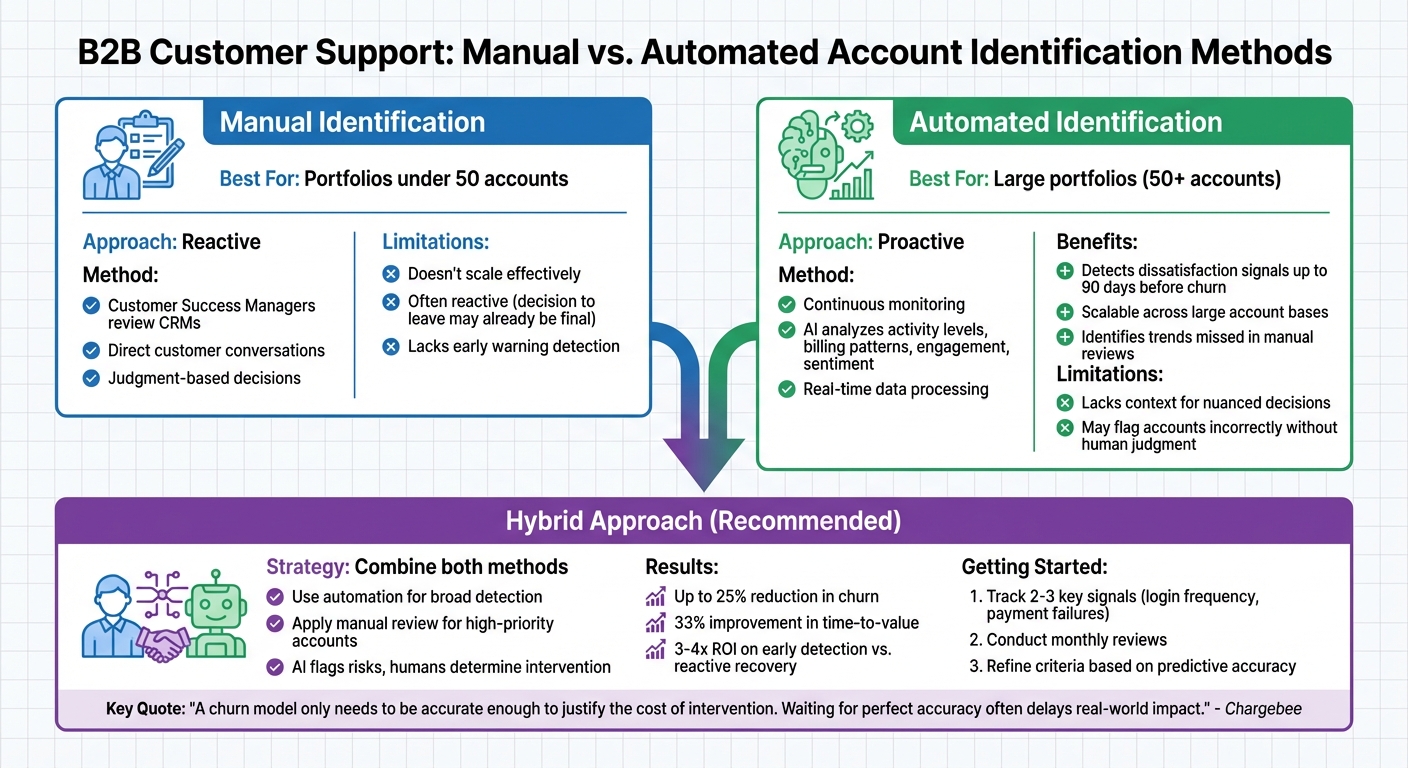
Once your criteria are set, the next step is choosing how to identify accounts. Manual identification works well for smaller portfolios – typically under 50 accounts – but doesn’t scale effectively. This method relies on customer success managers reviewing CRMs, holding conversations, and making judgment calls [8]. The downside? Manual processes are often reactive, meaning by the time an account signals cancellation, the decision to leave may already be final [6].
Automation, on the other hand, offers a proactive solution by continuously monitoring accounts. AI systems can detect dissatisfaction signals up to 90 days before churn actually happens [6]. These systems analyze data like activity levels, billing patterns, engagement, and even sentiment to uncover trends and identify at-risk customers that might go unnoticed in manual reviews [6].
However, automation isn’t perfect. It lacks the context needed for nuanced decisions, especially for high-value accounts. For instance, a system might flag an account due to a drop in usage without recognizing that the customer’s key contact is temporarily unavailable.
The most effective strategy combines both approaches. Use automation to handle broad detection, then rely on manual review for high-priority accounts. This hybrid model allows AI to flag risks while human judgment determines whether to intervene or add the account to the list. Teams employing this method have seen churn reductions of up to 25% in some cases and improved time-to-value by 33% [5].
Start with the basics. Track two or three key signals, such as login frequency and payment failures, before expanding to more complex health scoring models [1]. Conduct monthly reviews to evaluate which signals are the most predictive and refine your criteria accordingly [6]. As Chargebee puts it:
"A churn model only needs to be accurate enough to justify the cost of intervention. Waiting for perfect accuracy often delays real-world impact" [5].
This hybrid approach not only improves identification accuracy but also simplifies the ongoing management of your ‘Do Not Service’ list.
sbb-itb-e60d259
How to Build and Maintain Your ‘Do Not Service’ List
To set up your "Do Not Service" list, start by centralizing data from various sources. Combine insights from your product analytics (like usage patterns), billing system (failed payments), and support platform (ticket sentiment) into a single CRM view [2][6]. This integrated approach helps you catch subtle churn signals – something missed in 44% of cases without a unified view [2]. Without this, identifying at-risk accounts becomes nearly impossible.
Once your data is centralized, create a scoring system to weigh different risk signals. For example, a 30-day drop in core feature usage or a failed payment could increase an account’s risk score. Using this system, you can sort accounts into High, Medium, and Low risk categories. This helps you decide which accounts need immediate attention and which should go on the "Do Not Service" list. As Jordan Rogers from RevenueTools explains:
"You cannot save accounts you did not know were at risk" [2].
After assigning risk scores, maintaining clean and accurate data is critical to ensure your system remains effective.
Keeping Your List Data Clean and Accurate
Clean data is the backbone of reliable risk scoring and proactive support. Did you know B2B data decays at an average rate of 22.5% per year? On top of that, 20% to 30% of CRM records are often duplicates [15]. To tackle this, set up regular data maintenance routines:
- Daily automated checks: Flag duplicates and invalid emails.
- Weekly spot checks: Review field completion for accuracy.
- Monthly quality reviews: Monitor duplicate creation rates [15].
Also, define clear inactivity thresholds tailored to your product. For instance, some businesses might consider an account inactive after 12 months without a purchase, while others might use six months of no logins as the marker [14]. Once an account hits this threshold, move it to a "do-not-target" segment instead of deleting it. This keeps your active support list clean while leaving the door open for future win-back campaigns. Additionally, run quarterly re-enrichment cycles to refresh data for accounts that have been inactive for a long time [15].
Using AI to Tag and Update Accounts Automatically
Automation can take your account management to the next level. Manual updates are slow and often miss early warning signs, but AI-driven sentiment analysis can analyze support conversations, login trends, and billing updates in real time. For example, phrases like "tightening our belt" in customer interactions can trigger an AI system to tag the account as "Churn Risk" [12].
You can also automate workflows to sync your billing system with your support platform. If a payment fails or an account moves to "Past Due", the system can adjust the account’s health score and reassign it to the appropriate risk tier [13]. AI can even pick up on the tone of support interactions, flagging accounts showing frustration or anger – sometimes before the customer explicitly mentions canceling [6]. Teams using these workflows report saving two to three hours per representative each week [12], freeing time for proactive outreach to retain valuable accounts.
Start small by tracking five to ten high-confidence signals, such as competitor mentions, budget concerns, or usage drops [12]. Before fully rolling out AI, test it against historical ticket data to ensure it accurately identifies churn-risk accounts [11]. As Stevia Putri from eesel AI points out:
"The warning signs are usually sitting right there in your daily support conversations" [11].
Using the ‘Do Not Service’ List to Improve Operations
A well-implemented "Do Not Service" list can transform customer support from a reactive cost center into a strategic tool for growth. By focusing resources on high-value customers, businesses can prioritize accounts that actively drive revenue. This approach allows CX leaders to shift from constantly "putting out fires" to designing systems that cater to their most impactful customers [16].
Consider this: acquiring a new customer can cost 5 to 25 times more than retaining an existing one. Plus, improving retention by just 5% can increase profitability by 25% to 95% [16]. Combining AI insights with human expertise on key accounts can even prevent churn at a rate of 71% [16]. The goal is simple: ensure your team spends their time where it matters most.
Freeing Up Agent Time for Active Accounts
The "Do Not Service" list doesn’t just identify accounts – it also helps streamline operations. Every minute your agents spend on churned or paused accounts is time they could use to engage with active, revenue-generating customers. With the average support resolution costing $15 [17], rerouting non-revenue interactions to automated systems or cost-effective marketing channels can save both time and money.
Dynamic SLA (Service Level Agreement) management is a great example of how this works. By leveraging account status, your support platform can automatically adjust service levels. High-risk or active accounts get faster response times and escalated support, while accounts on the "Do Not Service" list are redirected to self-service options or automated workflows.
Here’s a real-world example: In early 2024, a Grammarly user requested a refund for an auto-renewed subscription via chat. Forethought‘s agentic AI (Autoflows) identified the request, confirmed eligibility, and processed the refund – all in under two minutes, without any human involvement. This not only avoided a costly support ticket but also left the customer so impressed with the seamless process that they expressed a higher likelihood of resubscribing [17].
By automating low-risk tasks and prioritizing active accounts, businesses can reduce support costs while improving operational efficiency.
Cutting Support Costs and Reducing Risk
In addition to saving time, a "Do Not Service" list can significantly reduce operational expenses and minimize risks. Companies that use agentic AI to automate resolutions report a 63% reduction in costs [17]. On a broader scale, inefficient support practices cost the economy an estimated $75 billion annually [16], much of which stems from misallocated resources on accounts that have already churned. A formal list ensures agents don’t accidentally provide services outside of a contract, avoiding billing disputes or confusion about service entitlements [18].
For paused accounts, maintaining their data on a "Do Not Service" list offers another advantage: near-zero re-activation costs [18]. Instead of losing these customers entirely and incurring the hefty acquisition costs to win them back, businesses can preserve their settings and information. This approach protects Lifetime Value (LTV) without resorting to heavy discounting. As Alex Mercer, SaaS Growth Strategist at Churnmate, puts it:
"The Subscription Pause is the low-CAC solution to temporary churn. It’s a calculated decision to defer revenue, not lose it forever" [18].
Managing risk is another critical benefit. Churn becomes most dangerous when it catches you off guard. Without systems in place to detect and address early warning signs, businesses are forced into reactive recovery efforts, which only save 15–20% of at-risk revenue. In contrast, proactive measures can retain 40–60% of revenue [2]. Investing in early detection and routing systems delivers a return of 3–4x compared to last-minute efforts to salvage accounts [2].
| Benefit Category | Operational Impact | Financial Outcome |
|---|---|---|
| Support Efficiency | Removes inactive tickets from agent queues | Cuts $15/resolution waste [17] |
| Retention Spend | Uses "Pause" instead of "Discount" | Protects profit margins [18] |
| Acquisition | Saves user data for seamless return | Near-zero re-activation CAC [18] |
| Automation | Routes high-risk accounts to AI | Lowers operational costs by 63% [17] |
Common Mistakes to Avoid When Managing the List
Even the best-designed systems can fail without consistent upkeep. A "Do Not Service" list, for example, becomes ineffective when treated as a one-time task rather than an ongoing process. Research shows that 44% of churned accounts display no warning signs before cancellation – not because the signs don’t exist, but because there’s often no continuous monitoring in place[2]. This highlights the importance of automated, ongoing tracking, as previously discussed.
When businesses handle the list like a short-term campaign instead of a continuous system[3], they risk letting reactivated customers slip through the cracks or missing high-risk accounts altogether. As the AI Shortcut Lab Editorial Team aptly puts it:
"A campaign runs once. A system runs continuously. The recovery pipeline should trigger automatically as users hit the inactivity threshold."[3]
Another common issue is setting incorrect thresholds, which can lead to alert fatigue. For example, if more than 40% of flagged accounts turn out to be false positives, it’s time to tighten the criteria[2]. Regularly reviewing flagged accounts against actual outcomes helps fine-tune the system, ensuring it remains both accurate and actionable.
Forgetting to Remove Reactivated Accounts
Failing to update the list when accounts are reactivated can block support access and waste valuable time. Customers who are flagged despite re-engagement often find themselves unable to contact support or respond to inquiries. One Amazon seller shared their frustration:
"all thanks to amazon deactivating my account and not allowing me to provide support to customers as we can’t respond to customers anymore if deactivated" – Seller_5xtSVD7d1acZ5, Amazon Seller[19]
Outdated flags force customers to file multiple appeals, consuming agent resources that could be better spent on active issues. This inefficiency directly undermines the benefits of cost savings and improved workflows. In one case, a seller reported their Order Defect Rate (ODR) increased because they couldn’t provide necessary support[19].
The solution? Automated reactivation monitoring[3]. Tools that flag and update accounts as soon as a customer logs in or reaches a specific engagement milestone can prevent these issues. Reactivating a lapsed customer is far more cost-effective than acquiring a new one, and a multi-channel reactivation strategy can improve response rates by around 30%[20].
Not Documenting Your Criteria and Processes
Without clear documentation, account management becomes inconsistent, and compliance risks rise. Team members may apply different standards, leading to inefficiencies or even legal issues in regulated industries. As the saying goes:
"If it isn’t documented, then it wasn’t performed." – Palmetto GBA[22]
Documentation is essential for keeping everyone aligned on the status and strategy for each account[23]. Poor record-keeping can lead to serious consequences. For instance, documentation errors contribute to at least one death and 1.3 million injuries annually in the U.S.[21].
To ensure accuracy, use the FACT method: Factual, Accurate, Complete, and Timely[23]. Avoid subjective language like "difficult customer" or "noncompliant account." Instead, use objective descriptions such as, "Customer has not logged in for 90 days and has not responded to three email outreach attempts."
| Documentation Factor | Effect on Documentation Accuracy |
|---|---|
| Specific Training | 4.2x more likely to be accurate[21] |
| Availability of Standard Tools | 2.5x more likely to be accurate[21] |
| Use of Electronic Systems | 2.2x more likely to be accurate[21] |
Standardized tools and processes are critical. Teams using electronic systems are more than twice as likely to maintain accurate documentation compared to those relying on manual methods[21]. Implementing a tiered response framework with clear criteria – such as "Yellow" for early risk, "Orange" for high risk, and "Red" for immediate service pause – can streamline decision-making[2]. Additionally, document who has the authority to pause services and the exact steps required to reactivate an account. As Nicole Walker, MSN, RN, CCHP-A, NCCHC, advises:
"Chart like it may one day be read in a deposition."[23]
Clear and thorough documentation supports the continuous management approach needed for effective customer support operations.
Examples and Best Practices
Example: Managing a Paused Enterprise Account
For enterprise accounts that go quiet, AI-driven workflows can help conserve resources while keeping the door open for reactivation. Take an account paying $150 or more per month that shows a 41% drop in product usage over 90 days – a common warning sign of voluntary churn [3]. Instead of continuing full support, AI steps in to classify the account as "Stuck" (facing an obstacle), "Situational" (change in use case), or "Drifted" (never fully adopted the product) [3].
For instance, if a "Situational" account reports budget concerns, AI flags it as at-risk and sends a "Pause" offer through Stripe [3][10]. This keeps the account’s data intact and within the ecosystem for 60–90 days, all while reducing active support costs. As AI Shortcut Lab explains:
"Pausing converts cancellations at a meaningful rate among users who aren’t ready to engage now but would come back in 60–90 days." [3]
To make this process more effective, adjust inactivity thresholds based on usage patterns – 14 days for daily-use products and 30 days for weekly-use products [3]. For accounts exceeding your monthly recurring revenue (MRR) threshold, AI can draft the pause email, but a Customer Success Manager should review it to maintain the relationship. This method not only saves agent resources but also aims for a 15–25% recovery rate for situational accounts [3].
These AI-driven workflows demonstrate how enterprise accounts can be managed with precision before diving into strategies suited for small and medium-sized businesses (SMBs).
Example: Handling Churned SMB Accounts
Managing churn for SMB accounts often calls for a different, more automated strategy. With SMBs experiencing high churn rates – sometimes leading to a 46% annual loss – it’s not practical to provide human interaction for every low-LTV account [24][25]. Instead, automated workflows can handle these cases more efficiently. For example, low-engagement accounts with minimal usage throughout their lifecycle typically have a recovery rate of only 10–15% [3]. In such cases, automated exits with pause or cancellation options save valuable time for support teams.
AI Shortcut Lab describes this phenomenon:
"The silent drop-off is different. No complaint. No cancellation email. No reply to your check-ins. They just stop showing up." [3]
However, for SMB accounts that show signs of re-engagement – such as a successful payment retry or login activity after 30+ days of inactivity – automated triggers can remove them from the "Do Not Service" list immediately [12][4]. This ensures that reactivated customers regain full support access without delays. Maintaining this system is cost-effective, with tools like PostHog, ConvertKit, and Zapier costing around $78 per month. By automating exits and reallocating resources, this approach helps focus support efforts on higher-value accounts while keeping operational costs in check.
Conclusion
A "Do Not Service" list helps refocus support resources on what matters most: active, revenue-generating customers. When support teams spend time on paused or inactive accounts, they divert energy away from customers who contribute to the bottom line. Every minute spent on misallocated support directly affects profitability.
This is where AI automation comes into play. By transforming manual processes into efficient, real-time operations, AI-enabled systems take the guesswork out of account prioritization. These systems use dynamic SLA management and unified profiles to evaluate engagement, payment history, and usage metrics. As a result, accounts are triaged automatically – churned customers are routed to self-service workflows, while high-value accounts receive the attention they deserve. This approach not only improves efficiency but ensures resources are allocated where they’ll have the greatest impact.
As Nooshin Alibhai, Founder and CEO of Supportbench, explains:
"Predicting and managing customer churn is no longer optional – it is a vital capability for businesses focused on long-term success." [7]
Her perspective underscores the importance of adopting AI-driven strategies to optimize support operations. The results speak for themselves: businesses leveraging AI in support see a 64% boost in customer satisfaction, compared to just 49% for those that don’t [17]. By automating the handling of inactive accounts, teams free up time to focus on proactive retention efforts that drive revenue. With clean data, well-documented criteria, and AI tools doing the heavy lifting, your team can concentrate on what truly matters: keeping active customers satisfied and ensuring steady growth.
FAQs
When should an account go on the Do Not Service list?
When an account exhibits signs of high churn risk or disengagement, and retention strategies have proven ineffective, it should be added to the "Do Not Service" list. Common warning signs include ongoing negative feedback, a noticeable drop in engagement, recurring payment problems, or a complete absence of ticket activity. This approach allows businesses to allocate their resources more effectively, concentrating on active, engaged customers while reducing the costs and risks tied to accounts that are unlikely to rebound or generate future revenue.
How can we avoid blocking support for reactivated customers?
To avoid blocking support for customers who reactivate, it’s crucial to keep an eye on early warning signs like drops in product usage or fewer logins. AI tools can be a game-changer here, automating personalized reactivation campaigns tailored to customer behavior. Establish clear guidelines for dormancy – such as 90 to 180 days of inactivity – and categorize accounts based on their value to prioritize efforts. Taking a multi-channel approach, like combining email campaigns with direct outreach, helps ensure you reconnect with customers at the right time while keeping support available for those who return.
What should Do Not Service accounts see instead of live support?
Accounts marked as "Do Not Service" should receive a clear and direct message explaining that support is unavailable because their account is either paused or no longer active. This approach ensures clarity while reducing unnecessary interactions with live support teams.






