


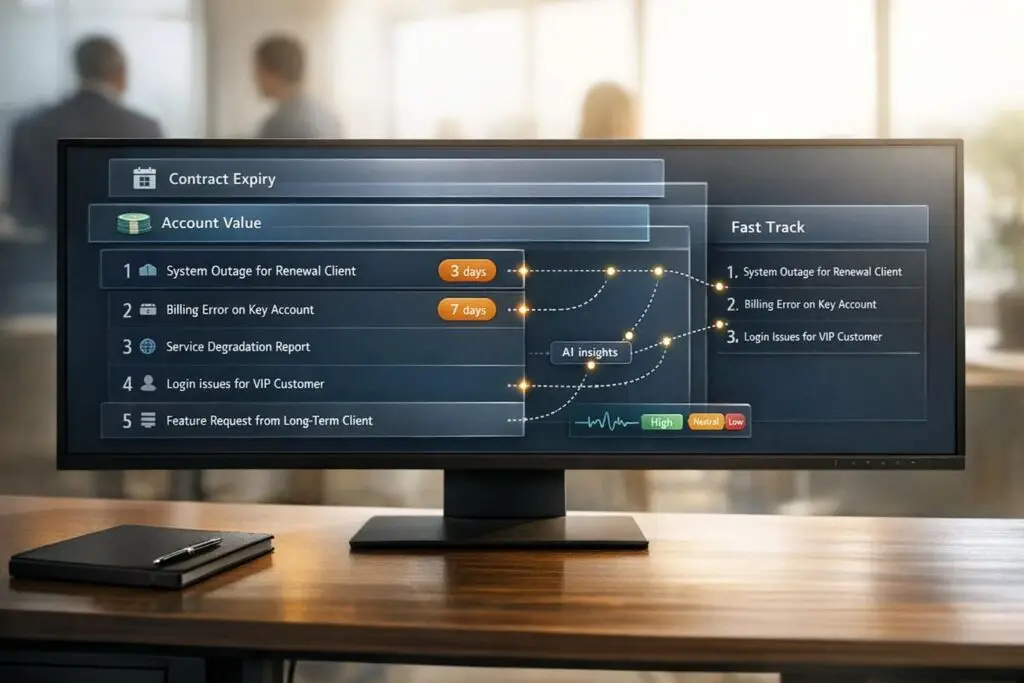
Support teams often mishandle high-value customer issues during critical contract renewal periods. This can result in lost revenue and churn. Renewal-aware routing solves this by prioritizing tickets using contract data, sentiment analysis, and AI. Here’s how it works:
- Key Idea: Integrate CRM data (like contract expiration dates, account value, and usage patterns) with your ticketing system to prioritize urgent issues.
- Why It Matters: A missed renewal deadline can lead to losing high-value accounts. Retaining customers is 5-25x cheaper than acquiring new ones.
- How It Works: AI analyzes ticket urgency, customer sentiment, and renewal timelines. For instance, a frustrated account nearing renewal gets fast-tracked to senior staff.
- Benefits: Companies using this system report higher SLA compliance, faster resolutions, and up to 71% churn prevention.
Preparing Your Systems for Renewal-Aware Routing
To make renewal-aware routing effective, it’s essential to integrate your CRM, ticketing, and analytics systems. These systems often hold critical yet fragmented data: contract details in the CRM, support interactions in ticketing platforms, and product usage metrics in analytics tools. This lack of integration can be expensive – poor contract management alone eats up an average of 9% of annual revenue for organizations [6]. By unifying these data sources, you create a strong foundation for identifying the key data points needed for effective renewal routing.
Required Data and System Connections
Your routing system relies on five core categories of data:
- Contract Metadata: Includes details like end dates, notice periods, and auto-renewal clauses.
- Financial Data: Metrics such as Annual Recurring Revenue (ARR) or Annual Contract Value (ACV).
- Engagement Signals: Tracks login frequency and feature utilization.
- Relationship Data: Covers account ownership and changes to primary contacts.
- Support History: Includes ticket volume and sentiment analysis [6].
Among these, the most critical data point isn’t just the contract expiration date – it’s the Notice Deadline. For example, if a contract ends on December 31, 2026, with a 90-day notice period, the critical date shifts to October 2, 2026. Missing this deadline means the customer’s decision is likely already made. Companies using AI-powered systems to monitor these deadlines report detecting churn risks 30 days earlier than manual methods [4].
CRM integrations help pull essential contract details and account tiers, while ticketing platforms use Natural Language Processing (NLP) to analyze customer sentiment [1]. Product telemetry adds another layer by flagging declining engagement patterns before customers raise concerns. When these data points are combined through AI, ticket prioritization becomes far more refined during high-stakes renewal periods. One example: a company recently reclaimed 30% of its Customer Success Managers’ time by centralizing data with AI, showing how modern tools can free up essential resources [7].
Fixing Data Quality Problems
After integrating your data sources, the next step is ensuring the data is accurate and actionable. Poor data quality – such as scattered contracts, outdated contact information, and missing notice periods [6] – can derail your routing efforts. Start by conducting a signal audit to pinpoint the most reliable predictors of renewal risk [5]. For instance, focus on engagement data that reflects meaningful trends, not just basic login counts.
Clean data is the backbone of AI accuracy. AI systems can achieve up to 91% accuracy in renewal predictions when the input data is well-maintained [7]. Begin by confirming that all customer health signals are accessible via API. Then, define risk criteria – such as a 20% drop in feature usage, the departure of a primary contact, or repeated negative sentiment across multiple tickets – and use AI to automate categorization. High-quality data doesn’t just improve AI performance; it also boosts operational efficiency. Companies using AI-driven renewal workflows report an 86% reduction in time spent on manual data gathering [5].
sbb-itb-e60d259
Building Your Renewal-Aware Routing Workflow
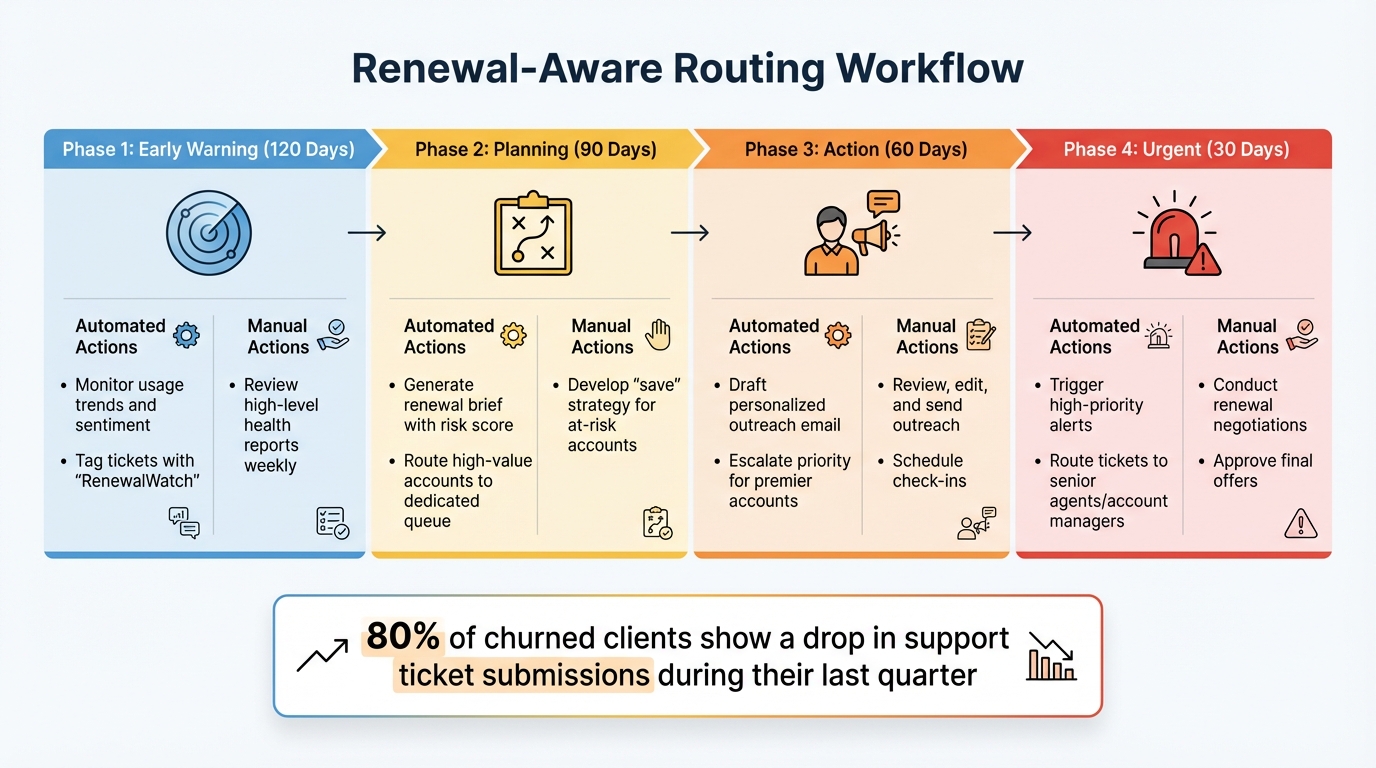
Renewal-Aware Routing Workflow: 4-Phase Timeline from 120 Days to Contract Expiry
With clean, integrated data at your disposal, you can craft routing rules that prioritize tickets based on how close a customer is to their contract expiration and the revenue they represent. The idea is straightforward: focus on your most valuable and at-risk accounts while letting routine requests follow standard workflows.
Setting Up Your Routing Rules
Start with your integrated data foundation and create precise rules to guide ticket flow. A common approach divides the renewal timeline into four phases: 120 days (early warning), 90 days (planning), 60 days (action), and 30 days (urgent) [9]. As tickets approach these renewal phases, their urgency increases, prompting faster action.
You can also use CRM metadata, like Customer Tier or Annual Contract Value (ACV), to automatically adjust ticket priority. For example:
IF Customer_Tier = "Premier" AND Days_Until_Expiry < 60 THEN SET Priority = "High" AND ASSIGN TO "Renewal Success Team" [1][8].
This ensures high-value accounts nearing renewal deadlines don’t get buried under routine inquiries.
Add AI-driven sentiment analysis as another layer. AI tools can scan ticket content for signs of frustration or urgency, even if the customer hasn’t explicitly flagged the issue. Nooshin Alibhai, Founder and CEO of Supportbench, puts it perfectly:
"AI cuts through the noise to identify truly urgent issues requiring immediate attention, regardless of how poorly the initial request might have been phrased" [1].
For instance, if a premier account within 60 days of renewal sends a ticket with negative sentiment, the system can bypass manual triage and route it directly to a specialist.
You should also align escalation paths with issue complexity. Technical problems, for example, should go straight to experts instead of passing through general support tiers [1]. To prevent burnout, set workload caps for senior agents handling high-priority cases and create fallback queues to catch tickets that don’t meet specific automated criteria [8].
When to Automate vs. When to Use Manual Review
Automation is ideal for repetitive tasks like tagging tickets, scoring priorities, categorizing issues, and making standard routing decisions. AI excels at applying consistent logic across large volumes of tickets. For instance, a managed IT services provider in Manchester automated contract monitoring for 47 active accounts, flagging at-risk renewals. This approach saved three clients and retained $14,000 in monthly recurring revenue in just one quarter, cutting annual churn from 15% to 8% [9].
However, human involvement is critical for high-stakes scenarios. Complex cases, sensitive legal issues, or VIP accounts with unique contracts require judgment that AI can’t provide [2][4]. For manual reviews, give agents a detailed renewal brief with engagement scores, usage trends, and suggested talking points. This ensures they have the context they need to deliver effective, informed responses.
AI can also draft responses based on customer history and product usage, but a human should review and fine-tune the message to ensure the tone and details are on point. As Joshua Silvia of EverWorker explains:
"AI should accelerate decision-making, not replace human judgment entirely. Complex, high-impact, or sensitive issues should still allow for manual review" [2].
Example Workflow You Can Adapt
Here’s a sample workflow combining automation with manual intervention:
| Renewal Phase | Timing | Automated Action | Manual Action |
|---|---|---|---|
| Early Warning | 120 Days | Monitor usage trends and sentiment; tag tickets with "RenewalWatch" | Review high-level health reports weekly |
| Planning | 90 Days | Generate renewal brief with risk score; route high-value accounts to a dedicated queue | Develop a "save" strategy for at-risk accounts |
| Action | 60 Days | Draft personalized outreach email; escalate priority for premier accounts | Review, edit, and send outreach; schedule check-ins |
| Urgent | 30 Days | Trigger high-priority alerts; route tickets to senior agents or account managers | Conduct renewal negotiations; approve final offers |
For example, in 2025, Wolseley Canada used Supportbench to manage 7,000–8,000 monthly support emails. By automating ticket routing based on case type and client profiles, they centralized operations and improved SLA visibility. Eilis Byrnes, Customer Service and Process Improvement Manager, shared:
"The ticketing system assisted us in resolving instances that were long overdue and in providing the staff with a smooth platform experience" [8].
This shift from manual sorting to automated workflows allowed agents to focus on more complex, high-value interactions.
Start with impactful rules – like prioritizing VIP accounts or tickets within a 90-day renewal window – and gradually expand automation to cover all ticket types [8]. Regularly audit your routing system to identify misrouted tickets and refine processes [5]. It’s worth noting that 80% of churned clients show a drop in support ticket submissions during their last quarter [9]. Declining engagement is often a red flag, and this workflow can help you address such risks effectively while maintaining customer satisfaction.
Setting Up Automated Prioritization and Escalation
Once your routing workflow is in place, adding automated prioritization and escalation ensures a smoother response process as renewal dates approach. This approach helps high-value or at-risk accounts get quicker attention without requiring your team to manually intervene.
Configuring Dynamic SLAs
Dynamic SLAs adjust response and resolution times based on how close a customer is to their contract renewal. For example, standard tickets might have a 24-hour response time, but for accounts nearing renewal, this window could shrink to just 2 hours – or even 30 minutes as the renewal date gets closer. To achieve this, sync your CRM renewal data with your platform to calculate SLA tiers. Then, apply the appropriate SLA policies based on factors like customer tier, contract value, and how soon the renewal is due [11].
To ensure no critical accounts fall through the cracks, set up real-time dashboards and automated alerts. These tools can notify your team of potential SLA breaches, especially for high-value accounts approaching renewal.
Once dynamic SLAs are in place, the next step is incorporating AI to analyze customer sentiment and predict escalations.
Using AI for Sentiment Analysis and Escalation Prediction
AI-powered sentiment analysis goes beyond recognizing keywords. It evaluates tone and urgency, even when a customer doesn’t explicitly state their issue as critical. For instance, if a key account within 60 days of renewal submits a ticket mentioning phrases like "frustrated with delays" or "cannot access", AI can detect the negative sentiment and automatically escalate the ticket to a senior agent or account manager [1].
Escalation prediction takes this a step further. By using machine learning models trained on historical data, the system can forecast which tickets are likely to escalate. For example, if a ticket shows a 70% or higher likelihood of escalation – based on worsening sentiment, repeated follow-ups, or a renewal date within 60 days – it can be rerouted immediately.
Here’s a real-world example: A mid-sized SaaS company managing 150 daily tickets implemented AI-driven escalation. Over six months, they automated 70% of initial queries, cut escalation times by 40%, boosted customer satisfaction by 12%, and improved renewal rates by 10% [12]. This type of context-aware system ensures urgent issues are addressed promptly, even when a customer’s initial request isn’t clearly marked as critical.
Setting Up Escalation Triggers
Building on AI predictions, clear escalation triggers ensure urgent cases are routed to the right team members quickly. These triggers should combine factors like renewal proximity, customer tier, sentiment score, and urgency keywords (e.g., "outage", "system down", "cannot log in"). For example: If renewal date ≤ 30 days AND priority = high OR sentiment score < -0.3, THEN route to senior support staff or an account manager [13][14].
To avoid missed escalations, set fallback processes. If a high-priority ticket isn’t picked up within a shortened SLA, it should automatically escalate to management or trigger an alert. Additionally, use workload caps and availability filters to prevent senior agents from becoming overloaded, which could delay resolutions and harm SLA performance [8].
Ensure escalated tickets are assigned to agents based on their expertise, certifications, and current workload. This minimizes unnecessary transfers and increases the likelihood of resolving the issue on the first attempt. Also, keep an eye on interaction velocity – if a customer sends multiple follow-ups in a short period, it’s a strong indicator of escalating urgency and should trigger immediate action [1].
Lastly, create a feedback loop. Encourage agents to flag misrouted tickets or incorrect sentiment analysis results. Use this data to fine-tune your AI models and routing rules over time. AI systems need regular monitoring and adjustments to stay accurate and effective [1].
Tracking Performance and Improving Your Routing Strategy
To safeguard your revenue, it’s essential to measure and fine-tune your routing strategy. By tracking the right metrics, you can ensure your system’s performance aligns with your business goals and delivers the results you need.
Metrics to Track
Focus on four key metrics that directly connect routing performance to renewal outcomes:
- First Response Time (FRT): For critical (P0) tickets from accounts within 60 days of renewal, aim for a response time of under 10 minutes [3].
- First Contact Resolution (FCR): This measures whether tickets are routed to the correct specialist on the first try. Strong operations typically achieve FCR rates above 75% [15].
- Reassignment Rate: A high reassignment rate suggests your routing logic isn’t matching tickets to the right agent initially [8].
- Renewal Win/Loss Rates by Support Experience: This metric reveals whether your routing strategy is effectively protecting revenue.
Other important factors to monitor include sentiment trajectory – whether the customer’s mood improves or worsens after the first response – and SLA breaches for renewal accounts [3]. Additionally, review workload distribution. If high-priority renewal tickets consistently pile up with a few senior agents, it can lead to burnout and SLA failures [8]. These metrics ensure SLA compliance and maintain customer satisfaction, reinforcing the effectiveness of your routing strategy.
Using Renewal Outcomes to Improve Routing
Once you’ve established your metrics, use renewal outcomes to refine your routing strategy. For accounts that successfully renewed, analyze support tickets from the 90 days leading up to the renewal. Look for patterns like quick assignment of P0 and P1 tickets, high first-contact resolution, and improved customer sentiment.
For accounts that churned, dig into the data to identify issues such as misrouted, escalated, or unresolved tickets near the renewal date.
Set up a regular review process to stay on top of routing accuracy. For example, review recent P0 and P1 tickets weekly [3]. On the first Monday of each month, conduct a thorough review of your scoring rubric and routing weights to ensure they align with your current business goals and any product updates [3]. Don’t overlook agent feedback – this input is invaluable for identifying misrouted tickets or confusing rules. Remember, retaining an existing customer is five times cheaper than acquiring a new one, so every improvement in routing has a direct impact on your bottom line [8] [15].
Conclusion
Renewal-aware routing transforms your support team into a revenue protection powerhouse. By automatically prioritizing tickets based on contract expiration dates and account value, your team shifts gears from merely reacting to proactively addressing churn risks – sometimes as early as 90 days before a contract ends[4]. This proactive approach improves retention, enhances revenue forecasting, and ensures quicker responses[5][10].
Pairing automation with human expertise creates a winning formula for customer engagement. AI takes care of identifying patterns and making routing decisions with a prediction accuracy of around 91%[5], freeing up your team to focus on building relationships and solving complex issues. This dual approach not only reduces churn but also uncovers upsell opportunities, such as when accounts approach usage limits or signal interest in expanding their services. Together, AI precision and human insight create a dynamic strategy for customer success.
"The companies winning on retention aren’t the ones with the biggest CS teams. They’re the ones with the smartest systems." – MarketBetter[4]
To get started, begin by integrating your customer management and CRM data. From there, develop routing rules that prioritize accounts approaching renewal periods. Keep an eye on key metrics and sentiment trends to measure the success of your strategy.
Contract renewal isn’t a one-and-done task – it’s an ongoing process that demands vigilance and smart intervention. By adopting renewal-aware routing, your support team strengthens customer relationships and safeguards revenue. The teams that embrace this approach today will be the ones cultivating long-term customer loyalty tomorrow.
FAQs
What’s the fastest way to start renewal-aware routing?
The fastest path to setting up renewal-aware routing is through AI-powered ticket routing tools. These solutions work by analyzing support requests instantly, sorting and prioritizing tickets based on factors like contract expiration, urgency, and the overall value of the customer.
Here’s how you can begin:
- Choose a platform that offers built-in renewal-aware routing capabilities.
- Set it up to leverage contract details and customer profiles for smarter prioritization.
- Automate workflows to focus on renewals and high-value accounts, ensuring no critical opportunities slip through the cracks.
How do we prioritize tickets when contract data is incomplete?
When contract details are missing, AI steps in to prioritize support tickets by analyzing contextual clues such as customer profiles, sentiment, and urgency. With tools like natural language processing, support teams can pinpoint high-priority or at-risk tickets, even without complete contract information. This method helps ensure critical accounts get prompt attention, streamlines workflows, and boosts customer satisfaction by dynamically evaluating each ticket’s context.
How can we maintain AI routing accuracy and avoid misroutes?
To improve the accuracy of AI routing and cut down on misroutes, leverage tools like Natural Language Processing (NLP), sentiment analysis, and continuous learning. These techniques help the system grasp user intent, identify urgency, and adjust to evolving situations. Keeping AI models updated regularly and incorporating real-time data boosts precision, ensuring support tickets are routed effectively and stay aligned with your team’s goals.






