



Managing too many tools is costing your business time and money. B2B support teams often juggle dozens of disconnected systems – ticketing, CRM, live chat, reporting, and more. This inefficiency leads to higher costs, wasted time, and poor customer experiences. Vendor consolidation – merging tools into a single platform – can solve these problems by cutting costs, improving workflows, and enabling AI-driven support.
Key Insights:
- Hidden Costs of Tool Overload: Support agents spend 32% of their time switching between systems, costing thousands in lost productivity annually.
- Benefits of Consolidation: Unified platforms reduce licensing costs by 20–30%, cut case handling time by 36%, and increase customer retention by up to 37%.
- AI Integration: Consolidated systems provide clean, centralized data, enabling built-in AI to deliver accurate, cost-effective support.
- Steps to Consolidate: Audit your tools, identify redundancies, define core platform requirements, and migrate in phases for a smooth transition.
By consolidating tools, you’ll save money, simplify operations, and set the stage for scalable growth and better customer experiences.
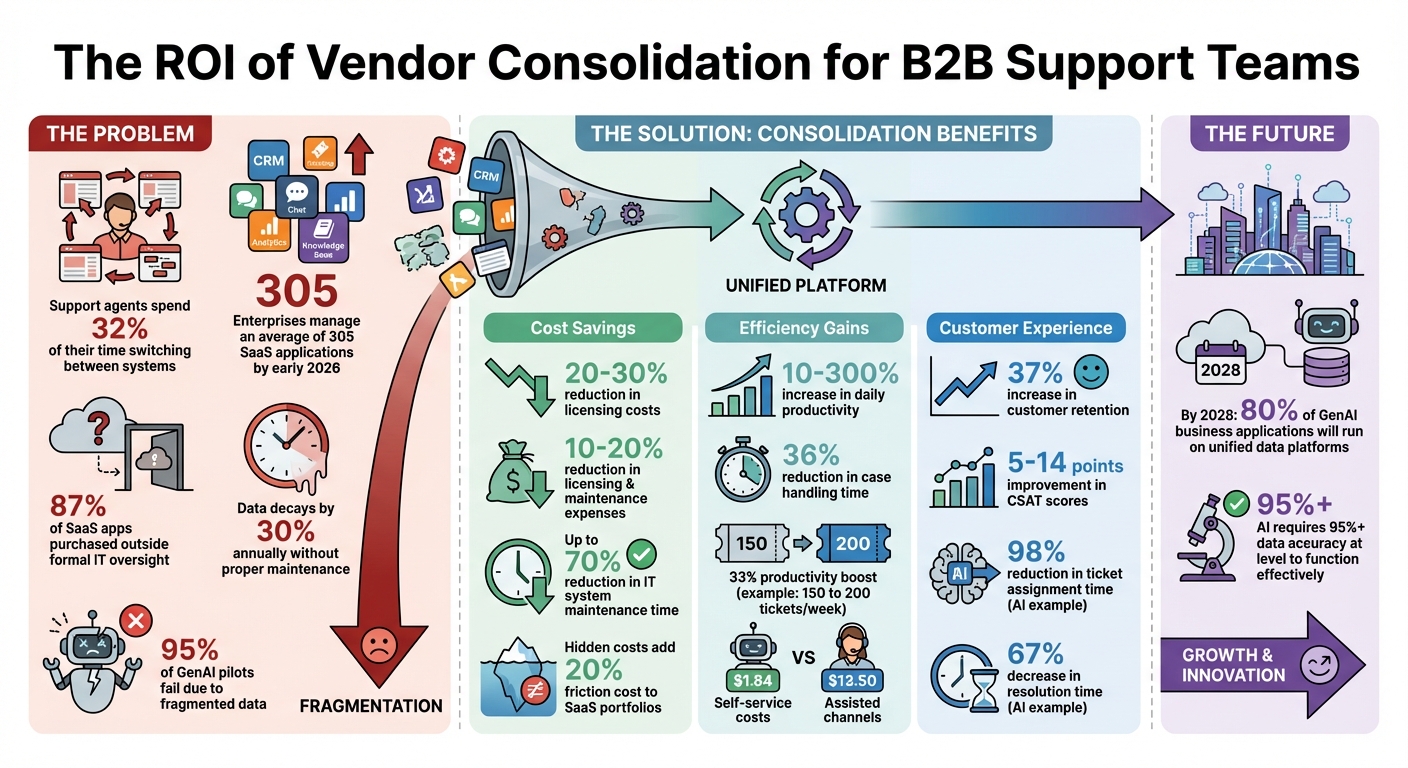
Vendor Consolidation ROI: Cost Savings and Efficiency Gains from Unified Support Platforms
Step 1: Audit Your Current Tool Stack
The first step in streamlining your tools is conducting a thorough audit of your entire stack. This process helps align your tools with both your consolidation goals and AI-ready standards. Many support leaders underestimate just how many tools their organization uses. By early 2026, enterprises are managing an average of 305 SaaS applications, with 87% of those purchased outside formal IT oversight [5]. Even mid-sized companies typically juggle 30 to 50 software subscriptions [4].
To kick things off, designate a process owner – usually a Support Operations lead or a Director of Customer Service. This individual will oversee the audit and ensure alignment with strategic objectives. They’ll gather data from multiple sources, such as accounts payable systems, expense reports, SSO logs, and existing contracts. Avoid relying on memory or surveys alone; instead, use expense reports and SSO logs to uncover "shadow IT" tools that bypassed official procurement channels [5].
Create a Complete Tool Inventory
Compile a detailed list of every application your team uses. For each tool, document its primary function, total cost of ownership (TCO), license counts, and actual usage patterns. Remember, TCO isn’t just about the subscription fee. Hidden costs like employee training, manual data entry, and context switching can add an estimated 20% friction cost to your SaaS portfolio [4]. As Sharp Hue aptly puts it:
"The subscription is the sticker price. The friction is the margin-killer." [4]
Start by examining your highest-cost tools for immediate savings opportunities [4]. Also, evaluate tools well in advance of their renewal dates – ideally 90 to 120 days beforehand – so you have time to consider migrations or consolidations [5]. Map out how customer data flows between systems, from your CRM to ticketing platforms and knowledge bases, to identify silos and integration gaps.
Find Overlaps and Redundancies
With your inventory in hand, pinpoint tools with overlapping functions. Focus on the "Golden Four" systems: ticketing, CRM, knowledge management, and identity/permissions [6]. Many organizations discover they’re paying for multiple tools that provide similar functionalities, such as several reporting platforms or duplicate live chat solutions.
Assess each tool’s features against its actual usage [4]. If a tool offers 50 features but your team only uses five, it’s not delivering value. When two tools share more than 60% of their core capabilities, they should be reviewed for redundancy [7]. Also, check user engagement. Tools with fewer than 40% of licensed users actively engaging are prime candidates for elimination [7].
Calculate hidden labor costs using this formula: (Number of people) × (Average Salary) × (% friction/time lost to workarounds) [4]. For instance, if 10 support reps earning $60,000 annually each waste 20% of their time switching between disconnected tools, that’s $120,000 in lost productivity every year.
Assess Integration Problems
Finally, evaluate how well your tools work together. Look at the reliability and completeness of integrations, including custom data fields like account health scores or renewal dates [6][8][10]. Pay close attention to data latency – some "real-time" integrations actually lag by 15 minutes, which can lead to decisions based on outdated information [8]. By 2028, 80% of GenAI business applications are expected to run on unified data platforms, as fragmented systems hinder AI effectiveness [7]. Richie Aharonian, Head of Customer Experience & Revenue Operations at Unito, explains:
"The gap between AI capability and AI effectiveness is typically a data unification problem, not a model training problem." [8]
Map your workflows to identify where data duplication and manual handoffs occur [7]. Look for schema mismatches, such as one tool using "High/Medium/Low" for priorities while another uses "Critical/Major/Minor", which can corrupt data during synchronization [8]. Once your audit is complete, you’ll have a clear understanding of what’s needed to build a unified and efficient platform.
sbb-itb-e60d259
Step 2: Define Core Requirements for a Unified Platform
After completing your audit, the next step is to pinpoint the features and capabilities your platform needs to address inefficiencies, streamline workflows, and support future growth. Many organizations make the mistake of jumping straight into vendor comparisons without first defining their needs. This often leads to selecting platforms that appear impressive during demos but fail to solve real operational challenges. For AI-powered solutions, seamless data integration and unification are critical from the outset, as these factors directly impact performance. This step builds on the insights from your audit, turning them into actionable requirements.
Identify Must-Have Features
Your requirements should directly address the issues uncovered during your audit. Prioritize features that reduce complexity and eliminate the need for additional middleware. For example, functionalities like case management, integrated CRM, and a built-in knowledge base should work together natively. This is especially important for B2B support teams, where the focus extends beyond ticket resolution to include account-level insights, customer health metrics, and unified workflows. These features should provide a clear, centralized view of all customer interactions.
When it comes to AI capabilities, evaluate platforms based on their ability to deliver across three key areas:
- Predictive AI: Helps identify risks like churn or escalation.
- Generative AI: Assists with drafting responses and summarizing conversations.
- Agentic AI: Automates tasks such as research or routing. [11]
For instance, in January 2026, a global finance automation company integrated AI into their support workflow. The result? A 98% reduction in ticket assignment time and a 67% decrease in resolution time [12]. Such outcomes underscore the importance of choosing a platform where AI capabilities are built into its core, rather than added as an afterthought.
Security and compliance are non-negotiable. Industries like manufacturing, logistics, and managed services often require strict adherence to standards like role-based access controls, data residency, and audit trails. Treat these as essential, not optional.
Plan for Growth and Scalability
Think beyond your current needs. Your platform should be able to grow with your business over the next three to five years. A system that works well for a small team of 10 agents but struggles with scaling to 50 agents – or becomes prohibitively expensive – will lead to another costly migration in the future.
Consider platforms with a composable or "zero-data" AI architecture [3]. This approach enables the system to access data in its original location, reducing the need for extensive migrations. Additionally, set up automated data quality monitoring to maintain accuracy and combat data decay. AI models require over 95% accuracy at the field level to function effectively [7]. Without ongoing maintenance, data can degrade by as much as 30% annually, so ensure your platform supports standardized definitions across all systems.
Pricing models should also be scalable and transparent. Consolidating SaaS tools can lead to a 20–30% reduction in licensing costs and a 40–60% improvement in team efficiency [2]. Choose a platform that allows for growth without unexpected cost spikes when adding users or expanding functionality.
Map Workflows to Platform Capabilities
Before transitioning to a unified platform, map out your existing workflows to ensure a smooth transition. However, this isn’t just about replicating your current processes – it’s an opportunity to redesign workflows to align with best practices while maintaining operational continuity.
Start by charting your workflows from start to finish, covering every step from the first customer interaction to resolution and follow-up. Identify areas where data duplication, manual handoffs, or tool-switching cause inefficiencies [7].
One critical area to focus on is context unification. Your platform should enable bidirectional syncing so that essential information – like engineering updates or billing statuses – is always accessible to support agents in real time [8]. Richie Aharonian, Head of Customer Experience & Revenue Operations at Unito, highlights this point:
"AI effectiveness depends on complete customer context being available wherever the AI makes decisions. When that context is fragmented across disconnected tools, even sophisticated AI makes poor calls." [8]
Avoid the pitfall of simply transferring broken processes to a new system. For example, a global firm restructured its workflows around unified opportunity guidelines and pipeline visibility. This led to cleaner pipelines and more consistent reporting across regions [7]. Use this transition as a chance to address underlying problems rather than perpetuating them.
Finally, set clear success metrics for each workflow. Define measurable goals – like response times, resolution rates, or data accuracy – so you can evaluate whether the new platform meets your needs before fully phasing out legacy systems.
Step 3: Compare Consolidation Options
Now that you’ve defined your requirements in Steps 1 and 2, it’s time to focus on selecting a platform that genuinely unifies your customer management data and workflows. This step is critical because many organizations make the mistake of choosing solutions that seem unified but fail to deliver real integration. The difference between a truly integrated platform and a bundle of loosely connected tools can be the deciding factor in achieving cost savings or simply shifting the complexity elsewhere. This evaluation process is key to identifying the best consolidation solution.
What Defines a Unified Platform
A truly unified platform stands out with three essential features: a single data model, a unified interface, and native AI capabilities that seamlessly integrate across the entire customer journey. These features aren’t just nice to have – they’re fundamental for true consolidation.
The data model is the backbone. A platform should provide a single source of truth where customer data is stored in one place, eliminating the need for constant reconciliation that arises from scattered databases.
Equally important is native CRM integration. This ensures smooth lead-to-opportunity and quote-to-cash workflows without relying on complex APIs or third-party connectors. When CRM integration is native, AI can function effectively by working with complete, unified customer data rather than fragmented pieces.
The interface is another critical factor. If your team is still jumping between multiple screens or manually transferring data, your platform isn’t truly unified. Instead, you’ve just reduced the number of vendors involved without solving the core issue.
The Problem with Bundled Tool Suites
Bundled tool suites often lead to what Declan Ivory, VP of Customer Support at Intercom, calls the "disjointed tool assembly problem." He explains:
"My issue with Dr. Frankenstein’s monster is not that he’s assembled from different components. It’s that he’s ugly (or put more politely, his individual parts don’t work seamlessly together)." [9]
The financial impact of such disjointed systems is substantial. Using multiple tools that don’t integrate well can drive costs up by 2–3 times while delivering minimal return on investment [9]. Additionally, 95% of generative AI pilots are failing because they rely on siloed data from disconnected systems [11]. By 2028, 80% of generative AI applications are expected to operate on consolidated data platforms, as fragmented systems simply can’t support effective AI [7].
Bundled suites also come with hidden maintenance costs. Each tool often requires its own API connections, separate updates, and individual troubleshooting. For example, a team of 50 representatives losing just three hours a week to tool-switching – at $75 per hour – could end up costing $562,500 annually in lost productivity [11].
Framework for Comparing Platforms
When assessing platforms, don’t rely solely on feature checklists. Instead, focus on four key areas: data architecture, user experience, AI capabilities, and long-term maintenance requirements.
- Data Architecture: Ask vendors to demonstrate how data flows in their system. Can they show you a single customer record updating in real time across all modules? If data requires scheduled syncs or middleware, it’s not truly consolidated.
- User Experience: Test the platform using real workflows. Count how many screens an agent needs to navigate to complete a task. If it’s more than two or three, the platform may not offer a unified experience. Also, check if agents need to leave the platform to access important information.
- AI Capabilities: Evaluate the platform’s AI features across three levels: Predictive AI (for risk detection), Generative AI (for content creation), and Agentic AI (for automating tasks) [11]. The platform should natively support all three, ensuring AI can operate across the full customer dataset rather than isolated fragments.
- Maintenance: Consider the complexity of maintaining the platform. A unified system should require fewer updates and less troubleshooting compared to a collection of tools with separate APIs.
Here’s a quick comparison to guide your evaluation:
| Evaluation Criterion | True Unified Platform | Superficial Vendor Bundle |
|---|---|---|
| Data Architecture | Single shared data repository | Multiple databases requiring sync |
| User Interface | Unified interface and single login | Multiple UIs and separate logins |
| AI Capabilities | Native AI across all data | Bolt-on AI limited to tool silos |
| Integration | Native CRM without middleware | Requires APIs or third-party connectors |
| Maintenance | Low; one vendor and update cycle | High; multiple APIs to maintain |
Finally, calculate the total cost of ownership over three to five years. Go beyond licensing fees and factor in implementation costs, ongoing maintenance, training, and productivity losses from tool-switching. Sometimes, a platform with a higher upfront cost can save you more in the long run by eliminating inefficiencies.
As Maria Akhter, Editor at Outreach, puts it:
"Consolidation might sound like a cost-cutting exercise. It’s not. It’s about building a foundation where your data lives in one place, workflows actually work end-to-end, and AI agents can reason about your complete customer picture." [7]
Step 4: Implement the Consolidation Plan
Migrating to a consolidated system is a big step, requiring thorough planning, careful execution, and ongoing adjustments. This phase isn’t just about moving data – it’s about reshaping workflows, improving collaboration, and aligning teams to ensure the transition is smooth and effective.
Prepare for Migration
Start by creating a detailed inventory that includes each application’s name, annual cost, active users (over the last 30 days), stored data, and integrations [14]. This list will serve as your roadmap for the migration process.
Before transferring any data, clean it up. Duplicate records, inconsistent formats, and missing fields can disrupt operations. Aim for over 95% data accuracy, as this is essential for AI systems to function properly [7][11]. With customer data decaying at a rate of about 30% annually [7], this is your chance to fix issues before they carry over. As Outreach aptly explains:
"Migrating dirty data to a clean platform just gives you a clean platform full of dirty data" [7]
Next, rethink workflows to minimize manual tasks and integrate AI-based automation [7]. Use insights from retiring tools to design efficient processes for the new platform.
It’s also important to bring stakeholders into the loop early. Share the benefits, potential impacts, and available support clearly, perhaps with an FAQ [7][11]. Studies show that projects with strong change management are six times more likely to succeed [14].
Finally, establish rollback triggers. Define what issues – like critical bugs or severe performance drops – would justify reverting to legacy systems [7]. This safety measure will give your team confidence to move forward.
Once you’ve cleaned your data and mapped out workflows, it’s time to focus on rolling out the new system in phases.
Execute a Phased Rollout
For a smooth transition, run legacy and new systems side by side for 30–60 days [7][11]. This dual operation helps ensure data integrity and allows for troubleshooting. Start with a small, low-risk team as a pilot group to iron out any issues before a full-scale launch.
Recruit 15–20% of your workforce as early adopters. These champions can explain the system’s value in relatable terms, provide feedback, and support their peers during the rollout [7].
Tailor training programs to specific roles. For example, account executives and support managers will have different needs, so customized learning paths can speed up adoption and improve outcomes.
A great example of this approach is Siemens. In late 2025, the company introduced a unified forecasting platform to 4,000 sellers across 190 countries. By tracking forecast submission rates (which exceeded 70%) and setting clear opportunity guidelines, Siemens achieved cleaner pipelines, better accountability, and significant cost savings [7].
Stick to a structured timeline for the rollout:
- Week 1: Finalize blueprints and KPIs
- Weeks 2–4: Connect systems using no-code tools and run in "shadow mode" to fine-tune operations
- Days 30–60: Launch core features like chat and email
- Days 60–90: Expand to advanced channels, including voice and messaging [6]
Timing matters. Plan your launch for a low-activity period, such as after the fiscal year-end, and avoid busy seasons or major company events [14]. Once the system is up and running, focus on monitoring and refining it.
Monitor and Optimize After Migration
Set up a cross-departmental governance group – like a "Revenue Council" – to meet monthly [7]. This team will oversee the platform’s performance and prevent tool redundancy by requiring a business case for any new software requests.
Standardize key terms across teams. For instance, ensure everyone agrees on what constitutes a "qualified lead" or a "resolved ticket" [7]. Measure success through outcome-based KPIs, such as win rates, sales cycle length, customer lifetime value, and forecast accuracy. Additionally, track efficiency metrics like time spent searching for information and the frequency of switching between tasks.
Automate data quality checks. Set targets for field completeness, ensuring critical fields like contact roles and opportunity values are consistently filled. Regular audits can prevent data decay [7][11].
Conduct quarterly reviews of tool usage and an annual audit of your entire software stack. This helps identify underused tools early, as studies show that 20–30% of SaaS spending goes to tools with less than 50% user adoption [14].
The benefits of consolidation go beyond immediate savings. By 2028, 80% of GenAI business applications are expected to rely on consolidated data platforms [7]. As Stuart Leo, Founder of Waymaker, puts it:
"The organization that consolidates in 2026 will have AI capabilities in 2027 that fragmented competitors cannot match" [14]
Step 5: Measure Cost Savings and Efficiency Gains
Once your consolidated platform is up and running, it’s time to evaluate its impact. The true value of consolidation lies in the measurable improvements it delivers. To demonstrate success, track key metrics from the very beginning – before migration, during rollout, and after stabilization. This baseline data will help you clearly see where your resources were going before and how they’re being optimized now.
Track Cost Reductions
Start by analyzing licensing and maintenance costs. Consolidating systems often cuts expenses by 10–20% by eliminating duplicate tools and reducing the need for multiple vendor contracts [16]. Calculate the total cost of the retired systems, including hidden fees like per-user charges, add-ons, and annual maintenance agreements. Then, compare this to the all-inclusive cost of your new platform.
But don’t stop there. Factor in IT overhead and the time spent on vendor management. Consolidation can reduce the time spent on maintaining disparate systems by up to 70% [17]. For example, if your IT team previously spent 20 hours a week managing multiple tools, consolidation can free up 14 of those hours for more strategic initiatives.
Additionally, managing fewer vendor relationships saves time and effort. Fewer contracts mean less time spent on renewals, vendor negotiations, and processing invoices, which translates directly into cost savings.
Monitor Efficiency Improvements
To assess productivity gains, focus on metrics like Average Handle Time (AHT), First Contact Resolution (FCR), and task-switching time [13][15]. When agents no longer have to toggle between systems to access customer information, handle times decrease, and resolution rates improve.
Measure tool-switching time – the minutes saved by eliminating the need to jump between multiple systems to resolve a single issue [18]. These time savings can significantly increase your team’s capacity. For instance, if agents previously resolved 150 tickets per week and now handle 200, that’s a 33% productivity boost.
Another key area to track is training time. New hires can ramp up faster when they only need to learn one unified system instead of navigating a complex array of tools. This often reduces onboarding time by weeks [18].
These operational improvements not only enhance internal efficiency but also lead to better customer outcomes, laying the groundwork for improved satisfaction and loyalty.
Measure Customer Experience Impact
Customer satisfaction is another critical area to monitor. Use post-interaction surveys and AI-driven tools to track CSAT scores and sentiment analysis [2][6]. Companies using AI-powered consolidated platforms often see CSAT improvements of 5 to 14 points [2].
Keep an eye on SLA attainment – the percentage of tickets resolved within the agreed service levels. Streamlined workflows make it easier for agents to spend time solving issues rather than searching for information, which often improves SLA performance [6]. Similarly, First Contact Resolution rates should rise as agents gain a complete view of the customer without needing to switch between tabs [2][6].
Another metric to watch is customer repetition – how often customers need to repeat their information to different teams. A unified platform should reduce this significantly [2]. If your platform includes self-service options, track deflection rates. Self-service channels cost significantly less – $1.84 per interaction compared to $13.50 for assisted channels like phone or email [19]. Every ticket deflected to self-service represents substantial savings.
| Metric Category | Key Performance Indicator | Expected Improvement |
|---|---|---|
| Financial | Licensing & Maintenance Costs | 10–20% reduction [16] |
| IT Overhead | System Maintenance Time | Up to 70% reduction [17] |
| Operational Efficiency | Daily Productivity | 10–300% increase [17] |
| Customer Experience | CSAT Score | 5–14 point improvement [2] |
| Support Capacity | Endpoints per Technician | Higher ratio (varies by stack) [18] |
Review these metrics quarterly and conduct an annual audit of your software stack. This helps identify underutilized tools early, as studies show that 20–30% of SaaS spending often goes to tools with less than 50% user adoption [14]. The data you collect now will serve as compelling evidence when leadership evaluates whether the consolidation effort was worth it.
Conclusion: Building Long-Term Efficiency Through Vendor Consolidation
Vendor consolidation goes beyond just trimming expenses – it’s about creating a solid base for sustainable growth. By merging your customer support tools into one streamlined platform, you can cut down on inefficiencies that drive up costs and drag down productivity. At the same time, this approach provides the centralized, high-quality data environment that modern AI projects depend on. Without this foundation, your AI initiatives could end up among the 95% of generative AI pilots that fail due to fragmented data [11].
"The longer you wait to consolidate, the more you’ll pay to maintain the status quo." – 8×8 [1]
This quote highlights the urgency of simplifying your support tools.
To get started, conduct an audit to categorize tools into "keep", "consolidate", or "sunset" groups based on their usage and overlap. For example, tools with less than 40% active engagement or more than 60% overlapping features with other systems are prime candidates for removal [7]. Once redundancies are identified, focus on defining core requirements, evaluating potential solutions, and rolling out changes in phases to ensure smooth transitions. This step-by-step process lays the groundwork for AI-powered support operations.
As previously mentioned, consolidation not only reduces costs but also prepares your team for scalable growth. A unified platform ensures reliable data, enabling AI agents to handle routine tasks independently and efficiently.
For ongoing success, consider forming a Revenue Council or similar governing body to oversee requests for new tools [7]. Conduct quarterly audits to catch underused software and maintain data accuracy – without proper upkeep, data quality can degrade by around 30% annually [7]. The efforts you invest in consolidation now will pay off exponentially, allowing your team to focus on delivering standout customer experiences.
FAQs
How can I tell if vendor consolidation is necessary?
Take a closer look at your existing tools. Are they causing inefficiencies, driving up costs, or creating operational headaches? Some warning signs to watch for include overlapping functionalities, fragmented customer data, and license management struggles.
If you’re noticing that tool overload is dragging down agent productivity or driving up integration expenses, it might be time to rethink your setup. Consolidating your tools could simplify workflows, save you 20-30% on costs, and even improve your support team’s performance.
The key question is this: Are your tools solving your problems, or are they creating new ones? Answering this will help you figure out if consolidation is the right move for your business.
What data should we clean up before migrating to a unified platform?
Before making the big move, it’s crucial to tidy up your data. Why? A clean slate ensures a smoother transition and helps everything run better afterward. Here’s what to focus on:
- Audit and consolidate customer data: Comb through your records, merge duplicates, and make sure everything is in a consistent format.
- Remove outdated information: No one needs old, irrelevant data cluttering up the system.
- Verify accuracy: Double-check customer records to ensure all details are correct and up-to-date.
Don’t stop there. Take a closer look at license and user access data. Cleaning up these areas can save money by cutting unnecessary costs and reduce security risks. By doing this groundwork, you’ll establish a single source of truth, setting the stage for better AI-driven insights once the migration is complete.
How can we prove ROI after consolidating support tools?
To show the return on investment (ROI) after combining support tools, focus on outcomes you can measure, such as cost savings, efficiency improvements, and better customer experiences. Look at key metrics like:
- Reduced licensing fees: Highlight savings from eliminating redundant tools.
- Lower operational costs: Show how streamlined processes cut expenses.
- Faster resolution times: Demonstrate how consolidating tools speeds up issue resolution.
- Higher agent productivity: Track how employees can handle more cases or tasks with fewer resources.
- Improved customer satisfaction: Use feedback or surveys to reflect enhanced customer experiences.
Compare data from before and after the consolidation to highlight the impact. Incorporate case studies or financial analyses to strengthen your argument and provide solid evidence of success.
Related Blog Posts
- Legacy Helpdesk Migration: Cost Breakdown
- Tool Sprawl vs Unified Platforms: Key Differences
- Help Scout alternatives for B2B teams: what to choose when you outgrow shared inbox
- The Hidden Costs of “Free” Support Tools (Email, Spreadsheets, Slack)
Evaluating help desks for a B2B team?
Supportbench is all-inclusive from $32 per agent per month, with migration and onboarding included. See pricing or book a 20-minute demo.






