



When choosing between Salesforce Service Cloud and Supportbench for B2B support, the decision often boils down to usability and how quickly the platform can be implemented. Here’s a quick breakdown:
- Salesforce Service Cloud: Offers deep CRM integration, advanced AI tools, and extensive customization options. However, it comes with a steep learning curve, long implementation timelines (weeks to months), and high costs for advanced features. Best suited for large enterprises with complex workflows and dedicated IT resources.
- Supportbench: Focuses on simplicity, fast deployment (days to weeks), and out-of-the-box AI tools. Its straightforward pricing includes all features without extra add-ons, making it ideal for B2B teams seeking a quick, effective solution.
Quick Comparison
| Feature | Salesforce Service Cloud | Supportbench |
|---|---|---|
| Ease of Use | Complex; requires training | Intuitive; minimal training needed |
| Implementation Time | Weeks to months | Days to weeks |
| AI Features | Advanced but requires setup | Ready-to-use AI tools |
| Customization | Highly flexible, but complex | No-code workflows |
| Pricing | Starts at $25/month; AI add-ons costly | Starts at $32/month; all-inclusive |
| Target Audience | Large enterprises with IT resources | B2B teams needing fast deployment |
Both platforms have their strengths, but Supportbench stands out for teams prioritizing speed and simplicity, while Salesforce excels for those needing extensive integration and customization capabilities.
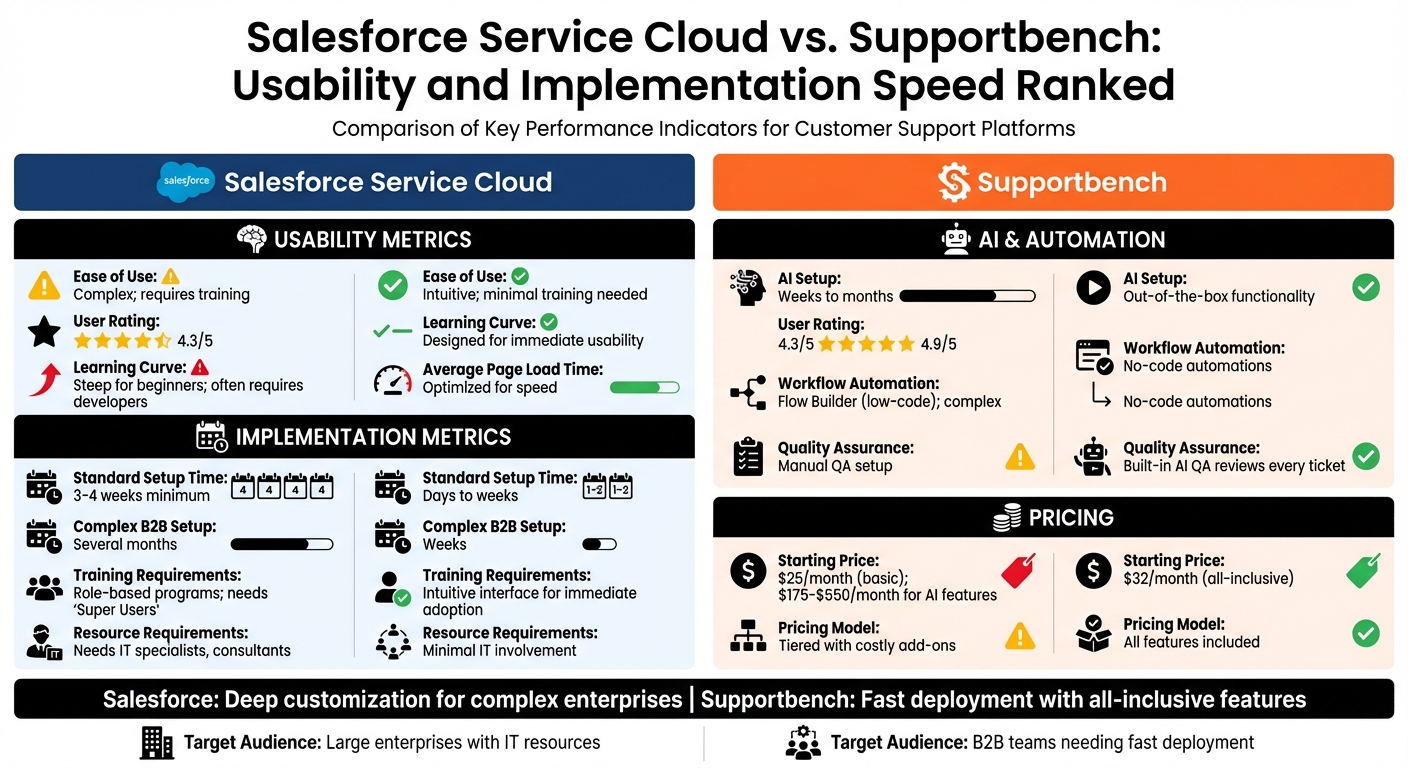
Salesforce Service Cloud vs Supportbench: Usability and Implementation Comparison
Salesforce Service Cloud: Usability Review
Interface and Navigation
At the heart of Salesforce Service Cloud is the Service Console, a centralized workspace that brings together customer data, interaction history, and productivity tools into one streamlined view. Key navigation features include:
- Split View: Lets users access list views in a side panel for quick reference.
- Workspace Tabs: Enables managing multiple cases within a single browser window.
- Utility Bar: Provides one-click access to tools like macros and softphones.
While these tools aim to simplify case management, many users report a steep learning curve, especially for those new to Salesforce. The platform’s design focuses on deep CRM integration, connecting sales, marketing, and service functions. This complexity often benefits B2B teams handling intricate, multi-stakeholder accounts, but it typically demands dedicated Salesforce expertise for setup and ongoing maintenance. Despite the learning curve, the interface aligns well with the needs of businesses managing high case volumes and intricate workflows.
Workflow and Case Management
Salesforce Service Cloud excels in account-centric support, tracking all interactions at the account level rather than isolating individual cases. This approach is especially valuable for B2B operations, where enterprise clients often have multiple contacts, open cases, and specific SLA requirements. Additionally, its Omni-Channel Routing feature ensures tasks are assigned to the right agent based on their skills and availability.
For more complex issues, the Slack integration facilitates cross-functional collaboration, allowing teams to address escalations without switching between apps. All updates sync seamlessly back to Salesforce, keeping records accurate and up-to-date. However, these advanced workflows often require significant initial configuration, posing challenges for teams trying to balance functionality with efficient deployment. The platform also incorporates advanced AI tools to further streamline case resolution processes.
AI and Automation Features
Salesforce leverages AI through two main tools: Einstein AI and Agentforce. Einstein AI focuses on predictive routing and case classification, while Agentforce supports autonomous case resolution. The Service Rep Assistant enhances efficiency by generating step-by-step action plans tailored to incoming case data and customer history, making it easier for agents to onboard and resolve cases faster.
AI-generated responses are rooted in the company’s trusted knowledge base, maintained via Data Cloud, ensuring responses remain accurate and consistent with the brand. However, implementing these AI features demands extensive data integration, a well-developed knowledge base, and careful configuration to set guardrails for autonomous operations. These requirements can significantly extend deployment timelines. Pricing for AI tools starts at $175 per user per month for the Enterprise tier and can go up to $550 per user per month for the full Agentforce 1 Service suite.
sbb-itb-e60d259
Supportbench: Usability Review
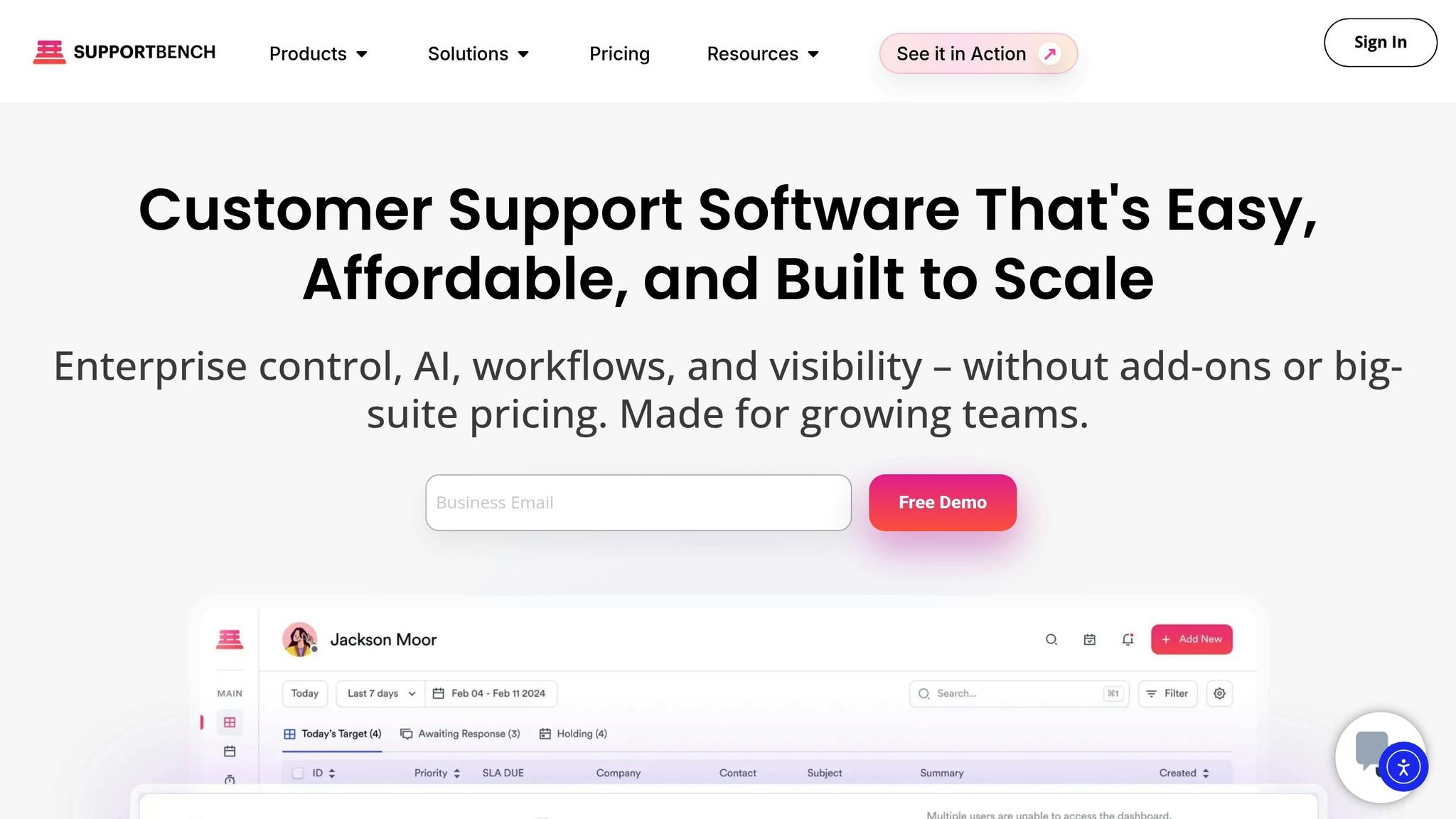
User Interface and Simplicity
Supportbench stands out by focusing on ease of use rather than overwhelming users with features. Its interface is clean and straightforward, with all key tools readily available – no need to dig through layers of menus or complicated settings. The platform’s communication tools feel as familiar as using email, which helps teams get comfortable with it quickly and without much hassle.
The platform also includes role-based security, which ensures users only see what’s relevant to their role. This minimizes information overload, especially in large organizations. Onboarding is typically quick, often completed within two weeks, thanks to its user-friendly design. With a stellar 4.9/5 rating from 80 reviews on Findstack, users frequently praise the interface’s simplicity and the platform’s overall performance. This accessible design also serves as a foundation for its advanced automation tools.
Customizable Workflows for Complex Operations
Supportbench simplifies the management of complex B2B workflows with its no-code automation tools, eliminating the need for IT involvement. Teams can set up dynamic SLAs that adapt automatically based on factors like case details, customer importance, or renewal deadlines. Its smart routing system ensures that tickets are prioritized and assigned based on urgency, topic, customer value, or even emotional tone, so critical issues get to the right experts without delay.
For teams handling enterprise accounts, Supportbench provides a unified 360° view of the customer. This includes account tiers, contract specifics, entitlements, and parent-child relationships – all accessible directly within the ticket interface. By delivering this level of context, the platform eliminates the need for agents to jump between systems to find information.
Eric Klimuk, Founder and CTO of Supportbench, puts it best: "In the complex world of enterprise customer support, context is everything. Your agents need more than just the immediate question being asked; they need a holistic understanding of the customer relationship, their history, their entitlements, and their specific product landscape".
This focus on context and streamlined workflows is further bolstered by the platform’s AI-driven tools.
AI-Powered Features
AI capabilities are seamlessly built into Supportbench, providing real-time support without requiring extra add-ons. The AI Copilot helps agents by summarizing long interaction histories, suggesting responses tailored to the situation, and pulling relevant details from the knowledge base. This makes it easier for agents to get up to speed on cases with complex backgrounds.
One standout feature is the ability to turn resolved tickets into searchable knowledge base articles with just one click, following Knowledge-Centered Service (KCS) principles. This ensures accurate and consistent documentation. Additionally, Supportbench offers predictive scoring for metrics like CSAT, CES, and First Contact Resolution, helping managers spot potential issues before surveys are completed. The platform’s AI-driven Quality Assurance reviews every ticket for tone, empathy, and accuracy, replacing manual QA processes with automated, continuous feedback.
These AI tools not only make support operations more efficient but also help agents resolve cases faster, improving both customer satisfaction and team performance.
Salesforce Service Cloud: Implementation Speed
Setup Complexity
While Salesforce Service Cloud offers user-friendly tools, implementing it for enterprise-level B2B operations is no small task. The Service Setup Assistant can quickly configure a basic Lightning Service Console app in minutes. However, for more complex setups, extensive pre-planning is essential. This includes conducting a gap analysis, aligning stakeholders, and assembling cross-functional teams.
A critical step in the process is developing a solid data migration strategy. Legacy data must be cleaned – removing duplicates and fixing inconsistencies – before transferring key objects like open cases, customer profiles, and knowledge articles.
As Tushar Seth from AbsoluteLabs explains, "Legacy data quality can make or break the rollout".
Beyond data, configuring Role-Based Access Control (RBAC) through profiles and permission sets is necessary. For organizations subject to regulations like GDPR or HIPAA, implementing Salesforce Shield for data encryption becomes a priority. Integration with other systems, such as ERPs, telephony platforms, and middleware, adds another layer of complexity, though Salesforce integration can be streamlined with the right tools. Custom API development, while powerful, is often the most resource-intensive and time-consuming aspect of the process.
Onboarding and Training Time
After the technical setup, onboarding and training become the next hurdles. For B2B teams, the onboarding process typically includes a one-week general orientation, followed by a 3-day intensive Customer Success Bootcamp to master key platform features.
However, the learning curve can be steep. Agents often face "interface overload" as they juggle multiple screens and manual tasks – especially if the platform isn’t fully optimized yet. To address this, experts recommend role-specific training sessions that focus only on the features relevant to each user’s responsibilities, rather than overwhelming them with the platform’s full range of capabilities. Providing ongoing resources like how-to videos and help guides can also ease the transition and reduce resistance to the new system.
Once onboarding is complete, the focus shifts to tailoring the platform to meet the specific needs of B2B operations.
Adaptation for B2B Needs
Customizing Service Cloud for complex B2B workflows often requires a phased approach. Starting with a small, high-performing team allows organizations to identify and address potential issues before a full-scale rollout. This approach also enables the creation of a "war room" for post-launch troubleshooting, where a dedicated team can resolve live issues quickly during the go-live period.
B2B workflows often demand intricate customizations. For instance, features like Split View let agents manage multiple cases simultaneously without leaving the main list. Similarly, Mass Quick Actions allow updates to up to 100 records at once, but setting these up requires careful planning. When adopting AI tools like Einstein, starting with simple automations for routine tasks is recommended before moving on to more advanced predictive capabilities.
These challenges in implementation, onboarding, and customization have a direct impact on operational efficiency. Extended deployment timelines not only delay productivity gains but also increase the total cost of ownership over time.
Supportbench: Implementation Speed
Quick Deployment and Configuration
Supportbench is built to bypass the usual IT roadblocks during deployment. Its out-of-the-box AI tools are ready to go from day one, allowing support teams to set up automations and intelligent ticket routing using simple no-code tools. Pre-configured for B2B needs, the platform includes features like dynamic SLA adjustments, predictive first contact resolution scoring, and customer health tracking – all of which are operational immediately. Ticket triage is fully automated, prioritizing cases based on customer value, urgency, and sentiment, removing the need for manual rule setups. This streamlined approach avoids the delays often associated with traditional, heavily coordinated implementations.
"Supportbench is easy to configure and launch… No IT team required", according to its Software Advice profile.
This level of readiness ensures a smoother onboarding process right from the start.
Streamlined Onboarding for Teams
Rated 4.8/5 for ease of use, Supportbench reduces the learning curve for teams significantly. It consolidates customer interactions – email, chat, Slack – and CRM data into a single 360° view, eliminating the hassle of switching between multiple tools. Built-in AI-powered knowledge base training tools further accelerate the onboarding process for agents. An AI QA Bot reviews tickets in real time for empathy, tone, and accuracy, providing instant coaching to agents. As Daniel V., a verified reviewer in IT services, shared:
"We also didn’t spend a lot on the initial set-up and training".
Once teams are up and running, they quickly see how the platform simplifies even the most complex support scenarios.
Immediate Usability for Complex Cases
Supportbench is specifically designed for B2B environments, with a multi-tenant architecture and adaptive SLA engine that can manage layered customer relationships and diverse contracts right out of the box. Its AI-powered automation takes over tasks like ticket triage, routing, and prioritization from the moment it’s deployed. This helps prevent SLA breaches and operational slowdowns while ensuring compliance with standards like HIPAA and ISO 27001.
"Supportbench is incredible at getting things done compared to other success and case management solutions I’ve used. In my opinion, it is incomparably superior when it comes to resolving end-user issues", says Caitlyn Langston, Chief Technology Officer.
Side-by-Side Comparison: Usability Metrics
After diving into the detailed reviews, let’s break down the key usability metrics for both platforms. These comparisons highlight how each system performs in practical, day-to-day scenarios.
Salesforce offers extensive customization, which can be a double-edged sword. While the flexibility is impressive, it often complicates operations for non-technical teams. Beginners and those without technical expertise may struggle with Salesforce’s learning curve, and performance can lag when too many custom objects are added. On the other hand, Supportbench focuses on simplicity with its "no more switching tabs" approach. This design integrates customer interactions and CRM data into a single, ready-to-use interface, eliminating the need for additional setup.
AI functionality is another area where the platforms differ. Salesforce employs tools like Agentforce and the Atlas Reasoning Engine for advanced AI tasks. However, implementing Einstein AI can be a lengthy process, often taking weeks or even months to fully configure. Supportbench, by contrast, provides immediate AI capabilities. Its AI Copilot suggests replies, summarizes interactions, and even generates knowledge base articles without delay. It also includes built-in AI quality assurance (QA) that evaluates every ticket for tone, empathy, and accuracy automatically.
Workflow automation is another point of contrast. Salesforce recently moved entirely to Flow Builder, discontinuing Workflow Rules and Process Builder support as of December 31, 2025. While Flow Builder is robust, it requires considerable time for migration and testing in larger organizations. Supportbench simplifies workflows with no-code automations that intelligently route tickets based on factors like customer sentiment, value, and topic. This approach reduces IT involvement while maintaining enterprise-grade functionality.
The table below highlights these usability metrics, offering a clear side-by-side comparison.
Comparison Table: Usability Features
| Usability Metric | Salesforce Service Cloud | Supportbench |
|---|---|---|
| User Interface | Highly customizable, CRM-first design with Service Console | Streamlined, support-first interface with a 360° customer view |
| Learning Curve | Steep for beginners; often requires developers or consultants | Designed for immediate usability |
| Average Page Load Time | 2.5 seconds | Optimized for speed with real-time agent assistance |
| AI Setup Complexity | Weeks to months; setup can be complex | Out-of-the-box functionality; no extra configuration needed |
| Workflow Automation | Flow Builder (low-code); powerful but complex to implement | No-code automations with intelligent routing by sentiment and value |
| Knowledge Management | Centralized repository; manual or semi-automated updates | One-click AI generation of knowledge base articles from resolved tickets |
| Quality Assurance | Manual QA setup hinders real-time feedback | Built-in AI QA reviews every ticket for empathy and accuracy |
| Agent Productivity | Case classification and suggested replies within the platform | AI Copilot, interaction summaries, and predictive CSAT and CES scoring |
Another critical factor to consider is pricing. Salesforce Service Cloud offers plans ranging from $25 to $1,000 per user per month, depending on the edition. However, many advanced AI features come as paid add-ons. For instance, the Enterprise Plan begins at $175 per user per month, while the Agentforce 1 Service Plan can cost up to $550 per user per month. In comparison, Supportbench provides a straightforward pricing model starting at $32 per agent per month. This includes all AI features and enterprise-level tools without requiring additional purchases. This transparency and simplicity reflect Supportbench’s focus on quick and effective deployment.
Side-by-Side Comparison: Implementation Timelines and Challenges
Getting your team up and running quickly is critical when it comes to resolving customer issues. A three-week deployment versus a months-long project can mean the difference between staying productive or facing delays, frustrated agents, and missed opportunities.
For Salesforce Service Cloud, a standard implementation usually takes three to four weeks. However, this assumes a relatively simple setup. For B2B organizations with complex needs – like integrating multiple departments or heavy customization – the timeline can stretch to several months due to the extensive planning required before configuration begins.
One of the biggest hurdles with Salesforce is data migration. If your legacy data is inconsistent or messy, it can lead to poor system adoption and unreliable analytics.
"If Salesforce is the brain of your customer operations, data is the fuel. And if that fuel is contaminated, your entire engine sputters".
Another common issue is user resistance. Employees may see the new system as an extra burden rather than a tool to boost productivity. Over-customization can also create headaches, turning the platform into a patchwork of custom code that’s hard to manage and slows down upgrades.
On the other hand, Supportbench prioritizes quick deployment with minimal setup. Its pre-built functionality is tailored for complex B2B operations, especially those that rely on AI-driven customer support. Teams can dive in right away – managing cases, using AI tools, and running enterprise workflows – without needing lengthy customizations or intensive training programs.
Here’s a breakdown of how these two solutions compare when it comes to implementation:
Comparison Table: Implementation Speed
| Implementation Factor | Salesforce Service Cloud | Supportbench |
|---|---|---|
| Standard Setup Time | 3–4 weeks minimum | Days to weeks with streamlined configuration |
| Complex B2B Setup | Several months | Weeks; pre-built for complex B2B scenarios |
| Data Migration | Complex; requires cleanup and validation | Streamlined process with clear data mapping |
| Training Requirements | Role-based programs; often needs "Super Users" | Intuitive interface for immediate adoption |
| Customization Approach | Flexible but prone to over-customization | No-code workflows; avoids technical debt |
| Resource Requirements | Needs strategic leadership, IT specialists, consultants | Minimal IT involvement; user-friendly setup |
| Common Challenges | Data quality issues, user resistance, integration gaps | Few; designed for fast time-to-value |
| Testing Protocol | Rigorous testing slows deployment | Simplified testing with production-ready defaults |
| Post-Launch Support | Requires ongoing monitoring | Live human support available from day one |
This table highlights the stark differences in setup and usability between the two platforms, making it easier to see which might align better with your team’s priorities.
Conclusion: Choosing the Right Platform for Your B2B Team
Key Takeaways
The comparison between platforms highlights some clear distinctions. Salesforce Service Cloud stands out with its extensive automation options and a wide range of integrations. However, it comes with challenges like a steep learning curve, complex setup processes, and occasional stability concerns. For larger B2B operations, implementing Salesforce can take months due to the need for significant customization and training.
On the other hand, Supportbench is designed for quick deployment and ease of use. With a user satisfaction score of 4.9 out of 5 – compared to Salesforce’s 4.3 – it enables teams to become fully operational within weeks, not months.
Where Salesforce often requires external consultants, dedicated administrators, and costly add-ons to unlock full B2B functionality, Supportbench delivers essential features like AI-driven tools (AI copilot, sentiment analysis, automated quality assurance), SLA management, and account health tracking – all included without extra fees or extensive customization.
These differences provide a solid foundation for making strategic decisions about your support operations.
Recommendations for Decision-Makers
When choosing a platform, focus on aligning your support strategy with the speed and efficiency your team needs. If rapid ROI and minimal setup time are priorities, opt for solutions tailored for fast deployment. Look for platforms that offer critical B2B features – such as account health monitoring and renewal-sensitive SLAs – as part of their core offerings, rather than requiring costly customizations.
During evaluations, request live demonstrations to assess how AI features perform in real-world scenarios. Also, consider how quickly your team can transition to handling actual cases. In B2B environments, where service interruptions can damage customer relationships, platform stability and an intuitive interface are non-negotiable. The right solution should simplify workflows and empower your team to deliver outstanding support from day one.
FAQs
What data should we clean before migrating into a new support platform?
Before making the move, take time to audit your data thoroughly. This means pinpointing critical information, getting rid of duplicates or outdated entries, and standardizing formats for consistency. Double-check attachments, timestamps, and any custom configurations to ensure everything is accurate. It’s also smart to document dependencies, such as custom fields and workflows, to avoid surprises later.
When exporting data, handle it with care. Map fields accurately to prevent errors during the transfer. Cleaning your data ahead of time ensures that only relevant and accurate information makes the cut. This step helps minimize risks like broken workflows or lost data during the migration process.
How much IT help is needed to launch and maintain this?
The level of IT assistance you’ll need largely depends on your support workflows and how much integration is required. Setting things up initially might include tasks like auditing data, migrating information, and running tests, which can take some technical effort. That said, Supportbench’s intuitive design and built-in integrations significantly cut down on the need for constant IT involvement. Most ongoing tasks center around updates, managing users, and fine-tuning the system. Plus, automation features and prebuilt connectors make processes even smoother, keeping the need for heavy technical support to a minimum.
Which AI features deliver the fastest time-to-value for B2B support?
AI that’s built directly into a platform offers the quickest way to see results. Features like AI copilots, predictive engines, and real-time analytics simplify workflows, cut down on manual tasks, and boost overall efficiency. On the other hand, using add-ons or third-party tools often means more setup time and ongoing maintenance, which can slow things down. With native AI, businesses can achieve faster outcomes while keeping costs in check – perfect for modern B2B support needs.
Related Blog Posts
- What’s the best alternative to Salesforce Service Cloud for B2B support teams?
- Salesforce Service Cloud pricing vs helpdesk pricing: what are you really paying for?
- Pylon alternatives for B2B support: what should you use as you scale?
- HappyFox alternatives for B2B: what platforms support complex workflows best?






