



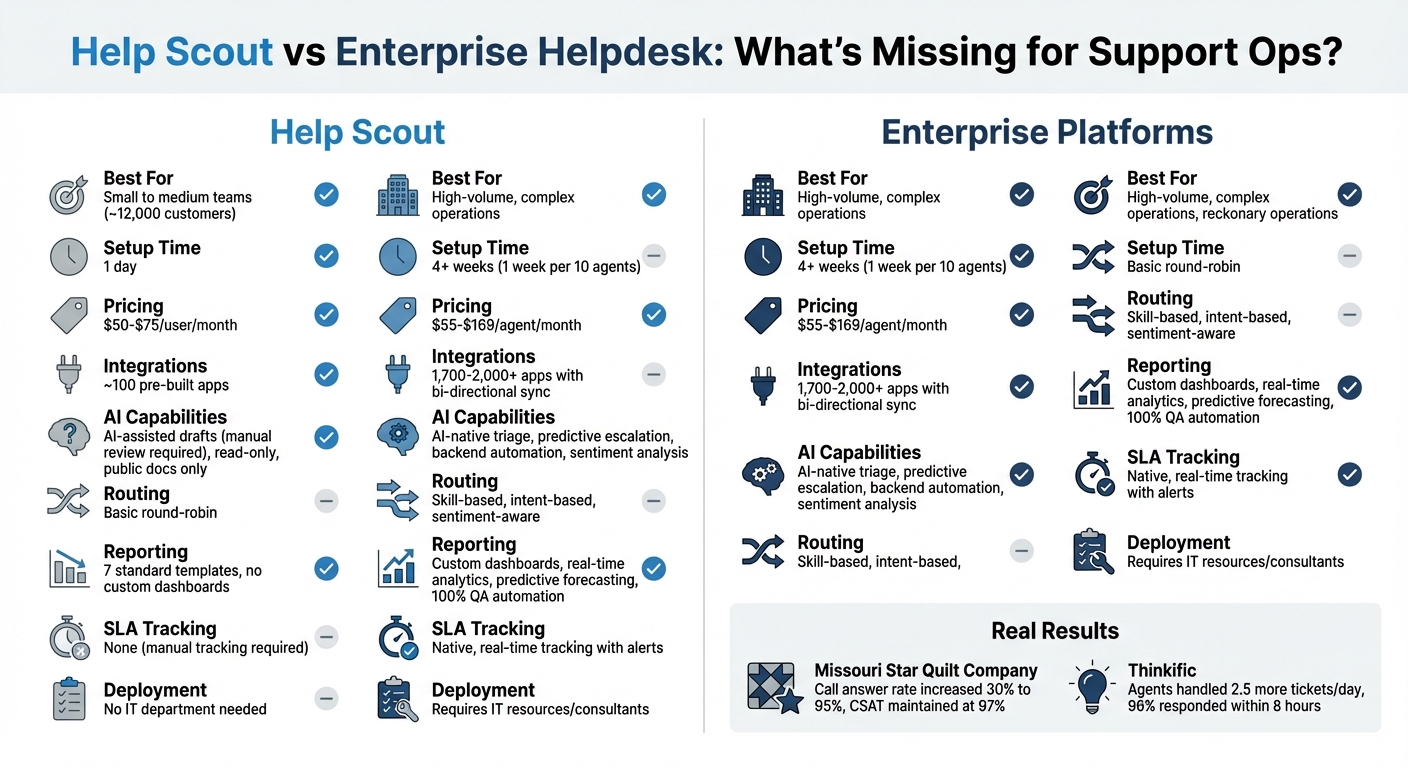
Help Scout is a simple, user-friendly helpdesk tool ideal for small to medium-sized businesses (SMBs). But as support teams grow and handle complex workflows, its limitations – like lack of native SLA tracking, advanced automation, and deep integrations – become apparent. Enterprise-grade platforms cater to these needs with features like skill-based routing, AI-powered triage, real-time analytics, and extensive integrations. While Help Scout’s $25–$75 per user pricing is attractive, enterprise solutions often justify their higher costs ($55–$169 per agent) with greater efficiency and scalability.
Key Takeaways:
- Help Scout: Great for small teams; quick setup; lacks advanced features like custom reporting and AI-driven automation.
- Enterprise Platforms: Designed for high-volume, complex environments; offer robust automation, deep integrations, and advanced analytics.
- Cost Trade-Offs: Help Scout is cheaper upfront, but enterprise tools save time and reduce inefficiencies for larger teams.
For growing support operations, the choice depends on choosing the right helpdesk for your business size and long-term goals.
Help Scout vs Enterprise Helpdesk: Feature and Pricing Comparison
Scalability and High-Volume Ticket Management
SMB Architecture vs. Enterprise Design
Help Scout is tailored for small teams managing shared inboxes, serving around 12,000 customers. Its setup is quick – teams can get started in a day without requiring an IT department. But this simplicity comes with trade-offs, especially when ticket volumes spike.
Enterprise platforms, on the other hand, are built for scalability. With auto-scaling infrastructure and performance benchmarks designed for high-demand environments, they handle heavy workloads with ease. While Help Scout offers limited integrations, enterprise systems thrive on extensive connectivity, enabling them to manage complex workflows seamlessly. This difference becomes even more apparent with features like native SLA tracking, AI-powered ticket routing, or real-time custom dashboards – capabilities that Help Scout lacks. These gaps in architecture can lead directly to inefficiencies as ticket volumes grow.
How Scaling Bottlenecks Affect Operations
As ticket volumes increase, the limitations of smaller platforms become even more pronounced. Without automated SLA tracking, teams may struggle to meet response-time goals. Tasks like merging customer conversations manually can quickly become overwhelming. Reporting is another pain point – teams relying on manual data downloads and entries lose the ability to monitor operations in real time.
A clear example of these challenges comes from Missouri Star Quilt Company. Facing scalability issues, the company decided to move to an enterprise platform under the leadership of Customer Service Manager Wendi Mills in 2026. The results were striking: their call answer rate jumped by 30%, reaching 95%, while customer satisfaction held steady at 97%. Similarly, Thinkific saw a significant boost in efficiency. Their agents, equipped with enterprise-grade workflows, handled 2.5 more tickets per day and responded to 96% of tickets within eight hours.
These examples highlight a critical point: solutions that work well for small teams often fall short when faced with the demands of larger operations.
sbb-itb-e60d259
AI-Driven Automation and Intelligent Routing
Help Scout‘s Automation Challenges
Help Scout employs a "copilot" model where AI assists agents by drafting responses, but these drafts require manual review and approval before being sent or updated. Features like AI Drafts and AI Summarize provide suggestions, but they still demand a human touch to finalize actions. While this setup works well for smaller teams managing simpler queries, it quickly becomes inefficient as ticket volumes grow.
Another limitation is that Help Scout’s AI only interacts with public documentation and operates in a read-only capacity. This means agents must manually search internal resources and handle backend tasks themselves.
Additionally, Help Scout relies on basic routing methods, such as round-robin assignments, which fail to consider factors like agent expertise, ticket complexity, or customer sentiment. The absence of predictive escalation tools to identify and prioritize urgent cases also poses challenges, particularly in environments with complex issues or multiple stakeholders.
In contrast, enterprise platforms address these gaps with advanced automation and smarter routing systems.
Enterprise AI Capabilities
Enterprise platforms take automation to the next level. With AI-native triage, tickets are automatically sorted based on intent, sentiment, and historical data, then routed to the most qualified agent – completely eliminating the need for manual intervention. This approach significantly improves efficiency, with businesses reporting first-contact resolution rates jumping from 50% to 72% and response times dropping from 15 minutes to just 5 minutes.
Beyond routing, enterprise AI offers predictive tools that flag potential escalations, forecast staffing requirements, and even identify churn risks before they arise. It also automates backend tasks, such as processing refunds or retrieving CRM data, ensuring that workflows are completed without agent involvement.
For support teams managing complex, long-term issues with multiple stakeholders, this level of automation isn’t just helpful – it’s essential for staying efficient and proactive. By streamlining tasks and enabling smarter decision-making, enterprise AI transforms how support operations function.
Automating Enterprise Customer Support Workflows with Decagon AI | Ashwin Sreenivas
Reporting and Analytics Depth
As operations grow, having clear and detailed reporting becomes increasingly important – automation alone won’t cut it.
Help Scout’s Reporting Capabilities
Help Scout offers seven standard reporting templates that cover email, chat, phone, company/user data, CSAT, and knowledge base metrics. These templates are useful for basic monitoring, but they come with some notable limitations. For instance, you can’t customize how metrics are calculated or create custom reports using your own data sets. Help Scout’s documentation explains:
"While we offer lots of filters, there isn’t a way to customize how calculations are performed nor is there an option to build custom reports based on custom data sets."
The platform only allows basic filtering options like inbox, tag, or custom field. It doesn’t include native SLA/OLA tracking, advanced predictive analytics, or built-in benchmarking tools to measure performance against industry standards. If you need more advanced insights, you’ll have to export raw data using the Inbox API and rely on external BI tools to build custom dashboards. These limitations make it clear why some teams look to enterprise solutions for more in-depth analytics.
Enterprise Reporting and Analytics
In contrast to Help Scout, enterprise platforms excel in dynamic reporting tailored for complex support needs. They offer highly customizable dashboards where you can define your own metrics, create custom formulas, and analyze data across multiple dimensions. These tools also provide granular SLA tracking, skill-based performance analysis, and cross-channel benchmarking, enabling you to compare your team’s performance with industry standards.
Enterprise solutions go a step further by integrating AI-driven tools. These can forecast support demand, predict staffing requirements, and even identify potential churn risks before they become critical. Additionally, AI-powered Quality Assurance tools assess 100% of customer interactions, automatically flagging areas for improvement – features that Help Scout does not provide.
For teams handling complex, multi-stakeholder issues, this level of reporting sophistication is crucial. It allows for data-driven decision-making and ensures support operations align with broader strategic objectives. Advanced reporting isn’t just a nice-to-have – it’s a necessity for continuous improvement and staying ahead in competitive industries.
Integration Capabilities and System Connectivity
As support operations grow, the helpdesk becomes a vital hub for connecting customer data across various departments. The efficiency of these connections can directly influence how well teams handle complex issues that involve multiple stakeholders – something that’s especially important for modern, AI-driven B2B support environments.
Help Scout’s Integration Options
Help Scout provides around 100 pre-built integrations, targeting popular small and medium-sized business (SMB) tools such as Slack, HubSpot, and Shopify. These integrations handle basic tasks like syncing customer data, sending notifications to team channels, or pulling order details from e-commerce platforms.
However, in more complex B2B scenarios, these integrations often reveal their limitations. For instance, Help Scout’s Jira integration doesn’t allow ticket updates directly within the Jira interface. This forces agents to switch between tools, creating unnecessary friction and increasing the likelihood of data inconsistencies.
Additionally, Help Scout’s AI capabilities are restricted to public-facing content. While it can pull information from public knowledge bases or websites, it cannot access private resources like internal Confluence pages, private Google Docs, or historical ticket data. As Stevia Putri, Marketing Generalist at eesel AI, explains:
"Help Scout’s AI… can’t actually do anything. It can’t check an order status in your backend system, process a refund, or assign a ticket to a specific agent. It’s strictly a read-only tool."
For teams working with older systems, Help Scout’s API endpoints may not provide the level of data synchronization required. This often pushes teams toward using middleware or custom API solutions, which can increase both complexity and costs. Furthermore, Help Scout lacks built-in voice and SMS functionality, relying instead on third-party integrations that can fragment data and complicate reporting workflows.
These challenges highlight the need for more robust integration capabilities, especially in enterprise-level platforms.
Enterprise Integration Depth
Enterprise platforms address these gaps by offering extensive, bi-directional integrations that ensure seamless data flow across systems. Instead of a limited set of options, these platforms provide marketplaces featuring 1,700 to 2,000+ pre-built apps, including specialized tools tailored to niche and industry-specific needs. They also include broader API endpoints and advanced developer tools to support custom infrastructure connections.
The key advantage here is bi-directional data flow, where updates in one system automatically sync with the helpdesk and vice versa. This eliminates the need for manual data entry and ensures teams have a complete, real-time view of each customer.
The impact of these deeper integrations is clear. Companies that switch to enterprise platforms often report noticeable gains in operational efficiency, such as reduced staffing costs, higher call answer rates, and better customer satisfaction scores.
For B2B support teams handling complex relationships, advanced integration features are more than just a nice-to-have – they’re critical for achieving a comprehensive, 360-degree customer view. When evaluating platforms, it’s important to consider whether integrations enable true bi-directional workflows, examine the API’s capabilities for your infrastructure, and account for any additional costs tied to third-party services.
Pricing Models and Total Cost of Ownership
For support teams navigating growing complexities, pricing must be evaluated alongside the platform’s functional capabilities and helpdesk ROI.
Help Scout’s Pricing Structure
As of late 2025, Help Scout offers a straightforward monthly pricing model: Standard at $50/month (unlimited users and contacts), Plus at $75/month, and Pro, which requires custom pricing.
Additional costs include $10/month for extra inboxes and $20/month for extra knowledge base sites. For AI Answers, Help Scout charges $0.75 per successful resolution after a three-month trial period. While this rate is 50% lower than some enterprise platforms, the usage-based pricing can become tricky – more automation often means higher costs.
Certain critical features, like SSO/SAML and HIPAA compliance, are only available in the Pro tier. Additionally, since Help Scout lacks native phone and SMS support, integrating third-party tools may lead to extra expenses.
These pricing details highlight the trade-offs when comparing Help Scout to enterprise-level solutions, which may seem pricier initially but often include advanced features as part of the package.
Enterprise Pricing and Long-Term Costs
Enterprise platforms generally charge on a per-agent basis, with prices ranging between $55 and $169/month depending on the plan. Although these plans may appear more expensive upfront, they often include features that Help Scout either charges extra for or doesn’t provide – such as native phone support, advanced SLA management, community forums, and support for more light agents to encourage collaboration across departments. These bundled features aim to deliver operational efficiencies that justify the higher initial cost.
The overall cost of deployment and maintenance further separates these platforms. For instance, setting up enterprise solutions like Zendesk requires at least four weeks, with an additional week needed for every 10 agents. This often involves hiring IT consultants or allocating internal resources. In contrast, Help Scout can be fully deployed in under a day.
When it comes to resolution-based costs, enterprise platforms typically charge around $1.50 per resolution after offering a small monthly allowance. Although Help Scout’s $0.75 rate seems more economical, both pricing models share a similar challenge: increased automation leads to higher bills. The real question isn’t which platform has the lowest per-seat cost, but whether it can handle your operational needs without requiring costly add-ons or middleware solutions.
When Help Scout No Longer Fits Your Needs
Signs You’ve Outgrown Help Scout
One of the clearest signs that Help Scout may no longer suit your needs is when your team spends more time working around its limitations than solving customer issues. For instance, if your support staff has to manually assign tickets because the platform lacks skill-based routing, or if managers are forced to compile data manually due to the platform’s limited reporting options – just seven pre-built reports with no custom dashboards – the operational inefficiency quickly outweighs any cost savings on licensing fees.
In more complex B2B scenarios, the challenges become even more evident. Contracts with flexible SLAs that shift based on customer value or priorities can expose gaps in Help Scout’s capabilities. Without native SLA management, teams are left to track these commitments manually or rely on inefficient workarounds. Similarly, when support cases involve multiple parties – like internal engineering teams, account managers, and customer IT departments – Help Scout’s limited multi-department visibility and basic customer profiles can make coordination a struggle.
Integration is another key area where Help Scout may fall short. As mentioned earlier, its roughly 100 integrations often provide only surface-level connectivity. For teams that need deep, bi-directional workflows, these limitations can create operational bottlenecks.
Recognizing these pain points is the first step toward finding a solution that better aligns with your growing needs.
How to Evaluate Enterprise Solutions
If you’ve determined that Help Scout no longer aligns with your requirements, here’s how to approach the evaluation of enterprise alternatives:
1. Test with real, complex data. Use your actual multi-stakeholder tickets to test features like routing rules, SLA tracking, and permission structures. If the platform requires significant customization to support your workflows, it may not scale effectively with your operations.
2. Audit included features versus extra costs. Many enterprise platforms gate advanced features like reporting, custom roles, and security controls (e.g., SSO/SCIM) behind higher-tier pricing. Make sure these essentials are included in the base package to avoid unexpected costs inflating your total investment.
3. Evaluate workflow alignment. The platform should fit seamlessly into your operating model rather than forcing you into workarounds. A great example comes from Zanda Wealth Mortgage Brokers, who revamped their workflow in December 2025 using enterprise service software. Led by Director Austin Rulfs, the team streamlined their process for managing 120–150 live loan files. They reduced manual touches per file from 14 to 9, cut the average time from application to formal acceptance to 6.8 days, and saved brokers 2.3 hours per file – allowing them to focus more on client interactions.
4. Assess AI governance and extensibility. Look for platforms that provide transparency and control over AI features, including safeguards like model explainability and human override options. The system should also offer open APIs, modular components, and webhook updates to support growth without requiring a complete overhaul. Without dedicated administrators or process owners to manage these capabilities, even the most advanced platform can become a financial burden.
These steps provide a framework for assessing whether a new enterprise platform can address the challenges you’ve encountered and support your long-term goals.
Conclusion: Matching Platform Capabilities to Your Support Needs
Deciding between Help Scout and an enterprise solution comes down to the complexity of your operations, not just the size of your team. Help Scout is designed for straightforward, email-based support, requiring minimal IT involvement. This makes it a great choice for businesses that prioritize building personal customer relationships over implementing extensive automation systems.
On the other hand, enterprise platforms step in when your operations demand more robust features. These include native omnichannel support (like phone, SMS, and community forums), skill-based routing across multiple departments, and real-time SLA tracking. They also provide governance tools essential for complex B2B environments, such as audit logs, role-based access controls, and sandbox testing environments.
When it comes to analytics, Help Scout offers pre-built reports that cover the basics but fall short in delivering real-time, customizable insights. These insights are critical for identifying bottlenecks and optimizing workflows, especially when managing high ticket volumes. Enterprise platforms excel here, offering the depth of analysis needed for scaling support operations effectively in an AI-driven world.
Although enterprise platforms come with higher upfront costs – ranging from $55 to $169+ per agent monthly, compared to Help Scout’s $25–$75 per user – the investment often pays off. Manual workarounds, like compiling data or integrating systems, can quickly erode any initial savings from lower licensing fees.
Ultimately, your choice should align with your long-term operational goals. If your roadmap includes features like AIOps integration, predictive maintenance, or advanced CRM capabilities for a unified customer view, it’s worth considering whether your current system can grow with you. Waiting too long to switch to an enterprise platform like Supportbench could lead to operational inefficiencies that put you at a competitive disadvantage.
FAQs
What are the clearest signs we’ve outgrown Help Scout?
If your team is dealing with advanced automation needs, detailed reporting requirements, or managing long-term, multi-stakeholder issues, it might be time to move beyond Help Scout. While its straightforward design works well for small to medium-sized businesses, scaling up often highlights its limitations. Features like custom reporting, AI-powered workflows (such as triage or escalation), and robust integrations are essential for handling more complex support operations effectively – and these are areas where Help Scout may fall short.
Which enterprise-grade features matter most for Support Ops teams?
Support Ops teams thrive when equipped with tools that prioritize scalability, automation, advanced reporting, AI-driven workflows (like triage and escalation prediction), and integrations. These features are game-changers for managing large volumes of requests, speeding up resolutions, and delivering tailored support on a larger scale.
- Scalability allows teams to grow without sacrificing performance or efficiency.
- Automation and AI simplify workflows by handling repetitive tasks and predicting next steps, such as escalating critical issues.
- Advanced reporting delivers actionable insights, helping teams make data-driven decisions.
- Integrations ensure seamless access to key data across platforms, keeping everything connected.
Together, these features drive smoother operations and help support teams meet growing demands with ease.
How can we estimate total cost of ownership before switching?
To get a clear picture of the total cost of ownership (TCO) before switching help desk platforms, you need to account for more than just the subscription fees. While subscription costs are the most obvious, there are often hidden expenses that can significantly inflate the overall cost. These include implementation, training, maintenance, and add-ons – all of which can make the actual cost 5–8 times higher over a five-year period.
When calculating TCO, don’t forget to factor in setup fees, integration with existing systems, and the potential costs of scaling the platform as your needs grow. It’s also a smart move to regularly audit your licenses to ensure you’re not paying for unused or unnecessary features, which could lead to unexpected expenses down the line.
Related Blog Posts
- Which non-US helpdesks are best for multi-tier support and escalations?
- Which non-US helpdesk platforms include advanced SLAs, portals, and knowledge base without add-ons?
- Help Scout alternatives for B2B teams: what to choose when you outgrow shared inbox
- What are the signs you’ve outgrown Help Scout (SLAs, tiers, escalations, reporting)?






