


When internal teams like Sales or Customer Success Managers (CSMs) delay responses, it can frustrate customers and risk revenue. Clear internal SLAs (Service Level Agreements) solve this by defining specific response times and responsibilities between teams. For instance, urgent issues might require a 30-minute response, while less critical ones could allow for 1-2 business days.
Here’s the process to set and enforce these expectations effectively:
- Define SLA Tiers: Categorize issues as Critical, High, Standard, or Low based on urgency and impact.
- Document Expectations: Use playbooks to outline roles, response times, and escalation steps.
- Automate Tracking: Use tools to monitor SLAs in real time, send alerts, and prevent missed deadlines.
- Leverage AI: Automate ticket routing, prioritize tasks, and adjust SLAs dynamically based on urgency.
- Review Performance: Regularly analyze metrics like First Response Time and Resolution Time to improve workflows.
When documented, monitored, and enforced, internal SLAs help teams respond faster, reduce misunderstandings, and keep customers satisfied. Start small, focus on measurable metrics, and refine processes quarterly to ensure alignment with business needs.
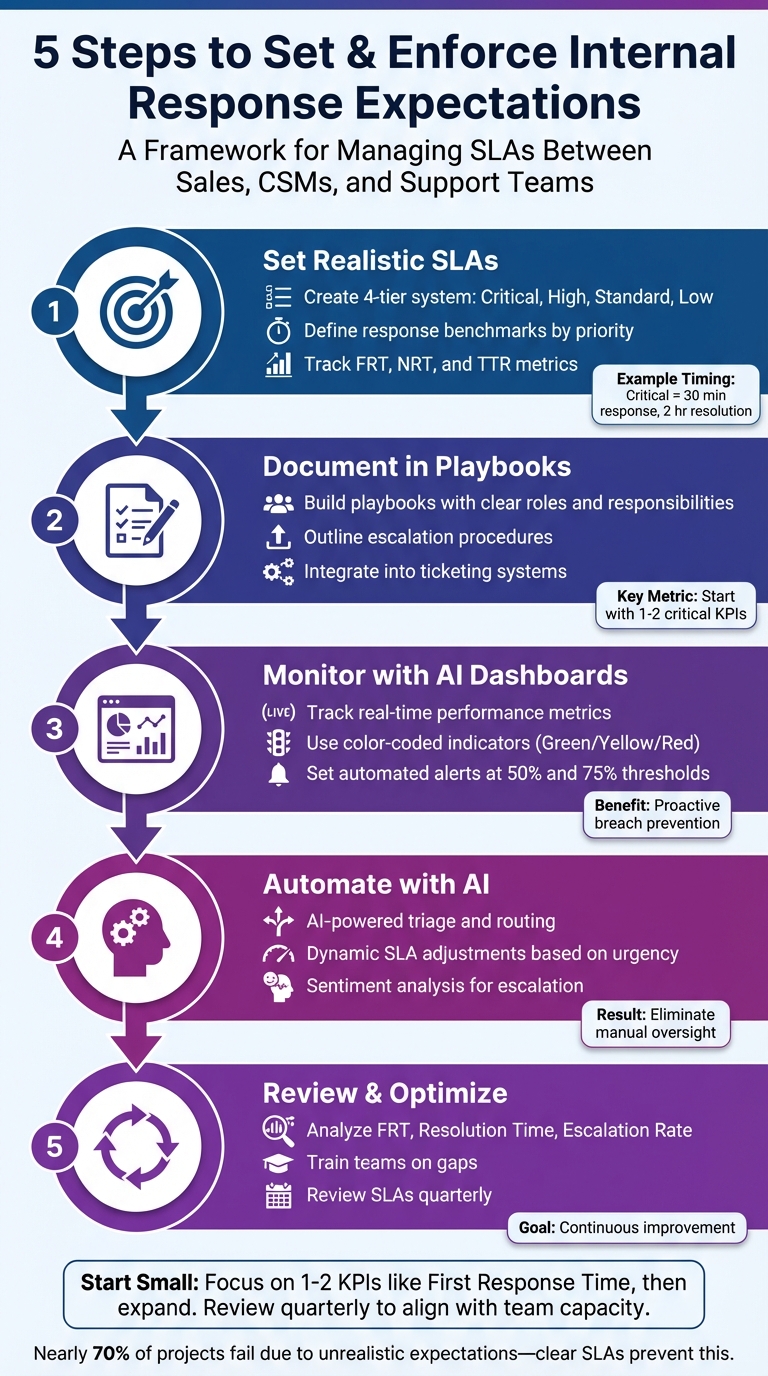
5-Step Process to Set and Enforce Internal SLA Response Expectations
What Response Expectations Are and Why They’re Hard to Manage
What Response Expectations Mean
Response expectations are essentially internal Service Level Agreements (SLAs) – formal agreements between departments that set clear standards for service, response times, and responsibilities. For instance, in Sales, the focus is often on responding quickly to high-value leads to maximize revenue opportunities. Meanwhile, for Customer Success Managers and Support teams, performance revolves around metrics like First Response Time, Next Response Time, and Resolution Time, all of which directly impact customer satisfaction.
Unlike SLAs that are customer-facing, internal SLAs prioritize efficiency between teams. For example, the IT department might pledge to resolve hardware issues for the Sales team within four hours, or the Legal department might promise to address compliance inquiries from Support within one business day. While these agreements are essential, they can become problematic without proper management.
Common Problems with Internal Response Expectations
The real challenge isn’t in defining response expectations – it’s in ensuring they’re actionable and enforceable. Many internal SLAs fail because they exist only as static documents, disconnected from everyday workflows. When these expectations aren’t integrated into daily processes, teams often rely on guesswork, leading to inefficiencies and delays.
A common issue is the lack of clear severity tiers. Without defined levels of urgency, teams may treat every request as equally critical, which drains resources and slows down response times. For example, Adobe‘s technical support team addressed this by implementing a tiered prioritization system. In their model, Priority 1 (Critical) is reserved for major system outages that require immediate attention, while Priority 4 (Low) is for minor cosmetic issues that have no operational impact. This kind of structure helps teams focus their efforts on the most pressing tasks and avoids the chaos of treating everything as an emergency.
Another issue is manual tracking, which can bog down workflows and lead to missed deadlines. When managers have to manually monitor ticket statuses instead of relying on automated systems, response expectations often become more of a guideline than a firm commitment. Additionally, operational inefficiencies – such as misrouted tickets or timers that keep running during customer wait times – can further disrupt the process.
Here’s an example of a priority-based SLA structure:
| Priority Level | First Response Target | Resolution Target | Business Impact Description |
|---|---|---|---|
| Critical | 30 Minutes | 2 Hours | Major system outage or halted operations |
| High | 1 Hour | 4 Hours | Significant disruption with partial functionality |
| Standard | 2 Hours | 1 Business Day | General performance issues or moderate delays |
| Low | 4 Hours | 2 Business Days | Cosmetic issues or feature requests with no impact |
Source: Supportbench Internal SLA Template Example
sbb-itb-e60d259
Step 1: Set Realistic SLAs for Internal Stakeholders
Create SLA Tiers Based on Stakeholder Roles
To manage priorities effectively, use a four-tier system: Critical, High, Standard, and Low. Each tier should reflect the business impact of an issue. For instance, a system outage that jeopardizes a major deal renewal demands immediate action, while a minor feature request from a smaller account can wait.
- Critical: Reserved for major system outages or situations where strategic accounts are completely unable to operate.
- High: Covers significant disruptions where partial functionality is still available.
- Standard: Handles routine inquiries or minor performance issues.
- Low: Used for cosmetic problems or non-urgent updates.
An example to draw inspiration from is the University of Saskatchewan‘s IT department. For Major Incidents, their SLA included a 90-minute response time and a 4-hour resolution window. For Critical Classroom Incidents – such as disruptions to teaching – they targeted a 1-minute triage and a 15-minute resolution. Their goal was to respond to 90% or more of tickets within these defined SLA windows.
To track performance, focus on key metrics like First Response Time (FRT) for acknowledgment, Next Response Time (NRT) for updates, and Time to Resolve (TTR) for closure. Monitoring "Ownership Time" is also vital to avoid tickets bouncing between teams without resolution.
Finally, customize these SLA tiers for each communication channel and customer type to ensure response benchmarks align with expectations.
Set Response Time Benchmarks by Channel and Customer Type
Different communication methods require tailored response times. For real-time platforms like Slack or internal messaging, some teams aim for acknowledgment within 30 seconds for critical issues. For email escalations, applying consistent SLA standards ensures fairness and efficiency.
It’s also essential to configure SLAs based on Business Hours rather than Calendar Hours. For example, if a 15-minute SLA starts just before the end of the workday, the timer should pause and resume at the start of the next business day. Automated alerts at 50% and 75% of the SLA timeframe can notify team leads in advance to prevent breaches.
Here’s an example of SLA benchmarks by priority level:
| Priority Level | First Response Target | Resolution Target | Example Scenario |
|---|---|---|---|
| Critical | 30 Minutes | 2 Hours | Major system outage affecting strategic operations |
| High | 1 Hour | 4 Hours | Significant disruption impacting a high-value account |
| Standard | 2 Hours | 1 Business Day | Routine inquiry or moderate operational issue |
| Low | 4 Hours | 2 Business Days | Cosmetic issue or non-urgent internal update |
These benchmarks not only streamline expectations but also lay the groundwork for AI-driven monitoring and dynamic SLA adjustments in future workflows.
Step 2: Document Expectations in Playbooks and Workflows
Build Playbooks for Clear Communication
Once you’ve established SLA tiers, the next step is to put them into action with playbooks. These documents turn strategic goals into actionable steps by outlining the roles, services, and metrics that define success. Without this formal documentation, expectations risk remaining vague and unenforceable.
"Internal SLAs help teams move beyond informal expectations and into clearly defined, measurable service standards." – Nooshin Alibhai, Founder and CEO, Supportbench
Take Adobe’s playbook as an example. Their tiered system helps prioritize issues effectively. Priority 1 (Critical) is for system-wide outages demanding immediate attention, while Priority 2 (High) addresses significant disruptions where partial functionality remains, with a response expected within hours. Your playbook should also cover what happens when targets aren’t met. For instance, it might include escalation management processes like reassigning tickets to a manager or notifying key stakeholders. Start small by focusing on one or two critical KPIs, such as First Response Time, before expanding to track additional metrics. These protocols work hand-in-hand with the automated dashboards mentioned earlier.
When expectations are clearly documented, they become easier to enforce and monitor through integrated workflows.
Use Workflow Tools to Track Accountability
A well-documented SLA is only as effective as the system supporting it. Static documents alone can lead to missed targets or lack of follow-through. Instead, embed these standards into your ticketing system for automated tracking and real-time accountability. Workflow tools consolidate expectations, assign responsibilities, and improve visibility across teams. For example, Group SLAs can define how long specific teams have to address a ticket. A Sales team, for instance, might have an 8-hour window to respond to a lead-related issue before it escalates.
The University of Saskatchewan’s IT department provides a practical example of this approach. They aim to respond to over 90% of tickets within the defined SLA timeframe while keeping ticket reopen rates below 3%. To maintain effectiveness, revisit your SLAs at least quarterly. This ensures they stay aligned with your team’s capacity and evolving business priorities.
How to Use SLAs for Sales Teams | Strategic HubSpot Tutorial
Step 3: Monitor and Enforce Compliance with AI and Dashboards
Once expectations are clearly documented and workflows are integrated, the next step is keeping everything on track with real-time monitoring tools powered by AI.
Track Performance with AI-Powered Dashboards
AI-driven dashboards turn SLA management into an active, real-time process. These dashboards monitor key metrics like First Response Time, Next Response Time, and Time to Resolve, breaking this data down by team and priority level. Instead of waiting for weekly updates, you can see exactly who’s meeting their commitments and who’s lagging behind.
To make things even clearer, many dashboards use color-coded indicators:
- Green: SLA met
- Yellow: SLA due soon
- Red: SLA breached
Some systems also track internal progress by logging updates through internal notes, rather than relying solely on public-facing responses. This ensures accountability, even when cases require additional information or approvals.
AI takes this a step further by dynamically adjusting SLA priorities. For example, if real-time sentiment analysis detects customer frustration, the system can escalate the ticket or tighten response times. This makes support operations more responsive and adaptable.
These tools also make it possible to set up automated alert systems that can prevent SLA breaches before they happen.
Set Up Automated Alerts and Escalations
Real-time dashboards are powerful, but automated alerts add a proactive layer of protection. Manual monitoring just doesn’t scale, especially in high-volume environments. Automated alerts can kick in at specific thresholds to keep SLAs on track. For example:
- Notify the assigned agent when 25% of SLA time has elapsed.
- Send a risk warning between 50% and 75% of SLA time.
- Escalate to a supervisor at 90% of SLA time.
These alerts align with the SLA tiers established earlier, ensuring consistency.
If tickets are left unassigned or become stuck, automated rules can reroute them. For example, inquiries left idle for just 15 minutes can be reassigned or escalated to a team lead. Similarly, if an agent hasn’t provided a public reply within 45–60 minutes, an alert can notify their manager. This targeted approach ensures timely action without overwhelming supervisors.
Step 4: Automate SLA Enforcement with AI-Driven Workflows
Once SLAs are set and workflows are documented, incorporating AI-driven automation takes accountability to the next level. By dynamically adjusting priorities and managing requests from start to finish, AI eliminates the need for constant manual oversight. Here’s how AI streamlines triage, prioritization, and real-time SLA adjustments.
Use AI for Triage and Prioritization
AI steps in the moment a request arrives, analyzing urgency, customer value, and directing it to the appropriate team. As Supportbench explains, "AI is built right in and can instantly classify, prioritize and assign tickets to the right person". This means internal teams like Sales and Customer Success Managers (CSMs) no longer have to wait for manual sorting to get issues routed correctly.
What sets AI apart is its ability to go beyond simple keyword detection. It evaluates sentiment to gauge urgency, ensuring high-stakes requests get immediate attention. For example, if a CSM submits a request about a customer nearing renewal and the tone suggests concern, AI can automatically escalate the case to a higher SLA tier. Similarly, AI identifies VIP or strategic accounts and applies faster response times without relying on manual intervention. This approach shifts the focus from just technical severity to the broader business impact – prioritizing a high-value account over a less critical one when necessary.
Beyond routing, AI continuously fine-tunes SLA targets as situations change, ensuring responsiveness stays aligned with business needs.
Adjust SLAs Dynamically with AI
Traditional SLAs are static, but real-world conditions are anything but. AI addresses this by recalibrating response targets in real time. For instance, during critical periods like upcoming renewals, AI can tighten SLAs to prioritize faster responses. If a CSM is handling a customer with a contract expiring in 30 days, AI ensures the SLA reflects the urgency of that situation.
AI also takes team capacity into account when adjusting SLAs. As Newgen Software puts it, "The future of SLA management is no longer about monitoring timelines; it now demands orchestrating outcomes". This means AI doesn’t just track compliance – it actively manages the factors that lead to successful resolutions. By redistributing workloads and adapting SLAs dynamically, AI ensures the right balance between efficiency and effectiveness.
Step 5: Review Performance and Improve Response Workflows
Setting SLAs and automating workflows is just the start. The real challenge lies in regularly reviewing performance to identify what’s working and what isn’t. Without consistent evaluations, teams risk falling behind on targets without understanding the root causes.
Analyze Performance Metrics
Dig into metrics that highlight delays and inefficiencies. First Response Time (FRT), Resolution Time, and Escalation Rate are key indicators of where requests might be getting stuck – whether in routing, waiting on dependencies, or bouncing between teams. By monitoring SLA compliance, you can uncover patterns and pinpoint breaches. For instance, if tickets frequently miss SLAs between 2–4 PM, it’s likely a staffing issue rather than a performance problem.
Pay attention to "Tickets at Risk", which are requests nearing their SLA deadlines. These serve as early warnings, allowing you to intervene and prevent breaches. Beyond speed, consider sentiment and quality metrics. Quick responses mean little if they’re rushed and ineffective. AI tools can help connect SLA performance with customer satisfaction (CSAT), CES, and NPS and Quality Assurance (QA) scores, ensuring that faster responses don’t come at the expense of quality.
Use these insights to guide team training and refine workflows for better results.
Train Teams and Optimize Workflows
Once you’ve identified performance gaps, focus on improving workflows and boosting team responsiveness. For example, if Sales or CSMs frequently miss response windows due to unclear escalation paths, it’s time to update your playbooks and provide targeted onboarding. As Nooshin Alibhai, Founder and CEO of Supportbench, explains:
"Internal SLAs only work if everyone understands them. Hold brief onboarding sessions for new team members, and make SLA terms visible inside the tools your teams use".
Gather feedback from stakeholders to uncover areas for improvement. Communication preference surveys can help determine how teams want updates – whether through monthly syncs, async recaps, or real-time dashboards. When stakeholders have unrealistic expectations about response times or project progress, use variance reports and historical data to set the record straight. Misaligned expectations remain a major issue, with nearly 70% of projects failing due to unrealistic goals.
Review SLAs quarterly to ensure they align with current team capacity, ticket volume, and shifting business priorities. Start by focusing on one or two impactful KPIs, like FRT, and stabilize those before expanding to more complex metrics. This step-by-step approach keeps workflows manageable and prevents teams from being overwhelmed by unattainable targets.
Conclusion
Establishing clear internal response expectations fosters accountability and helps minimize friction between departments. When Sales teams and Customer Success Managers (CSMs) have a clear understanding of what to expect from Support – and those expectations are reinforced by well-defined SLAs, automated processes, and real-time tracking – teams can operate more efficiently with fewer misunderstandings.
The five-step strategy shared here – defining realistic SLAs, documenting them in playbooks, monitoring compliance through AI-powered dashboards, automating enforcement, and conducting regular performance reviews – ensures no internal requests are overlooked. AI tools take over repetitive tasks like triage, routing, and escalation, ensuring requests land with the right person and avoiding the frustrating "hot potato" handoffs that slow teams down and create friction.
As Nooshin Alibhai, Founder and CEO of Supportbench, puts it:
"Internal SLAs create more than just structure – they build accountability and reduce friction across departments. When expectations are clear, teams can work faster, with fewer misunderstandings and better outcomes".
Start small by focusing on refining one or two impactful metrics, such as First Response Time, and build from there. Regularly review your SLAs – quarterly is a good benchmark – to ensure they align with your team’s capacity and shifting business priorities. The goal isn’t to achieve perfection overnight but to drive steady, continuous improvement. When breaches occur, dig into the root causes, fine-tune workflows, and use insights from data to make smarter decisions moving forward.
FAQs
How does AI help ensure internal SLA compliance?
AI plays a key role in improving internal SLA compliance by enabling real-time monitoring of response times and utilizing predictive analytics to spot potential SLA violations before they occur. It can also automate escalation procedures, ensuring that problems are handled quickly and effectively.
With AI, teams can boost accountability, simplify workflows, and uphold consistent service levels – all while cutting down on manual tasks and lowering operational expenses.
What challenges can arise when managing internal SLAs for teams like Sales and Customer Success?
Managing internal SLAs comes with its fair share of challenges. One of the biggest hurdles is defining response times that are both realistic and measurable. If SLAs are too aggressive, teams may struggle to meet them, resulting in frequent breaches. On the other hand, overly relaxed SLAs can lower accountability and slow down problem resolution.
Another common issue is ensuring consistent enforcement across different teams. Without proper tools or structured workflows, keeping track of SLA compliance can quickly become overwhelming. This often leads to missed deadlines or unnecessary escalations. To make matters worse, unclear escalation procedures can create further confusion when SLAs are on the verge of being breached.
There’s also the tricky task of aligning expectations among internal teams like Sales and Customer Success Managers (CSMs). Misaligned priorities or poor communication can cause friction and inefficiencies. To address these challenges, organizations can benefit from clear documentation, regular performance reviews, and leveraging AI-driven tools to monitor and manage SLAs more effectively.
How can I set up customized SLA response times for different communication channels?
Setting tailored Service Level Agreement (SLA) response times for various communication channels helps manage customer expectations effectively. Real-time channels like live chat or phone support naturally demand faster responses, while email or support portal inquiries can afford longer response windows. This customization ensures that response times align with the urgency and nature of each channel.
To make this work, start by defining clear response goals for each channel. For instance, you could aim for a 15-minute response time on live chat, while allowing up to 24 hours for email replies. Leveraging AI-driven tools can simplify this process by automating SLA monitoring, identifying potential breaches, and triggering escalations when necessary. This not only aligns response times with customer expectations but also streamlines your team’s workflow, leading to smoother operations and happier customers.
Related Blog Posts
- How do you build an SLA policy that actually improves response times (without burning out agents)?
- How do you set SLAs customers trust – and teams can consistently meet?
- How do you write customer-facing support policies that reduce escalations (templates)?
- What should an enterprise support readiness checklist include (before you sell bigger deals)?






