


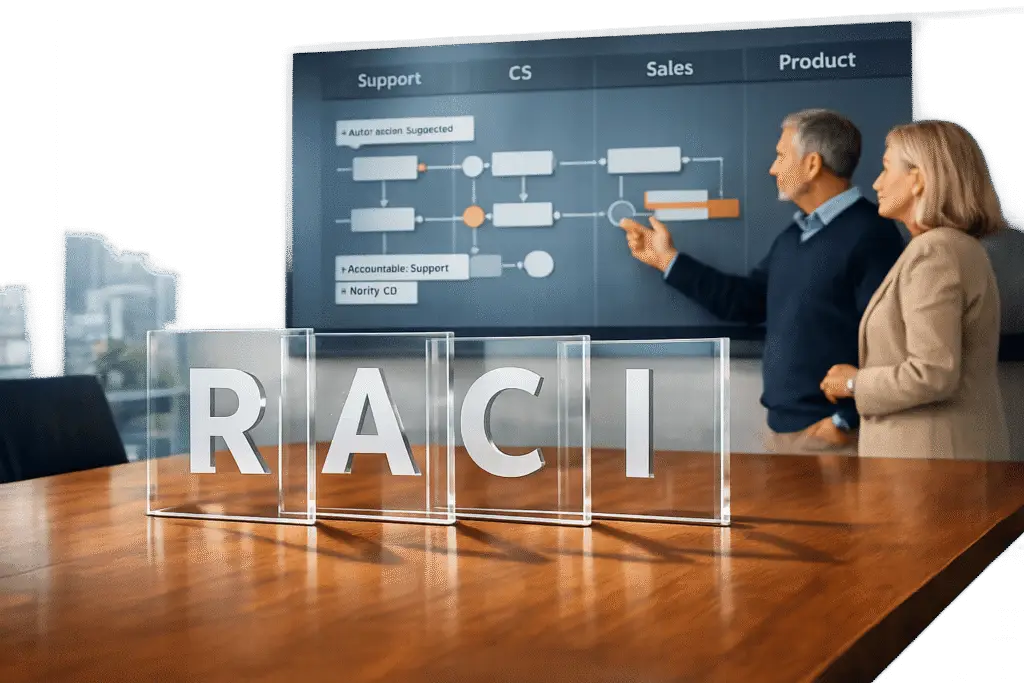
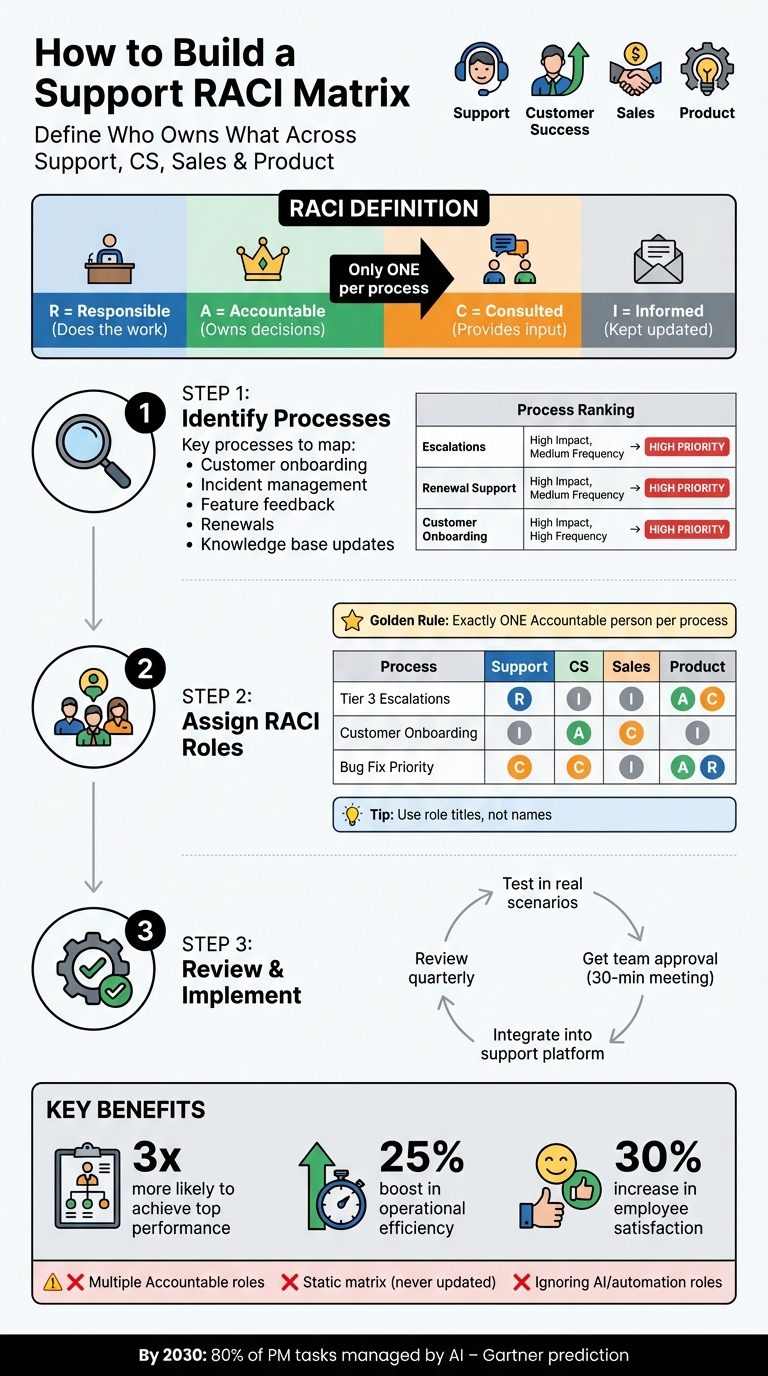
In customer-facing teams like Support, Customer Success, Sales, and Product, unclear roles often lead to delays, miscommunication, and duplicated efforts. A RACI matrix solves this by defining who is Responsible (does the work), Accountable (owns decisions), Consulted (provides input), and Informed (kept updated). It ensures every task has one clear owner and avoids confusion.
Key Takeaways:
- Map Processes: Identify critical workflows like onboarding, escalations, and feature rollouts.
- Assign Roles: Each process needs one "Accountable" person, while others are "Responsible", "Consulted", or "Informed."
- Use a Table: Organize roles by process and team for clarity.
- Review Regularly: Update the matrix quarterly or after team changes.
- Automate: Use tools to streamline updates and notifications.
By implementing a RACI matrix, teams improve accountability, reduce delays, and align better across departments.
RACI Matrix Implementation Guide for Support Teams
How to Use RACI Matrix Step by Step | Whiteboard Explainer
sbb-itb-e60d259
Step 1: Identify the Support Processes That Need Clear Ownership
The first step in creating a RACI matrix is pinpointing the processes that require clear accountability. These typically involve multiple teams or handoffs between departments, where unclear roles can lead to delays and customer dissatisfaction.
Start by mapping out the customer journey, from the point a deal closes to renewal. This journey often includes steps like transitioning new accounts from Sales to Customer Success, onboarding customers, driving product adoption, handling escalations, gathering feedback on features, and managing renewals. Each of these stages needs clearly defined ownership across teams like Support, CS, Sales, and Product.
"The magic of RACI is that it gives you a complete map of the CS plan for the entire customer journey, starting the moment you acquire a new customer and moving all the way through to renewal…" – Jeff Breunsbach, Director of Accounts, Customer Imperative
Technical support processes also demand precise ownership. Tasks such as incident detection, classification, and escalation between Tier 1, Tier 2, and Tier 3 teams can create bottlenecks when roles are unclear. Similarly, product launches and feature rollouts require coordination to ensure marketing aligns with technical capabilities and that support teams are ready to address customer inquiries.
List the Core Processes That Require Team Collaboration
Key processes often requiring collaboration include:
- Customer onboarding: Typically, Customer Success takes the lead, Support provides consultation, and Product offers input.
- Incident management: Support is primarily responsible, while Product is consulted for technical guidance.
- Feature feedback: Product is accountable for decisions, with Support and CS providing input.
- Renewals: Customer Success is usually responsible, with Sales accountable for final outcomes.
- Knowledge base updates: Support handles execution, while subject matter experts are consulted.
Without a RACI matrix, these processes can suffer from miscommunication, duplicated efforts, or dropped tasks.
Rank Processes by Impact and Frequency
To focus your RACI matrix effectively, rank processes based on their impact on revenue, customer experience, and risk of delays.
For instance, escalations and renewal risks should be high priorities because they directly affect customer retention. Product launches, while impactful, happen less frequently, whereas ticket triage and prioritization is a frequent process with lower individual impact. Prioritizing processes this way ensures your matrix addresses the most critical areas.
Here’s an example of how processes might be ranked:
| Process | Impact Level | Frequency | Priority Ranking |
|---|---|---|---|
| Escalations | High (affects retention) | Medium | High |
| Renewal Support | High (affects revenue) | Medium | High |
| Customer Onboarding | High (affects adoption) | High | High |
| Feature Feedback | Medium (affects roadmap) | High | Medium |
| Ticket Triage | Low (individual impact) | Very High | Medium |
| Knowledge Base Updates | Medium (affects efficiency) | Medium | Low |
This structured approach ensures that the most critical and frequent processes get the attention they need, reducing confusion and improving overall efficiency.
Step 2: Assign RACI Roles to Each Process
After identifying your key processes, the next step is assigning the four RACI roles: Responsible, Accountable, Consulted, and Informed. Here’s the golden rule: every process must have exactly one Accountable person. This eliminates confusion and ensures clear authority for decision-making.
- Responsible: This role belongs to those who execute the work. For instance, a Support Engineer diagnosing an issue is Responsible, while a Support Manager ensuring its resolution is Accountable.
- Consulted: This involves two-way communication with experts, such as involving Product for technical advice.
- Informed: This is one-way communication to keep stakeholders updated without requiring their active involvement.
"There is only one Accountable specified for each task or deliverable." – Nick Francis, Co-founder and Chairman, Help Scout
To avoid bottlenecks, keep the Consulted and Informed roles limited. If someone doesn’t need to provide active input, move them from Consulted to Informed. Use role titles (like "Support Tier 2" or "CSM Lead") instead of individual names to ensure the matrix remains relevant as team members change.
Build a RACI Table for Your Teams
Once roles are defined, use a RACI table to organize responsibilities. This table lists processes as rows and teams as columns, making ownership easy to identify. Each cell is marked with one of the four roles: R, A, C, or I. Here’s an example:
| Support Process | Support Team | Customer Success | Sales Team | Product Team |
|---|---|---|---|---|
| Handle Tier 3 Escalations | R | I | I | A/C |
| Onboard New Customer | I | A | C | I |
| Bug Fix Prioritization | C | C | I | A/R |
| Renewal Negotiation | I | R | A | I |
| Incident Detection | A/R | I | I | C |
Notice how each row has only one Accountable role. For example, in "Renewal Negotiation", Sales is Accountable for the outcome, while Customer Success handles the daily execution. This separation between strategic ownership (A) and tactical execution (R) is crucial. Review the table horizontally to ensure clear ownership for each process and vertically to avoid overloading any one team or role.
Before finalizing, get input from representatives across Support, Customer Success, Sales, and Product. This helps uncover and resolve disagreements about role expectations early, ensuring alignment.
Use AI Tools to Update Role Assignments Automatically
To keep your RACI matrix relevant in fast-changing environments, consider automating customer support workflows. Static RACI matrices can quickly become outdated as workflows evolve. AI-enabled platforms like Supportbench can integrate the RACI framework directly into your support workflows. Automation ensures timely updates, like sending reminders to adjust roles based on capacity shifts.
AI tools also allow team members to quickly find role-specific information. For instance, a Support Engineer can search the system to identify who’s Accountable for a specific escalation type, reducing delays and confusion.
Some platforms even adapt role assignments in real-time, based on changes like ticket surges or team availability. This dynamic approach ensures the right people are involved without requiring manual updates. By embedding the RACI framework into your support platform, you can maintain clarity and adapt as your operations evolve.
Step 3: Review, Test, and Put the RACI Matrix into Practice
Once your RACI table is complete, the next step is to review it thoroughly. This involves checking role assignments both vertically and horizontally to ensure everything aligns. Vertically, look for role overload – too many "R" or "A" assignments for a single individual could lead to inefficiencies. Horizontally, confirm that every task or process has exactly one "Accountable" role and at least one "Responsible" role. If you spot multiple "Accountable" roles for a single task, that’s a red flag that needs addressing.
"Developing RACI charts surfaces many organizational issues because it confronts the three elements of roles and responsibilities: Role Conception, Role Expectation, and Role Behavior." – Jeremiah Genest, Quality Professional
This review process ensures your matrix is ready for practical application.
Test the Matrix in Real Scenarios
Put your RACI matrix to the test by running it through actual workflows. For example, you could simulate how a Tier 3 escalation is approved or how a bug fix gets signed off using AI-powered ticket routing. These tests help identify gaps or areas where shadow ownership might exist. Also, take a close look at the "Consulted" list – if someone’s input isn’t critical, consider reassigning their role to "Informed" instead. This keeps things streamlined and avoids unnecessary delays.
Secure Team Approval
After refining the matrix, the next step is to get buy-in from all relevant teams. Schedule a short session – around 30 minutes – with team leads from departments like Support, Customer Success, Sales, and Product. During this meeting, go over the role definitions and ensure everyone is on the same page. Use this opportunity to clarify what each letter in the RACI matrix represents and invite immediate feedback. This is a great time to address any misunderstandings about roles. Ask direct questions like, "Are you comfortable with this role? Does it align with your job responsibilities?".
To avoid bottlenecks, set clear timelines for input. For example, allow "Consulted" roles 48–72 hours to provide feedback; if no response is received, the "Accountable" person moves forward by default. Once finalized, share the RACI matrix in accessible locations like Slack or your support platform. Plan regular check-ins, such as quarterly reviews, to ensure the matrix evolves alongside team changes or new hires.
Integrate the RACI Matrix into Your Support Platform
To make the RACI matrix truly effective, embed it within your support platform. Map each role to specific system actions: assign tasks with deadlines for "Responsible", require approvals from "Accountable", use comments for "Consulted", and automate notifications for "Informed". This approach keeps the matrix from becoming just another forgotten document.
Set up gating rules to enforce accountability. For instance, a bug fix marked "Verified" shouldn’t move to "Done" until the Product team formally signs off. Use workflow automation to send reminders to "Responsible" and "Accountable" roles 48 hours before deadlines. Additionally, create role-specific dashboards – like one highlighting "My A-approvals due this week" – to catch and address potential governance issues early on. By integrating the RACI matrix into your platform, it becomes a dynamic tool that evolves with your team’s needs and keeps everyone aligned.
Common Mistakes and How to Fix Them
Even the most well-meaning teams can stumble into pitfalls that lead to confusion and slowdowns. Let’s look at some common missteps and how to address them effectively.
Don’t Assign Multiple "Accountable" Roles to One Process
Every process needs just one person in the "Accountable" role. If you assign multiple "A" roles, you risk falling into the trap of "everyone and no one" taking ownership. When responsibility is spread too thin, it becomes unclear who has the final say, which often leads to delays and indecision.
Here’s the kicker: organizations with clearly defined roles and accountability are over three times more likely to achieve top-tier performance in organizational health.
"The golden rule of a RACI chart is that every task should have only one accountable (A) owner." – TeamGantt
For tasks requiring multiple contributors, assign them as "Responsible" and pick one person as "R Prime" (RP or R1) to take the lead. The sole "Accountable" person remains in charge of approvals and outcomes. For instance, if Support and Product teams are working together to resolve a bug, the Support Engineer might act as the "R Prime" for diagnosing the issue, while the Product Manager takes the "A" role to finalize the solution.
Include AI and Automation in Your Role Assignments
Don’t forget to assign roles to AI in customer support where they can make a difference. AI can take on "Responsible" tasks like ticket triage or sentiment analysis, freeing up your team for higher-value work. Many teams miss this opportunity to streamline their processes and improve efficiency.
For example, you could assign AI as "Responsible" for categorizing incoming tickets, while a human Support Lead remains "Accountable" for deciding on escalations. As AI capabilities grow, keep refining your assignments to ensure your processes stay ahead of the curve.
Update the RACI Matrix Regularly
Your RACI matrix isn’t a "set it and forget it" tool – it needs regular updates to stay useful. Plan quarterly reviews to ensure it reflects current realities, and make immediate adjustments when there are team changes, new stakeholders, or shifts in your product’s lifecycle.
During these reviews, evaluate whether "Consulted" roles are causing delays or if "Responsible" roles are overloaded. To future-proof your matrix, use role titles like "Support Lead" instead of individual names, so it stays relevant even as personnel changes.
"The RACI chart is a living document – it evolves with your team or product. Because of this, it’s important to revisit it every time you experience a change." – Raluca Piteiu-Apostol, Product Manager, LogRocket
Here’s a real-world example: a building materials distributor revamped its RACI matrix in 2025 to improve cross-department role clarity. The result? A 25% boost in operational efficiency and a 30% jump in employee satisfaction. Regular updates like these ensure your RACI matrix evolves alongside your team and goals.
Conclusion
Creating a support RACI matrix goes beyond just filling out a chart – it’s about bringing clarity to your team’s roles and responsibilities. By assigning one "Accountable" person per process, clearly defining "Responsible" roles, and separating "Consulted" and "Informed" responsibilities, you can eliminate confusion and delays across Support, CS, Sales, and Product teams.
When roles and accountability are clearly defined, organizations see better results. A well-implemented RACI framework can lead to noticeable improvements in operations and efficiency.
To maintain this momentum, your RACI matrix must be a living document. Regularly review and update it as your team evolves and roles shift. Keeping it current ensures it remains effective and actionable. As Nick Francis, Co-founder of Help Scout, wisely notes:
"Consensus is the enemy of progress, and while thoughtful discussion and debate are highly encouraged, most decisions should be made by one or two people".
Modern support operations benefit from AI-native platforms that can bring your RACI matrix to life. Tools like Supportbench can automate notifications for "Responsible" parties about deadlines and keep "Informed" stakeholders in the loop without manual effort. Gartner even predicts that by 2030, up to 80% of project management tasks could be managed by AI. For teams ready to embrace this shift, that future starts now.
Begin by focusing on the processes that matter most to your customers. Assign roles with precision, test your matrix in real-world scenarios, and integrate it into your daily operations. When everyone knows their role, your team can act swiftly, deliver better customer experiences, and avoid the setbacks caused by unclear accountability.
FAQs
How often should you update a RACI matrix?
A RACI matrix works best when it reflects the current dynamics of your team and project. That’s why it’s important to update it regularly, especially when there are shifts in team roles, responsibilities, or the scope of a project. Major organizational changes, new initiatives, or updated workflows are also key moments to revisit and adjust the matrix.
At the very least, schedule periodic reviews – quarterly or biannually can be a good starting point. This ensures the matrix stays accurate and continues to serve its purpose: providing clarity, improving accountability, and minimizing confusion across teams. Regular updates keep everyone aligned and on the same page.
What mistakes should I avoid when creating a RACI matrix?
When creating a RACI matrix, clarity and precision are essential. Vague role definitions can lead to confusion or overlapping responsibilities, so it’s important to define each role clearly. Also, try not to overload one person with too many tasks – this can cause bottlenecks and reduce accountability across the team.
Keep the number of roles marked as Responsible to a minimum. Having too many people in this category can muddy decision-making and slow progress. Make sure all relevant stakeholders are involved when developing the matrix to avoid missing key responsibilities or facing pushback later.
As projects evolve, update the RACI matrix regularly to reflect any changes. Clear communication and training are also crucial to ensure everyone fully understands their roles. Following these steps can help make the RACI matrix a practical tool for improving collaboration among teams like Support, CS, Sales, and Product.
How can AI improve the efficiency of a RACI matrix for support teams?
AI can make managing a RACI matrix much easier by automating tasks like assigning responsibilities, tracking progress, and keeping communication clear. For instance, AI tools can send real-time updates and notifications, ensuring everyone knows their roles and any changes – saving time and cutting down on manual work and mistakes.
On top of that, AI can dig into past data to spot issues like bottlenecks or overlapping duties. This helps teams fine-tune role assignments for better organization. Tools like chatbots add another layer of convenience, letting team members quickly check their tasks, get reminders, or update their progress without jumping through hoops.
By weaving AI into the mix, support teams can boost transparency, stay flexible, and hold everyone accountable. This creates smoother collaboration between key departments like Customer Success, Sales, and Product teams.
Related Blog Posts
- How do you merge two product support teams? A Tiger-Team cross-training playbook (Tier 1 vs Tier 2)
- How to Create Your First Support Ops Role (What to Hire For, When, and a 90-Day Plan)
- How do you run a weekly support ops review that drives real improvements?
- How do you decide what belongs in Support vs Customer Success?






