


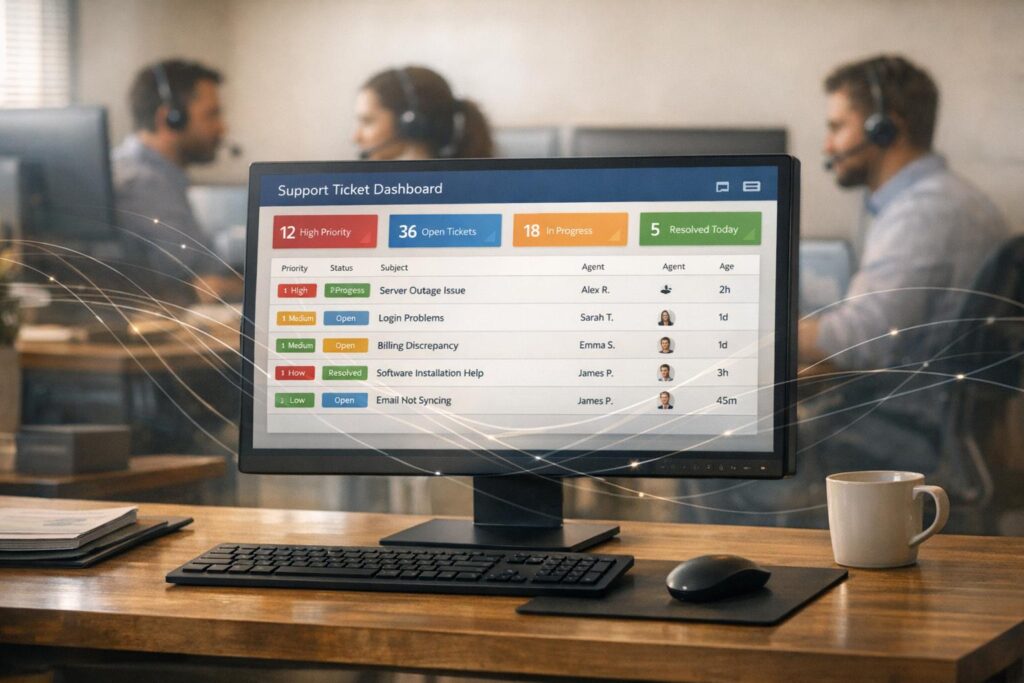
AI is reshaping how businesses handle support tickets, prioritizing them based on urgency, customer value, and business impact. Unlike outdated manual or rule-based systems, AI uses Natural Language Processing (NLP), sentiment analysis, and customer data to evaluate tickets dynamically. This ensures high-priority issues, like outages for top-tier clients, are addressed first, while routine tasks are handled efficiently.
Key benefits include:
- 45% reduction in manual sorting time.
- 30% faster resolution for critical cases.
- Over 90% accuracy in ticket routing and categorization.
- Reduced SLA breaches and operational costs by 25%.
AI automates prioritization by analyzing customer profiles, emotional cues, and business context in real-time. It continuously learns from historical data, adapting to evolving customer needs. Platforms like Supportbench integrate these capabilities, improving response times and customer satisfaction while cutting costs.
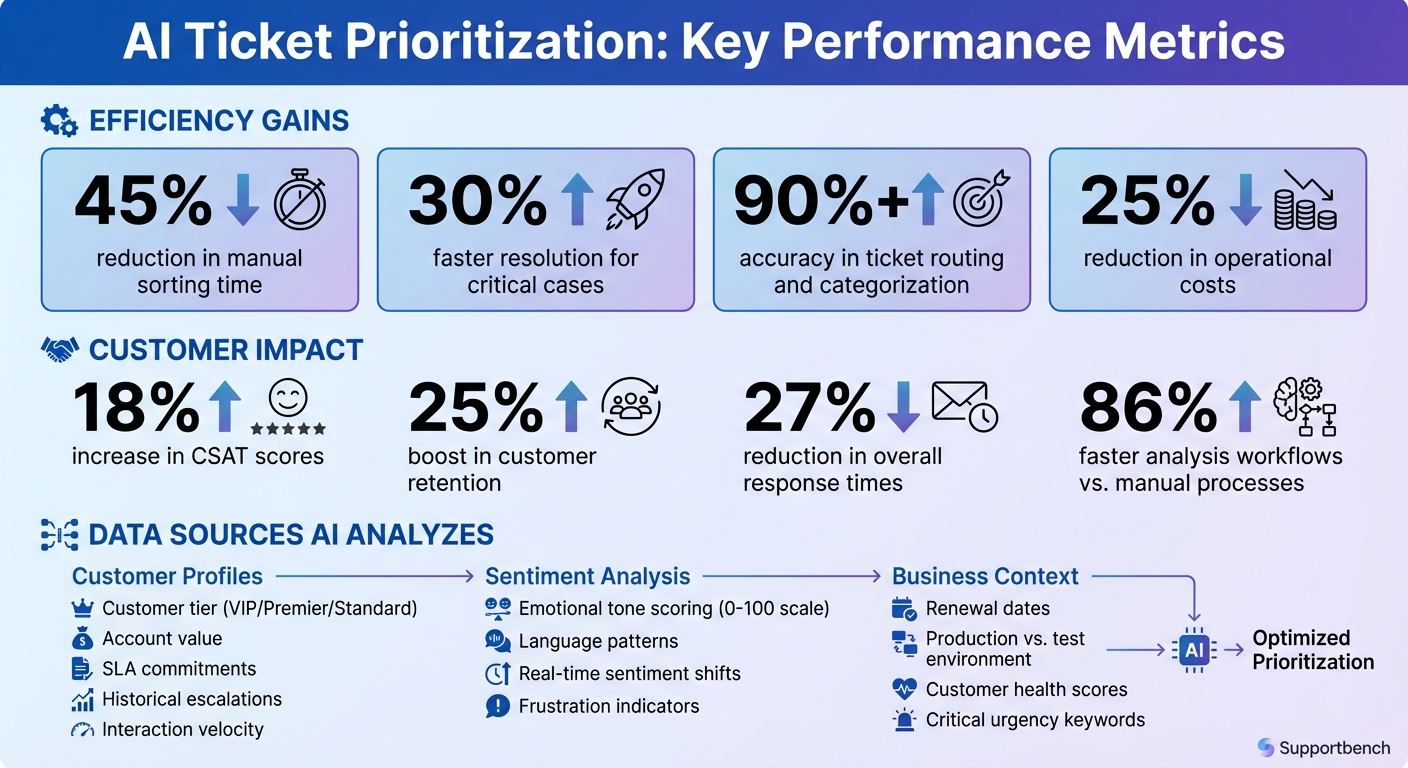
AI Ticket Prioritization Benefits and Performance Metrics
Data Points AI Uses to Predict Ticket Priority
AI doesn’t just depend on a single checkbox or field to determine which tickets need immediate attention. Instead, it evaluates a mix of customer profiles, emotional cues, and business-related factors to prioritize tickets effectively. This approach moves beyond the rigid keyword filters and static rules of older systems, creating a more dynamic and responsive prioritization process.
Customer Profiles and Historical Data
Understanding who is asking for help is the first step in smart ticket prioritization. By integrating with CRM systems, AI identifies key details like customer tier (e.g., VIP, Premier, Standard), account value, and specific SLA commitments tied to each profile. For instance, a Premier client with a two-hour response time guarantee will automatically take precedence over a Standard client’s routine inquiry. This isn’t about arbitrary rules – it’s about recognizing the contractual and revenue stakes.
AI also monitors interaction velocity – how frequently a customer reaches out and how quickly they follow up. A flurry of messages in quick succession can signal growing frustration, even if the word "urgent" isn’t explicitly used. Historical patterns also play a role. If a customer has a history of escalations or unresolved issues, the AI flags new tickets from them as higher risk, helping teams tackle potential problems before they escalate into churn risks.
| Data Category | Specific Data Points for AI Input | Impact on Prioritization |
|---|---|---|
| Account Profile | Customer Tier (VIP/Premier), Industry, Region | Prioritizes high-revenue or strategic accounts. |
| Contractual Data | SLA targets, Entitlement levels, Renewal dates | Ensures compliance with response time obligations. |
| Historical Data | Past ticket volume, Escalation frequency | Flags "at-risk" customers with recurring issues. |
| Behavioral Data | Interaction velocity, Follow-up frequency | Highlights real-time urgency and churn potential. |
Sentiment and Emotional Analysis
Many frustrated customers don’t label their issues as "urgent." That’s where AI steps in, using Natural Language Processing (NLP) to assess emotional tones like anger, frustration, or satisfaction directly from ticket content. Sentiment is often represented as a numerical score (e.g., 0-100) or categorized into labels like "Very Negative" or "Neutral." For example, a ticket with a sentiment score of 15 and language like "This is the third time I’ve asked" gets flagged for immediate attention – even if the customer mistakenly selected a lower priority.
What makes this system even smarter is its ability to reassess sentiment with every customer reply. If a tone shifts from neutral to negative after a delayed response, the AI automatically increases the ticket’s priority and may route it to a specialized escalation team. Businesses leveraging this kind of sentiment analysis have seen a 25% boost in customer retention, largely because they can address dissatisfaction before it leads to churn.
Impact Metrics and Business Context
AI doesn’t just ask, "Who is this customer?" or "How upset are they?" It also considers the broader business impact. Factors like upcoming renewal dates, whether the issue affects a production environment versus a test setup, or a declining customer health score can all elevate a ticket’s priority. For example, even a seemingly minor issue can take on greater urgency if the customer is within 30 days of their renewal period – small frustrations at critical moments can influence renewal decisions.
Additionally, AI identifies critical urgency keywords to speed up routing. By combining customer details, emotional cues, and business metrics, AI ensures that the tickets requiring the most attention – not just the ones making the most noise – are addressed first.
Machine Learning Models Behind Ticket Prioritization
Common Machine Learning Models Used
Ticket prioritization relies on various machine learning models like decision trees, neural networks, and classifiers, often enhanced by natural language processing (NLP) and sentiment analysis to gauge urgency and intent.
Ensemble methods combine multiple models to boost accuracy. For instance, Automated Machine Learning (AutoML) tools like TPOT streamline the process by selecting the best-performing model and fine-tuning its hyperparameters. Tools such as Featuretools play a key role by generating complex features from support data. For example, they might calculate the ratio of a ticket’s current age to the median resolution time for a specific customer. Additionally, these systems analyze both dynamic features (like how a ticket evolves over time) and pre-contextual features (such as historical customer data). This dual focus allows the AI to not only evaluate the current state of a ticket but also predict potential future outcomes. Proper training is essential to ensure these models keep up with the ever-changing challenges of customer support.
Training Models with Historical Case Data
To maintain accuracy, these models are trained using historical ticket data. This involves analyzing details such as timestamps, categories, resolutions, and escalation patterns to identify factors that indicate high-priority issues. For example, if tickets mentioning "Reporting V3" with negative sentiment have frequently escalated in the past, the model learns to flag similar patterns in the future.
Back-testing is used to validate the model by comparing its predictions against historical ticket outcomes. Once validated, the model continuously learns from resolved cases and agent feedback, which helps reduce false positives and refine its prioritization logic. A common practice is to retrain these models monthly using newly resolved tickets. This ensures the system stays accurate as customer behaviors and product features change over time. This iterative process has proven to deliver over 90% accuracy while cutting manual sorting time by 45%.
How AI Prioritizes Tickets in Real Time
From Ticket Ingestion to Queue Adjustment
When a ticket comes in, AI systems immediately get to work by scanning the subject line and message body to gauge its urgency. Using natural language processing (NLP), the system hunts for keywords like "outage", "system down", or "cannot log in", while also analyzing the message’s overall intent. At the same time, sentiment scoring assigns a numeric value to the customer’s frustration level. For instance, a score of -0.75 might indicate significant frustration, even if the message is politely worded but highlights a critical failure. To further refine priority, the system cross-references the ticket with CRM data, giving higher priority to premier-tier clients or accounts nearing renewal deadlines.
AI doesn’t stop there – it keeps an eye on how the case evolves. Quick follow-up messages from customers can signal increased urgency, prompting the system to adjust the ticket’s priority on the fly. This multifactor scoring method ensures that agent queues are updated in real time, pushing urgent issues to the top while routine requests stay in their place. The result? Companies using this method have reported resolving high-priority cases 30% faster and cutting overall response times by 27%.
How Supportbench Automates Prioritization
Supportbench takes ticket prioritization to the next level by automating it throughout the entire support process. Its AI-driven system evaluates tickets based on priority, topic, customer value, and even emotional tone as soon as they land. Unlike older, rule-based systems that might miss the mark when customers phrase things unexpectedly, Supportbench analyzes the complete context of each interaction to truly understand urgency.
The platform also features dynamic SLA (Service Level Agreement) adjustments, fine-tuning priorities based on the ticket’s content and customer details. This has allowed support teams to speed up analysis workflows by 86% compared to manual processes, all while maintaining accuracy rates above 90%.
sbb-itb-e60d259
Optimizing AI-Driven Ticket Prioritization
Performance Metrics to Track
To ensure your AI-driven ticket prioritization is effective, you need to monitor key performance metrics. Start with categorization accuracy, which measures how well tickets are tagged based on their actual content rather than just customer input. An accuracy rate of over 90% is a solid benchmark to aim for. Also, keep an eye on resolution time for high-priority cases – companies using AI prioritization often resolve critical issues 30% faster compared to manual processes. If your results fall short, it may be time to tweak your system.
Predictive scoring is another valuable tool. It can estimate metrics like First Contact Resolution (FCR), Customer Satisfaction (CSAT), and Customer Effort Scores (CES) before surveys are completed. This allows you to address potential issues proactively. Additionally, tracking sentiment scores on a scale from -1.0 to +1.0 can help identify rising customer frustration early on. For B2B environments, monitoring SLA adherence rates by customer tier and account-level health metrics gives you a clearer view of how AI prioritization impacts your most important clients.
| Metric Category | Specific KPIs to Track | AI Impact/Benefit |
|---|---|---|
| Speed | First Reply Time, Resolution Time, Sorting Time | Reduces manual triage by 45% |
| Quality | Predictive CSAT, Sentiment Score, QA Empathy Score | Identifies frustration before surveys |
| Accuracy | Categorization Accuracy, Routing Precision | Maintains >90% accuracy rates |
| B2B Strategic | Renewal-Aware SLA Adherence, Account Health | Prioritizes based on contract value/tier |
These metrics serve as a foundation for improving your AI system and ensuring it meets your operational goals.
Improving Model Accuracy Over Time
Once you’ve established performance benchmarks, the next step is refining your AI model to enhance accuracy and efficiency. This involves leveraging feedback and updating the system regularly.
A key part of this process is creating feedback loops. Encourage agents to flag misclassified tickets, and feed these corrections back into the model to improve its learning. For tickets where the AI shows low confidence, route them to human agents. This not only ensures better immediate outcomes but also generates training data for handling rare or complex cases.
Data quality is critical for ongoing improvement. Historical ticket data should be clean, properly tagged, and well-organized. Adding external context, such as customer tier or shifts in sentiment, can also enhance the AI’s decision-making. For example, a noticeable change from neutral to negative sentiment could automatically trigger priority escalation. Regularly review your system through weekly risk calibrations and monthly SLA evaluations to ensure the AI’s logic aligns with your business needs. Tools like Supportbench can simplify this process by automating updates based on your team’s actions, reducing the need for constant IT involvement.
Conclusion
AI-powered ticket prioritization is reshaping how businesses handle support requests, delivering measurable benefits like improved cost management, greater accuracy, and enhanced customer satisfaction. By automating the ticket triage process, AI reduces sorting time by 45%, slashes operational costs by 25%, and maintains an impressive accuracy rate of over 90%.
The customer experience also sees a notable boost. For instance, AI’s ability to manage high-risk tickets has been shown to increase CSAT scores by 18%. In B2B settings, where delays in resolving critical issues can jeopardize renewals and revenue, faster resolutions are essential. By directing tickets straight to the right specialists, AI minimizes delays, strengthens customer trust, and reinforces loyalty.
This shift is strongly supported by industry leaders:
"AI-powered ticket routing and prioritization represent a significant leap forward. By understanding the content and context of requests, AI enables more accurate categorization, smarter agent assignment, and context-aware prioritization that ensures critical issues receive immediate attention."
- Nooshin Alibhai, Founder and CEO of Supportbench
The most effective systems combine the efficiency of AI with the expertise of human agents. AI excels at clearing routine tasks and flagging urgent issues, while human agents step in for complex cases requiring empathy or nuanced judgment. Platforms like Supportbench integrate AI seamlessly into case management workflows, offering enterprise-grade prioritization without the hefty costs or complications tied to older systems.
In today’s AI-driven support landscape, adopting tools like Supportbench isn’t just beneficial – it’s essential for delivering faster, more reliable service while protecting profit margins and customer retention.
FAQs
How does AI determine ticket priority using sentiment analysis?
AI uses natural language processing (NLP) to evaluate the emotional tone in support tickets. By detecting feelings like frustration, urgency, or dissatisfaction in customer messages, it flags these tickets as high priority. This allows them to be escalated faster and addressed within tighter SLA deadlines.
By integrating sentiment analysis, support teams can tackle pressing issues more efficiently, boosting customer satisfaction and strengthening relationships.
How does AI use historical customer data to prioritize tickets?
AI uses historical customer data – like previous ticket urgency, resolution times, and interaction patterns – to spot trends and predict the priority of new tickets. By examining these established signals, AI can better determine which issues need immediate attention.
This method helps ensure that critical tickets are handled quickly, boosting response times, enhancing customer satisfaction, and simplifying support operations.
How can businesses evaluate the effectiveness of AI in prioritizing support tickets?
To gauge how well AI-driven ticket prioritization is working, businesses should focus on metrics that showcase both its accuracy and its impact on operations. Start by examining model accuracy – this includes metrics like precision (the percentage of high-priority tickets that genuinely required immediate attention), recall (how many urgent tickets were accurately identified), and overall accuracy. These figures establish how effectively the AI is categorizing tickets.
Operational performance is just as critical. Keep an eye on improvements such as quicker resolution times for high-priority issues, higher first-contact resolution (FCR) rates, and fewer instances of manual ticket re-prioritization. These measures indicate how well the system is streamlining processes and improving customer experiences.
Lastly, tie these metrics to financial outcomes to evaluate ROI. For example, fewer escalations, reduced overtime, and lower staffing needs can lead to noticeable cost savings. When AI enhances speed, precision, and customer satisfaction while cutting costs, it’s clear that the system is making a difference.
Related Blog Posts
- How to Measure Customer Support Performance in 2026: Key Metrics
- How AI Predicts Ticket Escalations
- Dynamic SLAs and Escalation Control with AI
- Dynamic SLAs with AI Prioritization
Evaluating help desks for a B2B team?
Supportbench is all-inclusive from $32 per agent per month, with migration and onboarding included. See pricing or book a 20-minute demo.






