



When comparing Zoho Desk and Supportbench for B2B support, the choice boils down to your business needs:
- Zoho Desk is a general-purpose helpdesk with tiered pricing starting at $14/user/month. It offers custom modules, a Sandbox for testing, and integrations with Zoho apps. However, advanced features like AI tools and dynamic workflows are locked behind the Enterprise plan ($40–$50/user/month). Its SLA tools are static, and managing multi-stakeholder accounts can involve manual setups.
- Supportbench is designed specifically for B2B. Priced at $32/user/month (all features included), it excels with dynamic SLAs, AI-driven case summaries, and a Customer 360 view. It simplifies managing long-term, complex cases and integrates seamlessly with tools like Salesforce and Slack.
Quick Comparison
| Feature | Zoho Desk | Supportbench |
|---|---|---|
| Pricing | Starts at $14/user/month; higher tiers for advanced features | $32/user/month (all-inclusive) |
| Primary Focus | General-purpose helpdesk | Tailored for B2B support |
| SLA Management | Static SLAs | Dynamic SLAs based on risk/renewals |
| AI Tools | Limited to higher tiers | Included for all users |
| Customer Context | Custom layouts; manual setup | Customer 360 view |
| Integration | Works well with Zoho Suite | Strong Salesforce, Slack sync |
For B2B teams handling complex accounts, Supportbench offers more tailored features and better long-term value. Zoho Desk is a fit for those already in the Zoho ecosystem but requires higher-tier plans for advanced needs.
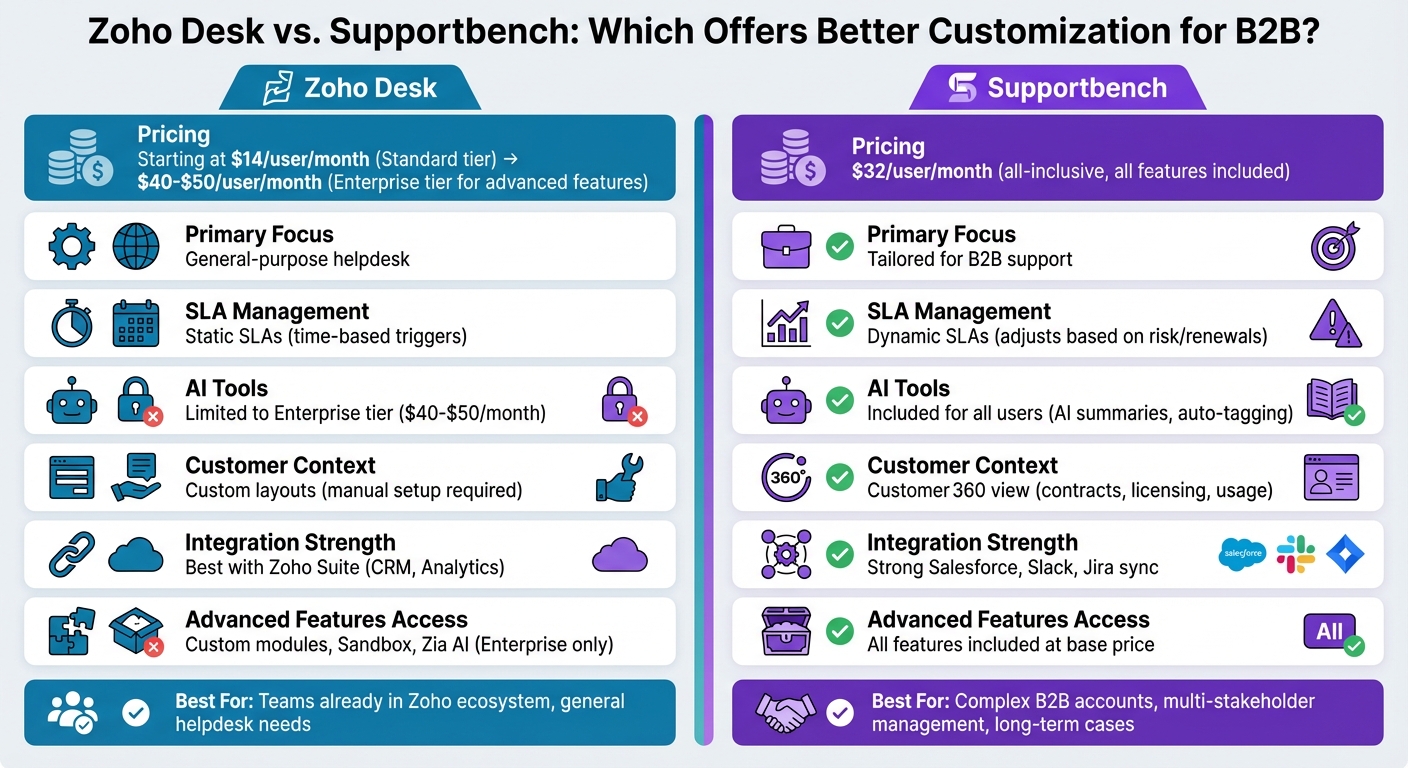
Zoho Desk vs Supportbench: B2B Customization Features and Pricing Comparison
Zoho Desk‘s Customization Capabilities
Custom Fields and Modules
Zoho Desk provides extensive customization options, particularly for users on the Enterprise tier. For instance, Enterprise users can create custom modules, such as an ‘Assets’ module, to store and manage B2B-specific data. These modules can be linked to other records through lookup fields, ensuring that all relevant information is easily accessible.
To maintain data accuracy, the platform supports RegEx validation, which enforces specific patterns for fields like serial numbers or product codes. Additionally, layouts can be customized for different departments, allowing teams to tailor the interface to their unique needs. These advanced capabilities, however, are exclusive to the Enterprise plan.
"Your customer service software should mirror the flexibility and dynamism of your business, and with custom modules, Zoho Desk achieves just that." – Tanisha Gupta, Zoho
Beyond these custom fields, Zoho Desk also simplifies workflows with its Blueprint automation, making it easier to manage complex B2B processes.
Workflow and Automation Rules
One of Zoho Desk’s standout features is its Blueprint tool. This visual workflow builder ensures that tickets move through predefined stages and actions, which is especially critical for B2B operations requiring strict compliance, approval chains, or technical escalations.
The platform also incorporates Zia AI, which predicts and auto-fills fields, categorizes tickets, and assigns them to the right agents based on historical data. However, Zia AI’s effectiveness depends on having a substantial amount of historical data, so smaller teams may need to rely on manual processes initially.
Time-based automation operates on 15-minute intervals rather than triggering actions instantly. While this is fine for many scenarios, it could be a drawback for high-priority B2B accounts that demand immediate responses. To mitigate risks, the Sandbox environment – available only on the Enterprise plan – allows teams to test workflows and automation before deploying them, minimizing errors that could affect important clients.
Integration and Reporting Options
Zoho Desk complements its customization and automation features with seamless integrations and detailed reporting tools. It integrates with other Zoho applications, such as its CRM and Analytics tools, creating a unified workspace for B2B teams. Features like parent-child ticketing allow complex issues to be broken into smaller, manageable sub-tickets, while custom functions (using Deluge scripts) enable integration with external tools, such as invoicing systems.
For real-time monitoring, the Radar app provides mobile dashboards to track key metrics. The platform also supports custom support plans and contracts, enabling teams to prioritize clients based on deal value or support tier. SLAs can be automated to align with these plans, but achieving a comprehensive Customer 360 view often requires additional integrations or custom configurations.
Where Zoho Desk Falls Short for B2B
While Zoho Desk offers a range of advanced features, there are notable limitations that could impact B2B users. One key issue is feature gating. Advanced tools like custom modules, AI-driven predictions, and the Sandbox environment are available only on the Enterprise tier, which costs significantly more than mid-tier plans. This makes it essential for businesses to carefully assess the total cost of ownership and ROI.
Another limitation is the platform’s static SLAs. While effective for time-based triggers, these SLAs don’t automatically adjust based on factors like renewal urgency or account risk without manual intervention. Managing multi-stakeholder accounts can also be cumbersome. Although role-based permissions are supported, configuring detailed access for different customer stakeholders can be complex. Additionally, cases with long email threads often lack a summarized view, forcing agents to manually piece together the conversation history – a task that becomes more difficult with larger, more complex accounts.
| Feature | Edition Required | Cost (Per Agent/Month) |
|---|---|---|
| Custom Modules | Enterprise | ~$40–$50 |
| Zia AI Predictions | Enterprise | ~$40–$50 |
| Sandbox Environment | Enterprise | ~$40–$50 |
| Blueprint Workflows | Professional & Enterprise | ~$23–$50 |
| Lookup Fields | Professional & Enterprise | ~$23–$50 |
sbb-itb-e60d259
Supportbench‘s Customization Capabilities
Dynamic Workflows and Custom Fields
Supportbench is designed to handle the complexities of B2B operations without relying on pricey add-ons or custom modules. Instead, it uses data tables to manage custom fields, allowing teams to track everything from multi-stakeholder details to infrastructure information, training records, and even login credentials – all directly within customer records. The best part? No coding required. These adaptable configurations lay the groundwork for an AI-driven approach that reduces the need for constant manual input.
AI-Powered Automation and Role-Based Permissions
Supportbench takes its flexibility a step further with AI-driven automation, streamlining repetitive tasks to save time and effort. Priced at $32 per agent per month (with all features included), the platform automates tasks like auto-tagging, assigning issue types, and prioritizing tickets. When a case is opened, the AI generates a summary of the case history and recent activities, giving agents immediate context to handle complex, ongoing issues.
The system also uses role-based portal access to tailor what different stakeholders can view. Whether it’s executives, end users, or technical contacts, each group sees only the tickets and information relevant to their role. This approach not only simplifies management for B2B accounts but also strengthens security.
Custom SLAs, Escalations, and Dashboards
Supportbench’s automated insights extend to SLA management, escalation paths, and real-time dashboards. For high-value accounts nearing renewal or showing risk signals, dynamic SLAs automatically adjust to ensure the right level of attention. escalation management is built right into the platform, allowing teams to configure escalation paths, add notes at each stage, and track progress through customizable dashboards.
The system also supports customer feedback surveys like NPS, CES, and CSAT, linking them directly to cases and feeding the data into customer health scoring. Fully customizable dashboards update in real time, helping teams monitor metrics like account health, renewal KPIs, and operational performance. The Customer 360 view further enhances usability by integrating contracts, licensing, and product usage into a single support environment.
Integration Options and Salesforce Sync
Supportbench syncs directly with Salesforce, giving agents instant access to critical data like licensing details, contracts, and account history – no system-hopping required. It also integrates with tools like Slack, Jira, and other B2B essentials, while offering an easy-to-use API for custom integrations. This ensures a streamlined, connected support ecosystem.
Designed for support teams, Supportbench is easy to configure and maintain without needing dedicated technical resources. Implementation is quick, often taking just weeks instead of months, and free migration and onboarding make the transition from other helpdesks seamless.
Zoho Desk vs. Supportbench: Direct Comparison
Feature Comparison Table
When it comes to customization for complex B2B support operations, there are clear differences between Zoho Desk and Supportbench. Zoho Desk provides customizable layouts and a sandbox environment to test changes before implementation. On the other hand, Supportbench is tailored for managing long-running cases and multi-stakeholder accounts, offering a complete account-level view for better context.
Pricing is another key differentiator. Supportbench starts at $32 per agent per month with an "everything included" approach, simplifying cost management. Zoho Desk uses a tiered pricing model, which increases as you add modules or rebranding options, making it a better fit for teams already using Zoho’s ecosystem. Here’s how the two platforms compare:
| Capability | Zoho Desk | Supportbench |
|---|---|---|
| Primary Design Goal | Customizable helpdesk for branding and general use | Built for complex B2B accounts and extended cases |
| Workflow Testing | Sandbox for testing updates | Live governance with AI-driven summaries |
| SLA Management | Standard ticket SLAs with automated escalations | Adaptive SLAs based on renewals and risk indicators |
| Account Context | Custom fields and layouts by department | Customer 360 view (contracts, licensing, usage) |
| Integration Strength | Works seamlessly with Zoho Suite (CRM, Analytics) | Unified B2B context with strong API syncing |
| Reporting Focus | Tracks team productivity and agent metrics | Focuses on retention, customer health, and churn prevention |
| Automation Depth | AI-powered routing and tagging | AI-driven triage, summaries, and routing |
| B2B Scalability | Handles moderate scaling but can be rigid at higher volumes | Built to scale for complex, long-term cases |
Zoho Desk is a solid choice for teams already invested in Zoho’s ecosystem, offering affordable plans with tiered options. However, its customization capabilities may fall short for enterprise-level B2B operations. Supportbench, with its focus on dynamic SLAs, detailed account context, and scalability, is purpose-built for businesses managing intricate, long-term customer relationships.
Real B2B Scenarios: Customization in Practice
Managing Multi-Stakeholder Accounts
B2B accounts are rarely straightforward. They typically involve multiple stakeholders, such as IT managers, procurement leads, and executives, each with their own priorities and access needs.
Supportbench simplifies this complexity with role-based portal access and a Customer 360 view. This approach consolidates contracts, licensing information, and product usage history into one centralized platform. For example, IT managers can focus on technical case details, while executives can quickly review high-level account health metrics. These tools highlight the growing demand for flexible, integrated support systems in the B2B space.
On the other hand, Zoho Desk offers customizable layouts tailored to different departments. However, ensuring seamless visibility across teams often requires more manual configuration.
Another major challenge in B2B support is maintaining context for issues that extend over weeks or even months.
Long-Running Issue Management
B2B products and services frequently lead to cases that evolve over long periods, accumulating numerous email threads, technical discussions, and updates. Without proper tools, new agents may waste valuable time piecing together the case history before they can respond effectively.
Supportbench tackles this with AI-powered features that auto-summarize case histories. It also dynamically adjusts SLAs based on renewal signals, allowing agents to quickly understand ongoing issues and prioritize accounts that matter most.
Zoho Desk, by contrast, relies on tools like ticket templates and custom statuses to manage extended cases. However, agents often need to manually sift through past interactions to get the full picture. To minimize disruptions when updating workflows for these cases, Zoho Desk provides a Sandbox environment where teams can test changes before rolling them out.
Beyond resolving immediate issues, effective support systems must also focus on customer retention and renewal strategies.
Renewal-Focused Reporting and SLAs
Supportbench stands out with dynamic SLAs that adjust automatically based on renewal dates or risk signals – no manual input required. This proactive approach integrates contract timelines and account health metrics directly into the workflow, enabling teams to act on renewal opportunities before they become problems. Tools like health scoring and sentiment analysis further enhance the ability to flag accounts at risk of churn.
In comparison, Zoho Desk requires manual setup for renewal-focused SLAs. Teams need to create custom fields to track contract end dates or subscription levels and build dashboards to monitor this data. However, these SLAs don’t automatically adapt to changing conditions, leaving more room for oversight.
7 Best Helpdesk Software & Ticketing Systems for 2025 (Ranked by Best Use Cases)
Which Platform Wins for B2B Customization?
For teams that need advanced B2B customization, Supportbench emerges as a tailored solution. While Zoho Desk provides useful tools for teams already using the Zoho suite – like its Blueprint feature for visual workflow design and a sandbox for testing – it demands significant manual setup to handle complex B2B requirements. Zoho Desk’s features can address general B2B needs, but they often fall short when it comes to automating intricate, long-term cases. Moreover, advanced tools such as AI-powered insights are locked behind higher-tier plans, with Enterprise pricing starting around $40–$50 per agent per month.
Supportbench, on the other hand, is designed to tackle these challenges directly. Its dynamic SLAs adjust automatically based on factors like renewal dates or risk indicators, eliminating the need for constant manual updates. The platform leverages AI to summarize lengthy email threads, create knowledge base articles from resolved cases, and provide instant context for ongoing issues. Features like role-based portal access and the Customer 360 view – which integrates contracts, licensing, and product usage directly into the ticket interface – streamline workflows without requiring third-party add-ons or custom integrations.
Pricing is another area where the two platforms diverge. Supportbench offers an all-inclusive rate of $32 per agent per month, compared to Zoho Desk’s tiered model, which can exceed $40 per agent when advanced features are included.
For teams managing high-value accounts with long-term technical issues and multiple stakeholders, Supportbench provides a more focused solution. Its AI-driven tools, automation geared toward renewals, and unified customer data make it particularly well-suited for industries like manufacturing and logistics. These features, combined with its straightforward pricing, highlight why Supportbench is a better fit for evolving B2B needs.
FAQs
How do dynamic SLAs work in B2B support?
Dynamic SLAs in B2B support are agreements designed to adjust based on the unique details of each customer interaction. With Supportbench, teams can tailor SLA workflows to align with factors such as customer contracts, ticket attributes, or the level of support required. These SLAs automatically adapt, ensuring teams stay on top of compliance with real-time tracking and alerts. The result? A more personalized and efficient support experience tailored to the complexities of B2B relationships.
What data should go into a Customer 360 view?
A Customer 360 view brings together essential data to provide a complete picture of your customer. This includes contact details, account information, support history, and communication logs.
For B2B businesses, additional details like renewal dates, SLA agreements, escalation history, and customer health scores are crucial. It’s also important to track multi-stakeholder account data, such as roles and permissions, to understand the dynamics of the customer’s organization.
By consolidating this information, businesses can deliver personalized support, address issues proactively, and build stronger, long-term relationships with their customers.
How can AI reduce time spent on long email threads?
AI simplifies communication by automating responses, identifying and prioritizing key issues, and providing agents with real-time insights. This minimizes the need for manual follow-ups and makes handling lengthy email threads much more efficient.
Related Blog Posts
- Zendesk vs Freshdesk vs Supportbench: Which Support Platform is Better and for who in 2026?
- Which helpdesk tools are built outside the United States (UK/EU/Canada/Australia)?
- HappyFox alternatives for B2B: what platforms support complex workflows best?
- Freshdesk vs. Supportbench: Why B2B Teams Outgrow Freshdesk’s Ticket Model
Evaluating help desks for a B2B team?
Supportbench is all-inclusive from $32 per agent per month, with migration and onboarding included. See pricing or book a 20-minute demo.






