



Scaling customer support without adding more staff is possible. By embracing AI and automation, businesses can improve efficiency, reduce costs, and meet growing customer demands. Here’s how:
- AI Triage: Automates ticket sorting and routing, saving time and cutting costs by 50%.
- AI Self-Service: Handles up to 70% of routine requests, reducing ticket volume significantly.
- Agent Copilots: Boost agent productivity by automating repetitive tasks and providing real-time suggestions.
- Automated Knowledge Base Updates: Keeps resources current with minimal effort, preventing repetitive tickets.
- Unified Support Channels: Combines tools into one platform, improving efficiency and reducing app-switching time.
- Predictive Analytics: Identifies and addresses issues before they escalate, reducing incident rates.
- Dynamic SLAs and Workflows: Prioritizes tickets based on urgency and customer value.
- Track Metrics: Monitors performance to optimize operations and increase efficiency.
- AI-Native Roles: Redesigns team roles to focus on complex, high-value interactions.
These strategies allow support teams to handle more tickets, improve customer satisfaction, and reduce costs without expanding headcount. Platforms like Supportbench integrate these tools, making scaling achievable for businesses of all sizes.
1. Use AI Triage to Handle Volume Spikes
Automation and AI Efficiency
Relying on manual triage can seriously slow things down. On average, agents spend 30–45 minutes sorting and categorizing incoming tickets. Now, imagine a sudden surge in ticket volume – maybe from a product launch, a service outage, or a seasonal rush. Those delays can quickly snowball into a backlog. AI triage steps in to solve this by analyzing ticket content in just seconds. It automatically categorizes requests based on topic, urgency, and customer value. By scanning keywords, sentiment, and context, AI determines the type and priority of each ticket and routes it to the right agent. This streamlined process dramatically improves efficiency.
Impact on Agent Productivity
With automated categorization and routing, agents can handle between 12 to 23 tickets daily – an impressive 92% increase in productivity. Plus, intelligent routing reduces misassignments by up to 35%, ensuring that critical issues land with the most experienced staff, where they’ll get the prompt attention they deserve.
Cost-Effectiveness in Scaling Operations
Beyond boosting efficiency, AI triage can also lead to substantial cost savings. By implementing AI, companies can cut the average cost per ticket in half – from $22 to $11. A great example is Jackpots.ch, an online casino that used AI triage across four languages during a period of high demand. They managed the surge without tripling their team size, ultimately saving hundreds of thousands of dollars in hiring costs.
Supportbench takes this a step further by embedding AI to identify ticket priority, predict SLA breaches, and route cases based on customer value and agent expertise. The system ensures high-value accounts and frustrated customers are prioritized for immediate attention, while routine inquiries are queued or redirected efficiently.
2. Deploy AI Self-Service to Deflect Repetitive Requests
Automation and AI Efficiency
Did you know that 81% of customers attempt to solve their issues using self-service before reaching out to support teams? AI-powered self-service tools meet this demand by leveraging natural language processing (NLP) to understand user intent and context. Unlike static FAQs, these tools provide dynamic, personalized responses. They’re also integrated with backend systems like order management and CRMs, making it easy to handle routine tasks such as password resets or tracking orders. When the AI encounters a complex issue it can’t resolve, it seamlessly hands off the case to a human agent – complete with all the necessary context – avoiding the dreaded “endless bot loop” frustration for customers. This approach not only meets customer expectations but also significantly reduces the volume of incoming requests.
Cutting Down Ticket Volume
AI self-service tools are incredibly effective at tackling repetitive tasks, resolving up to 70% of customer interactions instantly. This makes them a powerful first layer of support, letting human agents focus on more complex issues. For example, Motel Rocks implemented AI chatbots to address routine FAQs and achieved a 43% ticket deflection rate, slashing their overall ticket volume by 50%. Similarly, DataCamp improved its documentation to make it more accessible and saw a 66% drop in incoming support tickets. These reductions not only streamline operations but also allow support teams to dedicate more energy to high-value interactions.
Boosting Agent Productivity
When AI takes over repetitive Tier 1 queries, support agents can focus on more nuanced and challenging cases that require empathy and critical thinking. This shift enhances productivity and allows teams to handle higher workloads without increasing staff. For instance, Buffer redesigned its help center to proactively suggest relevant articles before customers could submit a ticket, resulting in a 26% reduction in ticket volume. By offloading routine tasks, agents can work more efficiently and deliver better outcomes for customers.
Scaling Without Breaking the Bank
AI self-service isn’t just about convenience – it’s also a game-changer for scaling operations cost-effectively. Traditional support models require hiring more agents as ticket volumes rise, but AI breaks this cycle. It manages spikes in demand without needing proportional staffing increases. The financial impact is impressive: automating and streamlining communications can cut customer service operating costs by up to 25%. For example, Vodafone UK‘s AI assistant, TOBi, handles over 1 million interactions every month and resolves around 70% of issues on the first try. IBM saw a 40% reduction in call center traffic after deploying Watson Assistant.
Supportbench incorporates these AI self-service tools directly into its platform, enabling businesses to scale their support operations efficiently. The system doesn’t just handle customer inquiries – it also updates itself by creating new knowledge base articles from resolved cases, ensuring that self-service resources stay up-to-date without requiring additional manual work. It’s a smart, scalable way to keep both customers and support teams happy.
3. Use Agent Copilots to Increase Productivity Per Agent
Automation and AI Efficiency
Agent copilots take the efficiency of AI self-service to the next level by directly assisting support agents in real time. Think of them as virtual sidekicks that offer context-aware support. They can suggest the best next steps, pull relevant details from knowledge bases or order management systems, and present all of this information right in the agent’s workspace. On top of that, they handle repetitive tasks like summarizing ticket histories, drafting responses, and categorizing tickets. By automating these time-consuming activities, agents can focus more on solving customer issues rather than drowning in administrative work.
Impact on Agent Productivity
The productivity boost from integrating AI into ticketing systems is hard to ignore. With agent copilots, teams can handle tickets faster and more efficiently. In fact, agents using these tools resolve interactions 38% quicker, and entire teams are able to manage three times the ticket volume compared to those without AI assistance. These copilots don’t just speed things up – they also deliver tailored support by providing timely, relevant information, all without requiring additional training for agents.
Cost-Effectiveness in Scaling Operations
Agent copilots completely change the game when it comes to scaling customer support. Traditionally, handling more tickets meant hiring more agents. But with AI, that’s no longer the case. These tools enable existing teams to handle increasing workloads, reducing the need for new hires by 45.8%. They also cut the time agents spend on admin tasks by 40%, significantly lowering per-ticket costs. For example, with U.S.-based support agents earning around $21.65 per hour (or about $45,000 annually before benefits), these efficiencies lead to substantial savings. It’s no surprise that 90% of CX leaders who have fully embraced AI report seeing a positive return on investment. This approach doesn’t just save money – it transforms customer support into a growth driver for the business.
Enhancing Supportbench‘s Platform with AI Copilots
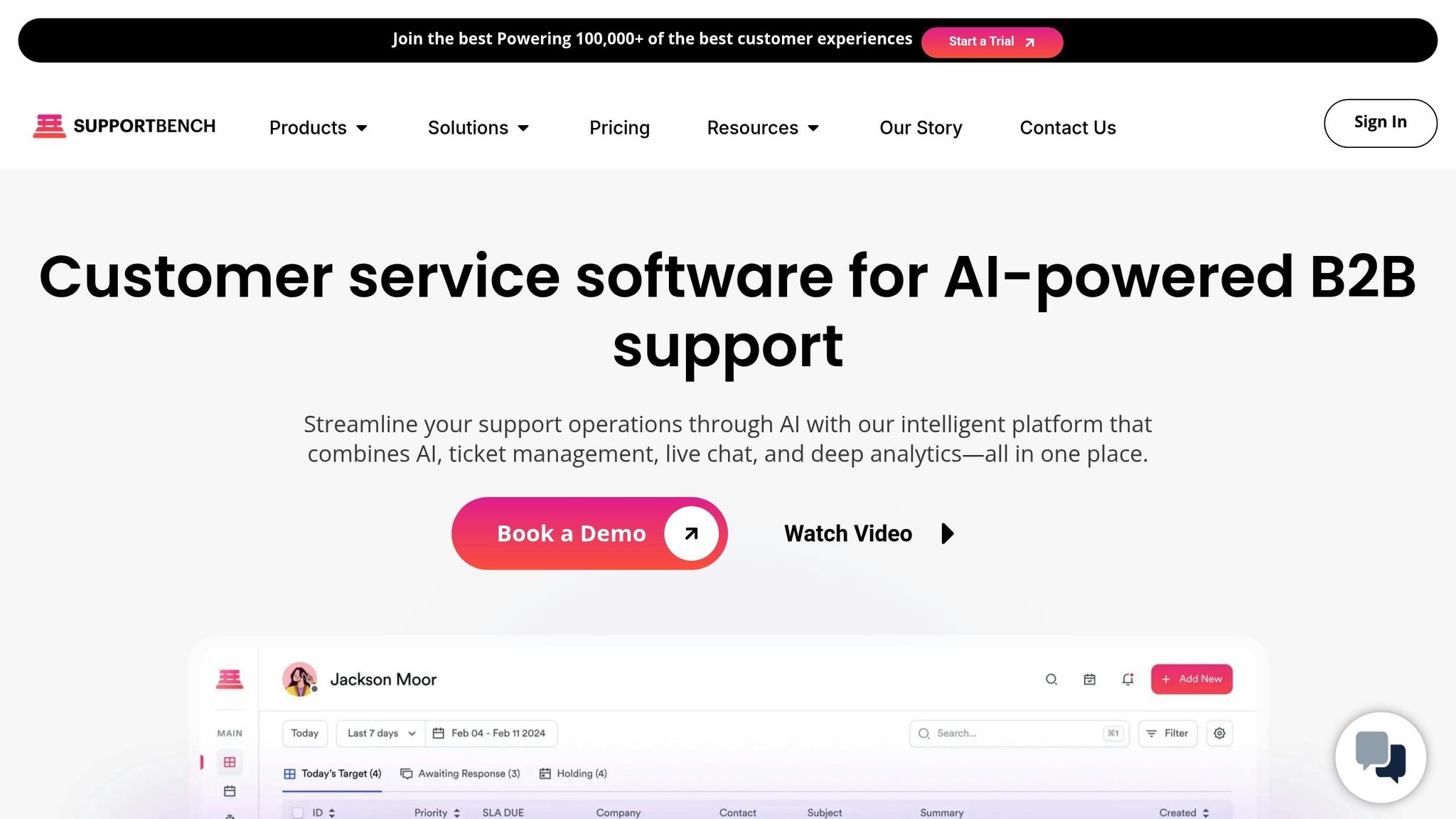
Supportbench integrates AI copilots directly into its platform, giving agents access to tools like suggested responses, case summaries, and relevant knowledge base articles – all without needing to switch between systems. These copilots analyze past cases and search connected knowledge bases to surface the best solutions, helping agents resolve issues more quickly. They can even draft responses based on historical data, allowing agents to review and send instead of starting from scratch. By combining these capabilities, Supportbench enables scalable, cost-effective support that doesn’t require increasing the size of the team.
4. Automate Knowledge Base Creation and Updates
Automation and AI Efficiency
Keeping a knowledge base current can be a major time drain. While support agents spend their days resolving issues, manually documenting these solutions eats into their productivity. This is where AI steps in to simplify the process. With modern tools, resolved tickets can be turned into knowledge base articles almost instantly – just one click to organize, summarize, and tag the content automatically. AI also pinpoints "knowledge gaps" by analyzing past conversations, ensuring your knowledge base evolves to address customer needs. This approach not only saves time but also equips your support system to handle similar issues in the future, reducing the need for repeated tickets.
Ability to Reduce Ticket Volume
The impact on ticket volume is impressive. AI-powered self-service tools can handle up to 70% of customer inquiries immediately. Companies have seen this in action. For example, Buffer revamped its help center to suggest relevant articles before customers could submit a ticket, cutting incoming requests by 26%. DataCamp also saw a 66% drop in support tickets after improving its documentation and self-service options. A well-maintained knowledge base becomes the first line of defense, stopping tickets from being created in the first place. This proactive approach not only lightens the workload for agents but also ensures customers find solutions faster.
Impact on Agent Productivity
Automating documentation frees agents from the tedious task of writing articles, letting them focus on solving customer problems. AI tools keep content up to date by flagging outdated articles that could harm customer trust. When integrated into an agent’s workspace, these tools can even suggest responses drawn from existing resources, cutting down research time and speeding up resolutions. The result? Agents can work more efficiently and focus their energy where it matters most.
Cost-Effectiveness in Scaling Operations
Automation also brings major cost savings. By reducing the manual effort needed to maintain a knowledge base, companies can avoid increasing staff numbers as ticket volumes grow. In fact, businesses using smart deflection strategies have reported up to 45.8% headcount avoidance. Instead of hiring dedicated documentation teams, agents can create articles directly from resolved cases with minimal effort. Platforms like Supportbench make this seamless by embedding AI-driven knowledge management into their systems, enabling teams to update content effortlessly, identify content gaps, and ensure documentation stays current – all without extra resources. This streamlined approach not only cuts costs but also improves service quality.
5. Consolidate Support Channels into One Platform
Impact on Agent Productivity
Switching between multiple communication tools can severely drain agent productivity. On average, agents toggle between apps nearly 1,200 times daily, leading to a 9% loss in work time. Over a year, that adds up to about five full working weeks per employee. When agents have to jump from one dashboard to another to find customer order details or past interactions, every ticket takes longer to resolve.
A unified platform eliminates this inefficiency by bringing all channels together in one streamlined dashboard. Agents can instantly access the full customer journey – purchase history, previous interactions, and the current issue – all on a single screen. This approach drastically reduces the need for manual lookups, with companies experiencing a 40% drop in administrative tasks and resolving tickets 52% faster. By cutting out the time lost to constant app-switching, unifying support channels leads to smoother workflows and better overall efficiency.
Automation and AI Efficiency
AI works best when it has access to a complete view of the customer across all communication channels. A centralized platform allows AI to analyze ticket content, customer history, and sentiment seamlessly, enabling it to route issues to the most qualified agent in real time. When AI reaches its limits, a unified system ensures smooth handoffs by providing agents with the full conversation history, avoiding customer frustration.
Businesses using AI and automation within a unified platform achieve a self-service ratio 2.4 times higher than those relying on older, disconnected tools. This not only speeds up response times but also lowers operational costs over time.
Cost-Effectiveness in Scaling Operations
Combining support channels into one platform translates directly into cost savings by increasing agent efficiency without requiring additional staff. While traditional phone support limits agents to one interaction at a time, messaging channels allow them to manage 3–6 live chats or even 10–20 asynchronous threads simultaneously.
A great example comes from Jackpots.ch (Grand Casino Baden), a Swiss online casino. In 2021, they faced a surge in customer inquiries and implemented a multilingual support system through a unified platform. By consolidating support for English, German, French, and Italian into a single process, they avoided the need to triple their team size. This move saved them hundreds of thousands of dollars in hiring and training costs while providing 24/7 multilingual support.
Supportbench takes this concept further by integrating channel consolidation with advanced AI capabilities. The platform combines automated triage, intelligent routing, and unified case management into one seamless system. Unlike legacy helpdesks that rely on fragmented tools and costly add-ons, Supportbench offers B2B support teams a more efficient way to handle complex, long-running cases while keeping costs predictable as demand increases.
6. Use Predictive Analytics to Work Ahead of Issues
Cutting Down Ticket Volume
Building on the earlier discussion of AI triage and agent copilots, predictive analytics takes a proactive approach to customer support. Instead of waiting for issues to be reported, it identifies potential problems before they escalate. For instance, if a user struggles with a feature or a system configuration shows signs of failure, predictive tools can step in. They might trigger in-app guidance or send troubleshooting tips directly to the user, preventing the issue from becoming a bigger problem. This kind of early intervention helps teams prioritize resources and address concerns more efficiently.
One example of this in action is a case where predictive AI flagged configuration risks, leading to a 30%-40% reduction in incidents and cutting downtime by 40%. Beyond this, predictive models excel at spotting patterns across multiple users. If a bug or outage begins to affect several customers, the system quickly identifies the trend, allowing teams to fix the root cause before it turns into a flood of support tickets.
Streamlining with Automation and AI
Once an issue is flagged, predictive analytics fine-tunes workflows to stop it from escalating. These models analyze data like customer sentiment, past interactions, and response times to predict outcomes. They can even estimate customer satisfaction (CSAT) and effort levels (CES) ahead of time, giving support teams the chance to intervene before dissatisfaction grows.
Predictive tools also help prioritize tickets based on factors like severity, customer value, or the likelihood of churn. For example, high-value accounts showing signs of frustration can be routed to senior agents immediately, while simpler issues are handled through automated channels. This ensures that resources are focused where they matter most.
Scaling Support Without Breaking the Bank
Adding predictive analytics to support operations allows teams to scale efficiently without needing to hire more staff. The cost savings achieved through automation and AI triage are amplified by predictive capabilities, making operations more efficient overall.
Supportbench, for instance, integrates predictive analytics directly into its case management system. This means there’s no need for extra tools or pricey add-ons. The platform predicts escalations, monitors first-contact resolution rates, and generates customer health scores – all within a single system. Unlike older platforms that charge extra for predictive features, Supportbench includes them as standard, enabling B2B teams to grow their support operations without increasing costs or headcount.
sbb-itb-e60d259
7. Standardize Processes with Dynamic SLAs and Workflows
Automation and AI Efficiency
Dynamic SLAs take the efficiency of AI triage and self-service to the next level by adapting responses based on real-time data. Unlike static SLAs, which process tickets in a fixed order, dynamic SLAs leverage Natural Language Processing (NLP) and predictive models to evaluate ticket content, customer sentiment, and account value as they come in. This means a frustrated, high-value customer’s ticket automatically jumps to the top of the queue, while routine inquiries from low-priority accounts are handled in the standard order.
Automation plays a huge role here. Incoming tickets are instantly categorized and tagged, then routed to the most qualified agent based on factors like expertise, language, or past interactions. The result? Near-instant processing. Time-sensitive escalations are also automated, with the system monitoring SLA compliance and notifying senior staff before deadlines are breached, ensuring issues are resolved proactively. These streamlined processes not only enhance customer satisfaction but also set agents up for success.
Impact on Agent Productivity
Dynamic workflows can supercharge agent productivity. For example, Jackpots.ch managed to maintain 24/7 multilingual support during a surge in demand without adding to their team, saving significantly on hiring costs.
Standardized macros simplify repetitive tasks, enabling agents to tag, email, and close tickets with just one click. AI-driven ticketing systems have been shown to increase the number of tickets handled per agent from 12 to 23 per day – a 92% productivity increase. Additionally, integrating tools like order and shipping data directly into the helpdesk minimizes context switching, which typically eats up 9% of an employee’s time – equivalent to about five weeks annually.
Cost-Effectiveness in Scaling Operations
Smart workflows don’t just improve efficiency – they also cut costs. Automating and standardizing communication can reduce overall customer service operating expenses by as much as 25%.
Supportbench takes this a step further by embedding dynamic SLAs and intelligent workflows directly into its platform, without the need for costly add-ons or integrations. The system automatically adjusts ticket priorities based on customer health scores, renewal dates, and sentiment analysis, ensuring high-value accounts receive immediate attention. Unlike older platforms that charge extra for workflow automation, Supportbench includes these capabilities as part of its core offering, allowing B2B teams to scale operations without increasing headcount or ballooning costs.
8. Track Key Metrics and Optimize for Results
Automation and AI Efficiency
To measure the success of your AI-powered support initiatives, tracking key metrics is non-negotiable. One of the most important metrics to monitor is the deflection rate – the percentage of customer inquiries resolved without human intervention. For effective scaling, teams should aim for a deflection rate between 40% and 70%, with a goal of achieving a 3:1 ratio of self-service resolutions to ticket submissions. At the same time, bot accuracy needs to exceed 85% to avoid frustrating customers or causing repeat inquiries.
Modern platforms also provide tools like predictive CSAT and predictive Customer Effort Score (CES), which analyze customer interaction patterns to estimate satisfaction levels before surveys are completed. These insights allow teams to step in proactively and fine-tune their approach, ensuring better outcomes. Together, these metrics create a clear picture of how AI impacts both agent performance and overall operational efficiency.
Impact on Agent Productivity
When it comes to boosting productivity, tracking the right metrics can show where AI makes the biggest difference. For instance, AI ticketing systems can enable agents to handle 92% more tickets per day, increasing their capacity from 12 to 23 tickets daily. Additionally, keeping an eye on Average Handling Time (AHT) and First Contact Resolution (FCR) rates is crucial. Teams should aim for FCR rates above 70%, as this indicates how well AI copilots help agents resolve issues quickly and reduce the need for follow-ups.
Cost-Effectiveness in Scaling Operations
AI doesn’t just enhance productivity; it also delivers significant cost savings. By tracking the cost per ticket, businesses can measure AI’s financial impact. AI-powered systems can cut this cost in half, reducing it from $22 to $11 per ticket. Smart deflection strategies further help avoid up to 45.8% in headcount increases, enabling teams to handle growing demand without proportional hiring. On top of that, for every $1 spent on AI support, companies can save $5 in operational costs.
Supportbench simplifies this process by embedding robust analytics directly into its platform. It tracks key performance indicators like deflection rates, predictive CSAT, predictive CES, and AI-detected first contact resolution – all without requiring additional tools or plugins. Its unified dashboards provide a balanced view of efficiency metrics (like AHT and cost per ticket) alongside quality metrics (such as CSAT and NPS). This ensures businesses can scale operations effectively while maintaining top-notch service standards and strong customer relationships.
9. Redesign Roles Around AI-Native Operations
Impact on Agent Productivity
The old way of scaling support teams by adding more agents as ticket volumes rise is quickly becoming outdated. AI-native operations have completely changed the game, allowing agents to handle 92% more tickets per day – jumping from 12 to 23 tickets daily. Instead of constantly expanding headcount, forward-thinking teams are reimagining roles to combine AI’s efficiency with human creativity and expertise.
Here’s how it works: AI takes care of 100% of Tier 1 queries – things like password resets, order tracking, and basic FAQs. This frees up human agents to focus on more complex, high-value interactions that demand empathy, problem-solving, and relationship-building. Agents are no longer just ticket processors; they’re strategic problem-solvers. With AI copilots offering real-time suggestions, instant ticket summaries, and access to integrated knowledge bases, agents can deliver faster, more impactful solutions. This shift not only boosts productivity but also redefines how teams balance human expertise with automated tasks.
Automation and AI Efficiency
By automating repetitive tasks, AI allows agents to dedicate their time to more meaningful work, like managing and curating critical knowledge resources. Instead of repeatedly answering the same questions, agents become the architects of the knowledge systems that power both self-service tools and AI responses.
AI also steps in to ensure quality. It audits interactions for tone, accuracy, and empathy, delivering instant feedback based on data. This minimizes the need for time-consuming manual reviews. The result? A more efficient, high-performing support team.
Cost-Effectiveness in Scaling Operations
The financial upside of these changes is hard to ignore. Take Aberdeen City Council, for example. In May 2025, they implemented Microsoft 365 Copilot to assist residents, projecting a 241% ROI in time savings and productivity gains – equivalent to about $3 million in annual savings. Similarly, Lemonade Insurance uses an AI assistant named Maya to handle over 30% of claims instantly, processing simple claims in as little as 3 seconds.
For companies using AI-driven tools like smart deflection and automated ticketing, the benefits extend beyond cost savings. These organizations report up to 45.8% headcount avoidance, allowing them to meet growing demand without hiring at the same rate. This is especially critical for B2B companies managing complex, long-term cases. By shifting roles from reactive ticket handling to proactive relationship management, businesses can protect both customer retention and revenue. Platforms like Supportbench make this transition seamless, enabling teams to move from a reactive, ticket-by-ticket mindset to a proactive, outcome-oriented approach.
How AI Helped This Business Scale | Customer Support Automation
Comparison Table
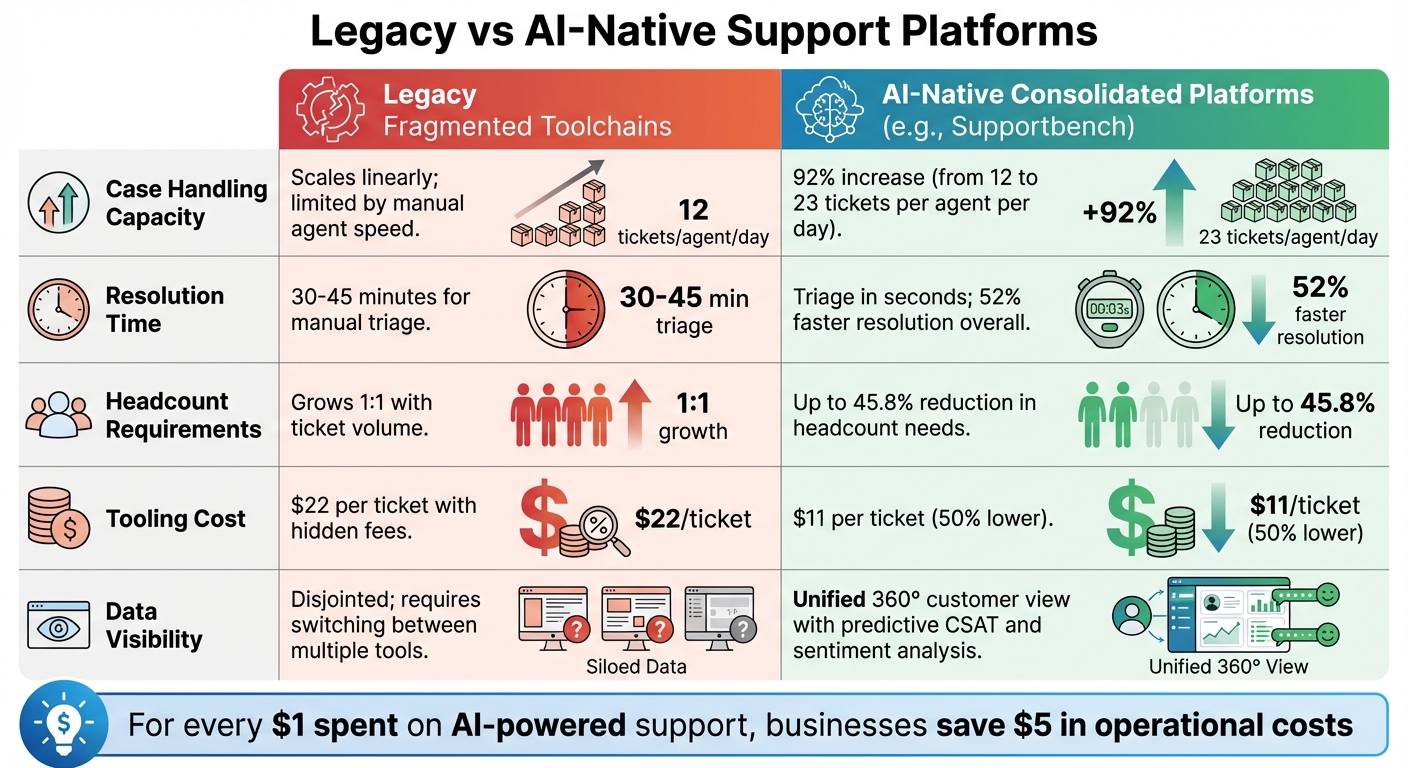
Legacy vs AI-Native Customer Support Platforms: Performance Comparison
Modern customer support needs to grow without requiring a proportional increase in staff. The table below shows how legacy systems and AI-native platforms differ in their ability to scale. Legacy systems expand linearly, meaning more tickets lead to more hires, higher costs, and constant recruitment. On the other hand, AI-native platforms like Supportbench dramatically increase ticket-handling capacity without needing additional staff. Here’s a breakdown of how AI-native platforms outperform legacy systems across key metrics:
| Feature | Legacy Fragmented Toolchains | AI-Native Consolidated Platforms (e.g., Supportbench) |
|---|---|---|
| Case Handling Capacity | Scales linearly; limited by manual agent speed | 92% increase in tickets per agent (from 12 to 23 per day) |
| Resolution Time | Long; 30–45 minutes for manual triage | Triage in seconds; 52% faster resolution overall |
| Headcount Requirements | Grows 1:1 with ticket volume | Up to 45.8% reduction in headcount needs |
| Tooling Cost | $22 per ticket; hidden fees and "business debt" | $11 per ticket (50% lower) |
| Data Visibility | Disjointed; requires switching between multiple tools | Unified 360° customer view with predictive CSAT and sentiment analysis |
These differences directly impact efficiency and cost savings. For every $1 spent on AI-powered support, businesses save $5 in operational costs. AI-native platforms consolidate customer data into a single, actionable view, including case history, sentiment scores, and predictive health metrics. This eliminates the need for agents to waste time searching for scattered information across multiple tools – a common issue with legacy systems.
"Legacy helpdesks are business debt – migrate to AI-native platforms to slash per-interaction costs, eliminate hidden fees, and recoup ROI within months." – Supportbench
Conclusion
The strategies outlined above show how AI-first operations are reshaping the way businesses scale. For B2B companies, scaling customer support without adding headcount has become the new benchmark for efficiency. By streamlining tools, automating repetitive tasks, and using real-time AI copilots, support teams can handle 92% more tickets while cutting per-ticket costs by 50%.
Proactive support goes beyond simply adding AI – it requires systems built for automation that can triage tickets in seconds, update knowledge bases on the fly, and identify churn risks early. This approach ties together all the strategies discussed, creating a smarter, more cost-efficient support framework. Companies adopting this model have seen a 45.8% reduction in staffing needs while maintaining – or even boosting – customer satisfaction scores.
Platforms like Supportbench take these ideas further by turning support into a driver of growth. With features such as automated knowledge base updates and predictive CSAT scoring, these platforms eliminate the inefficiencies of traditional systems. They replace hidden fees and fragmented workflows with a unified solution that delivers quicker resolutions, lowers costs, and scales seamlessly as your business grows.
AI-native operations are no longer optional – they’re essential. Every $1 spent on AI-powered support delivers $5 in savings on operational costs. The only question is: how soon can you implement these strategies to stay ahead of the competition?
FAQs
How does AI triage make ticket handling more efficient?
AI triage takes the hassle out of ticket management by automatically sorting, tagging, and prioritizing cases. It uses factors like the topic of the issue, customer value, or sentiment to ensure tickets are instantly routed to the right agent. No more time wasted on manual sorting.
With this system in place, agents can concentrate on addressing high-priority issues more quickly. This not only boosts first-contact resolution rates but also enhances overall efficiency, leading to a smoother and more satisfying customer experience.
How do agent copilots improve productivity in customer support?
Agent copilots serve as virtual assistants for support teams, simplifying workflows and cutting down on repetitive tasks. By tapping into customer history, knowledge bases, and real-time sentiment, they can suggest precise, tone-appropriate responses, draft replies, and even summarize previous conversations. This means agents no longer have to juggle multiple screens or manually jot down notes, freeing up valuable time.
When seamlessly integrated into platforms like Supportbench, these copilots can automatically draft responses and suggest relevant articles without requiring additional setup. The result? Increased productivity. Agents can handle more cases, respond faster, and dedicate their attention to complex, high-priority interactions – all without needing to expand the team.
How can predictive analytics help reduce future support issues?
Predictive analytics taps into historical ticket data, customer sentiment, and usage patterns to spot potential problems before they even surface. By examining these patterns, support teams can take proactive steps to address issues, tweak SLAs, and allocate resources more effectively, ensuring incidents don’t spiral out of control.
This method doesn’t just cut down on future support requests – it also boosts customer satisfaction by tackling concerns before they disrupt the user experience. Plus, it’s a smart way to enhance service quality without the need to expand your team.






