
Duplicate support tickets waste time, confuse agents, and distort data. Merging them effectively can save up to 10% of support time, improve workflows, and enhance customer satisfaction. Here’s what you need to know:
- Why duplicates matter: They inflate ticket counts, slow resolution times, and create inconsistent responses.
- Key causes: Multi-channel submissions, anxiety-driven resubmissions, and organizational overlaps.
- Solutions: Use AI for detection, set up automation rules with safeguards, and rely on manual review for complex cases.
- Best practices: Consolidate information carefully, maintain audit trails, and track metrics like ticket volume accuracy and agent productivity.
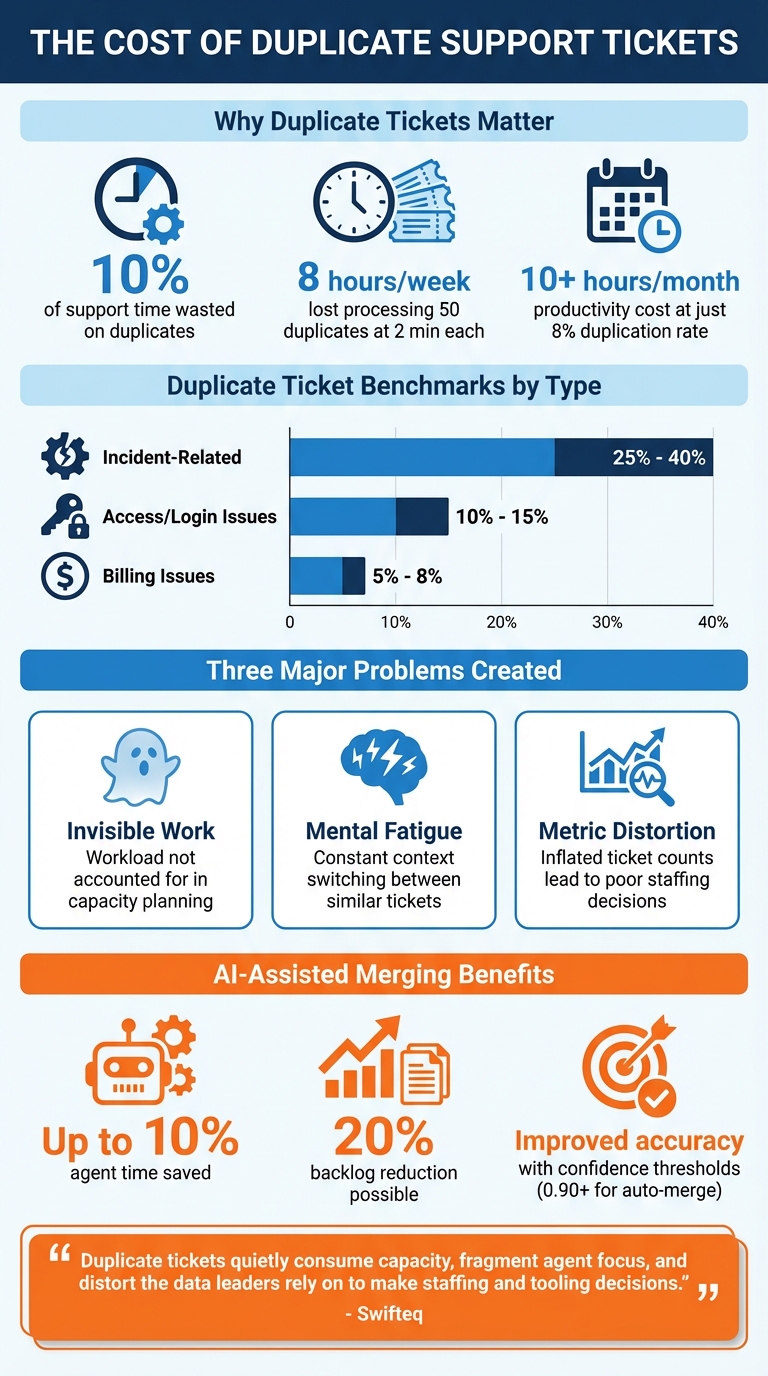
Duplicate Ticket Impact: Statistics and Benchmarks for Support Teams
Why Duplicate Tickets Create Problems for Support Teams
Duplicate tickets bring several challenges to support teams, causing inefficiencies that ripple through daily operations. First, there’s the issue of invisible work – each duplicate adds to the workload without being accounted for, making it harder to manage capacity effectively [2]. Then comes mental fatigue. Agents are forced to constantly switch between similar tickets, juggling nearly identical issues. This not only leads to exhaustion but also creates uncertainty about whether merging the tickets is the right move [2]. Finally, there’s metric distortion. Duplicate tickets inflate ticket counts and skew growth trends, which can lead to poor decisions, such as overstaffing or misallocating resources to solve problems that may not be as widespread as they seem [2][3]. These inefficiencies disrupt workflows and can damage customer trust over time, highlighting the need for a seamless customer support management system.
The extent of the problem varies depending on the ticket type. For example, incident-related tickets can have duplication rates as high as 25% to 40%. Access and login issues typically fall between 10% and 15%, while billing-related tickets are generally lower, around 5% to 8% [2]. Even at the lower end, an 8% duplication rate can cost teams more than 10 hours of productivity every month [2].
How Duplicates Disrupt Daily Workflows
When duplicates aren’t managed properly, agents may end up working on the same issue multiple times, leading to wasted effort and inconsistent responses [1]. Customers often submit requests through multiple channels – like email, chat, or social media – hoping for a faster resolution. Instead of streamlining communication, this creates multiple records, leaving agents to piece together fragmented information [1][2]. The result? Bloated queues, slower response times, and repeated work on the same problem [1]. In B2B settings, the issue is even more pronounced when several employees from the same company report the same problem, amplifying the redundancy across agent teams [2].
Duplicate tickets also create misleading performance metrics. Since they are often quicker to close, they can artificially improve metrics like Average Handle Time (AHT), hiding inefficiencies in the process [2]. For instance, in early 2026, Cars Commerce discovered that a large portion of their ticket volume came from vendor auto-replies – like "Hey, we got your ticket." If these duplicates hadn’t been filtered out, they would have inflated ticket counts and led to inaccurate staffing forecasts, potentially resulting in unnecessary overhiring [2]. These disruptions ultimately trickle down to the customer experience, as explored below.
The Effect on Customer Experience and Retention
When duplicate tickets are handled by different agents, customers can receive conflicting information. One agent might suggest a workaround, while another provides a different timeline for resolution [2][8]. This inconsistency can frustrate customers and erode trust, especially in B2B relationships where multiple stakeholders are closely monitoring the same issue. Manual merges only add to the problem, as they can omit CCs or followers, leaving gaps in communication that hurt customer retention [8]. Such lapses weaken the confidence customers place in the support team.
"Duplicate tickets quietly consume capacity, fragment agent focus, and distort the data leaders rely on to make staffing and tooling decisions." – Swifteq [2]
The inefficiencies don’t stop at individual tickets. If a team processes 50 duplicate tickets daily, spending just 2 minutes on each, they lose over 8 hours of productivity every week [8]. That’s time that could be better used for solving complex issues, strengthening customer relationships, or implementing proactive solutions to prevent future problems.
sbb-itb-e60d259
How to Identify Duplicate Tickets
Spotting duplicate tickets early can save your team from unnecessary workload and keep queues manageable. By recognizing common patterns and using effective detection strategies, you can prevent duplication headaches before they spiral out of control.
Common Scenarios That Create Duplicates
Duplicate tickets often arise from predictable situations. For example, multi-channel submissions are a frequent issue. Customers might send the same request through email, web forms, social media, and live chat, hoping one channel responds faster [1][7]. Another common cause is anxiety-driven resubmission – when customers don’t get an immediate confirmation, they may resend their request multiple times out of uncertainty [2][7].
In B2B settings, organizational overlap adds a unique twist. Here’s a common scenario: an employee reports an issue, their manager follows up, and then an IT admin submits the same concern. While the requesters are different, the underlying problem is the same. Swifteq explains it well:
"In B2B environments, one person might submit a ticket, followed by a colleague, an admin, or a forwarded internal email. Technically, these are different requesters, but they’re often the same issue operationally." – Swifteq [2]
System-generated loops can also complicate things. For instance, third-party integrations like PayPal or e-commerce platforms might create tickets using generic email addresses. Automated confirmation emails can then trigger even more redundant tickets [2][7]. Another challenge comes from supplemental information – customers might send screenshots or additional details as separate tickets instead of updating an existing thread [1][2].
Finally, major incidents, such as service outages, can flood your inbox with duplicate tickets. During these events, duplicate reports can make up 25% to 40% of total ticket volume [2].
These scenarios highlight the importance of combining automation and manual efforts to handle duplicates effectively.
Using AI to Detect Duplicates
AI tools are a game-changer when it comes to identifying duplicate tickets. By analyzing unstructured text in ticket descriptions and comments, AI can spot patterns like error messages, symptoms, or affected services that rule-based systems might overlook [5]. Advanced AI creates a "match fingerprint" by pulling key data from tickets for comparison [5]. Features like Intelligence Panels can even surface related tickets from the same requester, regardless of phrasing or submission channel [1].
AI systems also use metadata to group tickets. For example, they might compare tickets from the same account within a 72-hour window for product issues or up to 14 days for account-related problems [5]. To ensure accuracy, confidence thresholds can be set, such as auto-merging tickets with a similarity score of 0.90 or higher, while leaving lower-score matches for human review [5].
It’s also critical to protect sensitive data. Before sending ticket content to external AI APIs, make sure personally identifiable information is redacted [5].
Manual Detection Methods for Agents
While AI speeds up detection, manual methods are still essential for cases that require human judgment. Tools like customer context panels help agents view a requester’s recent ticket history, making it easier to spot overlapping issues [1]. Agents can also use search and filter queries – by requester name, ticket ID, or subject line – to track down related tickets submitted through different channels [9].
During high-volume periods, like major incidents, list view scanning can be a lifesaver. Agents can manually scan the queue for similar subjects or requesters and compare multiple tickets side by side [9][10].
Manual methods are particularly important when precision is key. For example, in B2B environments, automated systems might miss duplicate issues reported by different people within the same organization. In these cases, agents need to verify whether a colleague or admin has already submitted the concern [2]. Assisted merging – where tools flag potential duplicates for review – combines the speed of automation with the accuracy of human oversight [3].
"Because merges are irreversible, accuracy matters more than speed." – Lentil Labs [3]
Best Practices for Merging Tickets
Once you’ve identified duplicate tickets, the merging process needs to be handled carefully to avoid losing important details or creating confusion. The method you choose – manual, AI-assisted, or fully automated – will depend on factors like ticket volume, team size, and your risk tolerance. Here’s how to navigate each approach effectively.
Step-by-Step Guide to Manual Merging
Manual merging gives agents complete control, making it a good fit for smaller teams or when dealing with complex cases that require personal judgment. Start by selecting a primary ticket to remain active after the merge. Many teams prefer to keep the newest ticket as the primary since it often includes the latest customer update [1][9].
Next, consolidate all relevant information from duplicate tickets. This includes reviewing comments, attachments, and custom fields to ensure no key details are missed. If your system requires it, manually add secondary requesters to the CC field so everyone involved stays informed [9].
Before finalizing, disable public merge notifications to avoid confusing customers [3][11]. Once you’ve confirmed everything is in order, proceed with the merge. Keep in mind that in most platforms, merges are permanent and cannot be undone [11].
For larger teams dealing with higher ticket volumes, AI-assisted tools can help streamline this process.
AI-Assisted Merging: Balancing Speed and Accuracy
While manual merging works well for low-volume scenarios, AI-assisted merging is ideal for busier environments. These tools combine automation with human oversight by flagging potential duplicates for agents to review. This reduces errors while speeding up the process [3][1]. In fact, AI-assisted merging can save agents up to 10% of their time by cutting down on repetitive tasks like searching and switching between tickets [12].
The time savings are significant. Handling even a "quick" duplicate manually can take 1 to 3 minutes of focused effort [2]. During busy periods, agents often skip merging altogether, allowing duplicates to pile up. AI tools, however, stay consistent regardless of workload [2].
These tools also improve accuracy with logic-based matching. Instead of relying on basic identifiers like customer names, they use unique details such as Order IDs or custom fields to identify duplicates. Some even analyze text within messages to catch duplicates that might slip past standard filters [12][4].
Matt Anderson, Quality & Compliance Supervisor at Primrose, highlights the value of AI tools:
"A big help – when we hit peak season and see our queues creep up more than we’d like this app is brilliant for merging together multiple contacts from the same customer." [12]
Luke Benjamin, Director at Welham & Co, shares a similar experience:
"This app is a lifesaver! I only wish we discovered it sooner. Saves our team a huge amount of time merging multiple tickets, and they can now solve inquiries immediately." [12]
Here’s a quick comparison of merging methods:
| Feature | Manual Merging | AI-Assisted Merging | Fully Automated Merging |
|---|---|---|---|
| Control | Full control | Agent-reviewed | No intervention |
| Speed | Slow | Fast | Instant |
| Risk | Low (human error) | Low (with oversight) | Higher (false positives) |
| Best For | Low volume | High volume, complex | Simple, high-confidence |
For very high-volume operations, fully automated merging becomes a practical option when appropriate safeguards are in place.
Setting Up Automation Rules and Safeguards
Fully automated merging is designed for handling simple, high-confidence duplicates instantly. However, it requires careful setup to avoid errors. The key is to establish safeguards that prevent unrelated tickets from being merged or creating endless loops.
Start by defining exclusion rules. Configure your system to skip tickets from internal bots, specific email domains, or system-generated messages [12].
Next, prevent recursive merging by adding specific conditions to your rules. For example, you can use criteria like "If status does not equal X" to stop a rule from triggering repeatedly [13]. Use structured naming conventions for your automation rules – something like "[Merge] Duplicate Cleanup" – to make them easier to manage and audit [13].
For large-scale operations, schedule rules instead of using event-based triggers. Scheduled rules run at set intervals, reducing the risk of overloading your system with constant checks [13]. Always test new automation settings in a staging environment to catch potential issues before they go live [13][14].
Anahit Sukiasyan, an Atlassian Community Champion, underscores the importance of a thoughtful approach:
"Advanced Jira Service Management automation is about more than efficiency: it’s about scalability, resilience, and alignment with ITSM best practices without unnecessary complexity." [13]
Finally, track SLA safeguards by using custom fields to mark whether a ticket has already been escalated or merged. This prevents redundant notifications and ensures SLA compliance [13]. With the right setup, automation can handle large volumes while preserving data accuracy and customer trust.
Managing Permissions and Governance for Ticket Merging
When it comes to merging tickets, maintaining control and oversight is crucial. Since merging permanently changes customer records, it’s important to manage permissions carefully to protect data integrity and ensure compliance.
Role-Based Access to Merging Tools
Access to merging tools should be tightly controlled based on roles and responsibilities. Many modern support platforms offer role definitions through ticket_actions (such as EDIT, CLOSE, or DELETE) alongside ticket_access levels (like ALL, TEAM_ONLY, or ASSIGNED_ONLY) [15]. For instance, junior agents might only manage merging for tickets assigned to them, while team leads could handle merges within their department. Admins typically retain full access across all teams.
Manual merging requires assigning permissions to specific roles, whereas AI-assisted ticket routing and merging often relies on group-based permissions. In these setups, multiple agents might review and approve suggested merges. For fully automated merging, permissions should be strictly limited to admin-defined rules to prevent unauthorized changes [3].
Once permissions are set, it’s equally important to ensure clear records of every merge.
Maintaining Audit Trails and Compliance
Every merge action should generate a detailed, automatic record. For example, private notes can link back to closed tickets for easy reference [16][6][10]. When working across multiple platforms or during migrations, storing the original ticket ID in a dedicated field can help maintain traceability [17]. Additionally, webhooks can trigger updates, such as refreshing a "Latest Ticket" field in customer profiles, keeping support threads up to date in real time [1].
Before rolling out automated merging rules, use simulation modes to test the logic on historical data. This allows admins to see how the system would have handled prior tickets without affecting live interactions [6]. Without proper review, fully automated merges can mistakenly combine unrelated tickets, potentially disrupting audit trails – this is especially risky in industries with strict regulations [3].
Measuring the Results of Duplicate Ticket Cleanup
Once you’ve implemented merging strategies and governance controls, it’s time to measure their effectiveness. Tracking key performance metrics will help you validate your efforts, justify automation investments, and showcase the value of these improvements to leadership.
Key Metrics for Performance Tracking
One of the first areas to monitor is ticket volume accuracy. Duplicate tickets can inflate your numbers, creating a false picture of support demand [2].
Another critical metric is agent productivity. Automated merging can free up as much as 10% of your team’s time – time that would otherwise be spent identifying, managing, and closing redundant tickets [7][12]. This reclaimed capacity can be redirected toward resolving more complex issues that require human expertise.
Pay attention to Average Handle Time (AHT) as well. A slight rise in AHT after cleanup might indicate that you’re now dealing with more accurate, complex ticket data. Duplicate tickets, which are often quick to resolve, can artificially lower AHT and obscure inefficiencies in your workflows [2].
Keep an eye on backlog reduction. Bulk cleanup efforts can cut pending ticket counts by up to 20%, leading to more accurate reporting and faster resolution times [12].
To understand the financial impact, calculate the time lost per duplicate ticket and multiply it by your agents’ hourly rates. This provides a tangible measure of how much duplicate tickets were costing your team [2].
"The work is real, but it’s invisible. The time spent scanning, merging, responding, and documenting isn’t captured as a separate line item." – Tim, Manager of Customer Support, Cars.com [2]
Finally, compare your results to industry benchmarks to gauge how your team stacks up and identify areas for improvement.
Comparing Your Results to Industry Benchmarks
Industry benchmarks can provide valuable context for your metrics. Duplication rates often vary by ticket category. For example:
| Ticket Category | Estimated Duplicate Benchmark |
|---|---|
| Billing Issues | 5% – 8% |
| Access/Login Issues | 10% – 15% |
| Incident-Related Tickets | 25% – 40% |
To establish your own benchmarks, take a 2–4 week sample of your ticket data [2]. Compare the number of unique customer or account IDs to the total ticket volume to calculate your duplication rates [2]. If your rates exceed these benchmarks, it may indicate inefficiencies in your intake processes or communication channels.
Additionally, analyze duplication rates by channel to identify where redundant submissions are most common [2]. Addressing these issues at their source can help prevent duplicates from being created in the first place.
Conclusion
Duplicate tickets drain resources, confuse agents, and skew critical performance metrics [2]. Streamlining your ticket merging process can cut through this chaos, reducing redundancy, preventing conflicting responses, and ensuring accurate ticket counts [2][18][11].
As discussed earlier, refining your merging strategy is essential. Transitioning from manual processes to AI-powered merging can revolutionize your support operations. Automated duplicate detection and assisted merging not only save time but also let agents focus on more complex, high-priority tasks – all while maintaining data accuracy.
Focus on areas with the highest impact, such as billing issues, login problems, and incident management. Use clear merging criteria rooted in B2B-specific metadata like company IDs or order numbers, rather than relying solely on contact details [18][11]. At the same time, implement safeguards that flag potential duplicates for agent review – because merges are permanent, and accuracy is key [3].
Track metrics like ticket accuracy, agent efficiency, and backlog reduction to measure success. Regularly audit mismerged tickets to fine-tune your AI systems and improve processes over time [19]. These ongoing adjustments will help maintain a seamless and effective support operation.
Although it may be difficult to put an exact price tag on the cost of duplicate tickets, their impact on efficiency and customer experience is undeniable. By applying robust merging logic, establishing strong governance practices, and consistently monitoring performance, your support team can deliver better customer experiences and focus on solving complex, high-value problems.
FAQs
When should we auto-merge vs require agent approval?
When it comes to handling duplicates, auto-merging works best in situations where duplicates can be confidently identified using clear, predefined criteria – like an email address or subject line. This method is especially effective when the process is straightforward and the risk of losing important context is minimal.
On the other hand, agent approval is crucial for cases that are more sensitive or unclear. When duplicates involve complexity or require a nuanced understanding, relying on human judgment helps reduce the chance of mistakes.
To put it simply: use auto-merge for simple, consistent cases, and opt for agent approval when accuracy and care are essential in more ambiguous situations.
What data should we use to match duplicates in B2B accounts?
To identify duplicates in B2B accounts, rely on key identifiers such as email addresses, customer IDs, and order or tracking numbers. These unique attributes serve as the foundation for accurate matching. Advanced AI tools can take this a step further by analyzing semantic similarities and intent, offering a deeper level of detection. By combining these explicit identifiers with matching rules – like pairing First Name and Email – you can achieve greater accuracy when pinpointing and merging duplicates.
How do we prevent bad merges from breaking SLAs and reporting?
To keep SLAs on track and maintain accurate reporting, it’s crucial to stop bad merges in their tracks. AI-powered tools can help by spotting duplicates with precision before they’re merged. Transparency is key – document every change and double-check that important fields like tags, priority, and status are updated correctly.
A semi-automated system works well here: let AI recommend merges while agents review and approve them. This reduces mistakes. After merging, validate the results to ensure SLAs aren’t affected and your reports stay reliable.
Related Blog Posts
- How do you prevent duplicate tickets and “email thread chaos” in customer support?
- How do you structure support for partners/resellers (and avoid double-ticketing)?
- How do you prevent duplicate tickets and merge threads without losing context?
- Moving Beyond “Chat”: Why Asynchronous Ticketing Wins for Complex B2B Issues