


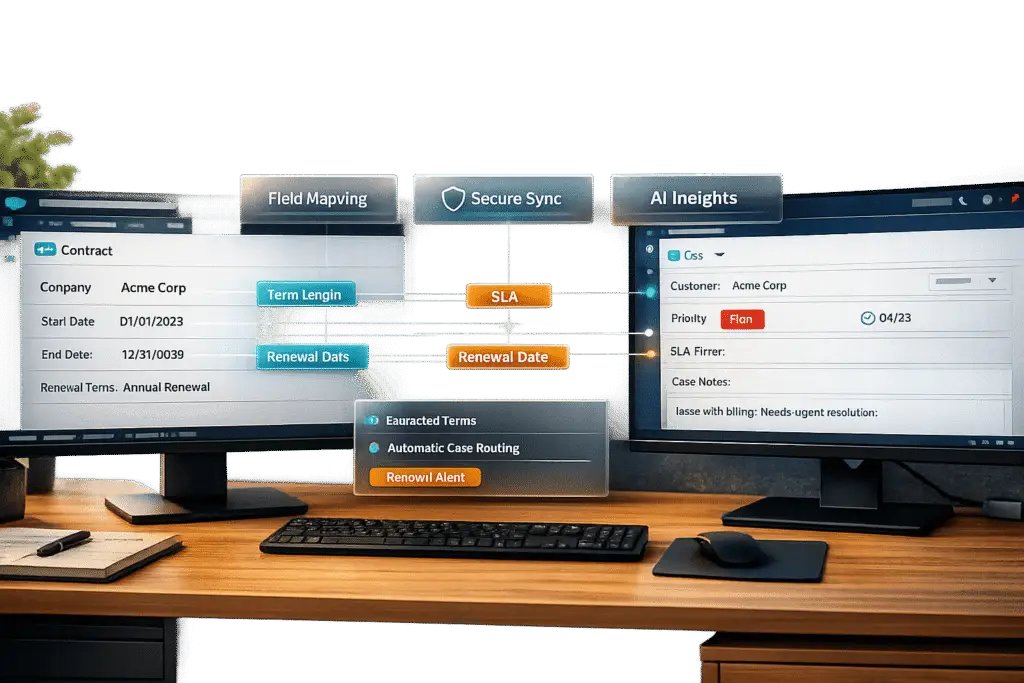
Tired of juggling Salesforce and your support platform? Syncing contract data directly into support tickets can save time, prevent errors, and improve customer interactions. Here’s the deal:
- Why it matters: Support agents lose productivity searching for account or SLA details. Sales teams risk contacting customers during unresolved issues.
- The solution: Integrating Salesforce contract data into tickets ensures agents access key info instantly – like SLAs, renewal dates, and support plans – while sales can track ongoing support activity.
- How to do it:
- Map Salesforce contract fields (e.g., status, expiration, SLAs) to ticket attributes.
- Automate workflows for contract updates, like triggering alerts for expiring agreements.
- Use AI-powered ticket routing to enhance triage, data extraction, and reporting for faster resolutions.
This guide walks you through setup, workflows, and AI tools to create a secure, efficient sync. Save time, reduce manual tasks, and deliver better service by aligning sales and support systems.
Preparing for Contract-Ticket Synchronization
Setting up for contract-ticket synchronization requires careful planning and the right tools to ensure smooth, AI-powered support operations. Before diving in, make sure you have the necessary permissions, tools, and a secure framework in place.
Required Tools and Permissions
To get started, your integration will rely on OAuth 2.0 for authentication and TLS 1.2 or higher to secure data during transfers [4]. It’s crucial to enforce Multi-Factor Authentication (MFA) for all administrative functions. Instead of using personal admin accounts, create dedicated service principals or integration users with the least-privilege principle – granting only the permissions required for the sync and nothing extra [4].
For Salesforce, you’ll need the Modify Metadata API permission to install sync packages and create custom fields. If you’re working with Salesforce Contracts, OmniStudio might be necessary to unlock additional features [4]. Data transfer can be handled through a native connector or an iPaaS (integration platform as a service) capable of managing field mapping and transformations. Strengthen the connection by setting up IP allowlisting and using org-specific connected apps [4].
A key step is establishing field-level ownership before syncing. For example, decide whether Salesforce will manage ticket statuses while your CLM system handles renewal dates. This avoids conflicts and accidental overwrites when both systems attempt to update the same field [1].
Once you’ve nailed down permissions and security, make sure your data is ready for synchronization.
Data Validation and Preparation
Clean, well-organized data is critical for a successful sync. Start by inventorying all fields in both systems – contract headers, parties, line items, SLAs – and classify them as "sync", "read-only", or "system-only." This ensures only relevant data is included, reducing unnecessary clutter [4][7].
"Connecting your CLM with Salesforce only delivers value when the right contract data moves cleanly and consistently between systems. If critical fields are missing, outdated, or misaligned, teams fall back on manual checks." – Sirion [5]
Use system-generated unique identifiers, like Contract Document IDs or External IDs, to anchor "upsert" logic. This prevents duplicate records when sync jobs run multiple times [4][5]. Adopt standardized naming conventions for contracts, such as "Vendor – Product – Region – Start Date", to make it easier for teams to search and filter across both platforms [5]. Audit key fields like renewal dates and entitlements to ensure accuracy, as these directly impact the reliability of the synchronization [5].
Once your data is validated, turn your focus to securing sensitive information.
Security and Role Considerations
Sensitive contract details – like pricing, PII, and legal clauses – should be protected with Field-Level Security (FLS) in Salesforce. Only roles that genuinely need access should be able to view this data [4][7]. Align Salesforce profiles, permission sets, and sharing rules with the roles defined in your CLM system to maintain consistency [4][7].
Enable detailed event logs to track all data pushes and administrative actions. This ensures compliance with standards like SOC 2, ISO 27001, and GDPR/CCPA [4][7]. Secure integration secrets in a managed vault, and schedule regular credential rotations [4][7]. Before going live, thoroughly test security scopes, token replays, and permission denials in Salesforce sandboxes and CLM staging environments [4][7].
| Security Layer | Control | Purpose |
|---|---|---|
| Identity | OAuth 2.0 & MFA | Secure authentication and scoped access |
| Data Protection | TLS 1.2+ & Encryption at rest | Safeguard data in transit and at rest |
| Access Control | RBAC & Field-Level Security | Limit access to sensitive information |
| Monitoring | Tamper-evident Audit Logs | Ensure traceability for compliance and issues |
| Governance | Field-Level Ownership Rules | Prevent data conflicts and drift |
With these measures in place, your synchronization process will be more secure, efficient, and reliable.
sbb-itb-e60d259
Step-by-Step Workflow for Syncing Salesforce Contracts to Support Tickets
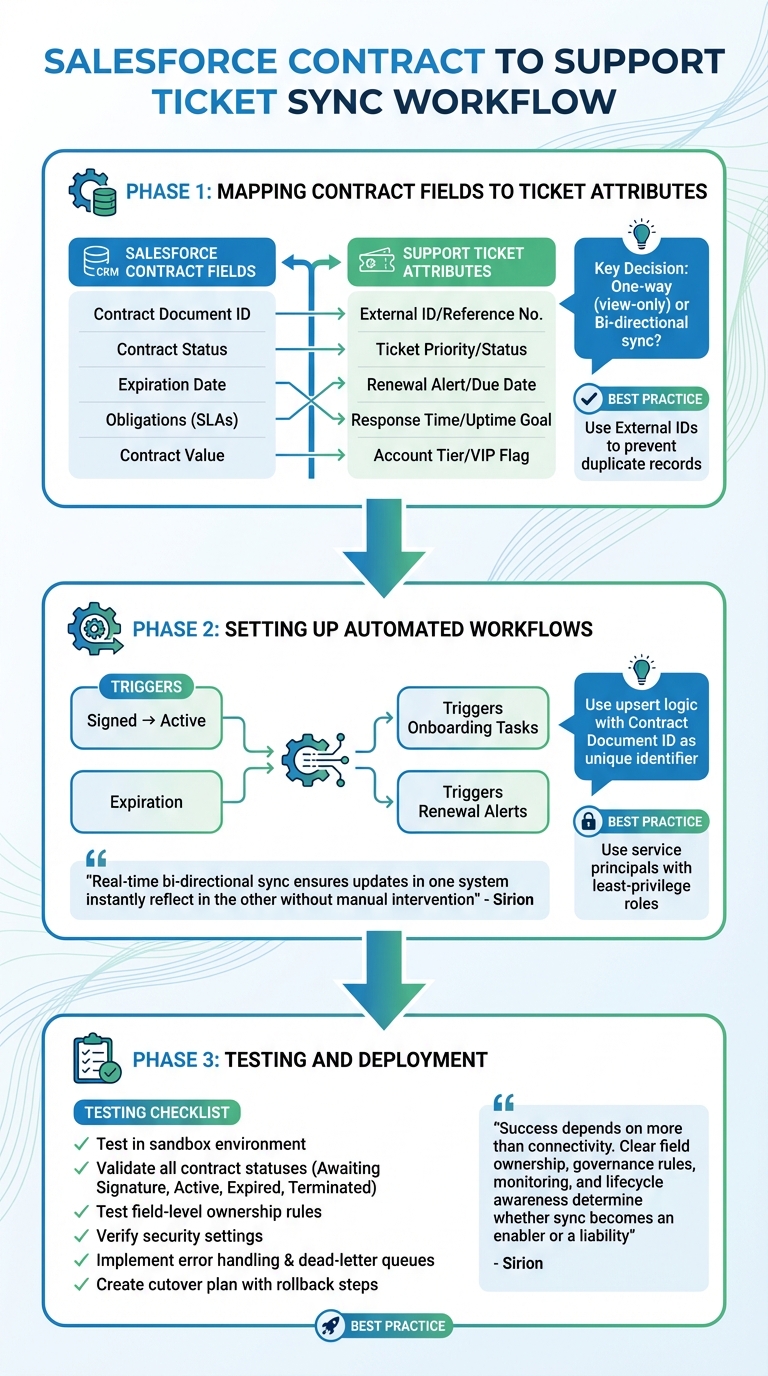
Step-by-Step Workflow for Syncing Salesforce Contracts to Support Tickets
Once your data is verified and secure configurations are in place, the next step is to structure how contract details will appear in support tickets. This involves aligning contract data with ticket fields, automating workflows tied to contract events, and rigorously testing before launching.
Mapping Contract Fields to Ticket Attributes
Start by identifying the key contract details that support teams need to resolve tickets efficiently. These typically include Contract Document ID, Contract Name, Status, Expiration Date, Obligations like SLAs, and Contract Value [5]. These fields help support agents prioritize tasks and address issues effectively.
To avoid conflicts during updates, assign ownership of each field to a specific system. For instance, Salesforce might manage the account value, while your support platform controls ticket statuses. This prevents situations where both systems attempt to update the same field simultaneously [1]. A CRUD matrix (Create, Read, Update, Delete) can help document permissions for modifying fields [1].
Decide whether the sync should be one-way (view-only) or bi-directional (allowing updates) [1][9]. Most teams begin with a one-way sync from Salesforce to the support platform and expand to bi-directional sync as needed.
Use External IDs to map Salesforce contract fields to ticket attributes. For example, the Salesforce Contract ID should link to an External ID or Reference Number in the support tool. This creates a reliable connection between the two systems [5].
| Essential Contract Field | Support Ticket Attribute | Purpose |
|---|---|---|
| Contract Document ID | External ID / Reference No. | Ensures records align and are easy to retrieve [5] |
| Contract Status | Ticket Priority / Status | Triggers actions based on stages like "Active" or "Expired" [5] |
| Expiration Date | Renewal Alert / Due Date | Helps avoid service interruptions and protects revenue [5] |
| Obligations (SLAs) | Response Time / Uptime Goal | Aligns support efforts with service promises [5] |
| Contract Value | Account Tier / VIP Flag | Enables priority handling for high-value clients [9] |
For periods of high activity, such as quarter-end contract updates, use real-time Change Data Capture to keep systems aligned [1]. Once the mapping and ownership rules are in place, you can automate processes to maintain synchronization.
Setting Up Automated Workflows
Automate workflows to respond to critical contract lifecycle changes. For instance, when a contract moves from "Signed" to "Active", trigger onboarding tasks and track service-level commitments. Similarly, when a contract expires, send renewal alerts and notify support teams of the change [5].
To avoid duplicate records, use upsert logic with the Contract Document ID as the unique identifier. This ensures updates modify existing records rather than creating new ones [5][4]. Implement conflict resolution rules to handle situations where both systems attempt updates. For example, if Salesforce owns the primary contact field, updates from the support tool should be rejected [1][4].
Set up workflows for proactive alerts by syncing the "Renewal Notice Date" instead of just the "Expiration Date." This allows teams to act before a contract lapses [5]. For high-value accounts, automate workflows to flag tickets for priority handling [9].
"Real-time bi-directional sync is the automatic, two-way exchange of contract and CRM data… ensuring updates in one system instantly reflect in the other without manual intervention." – Sirion [1]
Use service principals or dedicated integration accounts with least-privilege roles to secure the connection. This approach enhances security and simplifies auditing [4]. Automation not only reduces manual work but also sets the stage for future AI-driven improvements.
Testing and Deployment
After setting up mapping and workflows, conduct thorough testing to ensure the synchronization works as expected. Use a sandbox environment to validate the entire lifecycle – from contract creation through ticket generation and updates [10]. Test scenarios for every contract status, such as "Awaiting Signature", "Active", "Expired", and "Terminated", to confirm the correct support actions are triggered [5].
Test field-level ownership rules by simulating simultaneous updates from both systems. Your conflict resolution logic should prevent overwrite issues and sync loops [1]. Also, verify that security settings like field-level permissions and sharing rules work as intended in the sandbox [1].
To prevent duplicate ticket creation, implement error handling and idempotency. Set up dead-letter queues and monitoring dashboards to quickly identify and address failed sync attempts [1]. Use a combination of real-time Change Data Capture for immediate updates and scheduled batch jobs to reconcile any discrepancies [1].
"Success depends on more than connectivity. Clear field ownership, governance rules, monitoring, and lifecycle awareness determine whether sync becomes an enabler or a liability." – Sirion [1]
Develop a cutover plan with fallback options and rollback steps in case the integration encounters issues after deployment [1]. Involve teams from sales, support, IT, and data governance during testing to identify potential problems early and ensure compliance [1]. Test the full workflow – from quote to contract to ticket to renewal – without manual intervention. If everything runs smoothly, the sync is ready for production [10].
Using AI for Automation and Optimization
With a secure and automated sync as the foundation, AI is now transforming support operations with improved precision and efficiency. It builds on earlier workflow automation to reduce manual tasks and ensure support aligns seamlessly with contractual requirements. AI tools handle tasks like extracting contract terms, routing tickets based on service commitments, and triggering alerts before problems escalate.
AI-Powered Contract Data Extraction
AI turns unstructured documents into structured data that integrates directly with your support platform. By leveraging Optical Character Recognition (OCR) and Natural Language Processing (NLP), AI can identify key contract details such as status, expiration dates, renewal terms, total value, and specific service-level agreements. These tools also help pinpoint commitments like response times and uptime guarantees [11][5].
Generative AI and Agentic AI take this a step further by understanding context, autonomously prioritizing crucial clauses, and identifying potential risks. These systems can process thousands of contracts in seconds, cutting what once took weeks into mere moments [11]. AI-based contract parsing tools boast an impressive extraction accuracy of over 95% [12].
"reduces manual review time by up to 50% and eliminates costly errors by automating the identification and capture of critical contract information"
– Martyn Yuen at ContractPodAi [11]
To maintain accuracy, it’s essential to include a human validation step to review AI-suggested values before finalizing the data. This approach significantly reduces the time support teams spend searching for contract details – a task that can consume over 30% of legal teams’ time [11].
AI-Based Ticket Routing Using Contract Data
AI-powered routing uses contract data to dynamically assign tickets to the most suitable agents, moving beyond static tags to a system driven by skill scoring. For example, if a high-value account nearing renewal submits a ticket, AI can prioritize it in a "Virtual Queue" and assign it to an agent with strong retention experience [14]. By analyzing case complexity and status instead of just raw volumes, this system ensures high-priority cases get the attention they need while preventing agent burnout [14]. If primary agents are unavailable, fallback logic ensures tickets are reassigned to secondary teams [14].
To enable this, it’s critical to sync key routing fields from Salesforce – such as Support Plan/SLA levels, Renewal Dates, Product/License Information, and Customer Tier – so AI copilots and predictive engines can access comprehensive data [3].
"AI tools – the Copilots, predictive engines, and automation flows you rely on – operate at peak effectiveness only when fueled by comprehensive data"
– Eric Klimuk, Founder and CTO of Supportbench [3]
Beyond routing, AI also monitors contract-based events to send proactive alerts.
Automated Alerts and Reporting
AI keeps a constant eye on workflows, issuing real-time alerts as needed. For example, sentiment-triggered alerts use NLP to analyze customer interactions across tickets and calls, assigning sentiment scores. When a negative tone is detected – especially from VIP customers – the system flags the issue and notifies account managers, enabling teams to resolve critical problems 40% faster [8].
AI also maps key contract dates – like expiration, renewal notice, and auto-renew cutoffs – to Salesforce, triggering automated tasks or email sequences [5]. It identifies risky clauses, such as termination or indemnity terms, and highlights them in Salesforce reports. This allows legal and support teams to monitor high-risk accounts effectively [13].
For compliance, AI extracts service-level agreements and generates reports comparing actual ticket performance against contractual commitments [5]. Predictive models combine contract metadata with support data to identify churn risks or upsell opportunities. Companies that integrate this feedback into customer profiles have seen a 27% increase in CSAT scores [8].
Here’s an overview of how key dates trigger actions across teams:
| Date Field | What It Triggers | Who Acts |
|---|---|---|
| Signature Date | Booking/revenue processes | Sales Ops, Finance |
| Effective Date | Service kickoff, onboarding | Delivery, Customer Success |
| Renewal Notice Date | Customer outreach sequences | Sales, Customer Success |
| Expiration Date | Churn risk alerts, wind-down | Success, Operations |
Monitoring and Continuous Improvement
Once your system is live, it’s crucial to keep an eye on key metrics like sync success rates, throughput, and latency to confirm that real-time performance is meeting expectations [7][1]. This step ensures that the integration and automated workflows you set up earlier stay reliable. Pay close attention to data quality indicators, such as duplicate records or "orphaned" records – cases where contract data doesn’t properly link to support tickets [7]. These metrics act as a health check for your "data highway", showing whether everything is running smoothly.
These technical metrics aren’t just numbers – they directly impact business performance. For example, integrating contract data can cut response times for high-value clients from 2–4 hours to under 15 minutes [9]. By leveraging contract lifecycle data, you can take proactive steps that reduce customer churn by 15–25%. Additionally, resolving technical issues flagged in support tickets faster – thanks to CRM visibility – can speed up sales cycles by 20–30% [9]. Streamlining workflows to combine multiple customer cases into a single infrastructure incident can also slash problem resolution times by 40–60% [9].
To act quickly and effectively, build real-time dashboards that track sync status, mapping errors, and renewal risks [7]. These dashboards should highlight sync performance (throughput, latency, success/failure rates), error management (mapping errors, permission issues, dead-letter queue volumes), and data reconciliation (record count comparisons, field-level drift analysis) [4]. Use color coding to make trends easy to spot – green for improvements, red for issues – and set up auto-alerts for when metrics cross critical thresholds [8]. This kind of monitoring strengthens the AI-driven automation efforts discussed earlier, making continuous improvement a seamless part of your system.
"Pushing contract data from CLM into Salesforce is no longer just an integration task – it’s an architectural choice that affects revenue visibility, compliance posture, and operational trust across teams."
– Sirion [7]
To keep things running smoothly, review KPIs like sync latency and error frequency on a quarterly basis and adjust workflows as needed [6][4]. Regularly compare record counts and key field values between Salesforce and your support system to spot discrepancies or orphaned records [4]. This kind of consistent monitoring and fine-tuning ensures that your sync isn’t just a technical achievement – it’s a strategy that protects revenue and adapts to changing support demands [6]. By staying disciplined and proactive, you can keep your system aligned with business goals and evolving needs.
Conclusion
Syncing Salesforce contracts with support tickets is more than just a technical integration – it’s a strategic move that enhances revenue tracking, boosts customer satisfaction, and streamlines operations. By embedding contract data directly into your support system, agents gain instant access to essential details like account tiers, entitlements, and contract specifics. This context helps them tailor interactions and avoid asking customers repetitive questions. Meanwhile, sales teams benefit from better visibility into recent support activities. Treating contract-CRM synchronization as a critical part of your system architecture can lead to quicker renewals, more accurate forecasts, and improved compliance outcomes [1].
AI-powered tools take this a step further by turning raw contract documents into actionable insights. For example, they enable intelligent ticket routing based on a customer’s contract status or value [13][3]. Centralized feedback loops and automated reporting allow teams to address key issues up to 40% faster [8]. These gains translate into better efficiency, enhanced customer service, and stronger revenue protection.
To keep these systems running smoothly, it’s crucial to regularly check for data alignment between platforms [4]. AI tools also need access to accurate, current data to maintain reliable insights [2]. Conducting quarterly reviews of metrics like sync speed, error rates, and renewal success can help teams fine-tune processes and adapt to changing business demands. These reviews ensure your system evolves alongside your organization’s needs [4].
At the heart of this approach is the power of unified systems and real-time data sharing.
"When your systems speak the same language, everyone wins." – Contracts 365 [2]
Begin by syncing high-impact fields like contract status, expiration dates, and total contract value to see immediate results. From there, you can gradually expand the integration’s scope [5]. With consistent monitoring, clear ownership of data fields, and human oversight for critical information, you’ll create a scalable system that keeps sales and support teams aligned for success [1][13].
FAQs
Which contract fields should we sync first for the biggest impact?
To get the most out of your efforts, focus on syncing fields that deliver actionable insights and simplify workflows. The most important fields to prioritize include:
- Contract status
- Expiration date
- Value
- Customer information
- Obligations
- Key dates
By ensuring these fields are synced, you’ll gain real-time visibility into contract lifecycles, cut down on manual data entry, and foster better collaboration across sales, legal, and finance teams. This approach speeds up renewals, streamlines approvals, and boosts overall efficiency in your operations.
How do we prevent field conflicts and sync loops between systems?
To avoid field conflicts and sync loops, it’s crucial to follow a governance-driven sync process. Start by defining distinct, non-overlapping fields for updates to minimize the risk of conflicts. Use validation rules to ensure data accuracy and consistency. Employ conflict resolution strategies – such as prioritizing updates based on timestamps – to handle discrepancies effectively.
Additionally, make it a habit to monitor sync processes regularly and incorporate robust error-handling mechanisms. These practices help maintain data integrity, ensuring a smooth and reliable flow of information between systems without running into unnecessary sync problems.
What KPIs should we monitor to prove the sync is working?
When evaluating system performance, keep an eye on these critical metrics:
- Data accuracy: Verify that key contract details – such as status, expiration dates, and values – are syncing correctly between systems.
- Sync success rate: Measure how often syncs are completed successfully compared to how often they fail.
- Update latency: Assess the time it takes for updates in one system to reflect in the other.
- Error rates: Keep track of errors that require manual intervention to fix.
- Operational impact: Look for signs of improvement, such as faster resolution times, less manual work, and better customer satisfaction levels.
These KPIs give a clear picture of how well your systems are working together and where adjustments might be needed.
Related Blog Posts
- How do you structure support for partners/resellers (and avoid double-ticketing)?
- How do you map Salesforce Case fields, Record Types, and Statuses to a new helpdesk?
- How do you convert Intercom conversations into tickets and keep ownership + SLAs?
- How do you design a workflow where Intercom stays for chat but tickets live elsewhere?






