
Onboarding new B2B support agents can be overwhelming, but a structured process reduces ramp-up time, improves performance, and ensures customer satisfaction.
This 15-step checklist covers everything from assigning mentors to leveraging AI tools. It addresses common challenges like information overload, inconsistent training, and SLA management. Key steps include:
- Assigning onboarding buddies and setting clear expectations
- Implementing secure, role-based system access
- Teaching company and customer context for better communication
- Defining SLA expectations and escalation protocols
- Training on AI tools for case management and knowledge sharing
With this approach, new agents are equipped to handle complex cases, meet critical SLAs, and contribute to customer success. A well-planned onboarding program not only boosts agent confidence but also reduces attrition and operational costs.
Let’s dive into the full checklist to see how each step builds a stronger, more efficient support team.
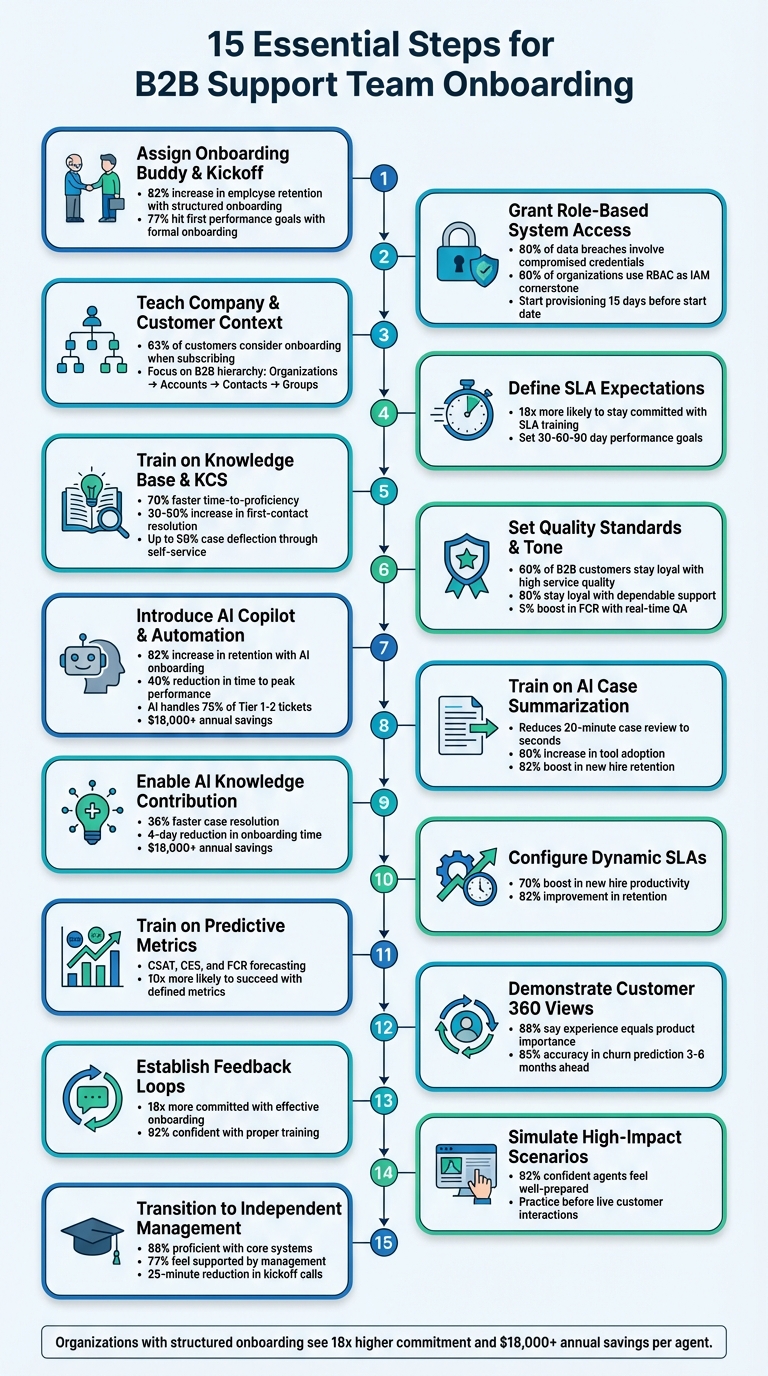
15-Step B2B Support Team Onboarding Checklist
Step 1: Assign an Onboarding Buddy and Hold a Kickoff Meeting
From day one, pair each new agent with an experienced peer to ease their transition and speed up their learning curve. A well-structured onboarding program can increase employee retention by 82%. A big part of this success comes from building immediate personal connections. In B2B support settings – where agents deal with complex products, multiple stakeholders, and high-pressure situations – a peer mentor can help ease first-week nerves and reduce early turnover.
It’s important to note that the peer mentor isn’t a manager. Instead, they offer a comfortable space for questions that new hires might feel uneasy bringing up with their supervisors. As one expert explains:
"It’s often easier for an agent to talk to someone who will perform the same job as them rather than discussing it with their boss or supervisor".
This peer-to-peer support is invaluable for sharing practical, day-to-day workflow tips.
The kickoff meeting complements this process by establishing clear expectations right from the start. Use this meeting to introduce the company’s mission, clarify the agent’s role, and outline key performance metrics like average handle time and customer satisfaction scores (CSAT). 77% of employees who go through formal onboarding hit their first performance goals, and that early success starts with knowing what’s expected on day one.
To make the process seamless, assign top-performing agents as buddies, plan structured check-ins, and provide a concise "First Day Playbook" with essential contacts and resources. Combining personalized mentorship with operational clarity ensures new agents feel supported, confident, and ready to make an impact. Once these interpersonal foundations are in place, the next step is granting technical system access.
Step 2: Grant Role-Based Access to Core Systems
Idle agents on their first day can slow down progress. And with over 80% of data breaches involving compromised credentials, relying on manual, ad-hoc provisioning isn’t just inefficient – it’s risky. In B2B settings, where agents need quick access to CRMs, knowledge bases, omnichannel platforms, and collaboration tools, having a secure and efficient access process is essential.
The solution? Implement Role-Based Access Control (RBAC). Instead of configuring permissions for each individual, you create roles like "Tier 1 Agent" or "Billing Specialist" that automatically grant the necessary access for that role. This approach not only eliminates delays but also minimizes security risks by adhering to the principle of least privilege. In fact, over 60% of organizations recognize RBAC as a cornerstone of Identity and Access Management, especially when scaling onboarding processes.
Modern tools make this even easier by automating provisioning, reducing IT workload by as much as 95%. When tied directly to HR systems, automated provisioning ensures that new hires are set up and ready to go without manual intervention.
To avoid delays, start provisioning at least 15 days before the agent’s start date. Use role-specific templates to grant access to essential tools like CRMs, communication platforms, and internal knowledge bases. If your system allows, set up sandbox environments where new agents can safely practice resolving cases without interacting with live customer data. This hands-on training speeds up learning while keeping operations secure.
Don’t forget to regularly review access permissions. Alarmingly, 48% of organizations admit that former employees still have access to corporate networks. Automated offboarding can eliminate this preventable security risk. With secure and streamlined access in place, new agents can focus on understanding customer needs and delivering excellent support from day one.
Step 3: Teach Company and Customer Context
Once secure systems are in place, the next step is ensuring your agents understand the broader picture – how the company and its customers interact. A great customer experience starts with agents who know the product inside out, understand customer goals, and are familiar with account history. Without this knowledge, agents risk asking repetitive questions, which only slows down resolution times and frustrates customers.
New agents should learn the B2B hierarchy: Organizations, Accounts, Contacts, Groups. This framework helps them navigate the often-complex relationships between multiple accounts and stakeholders. Training should clearly explain roles like the "Point Person" (the internal advocate whose success often hinges on your product), the economic buyer (who controls the budget), technical leads (responsible for implementation and data), and end-users (who rely on the product daily). By focusing on the Point Person, agents can streamline communication and avoid juggling conflicting demands from various stakeholders.
Agents must also have access to sales hand-off notes and Success Plans – key documents that outline customer goals, KPIs, and any technical details discussed during the sales process. As Arrows puts it:
"customers notice instantly when teams are siloed".
When customers have to repeat their needs over and over, trust erodes. Instead, shared documents that track customer tasks and timelines can ensure seamless communication and prevent redundant conversations.
This foundational knowledge paves the way for more advanced, role-specific training. Using this understanding of the data hierarchy, scenario-based training turns theoretical knowledge into practical skills. Introduce buyer personas that represent typical users, their motivations, and the situations in which they contact support. For instance, an enterprise admin troubleshooting SSO integration will have very different concerns compared to a frontline user asking about a dashboard feature. By understanding these scenarios, agents can deliver tailored advice right away, improving first-contact resolution rates. It’s worth noting that 63% of customers consider the onboarding process a deciding factor when choosing to subscribe to a product.
Additionally, train agents to identify the customer’s "aha moment" – that key point when they realize the value they expected from your product. Reaching this milestone should be the aim of every interaction. When agents understand what success looks like for different customer segments, they can guide conversations toward meaningful outcomes rather than simply resolving tickets.
With this comprehensive context in place, agents are better prepared to tackle operational standards and escalation protocols, which are covered in the next step.
Step 4: Define SLA Expectations and Escalation Protocols
After agents understand the customer’s needs, the next step is ensuring they know how quickly they need to act and when to escalate an issue. Without clear training on service level agreements (SLAs), teams risk mismanaging priorities, leaving urgent problems unresolved. This not only frustrates customers but also increases operational costs.
Start by outlining how SLAs translate into measurable goals for response and resolution times. For instance, break down response and resolution timelines based on ticket priority, so agents are clear about when they should respond and how quickly they need to close a ticket. As Justine Caroll, Director of Product Marketing at Zendesk, explains:
"Establishing service level agreements (SLAs) can clarify response times based on the nature of the issue, ensuring that support teams prioritize and promptly address inquiries."
Once response benchmarks are in place, it’s crucial to define a structured escalation process for complex cases. Create multi-level escalation paths so agents immediately know who to contact if a ticket exceeds their expertise or authority. Without this clarity, agents can get stuck handling issues they aren’t equipped to resolve, delaying solutions.
To reinforce these procedures, consider incorporating role-playing exercises and maintaining a centralized repository that outlines escalation protocols and SLA targets. Tools like Supportbench can also simplify SLA management by dynamically adjusting targets based on real-time account changes.
Finally, set 30-60-90 day performance goals to measure progress. For example, focus on improving on-time response rates and ensuring proper escalation of complex tickets. Research shows that agents trained effectively on SLAs are 18 times more likely to stay committed to their roles.
Step 5: Train on Knowledge Base Usage and Knowledge-Centered Service (KCS)
After agents grasp SLA expectations, the next step is teaching them how to use your knowledge base effectively. Without proper KCS (Knowledge-Centered Service) training, teams often fall back on "tribal knowledge." This can lead to inconsistent answers, slower resolutions, and wasted time as new hires end up recreating solutions that already exist.
Encourage a "search early, search often" mindset so agents rely on the collective knowledge already available. Atlassian explains it well:
"KCS is about getting the in-depth knowledge of IT teams out of their heads and onto the page… treating knowledge as a business asset and not relying entirely on memory and experience".
Organizations that embrace this approach report impressive results: 70% faster time-to-proficiency for new support analysts and a 30–50% increase in first-contact resolution rates [37,44]. This method sets the stage for faster case resolution and better knowledge sharing.
To build on this, train agents in the "Solve Loop" workflow, which focuses on capturing and reusing knowledge systematically. Here’s how it works: during interactions, agents document knowledge in standardized templates, covering the Issue, Environment, Resolution, and Cause. This turns problem-solving into an opportunity for immediate documentation. Lana Kosnik, Knowledge Management Practice Manager at Upland Software, highlights the importance of this real-time approach:
"With KCS we are reacting. Knowledge is a product of interaction… it’s not anticipating what we might need to know".
Agents should follow the "fix or flag" rule: correct minor errors immediately or flag issues for review. This keeps the knowledge base accurate and up-to-date. Assigning KCS coaches to provide feedback and guide documentation efforts can also help agents improve quickly.
Structured knowledge doesn’t just improve workflows – it powers AI capabilities like copilots, auto-responses, and self-service tools. Platforms like Supportbench use your knowledge base to enhance these features. The better agents are at capturing and organizing knowledge during onboarding, the more effective AI tools become. This can lead to impressive results, such as up to 50% case deflection through improved self-service options.
Step 6: Set Quality Standards and Define Professional Tone
Once agents know how to locate and use knowledge effectively, the next step is teaching them how to communicate with B2B customers. In B2B support, agents aren’t just resolving issues – they’re representing your brand to high-value clients. Every interaction matters, as even a single misstep can affect customer retention. Without clear benchmarks for quality and tone, responses can become inconsistent, eroding trust and professionalism. Building on a strong knowledge foundation, clear communication standards are key to delivering exceptional support.
Start by creating an Internal Quality Score (IQS) rubric to evaluate tone, accuracy, and thoroughness. Studies show that maintaining high service quality keeps 60% of B2B customers loyal.
Equip agents with a Writing Style Guide and response templates that strike the right balance between professionalism and personalization. Templates should serve as a starting point, but agents need to tailor responses with customer-specific details to maintain a polished and personal tone. This approach not only ensures consistency but also helps agents become proficient faster while reducing errors. In B2B communication, the tone should exude authority and confidence, using clear and direct language. Avoid casual elements like emojis or slang, which can undermine credibility. Train agents to follow the "10 to 10 Rule": focus on building trust in the first 10 seconds of an interaction and leaving a positive, lasting impression in the final 10 seconds.
Implement the LAST Method to guide interactions. This involves:
- Listening (rephrasing the issue to show understanding)
- Apologizing (acknowledging the customer’s feelings)
- Solving (clearly outlining the next steps)
- Thanking (expressing appreciation and framing feedback as valuable)
Responses should always include clear next steps and specific timeframes. While 90% of customers expect a response within 10 minutes, remind agents that speed should never come at the cost of clarity or professionalism. For escalations, explain why the issue requires additional expertise – this reassures clients that their concerns are being handled with care.
To maintain consistent quality, hold monthly QA calibration sessions. These sessions help prevent "subjectivity creep", where reviewers apply standards inconsistently. Real-time QA tools can boost first contact resolution rates by 5%, while structured feedback loops can cut repeat calls by 40% and deliver up to 600% ROI. Consistency in service builds trust: 80% of clients stay loyal to companies that provide dependable support. With these standards in place, agents are well-prepared to integrate AI-powered tools that enhance their efficiency even further.
Step 7: Introduce AI Copilot Features and Automation Tools
Once quality and communication standards are established, it’s time to equip new agents with AI copilots and automation tools to streamline their workflow. These tools are especially valuable in B2B support, where agents often manage complex cases, collaborate with multiple stakeholders, and work under tight SLAs. In fact, organizations with strong AI onboarding processes report an 82% increase in new hire retention, and AI-powered solutions can reduce the time it takes for agents to reach peak performance by 40%.
One of the first steps is implementing AI agent copilots. These tools analyze past cases and knowledge base articles to suggest relevant responses during live interactions. This real-time guidance allows new agents to tackle complex queries from day one without constantly relying on senior team members for help. When paired with secure system access and thorough knowledge training, AI copilots enable agents to confidently manage intricate B2B cases right from the start. For example, in March 2025, Hitachi shortened onboarding by four days and reduced HR involvement from 20 hours to just 12 hours per hire by using an AI assistant to handle routine administrative tasks. Similarly, Texans Credit Union implemented robotic process automation to grant new employees system access in under a minute – a dramatic improvement from the previous 15–20 minutes required for manual provisioning.
Another useful tool is AI chatbots integrated into platforms like Slack or Microsoft Teams. These bots can instantly provide answers to policy questions, troubleshooting steps, or customer details. Additionally, offering a safe testing environment helps agents practice using AI-generated case suggestions and auto-responses in simulated scenarios without impacting live data. These features not only boost confidence but also pave the way for automating repetitive tasks.
Speaking of automation, routine tasks like activity logging, meeting recaps, ticket routing, and password resets can be handed off to AI systems. These tools are capable of managing 75% of Tier 1 and Tier 2 help desk tickets, freeing up agents to focus on more complex, strategic interactions that require human judgment and empathy. As Gillian Heltai, Chief Customer Officer at Haus, explains:
"It’s great, because it’s work that people hated doing: activity logging, meeting notes, recaps to customers… we can now just totally automate today through AI".
By incorporating AI-powered onboarding solutions, companies can save over $18,000 annually while creating a better experience for their agents.
Finally, train agents to use AI-powered knowledge access tools that surface relevant articles during customer interactions. Considering agents often spend 30–35% of their time searching for information, these tools are critical for maintaining quick response times without compromising on quality. Modern AI-native platforms integrate these features directly into case management workflows, eliminating the need for costly add-ons or extensive IT support.
Step 8: Train on AI-Driven Case and Activity Summarization
In B2B support, resolving cases often requires multiple interactions. This can lead to a "context tax", where new agents spend up to 20 minutes reviewing case histories before they can even begin working on an issue. AI-driven case and activity summarization tackles this problem head-on by condensing complex case histories into clear, concise snapshots. This allows agents to dive in without delay. To maximize the benefits, train your team on how to use these AI-generated summaries effectively at every stage of a case.
Focus on four essential types of AI summaries commonly found in modern platforms:
- Initial inquiry summaries: Help agents quickly triage and prioritize incoming cases.
- Individual activity summaries: Provide continuous updates to keep agents informed as cases progress.
- Current state summaries: Highlight unresolved issues, recent actions, and next steps – perfect for shift handoffs in "Follow the Sun" workflows.
- Full closure summaries: Support knowledge base updates and quality analysis by wrapping up case details.
This approach not only saves time but also reduces the 10% of call time agents typically spend on manual note-taking. AI call summarization, powered by speech-to-text technology, automatically transcribes and tags key takeaways, streamlining the process.
A great example of this in action is Red Hat. Between August 2024 and February 2025, they implemented AI-driven case summarization, cutting average summary generation time to just 19.62 seconds. They achieved a quality rating of 7.41 out of 10 and saw a 60% increase in tool adoption. This allowed engineers to focus on more complex tasks. As Prasanna Pujari, Principal Business Analyst at Red Hat, put it:
"A concise and accurate case summary is vital for quickly grasping the context, latest updates and customer impact related to the case".
To ensure your team is ready, include hands-on practice during onboarding. Have agents work with real case histories in a sandbox environment to interpret AI-generated summaries. Create a feedback loop where agents rate summary accuracy on a 1–10 scale, helping refine the AI over time. Organizations that invest in strong AI onboarding processes see an 82% boost in new hire retention, while access to AI tools increases productivity by an average of 14%.
sbb-itb-e60d259
Step 9: Enable Knowledge Base Contribution Using AI
For new agents, contributing to the knowledge base can feel overwhelming – writing detailed documentation often seems like a daunting task. This is where AI steps in to simplify the process. By converting resolved cases into ready-to-publish articles, AI removes much of the friction. During onboarding, teach your team how to use AI-powered tools to document fresh solutions without worrying about excessive formatting.
Many modern platforms can analyze case histories and automatically draft knowledge base articles, complete with subject lines, summaries, and keywords. This approach ensures that key troubleshooting steps are turned into accessible resources, reducing repetitive inquiries and helping future agents resolve similar issues more efficiently. By transforming insights from closed tickets into searchable content, AI not only accelerates case resolution but also supports a continuous learning environment for the support team. Additionally, AI can detect content gaps by analyzing ticket trends and search queries, suggesting topics for new articles to address common customer concerns.
To maintain quality, consider a human-in-the-loop process: let AI draft the initial article, then have agents refine it. This includes writing in clear, complete sentences and converting tables or graphs into descriptive text, tasks that AI often handles less effectively.
Real-World Success Stories
In March 2025, Hitachi managed to reduce onboarding time by four days and cut HR involvement from 20 hours to just 12 per new hire by leveraging an AI assistant for knowledge retrieval and administrative tasks. Similarly, Intuit QuickBooks integrated a custom AI-powered knowledge base within Slack for its support teams in 2025. This allowed agents to search across channels, tickets, and documentation using natural language. The result? A 36% faster case resolution rate, along with improved Net Promoter Scores and greater confidence among representatives.
Best Practices for Adoption
To ensure widespread adoption, embed AI knowledge tools into your team’s daily workflows, whether through your support platform or tools like Slack. Assign dedicated knowledge managers to oversee content curation and maintain consistent formatting across articles. Incorporate feedback mechanisms, such as a "thumbs up/down" feature on AI-generated articles, to identify areas for improvement and enhance content quality over time.
Organizations that prioritize robust AI onboarding processes report an 82% increase in new hire retention, while those using AI-powered onboarding solutions save over $18,000 annually. By integrating AI into knowledge management, companies set the stage for smoother operations and further improvements in the onboarding experience.
Step 10: Configure Dynamic SLAs and Automation Rules
Now it’s time to introduce automated case prioritization and routing to your team. Dynamic SLAs and automation rules help ensure that high-priority B2B cases get the attention they need – without requiring manual effort. Instead of treating every ticket the same, modern platforms adjust response expectations based on key factors like account health, customer tier, or contract terms. For example, enterprise accounts nearing contract renewal might have stricter SLAs, while lower-tier cases stick to standard timelines. This automation removes the guesswork and extends the onboarding process by streamlining case management.
AI-powered platforms use core B2B principles to enable adaptive routing and dynamic SLAs. With cascading rules and smart forms, intake data is automatically analyzed to set priorities and assign SLAs. For instance, tickets from high-value customers in their first 90 days can be flagged as high-priority and routed to senior agents. Automated reminders also play a key role – if a task deadline is missed by either the customer or the agent, the system sends a nudge to keep things moving.
Training your team on these automation tools reduces administrative workload and builds trust in the process. Companies that implement strong, automated onboarding processes often see impressive results, such as a 70% boost in new hire productivity and an 82% improvement in retention rates. By embedding automation into everyday workflows, you create a foundation for consistent and proactive service delivery.
Some effective practices include setting up automated reminders for unresolved technical tasks after three days and using triggers to send personalized emails or in-app messages. Define key milestones like a successful data import, and let automation track progress and initiate timely check-ins to speed up case resolution.
Additionally, many platforms provide modular scalability, allowing teams to add AI agents to handle specific SLA components as needed. This ensures the system grows with your team without requiring complex IT changes or costly customizations.
Step 11: Train on Predictive CSAT, CES, and FCR Metrics
Predictive metrics take customer support from being reactive to proactive, helping you address potential issues before they spiral into dissatisfaction. AI tools analyze factors like tone, response time, and case complexity to forecast customer satisfaction (CSAT) scores in real-time, even before an interaction concludes. This means new agents can quickly identify cases at risk of low CSAT, high Customer Effort Score (CES), or failed First Contact Resolution (FCR) – and prioritize them immediately.
Introducing these metrics during onboarding gives agents a deeper understanding of why their actions matter, not just what they need to do. Instead of focusing only on speed-related KPIs like Average Handle Time, agents learn how to balance efficiency with customer sentiment and effort. This is particularly critical in B2B support, where customer satisfaction directly impacts long-term account renewals. Many modern platforms now offer real-time alerts that flag at-risk cases in an agent’s queue. For example, if AI detects negative sentiment in a case involving a high-value account nearing renewal, it marks the case as high-priority. This early identification enables agents to act quickly – whether by escalating the issue or adjusting their approach – before the situation worsens. Research shows that customer service teams are nearly 10 times more likely to succeed when leaders actively define and monitor specific experience goals and performance metrics. Predictive metrics not only streamline operations but also improve customer satisfaction by encouraging preemptive action. Agents can further refine their skills by practicing these scenarios in controlled environments.
Use sandbox environments and role-playing exercises to help agents interpret and respond to predictive insights. For instance, simulate a scenario where an AI tool flags a "High Effort" score and challenge the agent to turn the situation around. Incorporating predictive dashboards into coaching sessions also allows agents to compare predicted outcomes with actual results, speeding up their learning curve and building trust in AI-driven guidance.
"AI-powered dashboards and predictive alerts give HR and managers actionable data to intervene early, tailor support, and keep onboarding efforts aligned with employee performance." – Penny Swift, Author
With this kind of real-time data, agents can fine-tune their approach on the spot. By embedding predictive metrics into onboarding, you give agents the tools they need to safeguard customer relationships, resolve problems before they escalate, and reduce both operational costs and employee turnover.
Step 12: Demonstrate Customer 360 Views and Health Scoring
In B2B support, new agents can’t afford to start each case from scratch. That’s where Customer 360 views come in. These views pull together everything from sales calls to product usage history into a single profile. Instead of digging through multiple systems, agents can quickly access key details like renewal dates, main stakeholders, interaction history, and escalation records – all in one place. This immediate access is crucial, especially when 88% of customers say the experience a company provides is just as important as the products or services themselves. By giving agents this consolidated view, you’re equipping them with the context they need to hit the ground running.
Adding to this, health scoring takes customer insights a step further. AI-powered health scores analyze factors like product usage, customer sentiment, and business metrics to predict churn. These scores can forecast customer churn 3–6 months in advance with an accuracy of 85% or more. This allows teams to act early, addressing potential issues before customers decide to leave.
During onboarding, it’s essential to walk new agents through these tools using real-world examples. Show them how to identify the "point person" on the customer’s side – the individual whose success is tied to the product – and how to use success plans to track technical milestones and timelines. Break down how health scores are calculated, covering components like product usage depth, ticket volume, sentiment trends, and relationship health. Use sandbox environments for hands-on practice, simulating scenarios where agents prioritize accounts based on health scores – whether it’s accounts nearing renewal or those showing signs of disengagement.
"Best-in-class organizations must have a complete 360-view of their customer data in order to respond accurately and intelligently to their customer demands, trends and expectations." – Stibo Systems
Modern AI-native platforms make this process even smoother by embedding these tools directly into the agent’s interface. New hires don’t need IT help or manual exports to access customer insights. Instead, everything – onboarding tasks, usage patterns, AI-generated summaries – is available on a single dashboard. This saves time, speeds up problem resolution, and ensures consistency across the onboarding process. By integrating these capabilities into the broader AI-native support framework, you’re preparing agents to handle complex B2B cases while reducing risks and improving customer retention.
Step 13: Establish Feedback and Coaching Loops
Training and system access are just the starting points for onboarding success. To truly help new hires grow into top-performing agents, continuous feedback is key. Onboarding doesn’t stop after the first month – it’s an ongoing process. Without regular coaching and guidance, agents may struggle to meet expectations. Consider this: employees who rate their onboarding as "highly effective" are 18 times more likely to feel deeply committed to their organization. That’s why creating structured feedback loops from day one is essential in B2B support environments.
Begin with weekly one-on-one sessions during the first 60–90 days. These meetings are a chance to review ticket responses, examine CSAT scores, and address any knowledge gaps. Use real-time dashboards to monitor critical metrics like Average Handle Time (AHT), First Contact Resolution (FCR), and overall customer sentiment. If an SLA is missed or a response tone feels off, provide immediate, actionable feedback. As Stephanie Kemp, Enterprise Accounts Director at Bridge, explains:
"By engaging in ongoing conversations, employees will never be in the dark about their performance".
This approach ensures that new hires receive timely coaching and can make proactive adjustments as they grow.
Don’t forget the buddy or mentor system introduced in Step 1. Pairing new agents with experienced peers creates a supportive environment where they can ask questions, role-play tricky scenarios, and learn how to handle complex B2B cases. Senior agents can also review tickets and share insights into company-specific practices. This peer-driven support is invaluable – 92% of customer support agents who feel their training prepares them well are confident in their ability to assist customers. That confidence stems from consistent, practical feedback – not from infrequent annual reviews.
Modern AI-enabled platforms make this even easier. These tools can monitor real-time performance metrics and send automated alerts when issues arise. For example, a formal review at the 60-day mark can help align individual performance with team goals. Managers can track ticket quality, response times, and knowledge base usage without manually compiling reports. This continuous feedback cycle – communicate, coach, document, and refine – helps new agents ramp up faster, maintain high service standards, and minimize operational risks.
Step 14: Simulate High-Impact Scenarios and Role-Play
Training videos and manuals can only take you so far. True confidence comes from practice – especially in B2B environments where agents often handle multi-stakeholder conflicts and technical escalations. Role-playing gives new hires a chance to apply organizational frameworks and best practices in a controlled setting before engaging with real clients. This hands-on method helps them grasp industry-specific terminology, navigate complex resolution processes, and fine-tune their communication style – all without risking customer relationships. It’s the bridge between theoretical training and real-world application.
Start by setting up a sandbox or test account within your support platform. Fill it with simulated tickets that reflect typical B2B challenges. During the first 30 days, schedule mock calls and email simulations so team leaders can assess an agent’s communication skills, accuracy, and empathy in real time. Have senior team members review these simulated responses to ensure they align with quality and tone standards before the agent begins handling live cases.
Once the basics are covered, move on to more challenging scenarios. Gradually increasing complexity is essential. Begin with simple "how-to" questions that require using the knowledge base, then progress to multi-step technical tickets involving tasks like data migration, permission adjustments, or third-party integrations. New hires should also shadow experienced agents and role-play those scenarios to confirm their understanding. This hands-on practice not only accelerates their learning curve but also builds their confidence. Research shows that 92% of customer support agents who feel their training prepares them effectively are confident in their ability to assist customers.
During these role-plays, reinforce the company’s communication guidelines. Whether your brand voice is formal and professional for financial services or more casual for creative industries, simulations are the perfect time to ensure agents consistently reflect it. Celebrate milestones like an agent’s first independent resolution as they transition from practice to managing real cases under supervision. These moments mark significant progress and signal readiness for live customer interactions.
Step 15: Transition to Independent Case Management with Monitoring
After completing the role-play and simulation exercises from Step 14, it’s time to guide agents into live interactions step by step. Begin with new hires shadowing experienced team members during their first week. From there, move them to supervised live tickets before allowing full independence. This gradual process ensures they can apply their training effectively without jeopardizing customer relationships.
For asynchronous channels like email, require a mentor to review responses before they are sent. For real-time channels such as phone or chat, pair new agents with a mentor who can observe in real time and provide immediate assistance if needed. These measures help safeguard the customer experience while also building the agent’s confidence during their initial interactions.
To assess readiness, track performance using clear KPIs like average handle time (AHT), customer satisfaction (CSAT), resolution accuracy, and escalation adherence. Research shows that 88% of well-trained agents are proficient with core systems, and 77% feel supported by management. These metrics not only highlight the effectiveness of your onboarding process but also indicate when an agent is prepared to handle cases independently.
Modern AI-powered platforms make this transition smoother by offering built-in monitoring and guidance tools. AI-driven dashboards can track module completion rates, time spent on training content, and behavioral signals to identify when an agent may be struggling. Predictive alerts can flag disengaged agents, enabling managers to step in with tailored coaching before issues escalate. Additionally, AI can analyze agent interactions to predict CSAT scores, helping managers proactively address potential problems before customers provide negative feedback. For example, in March 2025, Hitachi reduced onboarding time by four days and significantly cut HR involvement by leveraging an AI assistant.
To maintain a structured approach, implement a 90-day roadmap for new agents: dedicate Month 1 to shadowing, Month 2 to supervised live cases, and Month 3 to independent case management with weekly performance reviews. This continuous feedback loop ensures agents are never left guessing about their progress, while giving managers clear insights into who is ready for full responsibility and who might need additional support.
Conclusion
A well-structured onboarding process, like the 15-step checklist we’ve discussed, can fast-track team productivity and ensure strong customer relationships from the very beginning. By following a clear plan, new agents gain the knowledge, tools, and confidence to tackle complex B2B cases without constantly relying on informal knowledge sharing or frequent escalations. These benefits are reflected in performance metrics throughout the onboarding journey.
For instance, employees who go through effective onboarding are 18 times more likely to feel committed to their organization. Additionally, 92% of customer support agents who believe their training sets them up for success report being satisfied with their ability to assist customers. These results not only improve retention but also cut down on recurring training costs and ensure consistent service quality as your team grows.
Modern AI-powered platforms further enhance onboarding by embedding intelligence directly into workflows. Instead of forcing agents to search through disconnected systems or rely heavily on senior colleagues, AI tools can surface relevant knowledge instantly, flag at-risk interactions with predictive CSAT alerts, and automate time-consuming tasks like documentation. For example, in October 2025, Rachel Jennings-Keane, Assignar’s Global Head of Customer Success, introduced standardized onboarding templates and workspaces. This change reduced kickoff call durations by 25 minutes on average and created a more consistent experience across regions.
When combined with a disciplined checklist, these AI-driven tools create a scalable support framework that safeguards revenue and boosts customer retention. Investing in effective onboarding doesn’t just strengthen customer relationships – it also lowers attrition and reduces support costs, setting your team up for long-term success.
FAQs
How does having an onboarding buddy help new support agents succeed and stay longer?
Assigning an onboarding buddy pairs a new agent with a seasoned teammate who can offer guidance, answer questions, and share best practices. This one-on-one support makes it easier for new hires to get up to speed in complex B2B environments, like managing SLAs, navigating tools, and handling customer accounts.
Having a dedicated go-to person not only helps new team members feel supported but also accelerates their learning and strengthens their connection with the group. This extra layer of support boosts confidence, minimizes early frustrations, and significantly reduces the chances of turnover. When approached as a mentorship, it creates a sense of engagement and ownership in their role, driving better performance and long-term commitment.
How does AI improve the onboarding process for support teams?
AI is changing the game when it comes to onboarding, taking over time-consuming tasks like setting up accounts, managing permissions, and handling compliance checks. This frees up managers to spend more time coaching and building meaningful relationships with their team. Plus, it ensures every new agent gets a consistent start, cutting down on errors and delays.
With AI-powered tools, new agents can get real-time help. These tools answer common questions, suggest relevant knowledge base articles, and guide them on the next steps in their training. The result? Agents ramp up to full productivity faster, without relying on informal or undocumented processes.
AI-enabled support platforms go one step further by analyzing an agent’s role and assigned accounts. They provide useful insights like customer history, SLA requirements, and escalation paths. This means agents can deliver quicker, more accurate responses from day one, boosting customer satisfaction and lowering operational risks.
Why is it important for B2B support agents to understand customer context?
Understanding the full picture of a customer’s context – like their account history, key stakeholders, contract specifics, and previous interactions – is a game-changer for effective B2B support. In the B2B world, every support ticket is usually tied to an organization, account, and contact, meaning agents need quick access to this information to work efficiently. This allows them to pinpoint issues more accurately, honor SLA commitments, and collaborate smoothly with other teams.
When agents have a clear understanding of a customer’s situation, they can solve problems more quickly, avoid unnecessary back-and-forth, and provide personalized, top-notch service. This becomes even more crucial in B2B settings, where complex usage patterns and multiple decision-makers often come into play. By training agents to navigate account-level details and grasp each client’s unique needs, businesses can speed up onboarding, reduce dependence on informal knowledge sharing, and improve both customer satisfaction and support efficiency.