
Skill-based routing connects customer issues with the right support agents, but too much irrelevant data can slow things down. Instead of focusing on unnecessary details, like customer demographics or excessive historical metrics, prioritize these two areas:
- Agent Data: Track skills (e.g., language, technical expertise), real-time availability, and workload to ensure tickets go to capable agents who aren’t overwhelmed.
- Ticket Data: Focus on attributes like language, product type, urgency, and complexity to match tickets with the right expertise.
Avoid cluttering your system with irrelevant data, such as customer age or overly detailed histories, which complicate routing without improving outcomes. Use AI tools to automate processes, analyze ticket intent, and detect language for faster assignments. Regularly update agent skill profiles to keep routing accurate and efficient.
The goal is simple: match tickets with the right expert quickly by cutting out unnecessary complexity. This approach reduces delays, improves response times, and ensures customers get the help they need without frustration.
What is Skills-Based Routing and How/Why Do Call Centers Use It?
sbb-itb-e60d259
Data You Need for Skill-Based Routing
To make skill-based routing work effectively, you need two main types of data: agent capabilities and ticket characteristics. The idea is simple – pair the problem with the person best equipped to solve it quickly, without drowning in unnecessary data about your team or customers.
Agent Skills and Availability
Start by documenting static agent skills like technical expertise, language fluency, and operational details (e.g., time zone or seniority). These are the foundational pieces that define what each agent can handle.
Next, track dynamic factors like real-time availability, open ticket count, and workload. For example, use tie-breakers such as "Least Active" or "Most Available" to ensure tasks are evenly distributed and no one gets overwhelmed [4].
Assigning agents a proficiency level – whether numeric or tiered – helps refine the process further. This way, tickets requiring advanced skills are routed to the right people. Advanced AI-powered ticket routing and prioritization tools can even take it a step further by analyzing ticket intent and sentiment to fine-tune routing decisions [2].
Customer and Ticket Attributes
Just as agent data is crucial, understanding ticket details is equally important for precise routing.
Focus on ticket attributes that directly impact routing decisions, such as language, product type, region, urgency, and technical complexity. These attributes are easily matched with agent capabilities using routing logic.
For instance:
- A ticket tagged with
Case.Language = Spanishwould automatically be routed to an agent fluent in Spanish [4]. - A billing-related inquiry could go to someone certified in payment systems.
- A critical issue from a high-risk account might be directed to a senior agent experienced in managing SLAs.
The goal is straightforward: match the "Requested Skills" (what the ticket demands) with the "Rep Skills" (what the agent offers) [4]. Avoid overcomplicating the process with unnecessary details like customer demographics or excessive historical data.
Here’s a quick reference table mapping ticket attributes to agent skill requirements:
| Attribute Type | Example Field Value | Mapped Skill Requirement |
|---|---|---|
| Language | Spanish, French, German | Language Proficiency |
| Product | Billing, API, Reporting | Subject Matter Expertise |
| Region | EMEA, North America | Location/Timezone Knowledge |
| Urgency | VIP, Critical, At-risk | Seniority/SLA Management |
| Technical | API, Hardware, Security | Technical Certification/Aptitude |
This streamlined approach ensures that tickets are routed efficiently, reducing delays and improving resolution times.
Data You Don’t Need
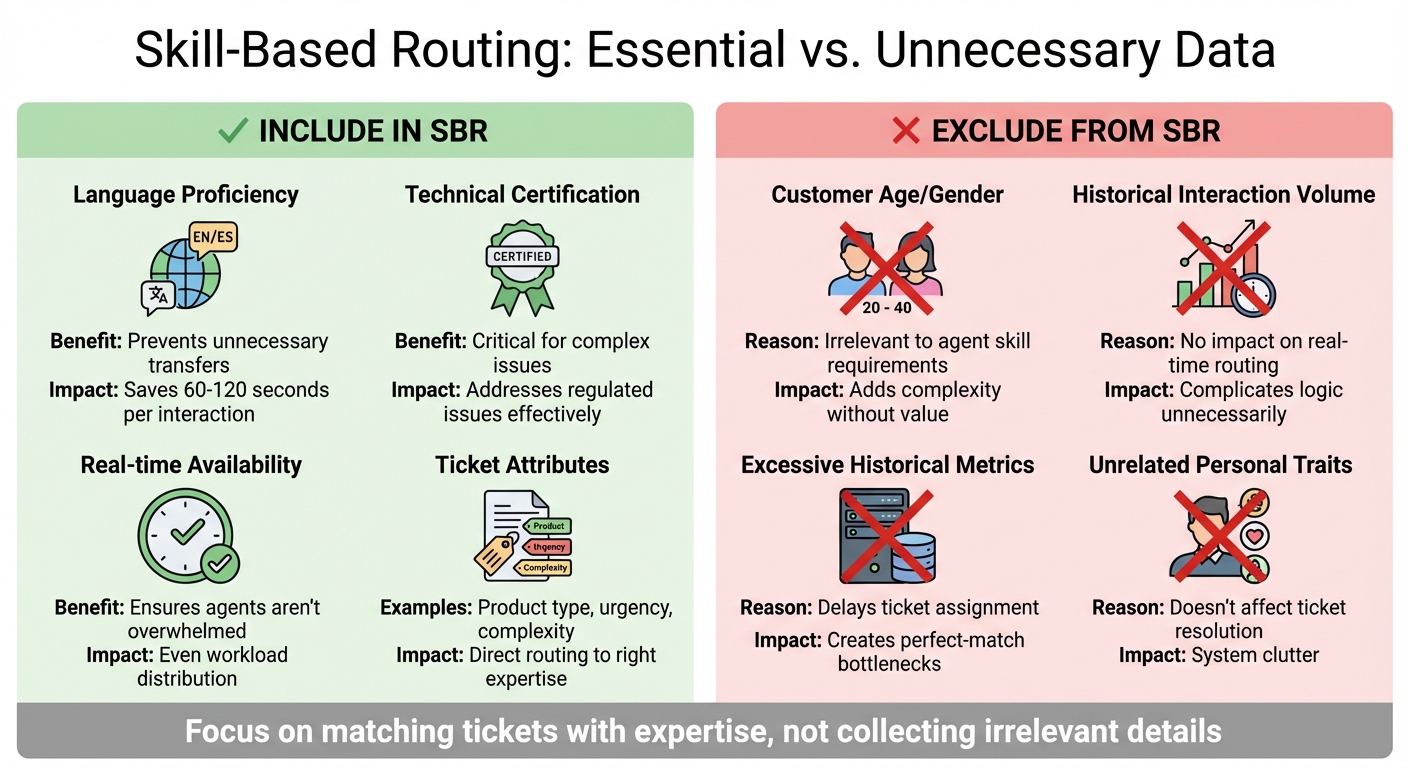
Skill-Based Routing Data: What to Include vs Exclude
Cutting out unnecessary data from your routing system is key to keeping it efficient. The focus should be on aligning tickets with the right expertise, not hoarding irrelevant details about customers or agents.
Irrelevant Customer Demographics
Skip collecting personal demographic information that has no bearing on routing decisions. In B2B support, factors like age, gender, or unrelated personal traits contribute nothing to effective ticket assignment. Knowing whether a customer is a 45-year-old executive or a 28-year-old manager doesn’t affect their need for an agent skilled in payment systems, API troubleshooting, or SLA management.
The real question your routing system should answer is: What does this ticket require? not Who is this customer? Including demographic data only adds unnecessary complexity without improving outcomes.
Instead, focus on ticket attributes that matter, such as the product involved, language requirements, or the technical complexity of the issue. These are the factors that determine which agent can solve the problem most efficiently.
Excessive Historical Metrics
While historical data is valuable for long-term analysis, it has no place in real-time routing. Metrics like total past interactions, long-term performance trends, or overly detailed agent histories only complicate routing logic. This can lead to tickets being delayed because no agent matches every criterion perfectly, which defeats the purpose of automation.
"If a representative isn’t available with all the required skills and corresponding proficiency, then the conversation remains unassigned in the queue." – Microsoft Learn [3]
Use historical data for periodic reviews, not day-to-day routing. Instead, prioritize current factors like agent availability, active workload, and verified skills – elements that directly impact whether an agent can resolve the ticket right now. Employ "closest match" algorithms rather than rigid "exact match" rules to keep tickets moving, even when the perfect agent isn’t immediately available [3].
What to Include and Exclude
Here’s a quick breakdown of what data to prioritize:
| Data Category | Include in SBR? | Reason |
|---|---|---|
| Language Proficiency | Yes | Prevents unnecessary transfers, saving 60-120 seconds per interaction [1] |
| Technical Certification | Yes | Critical for addressing complex or regulated issues [1] |
| Customer Age/Gender | No | Irrelevant to agent skill requirements [1] |
| Historical Interaction Volume | No | Adds complexity without improving ticket resolution [1] |
How to Implement Skill-Based Routing
This plan turns key data into quick and accurate ticket assignments, helping streamline support operations. Skill-based routing uses your team’s abilities and ticket information, paired with automation, to create a more efficient process.
Step 1: Audit and Categorize Agent Skills
Start by identifying the practical skills your team uses to resolve tickets effectively. This isn’t about listing every certification or training – focus on what directly impacts ticket resolution. Work with team leads to pinpoint which agents excel in specific areas like products, languages, or technical expertise.
Group these skills into broad categories to keep your routing system organized:
- Product Skills: Knowledge of specific software or services (e.g., Product A, Product B, Legacy Software).
- Language Skills: Fluency in languages like Spanish, German, or Mandarin, ensuring customers get support in their preferred language.
- Expertise Skills: Specialized areas like billing, API troubleshooting, or onboarding.
- Location/Timezone Skills: Routing to agents in the appropriate region or time zone (e.g., EMEA, North America, APAC).
| Skill Type Category | Example Skills | Purpose |
|---|---|---|
| Product | Product A, Product B, Legacy Software | Routes based on specific product knowledge. |
| Language | Spanish, German, Mandarin | Matches tickets to agents fluent in the language. |
| Expertise | Billing, Technical API, Onboarding | Directs complex issues to specialists. |
| Location/Timezone | EMEA, North America, APAC | Ensures tickets go to agents in the right region. |
Avoid overcomplicating things by creating too many niche skills. For example, if only a couple of agents handle a specific issue a few times a month, group it under a broader skill category instead. Once you’ve sorted the skills into clear categories, you can map them to ticket attributes for precise routing.
Step 2: Map Ticket Attributes to Skills
Once your skills are categorized, link them to ticket attributes using triggers. These triggers assign skills based on ticket conditions like language, tags, or channel. To ensure smooth routing, an agent must meet all the required skills for a ticket, so keep combinations manageable.
Start by reviewing any existing manual routing rules. Many teams already use groups, views, or tags to sort tickets – these can be replaced with a skill-based system. For instance, if you tag high-priority accounts in customer profiles, use those tags to trigger routing to agents with the "Account Manager" skill.
| Ticket Attribute | Mapping Method | Resulting Skill Assignment |
|---|---|---|
| Language (via AI) | Trigger: If Language is "French" | Assign Skill: "French" |
| Customer Tag | Trigger: If Tag is "VIP_Gold" | Assign Skill: "Account Manager – Gold" |
| Channel | Trigger: If Channel is "Phone" | Assign Skill: "Voice Support" |
| Product Field | Trigger: If Product is "Software_X" | Assign Skill: "Product X Specialist" |
| Location/Timezone | Trigger: If Timezone is "EMEA" | Assign Skill: "EMEA Regional Support" |
To prevent delays, set skill timeouts. For example, mark certain skills as "Optional" with a time threshold. If no specialist is available within that time, the system broadens the search by dropping the optional skills. This keeps tickets moving instead of piling up in queues.
Step 3: Automate with AI Tools
With skills defined and ticket attributes mapped, use AI to automate routing. AI-driven workflows take the guesswork out of assigning tickets. Features like intelligent triage identify ticket intent and sentiment, which can then be linked to specific skill tags. Localization tools detect the customer’s language automatically, routing the ticket to an agent fluent in that language.
Enable omnichannel routing to distribute tickets across all channels – calls, emails, chat – while considering agent capacity. This ensures agents aren’t overwhelmed on one channel while underutilized on another. The system continuously evaluates which agents have the right skills and enough capacity to take on new tasks.
| Feature | AI/Automation Benefit | Implementation Strategy |
|---|---|---|
| Intelligent Triage | Automatically identifies intent/sentiment | Map detected intent to specific skill tags via triggers |
| Localization | Detects customer language automatically | Use detected language as a condition to assign language skills |
| Skill Timeouts | Prevents tickets from sitting in queues | Set thresholds to drop optional skills if no agent is available |
| Omnichannel Routing | Real-time automated ticket assignment | Enable "skills-based routing" in global settings |
You can also prioritize skill assignments by setting priority levels and timeout thresholds. For instance, agents with "High" priority for a skill will receive those tickets first. Agents with "Normal" priority act as backups when specialists are busy, keeping the workflow efficient.
Common Mistakes and How to Fix Them
Skill-based routing can stumble when the setup becomes overly complicated or when agent skills aren’t kept up to date. These two issues often lead to misrouted tickets, frustrated agents, and slower resolutions. To keep routing effective, it’s crucial to maintain a simple, up-to-date skill framework.
Using Too Many Data Fields
Overloading your system with excessive skills can make workflows inefficient. Trying to account for every possible scenario with countless niche skills complicates the setup, increases the risk of errors, and makes management a nightmare. As Sherwood CX highlights, "Too many skills can create confusion, making it difficult to properly route tickets or manage the system long-term." [5]
The situation worsens when excessive skills are paired with multiple automations. Each new trigger or tag adds complexity, which can lead to misconfigured rules and delays in ticket resolution time. You might find yourself wasting hours tracking down why a ticket landed in the wrong queue – a problem that’s been linked to data overload in routing systems.
The solution? Start small. Focus on a core set of essential skills, such as language proficiency, product knowledge, and a few key areas of expertise. Only introduce new skills when there’s consistent demand and agents with the right specialization. Stick to static attributes like language or product expertise, which don’t require constant monitoring. Let AI-powered tools handle dynamic tasks like identifying customer intent, intent detection tools, language, or sentiment, instead of relying on hundreds of manual "if-then" rules [5][2].
Failing to Update Agent Skills
Even with a streamlined setup, neglecting to update agent skills can derail routing efficiency. Agents gain new expertise, complete training, or shift responsibilities over time. If skill profiles aren’t updated to reflect these changes, tickets might be routed to the wrong agents – or even to those no longer handling specific areas.
Keeping skills current improves efficiency. When agents work within their actual expertise, they resolve issues faster and with less stress. Maddy Martin, SVP of Growth at Smith.ai, puts it well: "Team members handle calls within their areas of competency, reducing the stress and frustration that come from fielding inquiries outside their knowledge base." [6]
To avoid this pitfall, schedule regular skill audits to ensure agent profiles reflect their current capabilities. Update skills immediately after training sessions to capture new expertise as it becomes available. Maintain centralized documentation of agent skills to quickly identify team strengths and gaps. Additionally, cross-train agents in secondary areas to balance workloads and avoid burnout during demand spikes in specialized categories.
Conclusion
Skill-based routing thrives when it’s built on the foundation of essential agent and ticket data. By focusing on these core elements, you can avoid the pitfalls of system slowdowns and misrouted tickets caused by unnecessary data clutter.
AI-powered routing and prioritization takes this efficiency a step further by improving accuracy and simplifying maintenance. As Stevia Putri, Marketing Generalist at eesel AI, puts it: "Instead of relying solely on rule-based logic, [AI]… ensuring that even nuanced queries find the right home quickly." [2] This approach not only smooths out workflows but guarantees that every ticket is directed to the right expert without delay.
The benefits of precise skill-based routing are clear: faster resolutions, fewer handoffs, and lower operational costs. Maddy Martin, SVP of Growth at Smith.ai, highlights the importance of this efficiency: "Every call reaching the right team member prevents losing prospects to competitors who answer correctly immediately." [6]
To make the most of skill-based routing, keep your framework simple, update agent profiles regularly, and let AI handle repetitive tasks. By concentrating on critical data and leveraging AI tools, your team can cut down on delays and deliver top-notch support. The aim isn’t to create a complicated system – it’s to connect customers with the right expert as quickly as possible.
FAQs
How do I decide which agent skills are worth tracking?
To truly boost support efficiency and customer satisfaction, it’s essential to zero in on the skills that make the biggest difference. Start by pinpointing the abilities that are crucial for handling both routine and complex issues. This ensures your team is equipped to tackle the challenges they face daily.
Use a skills matrix to map out these key abilities, and keep it up-to-date with performance data. This helps you identify which skills have the most impact and should be prioritized. Regularly monitor metrics like average resolution time and first-call resolution rates – these are strong indicators of how effectively your team is performing.
Don’t forget to keep skill data fresh by incorporating cross-training and ongoing evaluations. Focus on the skills that directly influence your team’s performance metrics, as these are the ones that will have the greatest effect on overall success.
What should routing do when no “perfect match” agent is available?
When a ‘perfect match’ agent isn’t available, it’s essential to route the call or ticket to the best available agent. This should be based on the closest skill match or priority level. Doing so ensures the issue gets attention quickly, rather than sitting unassigned or delayed while waiting for an ideal agent to become available.
How often should we audit and update agent skill profiles?
Agent skill profiles need regular reviews and updates to keep skill-based routing accurate and efficient. It’s a good idea to conduct periodic audits to ensure these profiles reflect the team’s actual expertise and adapt to changing customer demands. Keeping profiles current minimizes inefficiencies and boosts routing precision.