



Slack is great for quick chats but terrible for storing knowledge. Support teams often waste time hunting through scattered threads for past solutions, slowing response times and frustrating customers. Here’s the issue: Slack’s search is outdated, conversations are fragmented across channels, and there’s no built-in way to organize or preserve critical insights. This leads to repeated work, inefficiency, and lost institutional knowledge.
Key Points:
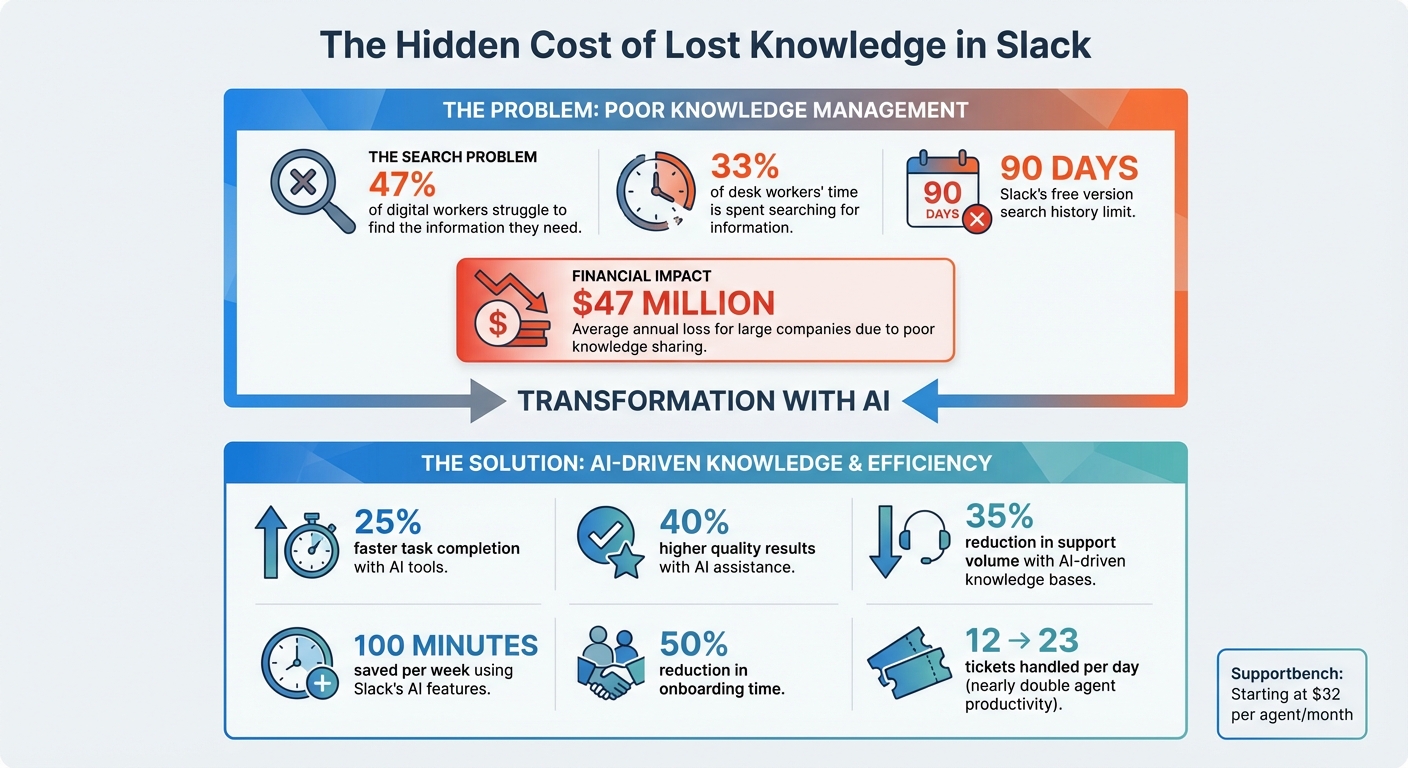
- 47% of digital workers struggle to find the information they need.
- Slack’s search relies on exact keywords, often missing context or intent.
- Threads lack structure, making it hard to track or retrieve solutions.
- Companies lose millions annually due to poor knowledge management.
Solutions:
- Use dedicated channels (e.g., #support-resources) and pin key resources.
- Move support discussions from private messages to public channels.
- Leverage AI tools to summarize threads, generate documentation, and organize knowledge.
- Integrate Slack with external platforms like Google Drive or Confluence.
Slack isn’t built for long-term knowledge retention. Teams should consider AI-native platforms that automate knowledge management, improve search functionality, and reduce wasted time. Tools like Supportbench convert resolved cases into structured articles and streamline workflows, starting at $32 per agent per month. Investing in better tools isn’t optional – it’s necessary to save time, money, and effort.
The Cost of Poor Knowledge Management in Support Teams
How NOT to Use Slack – 7 Mistakes to Avoid
sbb-itb-e60d259
Why Support Knowledge Gets Lost in Slack
Slack’s real-time nature makes it great for quick conversations but terrible for preserving knowledge over time. Its design and limitations often lead to valuable insights slipping through the cracks.
Scattered Information Across Multiple Threads
Support discussions on Slack often spread across public channels, private messages, and even conversations outside the platform. This fragmentation makes it hard to piece together the full context or track key decisions. When team members leave or fail to document their insights, those troubleshooting gems vanish, leaving others to reinvent the wheel. On top of that, Slack’s search struggles to bring scattered threads back together, making it even harder to recover lost knowledge.
Slack’s Native Search Limitations
Slack’s search feature is clunky and outdated, relying on exact keyword matches without understanding the intent or context behind a query. As Peter Choi bluntly put it:
"Slack search is somehow still stuck in 2010. No semantic search, no vector search, no personalization… Type one wrong letter and you may as well have hallucinated that conversation." [6]
This means a search for "payment processing error" might completely miss threads labeled "checkout failure" or "transaction declined." Slack’s free version compounds the issue by limiting search history to just 90 days [8]. Even when results show up, they’re often a mess of outdated discussions, partial answers, and conflicting viewpoints, forcing agents to waste time sifting through irrelevant content [7]. And since Slack doesn’t have built-in tools to organize solutions, the problem snowballs.
No Built-In Knowledge Management System
Slack lacks features to organize or maintain a structured knowledge base. There’s no way to tag threads, mark solutions as verified, or track recurring issues. Everything – whether it’s a critical fix or casual chit-chat – gets treated the same, turning Slack into a chaotic archive instead of a useful repository. This disorganization has consequences: 47% of employees avoid their company’s knowledge base because it’s too messy and switching contexts constantly disrupts their workflow [4]. For larger businesses, the stakes are even higher – losing institutional knowledge when employees leave can cost tens of millions of dollars annually [2].
Without tools to categorize and structure information, Slack becomes a black hole for support knowledge, forcing teams to waste time and resources solving the same problems over and over.
How to Organize and Preserve Knowledge in Slack
While Slack doesn’t come with built-in tools for managing knowledge, you can set up workflows to minimize the risk of losing important information. These strategies won’t completely solve Slack’s structural limitations, but they can help your team find answers quicker and reduce time spent sifting through old conversations. Here’s how to centralize and protect your high-performing support team’s critical knowledge.
Create Dedicated Channels and Pin Key Resources
To address scattered advice and fragmented information, create specific channels (like #support-resources or #troubleshooting-archive) to house essential knowledge. Use Slack’s pinning feature to keep key resolutions, troubleshooting guides, and documentation front and center. This way, important resources stay accessible without relying on Slack’s less-than-ideal search function. Make it a habit to update these pinned items regularly to avoid outdated or conflicting information.
Use Public Channels Instead of Direct Messages
Shifting support conversations from private messages to public channels is another effective way to preserve shared knowledge. Unlike direct messages, which disappear after a problem is resolved, public channels create a searchable record that everyone on the team can access [2]. This ensures that troubleshooting steps, solutions, and decisions are visible to all. Teams that embrace a "search-first" mindset often experience smoother knowledge sharing and reduced repetitive questions [2].
Use AI to Summarize Threads and Capture Knowledge
AI tools can take your knowledge management to the next level by automating the way information is captured and organized. These tools can summarize long threads, highlight key actions, and even draft documentation on the fly [2][3]. For example, Retrieval-Augmented Generation (RAG) technology pulls data from various sources and delivers clear, conversational answers instead of just providing a list of links [3].
Organizations using Slack’s AI features have reported saving up to 100 minutes per week and cutting onboarding times by 50% [4]. You can also use Slack’s Workflow Builder to automate tasks like project wrap-ups or gathering feedback after resolutions, ensuring no details are overlooked [2]. To maximize these benefits, integrate Slack with external tools like Google Drive, Jira, or Confluence. This allows AI to search your entire tech stack and surface relevant information without requiring you to switch platforms [4][9].
Moving Beyond Slack with AI-Native Platforms
Slack was never designed to function as a knowledge management system. While it’s fantastic for real-time communication, it falls short when it comes to offering the structured, scalable, and searchable knowledge infrastructure that today’s support teams need. The numbers paint a clear picture: large companies lose an average of $47 million annually due to poor knowledge sharing [2][10], and desk workers spend about 33% of their time searching for information [2][1]. These inefficiencies highlight the need for purpose-built solutions. Let’s dive into how AI-native platforms tackle Slack’s limitations head-on.
Automated Knowledge Management with AI
AI-native platforms like Supportbench solve the "search problem" by transforming resolved support cases into structured knowledge articles. With just one click, a resolved case can be converted into a detailed, organized article for the knowledge base [12]. This eliminates the "maintenance debt" of traditional systems, where documentation often becomes outdated faster than it can be updated [11].
These platforms also leverage gap analysis to identify missing FAQ topics [11]. Instead of guessing what to document, teams can strategically create content to address future issues before they arise. The results are impressive: AI-driven knowledge bases can reduce support volume by 35% and nearly double agent productivity, increasing ticket handling from 12 to 23 per day [11].
Better Collaboration and Scalability
AI-native platforms go beyond automating knowledge management by optimizing workflows in ways Slack simply can’t. Features like intelligent routing ensure tickets are automatically classified, prioritized, and assigned to the right team members, making it easier to scale as support demands grow [12]. Meanwhile, context-aware AI Co-Pilots offer real-time suggestions and even draft responses based on case history, moving from basic keyword searches to proactive problem-solving [12].
These platforms also use semantic reasoning to understand the intent behind words, addressing the limitations of traditional tools [3]. Additionally, one-click citations allow teams to instantly link to source material, fostering trust and making it easier to verify information without digging through endless threads. For B2B support teams handling complex accounts or long-term cases, this shift from "knowledge retrieval" to "knowledge delivery" [1] means faster resolutions, fewer repeated questions, and pricing models that grow with your team – not your ticket volume.
Common Mistakes and How to Avoid Them
Even when teams acknowledge Slack’s shortcomings, they sometimes make decisions that make knowledge retrieval even harder. One major misstep is keeping critical details locked away in direct messages. When vital information – like key decisions, troubleshooting steps, or customer insights – stays hidden in DMs, it’s inaccessible to the larger team. This not only limits collective knowledge but also disrupts workflows, especially during handoffs.
A better approach? Use public channels by default. Public channels create a searchable, shared record that remains available even as team members leave or change roles. For example, if support agents discuss a tricky customer issue in a public channel instead of a DM, future agents can find the solution quickly without starting from scratch. Below, we’ll cover some common pitfalls and actionable ways to address them.
Leaving Critical Information Buried in Threads
Threads can hold valuable insights, but without proper action, that knowledge can disappear over time. For instance, a troubleshooting thread might contain the perfect solution, but if it isn’t summarized and saved, it’s as good as lost. To prevent this, assign "knowledge champions" who can review and distill key takeaways from threads. Additionally, AI case summarization tools can help capture and archive this information in real time, ensuring nothing slips through the cracks.
Not Updating and Reviewing Knowledge Regularly
Capturing information is just the first step – keeping it up-to-date is equally important. Outdated guides and resources don’t just waste time; they erode trust. To avoid this, schedule regular content audits to ensure accuracy. Simple mechanisms, like thumbs up/down buttons for AI-generated summaries, let team members flag outdated or unhelpful content instantly. Adding metadata, such as "last updated" timestamps on documents, also helps identify resources that need attention. The focus isn’t on perfection from day one but on building a system that evolves and improves as your team uses it.
Conclusion
Slack was never intended to handle knowledge management, and trying to make it fit that role wastes time and money. In fact, poor knowledge sharing costs large organizations millions every year[13]. When your team spends 33% of their time searching for information, it’s a clear sign that the system isn’t working[1][2].
The solution? Shift from "knowledge retrieval" to "knowledge delivery." Modern support teams need AI that understands context and delivers insights quickly. Studies show that workers using AI tools finish tasks 25% faster and produce 40% higher-quality results[1][5]. This means quicker resolutions and improved customer experiences.
These stats highlight an urgent need to rethink how support teams handle knowledge.
"For too long, we’ve been putting the document at the center of the experience instead of the user. We’ve treated knowledge management as a library for retrieval, not a living, breathing system that can proactively collaborate with workers." – Slack Blog [1]
To address this, teams need AI-native tools that do more than just store information – they should actively deliver it.
If your team is bogged down by scattered Slack threads and buried expertise, consider AI-driven solutions like Supportbench. Unlike traditional tools, it integrates AI-powered knowledge management directly into its platform – no costly add-ons required. Features like automated case summaries, knowledge base creation from case history, and intelligent search across customer interactions are included. Starting at $32 per agent per month, it’s designed to scale without the sticker shock of enterprise-level pricing.
The real question isn’t whether to improve your knowledge management – it’s whether you can afford not to.
FAQs
How do we measure time lost searching Slack?
To figure out how much time is lost in Slack searches, keep an eye on how long employees spend looking for information, how often the same questions are asked, and the time it takes to sift through threads. AI-powered tools can also offer insights by analyzing search efficiency. Research suggests that employees might spend as much as 30% of their workweek searching for answers. That’s a significant chunk of time that could be impacting overall productivity.
What’s the simplest Slack workflow to capture solutions?
The easiest way to streamline your workflow is by using AI tools to automatically extract and save important takeaways from Slack conversations. For instance, you could deploy an AI bot to summarize discussion threads or set up an emoji reaction (like 📚) that triggers the capture of key information. These insights are then saved directly into your knowledge base, making sure valuable solutions are documented without interrupting your team’s daily processes.
When should we move from Slack to an AI-native platform?
If Slack’s limitations – like fragmented knowledge across threads and isolated silos – are slowing down your support team’s efficiency, it might be time to explore an AI-native platform. Teams often face challenges like repetitive questions, disorganized information, and difficulty scaling support efforts. AI-powered tools can address these issues by centralizing knowledge, delivering instant answers, and streamlining operations.
Switching to an AI-driven solution becomes crucial when manual knowledge management starts consuming too much time or becomes too expensive to keep up with your team’s demands.






