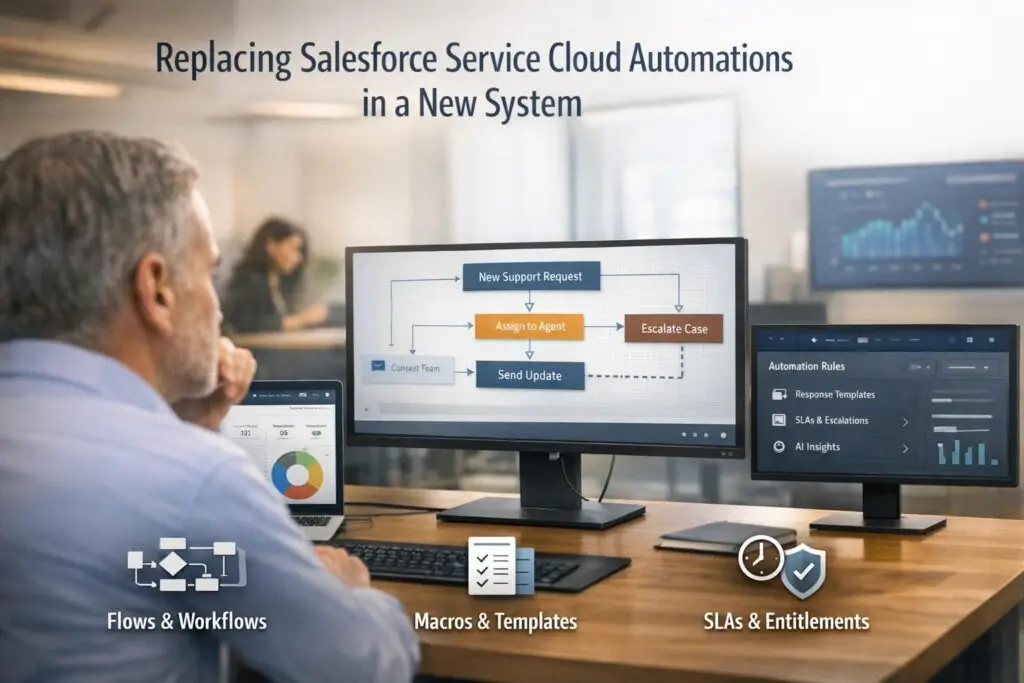
Switching away from Salesforce Service Cloud automations like Flows, Macros, and Entitlements isn’t just about migrating processes – it’s an opportunity to streamline operations and reduce inefficiencies. Here’s how to approach it:
- Document everything: Create a detailed inventory of all current automations, triggers, and workflows to avoid losing critical logic or carrying over inefficiencies.
- Replace Flows: Use AI-powered workflow engines that can dynamically handle complex tasks without constant manual updates.
- Upgrade Macros: Implement AI agent copilots for real-time suggestions and auto-responses to speed up repetitive tasks and reduce errors.
- Modernize Entitlements: Shift to dynamic SLAs that adapt to case context and use AI to prioritize cases based on urgency and customer value.
- Test thoroughly: Validate all automations in a sandbox to ensure they work as intended and refine them with agent feedback.
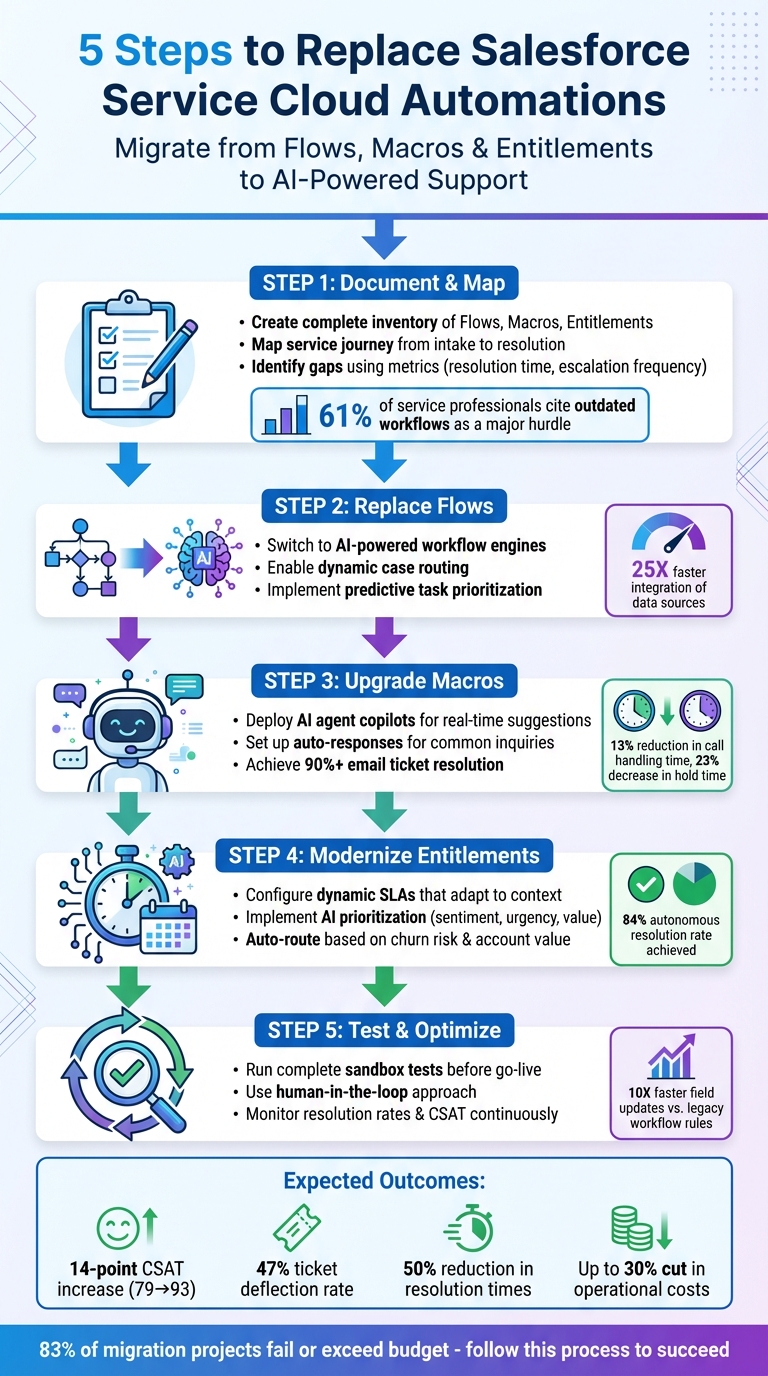
5-Step Process for Replacing Salesforce Service Cloud Automations with AI-Powered Solutions
How to Migrate Salesforce Workflows the Right Way
sbb-itb-e60d259
What Salesforce Service Cloud Automations Do
Salesforce Service Cloud uses three key automation tools – Flows, Macros, and Entitlements – to streamline support tasks like ticket routing and SLA enforcement. These features ensure that customer service operations run efficiently and consistently.
Flows: Simplifying Complex Workflows
Flows allow teams to automate multi-step processes using a drag-and-drop interface, eliminating the need for coding. In customer support, Flows handle tasks like case routing, updating records, sending notifications, and managing approvals. For example, a Flow might automatically escalate a high-priority case to a specialized team based on the product type.
"Automation helps to streamline the process… saving time for the customer and service team while ensuring accuracy." – Salesforce Trailhead
While Flows are powerful for managing intricate processes across teams, they require technical expertise to configure. They can also become challenging to update as business needs evolve, making flexibility a potential issue.
Macros: Boosting Agent Productivity
Macros are designed to handle repetitive tasks quickly and efficiently. With just one click, a macro can send a templated email, update a case status, or fill multiple fields across the system. This allows agents to spend less time on administrative work and more time interacting with customers.
Studies show that reps spend only 28% of their time on core tasks due to manual data entry. By automating routine actions, macros reduce response times and help minimize human errors, improving both efficiency and accuracy.
Entitlements: Enforcing SLAs and Service Standards
Entitlements ensure that Service Level Agreements (SLAs) are met by tracking milestones like response and resolution times. This tool is especially critical in B2B environments, where service levels often vary by contract.
Entitlements essentially act as a timer, prioritizing cases and triggering actions like escalations or notifications to prevent SLA breaches. With 83% of customers expecting immediate assistance, automated follow-ups play a vital role in maintaining customer satisfaction.
These automation tools provide the foundation for transitioning to more advanced, AI-driven solutions, helping businesses maintain efficient and reliable customer service.
Step 1: Document and Map Your Current Automations
Before diving into migration, take the time to document your system’s automations. This involves creating a detailed inventory of every Flow, Macro, and Entitlement currently in use. Skipping this step can lead to losing critical logic or carrying over inefficiencies into the new system.
Create a Complete List of Your Automation Workflows
Start by cataloging all automations based on their primary object – like Cases, Leads, or Opportunities. For each workflow, document the trigger conditions, rule logic (such as if/then criteria), and actions, which might include field updates, task assignments, or email alerts.
"In a workflow rule, you get one set of criteria with multiple conditions and then a list of actions to run after the criteria is met. Being able to ‘chain’ multiple sets of criteria provides for if-then-else logic to easily build complex business processes." – Jonathan Keel, Founder and President, 6 Street Technologies
To get a clear picture of how cases move through the system, map the service journey from intake to resolution. Use tools like the Service Console and case history data to observe how workflows operate in real time. Additionally, document data flows between your platform and any external tools, assigning clear responsibilities for each step in the process.
With this thorough inventory, you can identify inefficiencies and create a solid foundation for introducing AI-powered ticket routing and prioritization later in the migration.
Find Gaps and Problems in Your Current System
After documenting your processes, focus on identifying areas for improvement. Metrics like resolution time, escalation frequency, and customer satisfaction scores can help highlight weak spots. Dive into case histories to pinpoint where cases tend to stall, loop unnecessarily, or trigger redundant automations. Considering that 61% of service professionals cite outdated workflows and tools as a major hurdle, this is your chance to address inefficiencies rather than just replicating them.
Review your rules carefully to spot overlaps or error-prone scenarios – like emails being sent to incorrect recipients. Look for repetitive tasks, such as agents re-entering the same customer details, which could be streamlined. For instance, in 2025, a global technology group analyzed its workflows and found that field technicians were slowed down by manual notetaking and limited real-time troubleshooting options. By automating notetaking and introducing mobile troubleshooting tools, they anticipated a 20% boost in tech team efficiency.
"You can’t simplify what isn’t defined. Well-documented workflows make it easier to identify where AI customer service tools like automation, chatbots, and intelligent agents add the most value." – Salesforce
Step 2: Replace Flows with AI-Powered Workflow Engines
After documenting your existing automations, the next step is to swap out rigid Flows for AI-powered workflow engines. These engines are designed to handle complex B2B processes without constant manual updates. Unlike traditional Flows, which rely on predefined decision trees with every condition and exception mapped out, AI-powered systems use reasoning to adapt dynamically. They can process unstructured data – like emails or chat messages – and execute multi-step tasks across applications without needing reconfiguration. This shift lays the groundwork for selecting the right AI platform to transform your workflow management.
Select a Platform with Built-In AI Workflow Capabilities
When choosing a platform, focus on one that integrates AI capabilities from the beginning. Key features to look for include:
- Dynamic case routing: Automatically assigns cases based on urgency, sentiment, or business impact.
- Predictive task prioritization: Identifies high-risk issues early to prevent escalation.
The goal here is to establish a seamless customer support management system that avoids the hassle of piecing together multiple tools with APIs or custom code.
For example, in 2025, Luka Pilic, a marketplace tech lead at StepStone, shared how modern workflow automation drastically improved his team’s efficiency:
"We’ve sped up our integration of marketplace data sources by 25X. It takes me 2 hours max to connect up APIs and transform the data we need. You can’t do this that fast in code".
Similarly, Dennis Zahrt, Director of Global IT Service Delivery at Delivery Hero, reported saving 200 hours of manual labor every month by implementing a single automated workflow for user management.
When evaluating platforms, prioritize ones that unify Sales, Support, and Success teams into a single system. This eliminates data silos, allowing agents to access crucial details – like licensing information, renewal dates, or escalation history – without switching between tools. For B2B teams, this level of integration is particularly important for managing long, complex cases involving multiple stakeholders.
Build Workflows That Scale with Your Business
After selecting the right platform, the next step is designing workflows that grow with your business. Instead of replicating outdated automations, focus on building intelligent workflows that consolidate redundant logic and fully utilize AI capabilities. Tools that simply migrate old Flows often lead to a cluttered system with too many standalone workflows, making maintenance a nightmare.
For example, rather than having five separate rules for case escalations based on different criteria, combine them into a single intelligent workflow that evaluates all conditions dynamically. This approach simplifies maintenance while improving efficiency.
Start with high-impact but straightforward areas, like account updates or Tier-1 troubleshooting. These are ideal for delivering quick results while giving your team time to adapt to the new system. To ease this transition, adopt a human-in-the-loop (HITL) strategy. Here, AI suggests actions, and agents approve them before execution. This builds trust in the system and helps identify edge cases early on.
Looking ahead, Gartner predicts that by 2028, one-third of enterprise software will feature agentic AI – moving from passive support tools to proactive systems capable of handling complex tasks autonomously. By designing workflows that can evolve from assisted to autonomous operation, you’ll ensure your support infrastructure stays flexible and ready for future challenges, avoiding rigid automations that fail when your business grows or changes.
Step 3: Replace Macros with AI Agent Copilots and Auto-Responses
Modern AI solutions are transforming support workflows by replacing outdated tools with smarter, more dynamic systems. Traditional macros, while helpful for repetitive tasks like updating ticket fields or sending templated responses, are inherently rigid. Agents must manually search for the right macro, remember when to use it, and fill in missing details. As support operations become more complex, this manual process can slow things down. AI agent copilots and auto-response systems solve these challenges by offering real-time, context-aware suggestions and automating responses without requiring manual input.
Use AI Agent Copilots to Assist Your Team
AI agent copilots take the guesswork out of finding and using macros. By analyzing conversations in real time, these tools suggest the most relevant actions – often referred to as "Action Flows" – that agents can approve with a single click. Once approved, the copilot handles the rest, automatically pulling important details like order IDs or customer sentiment to update fields.
These copilots also streamline workflows across platforms. For instance, they can create Jira issues, send Slack updates, or process Shopify refunds, all within a single workflow. This eliminates the need for agents to juggle multiple tools. As Zendesk explains, when the system suggests an action, "the agent can approve it and the system carries out the action automatically, saving the agent time".
To improve the accuracy of these suggestions, it’s essential to give action flows clear, descriptive names. Instead of a generic label like "Refund Process", use something more specific, such as "Issue Full Refund for Damaged Product Orders." This helps the AI understand when to recommend the flow, reducing irrelevant suggestions and speeding up decision-making.
With these copilots in place, the next logical step is to automate responses for common inquiries.
Set Up AI Auto-Responses for Common Inquiries
While AI agent copilots assist with decision-making, AI auto-responses handle routine inquiries entirely on their own. Using Natural Language Processing (NLP), these systems interpret customer intent and tone, then generate accurate, context-sensitive replies. They pull information from trusted business sources like knowledge bases and CRM systems to ensure responses are both precise and relevant. Unlike static macros, auto-responses adapt their tone and content to fit each specific interaction.
The results can be game-changing. Advanced automation platforms can resolve over 90% of email tickets in seconds, with accuracy rates as high as 99.8%. For example, in 2025, ezCater used Level AI‘s Real-Time Agent Assist to help agents navigate a library of over 1,000 knowledge articles. This led to a 13% reduction in overall call handling time and a 23% decrease in call hold time during peak hours, with 94% of calls answered within 30 seconds.
To set up auto-responses effectively, start by auditing your knowledge sources. Identify where your team currently finds answers – whether in Slack, wikis, or Google Docs – and connect these to your AI tool to establish a single, reliable source of truth. Before going live, test the system using past support tickets to ensure it performs well. Additionally, set clear boundaries to prevent the AI from addressing off-topic questions or sharing inappropriate content. Define rules for escalating complex issues to human agents, ensuring a smooth handoff when needed. This balance between automation and human oversight builds confidence while fine-tuning the system’s accuracy over time.
Step 4: Move from Entitlements to Dynamic SLAs and AI Prioritization
Shifting from static entitlements to dynamic SLAs isn’t just about improving accuracy – it’s about enabling smarter, more responsive case handling powered by real-time AI insights. Traditional entitlement systems tie service levels to fixed contract terms, but dynamic SLAs adapt to the context of each case, ensuring critical issues take priority over routine ones.
Configure Dynamic SLAs That Adapt to Case Context
Dynamic SLAs leverage business logic to adjust service targets on the fly. Instead of manually assigning entitlements to each case, these systems evaluate attributes like customer region, account value, or the urgency of the situation. Based on this evaluation, the appropriate SLA is applied automatically. For example, if a customer escalates a billing issue close to their renewal date, the system reevaluates the "Applicable When" conditions and updates SLA targets in real-time. Modern platforms can even cancel an existing KPI instance and generate a new one when case details change. Timers are recalculated, and they can be paused when waiting for customer input.
To configure dynamic SLAs effectively, start by defining field-based triggers that determine when an SLA should start, pause, or resume. Use "Applicable When" conditions to align SLAs with real-time case attributes. It’s also essential to set up a default SLA for cases that don’t meet high-priority criteria, ensuring that every customer interaction is tracked. Key SLA metrics – like remaining time and current status (Paused, Succeeded, or Non-compliant) – are displayed through timers, giving agents and managers full visibility into service performance.
Once dynamic SLAs are in place, the next step is to ensure that the most critical cases are prioritized effectively. This is where AI-driven prioritization comes into play.
Let AI Prioritize Cases Automatically
Dynamic SLAs lay the groundwork for AI to take case prioritization to the next level. Rather than relying on outdated "first-in, first-out" methods or manual flags, AI evaluates factors like customer sentiment, account value, and urgency indicators such as predicting churn risk.
The impact of AI prioritization can be game-changing. For instance, in September 2025, Salesforce reported that its internal support team reached an autonomous resolution rate of 84% by implementing its Agentforce AI system. The AI handled routine inquiries end-to-end, intelligently routed cases, and allowed Salesforce to reallocate 500 support engineers to more strategic projects. AI now manages between 30% and 50% of the workload with an impressive 93% accuracy rate.
"The breakthrough came when they stopped thinking about AI as a replacement technology and started viewing it as an amplification system." – Chris Daigle, Salesforce’s Chief AI Officer.
To implement AI prioritization, start by unifying all relevant data sources into a single dataset for the AI to analyze. Then, define prioritization rules that incorporate sentiment analysis, urgency thresholds, customer value, and predictive indicators like renewal timelines. Before deployment, test the AI logic using simulation modes against historical tickets to ensure accuracy and identify any potential gaps. Build workflows using modular components so updates can be made seamlessly without disrupting the system. Once live, monitor resolution rates and satisfaction scores continuously to fine-tune the AI based on actual results.
Step 5: Test, Validate, and Optimize Your New Automations
Testing is the key to ensuring smooth transitions and avoiding support hiccups. Before activating your new automations, you’ll need to confirm that workflows run as intended, SLAs trigger correctly, and AI-powered tools genuinely enhance agent efficiency instead of creating new obstacles.
Run Complete Tests Before Going Live
Always test your automations in a controlled environment, such as a sandbox. As Salesforce Trailhead advises:
"Because some flows affect the data in the org, never debug flows in production with live data. Always ensure that the flow is working properly in your test environment before you move it to production".
This precaution safeguards your live customer data and minimizes disruptions to ongoing support operations.
Start by validating the execution order using a workflow trigger tool. This helps ensure that record-triggered automations don’t conflict with one another and avoids recursion issues – situations where records are repeatedly evaluated, potentially leading to unexpected behavior. Confirm that integration points with systems like CRMs, knowledge bases, and third-party APIs operate as intended.
Modern platforms with faster field updates can perform up to 10 times faster than older workflow rules, but only if configured correctly. Keep an eye on metrics like resolution times, escalation rates, and customer satisfaction to quickly identify and address any bottlenecks. Document every automation’s purpose, dependencies, and logic to maintain clarity and simplify future updates.
Gather Feedback and Make Improvements
After verifying technical functionality, shift your focus to how the automations perform in real-world scenarios. Use a human-in-the-loop approach, where AI suggestions require agent approval. This approach builds trust while catching errors early. Monitor metrics like First Contact Resolution rates and average handle times to ensure the automations meet your business needs under actual operating conditions.
Agent feedback is invaluable in this phase. With 77% of service professionals noting their roles have become more complex and 61% identifying outdated workflows as a major obstacle, their insights can pinpoint what’s working and what isn’t. Export automation data to external tools for custom analyses that quantify the value your automations provide. Additionally, consider transitioning agents into "AI supervisors" who refine AI models and design new workflows based on observed trends. This collaborative approach ensures your automations evolve alongside your business needs.
Common Mistakes to Avoid and Ways to Reduce Costs
When transitioning away from legacy systems, steering clear of common errors is essential for maintaining efficiency and keeping costs under control. A staggering 83% of migration projects either fail or exceed their budgets, often because teams rush to replicate outdated systems without addressing existing flaws. One of the most expensive missteps is transferring incomplete or outdated data and logic – essentially moving unresolved issues to a new platform. As Anjali from Girikon points out:
"Migrating incomplete, outdated, or inconsistent records only relocates the problem without clean and structured data".
Poor-quality data costs organizations an average of $12.9 million annually, making pre-migration data audits non-negotiable. Additionally, unexpected automation triggers during migration can silently delete data or flood inboxes with automated emails [51,54]. To mitigate these risks, deactivate all validation rules, triggers, and flows before starting the migration. Afterward, re-enable them incrementally, running regression tests to ensure compatibility with the new data structure. This phased approach can cut operational costs tied to data management by up to 30%.
Keep Workflows Simple and Maintainable
Migration tools often convert every legacy rule into a separate flow, which can lead to an overwhelming number of automations and increased maintenance demands. Instead of replicating hundreds of outdated rules, consolidate related logic into streamlined workflows. For example, instead of maintaining individual flows for each SLA tier, create a single dynamic workflow that adapts based on context, like upcoming renewals or customer health scores.
Migration also presents a chance to address technical debt. Before rebuilding, identify and eliminate overlapping, conflicting, or unused logic. With 61% of service professionals citing outdated workflows as a significant hurdle, removing redundant conditions can make your new system leaner and easier to manage. Properly documenting workflows – capturing their purpose, dependencies, and logic – prevents reliance on informal processes that can complicate onboarding and drive up consulting costs. Simplified workflows reduce both maintenance headaches and migration expenses.
Get More Value with AI-Native Platforms
Simplified workflows lay the groundwork for taking full advantage of AI-native platforms. These platforms eliminate the need for expensive custom-coded solutions and reduce manual tasks. For example, instead of purchasing separate tools for case prioritization, sentiment analysis, or knowledge base article creation, AI-native platforms like Supportbench include these features as standard, starting at $32 per agent per month – without additional fees for add-ons. Using AI to draft personalized responses can save anywhere from 5 to 30 minutes per issue, cutting labor costs while speeding up resolution times.
It’s no surprise that 83% of service decision-makers plan to increase automation investments. By choosing platforms that simplify configuration changes without requiring IT support, organizations can use AI to pre-fill case fields, route inquiries to the most suitable agent, and prioritize cases based on urgency. Companies that emphasize clean data and streamlined workflows during migration often see noticeable improvements in both efficiency and cost savings, proving that upfront effort pays off quickly.
Here’s a quick summary of the key migration phases and actions:
| Migration Phase | Key Action for Automation | Goal |
|---|---|---|
| Pre-migration | Audit active Flows, Macros, and Triggers | Identify what to keep, retire, or fix |
| During Migration | Disable Validation Rules and Triggers | Prevent automation collisions and data blocks |
| Post-migration | Re-enable and run regression tests | Ensure logic works with the new data structure |
| Validation | Reconcile record counts and critical fields | Confirm no silent data loss occurred |
Conclusion: Building Scalable, AI-Powered Customer Support
Shifting away from Salesforce Service Cloud automations isn’t just about swapping tools – it’s about reimagining how customer support operates. The outlined five-step strategy offers a roadmap for creating smarter, AI-driven support systems that deliver measurable outcomes.
The results speak for themselves. In 2023, cybersecurity company Cynet saw their CSAT score jump by 14 points (from 79 to 93) and achieved a 47% ticket deflection rate after introducing generative AI into their support operations. They also halved resolution times, resolving nearly 50% of Tier 1 tickets without escalation. These improvements highlight the potential of moving from reactive, rule-based systems to proactive, AI-powered workflows capable of handling unstructured data, solving complex issues, and seamlessly managing multi-step tasks across various platforms.
Looking ahead, industry forecasts reinforce the value of this shift. Gartner predicts that by 2028, one-third of enterprise software will integrate agentic AI, with AI agents expected to resolve up to 80% of common customer issues by 2029. By replacing outdated automation, companies not only eliminate technical debt but also prepare for future growth. Businesses that adopt AI-native platforms now will be better equipped to handle increased demand without additional headcount, cut operational costs, and enable human agents to focus on building high-value customer relationships.
Supportbench makes this transition more accessible, offering AI-powered tools, dynamic SLAs, and workflow automation for just $32 per agent per month. With systems that simplify configuration changes and provide full customer context in one interface, B2B teams can scale efficiently while protecting both retention and revenue. The real question isn’t whether to make the move – it’s how soon you can start building a support system ready to meet the challenges of the next decade.
FAQs
What are the steps to replace Salesforce Service Cloud automations like Flows, Macros, and Entitlements in a new system?
To move away from Salesforce Service Cloud automations like Flows, Macros, and Entitlements, the first step is to thoroughly document and map out your existing workflows. Pinpoint the key triggers, actions, and decision points to make sure every critical process is captured. This groundwork is crucial to either replicate or improve the functionality in your new system.
Once you’ve mapped everything out, it’s time to explore tools that are AI-driven, scalable, and budget-friendly to handle your support operations. Many modern platforms offer flexible automation features that can cut down on manual tasks and speed up response times. After choosing the right tools, focus on configuring and testing the new workflows to ensure they meet – or even surpass – the capabilities of your old system.
To wrap things up, go for a phased rollout while keeping a close eye on performance. This approach helps you catch and resolve any issues early, allowing you to fine-tune workflows and ensure a seamless transition for both your team and your customers.
How can AI improve the efficiency of customer support operations compared to traditional methods?
AI-powered tools are transforming customer support by automating time-consuming tasks like case classification, routing, and data entry. These tasks, which used to demand significant manual effort, are now completed faster and with greater accuracy. For example, AI can analyze historical data to recommend the best support pathway, eliminating the need for agents to manually triage requests and speeding up response times.
Beyond that, AI can manage ticket triage, escalation, and even resolution by seamlessly integrating with help desks, knowledge bases, and other systems. This not only lightens the workload for support teams but also reduces errors and ensures consistent service – even during off-hours. AI can also take a proactive approach by analyzing customer sentiment and behavior in real time, helping teams address issues before they grow into bigger problems. By simplifying workflows and scaling operations, AI delivers cost-efficient and tailored support that’s hard to achieve using older methods.
What should I watch out for when switching to an AI-native customer support platform?
When making the switch to an AI-powered customer support platform, there are a few key missteps you’ll want to steer clear of.
First, don’t underestimate the challenge of replacing legacy tools like Flows, Macros, and Entitlements. These older automations often have intricate dependencies, and if overlooked, can lead to broken workflows or missed steps. Taking the time to thoroughly map out your existing processes ensures that critical functions aren’t lost during the migration.
Second, picking tools that don’t fit your needs can be a costly mistake. The wrong platform might not scale with your business or could lead to unnecessary expenses. Carefully evaluate potential solutions to make sure they align with your goals and operational demands.
Finally, neglecting staff training and change management can derail even the best-planned transitions. Without clear communication and proper onboarding, your team might struggle to adapt, which could undermine the platform’s effectiveness. A well-thought-out plan that includes engaging stakeholders and ongoing adjustments is essential for a smooth shift.
Related Blog Posts
- How do you migrate from a US helpdesk to a non-US platform without losing history or data?
- How do you build a change management plan for switching helpdesks (adoption + resistance)?
- How do you migrate from Salesforce Service Cloud to a helpdesk without losing case history?
- How do you map Salesforce Case fields, Record Types, and Statuses to a new helpdesk?