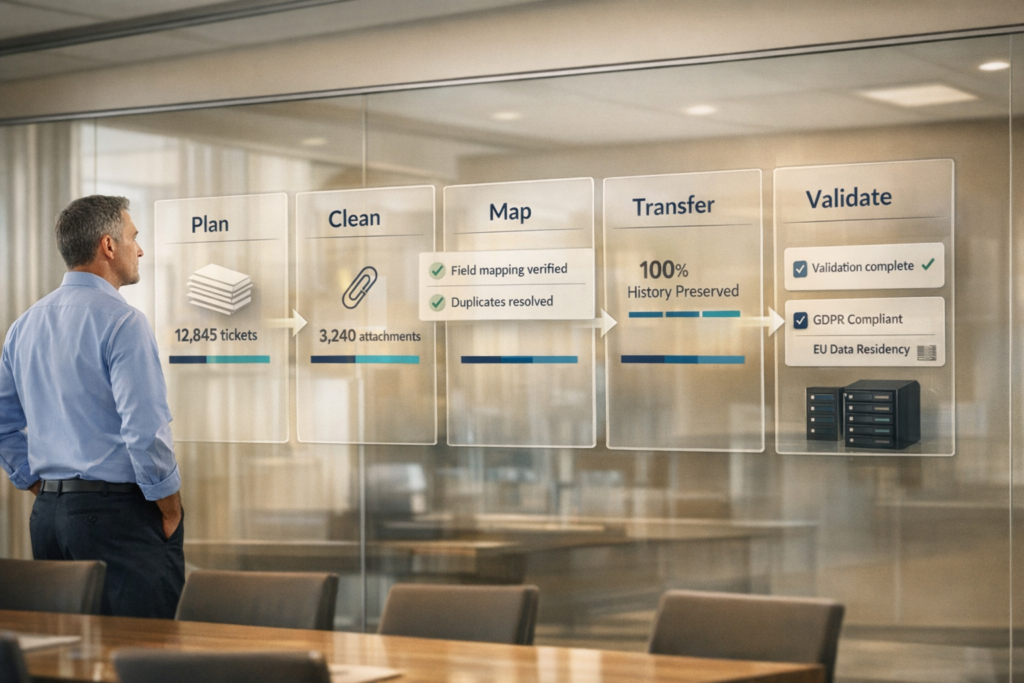
Migrating your helpdesk without losing data is possible but requires careful planning. Here’s what you need to know:
- Why Migrate? Rising costs, stricter regulations (like GDPR), and outdated US-based systems are driving companies to switch to modern, non-US platforms.
- Challenges: 83% of migrations fail or go over budget due to poor planning, data loss, or compliance issues.
- Key Steps:
- Audit Your System: Identify inefficiencies, clean up outdated records, and back up your data.
- Set Clear Goals: Define objectives like cost reduction, data preservation, and compliance.
- Map Data Fields: Ensure all fields (e.g., tickets, users) align between systems while meeting regulations.
- Use Automated Tools: Transfer data efficiently with minimal downtime.
- Validate and Train: Test the new system, train your team, and monitor performance post-migration.
Pro Tip: Use AI tools to improve workflows and customer support post-migration, reducing costs by up to 50%.
Switching platforms isn’t just about moving data – it’s a chance to improve processes and meet compliance standards.
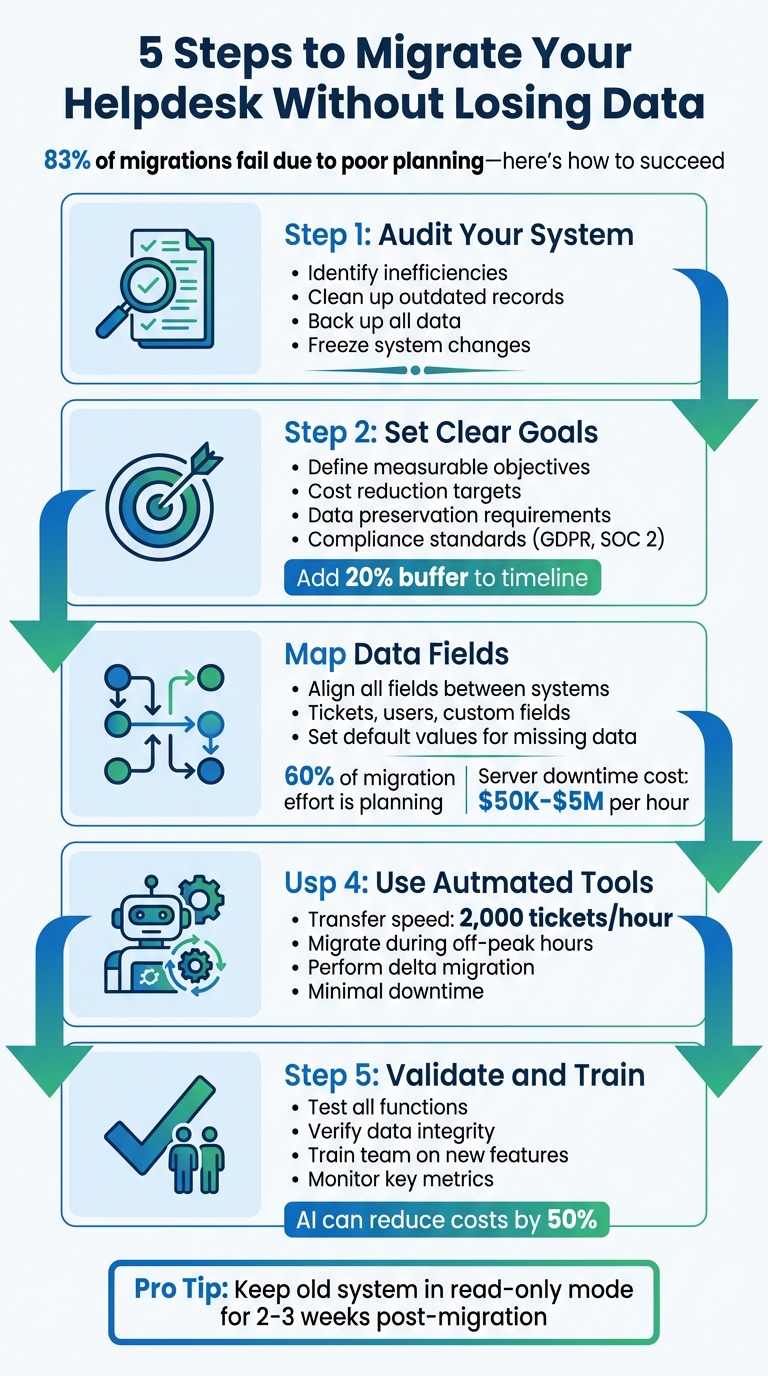
5-Step Helpdesk Migration Process: From Audit to Optimization
How the Help Desk Migration Wizard Works
Assess Your Current Helpdesk and Define Migration Goals
Before diving into a migration, it’s crucial to have a clear understanding of your current system and where you want to go. Vague aspirations like "modernizing" or "improving efficiency" won’t cut it. Instead, focus on specific, measurable objectives that will guide your decisions every step of the way. This initial groundwork is key to building a migration strategy that’s rooted in data and real needs.
Evaluate Current Features and Limitations
Start by identifying the exact shortcomings of your current US-based platform. Look for financial pitfalls like hidden costs – user seat limits, API restrictions, or reporting caps – that quietly drain your budget. On the technical side, frequent crashes, sluggish load times, or reliance on manual workarounds can be major productivity blockers.
Compliance issues are another area to scrutinize. If your platform struggles to meet non-US data residency requirements or falls short of critical security standards like GDPR, you could be exposing your organization to regulatory risks and operational headaches. Scalability is equally important – can your helpdesk handle increasing ticket volumes, or does it falter under pressure?
Don’t overlook your data. Outdated records, duplicate entries, and irrelevant saved replies can clutter your system. As Aprill Allen from Knowledge Bird explains:
"Often you’ll end up with stale content, or content that’s been written from the perspective of a technical person and not from a customer".
Now is the time to clean up "digital junk" like duplicate tags, outdated macros, and irrelevant responses, so you don’t carry them into your new system.
Talk to the people who use the platform daily. Frontline agents, IT staff, and finance teams often have insights into issues that aren’t obvious in technical reports. Also, review your vendor contract carefully for automatic renewal clauses or hidden penalties that could lead to overlapping expenses during the transition.
Set Goals for Migration Success
Once you’ve pinpointed the challenges, it’s time to define clear, measurable goals for your migration. These goals should address data preservation, operational continuity, and cost reduction.
For data preservation, focus on separating critical customer histories from outdated tickets. To maintain operational continuity, decide whether a Big Bang migration or a phased approach suits your needs better. And for cost reduction, go beyond initial pricing – factor in savings from reduced manual tasks, improved AI automation, and lower infrastructure costs.
Past migrations have shown that significant cost savings and minimal downtime are achievable. However, it’s wise to add a 20% buffer to your timeline and budget to account for unexpected technical challenges. Request access to a sandbox environment where your power users can test workflows and identify potential issues before fully committing.
Above all, ensure your new platform meets compliance requirements such as GDPR, SOC 2, or any industry-specific regulations. Confirm that it supports data encryption both at rest and in transit. These measures will help you avoid costly missteps and ensure a smooth transition.
Prepare and Clean Data for Migration
Getting your data ready for migration is a key step to ensure everything runs smoothly and preserves historical records. A well-organized dataset not only saves time but also avoids unnecessary costs and errors. As Eric Klimuk, Founder and CTO of Supportbench, aptly states:
"There’s no benefit to moving junk. A clean dataset saves time, reduces risk, and improves results in the new system."
By cleaning your data, you can cut migration costs since many services base their fees on the number of records transferred .
Audit and Back Up Historical Data
Before making any changes, create a complete backup of all data – this includes tickets, user profiles, knowledge base articles, attachments, and custom fields. Store this backup securely, whether in the cloud or an off-site location, and confirm that it can be restored without issues. This backup acts as your safety net.
Next, conduct a thorough audit of your data. Dive into ticket volumes, user activity trends, and how agents have utilized custom tags or manual workarounds. This process often uncovers hidden issues like incomplete fields, inconsistent formatting, or broken links between tickets and users. These problems can lead to errors during data mapping and validation . To ensure consistency, freeze any changes to the system during the migration process.
Remove Redundant or Outdated Data
Not all data is worth keeping. Identify and remove unnecessary records, such as old closed tickets, spam, duplicate contacts, or outdated saved replies that no longer serve a purpose in the new system. Separate essential data from nonessential, and delete or archive the latter.
Automated filters can help simplify this step. Use them to exclude categories like closed tickets older than a specific date, spam, drafts, or records from inactive agents. Consolidate duplicate contacts and companies, streamline redundant tags, and decide whether to skip large attachments or inline images to reduce the data load . These efforts not only make the migration process more efficient but also improve search functionality and reporting in the new platform, freeing your team to focus on more strategic tasks .
With your data cleaned, audited, and backed up, you’re ready to move on to mapping data fields and ensuring compliance in the next phase.
Map Data Fields and Ensure Compliance
Once your data is cleaned and organized, the next step is critical: mapping each field accurately. This ensures that essential relationships are preserved, and compliance standards are met during the migration process.
Field mapping involves aligning every field from your US helpdesk with its counterpart in the non-US platform. This includes ticket subjects, agent names, priorities, and custom fields. As Taras Velychko from Help Desk Migration notes:
"Data mapping plays a key role in data migration by placing every piece of information in its correct location. Unless you map your data correctly, you risk creating inaccurate results and damaging valuable information."
Planning and preparation take up about 60% of the effort in most migration projects, but this upfront work is essential to prevent costly mistakes. For perspective, losing a main server for just one hour during migration can cost a business anywhere from $50,000 to $5 million.
Align Data Structures Between Platforms
Start by creating a mapping document that pairs each source field with its corresponding field in the target system. This includes statuses, priorities, tags, and user roles. For example, if your US helpdesk uses "Ticket Subject", map it to "Subject" in the new platform.
Custom fields, such as SLA timers or product categories, should be recreated in the target system before migration. Pay attention to data types – if a field uses checkboxes in the original system, the target system should be configured the same way. Assign default values (like "Low" priority or "Open" status) for fields with missing data to avoid rejection.
Agent profiles and permissions also need careful alignment. If a specific agent doesn’t exist in the target system, you can map their tickets to a "default agent" to maintain data integrity. Temporarily set mandatory fields in the target platform to "unrequired" so that legacy records with missing values don’t disrupt the process.
To avoid duplicate records, disable automations like triggers and notifications in both systems. Before proceeding, run a trial migration of 20 tickets to confirm that the field mapping is accurate.
This groundwork is essential for addressing compliance challenges in the next phase.
Meet Non-US Data Regulations
Migrating to a non-US platform often involves adapting to local data regulations and formatting standards. Ensure your migration service and target platform comply with frameworks like EU GDPR, HIPAA, ISO/IEC 27001:2013, and SOC 2 Type II. Additionally, verify where your data will be hosted – many providers use infrastructure in Germany or other EU countries to meet data residency requirements.
During the mapping phase, define transformation rules for fields that require reformatting. For instance, US platforms often use MM/DD/YYYY date formats and $ currency symbols, while non-US platforms may require different standards. Many systems default to UTC for timestamps, so you may need to adjust them to reflect the local time zone of the target region. These adjustments ensure regulatory compliance and help maintain operational continuity during migration.
To protect data during migration, implement encryption for both data in transit and at rest, and enforce two-factor authentication. Establish clear data retention policies to ensure that migrated data is removed from the migration service’s servers within a defined period. By addressing compliance requirements and standardizing data formats during the mapping process, you can avoid costly issues and keep your support operations running smoothly across regions.
sbb-itb-e60d259
Execute the Migration with Minimal Downtime
With your data mapping and compliance checks in place, it’s time to move forward with the actual migration. This step requires precision and planning to ensure your operations remain uninterrupted. As Eric Klimuk, Founder and CTO of Supportbench, explains:
"Data migration is more than just copying files from one system to another – it’s a delicate, high-stakes process that can affect everything from day-to-day operations to long-term compliance".
Modern migration tools make it possible to transfer data in the background while your team continues working on the source system. This ensures minimal disruption and a smooth transition.
Use Automated Tools for Data Transfer
Automated migration tools simplify the process by eliminating the need for manual scripting. These no-code solutions use ETL (Extract, Transform, Load) processes to move data efficiently from your US-based helpdesk to the new platform. On average, these tools can transfer about 2,000 tickets per hour, making them suitable even for large-scale migrations.
Before starting, take a few precautions to ensure a smooth transfer:
- Disable alerts and triggers on both systems to prevent unnecessary notifications.
- Raise API limits temporarily to speed up the transfer process.
- Conduct a test migration to confirm that attachments, inline images, and custom fields transfer correctly.
After the primary migration, perform a delta migration to capture any tickets created or updated during the transfer. This step ensures no data slips through the cracks.
Schedule Migration During Off-Peak Hours
Timing is everything when it comes to minimizing user impact. Plan your final data cutover during off-peak hours or weekends when ticket volumes are typically lower.
You can choose between two migration models:
- Drain and Fill: Handle new and existing requests simultaneously during the transition.
- Live Cutover: Switch all channels to the new platform at once.
Before the cutover, audit all entry points, pre-create agent accounts, and document every step in a detailed run book. Include a rollback plan in case any issues arise.
Validate Data After Migration
Once the migration is complete, validation is critical to ensure everything transferred correctly. Start by manually testing key functions like creating, updating, assigning, and closing tickets. Check that attachments and inline images are intact.
Make sure relational data, such as ticket-to-user links and internal cross-references in knowledge base articles, remains accurate. Also, verify user permissions to ensure sensitive information is secure. Run reports to confirm historical data is reflected correctly in dashboards.
If any records seem missing, check system filters or use broad search terms to locate archived or hidden tickets. Be mindful of potential timestamp discrepancies if the platform uses UTC instead of local time zones. Verify that metadata like user IDs and timestamps is accurate.
Set up an internal communication channel so agents can quickly report issues like broken links, missing attachments, or mislabeled fields after go-live. Once validation is complete, re-enable automated alerts and reporting features to resume normal operations.
With the validation phase wrapped up, you’re ready to move on to platform configuration and team onboarding.
Configure and Optimize the Non-US Platform
With your data validated, the next step is to configure the new platform to align with your team’s existing workflow. This is where a blank system becomes a fully functioning support hub, ready to manage daily operations and take advantage of modern AI tools.
Replicate Workflows and Automations
Start by auditing your current workflows, capturing every detail – ticket routing rules, SLA policies, triggers, macros, and escalation paths. Use this information to create a comprehensive mapping document that aligns ticket properties, custom fields, and user roles between the old and new platforms.
While basic data often transfers seamlessly, more complex automations may need to be rebuilt manually. For example, multi-step macros or intricate triggers might require adjustments to match the logic of the new system. Similarly, organizational structures, like converting Groups into Teams, will need to be recreated to ensure accurate ticket assignments.
Pay special attention to SLA policies, as they directly impact the customer experience. For businesses with a renewal model, dynamic SLAs can be a game-changer. By automatically tightening response times as renewal dates approach, you can maintain service quality during critical periods without adding manual tasks.
To ease the transition, keep your old system in read-only mode for 2–3 weeks after launch. This provides a safety net for reference checks and boosts team confidence. If needed, plan for interval migrations to avoid disruptions during peak business hours.
Once workflows are in place, take them a step further by integrating AI-driven features.
Use AI Features to Improve Support
AI tools can take your newly streamlined workflows to the next level, enhancing efficiency and customer satisfaction. These tools work best when paired with clean, well-structured data.
Set up AI-driven automated triage to suggest ticket fields and categories as new requests come in. Use intelligent ticket assignment to match requests with agents based on their skill sets, moving beyond basic round-robin distribution. Additionally, configure the system to automatically turn resolved tickets into knowledge base articles, expanding your self-service options.
AI can also help identify potential customer issues early. Predictive CSAT and CES scoring analyze case histories and communication patterns to flag at-risk customers, giving your team time to act. AI also improves first contact resolution (FCR) detection by analyzing complete case histories, leading to more reliable insights.
When setting up AI workflows, ensure that category detection and triage occur before ticket creation. This ensures that categorized data flows seamlessly to agents. Adding specific tags to migrated tickets can also help the AI distinguish between historical and live data, improving analytics accuracy.
The benefits of automation are clear: operational costs can drop by as much as 13%, and even a modest 5% increase in customer retention can boost profits by 25% to 95%. These improvements not only streamline operations but also strengthen financial performance. As Eric Klimuk, Founder and CTO of Supportbench, puts it:
"Done right, migration isn’t just a one-time task. It’s a chance to improve how your data is structured, accessed, and supported for years to come".
Train Teams and Monitor Post-Migration Performance
With your data successfully migrated and workflows refined, the next step is preparing your team to fully leverage the new platform. Even the best tools are ineffective without a team that’s ready to use them. Start training before the final cutover. Focus on essentials like ticket handling, automation rules, macros, and reporting dashboards to ensure agents can hit the ground running on day one. To identify potential workflow issues early, involve top-performing agents in user acceptance testing (UAT) by giving them access to a sandbox environment. This hands-on approach can uncover critical problems before the system goes live.
Train Teams on New Features
Special attention should be given to training on AI-powered tools. Show your team how features like real-time ticket suggestions, automated routing based on skill sets, and sentiment analysis work. These tools can handle over 90% of common queries, allowing agents to focus on more complex issues. Provide clear, concise how-to guides and simulate customer interactions to help agents understand the interface. Additionally, set up a feedback channel where team members can report any system glitches or challenges they encounter. As Help Desk Migration Service emphasizes:
"Agents shouldn’t discover a new help desk on day one of migration. Get them inside early. The faster they feel at home, the smoother the switch."
Once your team becomes comfortable with these new features, you can shift your focus to tracking system performance to ensure everything runs smoothly.
Track Key Metrics for Migration Success
After the platform goes live, closely monitor its performance to confirm the migration’s success. Generate reports on key metrics like first response time, resolution time, and ticket volume, and compare these figures with historical data from your previous platform. Use real-time dashboards to keep an eye on system health and identify any slowdowns or performance issues.
| Metric | What It Measures | Why It Matters |
|---|---|---|
| Resolution Time | Average time to close a ticket | Reflects agents’ ease with the new interface |
| First-Contact Resolution | Tickets resolved in the first interaction | Shows how effective AI tools and macros are |
| Customer Satisfaction (CSAT) | Direct customer feedback | Evaluates the impact of the switch on user experience |
| Ticket Volume/Deflection | Tickets handled by AI vs. human agents | Demonstrates the ROI of automation features |
To maintain data integrity, perform spot-checks on the system. Audit logs can help you track every modification and action, ensuring compliance and accountability. Eric Klimuk, Founder and CTO of Supportbench, highlights the importance of this phase:
"Post-migration isn’t just about catching bugs. It’s about restoring usability, validating trust, and proving the value of your new system."
Extend your monitoring timeline by 20% to account for any unforeseen issues. Once the system stabilizes, conduct a retrospective to document lessons learned. Compile successful scripts, templates, and workflows into an internal knowledge base for future use. By ensuring your team is well-prepared and monitoring key metrics, you’ll not only secure the benefits of your migration but also support long-term operational success.
Conclusion
The migration strategy discussed above provides a clear and actionable roadmap for transitioning from a US-based helpdesk to a non-US system. Success depends on careful planning and execution. Start by auditing your system to identify inefficiencies, eliminate duplicates, and ensure that data fields are properly mapped to preserve the integrity of tickets, users, and metadata. It’s also vital to check compliance with regional regulations. Schedule the migration during off-peak hours, leverage automated tools, and validate the data immediately after the cutover.
It’s worth noting that approximately 83% of data migration projects fail or go over budget and timelines. Taking a methodical approach can help you avoid these pitfalls. As Eric Klimuk, Founder and CTO of Supportbench, puts it:
"Data migration is more than just copying files from one system to another – it’s a delicate, high-stakes process that can affect everything from day-to-day operations to long-term compliance."
Supportbench’s AI-native tools tackle these challenges head-on. With AI embedded in case management and automation, migrations can be completed in as little as 1–2 weeks, often slashing infrastructure costs by up to 50%.
But migration isn’t the end goal – it’s a stepping stone to greater scalability and efficiency. Features like auto-refreshed dashboards, dynamic SLAs, and AI-driven automation ensure your team can safeguard historical data while improving service quality. Whether you’re consolidating helpdesks or meeting new compliance requirements, the right platform equips your support operations for long-term success.
FAQs
Why do helpdesk migrations often fail, and how can you avoid common mistakes?
Helpdesk migrations often stumble because of poor planning and underestimating the complexities involved. Typical problems include data loss, broken ticket connections, compliance risks, and going over budget or missing deadlines. These challenges usually stem from skipping crucial steps like allocating enough time for data mapping, conducting thorough testing, or validating the migration afterward.
To steer clear of these issues, focus on detailed planning and rigorous testing. Proper data mapping is key to preserving ticket relationships, while strategies like delta migration can help minimize downtime. After the migration, validate the data carefully to catch and fix any errors early. Tackling these areas head-on can help ensure a smoother, more efficient transition.
How can AI improve customer support after migrating to a new platform?
AI tools can make a big difference in customer support after a platform migration. They help keep data accurate, streamline processes, and maintain the quality of service your customers expect. For example, AI can validate migrated data – like customer details and support histories – reducing errors and ensuring a smooth transition.
Beyond that, AI takes on repetitive tasks such as categorizing tickets, setting priorities, and routing them to the right team members. This means your team can respond quicker and spend more time tackling complex issues.
AI-powered analytics also provide valuable insights into customer interactions and common problems, helping teams refine workflows and make smarter decisions. On top of that, these tools can assist agents in real time, offering suggestions or pointing them to the right knowledge base articles during support interactions. The result? Faster resolutions and happier customers.
By integrating AI into your post-migration strategy, you can simplify the process, improve efficiency, and keep costs under control.
What compliance factors should you consider when migrating to a non-US platform?
When shifting to a platform outside the US, it’s essential to ensure compliance with local data privacy and security laws. For example, regulations like the GDPR in Europe outline strict rules on handling personally identifiable information (PII). To meet these requirements, prioritize data protection by implementing encryption for both transfer and storage, enforcing strict access controls, and keeping comprehensive audit logs.
Another key consideration is data residency requirements, which may mandate that certain data remains within specific geographic boundaries. Opt for data centers or cloud providers that align with these regional rules. It’s also important to review any existing contracts with customers or partners to confirm that the migration process respects all agreed-upon terms. Careful planning and thorough documentation will help ensure compliance and minimize potential disruptions during the migration.
Related Blog Posts
- A practical guide on how to Migrate From one Helpdesk to Another
- Help Desk Migration Checklist: How to Switch Platforms Without Downtime
- How do you map Zendesk fields, tags, and statuses to a new help desk correctly?
- How do you run a successful help desk migration project (timeline, roles, and cutover plan)?