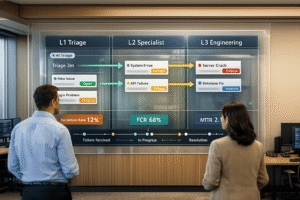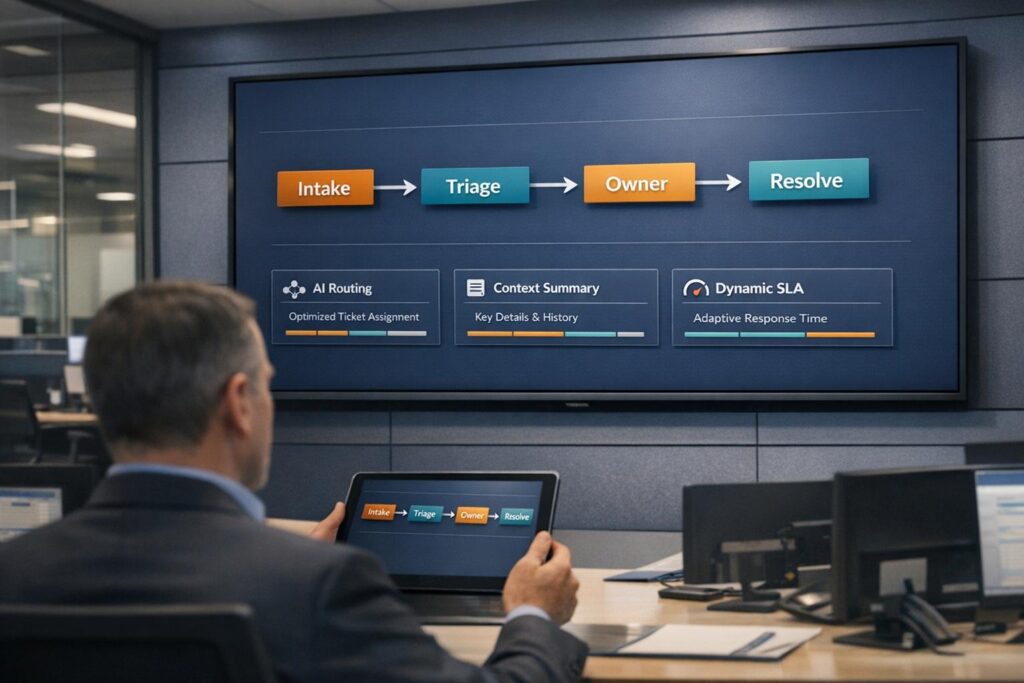
Ticket ping-pong slows down resolutions, frustrates customers, and wastes time. It happens when support tickets bounce between teams or back and forth with customers, delaying solutions. For B2B companies, this inefficiency can harm client relationships and even threaten contract renewals.
Key Takeaways:
- 30% of tickets are reassigned, adding 15 minutes of delay per transfer.
- Agents spend 3.3 hours daily gathering context across tools.
- Unclear ownership, incomplete details, and manual processes are major causes.
- AI-powered tools and clear workflows can cut delays by 30–50%.
Solutions:
- Define Clear Statuses: Use simple, action-oriented ticket statuses (e.g., "New", "Pending").
- Automate Routing: AI triage reduces misrouting by analyzing intent and urgency.
- Provide Context: AI-generated summaries save agents time by consolidating data.
- Dynamic SLAs: Adjust priorities based on customer value and issue severity.
- Track Metrics: Focus on First Contact Resolution (70–79%), SLA compliance (75–100%), and Escalation Rate (<5%).
These strategies ensure faster resolutions, fewer escalations, and improved customer satisfaction. Tools like AI-driven routing and activity tracking are game-changers for optimizing B2B support workflows.
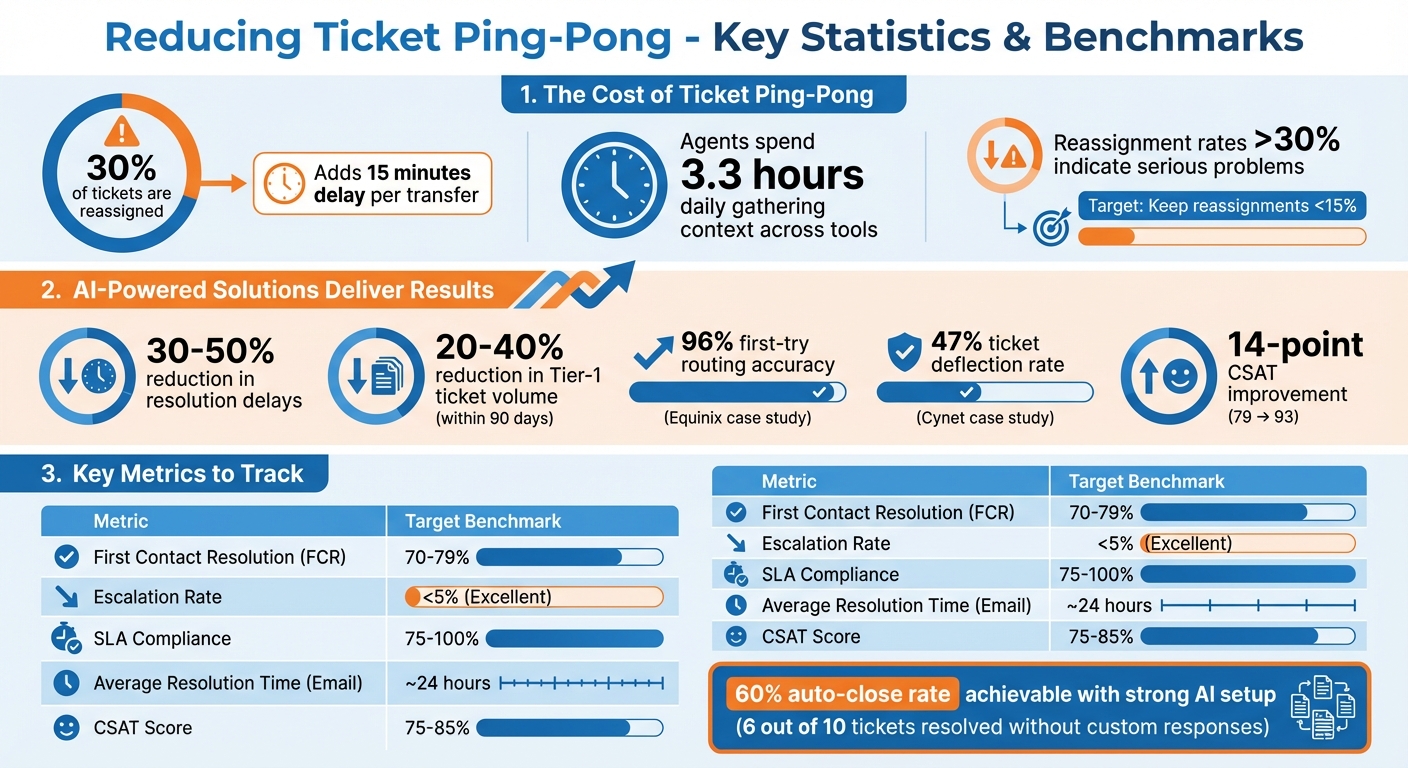
Ticket Ping-Pong Impact Statistics and Resolution Benchmarks
The Hidden Cost of Misdiagnosing Customer Issues (And How AI Can Help) | The Ticket
sbb-itb-e60d259
What Causes Ticket Ping-Pong in B2B Support
Ticket ping-pong in B2B support often stems from three main issues: unclear ownership, incomplete customer details, and reliance on manual processes. These problems create delays, frustrate customers, and make resolution more challenging.
Unclear Ticket Status and Ownership Rules
When ticket statuses and ownership rules are vague, tickets can fall through the cracks. Simple requests get resolved quickly, while complex ones are left unattended – what William Westerlund from Suptask describes as "a black hole experience" [4].
One common issue here is the "Watermelon Effect", where agents send generic responses just to stop the SLA clock. This might make dashboards look good, but it leaves customers dissatisfied [4]. On top of that, frequent reassignments due to unclear ownership disrupt the process. Customers end up repeating themselves, and delays pile up. Ideally, reassignment rates should stay under 15%, while rates above 30% indicate serious ping-pong problems [4].
But ownership isn’t the only challenge. Missing or unclear customer information can stall the process even further.
Missing or Unclear Customer Information
Effective triage depends on having clear, complete details from the start. Agents need to know the basics: Who reported the issue? What asset or service is involved? Where is the issue occurring (production or staging)? When did it happen? Why is it urgent? Without this information, agents waste time chasing follow-ups that should have been addressed upfront [4].
The problem gets worse when customers pick incorrect categories in dropdown menus. For example, during a critical outage, a frustrated user might select "Quick Question", leading to immediate misrouting by rule-based systems [1]. In 2025, Equinix tackled this by implementing AI-powered routing that matched tickets to the right experts, achieving 96% accuracy on the first try and cutting ticket resolution times by a third [4].
Manual processes only add to these challenges, as explained next.
Manual and Reactive Processes
manual ticket management systems often create bottlenecks. Rule-based systems that rely on exact keywords can easily misroute tickets. For instance, missing a term like "SAML" in an integration failure might send the ticket to the wrong team [1]. Nooshin Alibhai, Founder and CEO of Supportbench, highlights this issue:
"Traditional methods often struggle to keep pace with the volume, velocity, and nuanced complexity of modern support demands" [1]
In dynamic B2B environments with constantly evolving products, maintaining hundreds of manual routing rules becomes overwhelming and error-prone. A Tier 1 agent might spend 20 minutes researching a specialized query, only to transfer it to another team – wasting valuable time [1]. Manual processes can also misinterpret urgency. A major failure reported politely might be deprioritized, while sarcastic language could trigger unnecessary escalation [1].
Together, these issues slow down resolutions and highlight the need for automated, AI-driven solutions to streamline support processes.
How to Reduce Ticket Ping-Pong
To prevent tickets from bouncing between team members, it’s essential to streamline processes using automation and AI. The goal is simple: assign tickets to the right person from the start, provide agents with all necessary context immediately, and eliminate delays caused by manual handoffs or missing information.
Define Clear Ticket Statuses and Automate Workflows
Confusing or vague ticket statuses can stall resolutions. By sticking to a streamlined set of five statuses – New, Open, Pending, Waiting on Customer, and Resolved – you can keep workflows moving efficiently and avoid confusion [7]. Each status should have clear entry and exit rules. For example, a ticket enters "New" upon arrival and exits when an agent takes ownership [7].
"Statuses are more than labels. They are agreements between agents, leads, and customers." – Support Oasis [7]
Automation ensures these rules are followed consistently. For example, if a customer responds to a ticket marked "Waiting on Customer", automation can move it back to "Open" to ensure it doesn’t get overlooked. Similarly, tickets with no activity for a set period can be automatically closed [7].
Take the example of Wolseley Canada: in June 2025, their Customer Service and Process Improvement Manager, Eilis Byrnes, used Supportbench to manage 7,000 to 8,000 monthly emails. By automating workflows based on case type and client profile, the team centralized ticket management and resolved long-standing issues [5].
Here’s how clear statuses compare to poorly defined ones:
| Poor Status Definition | Effective Status Definition | Why it Works |
|---|---|---|
| Waiting: Ambiguous – could mean waiting on a developer, vendor, or customer. | Waiting on Customer: Clearly assigns responsibility to the customer. | Prevents agents from wasting time on tickets that don’t require their action [7]. |
| In Progress: Doesn’t clarify if the agent is actively working or stuck. | Pending: Reserved for internal or third-party dependencies. | Differentiates active work from external blockers for better reporting [7]. |
| On Hold: Often becomes a parking lot for forgotten tickets. | Open (with Age Alerts): Keeps the ticket active but flags it if it sits too long. | Ensures tickets don’t languish without a clear next step [7]. |
Use straightforward, action-oriented language for status names to make the next step obvious. Limit who can change statuses – only the assigned agent should move a ticket out of "New" or "Open" [7]. Regular audits of status usage can also help simplify workflows by removing rarely used statuses [7].
Once statuses are clear, AI can take ticket routing to the next level.
Use AI-Powered Routing and Triage
Traditional keyword-based routing systems often misroute tickets. For example, if a customer describes a critical outage as a "Quick Question", the ticket may end up in the wrong queue [6]. AI-powered routing, however, uses Natural Language Processing (NLP) to interpret the intent and sentiment behind a request, not just the keywords [6].
AI triage can also evaluate urgency, tone, and business value. For instance, if a customer sends multiple rapid follow-ups, AI can detect frustration and prioritize the ticket – even if the customer doesn’t explicitly say it’s urgent [6]. Skills-based routing ensures tickets go directly to agents with the right expertise, such as assigning a SAML 2.0 error to an API specialist, bypassing unnecessary transfers [6][9].
"AI routes the ticket to the best-equipped available agent or queue the first time. This minimizes internal transfers (‘ticket tennis’), reduces delays, and ensures customers connect with someone who can actually solve their problem faster." – Nooshin Alibhai, Founder and CEO, Supportbench [1]
To ensure nothing slips through the cracks, set up fallback paths with default queues or overflow triggers for tickets that fall outside narrow routing criteria [5]. Keep an eye on reassignment rates – if more than 30% of tickets are being reassigned, it’s a sign your routing logic needs fine-tuning [9].
Apply AI Case Summaries and Activity Tracking
AI tools can consolidate data from CRM, billing, and analytics systems to create comprehensive ticket summaries. This eliminates the need for agents to spend time manually gathering context, saving hours of productivity for teams managing high ticket volumes [2].
AI can also generate concise, one-paragraph summaries of issues, making it easier for agents to understand the situation without sifting through long email threads [9]. Sentiment analysis further enhances prioritization by detecting frustration or negative language, even when customers don’t use explicit "urgent" keywords [1].
Automated activity tracking adds another layer of efficiency. It provides insights into agent performance, workload distribution, and SLA adherence. For example, Wolseley Canada used Supportbench to link ticket management with their knowledge base, speeding up resolutions and giving leadership better visibility into team performance [5].
AI-enriched context works seamlessly with dynamic SLAs to keep escalations on track.
Set Up Dynamic SLAs and Escalation Paths
Static SLAs treat all tickets the same, which can lead to missed opportunities to prioritize high-value customers or critical issues. Dynamic SLAs, on the other hand, adapt based on factors like customer tier, renewal timelines, or issue severity. For a high-value customer nearing renewal, tighter SLAs can improve their experience and reduce churn risk.
Define clear escalation procedures to maintain accountability. Specify who gets notified at each escalation level, what information they need, and what actions they should take. AI can flag tickets stuck in "Pending" or "Waiting on Customer" statuses for too long, ensuring they don’t get forgotten [7]. Escalation tools also allow agents to track multi-level escalations, add notes, or de-escalate cases when needed.
Use Predictive AI Metrics for Early Problem Detection
Predictive AI metrics help teams proactively address potential problems. For instance:
- AI Predictive CSAT estimates customer satisfaction with a resolution, even if no survey is completed.
- AI Predictive CES (Customer Effort Score) evaluates how difficult it was for the customer to get their issue resolved.
- AI First Contact Resolution (FCR) detection determines if a ticket was resolved on the first try, a traditionally hard-to-measure metric.
Sentiment analysis can also detect frustration or anger in messages, automatically escalating priority when needed – even if the customer doesn’t explicitly say it’s urgent [6][8]. Regularly review metrics like the "Auto-Close Rate" (tickets resolved via macro ÷ total tickets received) to evaluate the effectiveness of your AI and macro library [8]. A strong setup can achieve a 60% auto-close rate, meaning six out of ten tickets are resolved without requiring custom responses or extra research [8].
Measuring Results: Key Metrics and Benchmarks
Key Metrics for Tracking Efficiency
To ensure your strategies are effectively reducing ticket ping-pong, focus on measuring customer service metrics effectively. One of the most important is First Contact Resolution (FCR), which measures the percentage of issues resolved in a single interaction without requiring follow-ups. For most industries, the FCR benchmark falls between 70–79%, though more complex B2B cases often have lower rates [10].
Another critical metric is the Escalation Rate, which shows how often tickets are passed between support tiers. Ideally, this rate should stay below 5% – anything above 20% could indicate issues with triage processes or gaps in your knowledge base [10]. Average Resolution Time (ART) is another key indicator, tracking how long it takes to close tickets. On average, the resolution time is about 24 hours for email, 10 minutes for live chat, and 3–7 minutes for phone support [10].
You should also monitor your SLA Compliance Rate, which ensures tickets are resolved within agreed-upon timeframes. High-performing teams typically aim for compliance rates between 75%–100% [10]. Lastly, keep an eye on Ticket Backlog Growth, as a growing backlog often signals unresolved ping-pong issues [10].
"If you’re reporting on volume without context or measuring time without linking it to customer satisfaction, you’re just busy, not improving." – Eric Klimuk, Founder and CTO, Supportbench [10]
These metrics provide a solid foundation for setting performance benchmarks and ensuring continuous improvement.
Key Metrics
| Metric | Formula | Benchmark (B2B) |
|---|---|---|
| First Contact Resolution (FCR) | (Tickets Resolved on First Contact ÷ Total Tickets) × 100 | 70–79% [10] |
| Average Resolution Time (ART) | Total Time to Resolution ÷ Total Resolved Tickets | ~24 Hours (Email) [10] |
| Escalation Rate | (Number of Escalated Tickets ÷ Total Tickets) × 100 | < 5% (Excellent) [10] |
| SLA Compliance | (Tickets Handled Within SLA ÷ Total SLA Tickets) × 100 | 75–100% [10] |
| CSAT Score | (Positive Survey Responses ÷ Total Responses) × 100 | 75–85% [10] |
How to Set and Use Benchmarks
Once you’ve identified the right metrics, use benchmarks to guide your team’s improvement efforts. Tailor benchmarks to your specific channels and customer needs. For instance, B2B environments often have lower FCR rates compared to B2C, so comparing your results to consumer-focused benchmarks could lead to unrealistic expectations [10]. For B2B, aim for near-instant responses on real-time channels for strategic accounts, while email responses for commercial accounts should generally fall within one business day [11].
Rather than relying solely on averages, use percentiles to uncover systemic issues. For example, if the median resolution time is 12 hours but the 90th percentile is 72 hours, it points to specific ticket types or agents causing delays. Additionally, set tiered response targets based on account value – strategic accounts should naturally receive faster responses than standard commercial accounts [11].
"The best metrics don’t just track history – they change what happens next." – Eric Klimuk, Founder and CTO, Supportbench [10]
To stay proactive, prioritize real-time alerts over static weekly reports. Dashboards that flag potential SLA breaches or sudden spikes in escalations can help managers intervene before small issues snowball [10]. Normalize metrics like First Response Time (FRT) and ART across all channels – email, Slack, chat, and phone – to identify where inefficiencies are most pronounced. Finally, connect these metrics to outcomes by mapping resolution speed against CSAT scores. This ensures that faster resolutions aren’t compromising quality [10].
Conclusion: Improving B2B Support with AI and Better Workflows
Ticket ping-pong is a productivity killer. It frustrates customers, wears down support teams, and drags down overall efficiency. The strategies shared here – like defining clear ownership and support levels, using intent-based AI for triage, enriching tickets with diagnostic data, and implementing dynamic SLAs – offer a way to break free from this cycle. Together, these methods can cut Tier-1 ticket volume by 20–40% within 90 days and speed up resolution times by 30–50% for issues that still need agent involvement [3].
This isn’t just about automation for its own sake. As Ameya Deshmukh explains:
"AI routing is not ‘automation for automation’s sake.’ It’s an operating model upgrade: turning intent and context into real-time decisions so work flows to the right resolution path the first time." [12]
The result? Fewer misrouted tickets, fewer escalations, and fewer customers stuck waiting for solutions.
The numbers back it up. In 2025, cybersecurity company Cynet rolled out AI-driven tools to centralize knowledge and automate routine Tier-1 tasks. The impact was huge: a 14-point boost in CSAT (from 79 to 93), a 47% ticket deflection rate, and a nearly 50% reduction in resolution times [3]. These results highlight how AI can reshape support workflows for the better.
But success with AI requires treating it as a living system. Start with 2–3 high-volume ticket types, use confidence gating to ensure customer trust, and maintain audit logs to refine routing over time [3][12]. With AI handling repetitive tasks, agents can focus on the tougher, high-value cases that call for human judgment and empathy [3].
As Josh Solomon from Mosaic puts it:
"The real transformation isn’t about tickets, it’s about changing what your support team can accomplish. When tier-1 automation eliminates repetitive work your people have time for activities that actually prevent problems." [3]
FAQs
What’s the fastest way to identify ticket ping-pong in my support operation?
To spot ticket ping-pong efficiently, focus on metrics like Ticket Reopen Rate and First Contact Resolution (FCR). These metrics can reveal patterns of repeated reopenings or unresolved issues. Leveraging AI tools can further simplify the process by analyzing ticket histories and identifying back-and-forth exchanges. Additionally, automated dashboards provide real-time tracking of tickets that are being reopened or transferred. Pairing these insights with intelligent routing can help minimize inefficiencies and streamline the resolution process.
How can I implement AI routing without risking incorrect assignments or losing customer trust?
To put AI routing into action successfully, it’s smart to take things step by step. Start with a phased rollout. Focus on AI tools that can handle intent detection and sentiment analysis to accurately sort and classify tickets. Begin with a pilot phase to test the system, using real-world data to fine-tune the models. Make sure there’s a fallback system in place for manual review, just in case the AI doesn’t get it right.
Be upfront with your customers about using AI. Transparency is key – let them know how the system works and always offer clear escalation options for when they need to speak with a human. Keep a close eye on metrics like accuracy and customer satisfaction to catch any issues early. This way, you can minimize mistakes and build trust over time.
Which 2–3 ticket types should I automate first to cut transfers quickly?
To make support more efficient and cut down on unnecessary transfers, focus on automating tasks that are high in volume but simple in nature. Think about things like FAQs, billing questions, or issues with logging in or accessing accounts. These repetitive tasks are perfect for AI tools, such as automated routing or self-service options. By addressing these straightforward issues quickly, you not only speed up resolutions but also allow your support team to concentrate on more complicated cases. This approach reduces back-and-forth interactions and keeps your support process running smoothly.
Related Blog Posts
- How do you handle “ticket ping-pong” between teams (handoff rules + templates)?
- How do you reduce “where is my ticket?” follow-ups with proactive updates?
- When should you move from Intercom inbox to a dedicated ticketing system?
- Moving Beyond “Chat”: Why Asynchronous Ticketing Wins for Complex B2B Issues